

MT5 VPS Hosting
One-Click MT5 VPS Hosting
One click, then RDP in. Run MetaTrader 5 on a dedicated MT5 VPS with static IPs, NVMe, and up to 40 Gbps links. Scale hourly.

 Trustpilot
There’s a reason 122,000+ developers & businesses choose us.








退款保证

在线支持

网络速度

网络正常运行时间
What Is MT5 VPS?
MetaTrader 5 is a desktop trading platform for forex and other markets, known for charts, technical indicators, and automation via Expert Advisors and MQL5 tools.
Cloudzy’s One-Click MT5 VPS runs it on Windows Server and keeps it online 24/7. You get dedicated EPYC vCPUs, DDR5 RAM, pure NVMe, static IPv4/IPv6, snapshots, hourly billing, up to 40 Gbps networking, and a 99.99% uptime SLA. RDP logins are hardened, and admin access stays open, so you can add indicators, DLLs, or multiple terminals as your workflow changes.
-
分布式拒绝服务攻击防护

-
多种支付方式可选
-
预装操作系统(可选)
-
完全管理员权限
-
零延迟连接


科技达人的心头好!
Fast execution starts with stable compute and clean networking. Cloudzy’s MT5 VPS hosting runs MetaTrader 5 on Windows Server with dedicated EPYC vCPUs, DDR5 RAM, and NVMe storage. Add static IPs, snapshots, and hourly billing, and you get a VPS server for MT5 that stays predictable during news spikes.
高端基础设施
基于顶级基础设施的服务器可确保您的工作负载得到顺畅、准时的处理。

无风险
我们为您提供退款保证,让您高枕无忧。

保证正常运行时间
我们保证99.99%的运行时间,为您提供可靠且稳定的连接。

全天候关怀支持
您的工作至关重要。我们深知这一点,并始终心系于此——我们的客户支持团队亦是如此。

Why Choose Cloudzy’s MT5 VPS Hosting
释放灵活性与性能的强大力量
Preinstalled, One-Click MT5
Choose a one-click image with MetaTrader 5 preinstalled on Windows Server. Log in over RDP, add your broker account, then import EAs and indicators.

Dedicated resources for trading hours
EPYC vCPUs, DDR5 RAM, and pure NVMe storage reduce noisy-neighbor slowdowns, so chart refresh, tick logs, and order routing stay consistent under load on your VPS for MT5.
Network headroom and stable allowlists
Get a dedicated IPv4 and IPv6 pair, plus up to 40 Gbps uplinks. Broker IP allowlists stay steady, and latency checks help pick the closest region.
Snapshots for safer changes
Take a snapshot before EA updates, DLL installs, or Windows tweaks. If results drift, roll back fast and keep the same environment for your next run.
Flexible billing and real support
Pay hourly or monthly, resize with a reboot, and scale down after busy weeks. Support is available 24/7, with a 99.99% uptime SLA for core networking.
How to Set Up Cloudzy’s MT5 VPS
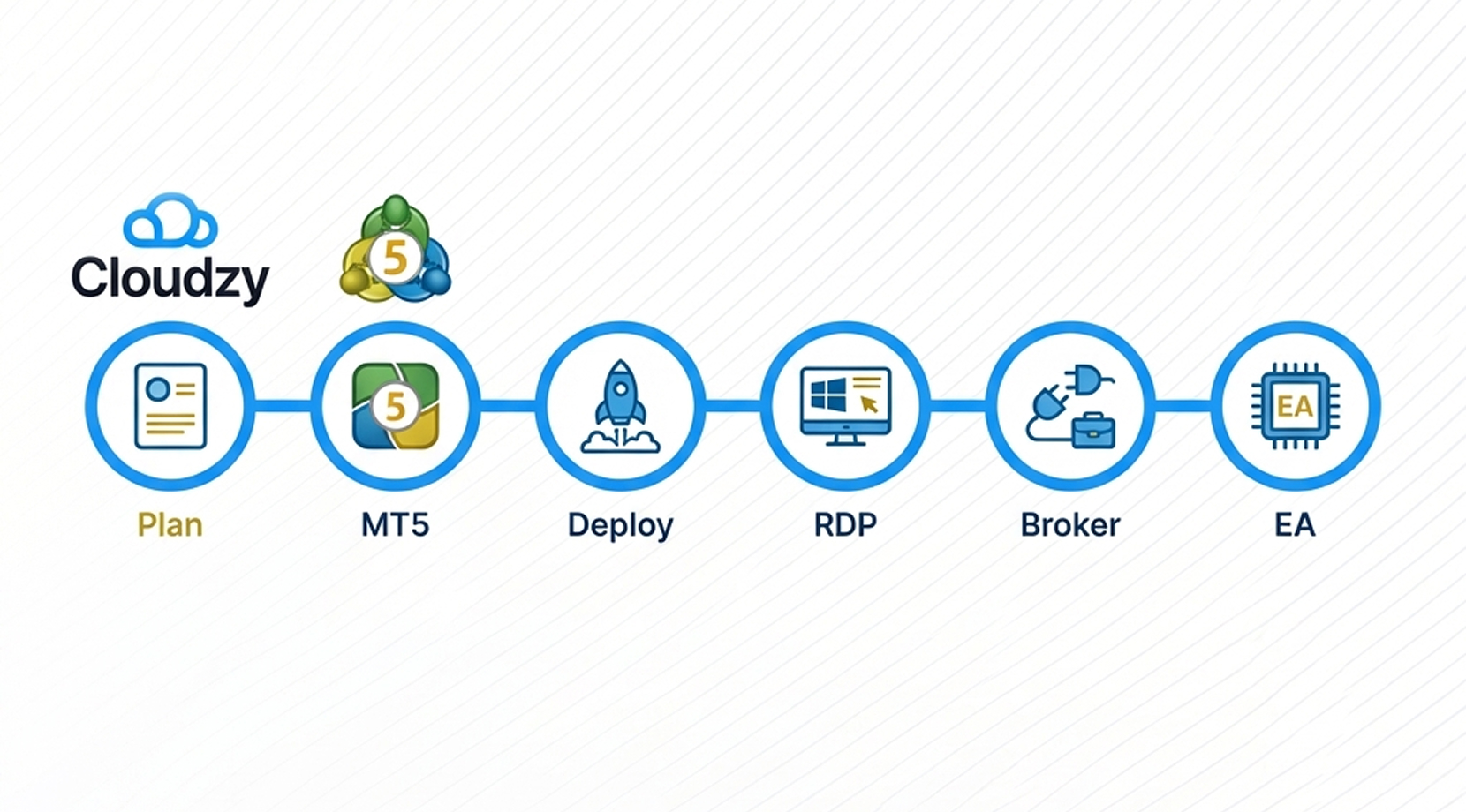
Pick a plan, choose the MetaTrader 5 image, and deploy the server. Open Remote Desktop to the static IP, log in with the credentials in your panel, then connect your broker account and load EAs. Follow our MetaTrader 5 Server VPS page for the walkthrough.
16 regions. Four continents. One click away.
Put your server next to your users. Anywhere in the world, in under a minute.


0Gbps 网络速度

0.00% 网络正常运行时间

<0ms Average Latency

0/7 监控














常见问题解答 | MT5 VPS
什么是MT5 VPS?
An MT5 VPS is a remote Windows server that runs your trading terminal nonstop. It keeps charts, EAs, and signal subscriptions active even if your home PC restarts or loses power.
我的VPS是否预装了MT5?
是的。我们在您购买VPS的过程中提供MetaTrader 5的一键安装服务。只需点击一次,您即可选择在VPS上安装MT5,我们将为您交付预装MT5交易平台的VPS,该VPS将搭载您选定的Windows Server操作系统。
预装的MT5是否需要支付额外费用?
No, you don’t. We do not charge any additional fees for installing MT5 VPS on your server.
How can an MT5 VPS help reduce slippage?
Hosting your terminal closer to your broker can cut round-trip time. Lower latency can reduce the odds of re-quotes and help limit slippage during fast moves.
Can Expert Advisors run 24/7 on an MT5 VPS?
Yes, as long as the terminal stays connected. A VPS keeps the platform running 24/7 so Expert Advisors and signals can keep executing, even with your laptop off.
How do I migrate my MT5 setup to a VPS?
Most setups copy your MT5 profile, charts, and EA files to the server, then you log in and connect your broker account. After that, you confirm permissions for DLLs and automated trading in settings.
What matters most when choosing an MT5 VPS location?
Pick a location with the lowest ping to your broker, not to you. Many traders test latency from several regions, then settle on the one that keeps execution consistent.
How do I log in to my Cloudzy MetaTrader 5 VPS?
You connect over Remote Desktop (RDP) to the static IP shown in your panel, then sign in as Administrator. From there, open MT5, add your broker account, and load indicators or EAs.
What security steps should I take on a Cloudzy MetaTrader 5 VPS?
Start with strong Administrator passwords and IP-restricted firewall rules. Keep Windows updates on, limit RDP access, and snapshot before major changes. Dedicated IPv4/IPv6 helps keep broker allowlists consistent.
Can I scale or snapshot a Cloudzy MetaTrader 5 VPS without reinstalling?
Yes. You can take snapshots before EA updates, then roll back fast if needed. Resizing applies after a reboot, and hourly billing makes it easy to test short-lived MT5 VPS instances.
需要帮助?请联系我们的支持团队。
 提交工单
提交工单
 免安装费
60秒内部署
随时取消
免安装费
60秒内部署
随时取消
