

Cosmos Cloud VPS Hosting
Deploy Cosmos Cloud in One Click!
Launch a ready Cosmos Cloud VPS, skip server prep, and start managing self-hosted apps from the dashboard right away.

 Trustpilot
There’s a reason 121,000+ developers & businesses choose us.








退款保证

在线支持

网络速度

网络正常运行时间
Deploy Cosmos Cloud AND Get a VPS, All In One Click!
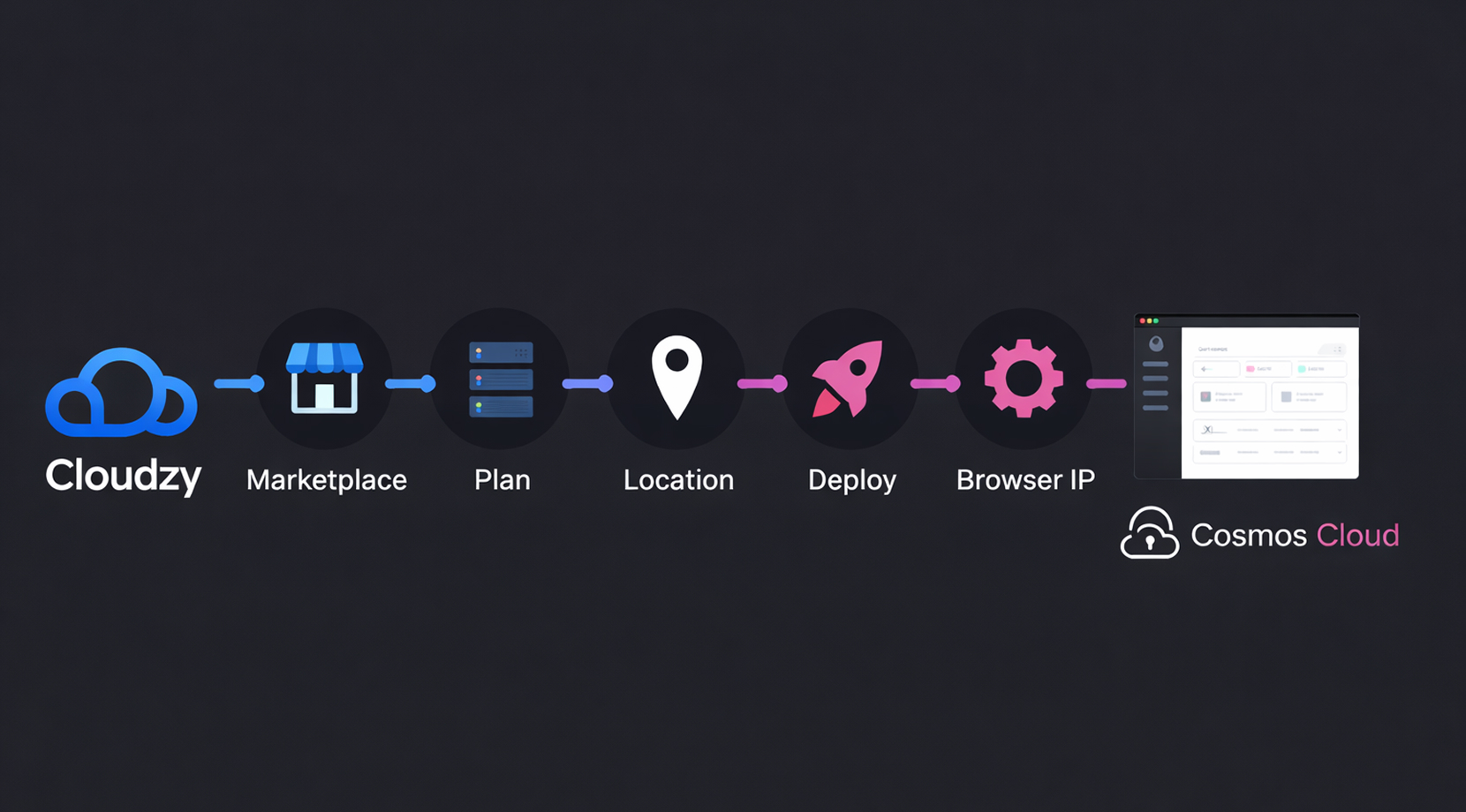
Cloudzy’s One-Click Cosmos Cloud VPS arrives with the base server stack prepared and Cosmos Cloud already installed on Ubuntu 24.04 LTS. Instead of building the environment yourself, you choose a plan, deploy, open your server IP in a browser, and follow the short setup wizard.
That means less time spent on Docker and host prep, and more time for adding apps, routing URLs, and setting access rules from the dashboard. Time is money, and you were going to spend money on a VPS anyway, so why not have Cosmos already set up without spending more?
-
分布式拒绝服务攻击防护

-
多种支付方式可选
-
完全管理员/超级用户权限
-
零延迟连接


Why Choose Cloudzy’s Cosmos Cloud VPS
释放灵活性与性能的强大力量
Ready Cosmos Cloud Stack
Cosmos Cloud is already installed on Ubuntu 24.04 LTS, so you can skip the base install work and start from the browser setup wizard.

Dedicated Hardware for Busy App Stacks
Choose dedicated resources with DDR5 RAM, NVMe SSD storage, and 4.2+ GHz Ryzen or AMD EPYC CPU options for smoother dashboards and containers.
Fast Networking, Better Placement
Put your VPS closer to users or your own admin sessions with 16+ regions and up to 40 Gbps networking
Root Access Without Lock-In
Full root access lets you tweak the host your way instead of being boxed into a fixed appliance-style setup
Protection, Backups, and Uptime
Daily backups, multi-layer DDoS mitigation, and a 99.99 uptime guarantee help when your Cosmos stack moves past casual testing
Launch in One Click!
How to Start Your Cosmos Cloud VPS in 60s
You can head over to our Cosmos Cloud marketplace page first to view how easy the steps are. Then choose your plan and location, deploy the VPS, open your server IP in a browser, and follow the short setup wizard.
16 regions. Four continents. One click away.
Put your server next to your users. Anywhere in the world, in under a minute.


0Gbps 网络速度

0.00% 网络正常运行时间

<0ms Average Latency

0/7 监控














FAQ | Cosmos Cloud VPS
What is the easiest way to deploy Cosmos Cloud?
The fastest path is our preinstalled Cosmos Cloud VPS. You skip the base server work, open your server IP in a browser, and finish the short setup wizard.
Do I need server knowledge to run Cosmos Cloud on a VPS?
Not much for the first launch, but basic server knowledge still helps for domains, firewall rules, updates, and deeper Docker changes after setup.
How long does it take to deploy Cosmos Cloud?
Cloudzy deploys the VPS in about 60 seconds, then Cosmos Cloud opens in your browser for the short first-run setup.
Can I run multiple apps using Cosmos Cloud on one VPS?
Yes. Cosmos Cloud is built for managing several self-hosted apps, routes, and access rules from one place, so one VPS can handle a multi-app stack.
Can I use my own domain and HTTPS with Cosmos Cloud?
Yes. Cosmos Cloud includes URL management, automatic HTTPS options, and reverse proxy features for exposing apps with cleaner domains instead of random ports.
Can I customize my Cosmos Cloud server environment?
Yes. You get full root access, so you can change host settings, install extra packages, adjust Docker behavior, and shape the server around your own stack.
Is Cosmos Cloud VPS a good fit for production use?
It can be, if the plan matches your workload and you treat it like a real production server with backups, updates, access controls, and sensible sizing.
Can I scale my VPS resources as my stack grows?
Yes. As your app count, traffic, or storage needs rise, you can move to more CPU, RAM, storage, or bandwidth without rebuilding the whole setup.
需要帮助?请联系我们的支持团队。
 提交工单
提交工单
 免安装费
60秒内部署
随时取消
免安装费
60秒内部署
随时取消
