
Cloudzy からプロモーションクーポンを受け取った場合、簡単に
アカウントに適用して追加クレジットを獲得できます。手順は以下の通りです
クーポンを有効にしてクレジット残高を増やします。
ステップバイステップガイド
- Cloudzyアカウントにアクセス:
認証情報を使用して、Cloudzy ダッシュボードにログインします。
- クレジット追加セクションに移動してください:
ダッシュボードの右上隅にあるあなたの残高をクリックして
にアクセスする クレジットを追加 セクション
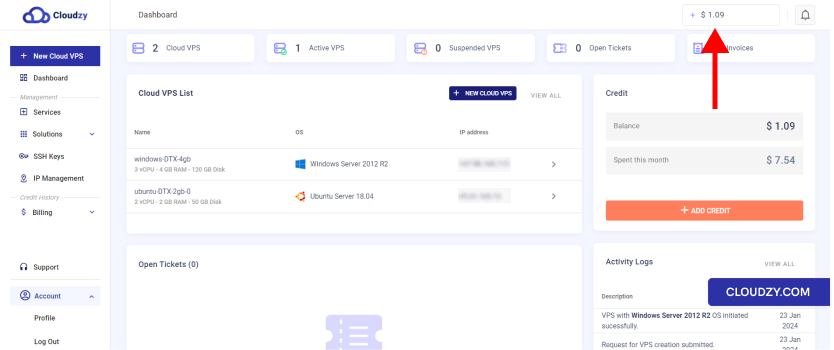
- クーポンコードの入力:
- 一度 クレジットを追加 セクション、場所
クーポンタブ の隣に お支払い方法
タブ.
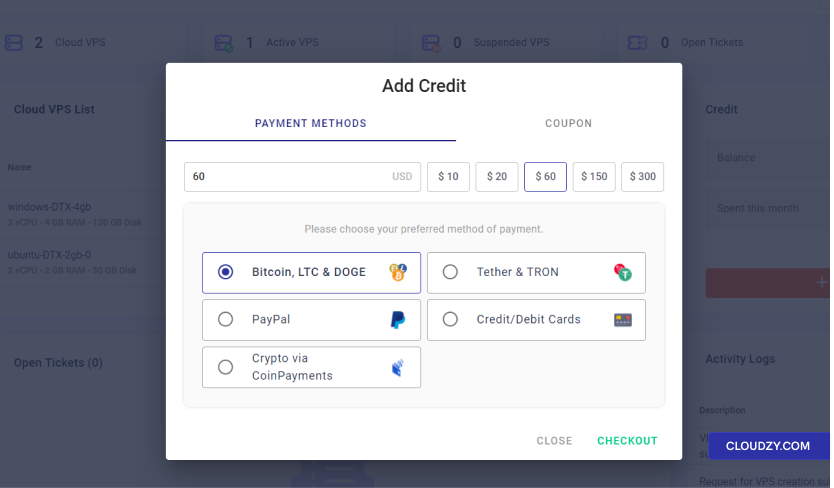
- クリックしてください クーポンタブ クーポンコードを表示する
入力フィールド
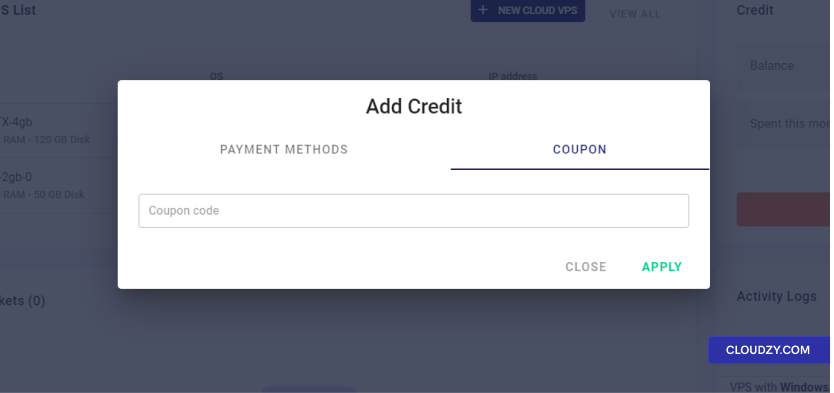
- クーポンを適用:
-
提供されたフィールドにクーポンコードを入力してください。
-
クリック 適用する ボタンをアクティベートする
クーポン
- 確認とクレジット調整:
-
クーポンを適用すると、確認メッセージが表示されます
クレジットがアカウントに適用されたことを示しています。 -
お客様のアカウント残高は新しいクレジットを反映するように更新されます
金額
Cloudzy のプロモーションクーポンの適用は簡単です。
以下のステップに従うことで、クーポンを利用して特典を享受できます
Cloud VPS サービス用に提供されています。確認してください。
クーポンを最大限に活用するための有効期限およびクーポンに関連する条件
ご不明な点やさらにお手伝いが必要な場合は、いつでもお気軽に
サポートチームにお問い合わせください 送信する
チケット.