
Cloudzy's Windows Server VPS comes with aは日本語で以下のように訳されます: CloudzyのWindows Server VPSには、 180日間の評価ライセンス (別名称で次のように呼ばれる Windows試用版このトライアル期間の後、VPS の使用を継続するには、正式な Windows Server ライセンスを取得する必要があります。本ガイドでは、ライセンスの取得方法と、VPS の仕様および Microsoft の要件に基づいて適切なバージョンを選択する方法について説明します。
前提条件
- Active Cloudzy Account: アクティブな Cloudzy アカウント: まず、アクティブで検証済みの Cloudzy アカウントが必要です。これは VPS とそのライセンスを管理するために不可欠です。
- Windows Server のバージョンを確認する: VPS の Windows Server バージョンを確認してください。バージョンによってライセンス要件が異なります。
- VPS の仕様を理解する: VPS の CPU コア数と RAM メモリ量を把握してください。これらの仕様はライセンス選択に影響します。
- Microsoft ライセンス情報にアクセス: Microsoftの公式ドキュメントを使用してライセンスの詳細を確認してください。 Microsoft のライセンスサイトで確認できます.
- ライセンス取得の準備: 新しいライセンスの購入に備えてください。Microsoft または認定販売業者から購入できます。このステップは 180 日間のトライアル後に重要です。
- コンプライアンスを意識する: Microsoft のライセンス条件について最新情報を保つてください。コンプライアンスはサービスの問題や法的問題を避けるために重要です。
適切なライセンスの取得
あなたのCloudzy VPSに含まれています 180日間の評価ライセンス Windows Server のためのものです。この期間の後、フルライセンスの購入はあなたの責任です。Cloudzy Windows Server の完全ライセンスを提供していませんため、ご自身で用意する必要があります。
適切なライセンスを選択するには、まず Windows Server バージョンを確認してください。
- あなたのVPSにログインしてください。
- 押す Win + R ファイル名を指定して実行ダイアログを開きます。
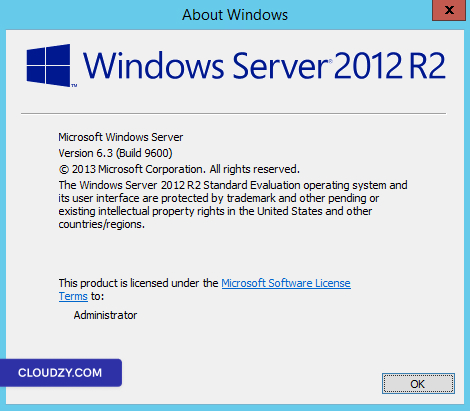
- タイプ winver そして押してください Enterこれにより、サーバーのバージョンとビルドが表示されます。
重要事項
-
リモートの Windows試用版 Cloudzy VPS に含まれるライセンスは、180 日間の評価版ライセンスと同じです。
-
180 日後、VPS は Windows Server を中断なく使用し続けるには、正式なライセンスが必要です。
-
ライセンスは以下から直接購入できます Microsoft または 認定リセラー.
このバージョン情報を使用して、対応するライセンスを選択してください。サーバーのバージョンと VPS 仕様に合致していることを確認してください。常に Microsoft のガイドラインを参照して、準拠した情報に基づいて選択してください。さらに詳しい情報やサポートが必要な場合は、以下の方法でサポートチームにお気軽にお問い合わせください。 チケットを送信する.