
Routeros jelszó beállítása
A hálózatbiztonság első vonala az erős jelszó beállítása a
a MikroTik útválasztó operációs rendszere. Ez az útmutató 4 lépésben végigvezeti Önt
egyszerű lépések egy erős jelszó létrehozásához, hogy biztos lehess abban, hogy az
a router felülete védve van az jogosulatlan hozzáféréssel szemben.
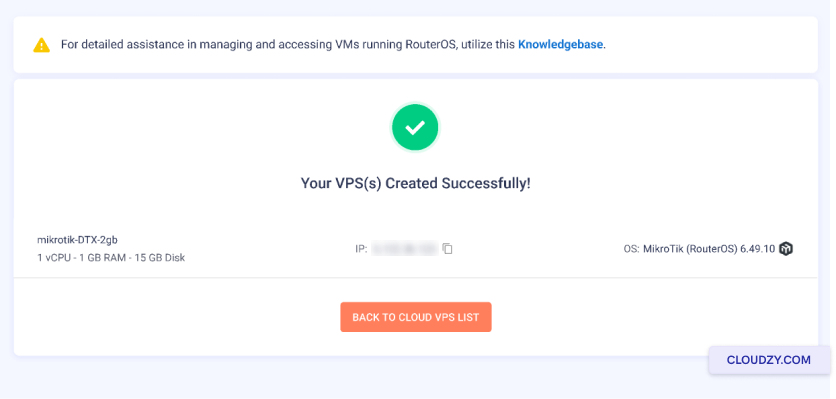
1. lépés: Hozzon létre egy VPS-t a Cloudzy panelen, majd
Másolja az IP-címet.
Lépés 2: Illessze be az IP-címet a címsorba a
a böngészőjében. Egy ehhez hasonló weboldalat fog látni. Most
beállíthatja az új jelszavát. A régi jelszó mezőt üresen hagyhatja
Ha ez egy új gép, és még nem állított be jelszót ehhez
gép még.
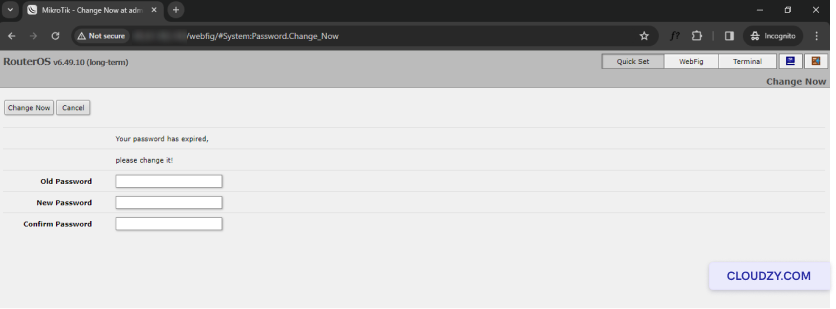
3. lépés: Kattintson Módosítás most.
4. lépés: Most már megtekintheti a konfigurációs oldalt a
RouterOS oldal.
Csupán néhány kattintással sikeresen beállíthat egy jelszót a
a MikroTik RouterOS-ról. Ha további információra vagy segítségre van szüksége,
forduljon bizalommal az ügyfélszolgálati csapatunkhoz a elküldve egy
jegy.
Szintén itt: Hálózat és tűzfal
Kapcsolódó útmutatók.
Másban kell segítség?
Medián válaszidő 1 órán belül. Valódi emberek, nem botok.