
ドメイン名をVPSにポイントするように設定すると、アクセスが簡単になります
RDP または SSH 接続用です。この記事では、以下の作成方法をガイドします
ドメイン名をご使用の Cloudzy VPS にリンクするための準備として、以下が必要です
ドメインパネルのDNS AレコードでドメインをIP<br/>アドレスに指定するか、またはCNAMEレコードを使用してください。ドメイン名をポイントするには
VPS IP アドレス。
前提条件
ドメインが登録されているサービスの
必要:
-
ドメイン コントロール パネル アクセス: ログイン認証情報
ダッシュボード内で、ご使用の -
Cloudzy VPS IPアドレス: Cloudzyのあなたのアカウントに位置しています
に割り当てられた特定の IP アドレスです
VPS.
DNS A レコードを作成する
記録
必要な準備がすべて整ったら、以下の手順に従ってください
DNS A レコードを作成し、ご使用のドメインを Cloudzy VPS にリンクします
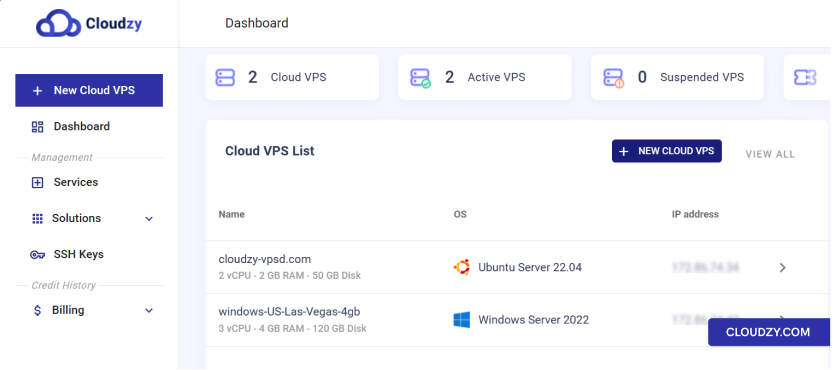
- Cloudzy VPS の IP アドレスを特定する:
-
Cloudzyダッシュボードにサインインします。
-
に移動 クラウドVPS一覧 セクション内で
VPS インスタンスのリストが表示されます。 -
接続したいVPSを特定し、横に表示されているIPアドレスを記録してください。
隣に表示されます。
- ドメインコントロールパネルにアクセス:
-
ドメインレジストラのコントロールパネルにログインします。
-
Go から DNS の設定またはドメイン管理エリアへ移動します。
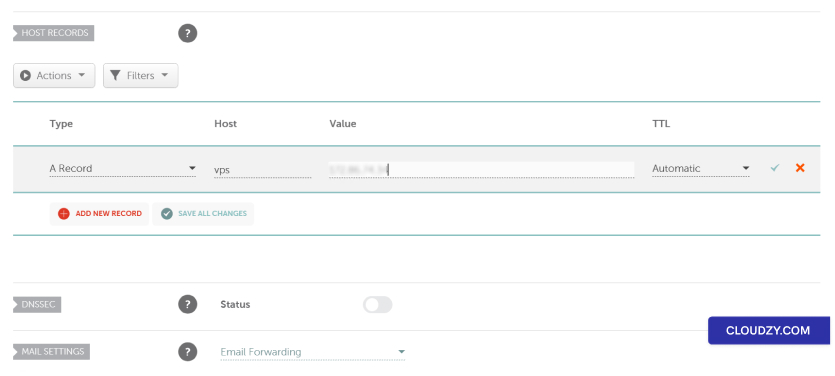
- 新しいAレコードを追加:
-
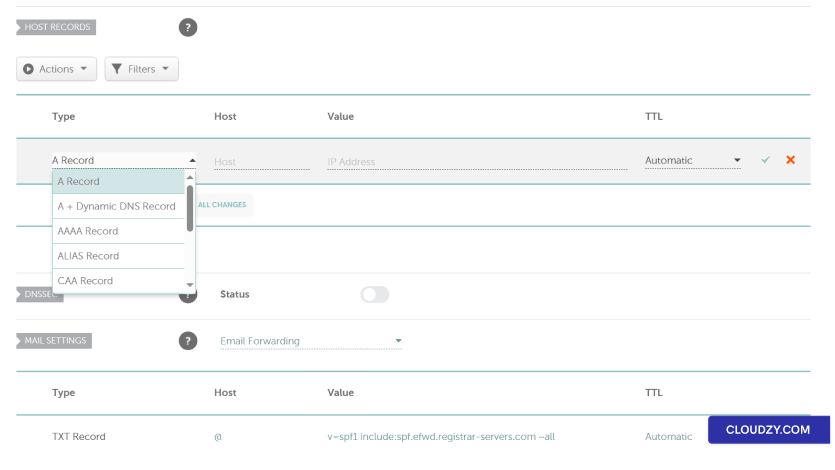
新しい DNS レコードを追加するオプションを探してください。通常は次のようにラベル付けされています:
新しいレコードを追加 -
選択 A レコードタイプのオプションから選択します。
-
に ホスト フィールドに希望するサブドメインを入力してください
(例: 'vps') またはルートドメインの場合は '@'
-
Cloudzy VPS のIPアドレスを入力してください 価値 または
IPアドレス フィールド -
ドメインレジストラが推奨するTTL (Time to Live) を設定してください。
不確定な場合は、デフォルトのままにしてください。
- 変更を保存する
-
新しい A Record を確認して詳細が正しいことを確認してください
正しい。 -
変更を保存して、DNS の設定を更新してください。
- DNS伝播時間:
-
DNS変更には、数分から48時間までかかる可能性があります
世界中に広がる。 -
この期間中、ドメインがすぐに指すようにならない可能性があります
VPS IP アドレス。
- ドメイン接続のテスト:
-
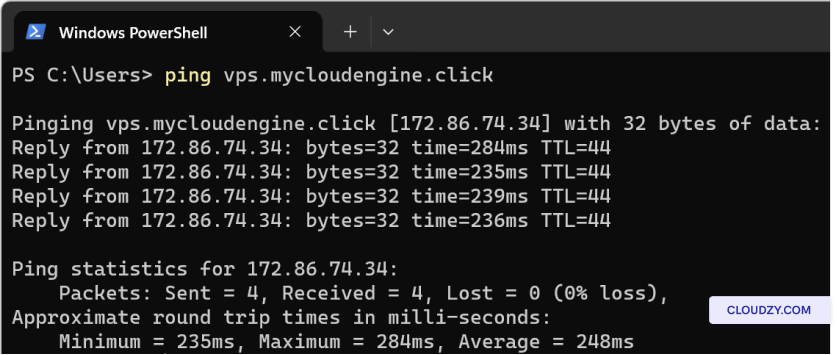
DNSの変更が反映されたら、コマンドプロンプトを開くか
ターミナル -
タイプ ping yourdomainname.com をピングします または
vps.yourdomain.com を入力してEnterキーを押してください。 -
VPS IPアドレスの応答を確認して、これが
ドメインが VPS に正しく向いています。
- CDNユーザーの追加検討事項:
- CDN のようなサービス(例:Cloudflare)を使用している場合は、必ず
プロキシ (CDN) オプションを無効にして、A レコードを追加する際に何らかの問題を防いでください
直接IP解決と競合します。
ドメインを Cloudzy VPS に接続を完了するには、以下を実行してください
ドメインパネルで A レコードが正確に追加されていることを確認してください。反映には最大
DNS の伝播には 48 時間かかります。ping コマンドでセットアップをテストしてください。その後
ご不明な点やさらにお困りのことがあれば、お気軽に
サポートチームにお問い合わせください 送信する
チケット.
同じカテゴリー ネットワークとファイアウォール