
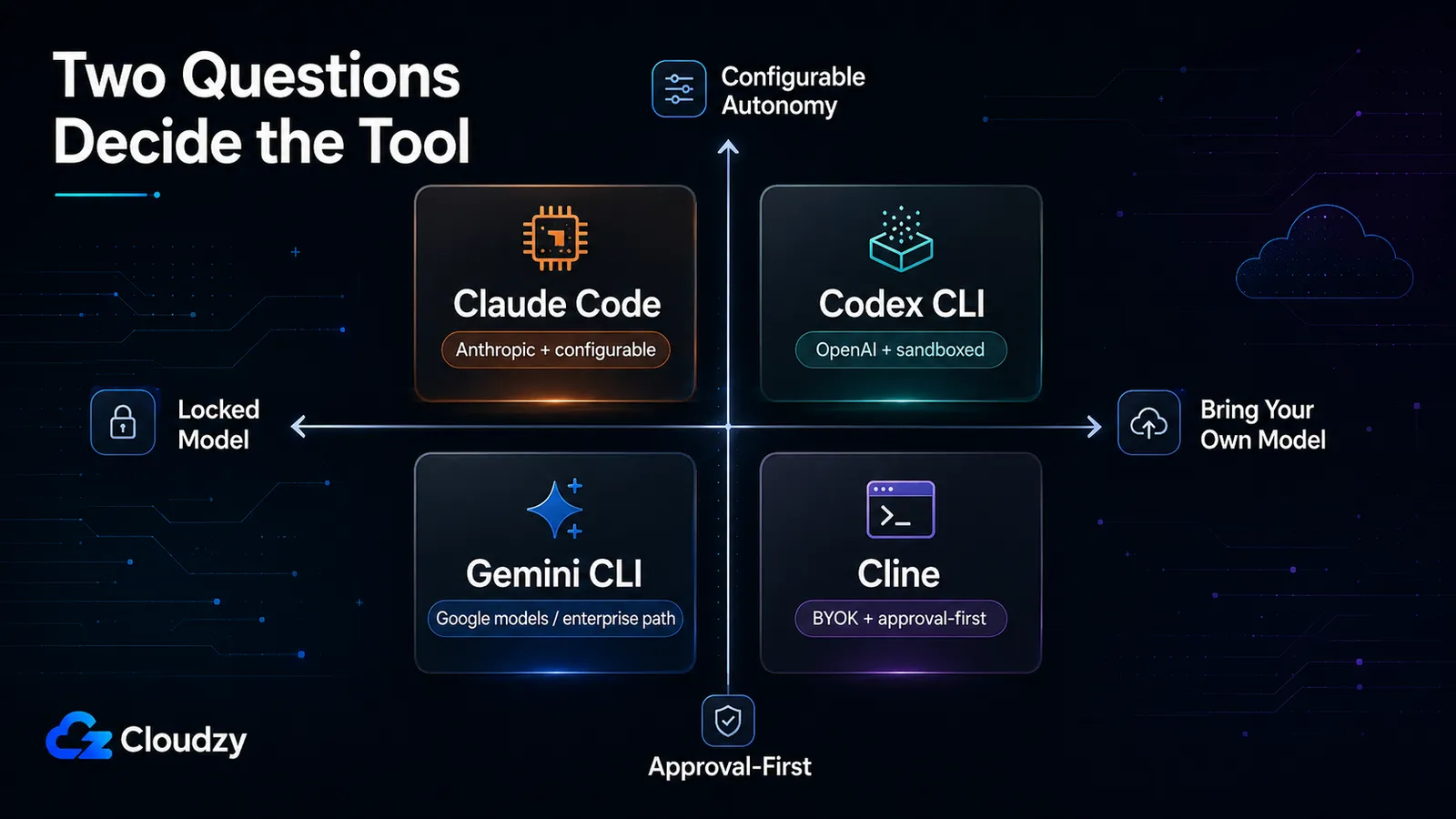
Vier tools, maar eigenlijk twee vragen. Wil je vastzitten aan één model of je eigen model meenemen? En wil je elke actie goedkeuren, of laat je het ding zelf draaien? Kies je antwoord op die twee vragen en het vierkamp tussen Claude Code, Codex CLI, Gemini CLI en Cline regelt zichzelf grotendeels. De rest is detail.
Ik zeg "grotendeels" omdat een van de vier deze maand voor iedereen veranderde. Het gratis individuele pad van Gemini CLI eindigde op 18 juni 2026, en Google stuurt die gebruikers richting Antigravity CLI, dus alles wat je wist over de gratis laag van Gemini CLI is nu achterhaald. Dit is niet zozeer een "welke is de beste"-race, maar eerder een kaart van welke hoek van de matrix jij bezet, en welke tool daar bij je past.
De korte versie
Als je niet verder leest, dan is dit waar ik op alle vier uitkom:
- Claude Code is de gepolijste, ecosysteem-zware keuze: één modelfamilie (die van Anthropic), diepgaande tooling, configureerbare autonomie. Geen gratis laag; je betaalt minimaal $20/maand, en zware gebruikers klimmen op naar een Max-abonnement van $200/maand.
- Codex CLI is de Rust-native, open-source OpenAI-terminalagent met ongeveer 92.000 GitHub-sterren. Hij draait lokaal, kan code uitvoeren binnen een beperkte sandbox, en is inbegrepen bij alle ChatGPT-abonnementen waaronder Free, Go, Plus, Pro, Business, Edu en Enterprise, met gebruikslimieten afhankelijk van het abonnement. Voor regelmatig dagelijks gebruik is Plus of hoger nog steeds de praktische basislijn, maar "geen gratis laag" klopt niet meer.
- Gemini CLI veranderde het meest: individuele en gratis-laag-toegang werd op 18 juni 2026 afgesloten, en Google stuurt die gebruikers naar Antigravity CLI. Enterprise- en betaalde API-key-gebruikers behouden toegang tot Gemini CLI.
- Cline is de meest flexibele van het stel: BYOK over 30+ providers, inclusief lokale modellen via Ollama. Het is gratis en open source; je betaalt alleen voor inference. Het vraagt standaard toestemming voor elke bewerking, wat je ofwel geweldig vindt of op dag één uitschakelt.
De kostendraai die je vooraf moet weten: als je een BYOK-tool zoals Cline hard genoeg gebruikt, kunnen variabele API-rekeningen een vast abonnement overstijgen, en op dat punt wordt een zelf-gehoste model-backend de goedkopere route. Meer daarover na het prijsrekenwerk.
De twee vragen die dit echt beslissen
Start een refactor in Cline en hij stopt bij de eerste bestandsbewerking en wacht tot je ja zegt. Start dezelfde taak in Codex CLI met permissieve goedkeuringsinstellingen, en hij kan de repo inspecteren, bestanden bewerken en commando's uitvoeren binnen een door het OS beperkte sandbox. Die kloof, plus nog één, is de hele vergelijking.
Vraag één is modelstrategie. Sommige tools binden je aan de modellen van één leverancier; andere laten je je eigen key meenemen (BYOK) en wijzen naar wat je maar wilt.
- Vast: Claude Code draait Anthropic-modellen (de Opus 4.x-familie) voor standaardgebruik. Integraties met externe providers bestaan, maar dat is niet de standaardmanier waarop je het zou gebruiken. Codex CLI draait de huidige Codex-modellijn van OpenAI, inclusief GPT-5.5, GPT-5.4 en GPT-5.4 mini afhankelijk van platform en abonnement. Toegang is inbegrepen bij alle ChatGPT-abonnementen met gebruikslimieten, en API-key-gebruik is apart beschikbaar.
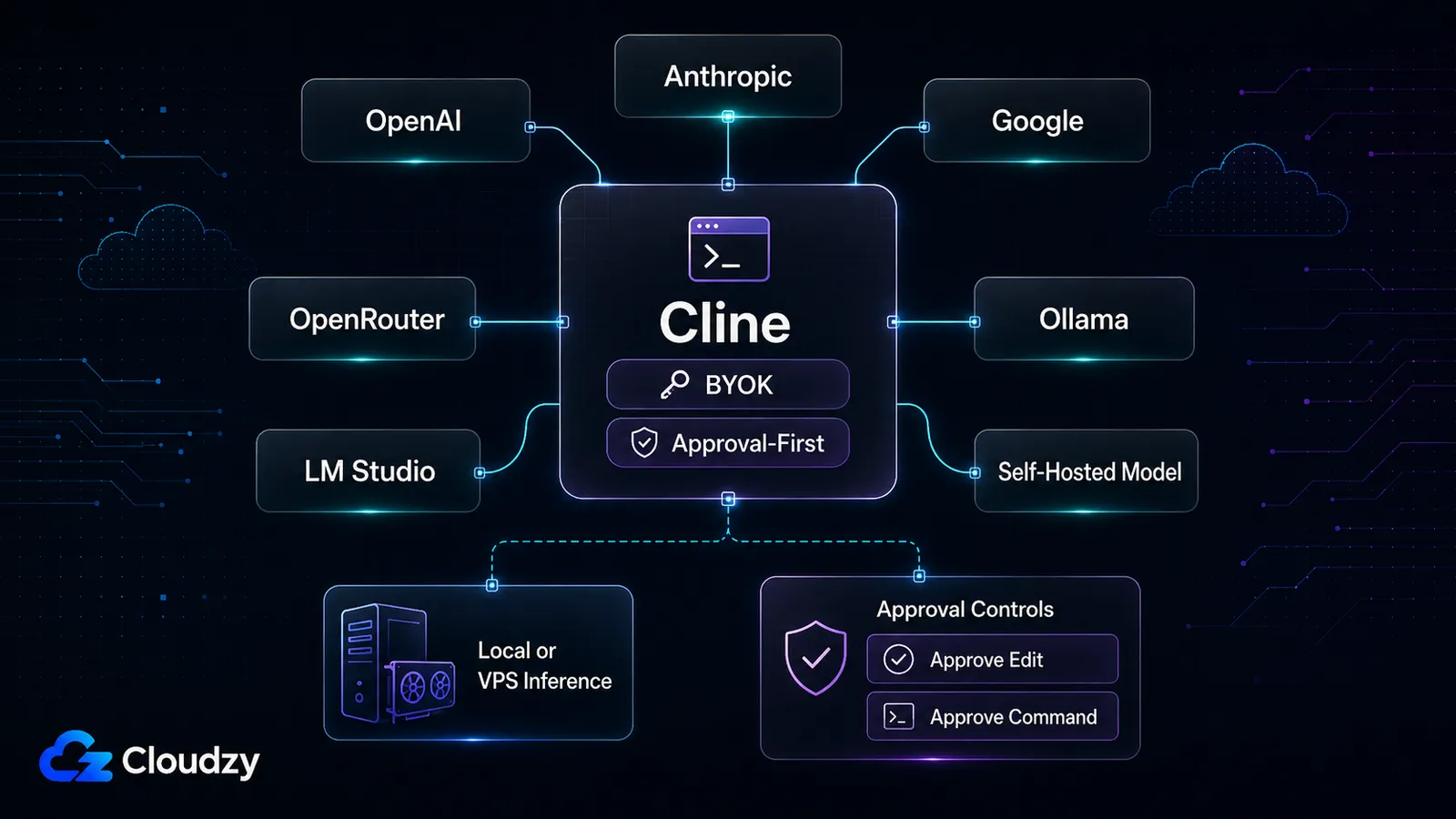
- Flexibel (BYOK): Cline verbindt met 30+ providers: Anthropic, OpenAI, Google, AWS Bedrock, Azure, OpenRouter, DeepSeek, Groq, plus lokale backends via Ollama en LM Studio. Gemini CLI in zijn enterprise-vorm draait Google-modellen via een betaalde API; zijn closed-source opvolger Antigravity blijft ook binnen het ecosysteem van Google.
Vraag twee is autonomiehouding. Vraagt de tool toestemming voordat hij handelt, of handelt hij en vertelt het je achteraf?
- Standaard goedkeuring vereist: Cline bevestigt elke bestandsbewerking en elk terminalcommando voordat het wordt uitgevoerd. De Plan Mode van Gemini CLI voert een alleen-lezen planningsronde uit voordat hij iets aanraakt.
- Configureerbaar richting autonoom: Claude Code leunt op zijn hooks-systeem en auto-goedkeuringsschakelaars, en gaat volledig hands-off met Agent Teams. Codex CLI kan commando's uitvoeren binnen een door het OS beperkte sandbox, waarbij goedkeuringsinstellingen bepalen wanneer hij stopt voor bevestiging. De meeste bieden ook een onbeheerde modus (de -y-vlag van Cline, de YOLO-vlag van Gemini) voor wanneer je echt weg wilt lopen.
Zet de vier op die twee assen uit en ze overlappen nauwelijks. Claude Code zit op vast-maar-configureerbaar. Codex op vast-maar-sandboxed-autonoom. Cline op flexibel-maar-goedkeuring-eerst. Gemini was vroeger de goedkeuringsvriendelijke, Google-model-optie voor individuen, maar die rol veranderde toen het gratis individuele pad van Gemini CLI werd afgesloten.
Conclusie van deze sectie: de vier tools concurreren niet echt op één enkele "beste"-as. Elk bezit een andere hoek van modelstrategie maal autonomie, en jouw hoek kiest jouw tool meer dan welke functielijst dan ook.
De snelle vergelijking
Hier is het hele veld op vijf assen, zodat je je hoek kunt vinden voordat je de per-tool-details hieronder leest.
| Claude Code | Codex CLI | Gemini CLI | Cline | |
|---|---|---|---|---|
| Modelstrategie | Vast (Anthropic) | Vast (OpenAI GPT-5.x) | Google-modellen (enterprise eigen API) | BYOK, 30+ providers incl. lokale Ollama |
| Standaard autonomie | Configureerbaar (hooks, Agent Teams) | Sandboxed uitvoering met goedkeuringscontroles | Goedkeuringsvriendelijk (Plan Mode) | Goedkeuring vereist per actie |
| Instapprijs | $20/mo (no free tier) | Inbegrepen bij ChatGPT Free/Go met limieten; Plus begint bij $20/maand | Gratis laag eindigde 18 juni 2026 | Gratis tool; betaal per inference (BYOK) |
| Contextvenster | Varieert per Claude-platform en model; ga niet uit van één vaste CLI-context | Niet vermeld | 1M tokens | Erft het geconfigureerde model |
| Primair model / benchmark | Opus 4.x (zie benchmark-kanttekeningen) | GPT-5.x (OpenAI stopte met rapporteren van SWE-bench) | Gemini 3-familie | Wat je ook configureert |
Lees de tabel als een routeringshulpmiddel, niet als een scorebord. Er is geen kolom waarin één tool op elke rij wint, en de prijsrij in het bijzonder is een bewegend doelwit: die van Gemini is net veranderd, en het "gratis" van Cline verbergt een variabele inference-rekening die ik later uitsplits. De per-tool-secties hieronder voegen de nuance toe die de cellen niet kunnen bevatten.
Claude Code
Het ding Claude Code krijgt goed dat het ophoudt aan te voelen als één enkele tool en begint aan te voelen als één workflow uitgestrekt over platforms. Je start een taak in de terminal, pakt hem op in de desktop-app, controleert hem op het web op claude.ai/code, dezelfde context, dezelfde agent. Voor het soort ontwikkelaar dat de hele dag in een AI-ondersteunde lus leeft, is die continuïteit de belangrijkste reden om het te kiezen.
Onder de motorkap is het alleen Anthropic voor standaardgebruik. De Opus 4.x-familie doet het werk; integraties met externe providers bestaan en zijn gedocumenteerd, maar ze zijn de uitzondering, niet de modus waarin je zult draaien. Als modelflexibiliteit een harde eis voor je is, is dit waar Claude Code "vast" zit, en het is een bewuste afweging voor een meer gepolijste, meer geïntegreerde ervaring.
De capaciteitenlijst is diep en, belangrijker nog, het is het soort diepte dat je daadwerkelijk gebruikt: Agent Teams en sub-agents (die met de Opus 4.6-integratie eerder in 2026 aankwamen) voor parallel werk, een CLAUDE.md persistent-geheugen-bestand dat de agent bij elke run leest, een hooks-systeem met 30+ programmeerbare lifecycle-events, MCP-ondersteuning, en CI/CD-integratie voor GitHub Actions, GitLab en CircleCI. Dat hooks-systeem is waar de autonomie leeft: jij beslist wat automatisch wordt goedgekeurd en wat stopt voor een mens.
Nu de haak. Er is geen losstaand gratis Claude Code-pad. Pro is $20/maand en bevat Claude Code, maar de echte klacht van zware gebruikers is dat het gebruik van Pro wordt gedeeld over Claude-platforms in plaats van een toegewijde coding-toelage te zijn. Een drukke chatdag kan vreten aan dezelfde abonnementsruimte die je voor coding wilde. Voor serieus dagelijks gebruik duwt Anthropic gebruikers richting Max: Max 5x is $100/maand en Max 20x is $200/maand, met 5x of 20x meer gebruik dan Pro. De Max-lagen zijn duidelijker dan Pro voor zwaar werk, maar je voelt de prijs.
Waar het zit: vast aan één model, configureerbaar richting autonomie. Het is de keuze voor mensen die één goed model en een diep ecosysteem willen, en die voor de afwerking willen betalen.
Codex CLI
Het kopcijfer voor Codex CLI is 92.000 GitHub-sterren, en als je ergens recent "65K" zag, was dat cijfer verouderd; het is 92K per medio juni 2026. Het is Apache 2.0, en hier is het detail dat ik echt interessant vind: het is 96,2% Rust. OpenAI herschreef het van TypeScript naar Rust eind 2025, en de huidige release is v0.141.0 (ze brengen ongeveer één release per dag uit). Dat is een tool in zware, actieve ontwikkeling.
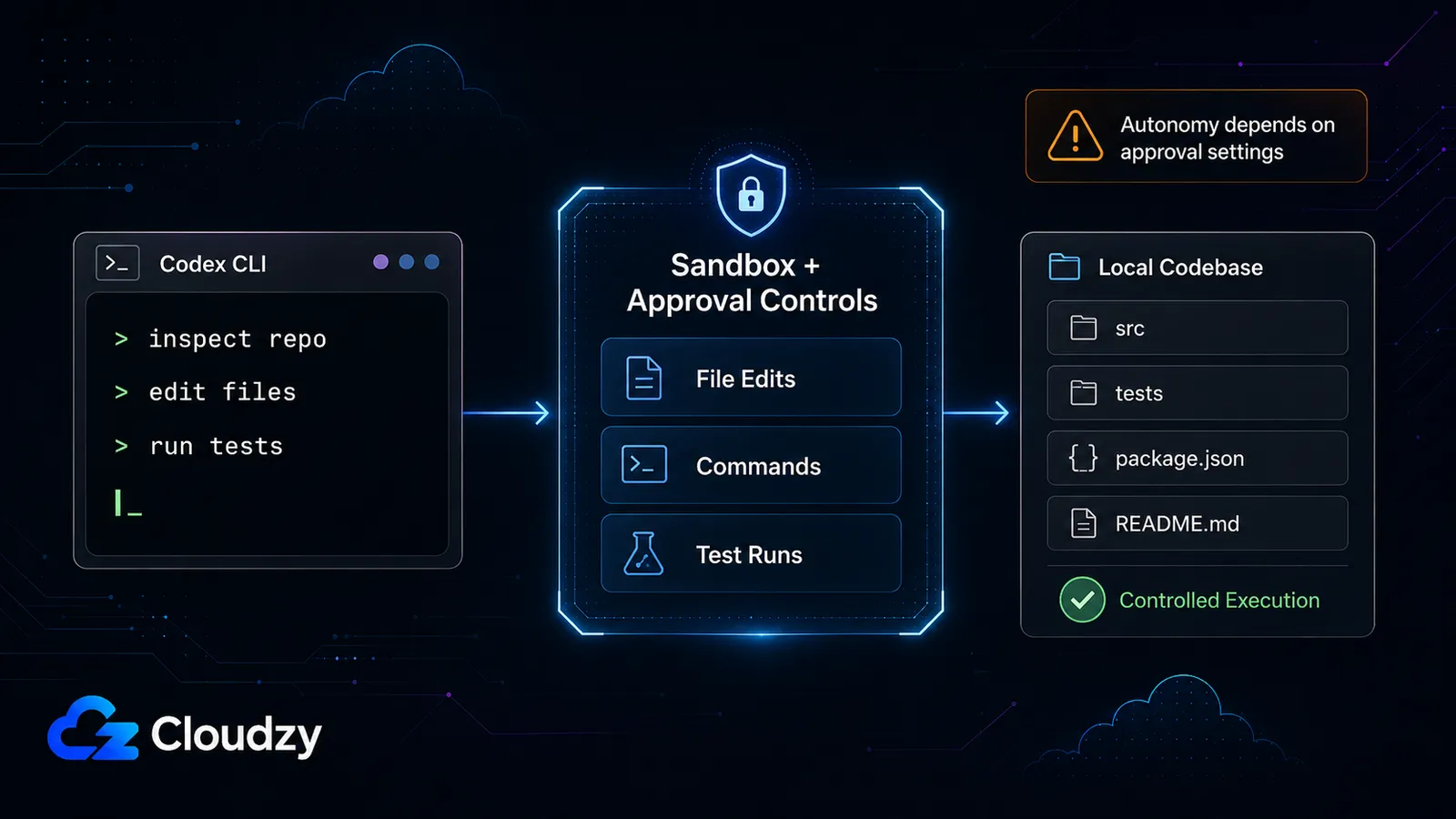
De architectuur is het sterkste deel van het verhaal. Codex CLI draait als een lichtgewicht lokale terminalagent die je repository kan inspecteren, bestanden kan bewerken en commando's vanuit de terminal kan uitvoeren. Het belangrijke detail is niet dat hij standaard "gewoon draait"; het is dat zijn uitvoeringsmodel is opgebouwd rond sandboxing en goedkeuringscontroles. Met andere woorden, je kunt hem richting meer autonoom werk duwen, maar je kiest nog steeds hoeveel hij mag doen voordat hij stopt voor bevestiging.
Wat prijs betreft is Codex nu inbegrepen bij de ChatGPT-abonnementen Free, Go, Plus, Pro, Business, Edu en Enterprise, met limieten afhankelijk van het abonnement. Free en Go kun je beter behandelen als proef- of lichtgebruik-toegang. Plus begint bij $20/maand en is de praktische basislijn voor regelmatig individueel gebruik, terwijl API-key-gebruik een apart, gemeten pad blijft.
De kanttekening is de perceptie van betrouwbaarheid. Sommige ontwikkelaarsdiscussies en analyses van derden hebben gevallen gemeld waarin Codex zich minder als een uitvoerende agent gedroeg en meer als een suggestie-engine, of leek commandoresultaten verkeerd weer te geven. Ik zou dat niet presenteren als een bewezen universeel defect zonder sterkere primaire bronnen, maar het is het signaleren waard als een gemelde zorg als je workflow afhangt van onbeheerde uitvoering.
Waar het zit: vast aan OpenAI, sandboxed, en configureerbaar richting autonomie. Het is de keuze als je een OpenAI-native terminalagent, Rust-native snelheid, en echte sandbox- en goedkeuringscontroles wilt, en als de betrouwbaarheidskanttekening hem niet diskwalificeert voor je workflow.
Gemini CLI en wat het zojuist verving
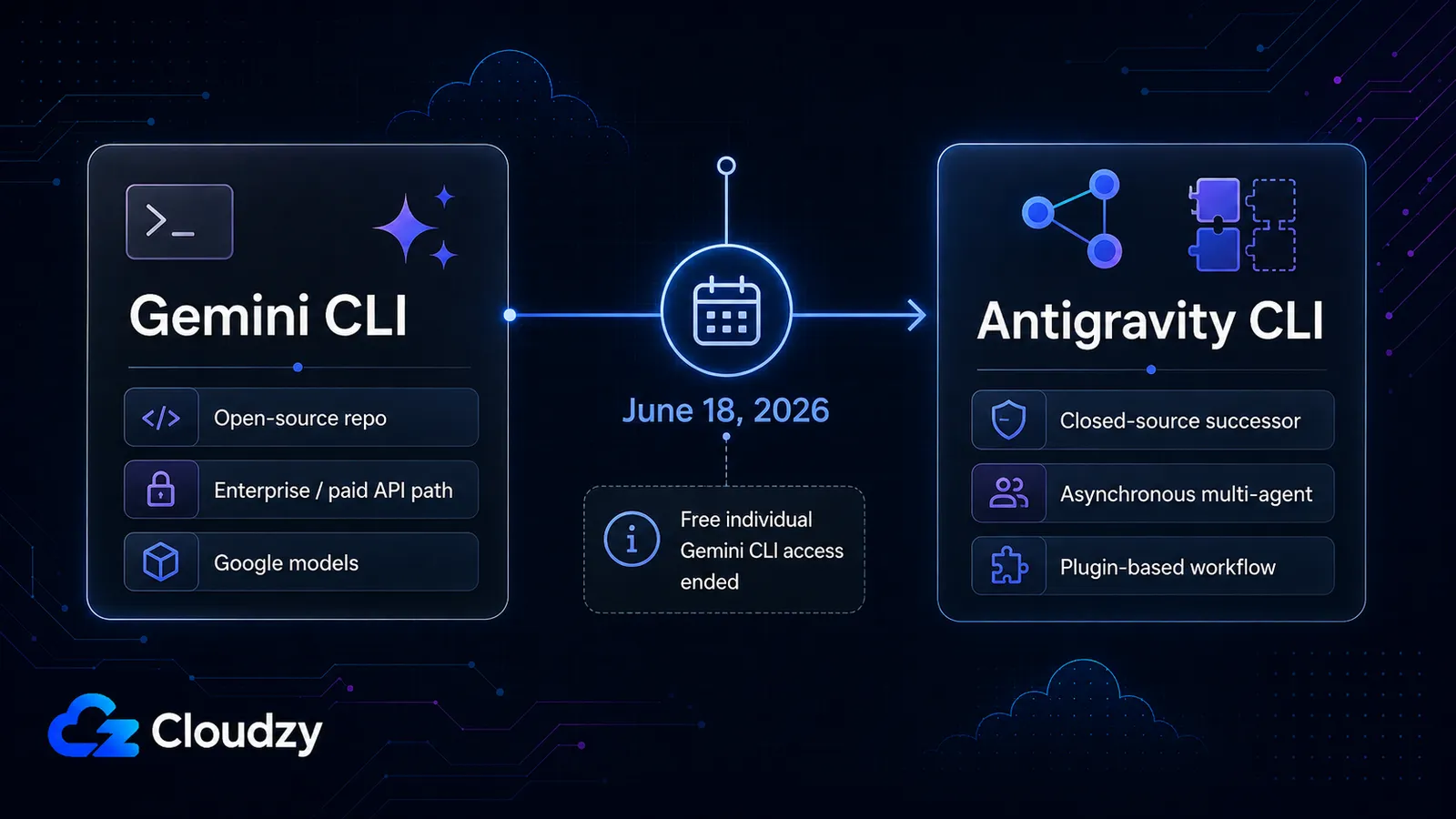
⚠ Let op: dit veranderde op 18 juni 2026. Gemini CLI bedient geen verzoeken meer voor gratis individuele gebruikers, Google AI Pro-gebruikers of Google AI Ultra-gebruikers. Google stuurt die gebruikers naar Antigravity CLI, een closed-source opvolger opgebouwd rond een asynchrone multi-agent-architectuur. Enterprise-gebruikers en betaalde API-key-gebruikers behouden toegang tot Gemini CLI.
Het verwarrende deel is dat de Gemini CLI GitHub-repository nog steeds bestaat en Gemini CLI nog steeds presenteert als een Apache 2.0 open-source terminalagent. De README kan ook nog steeds de oude gratis laag van 60 verzoeken per minuut en 1.000 verzoeken per dag vermelden, maar Google's overgangsmelding vervangt dat voor getroffen individuele gebruikers. De code is nog steeds open; het consumentenservicepad veranderde.
Vóór de afsluiting was Gemini CLI een sterke open-source optie: 100.000+ GitHub-sterren, Apache 2.0-licentie, toegang tot Gemini 3-modellen, een contextvenster van 1M tokens, ingebouwde tools, en een royale gratis laag. Die gratis laag was waar mensen over praatten. Alles dat Gemini CLI nog steeds vooral aanbeveelt vanwege "1.000 gratis verzoeken per dag" beschrijft nu de consumentenervaring van vóór 18 juni.
Antigravity CLI werd aangekondigd en beschikbaar gesteld in mei 2026. Google zei dat er bij de lancering geen 1-op-1-functiepariteit zou zijn, maar dat Antigravity CLI cruciale Gemini CLI-concepten zou behouden zoals Agent Skills, Hooks, Subagents en Extensions, nu afgehandeld als Antigravity-plugins. De afweging is duidelijk: Google beweegt richting een verenigd agentplatform, maar het individuele ontwikkelaarspad is niet langer hetzelfde open Gemini CLI-verhaal.
Waar het zit: Gemini CLI was vroeger de goedkeuringsvriendelijke Google-model-optie voor individuen. Na 18 juni 2026 hoort die rol vooral bij enterprise- en betaalde API-key-gebruikers, terwijl individuele gebruikers richting Antigravity CLI worden geduwd.
Cline
Cline is de enige tool hier die je je agent laat richten op een model dat op je eigen machine draait. Dat ene feit hervormt het kostengesprek later, dus houd het in gedachten.
Eerst de cijfers: Cline claimt momenteel 8M+ ontwikkelaars of installaties over platforms heen en ongeveer 63,6k GitHub-sterren. Zijn terminal-native CLI beweegt al snel, met CLI v3.0.29 uitgebracht op 20 juni 2026, dus behandel elk exact versienummer als een momentopname. De belangrijkere productverschuiving was Cline CLI 2.0, aangekondigd in februari 2026 als een terminal-native product apart van de VS Code-extensie. Het levert een interactieve TUI, een Plan/Act-schakelaar, een headless -y modus, parallelle agents, ACP-naleving, en stdin/stdout-piping voor CI/CD. Cline omschrijft het als "orchestratie, niet authoring": een terminal-first workflow, geen VS Code-kloon.
De kopfunctie is modelflexibiliteit, en het is geen marketing. Cline doet BYOK over 30+ providers (Anthropic, OpenAI, Google, Bedrock, Azure, OpenRouter, DeepSeek, Groq) en, het deel dat ertoe doet voor dit artikel, lokale en zelf-gehoste backends via Ollama en LM Studio. Het is de enige van de vier met native ondersteuning voor lokale modellen. Als "mijn agent draaien tegen een model dat ik host" op je verlanglijst staat, is Cline de enige tool hier die ja zegt.
Die flexibiliteit verandert ook hoe je redeneert over het model eronder. Met Claude Code of Codex wed je op de roadmap van één leverancier. Met Cline kun je een frontier-model inruilen voor een goedkoper model bij routinewerk en alleen de dure tokens uitgeven waar ze het verdienen, of een snel lokaal model draaien voor het boilerplate-werk en een cloud-API reserveren voor het moeilijke redeneren. Het zijn meer knoppen om te beheren, wat niet gratis is, maar voor iedereen die een verandering in prijs of beleid bij één leverancier zijn workflow heeft zien verwoesten, is het vermogen om de agent in één configuratieregel om te richten het eigenlijke verkoopargument. Als je al agents op een server draait, is dezelfde BYOK-bedrading wat een VPS-gehoste opzet laat werken.
Het autonomieverhaal is het omgekeerde van Codex. Standaard wacht elke bestandsbewerking en elk terminalcommando op jouw goedkeuring. Dat is de veiligste standaard van de vier, en voor een nachtelijke, fire-and-forget-run is het ook de meest irritante. Er is een auto-goedkeuringsschakelaar (Shift+Tab in CLI 2.0) en configuratie per actietype, zodat je hem kunt instellen van "vraag me alles" tot "ga gewoon". Je kiest je eigen autonomie in plaats van die van de tool te accepteren.
Prijs is het makkelijke deel: Cline zelf is gratis en open source. Je betaalt alleen voor inference, BYOK tegen providertarieven. Wat geweldig klinkt, en is, tot je het zwaar genoeg gebruikt dat de API-meter het verhaal wordt.
Eén kanttekening die ik niet zal overslaan: als je community-benchmarks voor "Cline" ziet, controleer dan of ze eigenlijk Roo Code testen, een populaire community-gedreven fork. Veel "Cline"-vergelijkingen online zijn eigenlijk Roo Code-vergelijkingen, dus de cijfers zijn misschien geen appels-met-appels met de tool die je zou installeren. En Cline heeft gedocumenteerde context-onderhoudslimieten bij grote projecten met meerdere bestanden (cline/cline): een gebruiksstudie van 600 uur (bv_dev) signaleerde dat het moeite kan hebben om projectstructuur vast te houden bij grote codebases. Geen enkele tool heeft langdurige-sessie-context volledig opgelost, maar het is het waard om te weten waar de sterkte van Cline ligt.
Waar het zit: flexibel in modellen, standaard goedkeuring vereist (configureerbaar naar autonoom). De keuze voor modelflexibiliteit, een veiligheid-eerst-standaard, of lokale inference.
Benchmarks: lees deze zorgvuldig
Ik ga deze tools niet rangschikken op één SWE-bench Verified-tabel. OpenAI heeft publiekelijk betoogd dat SWE-bench Verified steeds meer vervuild is en rapporteert nu nieuwere coding-agent-prestaties via andere benchmarks. Benchmarkcijfers van Claude en Gemini bewegen ook snel, en Cline heeft geen eigen score omdat het erft welk model je ook configureert.
Dat maakt benchmarkcijfers nuttig als losse modelfamilie-context, niet als de beslissende factor tussen deze tools. Als je kiest tussen Claude Code, Codex CLI, Gemini CLI en Cline op basis van een benchmarkkloof van één punt, optimaliseer je waarschijnlijk de verkeerde variabele. In dagelijks gebruik doen betrouwbaarheid, autonomiehouding, modelflexibiliteit en kosten er meer toe dan een kopscore.
Prijs en de echte kosten van zwaar gebruik
De vergelijking die ertoe doet is niet de catalogusprijs. Het is wat je daadwerkelijk uitgeeft zodra je er een dagelijks gebruikt.
| Tool | Gratis laag | Instap betaald | Actief dagelijks gebruik | Zwaar gebruik |
|---|---|---|---|---|
| Claude Code | Geen voor Claude Code | $20/mo (Pro) | $20–100/mo | $200/mo (Max 20x) |
| Codex CLI | Beperkte toegang op ChatGPT Free/Go | Plus begint bij $20/maand | $20/mo for regular individual use; API optional | Hoger abonnementsniveau of gemeten API-gebruik |
| Gemini naar Antigravity | Gratis individueel pad van Gemini CLI eindigde 18 juni 2026 | Enterprise of betaalde API-key voor Gemini CLI | Details van Antigravity-abonnement moeten actueel worden gecontroleerd | N.v.t. |
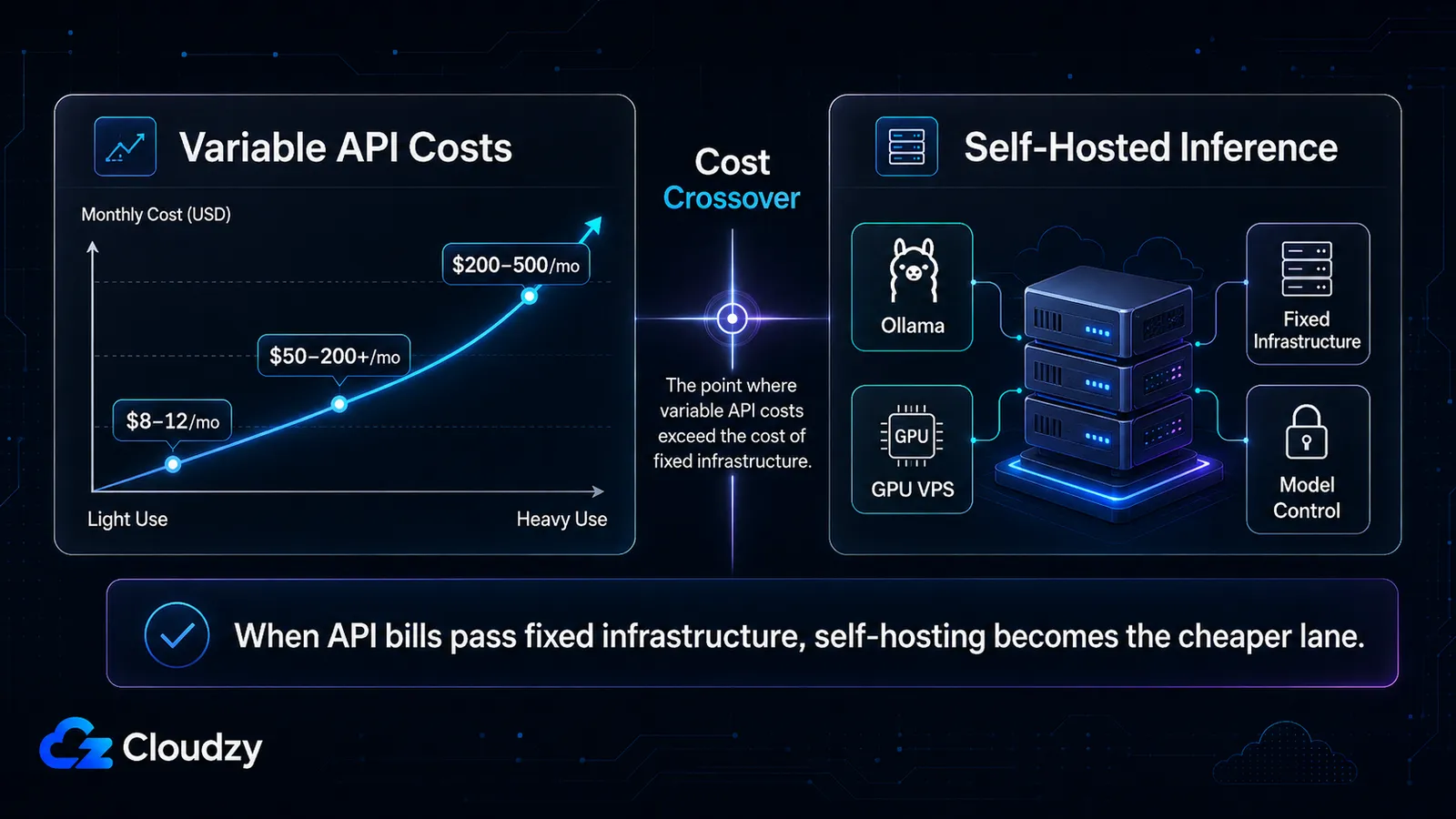
| Cline | Gratis tool | BYOK-inferencekosten | ~$8-12/maand matig | ~$50-200+/maand zwaar API-gebruik, en mogelijk meer |
Het interessante rekenwerk zit in de combinaties, want veel mensen draaien een hybride opzet: een BYOK-tool zoals Cline voor dagelijks werk, plus een abonnementstool voor de grote refactors.
- Cline BYOK dagelijks plus af en toe Claude Code Pro: ongeveer $28-32/maand.
- Cline BYOK plus Claude Code Max 5x: ongeveer $108-112/maand.
- Puur Claude Code Max 20x, zwaar dagelijks: een vaste $200/maand.
- Puur Cline BYOK kan duur worden bij zwaar gebruik. Bijvoorbeeld, als een API-sessie van Sonnet-klasse $2-5 kost en je draait vijf sessies per dag gedurende twintig werkdagen, dan landt de maandrekening rond $200-500. Dat zijn geen universele Cline-kosten; het is het punt waarop variabele API-facturering begint te concurreren met vaste abonnementen of zelf-gehoste inference.
Die laatste regel is degene om bij stil te staan. Draai een BYOK-tool hard genoeg en de variabele API-rekening passeert stilletjes het vaste Max-abonnement, en blijft klimmen. Een ontwikkelaar op Hacker News die drie agents non-stop draaide vatte het samen: "API-tokens kosten x40 vergeleken met tokens in het abonnement." Zodra je in die zone zit, heb je twee rationele zetten: overschakelen naar een vast abonnement, of, als je BYOK en modelflexibiliteit wilt behouden, helemaal stoppen met betalen per token.
Wanneer variabele API-kosten geen zin meer hebben
Die variabele rekening van $200-500/maand is het anker voor een derde optie die het waard is door te rekenen. Omdat Cline kan praten met lokale en zelf-gehoste backends via tools zoals Ollama, kunnen zware gebruikers een deel van de inference verplaatsen naar infrastructuur die ze beheren in plaats van elke token via een cloud-API te meten. Cloudzy's one-click Ollama VPS en GPU VPS abonnementen maken die opzet mogelijk, maar de juiste hardware hangt af van modelgrootte, kwantisatie, concurrentie en huidige prijzen. De praktische vraag is simpel: kan een vaste GPU VPS jouw variabele API-rekening verslaan? Als het antwoord ja is, wordt zelf-gehoste inference de goedkopere route.
Welke moet je gebruiken
Nu je de gegevens hebt, is de routering simpel. Vind je hoek van de tweeassige matrix en de tool is grotendeels beslist:
- Wil je één gepolijst model en een diep ecosysteem, bereid om een abonnement te betalen, comfortabel met het configureren van je eigen autonomie? Claude Code. Ga direct naar Max als je zwaar gebruikt, en maak vrede met de gedeelde-limiet-eigenaardigheid op Pro.
- Al in het OpenAI-ecosysteem en wil je een Rust-native terminalagent met sandboxing en goedkeuringscontroles? Codex CLI, op voorwaarde dat de betrouwbaarheidskanttekening hem niet diskwalificeert voor je werk. Als je al gebrand bent door een agent die zijn rol vergat, weeg dat dan zwaar af voordat je je committeert.
- Vertrouwde je op de gratis laag van Gemini CLI? Dat pad sloot op 18 juni 2026. Evalueer Antigravity voorzichtig (het is closed-source met een pariteitskloof), of stap over naar een BYOK-tool en stop met afhankelijk zijn van het gratis aanbod van welke leverancier dan ook.
- Wil je modelflexibiliteit, een standaard goedkeurings-vangnet, of lokale en zelf-gehoste inference? Cline. Het is de enige van de vier die alle drie doet, en de enige die je kunt richten op een model dat je zelf host.
- Wil je echte fire-and-forget nachtelijke runs delegeren? Grijp naar de autonomie-configureerbare tools, Claude Code's Agent Teams of Cline met -y, niet naar een goedkeuring-gated standaard. Als je auto-goedkeuring nog niet vertrouwt (veel mensen doen dat niet), laten de per-actie-poorten van Cline je dat vertrouwen geleidelijk opbouwen in plaats van één enge schakelaar om te zetten.
Een paar voorzorgsmaatregelen, want dit zijn de bezwaren die ik zelf zou opwerpen. BYOK verkiezen om een abonnement te ontwijken waarvan de limieten onder je vandaan kunnen schuiven is terecht, precies tot de BYOK-rekening niet langer de goedkopere optie is. En overstappen van je IDE-assistent naar een terminalagent is geen alles-of-niets; de hybride opzet hierboven is voor de meeste mensen het echte antwoord, geen schone migratie.

Discussie
Reacties
Log in om mee te praten.