


Our services at Cloudzy are preferable for experienced Linux users who need the most performance possible at a low price. For comparison, our 4GB Linux VPS includes two dedicated vCPUs and 120GB of NVMe storage currently for $14.48/month. DigitalOcean’s selected 4GiB Basic Regular plan lists two shared vCPUs and 80GiB SSD storage for $24/month. That makes us worth choosing when pure performance and price is your top priority.
Apart from being cost-efficient and delivering top-of-the-line performance for tech-savvy users, our VPS also comes with countless one-click apps for those who are beginning to get into Linux.
For a $10–20 monthly budget, DigitalOcean's bundled Basic Regular 2GiB plan with weekly backups is our cost reference. For continuous CPU work, start with dedicated allocation. For a first website, decide whether you are willing to administer Linux. The six scenarios below give specific recommendations and cost examples.
| Provider | Who we would shortlist it for | Difference that affects the decision | Main precaution |
|---|---|---|---|
| Cloudzy | An experienced operator buying a simple Linux environment (one-click apps included for beginners and intermediate users) | Generous resources for a low price, included IP and disk resources; flexible resize option | Snapshots cannot be downloaded for off-platform recovery |
| Hetzner | A European workload choosing CPU allocation deliberately | Shared families and dedicated CCX threads, with region-specific pricing | Strict account verification and onboarding requirements |
| DigitalOcean | A willing learner or team that will use deployment and growth services | Documented WordPress setup and separately priced load balancing | Droplets need an operator; resizing requires shutdown and extras expand the bill |
| Vultr | A buyer choosing between shared compute and dedicated Optimized plans | Explicit allocation categories for different workloads | No in-place server downsizing |
The best Linux VPS fits your workload, operating skills and tolerance for interruption. This comparison does not establish a measured performance winner.
What people get wrong when choosing a Linux VPS
Advertised vCPUs are not guaranteed sustained performance
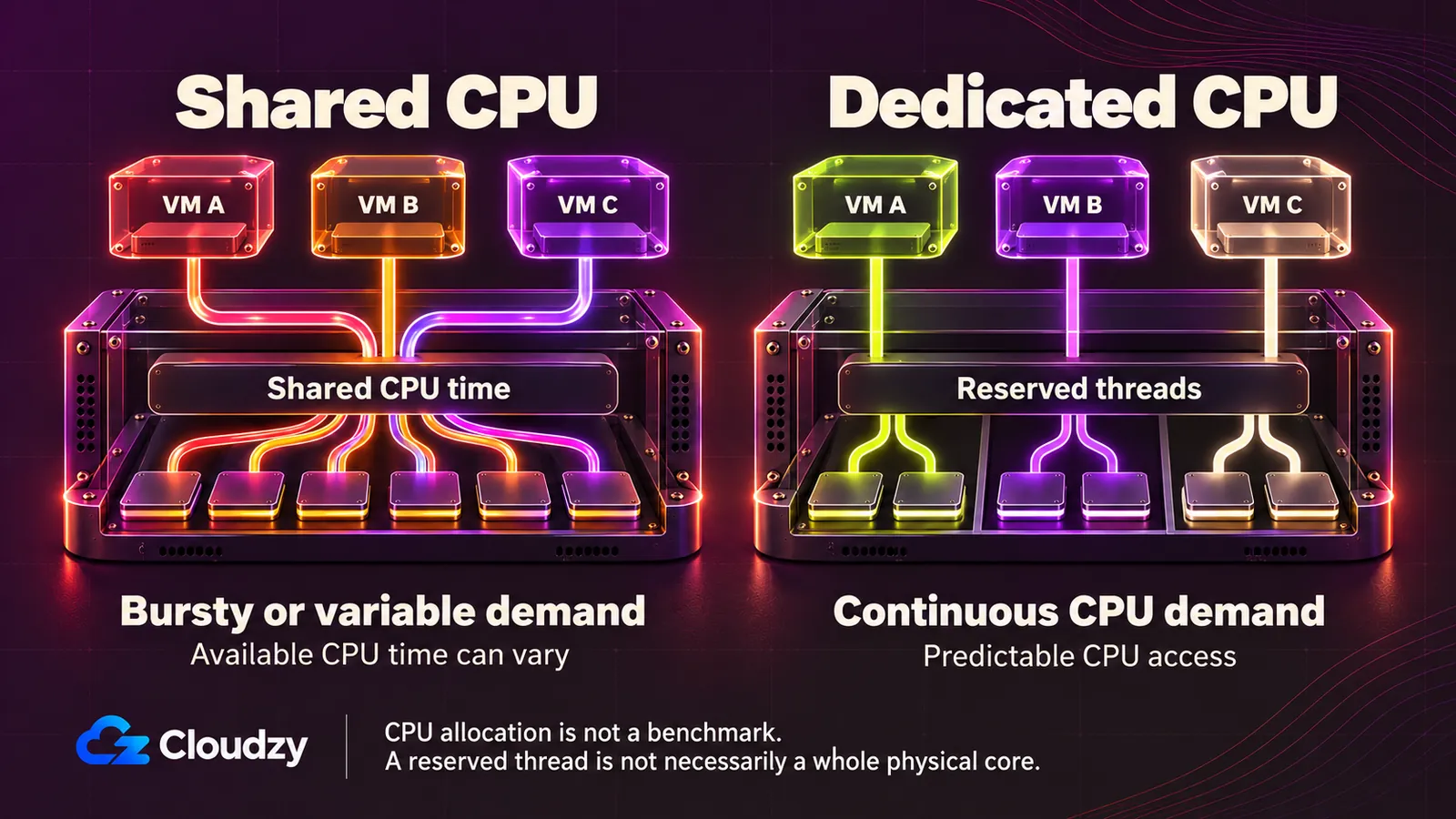
A vCPU describes an allocation, but it does not tell you how much processor time is reserved for you. On a shared plan, other workloads can affect the CPU time available. A site that needs occasional bursts has different requirements from a build worker or encoder that stays busy for hours.
DigitalOcean distinguishes shared Basic plans from dedicated CPU families. Hetzner describes CCX as providing exclusive CPU threads. A thread is not necessarily a whole physical core, and neither allocation description proves a particular application throughput.
Eight shared vCPUs can be a worse fit for continuous work than a smaller dedicated allocation. Check allocation and sustained-use rules first, then look for sustained tests of a similar workload.
An uptime SLA does not keep your application running
An available VM can still serve a broken website. Your database can stop, a certificate can expire or a deployment can fail while the underlying infrastructure remains available.
SLA scope and remedies also differ. Our Service Level Agreement addresses infrastructure availability and service credits, while guaranteeing a 99.95% uptime. Hetzner's cloud service agreement defines VM availability and excludes specified events. DigitalOcean's Droplet SLA has its own definitions, exclusions and claims procedure. Comparing the headline percentages does not establish which application will experience fewer interruptions.
Credits do not restore a database or replace all lost business. Read the availability definition, maintenance exclusions, remedy and claim deadline; monitor your application separately and set acceptable recovery time and data-loss limits.
A snapshot is useful only if you can restore what matters
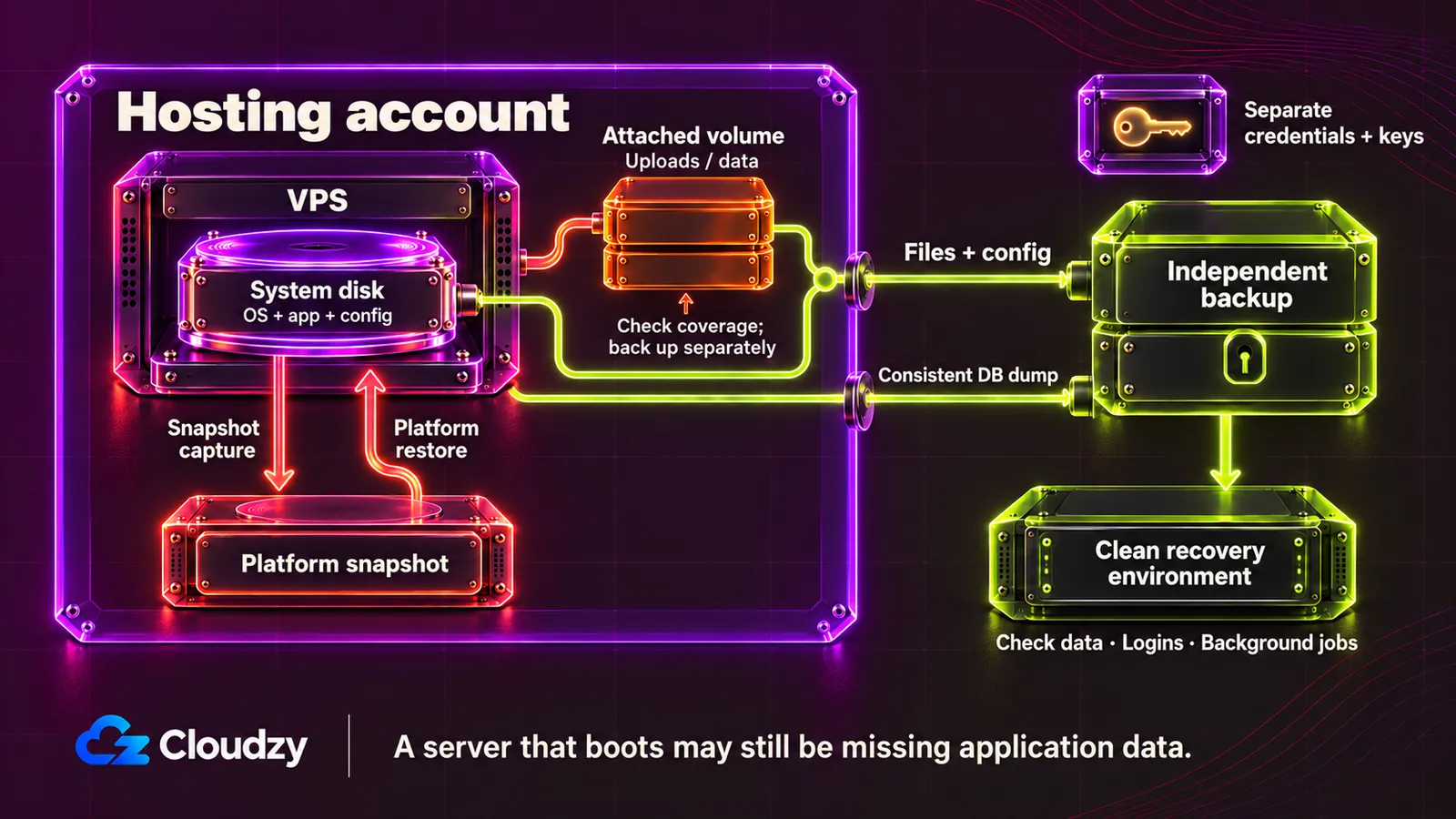
A successful snapshot job does not prove that your application will recover. Check which disks it covers, where it can be restored and whether the restored application works.
For example, imagine restoring a website's system disk while its uploaded images live on a separate volume. The server boots, but the site remains incomplete. Hetzner's server backups, DigitalOcean's Droplet backups and Vultr's automatic backups exclude attached block-storage volumes.
Platform recovery and independent recovery also differ. DigitalOcean’s backups and snapshots have documented download restrictions. A copy in another region may help with a regional failure, but keeping every copy under one account still leaves an account-access risk.
For databases, use a recovery method that understands the database. PostgreSQL's SQL-dump documentation explains consistent logical dumps; roles and other cluster-wide objects need separate handling. Application files, configuration and recovery keys need attention too.
Keep an encrypted, independently usable copy with credentials accessible outside the VPS account. Restore it to a clean environment, check data, logins and background jobs, and record how long recovery took and how old the recovered data was.
The cheapest headline price may not produce the cheapest bill
Calculate:
Compute + backups + extra storage + billable transfer + IPs + licenses or paid help + applicable tax.
Then distinguish an offer from the recurring terms.
These components change real choices. DigitalOcean's Basic weekly backups add 20% of the Droplet cost. Hetzner separately charges for Cloud Primary IPv4. Additional storage needs its own protection, and an alert is not necessarily a spending cap: Hetzner's billing FAQ explicitly says traffic alerts do not prevent excess charges.
Write down the bill for your actual region and usage, including the price after any promotion. Keep unknown charges visible rather than treating them as zero.
An unmanaged VPS still needs an operator
Someone must patch the OS, maintain the application, control access, configure the firewall, renew TLS certificates, monitor failures and test recovery. A convenient installer only handles part of the initial setup.
Our unmanaged-service explanation assigns software, security and recovery work to the customer. DigitalOcean likewise describes Droplets as unmanaged. Support availability does not transfer those duties.
For a practical starting point, our Linux VPS security guide covers topics such as SSH access, firewalls and logs. Keep an existing SSH session open while validating access changes.
Name the operator and budget their time. If nobody will own maintenance and recovery, choose a service that explicitly includes the management you need.
Your account policies are part of your availability plan
A service can become inaccessible because of billing, identity checks or acceptable-use enforcement. These risks deserve the same planning as a server failure.
Verification is not unique to one provider. Hetzner documents possible ID or prepayment checks; DigitalOcean uses payment details for verification; Vultr requires a verified payment method before deployment. We, on the other hand, accept various payment methods for ease of purchase.
Nonpayment can escalate to data loss. DigitalOcean's late-payment policy includes shutdown and potentially permanent deletion; it does not give a universal published timeline.
A review-site ranking is not a workload test
Some websites provide only general information about a VPS provider, such as pricing history, plan and region availability, available add-ons, or aggregated customer feedback, similar to this review of Cloudzy's plans. Other websites focus on more technical VPS benchmarking, conducting hands-on performance tests on actual server instances. Before relying on a benchmark, check the plan, CPU allocation, hardware, region, test date, method and observation period. Also read the publisher's funding and affiliate disclosures.
A concrete example: a Cloudzy review from 2022 tested a two-vCPU instance in London using Geekbench 5. A February 2024 Cloudzy review tested a six-vCPU EPYC configuration in Singapore using Geekbench 6 among other tools. Combining their scores would mix benchmark versions, locations and configurations. Neither settles today's Regular-versus-High-Performance purchase.
Some VPS benchmark and review websites also disclose provider financial support and affiliate relationships. That is a reason to examine methods and scope, not evidence that every result is sponsored or invalid. An individual customer complaint likewise cannot establish a provider-wide failure rate.
Prefer original logs and comparable conditions. Use a short synthetic result as evidence about that sample, and reserve sustained-performance conclusions for tests that actually measure sustained work.
Evidence Supporting Our Services
Reliability: know what our commitment covers
An interruption can cost sales and prevent access to your tools. Our SLA specifies 99.95% monthly infrastructure availability and a credit process. Our status page provides a place to check reported service conditions.
Use those sources to understand the commitment and reported incidents. Neither establishes your application's uptime or a reliability advantage over competitors.
CPU: choose the allocation your workload needs
CPU contention matters when delays accumulate during sustained work. We offer different product families: Our Regular plans come with dedicated AMD EPYC vCPUs, while our high-frequency plans come with 4.2 GHz+ AMD Ryzen 9 vCPUs.
For a bursty application, Regular may be the appropriate starting point. For continuous CPU demand, evaluate reserved allocation against the workload and go for a high-frequency plan to achieve greater efficiency.
Network: choose a useful location, then check the route
Location can matter more to an interactive application than an extra vCPU. We currently offer our services in many distinct regions, such as New York, Amsterdam, London, Frankfurt and Dubai. The Looking Glass page offers regional test destinations.
Those options are useful when they bring the server closer to your users or dependencies. Test the relevant destination from your users' networks, then validate application response times under load.
Cost: compare the selected offer, not just the starting price
As mentioned before, our VPS plans come with the lowest prices, yet we offer the most resources compared with other providers. Our Regular 4GB offer has two dedicated vCPUs and 120GB of NVMe storage for $14.48/month. Other providers charge over $20/month for comparable instances with 4GB of RAM and two CPU cores.
Apart from that, we also offer countless one-click apps without adding a single dime to your billing. You simply need to open our marketplace, choose the app you want, and you have your app plus your VPS ready without configuring anything yourself.
Control: keep access to your Linux environment
If you already operate Linux, the practical requirement may be root access, an IP and the freedom to install your stack. We offer root SSH, a dedicated static IP and custom-image options.
Those capabilities support running your own services and configuration. They are also available elsewhere; the reason to choose us is the complete offer's fit. Check image compatibility and permitted use, and select a maintained OS release.
Growth: tune your hardware in minutes
If demand is likely to change, you can easily resize your resources through your Cloudzy dashboard and pick up right from where you left off after a short VPS reboot.
Support and recovery: understand which problem each solves
When something breaks, you need both an appropriate support route and recoverable data. Our services come with efficient, 24/7 support. We also offer snapshots to provide platform restoration. Not to mention our 14-day money-back guarantee, which makes it logical to test your setup before fully committing.
Other Linux VPS providers: Good services, but where should buyers be careful?
Hetzner: choose the CPU family and region before comparing price
We would recommend Hetzner to a capable operator whose European location and allocation needs fit its offer. Hetzner distinguishes shared CX, CPX and CAX families from dedicated CCX CPU threads.
Two limitations affect the purchase. First, use the applicable region's current price and add IP, backups and tax. The June 2026 price notice has separate geographic and old/new columns; a historical EU price cannot establish today's US cost. Second, rescaling stays within an architecture and cannot shrink the provisioned disk. Enlarging storage can remove a later downgrade option.
Onboarding may involve identity or payment verification. Its terms assign server administration and external backups to the customer and allow enforcement against misuse.
Choose Hetzner when its European placement and CPU allocation fit your workload. Reconsider if you need included administration, an unavailable regional product or a total below the quoted recovery-inclusive bill. Its identity or payment verification is also troublesome for those who don’t have access to mainstream payment methods.
DigitalOcean: useful deployment tools, with costs and operations to plan
DigitalOcean is a reasonable recommendation when you will use its documented workflows. Application teams can also use separately priced load balancers.
Choose the CPU class deliberately: Basic is shared; dedicated families serve different needs. Since DigitalOcean’s Basic plan costs more than ours and uses shared vCPUs, it is less desirable if you care about value.
The material limits are cost and disruption. Basic weekly backups add 20%; daily backups add 30%, while usage-based backup plans use a different billing method. Volumes, transfer excess and other services can add more. Resizing requires shutdown, cannot shrink the disk and has plan-family restrictions.
We recommend DigitalOcean when these deployment and growth workflows save your team work. Reconsider if you need website administration included or cannot accommodate an offline resize, and budget the services you actually intend to use.
Vultr: distinguish shared high-frequency plans from dedicated compute
Vultr's naming needs careful reading. Its Cloud Compute overview places High Frequency and High Performance in shared CPU categories. Its Optimized Cloud Compute families provide dedicated vCPUs.
We would shortlist shared compute for variable demand and evaluate dedicated Optimized plans for continuous work. That allocation distinction is useful; it does not establish comparative application performance.
Budget from the selected region's actual quote because prices can vary by location. Eligible automatic backups add 20%; excess transfer costs $0.01/GB. Attached block storage needs separate protection.
Capacity changes can also become migration work. Vultr documents no in-place downsizing. An in-place upgrade restarts the server; insufficient host capacity or changing families may require another VM and IP. Its published refund policy also describes payments and credits as non-refundable.
We recommend Vultr when the selected allocation and regional quote fit, with an acceptable migration plan. Reconsider if you require in-place downsizing or expect unused credit to be refundable. Ordinary server administration remains your responsibility.
Which VPS should you choose for your actual use case?
Prices below were checked on October, 2026. They retain each provider's published GB or GiB units and native currency. These are selected public configurations, subject to regional availability, rather than equal-performance packages.
The subtotals assume a full month with no billable excess transfer, additional storage, paid support or licenses. They exclude tax, domains, operator time and independent recovery storage. DigitalOcean uses bundled Regular plans, not v5; Hetzner uses the applicable new-price columns.
| Selected configuration | CPU, memory and disk | Monthly price | Compute + listed backup/IP subtotal before tax |
|---|---|---|---|
| Cloudzy Regular, US location such as Dallas | 1 dedicated vCPU, 2GB, 60GB NVMe | $7.48/month | IP included; no additional fee |
| Cloudzy Regular, same location qualification | 2 dedicated vCPUs, 4GB, 120GB NVMe | $14.48/month | IP included; no additional fee |
| DigitalOcean Basic Regular, NYC3 candidate | 1 shared vCPU, 2GiB, 50GiB SSD | $12/month | $14.40 with Basic weekly backups and bundled public IP |
| DigitalOcean Basic Regular, NYC3 candidate | 2 shared vCPUs, 4GiB, 80GiB SSD | $24/month | $28.80 with Basic weekly backups and bundled public IP |
| Hetzner CPX12, Nuremberg or Helsinki candidate | 1 shared vCPU, 2GB, 40GB NVMe | €14.27, excluding IPv4/VAT | €17.62 with 20% backups and €0.50 Primary IPv4 |
| Hetzner CPX22, Nuremberg or Helsinki candidate | 2 shared vCPUs, 4GB, 80GB NVMe | €23.79, excluding IPv4/VAT | €29.04 with 20% backups and €0.50 Primary IPv4 |
| Vultr vc2-1c-2gb, Atlanta | 1 shared vCPU, 2GB, 55GB SSD | $10/month, excluding IPv4 and automatic backups | $12/month with IPv4 and automatic backups |
| Vultr vc2-2c-4gb, Atlanta | 2 shared vCPUs, 4GB, 80GB SSD | $20/month, excluding IPv4 and automatic backups | $24/month with IPv4 and automatic backups |
A $10–20/month Linux VPS in a US region
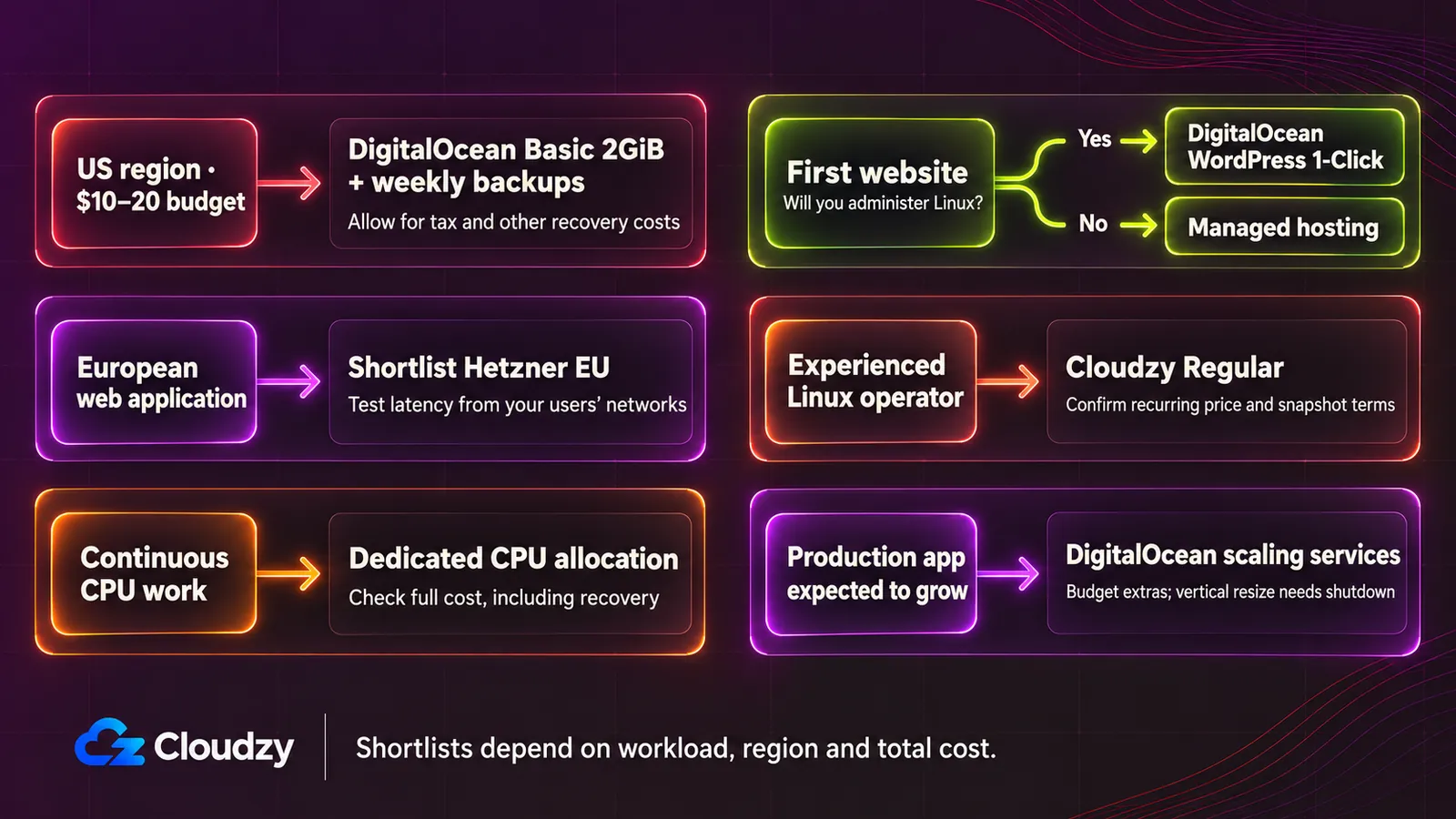
Keep DigitalOcean's bundled Basic Regular 2GiB/one-vCPU plan with Basic weekly backups as the cost reference. The arithmetic is $12 × 1.20 = $14.40/month before tax. NYC3 is a documented option, subject to selected-plan capacity. Weekly recovery is a pricing example; choose a backup frequency that meets your acceptable data-loss limit.
We offer our Linux VPS across multiple US locations from the east all the way to the west coast. If you seek a US server and prioritize pure performance, a low price, and zero additional fees, then our 1-vCPU/2GB plan is a better-priced option at $7.48/month, including premium IPv4 and free monitoring.
For perspective, adding a 20GiB DigitalOcean Volume and 100GiB of billable excess outbound transfer would take the $14.40 example to $17.40 before tax, with separate volume protection still needed: $2 for storage and $1 for transfer excess.
A European web application where latency matters
Shortlist Hetzner EU for a self-managed application whose users are well served by its locations. CPX22 is a documented shared-CPU candidate for variable demand; evaluate dedicated allocation for continuous CPU work.
We offer our Regular dedicated VPS in Amsterdam, London, Frankfurt or Bern, which can be a great alternative when that placement fits your audience. DigitalOcean also documents Basic options in Amsterdam, London and Frankfurt.
Select by actual user routes and application response times, including slow requests under load. Keep the application and database placement in view. Geography alone cannot establish a latency winner; compare the regional paths that matter to your users before committing.
CPU-intensive work around €50/month
Choose a dedicated-CPU VPS type before comparing core counts. Hetzner CCX13 is a specific EU candidate with two dedicated CPU threads, 8GB memory and an advertised €42.99 compute price. With Primary IPv4, that is €43.49 before VAT.
Two dedicated threads must still be enough for the job. With Hetzner's 20% backup charge, €42.99 × 1.20 + €0.50 = €52.09 before VAT. That exceeds a hard €50 budget before tax or independent recovery storage.
DigitalOcean's two-dedicated-vCPU CPU-Optimized Regular plan at $42 and Vultr Optimized are native-dollar alternatives to evaluate against a current quote. We also offer our Regular plans with dedicated vCPUs. Compared with DigitalOcean’s $42 plan, our dedicated 2-vCPU plan is offered for $14.48.
A beginner's first website
Choose DigitalOcean's documented WordPress 1-Click route if you want to learn Linux administration. Its setup guide walks through deployment and subsequent configuration. Choose the plan from your actual site needs; the 2GiB cost example is a starting candidate, not a universal minimum.
Our WordPress OCA is a credible alternative for initial setup.
The decisive question is who will maintain the result. You still need domain and TLS configuration, updates, access security, monitoring and recovery. If you want to publish without taking responsibility for those tasks, choose an explicitly managed hosting service whose scope covers them.
A basic unmanaged server for an experienced Linux user
We recommend our Regular VPS plans when you need SSH, root access, and an IP address, provided the selected location and configuration fit your needs. The documented control and advertised disk/IP combination make it a practical shortlist choice without requiring you to buy services you will not use.
DigitalOcean Basic is a credible alternative with documented SSH and public-IP access and the costed backup option above. Hetzner EU shared plans are also worth considering where the location and native-currency bill fit.
A production application expected to grow
Choose DigitalOcean if its documented resize path and paid load-balancer service match the architecture your team intends to operate. This is useful when those workflows save you work; the base Droplet alone does not supply application resilience.
For scale, two $24 bundled Basic Regular VMs, Basic weekly backups and one $12 regional HTTP load-balancer node produce an illustrative subtotal of 2 × $24 × 1.20 + $12 = $69.60/month before tax. The load-balancer price is separate. This omits the database, added storage, transfer excess, independent recovery and administration.
This is not a complete high-availability design, and weekly backups may be too infrequent for active production data. Decide how sessions, uploads and database state survive failure. DigitalOcean's vertical resize requires shutdown; extra VMs only help if the application can use them correctly.
Plan the change before you need it: preserve recoverable state, allow an interruption or design a tested cutover, and size from observed workload demand.
What to check before paying for any Linux VPS
Save this checklist and complete it against the exact offer you intend to buy:
- Configuration: Record the CPU allocation, RAM, disk, supported OS, selected region and available capacity.
- Workload fit: Check sustained-use conditions and whether any performance evidence matches the relevant plan, workload, region and date.
- Recurring bill: Include backups, extra storage, transfer, IPs, licenses, help and tax; record promotion duration and renewal conditions.
- SLA: Read the availability definition, exclusions, claim deadline and remedy.
- Recovery: Confirm covered disks, schedule, retention, billed size, restore steps and an independently usable copy with accessible keys.
- Capacity changes: Check billing eligibility, resize directions, disk and family limits, shutdown requirements and possible IP changes.
- Operations: Assign ownership of patching, access security, application maintenance, monitoring and recovery; check support scope.
- Account access: Read identity, permitted-use, payment, suspension and deletion rules.
- Validation: Set acceptable interruption and data loss, then rehearse recovery and validate the workload safely before depending on the server.
If you want an unmanaged Linux environment with root access, included IP resources and a configuration that fits your workload, compare our Linux VPS plans and locations.


Discussion
Comments
Sign in to join the discussion.