50% off all plans, limited time. Starting at $2.48/mo
2 min left
Servers & OS

How to find out what the correct VPS IP address is?

Allen By Allen 2 min read Updated May 30, 2023
How to find out what the correct VPS IP address is?

When you first receive your VPS from us, you will get the IP address you need to connect to it. Naturally, you may forget or lose it after a while. If you need to get your VPS IP address, you can use the steps I’ve outlined here. In this how-to guide, we will explain how to find out what the correct VPS IP address is.

Finding the VPS IP address

Knowing the IP address of your hosting account can be useful. You might remember the time when you wanted to view your website before completing the DNS propagation, or the time when you had wished to manage your DNS settings through a third-party service like Cloudflare. You always need this Address to connect to your server through RDP and other clients. But do you know how to find out what the correct VPS IP address is?
windows-vps Windows 10 VPS Hosting

Get yourself an efficient Windows 10 VPS for remote desktop, at the cheapest price out there. FREE Windows 10 running on NVMe SSD storage and high-speed internet.

Check Out Windows 10 VPS Plans

To find your IP Address, follow the steps below

Step 1: Log in to your Control Panel

Point your browser to the Cloudzy Client Area and enter your credentials (username and password) to enter your control panel. Then click on “Services.”.
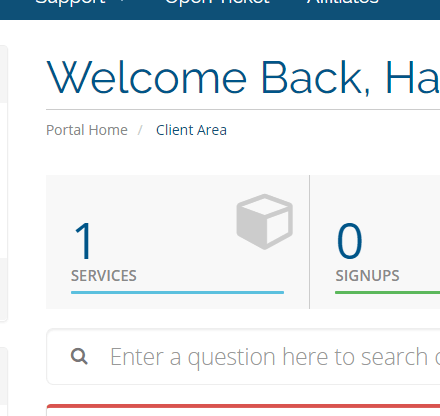
VPS IP address
how to find the VPS IP address

Step 2: Choose your VPS

On the “Services” screen, you’ll see a list of all the VPS services you’ve bought from us. Click on the VPS server whose IP address you need. If there’s more than one VPS, make sure to choose the correct one.

Step 3: Read the IP Address

On this page, you will see the Control Panel of your VPS which you can manage your VPS servers. Your IP address will be listed right below the VPS service description.


Share

More from the blog

Keep reading.

Best Self-Hosted Apps You Can Run with Cosmos Cloud cover image with app panels around a Cosmos dashboard.
Servers & OS

Best Self-Hosted Apps You Can Run With Cosmos Cloud: Files, Media, Passwords, Automation, & More!

Maybe you’ve set up Cosmos Cloud and now want to see what apps match well with it, or maybe you haven’t even decided on Cosmos yet and just want to see how well it fits your workfl

Nick SilverNick Silver 16 min read
Portainer vs Cosmos Cloud for Managing Docker Apps cover with hybrid setup diagram and neon ops vs access blocks.
Servers & OS

Portainer vs Cosmos Cloud: Best Fit for Docker App Management

If you already know Docker and just want the cleaner way to run a growing app stack, here is the short answer to Portainer vs Cosmos Cloud. Portainer is the stronger pick for direc

Nick SilverNick Silver 14 min read
Cosmos Cloud vs CasaOS vs Umbrel feature graphic showing three self-hosted paths inside one abstract cloud network world.
Servers & OS

Cosmos Cloud vs CasaOS vs Umbrel: Which Self-Hosted Platform Fits Your Setup?

The short answer is that CasaOS is still the easiest place to begin, Umbrel has the cleanest curated feel, and Cosmos Cloud makes more sense once you want tighter control over doma

Nick SilverNick Silver 11 min read

Ready to deploy? From $2.48/mo.

Independent cloud, since 2008. AMD EPYC, NVMe, 40 Gbps. 14-day money-back.