


There is already a ChatGPT subscription on someone's card, probably a design tool, and a monthly software line that nobody owns. What is left to decide is which of the next few products being pitched at you is worth adding, and which of them you cannot buy at your size at all.
The best AI tools for startups, at that size, are the ones you can actually buy: every recommendation below has a free tier or a published price you can read on the vendor's own site and sign up for without booking a call. That condition removes a surprising number of commonly recommended products, including enterprise tools that require a sales conversation and older recommendations that are no longer available. Prices and plan details in this article are as of September 2026.
Key Takeaways
- A useful starter stack can cost nothing. ChatGPT, Claude, Zapier, Notion, Canva and Chatbase all have free plans, although Zapier's task limit and Chatbase's message-credit limit make those two better suited to light use or evaluation.
- A practical paid AI stack starts at roughly $57 a month for one person on annual billing, before design and support tools are added.
- Customer support is the one job where paying usually returns the money, because the work is repetitive and the volume is measurable.
- Several widely recommended tools cannot be bought self-serve. Forethought, Sierra and Decagon publish no prices at all; IBM's platform starts at $530 a month.
- MonkeyLearn, a standard recommendation in older AI-tool lists, no longer exists as an independent product.
What This Article Does Not Cover
The scope is deliberately narrow, because the adjacent questions have different answers and different readers.
- AI coding tools (Cursor, Claude Code, Lovable). Different buyer, different evaluation.
- Vendor evaluation for a support team that already runs a helpdesk and an ops function.
- Model benchmarks. You are choosing products and prices here, not models.
The Jobs Worth Handing to AI First
Tooling is the second decision. The first is deciding which repetitive work in your company is well-defined enough that software can do it without supervision, because a tool pointed at a messy process makes the mess faster rather than smaller. Five jobs recur often enough to rank, and they do not all deserve a paid subscription.
Communication and Collaboration
Slack includes conversation and thread summaries on all paid plans, but Recaps are limited to Business+ and Enterprise+. Microsoft charges separately for the equivalent: intelligent recap in Teams is enabled by the Teams Premium add-on license, billed per user on top of the Teams license you already hold.
That split is the decision here. Either way the cost is zero or an add-on line on a bill you already pay, which makes this the weakest case for a new vendor. Check what your suite includes, and what it charges to switch on, before evaluating anything separate.
Customer Support
This is the strongest case for a paid tool, and the argument is arithmetic. If twenty of your questions are repetitive, low-risk and have settled answers (shipping, returns, password resets, opening hours), a support bot handles them at a cost you can calculate per conversation.
Free tiers in this category are sized for evaluation, not for running the job (Chatbase's is fifty message credits a month), so the question is whether a few hundred repetitive tickets a month divides cleanly by a paid tier's price. Above that volume it usually does.
Administrative Work
Scheduling, follow-up emails and moving data between systems are worth automating, but rarely with an AI product. This work is usually deterministic, so a plain automation rule is cheaper, more predictable and easier to debug than a model deciding what to do. If the job needs a small internal tool rather than a workflow, no-code app builders are the category, not an AI assistant.
Financial Management
Bookkeeping, expense categorization and forecasting are the jobs where a wrong answer is most expensive to unwind. Your accounting software's own AI features are the correct starting point, because they operate on data that is already reconciled. A separate AI layer on top of unreconciled data produces confident forecasts built on numbers nobody has checked.
Marketing
Copy drafting, image generation and audience research are faster with AI, and the output needs editing every time. Treat these tools as a first-draft machine that removes the blank page, not as a replacement for someone who understands the business. The free tiers are unusually generous here, which makes this the cheapest place to start.
The Tools Worth Paying For
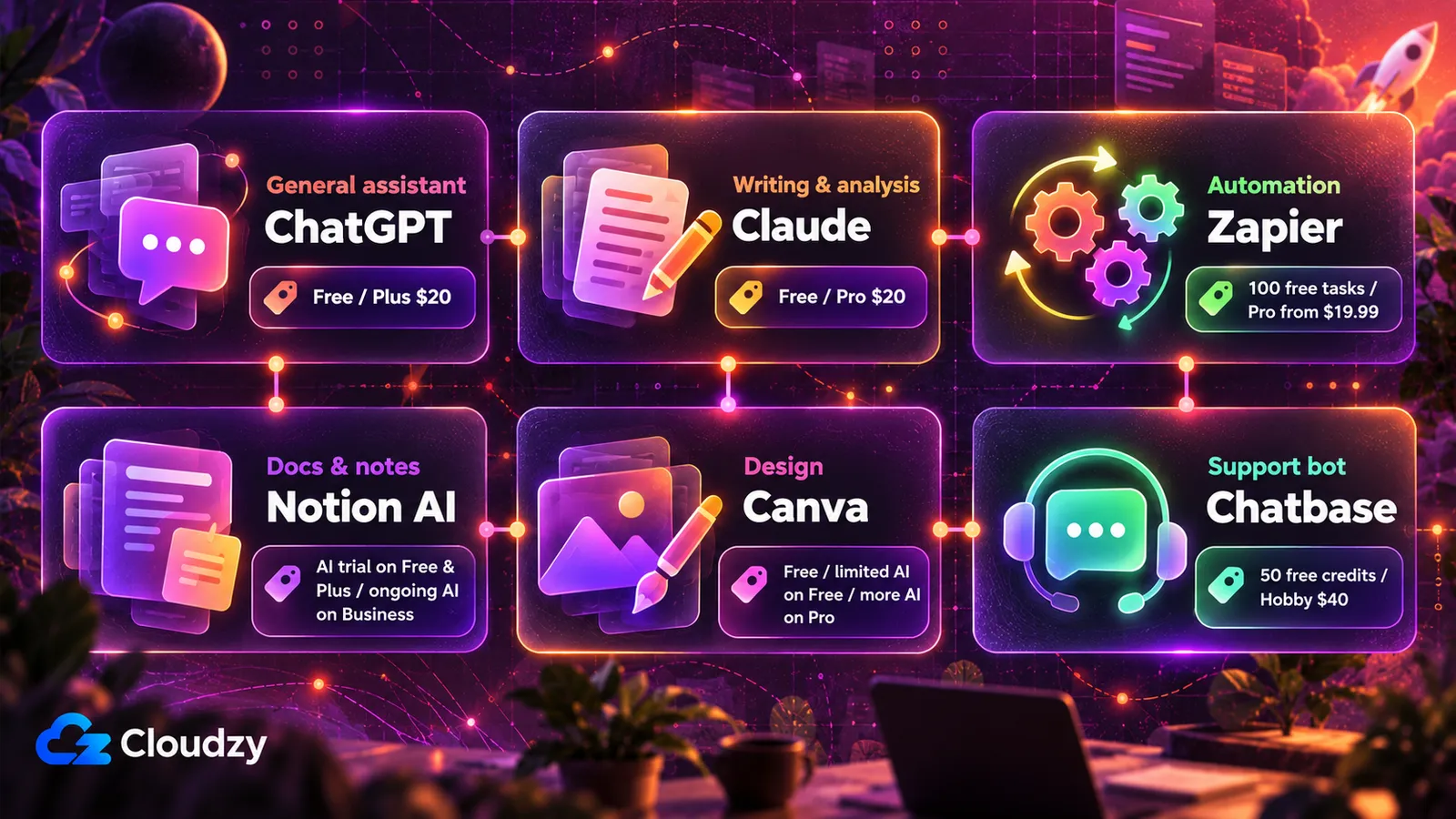
Each tool below was selected on the same rule: a free tier or a published self-serve price, verifiable on the vendor's own site, with no sales conversation required to begin. Prices move, so every entry links to the page that carries the current figure.
Two of them separate the plan from the feature. Notion's Free and Plus plans are permanent, but AI access on them is a trial. Ongoing Notion AI is included with Business, while Custom Agents use separate paid credits. Canva Free includes a limited AI allowance, while Pro substantially increases that allowance and unlocks additional AI tools. A trial that expires and a free tier you can stay on are different inputs to the monthly total, so the table marks both.
| Job | Tool | Entry cost (from) | Free tier? | Self-serve or sales call |
|---|---|---|---|---|
| General assistant | ChatGPT | Free; Plus $20/mo | Yes | Self-serve |
| Writing and analysis on your own documents | Claude | Free $0; Pro $20/mo or $200/yr | Yes | Self-serve |
| Automation between tools | Zapier | Free (100 tasks/month); Professional from $19.99/mo (annual billing) | Yes | Self-serve |
| Docs, wiki and meeting notes | Notion AI | Free $0; Plus from $10/member/mo and Business from $20/member/mo on annual billing; Custom Agents $10 per 1,000 credits | Yes for Notion; AI is a trial on Free and Plus | Self-serve |
| Design and social assets | Canva | Free; Pro is paid (current price on Canva's page) | Yes; limited AI usage on Free | Self-serve |
| Customer-support replies | Chatbase | Free: 50 message credits/month; Hobby: $40/month | Yes | Self-serve |
ChatGPT
The default general assistant, and the only recommendation carried over from this article's earlier version that still holds. Its entry cost is zero: the free tier handles drafting, summarizing and question-answering without a card on file. OpenAI's pricing page carries the current paid ladder for teams that outgrow it. Sign-up is self-serve.
The constraint to check before you build a process on it: ChatGPT answers from what it is given, so anything that depends on your own documents or ticket history requires you to supply that context yourself, by uploading it or by wiring up a connection. For a company without an engineer, the limit is no longer just individual productivity: ChatGPT can connect to services such as Google Drive and Slack, and supported apps can search company data or take actions. Availability still depends on the plan, app, permissions and workspace settings. If you want a comparison against the other widely used assistant, our ChatGPT and DeepSeek comparison covers where each one lands.
Claude
Claude occupies the same slot as ChatGPT and is worth running alongside it rather than instead of it, because the two behave differently on long documents. It handles a large contract, a policy file or a spreadsheet export pasted in whole, which is the specific case where a small company gets value without any integration work.
Pricing is published and self-serve: the free plan is $0, and Claude's plan comparison lists Pro from $200 a year (or $20 a month billed monthly), with higher-usage tiers above it. The distinction from ChatGPT is less about integrations than it used to be. Claude now supports connectors that can retrieve data and take actions in services such as Google Drive, Slack and Linear. Long-document work is still a useful reason to keep it in the shortlist, but integrations are no longer a clean weakness.
Zapier
Zapier is the connective layer, and for a company without an engineer it is usually the highest-return subscription on this list. It moves data between the systems you already run (form to spreadsheet, payment to invoice, ticket to Slack) without anyone writing code.
The free plan runs 100 tasks a month with unlimited two-step workflows and a single user. Zapier's pricing page lists Professional from $19.99 a month on annual billing, which adds multi-step workflows and unlimited premium apps. There is no sales call in the path: you sign up and start. One constraint decides the budget, though. Zapier counts each successful billable action as a task, so a workflow with five billable action steps that completes twenty times a month consumes 100 tasks. Model your volume before choosing a tier, because this is the line item that grows fastest.
Notion AI
Notion is the documentation layer, and its AI features are useful because they operate on content you have already written rather than on the open internet. Asking what a client agreed to in March is a question it can answer from your own pages.
Notion's pricing page lists Free at $0 per member, Plus from $10 per member per month on annual billing, and Business from $20 per member per month. Free and Plus include trial AI access; ongoing Notion AI is included with Business. Custom Agents are metered separately at $10 per 1,000 Notion credits and are available on Plus, Business and Enterprise. Signup remains self-serve.
Canva
Canva covers the design work a small company cannot justify hiring for, which below a certain size is most of it. Social posts, pitch decks, product images and simple video sit in one tool a non-designer can operate.
The free plan costs nothing and includes limited AI usage. Pro increases the AI allowance and unlocks additional AI tools, alongside Canva's premium design features. Canva's pricing page carries the current Pro figure, and sign-up is self-serve. Canva's templates are the same ones everyone else is using, so the output looks generic unless someone sets brand rules first.
Chatbase
Chatbase fills the support slot, and it is the one entry here whose free tier is sized to answer the buying question. You point it at your existing help pages, it answers from them, and you can test it on real customer questions before deciding whether to pay.
Chatbase's pricing page lists a free tier at 50 message credits a month with one member, a Hobby tier at 700 credits with two members, and a Standard tier at 4,000 credits with three members and a helpdesk. You can set the bot up without talking to anyone.
If your volume is well past that, the alternative to evaluate is Intercom's Fin, whose pricing page publishes a starting price of $0.99 per outcome with a 50-outcome monthly minimum, and which works alongside Salesforce, HubSpot or any existing helpdesk (Intercom's own helpdesk is a further $29 or more per seat per month on annual billing). That floor is reachable for a small company, but the pricing is linear in volume with no ceiling, so the monthly figure grows exactly as fast as your support load does. Model it at your busiest month, not your average one.
AI Tools You Cannot Buy at Startup Scale
The expensive failure here is not choosing the wrong tool. It is spending an afternoon on a shortlist and discovering that half of it has no published price. These are the specific names you will run into, and what each one's own site publishes.
Forethought was recommended in this article's earlier version and no longer belongs in it. Forethought's own pricing page publishes feature tiers with no figures attached, ending in "Get a Quote" rather than a signup. Zendesk's own release records that it completed its acquisition of Forethought in March 2026. Sierra and Decagon, two support-automation vendors in the same bracket, both return 404 on their pricing URLs and route every visitor to a demo request.
IBM's platform is not free. The old Watson Assistant product page now redirects to watsonx Orchestrate, and IBM publishes a migration path between them. Its published entry price is $530 a month, sold in capacity tiers measured in monthly active users and messages per month.
Google's enterprise AI platform is built for engineering teams rather than small-business buyers, and it has a new name. In April 2026 Google launched Gemini Enterprise Agent Platform as the evolution of Vertex AI, and all Vertex AI services now run through it. Parts of AutoML were retired earlier: AutoML Video is no longer available and AutoML Text shut down in June 2025. If you want Google's models at small-company scale, the relevant product is the Gemini API through AI Studio, which has a free tier and needs a developer to use.
Jasper is buyable but not at this scale. Its pricing page lists exactly two options: Pro from $59 a month billed yearly ($69 billed monthly) for a single seat, and a Business tier with custom pricing. There is no free tier, only a 7-day trial of Pro. For a company already paying for a general assistant that drafts copy competently, a second subscription from $59 a month for one seat is difficult to justify.
MonkeyLearn is gone rather than gated. The former product is no longer available as an independent service, and its domain now redirects to Medallia. For a startup evaluating text-analysis software today, it should be treated as a discontinued recommendation rather than a current buying option.
The same check works on any tool you are handed: look for a published price and a working signup before you invest evaluation time. Both are visible in under a minute, and neither can be inferred from how often a tool is recommended.
What a Working Stack Costs
There are two correct answers here, and the free one is not a stepping stone toward the paid one. Plenty of small teams run indefinitely on free tiers, and a team that codes its own tooling can reasonably spend nothing at all.
The free configuration costs $0 a month. ChatGPT and Claude for drafting and long-document work, Zapier for connecting systems, Notion for documentation, Canva for design, and Chatbase for a support bot on your help pages. The binding constraints are the two counters, Zapier's tasks and Chatbase's message credits. The other free plans can cover light small-team use for much longer, depending on each product's usage limits.
The paid configuration starts at about $57 a month for one person on annual billing. Claude Pro costs $200 a year, or about $16.67 a month; Zapier Professional starts at $19.99 a month on annual billing; and Notion Business is $20 per member per month on annual billing, which is the Notion tier that includes ongoing AI access. Design and support sit on top of that. If you only need Notion for documentation and not ongoing AI, Plus costs $10 per member per month and lowers the total accordingly.
Subscriptions accumulate faster than anyone tracks, so the upgrade trigger needs to be explicit. Move a tool from free to paid when a specific limit blocks specific work you are already doing, not when a plan comparison makes the paid tier look better. The same discipline applies in reverse: any subscription nobody has opened in a month is a cancellation, not a renewal. A more detailed version of that arithmetic, applied to a full stack, is in our breakdown of what a self-hosted stack replaces.
When Running It Yourself Costs Less
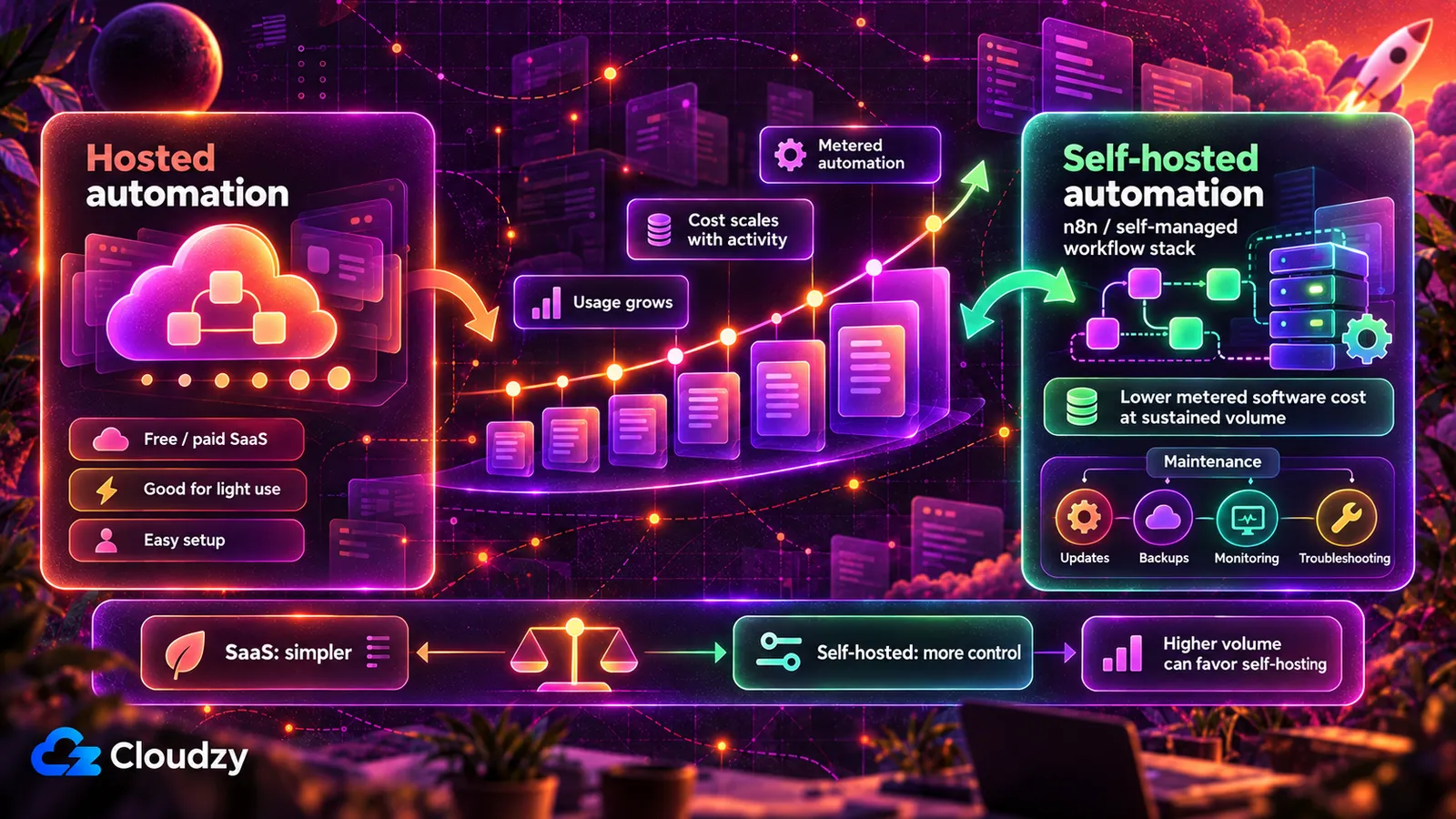
The arithmetic above stops working in one place: automation volume. Zapier meters per action, so a company running several multi-step automations a day crosses from the free plan into a paid tier quickly and then climbs through tiers as volume grows. As task volume grows, per-task pricing can start to resemble a utility bill rather than a fixed software subscription.
At higher volumes, self-hosting can become cheaper because n8n's Community Edition does not meter workflow executions the way a hosted automation plan does. The server bill stays roughly fixed only until CPU, memory, storage or concurrency requirements force you onto more infrastructure, so the crossover depends on workload complexity as well as volume. n8n is the usual destination: a source-available automation tool (fair-code, under n8n's Sustainable Use License) with the same trigger-and-action model, no per-task metering, and a visual editor a non-developer can operate. Our comparison of self-hosted automation tools covers where the cost crossover sits against Zapier's tiers in detail.
The cost you are taking on in exchange is operational, and it does not show up on an invoice. Initial setup takes manual work, and the maintenance is recurring: you own updates, backups, monitoring, security patches and troubleshooting when a workflow fails. At low automation volumes, free or inexpensive SaaS plans are often cheaper once maintenance time is included, and moving to a server you maintain can be a worse deal even though the invoice is smaller. The threshold is volume and workload, not principle.
If your volume justifies it, n8n deploys on a Cloudzy VPS in one click with a working configuration, which removes the installation step but not the maintenance one. You keep root access on a self-managed server, which is the same thing as saying the operational burden described above is yours to carry.
Frequently Asked Questions
What Is the Best AI Tool for Small Business?
For most small companies the default is a general assistant such as ChatGPT or Claude, because it is the only tool on this list that helps with every job rather than one. The condition that changes the answer is repetitive customer questions: if you handle more than a few hundred similar support tickets a month, a support-automation tool like Chatbase returns money faster, because you can divide its cost by the number of tickets it resolves.
What Are the Best Free AI Tools for Business?
The free tiers worth building on are ChatGPT and Claude for writing and analysis, Zapier for connecting systems, Notion for documentation, Canva for design, and Chatbase for a support bot. The two that run out first are Zapier's task counter and Chatbase's message credits. Google's Gemini API also has a free tier, but using it takes a developer. Enterprise platforms such as IBM watsonx Orchestrate are not free; that one starts at $530 a month.
How Much Should a Startup Spend on AI Tools per Month?
Zero is a legitimate answer, and many small teams operate on free tiers indefinitely. If you do pay, roughly $57 a month for one person covers a general assistant, an automation tool and a documentation tool using Claude Pro, Zapier Professional and Notion Business on annual billing. Support automation is the main variable above that, because it is usually priced per conversation or per resolved ticket, so it tracks support volume instead of headcount.
Do AI Tools Replace Hiring Someone?
For specific repetitive jobs, sometimes. A support bot answering the same twenty questions can defer a first support hire, and drafting tools reduce the hours a founder spends writing. They do not replace judgment, relationship work or anything requiring accountability for the outcome. The realistic framing is that these tools postpone a hire by handling volume, not that they remove the role.

Discussion
Comments
Sign in to join the discussion.