

CentOS isn’t what it used to be. The reliable, rock-solid CentOS Linux is gone, replaced entirely by CentOS Stream.
CentOS Stream is now a continuously delivered distribution that tracks just ahead of Red Hat Enterprise Linux (RHEL) development, so it receives changes before RHEL does. That is useful for developers testing upcoming changes, but it makes Stream a moving target for production environments that demand long-term stability.
For organizations needing a stable, RHEL-compatible OS, AlmaLinux and Rocky Linux step in, maintaining binary compatibility with RHEL and filling the gap left by CentOS Linux. For production servers needing long support windows, Ubuntu LTS, AlmaLinux, and Rocky Linux are the main options covered here. CentOS Stream can also serve production workloads when its continuous-delivery model and shorter lifecycle fit your requirements.
Key Differences Between CentOS and Ubuntu
Although both CentOS and Ubuntu are widely used in server environments, they have fundamental differences in architecture, update cycles, package management, and overall use cases. These differences directly impact long-term stability, security, and software availability. Today, “CentOS” means CentOS Stream, and CentOS Linux’s production role has passed to AlmaLinux and Rocky Linux, so the comparisons below set the RHEL family against Ubuntu. Both rebuilds remain binary-compatible with RHEL, although AlmaLinux now defines its target as Binary/ABI compatibility rather than an exact copy of RHEL’s source.
System Base and Architecture
CentOS was built on Red Hat Enterprise Linux, using RPM packages managed by YUM/DNF. This made it compatible with enterprise software designed for RHEL environments.
Ubuntu is based on Debian and uses DEB packages managed through APT. This package management system is widely supported and often more accessible for users unfamiliar with enterprise-focused distributions.
For those used to CentOS Linux, switching to Ubuntu requires adapting to a different package management system. Users who need a familiar RHEL-like environment may find AlmaLinux or Rocky Linux to be better choices.
Release Cycle and Stability
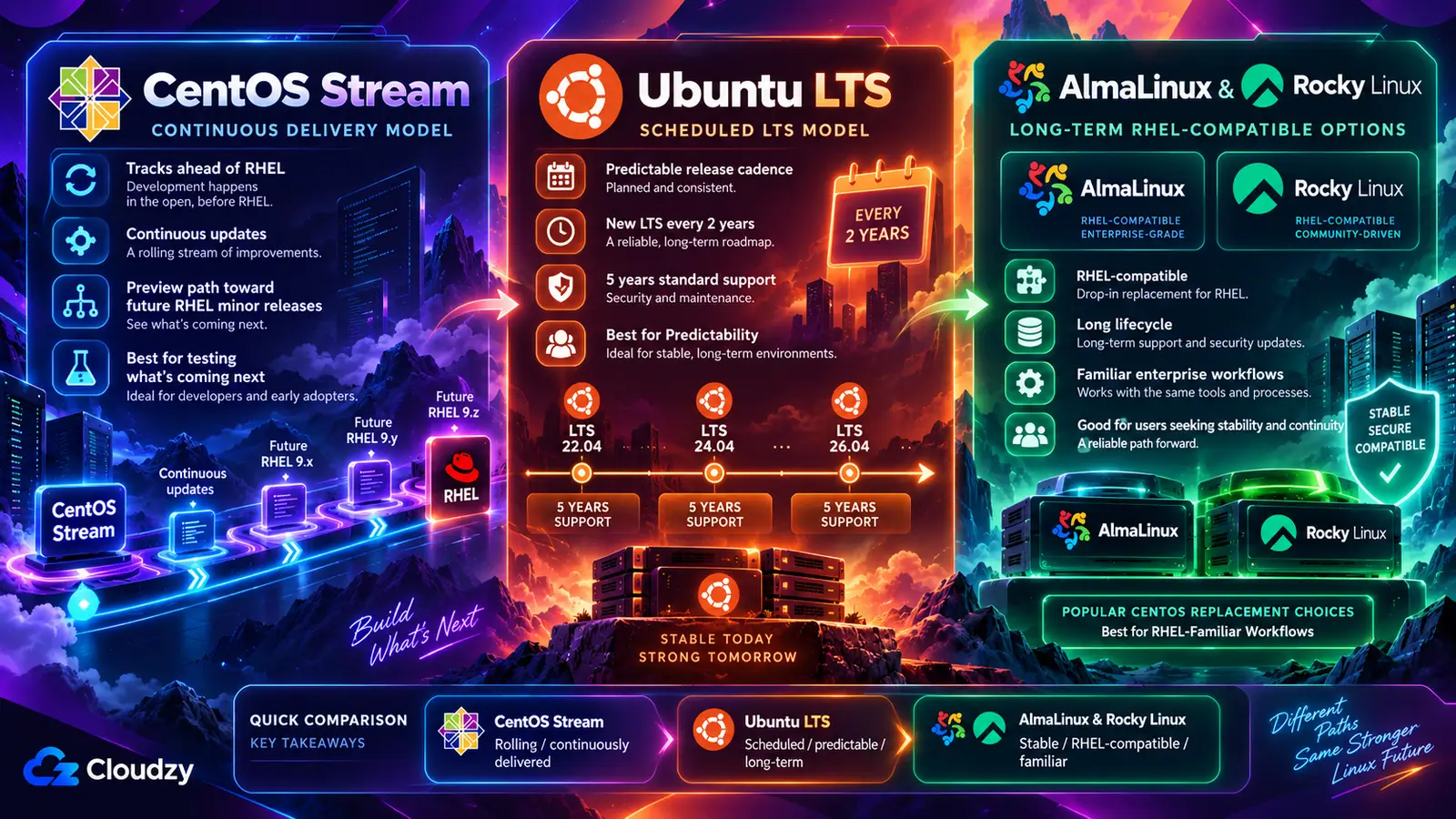
CentOS Linux was historically known for stability, as it followed RHEL’s update cycle. CentOS Stream does not function the same way. The CentOS project describes it as a continuously delivered distro that tracks just ahead of RHEL development, positioned between Fedora Linux and RHEL. In practice, changes intended for a future RHEL minor release generally land in Stream first. Security fixes are an exception: they can reach the current RHEL release before CentOS Stream.
Ubuntu, by contrast, has predictable update cycles. LTS versions are released every two years and, according to Canonical’s release cycle page, receive five years of standard security maintenance for packages in the Main repository. Ubuntu Pro extends that coverage to 10 years and adds the Universe repository of community-maintained packages, and a Legacy add-on stretches it to 15 years. Ubuntu Pro is free for personal use on up to five machines. Interim releases, published every six months between LTS versions, get only 9 months of updates.
The table below lists the current releases of each option, along with the end dates for CentOS Linux and Ubuntu 20.04 for anyone still running an older server.
| Release | Released | Security Support Ends | Notes |
|---|---|---|---|
| CentOS Linux 7 | July 2014 | June 2024 | No updates |
| CentOS Linux 8 | September 2019 | December 2021 | No updates |
| CentOS Stream 9 | December 2021 | May 2027 | Tracks ahead of RHEL 9 |
| CentOS Stream 10 | December 2024 | May 2030 | Tracks ahead of RHEL 10 |
| AlmaLinux 9 | May 2022 | May 2032 | Binary-compatible with RHEL 9 |
| AlmaLinux 10 | May 2025 | May 2035 | Binary-compatible with RHEL 10 |
| Rocky Linux 9 | July 2022 | May 2032 | Binary-compatible with RHEL 9 |
| Rocky Linux 10 | June 2025 | May 2035 | Binary-compatible with RHEL 10 |
| Ubuntu 20.04 LTS | April 2020 | May 2025 (standard) | Ubuntu Pro until May 2030; Legacy until May 2035 |
| Ubuntu 24.04 LTS | April 2024 | May 2029 (standard) | May 2034 with Ubuntu Pro |
| Ubuntu 26.04 LTS | April 2026 | May 2031 (standard) | May 2036 with Ubuntu Pro |
Release dates were checked against project announcements. Lifecycle dates come from endoflife.date for CentOS Linux, CentOS Stream, AlmaLinux, and Rocky Linux, and from Canonical’s release-cycle table for Ubuntu.
The nearest deadline in that table belongs to CentOS Stream 9. Its support ends in May 2027, so a Stream 9 server built today needs a replacement plan within months. Stream versions end early for a structural reason: each one stops when its matching RHEL release leaves full support, while AlmaLinux and Rocky Linux releases run for roughly a decade.
Performance and Resource Usage
Neither distribution is automatically faster or lighter. Resource use depends on the installed services, kernel, application versions, and workload, so compare minimal server images on the same VPS resources.
For VPS hosting and cloud computing, Ubuntu has a strong presence on the major public clouds. Canonical builds optimized and certified Ubuntu Server images for AWS, Microsoft Azure, Google Cloud, IBM Cloud, and Oracle Cloud.
CentOS Stream continuously delivers packages intended for upcoming RHEL minor releases. Ubuntu LTS has a predictable release and support lifecycle, but security and bug-fix updates arrive throughout that lifecycle rather than waiting for the next release. Test updates against your workload on either distribution.
Security Features and Updates
Both CentOS and Ubuntu use security frameworks to control system access. CentOS relies on SELinux (Security-Enhanced Linux), while Ubuntu uses AppArmor.
SELinux enforces strict policies at a granular level but requires careful configuration and takes more effort to learn. Switching SELinux off to clear a permission error removes the protection along with the error, which is why keeping SELinux turned on belongs on a Linux VPS hardening list. AppArmor uses application profiles and path-based rules, while SELinux uses security labels and system-wide policy. AppArmor is generally simpler to configure, but the protection either provides depends on the policies in place.
Community Support and Documentation
Ubuntu has a large community and extensive documentation, making it one of the most accessible Linux distributions for both beginners and experienced administrators.
CentOS was once widely supported by its enterprise user base, but the shift to CentOS Stream has split that support network between AlmaLinux and Rocky Linux.
Advantages of CentOS
Before its discontinuation, CentOS was widely used in enterprise environments and hosting. Its biggest strength was stability. Built from Red Hat Enterprise Linux (RHEL), it followed the same release model, ensuring a well-tested, consistent system.
CentOS was also binary-compatible with RHEL, allowing businesses to run Red Hat software without modifications. This made deployment easier, particularly for companies relying on RHEL-based applications.
It came with SELinux enabled by default, providing a strong security framework for managing permissions. While it required detailed configuration, it gave enterprises more control over system security.
Finally, CentOS was free, making it a practical alternative to RHEL for organizations that didn’t require official support. RHEL itself is now available at no cost on a small scale: Red Hat’s Developer Subscription for Individuals covers up to 16 physical or virtual systems, including small production use, but it is available only to individuals, not organizations.
Disadvantages of CentOS
One of the biggest issues was software availability. Compared to Ubuntu, CentOS had a smaller software repository. Many applications had to be installed through third-party repositories, such as EPEL, instead of being readily available.
Another challenge was limited commercial support. Unlike Ubuntu, which has official support through Canonical, CentOS relied entirely on community assistance. Businesses needing professional support had to switch to RHEL or pay for third-party services.
CentOS Linux also retained older upstream software versions for compatibility, which could limit access to newer features. While a release was supported, security fixes were often backported into those versions, so an older version number did not necessarily mean the package was unpatched.
With CentOS Linux discontinued, the largest drawback today is that CentOS Linux 7 receives no updates from the CentOS project, including security patches. CentOS has not disappeared from production, either. OpenLogic’s 2025 State of Open Source findings show CentOS still the third most used distribution overall, with 40% of the largest enterprises remaining on it after CentOS Linux 7 reached end of life. A server in that position should be rebuilt on a supported release, and the benefits that made CentOS Linux reliable have largely shifted to AlmaLinux and Rocky Linux.
In addition to AlmaLinux and Rocky Linux, Debian is another alternative that works well for users looking for stability. It follows a cautious release cycle, prioritizing reliability. This makes it a strong option for enterprise environments where system consistency is more important than frequent updates. It also has a large software repository, reducing the need for third-party sources.
Advantages of Ubuntu
Ubuntu remains a strong choice for server environments because of several factors. One of its biggest strengths is ease of use. Compared to CentOS, Ubuntu is simpler to set up, which makes it an ideal choice for new users and developers. It also provides better built-in support for modern software, reducing the need for third-party repositories.
Another advantage is its structured release cycle. LTS versions carry the long, published support windows shown in the table above, which makes Ubuntu a predictable choice for production servers. This level of stability allows businesses to plan ahead without worrying about unexpected system changes.
Ubuntu’s compatibility with containerization technologies, such as Docker and Kubernetes, makes it well-suited for modern application deployments.
Ubuntu also has a wide user base. In OpenLogic’s 2025 survey, Ubuntu was the most used enterprise Linux distribution regardless of company size, and in every region except Asia. Canonical provides commercial support for organizations that need direct assistance, something that CentOS Linux never offered.
Disadvantages of Ubuntu
Ubuntu has some downsides that are worth considering. One of them is frequent updates. While LTS versions are stable, interim releases have short support windows, so staying supported on them means upgrading roughly every six months.
For teams with existing SELinux policies and troubleshooting procedures, Ubuntu’s use of AppArmor creates migration work. SELinux policies do not transfer directly to AppArmor, so application confinement needs to be reviewed and configured for the new system.
For those used to RPM-based package management, switching to APT and DEB packages requires adjustments in workflow. While Ubuntu’s package management system is widely supported, it differs from CentOS and RHEL, which could make migrations more complex.
CentOS vs Ubuntu Server: Which One Suits Your Needs?
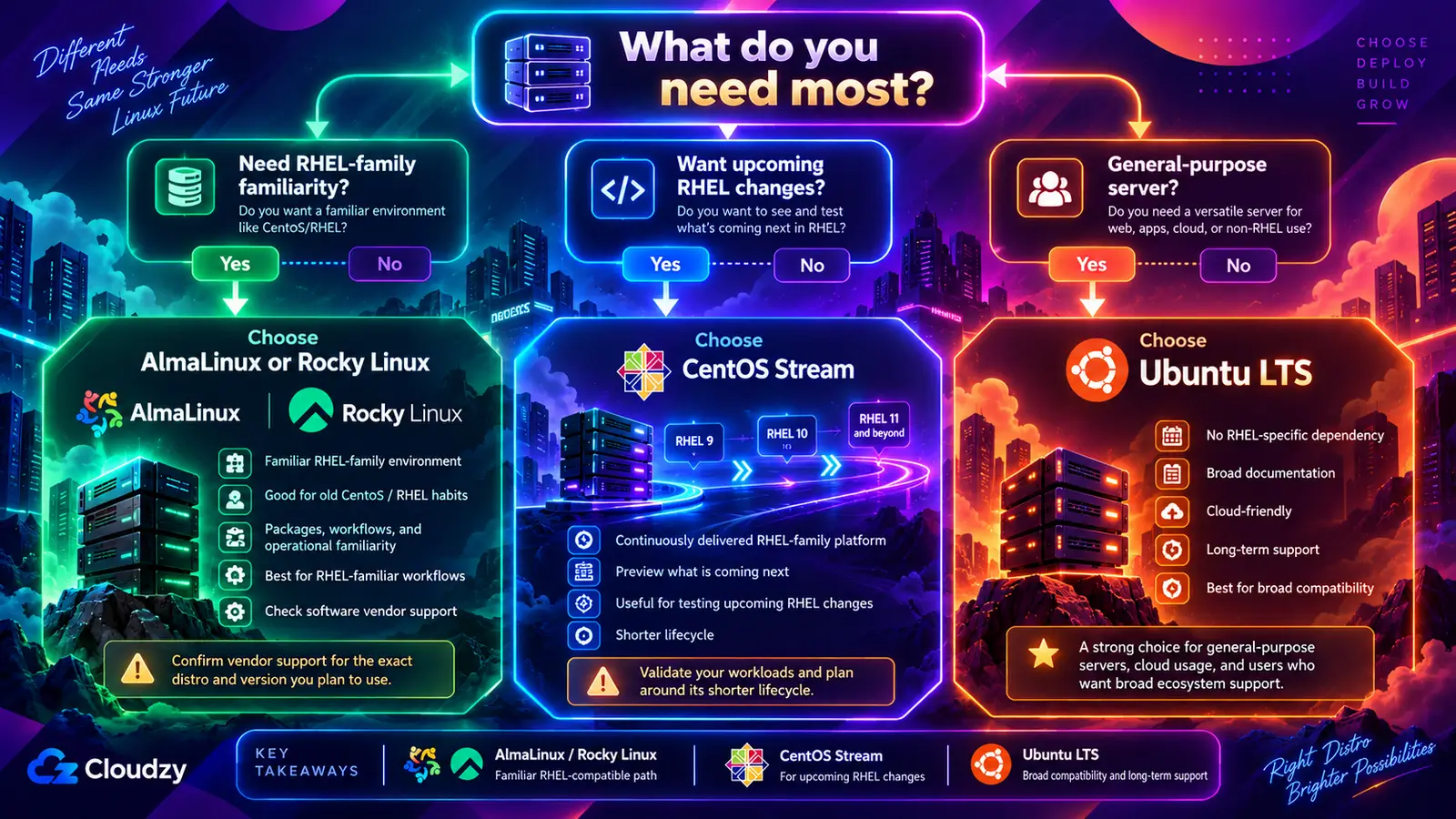
For years, the CentOS vs Ubuntu server debate revolved around stability versus flexibility. CentOS Linux was chosen for long-term reliability, while Ubuntu was preferred for its ease of use and frequent updates. Now that CentOS Linux is discontinued, the question is which of its successors fits your server, or whether to move to Ubuntu. The answer depends on what your software and your existing habits expect:
- Choose AlmaLinux or Rocky Linux when your packages, SELinux policies, or CentOS-era runbooks favor a familiar RHEL-family environment. Confirm that your software vendor supports the exact distribution and major version; RHEL-only certification does not automatically extend to either alternative.
- Choose CentOS Stream when you want to develop against upcoming RHEL changes or deliberately use a continuously delivered RHEL-family platform. For production, validate your workloads and plan around its shorter support lifecycle.
- Choose Ubuntu LTS for general-purpose servers without a RHEL-specific dependency. It has a large body of third-party documentation, Canonical’s certified cloud images, and a support window you can extend with Ubuntu Pro.
For a new production server, start on Ubuntu 24.04 or 26.04 LTS, or on AlmaLinux or Rocky Linux 9 or 10. Avoid Ubuntu 20.04 for new builds, since its standard support has already ended. If you are replacing an existing server, check which release it runs against the support table above before you choose.
Running CentOS Stream, AlmaLinux, or Ubuntu on a VPS
On a VPS, the OS image you pick at deployment is the decision. Moving between Ubuntu and the RHEL family generally means rebuilding the server and migrating its data and configuration. Some RHEL-family distributions offer in-place conversion tools, but those paths still require compatibility checks, backups, and testing. Pick a supported long-term image and check its version against the support table before you deploy.
You also need root access. Managing SELinux or AppArmor policy, adding repositories such as EPEL, and running a major-version upgrade all require it.
At Cloudzy, our Linux VPS gives you root access and one-click images for Ubuntu LTS, AlmaLinux, Rocky Linux, and Debian, so you can start on whichever family fits your workload. If you need to test against upcoming RHEL changes, a CentOS Stream VPS gives you that preview on a separate server.
FAQs
What Happened to CentOS Linux?
Red Hat discontinued CentOS Linux in favor of CentOS Stream. CentOS Linux 8 reached end of life on December 31, 2021, and CentOS Linux 7 on June 30, 2024, so neither receives updates. CentOS Stream continues as the project’s only release line.
What Is the Main Difference Between CentOS and Ubuntu?
CentOS belongs to the RHEL family: it uses RPM packages managed by DNF and ships with SELinux. Ubuntu is based on Debian, uses DEB packages managed by APT, and ships with AppArmor. Ubuntu offers official commercial support through Canonical, while CentOS Linux relied on community support.
Is CentOS Stream a Good Alternative to CentOS Linux?
CentOS Stream can run production workloads, but it is not a like-for-like replacement for CentOS Linux. It continuously delivers changes intended for upcoming RHEL minor releases and has a shorter support lifecycle. AlmaLinux or Rocky Linux is usually the closer fit when you want a long-lived, RHEL-compatible replacement.
Which Is Better for VPS Hosting?
Ubuntu LTS is a practical default for general-purpose VPS workloads. Choose AlmaLinux or Rocky Linux when your packages and operational procedures favor the RHEL family, but check your software vendor’s supported distributions and versions first. A product certified only for RHEL may require RHEL itself.
Can I Still Use CentOS?
Only as CentOS Stream, in versions 9 and 10, and Stream 9 support ends in May 2027. CentOS Linux 7 servers no longer receive updates. For a stable, supported RHEL-compatible server, use AlmaLinux or Rocky Linux.


Discussion
Comments
Sign in to join the discussion.