


Pay-as-you-go VPS hosting lets you rent a server for hours or days without buying a full month upfront. Start with our Regular CPU VPS for dedicated vCPUs, NVMe storage and transfer in one plan, Hetzner's Regular Performance tier for European development, and DigitalOcean for granular billing on disposable environments. Google Compute Engine and Oracle Cloud Infrastructure deserve attention if you want to stop compute between sessions without rebuilding.
The best pay-as-you-go VPS depends on what remains billable after your work ends. Many hourly servers keep charging while powered off: the meter follows the instance's existence, rather than CPU activity.
Best Pay-As-You-Go VPS Providers at a Glance
Compare the billing lifecycle first, then the configuration your application needs. A low hourly rate helps only if the machine can run your workload and you understand how to end its charges.
Pricing and billing policies last checked: October 2026.
| Provider / plan | CPU / RAM | Disk / transfer | Hourly price | Monthly cap or price | Billed when stopped? |
|---|---|---|---|---|---|
| Cloudzy Regular dedicated CPU | 2 dedicated vCPUs / 4 GB | 120 GB NVMe / 5 TB | $0.0431 before discounts | As low as $14.48 with monthly billing | Yes |
| Hetzner CPX22 | 2 shared vCPUs / 4 GB | 80 GB NVMe / 20 TB | €0.0312; excluding IPv4/VAT | €19.49 server cap | Yes |
| DigitalOcean Basic Regular | 2 shared vCPUs / 4 GiB | 80 GiB SSD / 4,000 GiB | $0.03571 | $24 maximum | Yes |
| Vultr Cloud Compute | 2 shared vCPUs / 4 GB | 80 GB SSD / 3 TB | $0.030 excluding IPv4/backups | $20/month excluding IPv4/backups | Yes |
| Akamai Shared CPU Linode 4GB | 2 shared CPUs / 4 GB | 80 GB disk / 4 TB | $0.036 | $24 cap | Yes |
| Lightsail Medium-4GB Linux | 2 burstable vCPUs / 4 GB | 80 GB SSD / 4 TB | $0.03225; IPv4 included | $24 maximum | Yes |
| OVHcloud Discovery d2-4 | 2 shared vCores / 4 GB | 50 GB disk / European traffic included | £0.0178 | £9.84 with monthly billing; no hourly cap | Yes; shelving differs |
| Google Compute Engine E2 custom | 2 vCPUs / 4 GiB | Storage and egress separate | About $0.05808, compute only | No fixed cap | Compute pauses |
| OCI Standard E4 Flex | 2 vCPUs / 4 GB | Storage separate / first 10 TB egress free | $0.031, compute only | No fixed cap | Compute pauses |
Prices exclude taxes and separately priced resources. Monthly offers are not automatically hourly caps. Google's and OCI's rates exclude boot storage; retained disks and addresses can remain billable after compute stops.
Nine Pay-As-You-Go VPS Providers Reviewed
Cloudzy: Best for Prepaid Development VPSs
Overview: Our offers combine dedicated vCPUs, NVMe storage and a transfer allowance in a prepaid VPS plan. That suits a development server you want to keep or destroy as the project changes.
Plan: Regular CPU: 2 dedicated x86 vCPUs, 4 GB RAM, 120 GB NVMe and 5 TB transfer. Pricing is $0.0431/hour before discounts or as low as $14.48/month with monthly billing.
Billing: Charges continue while the VPS exists, including powered-off time; delete it to end instance charges. Resize at any time in under a minute. Bitcoin payments available for ease of purchase.
Advantages: Dedicated vCPUs on Regular CPU; included NVMe and transfer; prepaid PAYG; easy resizing; countless one-click apps at no additional cost.
Limitations: Powering off does not end instance charges.
Best for: Developers wanting dedicated vCPUs with prepaid billing, disk and transfer together.
Check out our high-demand Linux VPS that comes with a 14-day money-back guarantee so you can test it against your own workload with an hourly billing cycle. Not only that, but we also offer free monitoring, a 99.95% uptime SLA, and efficient 24/7 support to make sure you don’t run into any problems.
Hetzner Cloud: Best for European Development With Bundled Transfer
Overview: Hetzner's CPX22 fits European development environments that can work with shared CPU capacity. Its included transfer allowance and monthly server cap make it worth considering for a server you expect to keep running.
Plan: CPX22 Regular Performance, EU: 2 shared x86 vCPUs, 4 GB RAM, 80 GB NVMe and 20 TB transfer; €0.0312/hour with a €19.49 monthly server cap. Primary IPv4 adds €0.0008/hour, capped at €0.50/month, before VAT.
Billing: Charges continue until deletion, including powered-off time. Partial hours round upward; the server cap applies within the billing month. Snapshots, volumes and excess outgoing transfer are billed separately. Retained Primary IPs need separate deletion.
Advantages: 20 TB EU transfer; NVMe storage; documented server cap.
Limitations: Shared CPU; IPv4 extra; regional stock must be checked; noticeably higher prices in non-EU regions; difficult payment and identity verification before purchase.
Best for: Developers with European workloads and suitable plan availability.
DigitalOcean Droplets: Best for Disposable Developer Environments
Overview: DigitalOcean's bundled Basic Droplet suits developers creating environments that they will destroy after testing. Per-second metering offers useful granularity, although a monetary minimum applies to short sessions.
Plan: Basic Regular, standard US pricing: 2 shared x86 vCPUs, 4 GiB RAM, 80 GiB SSD and 4,000 GiB transfer; $0.03571/hour and a $24 monthly maximum.
Billing: Charges run from creation to destruction, even when powered off. Billing is per second with a minimum of 60 seconds or $0.01, whichever costs more, and a 672-hour monthly usage ceiling. Transfer accrues proportionally; retained volumes and snapshots can add costs. Invoicing follows usage.
Advantages: Granular metering; bundled disk and transfer; documented usage ceiling.
Limitations: Shared CPU; monetary minimum; off-state billing.
Best for: Developers automating disposable test environments.
Vultr Cloud Compute: Best for Regional Deployment Options
Overview: Vultr offers several deployment image sources and a broad choice of regions. Its regular Cloud Compute plan suits developers who need to place an application near users, provided the required configuration is available locally.
Plan: Cloud Compute vc2-2c-4gb, New Jersey: 2 shared Intel vCPUs, 4 GB RAM, 80 GB SSD and 3,072 GB transfer; $0.030/hour and $20/month. Regional prices can differ.
Billing: Charges begin at deployment, with a one-hour minimum and a documented 672-hour monthly usage limit. Powered-off instances remain billable; destroy the instance to end its charge. Confirm the order quote because the published hourly and monthly figures do not reconcile.
Advantages: Broad location coverage; multiple deployment image sources; bundled SSD.
Limitations: Shared CPU; inconsistent hourly/monthly figures; shutdown charges.
Best for: Developers matching an available plan to their location and network needs.
Akamai Cloud / Linode: Best for Straightforward Linux Development
Overview: Akamai's Shared CPU Linode instance provides a straightforward Linux development server with disk and transfer included. Its per-service cap makes continuous use easier to estimate. Regional pricing still needs attention.
Plan: Shared CPU Linode 4GB, standard US pricing: 2 shared CPUs, 4 GB RAM, 80 GB disk and 4 TB transfer; $0.036/hour with a $24 monthly cap. Some locations have regional surcharges.
Billing: Services accrue charges while present on the account, whether running or unused, with usage rounded up to whole hours. Delete the Linode instance to stop its charge. Monthly invoicing applies; the cap is per service. Retained services and transfer overages can raise the total.
Advantages: Bundled disk and transfer; simple configuration; per-service cap.
Limitations: Shared CPU; off-state billing; regional pricing differences.
Best for: Developers needing a continuously available Linux environment.
Amazon Lightsail: Best for a Bundled Server Within AWS
Overview: Lightsail packages a virtual server with storage and transfer inside an AWS account. Its monthly maximum helps estimate instance spending, but shutting it down does not eliminate charges. Burstable CPU suits applications with occasional peaks rather than constant CPU demand.
Plan: Medium-4GB Linux with public IPv4, US East/N. Virginia: 2 burstable vCPUs, 4 GB RAM, 80 GB SSD and 4 TB transfer; $0.03225/hour with a $24 monthly maximum. The CPU baseline is 20% per vCPU.
Billing: Instances bill hourly while running or stopped until deleted. Snapshots, retained disks and unattached static IPv4 can remain billable. Incoming and outgoing transfer count toward the allowance; excess outbound traffic costs extra. Allowances vary by region.
Advantages: AWS account integration; Bundled disk, transfer and public IPv4; monthly maximum.
Limitations: Burstable CPU; stopped-instance charges; region-specific transfer allowances.
Best for: AWS users whose application has intermittent CPU demand.
OVHcloud Public Cloud: Best for Sandboxes Using Shelving
Overview: OVHcloud Public Cloud offers an alternative lifecycle for temporary environments: shelving an hourly instance releases compute and retains snapshot storage. That can suit a sandbox you want to resume later. Hourly and monthly billing are separate choices.
Plan: Discovery d2-4, UK catalog, European deployment: 2 shared vCores, 4 GB RAM, 50 GB disk and 250 Mbit/s networking; £0.0178/hour before VAT. European outgoing traffic is included. The £9.84 monthly option is not an automatic hourly cap.
Billing: Metering starts at ACTIVE, per second after a one-minute minimum. Ordinary stopping or pausing remains billable. Delete to end instance charges, or shelve an hourly instance and pay for its snapshot instead. Usage is invoiced afterward; retained options remain separate.
Advantages: Documented shelving; included European outgoing traffic.
Limitations: Shared CPU; 50 GB included disk; separate hourly and monthly arrangements.
Best for: Developers comfortable managing sandbox states and persistent resources.
Google Compute Engine: Best for a Configurable Stop/Restart Lifecycle
Overview: Compute Engine separates virtual-machine compute from persistent resources, giving intermittent workloads a documented stop/restart option. Buyers need to price disk, networking and addresses alongside the VM.
Plan: E2 e2-custom-2-4096, Iowa/us-central1: 2 x86 vCPUs and 4 GiB RAM; about $0.05808/hour for on-demand compute. No fixed cap applies. Boot disks, external IPv4 addresses and billable networking are billed separately.
Billing: Compute has a one-minute minimum, then per-second billing. Running time bills even when idle; compute metering ends at STOPPING. Retained disks, snapshots and static IPv4 can still cost.
Advantages: Compute charges can pause; configurable resources; standard x86 software compatibility.
Limitations: Separately priced disk and networking; more billing components to manage.
Best for: Buyers comfortable managing cloud billing and restartable workloads.
Oracle Cloud Infrastructure: Best for Configurable x86 Intermittent Compute
Overview: OCI's Standard E4 Flex VM lets an x86 application use configurable cores and memory with Standard-instance stop behavior. That makes it worth evaluating for workloads with breaks between sessions. Separate boot storage adds to the compute rate.
Plan: VM.Standard.E4.Flex, Ashburn: 1 AMD x86 OCPU, equivalent to 2 vCPUs, and 4 GB RAM at full baseline; $0.031/hour for compute. No fixed cap applies. Boot storage is billed separately, with a minimum of 50 GB or the selected image's size.
Billing: Compute is metered per second with a one-minute minimum. Standard instance charges pause when stopped; boot storage remains. Termination preserves the boot volume by default. Other retained services remain separately billable.
Advantages: Configurable x86 resources; stopped-compute savings; first 10 TB/month public egress free.
Limitations: Separate boot storage; quota and regional capacity checks.
Best for: Applications benefiting from repeated stop/restart cycles.
How Much Does an Hourly VPS Actually Cost?
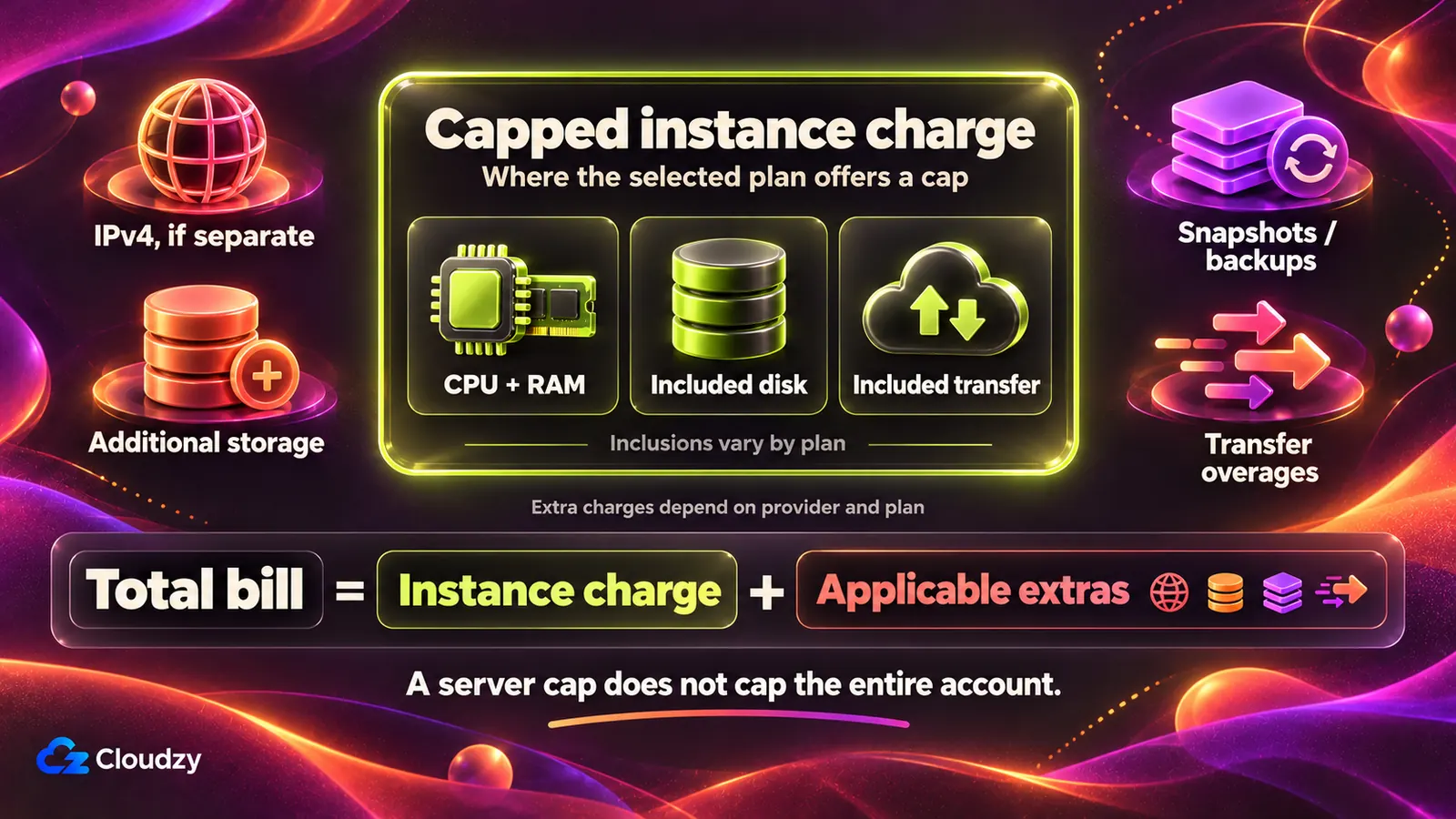
For a short-lived server, multiply the published rate by billable time, then apply its minimum and cap. These estimates assume the instance continues to exist for the entire duration, including any powered-off periods. They are base instance charges, not complete hosting bills.
Estimated compute cost = hourly rate × billable hours.
Use the provider's actual metering rules to determine those hours. Hetzner and Akamai round partial hours upward. DigitalOcean bills seconds, subject to a minimum of 60 seconds or $0.01, whichever costs more. At these whole-hour durations, the minimum does not change the results.
| Plan / hourly rate | 3 hours | 24 hours | 7 days / 168 hours | 30 days / 720 hours |
|---|---|---|---|---|
| Hetzner CPX22 EU: €0.0312/hour, €19.49 cap | €0.09 | €0.75 | €5.24 | €19.49 |
| DigitalOcean Basic Regular 4 GiB: $0.03571/hour, $24 maximum | $0.11 | $0.86 | $6.00 | $24.00 |
| Akamai Shared CPU Linode 4GB: $0.036/hour, $24 cap | $0.11 | $0.86 | $6.05 | $24.00 |
The model uses one unchanged instance, no earlier usage and one 30-day billing month. Hetzner and Akamai apply their monthly caps; DigitalOcean limits billable usage to 672 hours. Amounts round once to cents after calculation.
Hetzner's Primary IPv4 adds up to €0.50 over the full month, taking that example to €19.99 before tax.
Backups, snapshots, bandwidth overages, additional IPs, storage, licenses and taxes can increase the total. Short server lifetimes can also mean prorated transfer allowances. Crossing a billing-month boundary changes the period over which caps apply. Keep the instance size, billing period and retained resources consistent when comparing your own estimates.
For a transfer-heavy test, estimate outgoing data alongside instance time before choosing the lowest displayed rate.
Does Turning Off a VPS Stop Hourly Billing?
Usually, turning off a conventional hourly VPS leaves its charges running because resources remain allocated. Hourly billing often measures how long the server exists, rather than how long its CPU works. A shutdown command therefore needs to be distinguished from the provider operation that ends or pauses billing.
Power Off, Delete, or Pause Compute Billing?
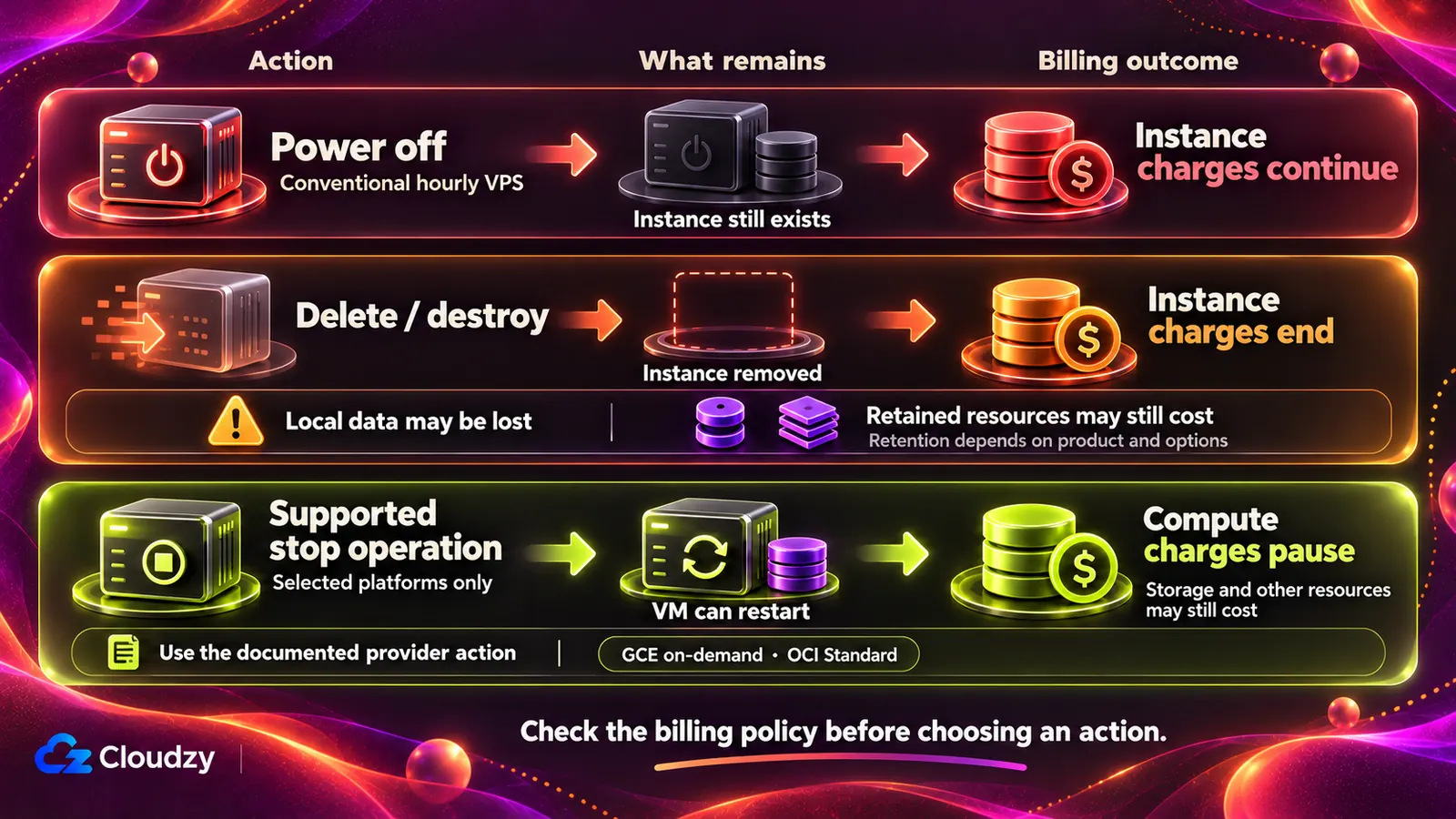
Power off stops the operating system while the instance remains allocated. Delete/destroy removes the instance and generally ends its instance charge, with possible data loss. Stop with compute billing paused preserves a restartable VM on platforms offering that policy, while disks and other resources may remain billable.
Google's restartable stopped state is named TERMINATED; it does not mean the VM has been deleted. OVHcloud's hourly shelve operation is different again: it releases instance resources and retains a charged snapshot. Use the documented action rather than interpreting the state name yourself. See Google's stop guidance and OVHcloud's state comparison.
How the Selected Products Handle Stopped Instances
| Selected provider / configuration | Charges while stopped? | How to stop instance/compute charges | Possible remaining costs |
|---|---|---|---|
| Cloudzy Regular CPU 4 GB | Yes | Delete/terminate VPS | Separately retained optional resources |
| Hetzner Regular Performance CPX22 | Yes | Delete server | Primary IPs, snapshots, volumes |
| DigitalOcean bundled Basic Regular 4 GiB | Yes | Destroy Droplet | Retained snapshots, volumes |
| Vultr Regular Performance vc2-2c-4gb | Yes | Destroy instance | Independently retained resources |
| Akamai Shared CPU Linode 4GB | Yes | Delete service | Other account services |
| Lightsail Medium-4GB Linux with IPv4 | Yes | Delete instance | Snapshots, disks, unattached static IPv4 |
| OVHcloud hourly Discovery d2-4 | Ordinary off/pause: yes | Delete; or shelve to substitute snapshot storage | Shelve snapshot, other options |
| GCE on-demand e2-custom-2-4096 | Compute pauses | Correctly stop VM | Boot disk, snapshots, retained static IPv4 |
| OCI Standard E4.Flex, 1 OCPU / 4 GB | Standard compute pauses | Stop instance | Boot/block volumes, other services |
Clean Up Without Losing Needed Data
Before deleting a temporary environment, identify files and databases you need, make a suitable backup or export, and verify that you can restore it. Then use the correct delete, stop or shelve action. Review volumes, images, snapshots, addresses and other services separately, followed by the billing inventory.
Retaining a recovery copy can be sensible, but it can cost money. OCI preserves boot volumes by default on termination; deleting compute alone does not remove that storage.
Hourly VPS vs. Monthly VPS: Which Is Cheaper?
Hourly hosting can reduce a short project's bill, while continuous use often favors a competitive monthly price or capped hourly plan. Intermittent use depends on what happens between sessions: ordinary shutdown may save no instance charges at all.
Our selected 2-vCPU, 4-GB hourly plan costs $0.0431/hour before discounts, while the monthly offer can be as low as $14.48. If you expect to keep the VPS, choosing monthly or a longer cycle can lower the effective cost. Check the price for the billing cycle you choose before deploying.
Consider the same Hetzner Regular Performance CPX22, excluding IPv4 and other extras. A three-hour test followed by deletion costs €0.0936, displayed as €0.09. Keep that server for an entire 30-day billing month and its €19.49 server cap applies. This compares hourly accumulation with the same product's documented maximum, rather than inventing a separate monthly contract.
Now suppose you need three hours on each of 20 days. Keeping the server allocated throughout the month, merely switching it off between sessions, still reaches €19.49. Creating and deleting twenty disposable three-hour servers totals 60 billable hours: €1.872, displayed as €1.87, before retained resources and IPv4.
Those workflows are operationally different. Recreating a machine means restoring applications and data, and potentially handling a changed address. Paid snapshots or persistent storage can narrow the saving. Use disposable infrastructure when rebuilding is acceptable; otherwise price a stop/restart platform such as the selected GCE E2 custom VM or OCI Standard E4 VM, including storage during the breaks.
A monthly offer is also different from an automatic cap. OVHcloud's £9.84 d2-4 monthly option does not cap its £0.0178 hourly option: 720 hours of the latter produces £12.816, displayed as £12.82. Choose the billing arrangement explicitly and compare the whole intended lifecycle, including what you retain afterward.
How to Choose the Best Hourly VPS
Choose the machine that meets your workload requirements, then check the rules that determine its final bill. A cheap hourly VPS becomes an expensive mistake if its CPU allocation is insufficient or resources remain allocated after testing.
- Billing rules: Check seconds, minutes or hours, plus rounding and monetary minimums. Calculate one realistic short session; an advertised hourly equivalent alone cannot establish that cost.
- Billing while stopped: Find the exact provider action that ends or pauses compute charges. Include the cost of retaining data between sessions in your comparison.
- Monthly caps: Verify the product, billing period and included resources. A calculator's monthly estimate, a separate monthly arrangement and a capped hourly service are different things.
- Extra charges: Price transfer, backups, snapshots, additional disks, addresses and licenses. Check taxes and whether a short lifetime reduces included transfer.
- Server requirements: Check RAM, disk capacity, CPU allocation and OS compatibility before choosing a plan.
- Locations: Confirm that the chosen plan is available in the actual deployment region at the stated price. A provider's country list does not guarantee that particular SKU or stock.
- Payment requirements: Check prepaid credit versus invoicing, verification and initial funding. Cloudzy uses loaded credit; Vultr documents zero-dollar card verification, while other payment methods need deposits. An undocumented minimum is unknown, not zero.
Set spending alerts and review active resources after a test. An alert provides notice; it should not be treated as a guaranteed cutoff that prevents further charges.
Which Pay-As-You-Go VPS Should You Choose?
Choose by workload and cleanup habits. DigitalOcean's bundled Basic Regular fits disposable tests; Hetzner's CPX22 fits European development with a large included transfer allowance. Our plans suit projects wanting dedicated vCPUs and fast NVMe storage along with numerous one-click apps that come pre-installed on your VPS, so you can save time and money on setup.
| Your situation | Providers to shortlist | Deciding check |
|---|---|---|
| Testing for a few hours | DigitalOcean Basic Regular 4 GiB; Hetzner CPX22 | Minimum, CPU requirements, deletion workflow |
| Development with disk and transfer included | Cloudzy; Akamai Shared CPU | Dedicated versus shared CPU, disk capacity, off-state charges |
| A specific deployment country | Vultr; Cloudzy | Exact regional plan, stock and networking |
| Continuous European development | Hetzner CPX22; Akamai Shared CPU | Monthly server cap plus IP and recovery costs |
| Repeated on/off sessions | GCE; OCI Standard E4; OVHcloud hourly shelving | Correct state/action and retained storage costs |
| A bundled AWS-based server | Lightsail Medium-4GB Linux with public IPv4 | CPU burst baseline, transfer and region |
| Keeping base spending predictable | DigitalOcean; Akamai; Cloudzy | Monthly cap, retained resources and transfer terms |
For repeated on/off use, the selected Google and OCI Standard VMs deserve closer attention because their documented compute charges can pause. OVHcloud's hourly shelving offers another approach, with snapshot storage taking over from instance charges.
No single provider wins every scenario. Choose enough resources for the application, verify the region and budget for the data you keep.
If a development VPS fits your workflow, compare our Regular CPU 4-GB plan with its current monthly and longer-cycle offers. The selected configuration includes NVMe storage and transfer. Include any optional resources you will retain, then delete temporary instances when their work is complete.
Frequently Asked Questions
Can I Rent a VPS for One Hour?
Yes. Eligible usage-based products support short server lifetimes, although billing minimums differ. Hetzner rounds to whole hours; Vultr specifies a one-hour minimum. DigitalOcean's bundled Droplets have a time or monetary minimum. Account verification or funding requirements are separate from the server's usage charge.
Does Hourly Billing Mean Paying Only While Running?
Often, no. The selected Cloudzy Regular CPU VPS, Hetzner CPX22, DigitalOcean bundled Basic Regular, Vultr Cloud Compute, Akamai Shared CPU Linode and ordinary Lightsail bundle remain billable while off. Their instance allocation continues to exist. Use each product's documented deletion or billing-pausing operation; shutting down the operating system may change nothing financially.
Is PAYG Cheaper Than Monthly VPS?
It depends on duration, caps and cleanup. A short-lived instance deleted after testing can cost less than a full month. Continuous allocation may reach a monthly cap. OVHcloud's d2-4 monthly option is a separate arrangement, not an hourly cap. Repeated shutdowns offer no instance savings where stopped time remains billable, and retained resources can add charges.
Can I Stop Paying Without Deleting My VPS?
Some platforms pause compute billing without deleting the VM. The selected GCE on-demand E2 custom VM and OCI Standard E4 VM provide examples; OVHcloud hourly shelving substitutes snapshot storage. Disks, snapshots and retained addresses may still cost money. Check the selected product's policy before treating a stopped environment as free.
What Happens to My Data When I Delete an Hourly VPS?
Deleting an instance can permanently remove its local data. Separate disks, snapshots and backups have their own retention and billing rules. Preserve a usable copy before deletion and verify restoration. A snapshot retained within one provider is not automatically an independent, portable backup.

Discussion
Comments
Sign in to join the discussion.