

A Binance scalping bot is software that opens and closes many short trades for you, each held for seconds to minutes. It either trades your account through Binance’s API with a key you create, or it is one of Binance’s own built-in bots that run inside the exchange.
Whichever way you run one, check the fees first. On scalping timeframes, the cost of one round trip decides whether a small winning move pays anything at all.
TL;DR
- There are three routes: Binance’s built-in grid bots (no API key, no server), a hosted platform that holds your trading key, or an open-source bot like Freqtrade on a server you maintain.
- At Binance’s regular spot fee of 0.1% per side, a round trip costs about 0.2% of the position (about 0.15% paying fees in BNB), so smaller scalps lose money before slippage.
- Binance margin and futures have separate leverage ceilings, and at high leverage a small adverse move wipes out the margin.
- A bot’s API key should trade but never withdraw, and should be locked to your server’s fixed IP address.
- Start a self-hosted bot in dry-run (simulated trades on live prices), then move to a small live allocation.
How a Scalping Bot Trades on Binance
A scalping bot watches Binance market data, applies fixed rules, and places orders through the API under your key, aiming for many small gains held for seconds to minutes. It can scalp on spot, where you trade only what you hold, or on USDⓈ-M (USDT- or USDC-margined) futures, where leverage comes into play.
Automation buys you two things: the bot keeps working while you sleep, and it follows its exit rule on a losing trade without hesitating. A bad rule followed without emotion still loses, though.
Leverage only exists on margin and futures, with a different ceiling for each. As of November 2026, Binance Cross Margin Classic offers 3x and 5x leverage. Cross Margin Pro supports up to 20x for eligible users; Binance currently restricts Pro eligibility to VIP 5 and above. Isolated Margin goes up to 10x on some pairs, tiered by how much you borrow. Binance’s leverage brackets for USDⓈ-M futures allow 150x on BTCUSDT and ETHUSDT, but only for positions up to 300,000 USDT; above that the ceiling drops to 100x, then 75x. Other pairs top out lower (SOLUSDT at 100x). Binance’s futures leverage FAQ states the rule that larger positions allow lower leverage.
The ceiling is a limit, not a target. At 20x, a 5% adverse price move represents a loss equal to the position’s initial margin, before fees. Liquidation can happen sooner because the account must still meet maintenance-margin requirements; the actual threshold depends on the margin mode, collateral and other positions. That is how a scalp aimed at a 0.3% gain ends in liquidation, one fast wick the wrong way.
Fees Set the Minimum Move a Scalp Must Catch
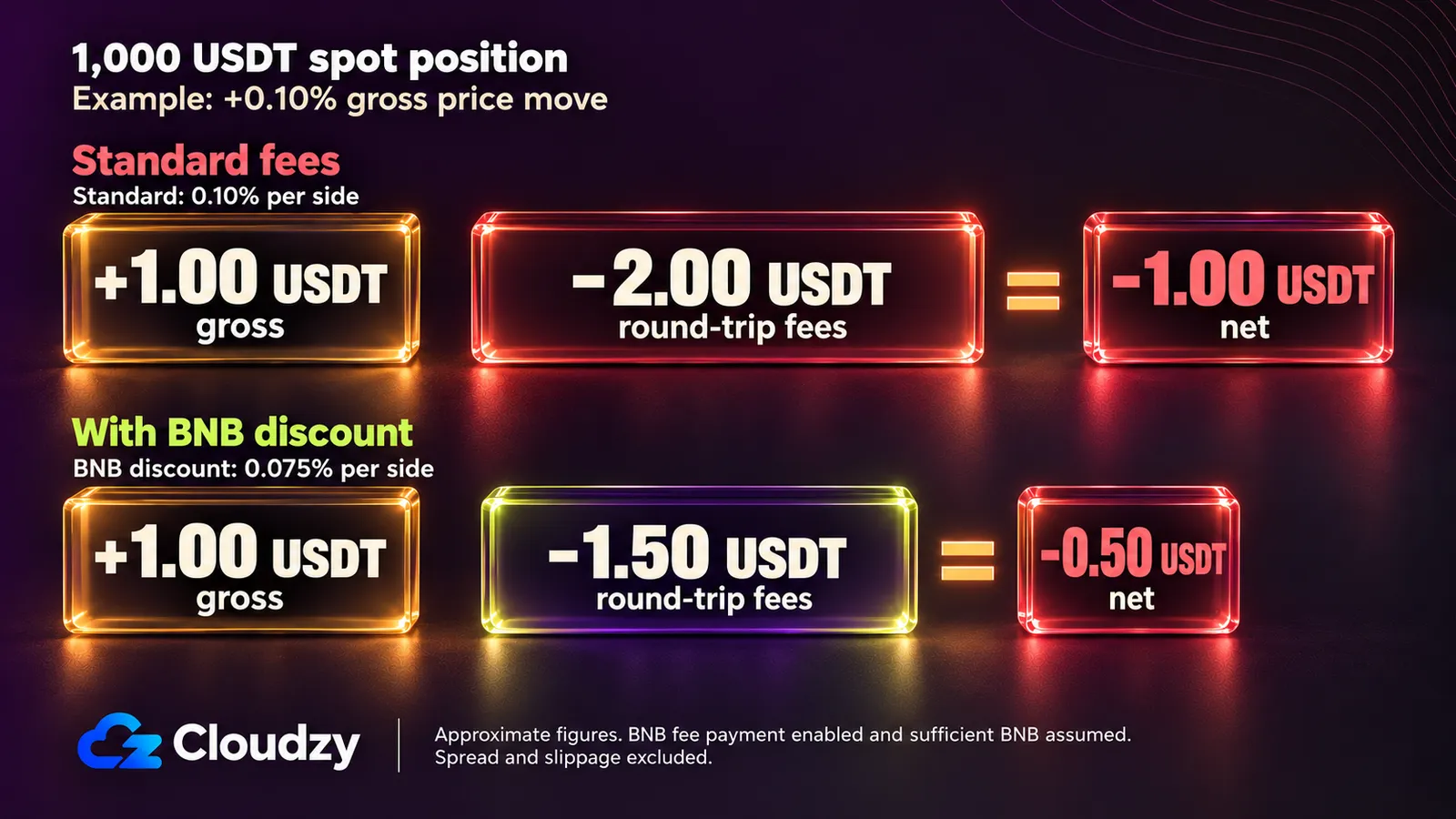
Binance’s spot fee FAQ sets 0.1% per trade for a regular account, so a spot buy followed by a sell costs about 0.2% of the position. A scalp has to move further than that before it earns anything, and slippage comes on top. Paying fees in BNB lowers the bar to about 0.15%.
The BNB fee discount takes up to 25% off spot and margin fees and up to 10% off futures, and Binance’s futures fee structure charges 0.02% maker and 0.05% taker on USDⓈ-M futures. One spot round trip on a 1,000 USDT position:
- Buy 1,000 USDT of BTC at 0.1%: 1.00 USDT in fees.
- Sell it back near the same price at 0.1%: about 1.00 USDT more.
- Round trip: about 2.00 USDT, or 0.2% of the position.
- With the BNB discount, each side drops to 0.075%: 0.75 + 0.75 = 1.50 USDT, or 0.15%.
A bot targeting 0.1% per trade loses money on every “winning” trade at this tier.
Futures charge fees on the leveraged notional, not on your margin. Put 100 USDT of margin behind a 10x position and the notional is 1,000 USDT. Two taker fills at 0.05% cost 1.00 USDT; two maker fills at 0.02% cost 0.40 USDT. Before spread, slippage and any funding payment, trading fees alone require a price move of about 0.10% for two taker fills or 0.04% for two maker fills at these rates, regardless of leverage. A perpetual position held through a funding settlement may also pay or receive funding.
On futures, a limit order that rests on the book and fills later pays the maker rate. A market order, or a limit order priced to fill immediately, pays taker, so a strategy that enters and exits with market orders pays taker on both legs. These are regular-user (VIP 0) rates; higher VIP tiers pay less.
Scalping Strategies Bots Run
Four strategy patterns fit scalping timeframes on Binance: trading inside a range, capturing the bid-ask spread, following short bursts of momentum, and arbitrage. Each needs a specific market condition and fails when that condition goes away. The same patterns show up in slower bot trading strategies, stretched over hours instead of minutes.
Range and Grid Scalping
A range bot buys near the bottom of a sideways range and sells near the top, over and over. A grid bot automates this with a ladder of limit orders at fixed price steps, each buy paired with a sell one step higher. It needs a market that is moving sideways, and it breaks when price leaves the range.
A breakout downward leaves the bot holding everything it bought on the way down, above the market. A breakout upward sells out the inventory and leaves buy orders below a price that has moved on. Binance’s Spot Grid bot is the built-in version, and it is worth deciding in advance what happens when price breaks out of your grid.
Spread Capture (Market Making)
A market-making bot posts a buy limit order just below the market price and a sell limit order just above it, and earns the gap between them when both fill. Both orders rest on the book, so on USDⓈ-M futures both legs pay the maker rate instead of taker, and that difference is what lets the strategy work on small spreads there.
On spot at the regular rate, each fill pays 0.1% whether the order makes or takes, so the spread has to clear the full round trip. It fails on inventory risk. When price trends, only one side keeps filling, and the bot accumulates a position moving against it. Hummingbot’s market-making controllers such as pmm_simple are the open-source example of this strategy.
Short-Timeframe Momentum
A momentum scalper enters when an indicator fires on a 1-minute or 5-minute candle: a fast moving average crossing a slower one, RSI leaving an extreme, or a close outside a Bollinger Band. It exits on a tight target or stop. This is the shape a candle-based bot like Freqtrade is built for.
It fails in chop, where signals flip back and forth and each false start pays a full round trip in fees. Combining and filtering signals can cut false starts, but no indicator removes the fee hurdle.
Arbitrage
Arbitrage bots trade price differences. Cross-exchange (spatial) arbitrage buys on one exchange and sells on another. Triangular arbitrage cycles through three pairs on Binance alone, for example USDT to BTC to ETH and back to USDT. Both depend on gaps that are small and close quickly, and every leg pays a fee.
Three spot legs at 0.1% each cost about 0.3%, so a triangular gap has to beat that first. Cross-exchange arbitrage also needs funds sitting on both exchanges, so that an arbitrage bot can act on a gap without waiting for a transfer.
Three Ways to Run a Scalping Bot on Binance
There are three ways to run a scalping bot on Binance: a built-in Binance bot, which runs inside the exchange; a hosted platform that runs your bot on its servers through your API key; or an open-source bot on a machine you control. The routes differ in who holds the key and who keeps the bot alive.
Binance’s Built-In Bots
Binance’s Trading Bots page offers Spot Grid, Futures Grid, an Arbitrage bot, a Rebalancing Bot, Spot DCA, Futures TWAP, Futures VP and Algo Orders. None is labelled a scalping bot. They run inside Binance, so you create no API key and run no server.
Binance’s docs list no extra fee beyond normal trading fees; Spot Grid follows the spot fee rates. Spot Grid and Futures Grid fit range scalping. The Arbitrage bot runs a delta-neutral funding-rate strategy, not price-gap arbitrage, and TWAP and VP are execution tools for large orders. The limit is control. You set preset parameters and can’t write your own entry logic.
Hosted Bot Platforms
A hosted platform runs your bot on the vendor’s servers and trades your Binance account through an API key you hand over. 3Commas, Cryptohopper and Altrady all support Binance and work this way, so nothing runs on your own machine. The cost of that convenience is custody, because the vendor holds a key that can trade.
3Commas runs in the browser, Cryptohopper operates entirely in the cloud, and Altrady’s bots run on Altrady’s servers even with its app closed. HaasOnline spans both routes, with a vendor-hosted TradeServer Cloud and a self-hosted TradeServer for Windows, Linux and macOS.
Custody has a precedent. In December 2022, 3Commas’ chief executive confirmed that 100,000 API keys posted online by an anonymous user had been obtained from its service. You give the vendor a key with trading permission, and its security becomes part of yours. That makes custody a maintenance question as well: who rotates the key, and who notices first if it leaks.
Two hosted bots that used to support Binance have closed their consumer products. Trality wound down its consumer product suite on July 31, 2023, and Shrimpy shut its service down on July 7, 2023.
Self-Hosted Open-Source Bots
Open-source bots run on a machine you control and connect to Binance with a key that only you hold. Freqtrade and Hummingbot are both free, written in Python, actively maintained, and support Binance. You get full control of the strategy code, and you also take on the server, the updates and the monitoring.
Freqtrade is GPL-3.0 licensed, with releases through 2026. Its README lists Binance among supported spot and futures exchanges, and it ships with dry-run, backtesting (replaying a strategy over historical candles), strategy optimization, a web UI (FreqUI) and Telegram control. Hummingbot is Apache-2.0 licensed, with a mission to “democratize high-frequency trading.” It has a Binance spot connector and a Binance perpetual futures connector that supports testnet. To write your own bot instead, CCXT and python-binance are two libraries that handle the Binance API calls for you.
The Three Routes Side by Side
Read the fifth column first, since it shows who holds a key that can trade.
| Route | Who runs the bot | Strategy control | What it costs | Who holds your API key | Best fit |
|---|---|---|---|---|---|
| Binance built-in bots | Binance | Preset parameters | Standard Binance trading fees; Binance’s docs list no separate bot fee | No API key needed | Range-trading one pair without code |
| Hosted bot platforms | The vendor’s servers | Vendor strategy builder and templates | A subscription, plus trading fees | The vendor | Templates without running a server |
| Self-hosted open-source bots | Your own machine or server | Full code (Python) | Free software, plus your server and trading fees | Only you | Custom strategies, if you can maintain a server |
Which Route Fits Your Trading
Pick a built-in grid bot if you want to range-trade one pair with no code and no server. Pick a hosted platform if you want strategy templates without running a machine and accept that a vendor holds a trading key. Pick a self-hosted bot if you want to write the strategy yourself and can keep a server healthy.
The built-in route may be all you need. If your manual scalping is buying low and selling high inside a range on one pair, Spot Grid does that without a key leaving your account. The other routes earn their extra work only when your rules don’t fit a preset.
Inside the self-hosted route, the two tools behave differently. Freqtrade’s standard indicator-based entry and exit signals use completed candles; its strategy dataframes do not include unfinished candles. Its main loop runs every 5 seconds by default (internals.process_throttle_secs), and stop-loss, ROI and custom exit checks can run between candle closes. For indicator-driven scalping, think 1m or 5m candle signals with position management between candles.
Hummingbot’s clock ticks every second by default, and its market-making controllers re-evaluate the market on that loop. For spread capture, Hummingbot is the natural fit. For indicator signals on 1-minute candles, Freqtrade is.
Running a Self-Hosted Bot Around the Clock
A self-hosted bot only trades while the machine running it is on and connected. A laptop that sleeps or a home connection that drops leaves open positions with nothing managing them, so the bot belongs on an always-on Linux server, run under Docker with a restart policy, and started in dry-run before it touches real funds.
Any always-on Linux server works. Freqtrade’s docs recommend at least 2 GB RAM, 1 GB of disk and 2 vCPU. Hummingbot’s installation requirements are 4 GB RAM, 5 GB of disk and at least 1 vCPU per instance. I treat a trading bot like any long-running service: it needs a restart policy, readable logs and an update routine, or it fails quietly overnight.
Here is the Freqtrade path from Freqtrade’s Docker quickstart, assuming Docker with the Compose plugin is installed.
mkdir ft_userdata

cd ft_userdata/

# Download the docker-compose file from the repository

curl https://raw.githubusercontent.com/freqtrade/freqtrade/stable/docker-compose.yml -o docker-compose.yml

# Pull the freqtrade image

docker compose pull

# Create user directory structure

docker compose run --rm freqtrade create-userdir --userdir user_data

# Create configuration - Requires answering interactive questions

docker compose run --rm freqtrade new-config --config user_data/config.json
Dry-run runs your strategy against live Binance prices and simulates the fills, so no money moves. When new-config asks “Do you want to enable Dry-run (simulated trades)?”, answer yes; the config then holds "dry_run": true, which is also Freqtrade’s default. For the dashboard used below, also enable the API server (FreqUI) and set its login credentials in new-config. Start the bot and check it:
docker compose up -d

docker compose ps

docker compose logs -f
The docs say docker compose ps “should list the service freqtrade as running.” Logs also go to user_data/logs/freqtrade.log. To update, run docker compose pull, then docker compose up -d. The restart behavior lives in the compose file you downloaded:
# excerpt from docker-compose.yml (other keys, comments and the command block omitted)
services:
  freqtrade:
    image: freqtradeorg/freqtrade:stable
    restart: unless-stopped
    ports:
      - "127.0.0.1:8080:8080"
restart: unless-stopped tells Docker to bring the container back if it exits or the Docker daemon restarts, but not if you stopped it yourself. That is why the docs want docker compose up -d rather than docker compose run for trading: it “will make sure that the container will restart after a system reboot.” The default strategy is a placeholder, too: “SampleStrategy is just a demo!”, and the docs ask you to backtest and dry-run “for some time before risking real money.”
Binance has practice environments of its own. The Spot Testnet works only through the API, and Demo Trading covers spot plus USDⓈ-M and COIN-M futures. Hummingbot’s perpetual connector supports testnet; for Freqtrade, dry-run is the documented practice mode.
The ports line binds FreqUI to 127.0.0.1, so it isn’t reachable from outside. Keep it that way. On a VPS, the quickstart recommends an SSH tunnel or a VPN so that FreqUI is not directly exposed to the internet, since it has no HTTPS out of the box. A standard OpenSSH local forward does it:
ssh -L 8080:127.0.0.1:8080 user@your-server-ip
Then open http://localhost:8080 locally. I tunnel every admin UI this way; a trading dashboard doesn’t justify a public port.
On latency, my reading is this: a few milliseconds of network distance usually matter less for Freqtrade’s candle-based entry signals than for Hummingbot’s spread capture. But Freqtrade still places orders and manages exits between candle closes, so connection reliability and execution latency matter on both routes. For market making, server location deserves particular attention.
A home connection also rarely gives you a fixed IP to put on the key’s trusted list (the next section sets that up). At Cloudzy, our Binance VPS is a Linux server covered by a 99.95% uptime SLA, with its own IPv4 address for that trusted list and root access to run Docker with Freqtrade or Hummingbot.
Lock Down the Binance API Key
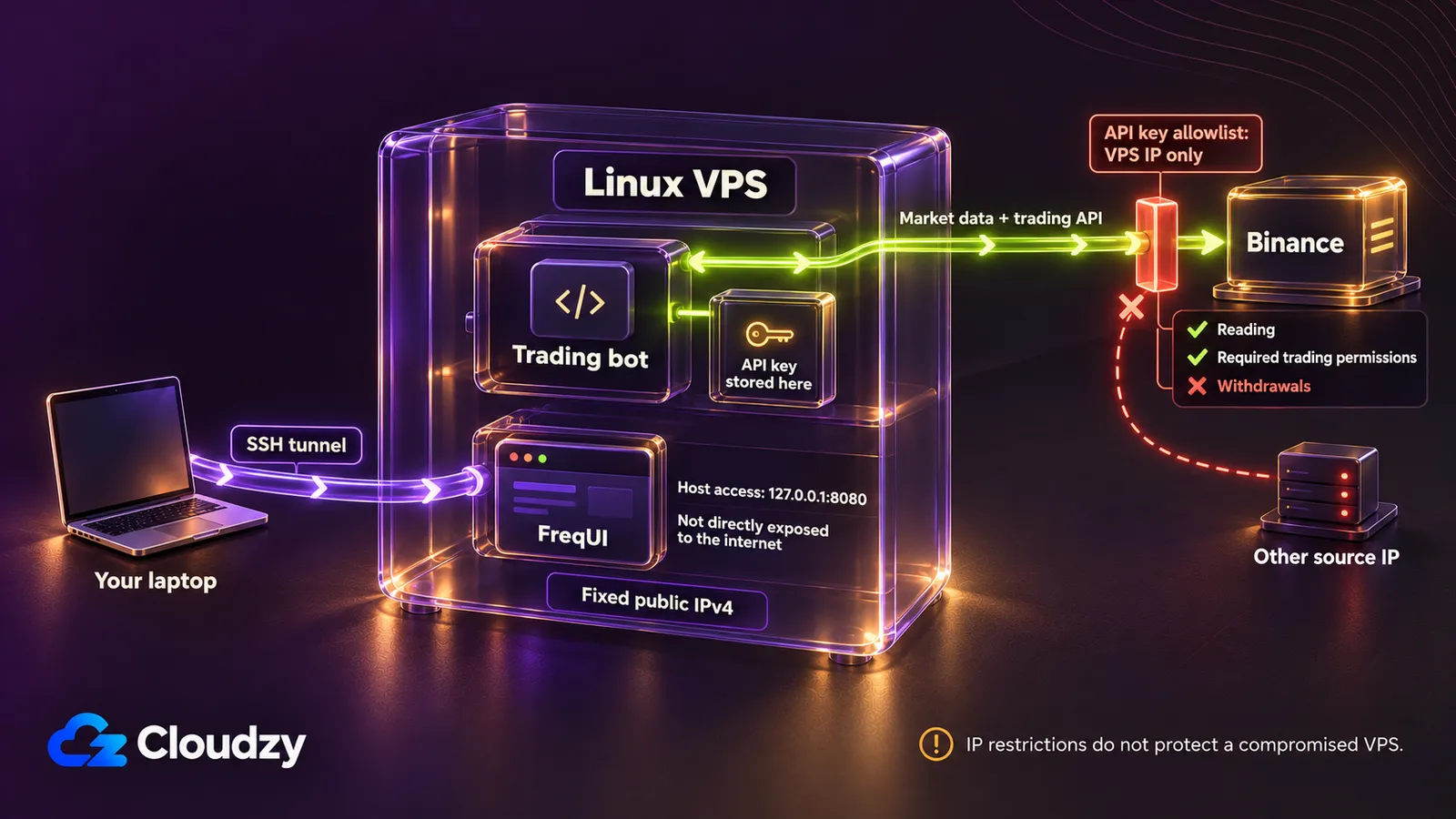
Create a separate API key for the bot, give it reading plus the trading permission it needs, leave withdrawals disabled, and restrict it to your server’s fixed IPv4 address. Binance’s own rule pushes you the same way, because a system-generated key with unrestricted IP access can only read.
An API key lets software act on your account without your password, and its permissions decide what that software may do. With IP restriction, Binance also accepts the key’s requests only from addresses on its trusted-IP list. Binance’s API key FAQ states that “Unrestricted-IP-Access HMAC API Key(s) won’t have any permission other than reading,” and that adding IP access restrictions “is mandatory to enable withdrawal permission.”
The settings for a bot key:
- Create a new key used only by this bot, so you can revoke it without touching anything else.
- Enable reading and the trading permission the bot needs: spot, futures, or both.
- Leave withdrawals disabled. This bot needs trading access, not withdrawal access. Disabling withdrawals blocks direct withdrawals through the key, but a stolen trading key can still place unauthorized trades and cause substantial losses.
- Restrict the key to your server’s fixed IPv4 address.
Binance also allows self-generated Ed25519 or RSA keys as another documented way to enable trading. Whatever the key type, still restrict it to your server’s IP. This blocks requests from other source IPs, but it does not protect you if an attacker compromises the allowed server. On a self-hosted server, the trusted list holds one address: yours.
That moves the exposure to the server itself, which now holds a working key. Log in with an SSH key pair instead of a password, keep the system updated, and watch your Binance account for activity that your bot’s log doesn’t explain.
Where Scalping Bots Fail
Unattended scalping bots fail in predictable ways: fees and slippage eat wins smaller than the round-trip cost, backtests fit the past too closely, the exchange rate-limits a noisy bot, thin order books turn a fast wick into a bad fill, and a bug keeps trading with nobody watching. Each one is something to plan for before going live.
Fee and slippage drag is the quiet one. A high win rate on small targets can still lose money, because every trade pays the round trip and market orders add slippage. Compare the average win with the break-even move, not the win rate.
Overfitted backtests come next. Tune enough parameters against enough history and the strategy fits the past and says nothing about the future.
The exchange limits noisy bots. Binance’s spot API rules track unfilled orders per account, base request limits on IP rather than key, and answer repeated violations with automated IP bans from 2 minutes to 3 days. A bot that floods the book with orders that never fill can lock itself out mid-position. Exchange maintenance and API errors do the same: an exit order that can’t be placed leaves a position nobody is managing.
Thin books and wicks hit stops hard. A stop that fires as a market order during a fast move fills wherever liquidity sits, not at the price you set, and on a thinly traded pair that gap can exceed the target. Indicator-driven bots also read no news, so a headline move looks like any other signal.
The last failure is your own code. A bug in an entry condition runs every few seconds, all night. Freqtrade’s Telegram control lets you check and stop the bot from your phone, and the monitor that alerts you when the bot goes quiet should run on a separate machine from the bot.
Run the strategy in dry-run until its trade log looks like something you would accept with real money. Simulated fills do not prove that live execution will match, especially for small targets and resting limit orders. Before switching live, stop the bot with docker compose down and back up user_data. Configure the restricted live API key, set "dry_run": false, and limit the stake and number of open trades to a small allocation you can afford to lose. In docker-compose.yml, change the command’s database argument to --db-url sqlite:////freqtrade/user_data/tradesv3.live.sqlite, using a filename that does not already exist. Restart with docker compose up -d and check the logs.
Frequently Asked Questions
Is Scalping With a Bot Profitable on Binance?
Only under conditions, and nothing guarantees them. The average win has to clear the round-trip fee and slippage, about 0.2% of the position at Binance’s regular spot rate. The strategy has to hold up in dry-run on live prices, not only in a backtest. Leverage magnifies the downside: at high leverage, a small adverse move can liquidate the position.
Does Binance Have Its Own Scalping Bot?
Not by that name. Spot Grid comes closest. It range-trades one pair with a ladder of buy and sell limit orders, and per Binance’s Spot Grid FAQ it pays the standard spot fee and nothing more. Because it runs inside your Binance account, there is no key to create and nothing to host, but you tune preset parameters rather than writing entry rules.
Is It Allowed to Use a Trading Bot on Binance?
API trading is a documented Binance feature, with official Spot REST API docs and a key-creation process in Binance’s support FAQ. Your account still has to follow Binance’s Terms of Use, including where you are allowed to use the service.
How Much Leverage Can a Binance Scalping Bot Use?
As of November 2026, Binance Cross Margin Classic allows 3x or 5x, Cross Margin Pro supports up to 20x for eligible VIP 5+ users, Isolated Margin supports up to 10x on some pairs, and USDⓈ-M futures allow up to 150x on BTCUSDT and ETHUSDT in the smallest position bracket. Futures brackets shrink as position size grows. Binance’s futures leverage FAQ also caps new futures accounts at 20x for their first 30 days.
Do I Need a VPS to Run a Binance Trading Bot?
Only for the self-hosted route. Binance’s built-in bots run on Binance, and hosted platforms run your bot on the vendor’s servers. A self-hosted bot such as Freqtrade or Hummingbot needs a machine that stays on and connected, which means a server rather than a laptop.





Discussion
Comments
Sign in to join the discussion.