

PCoIP, short for PC over IP, is a display protocol that renders a desktop on a machine in a data center and streams the finished pixels to whatever device you're sitting in front of. Teradici built it in 2007, HP bought Teradici in 2021, and for most of the time since it has been one of the default answers for desktop virtualization.
That era is closing, though, and the three companies that put PCoIP in front of customers, HP, Omnissa and Amazon, have each announced end-of-life dates for their PCoIP products, two of which have already gone by. Nothing switches off tomorrow, but HP Anyware and PCoIP-based Amazon WorkSpaces are already closed to new customers, while Omnissa is removing PCoIP from Horizon in stages.
So what is PCoIP, what made it worth choosing, and which of those clocks is ticking on your deployment? Here's where things stand.
TL;DR
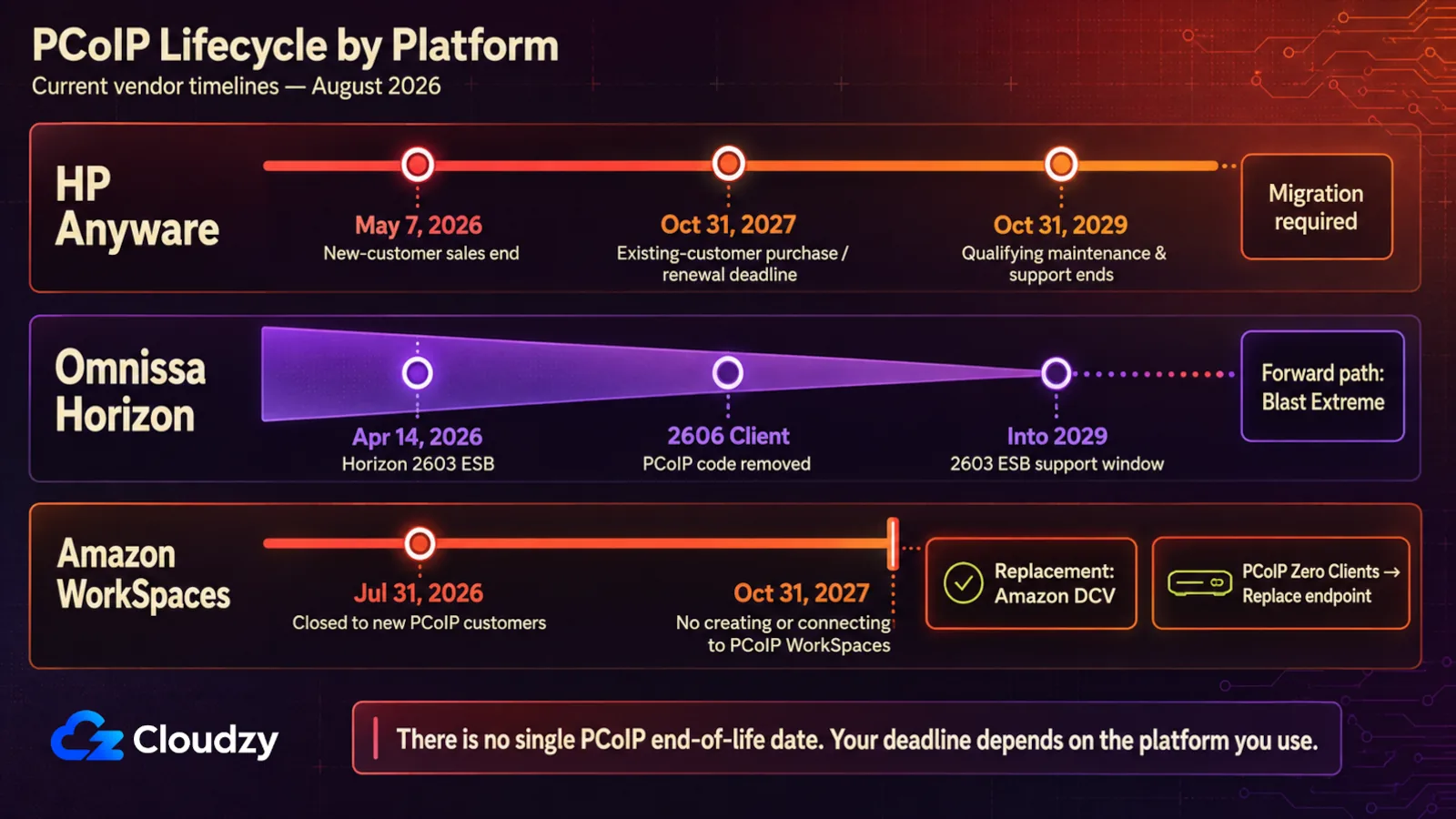
- PCoIP still works, but its commercial paths are closing. HP Anyware reached end of sale for new customers on May 7, 2026. Existing customers can continue purchasing renewals through October 31, 2027, while maintenance and support for qualifying multi-year terms continues through October 31, 2029.
- On Omnissa Horizon, the 2603 Extended Service Branch, released in April 2026, preserves the long-lived PCoIP path into 2029. Horizon Client 2606 removes PCoIP code, while the Agent retains it for several more releases for compatibility. Blast Extreme is the forward path.
- On Amazon WorkSpaces, PCoIP stopped taking new customers on July 31, 2026, and nobody can create or connect to a PCoIP WorkSpace after October 31, 2027. Amazon DCV replaces it.
- PCoIP zero clients can't speak Amazon DCV, so those endpoints need replacing before that 2027 date.
- RDP covers plain access to a Windows machine. For color-critical or 3D work over a long link, a self-hosted workstation protocol is the better swap.
What Is PCoIP and What Is It Used For?
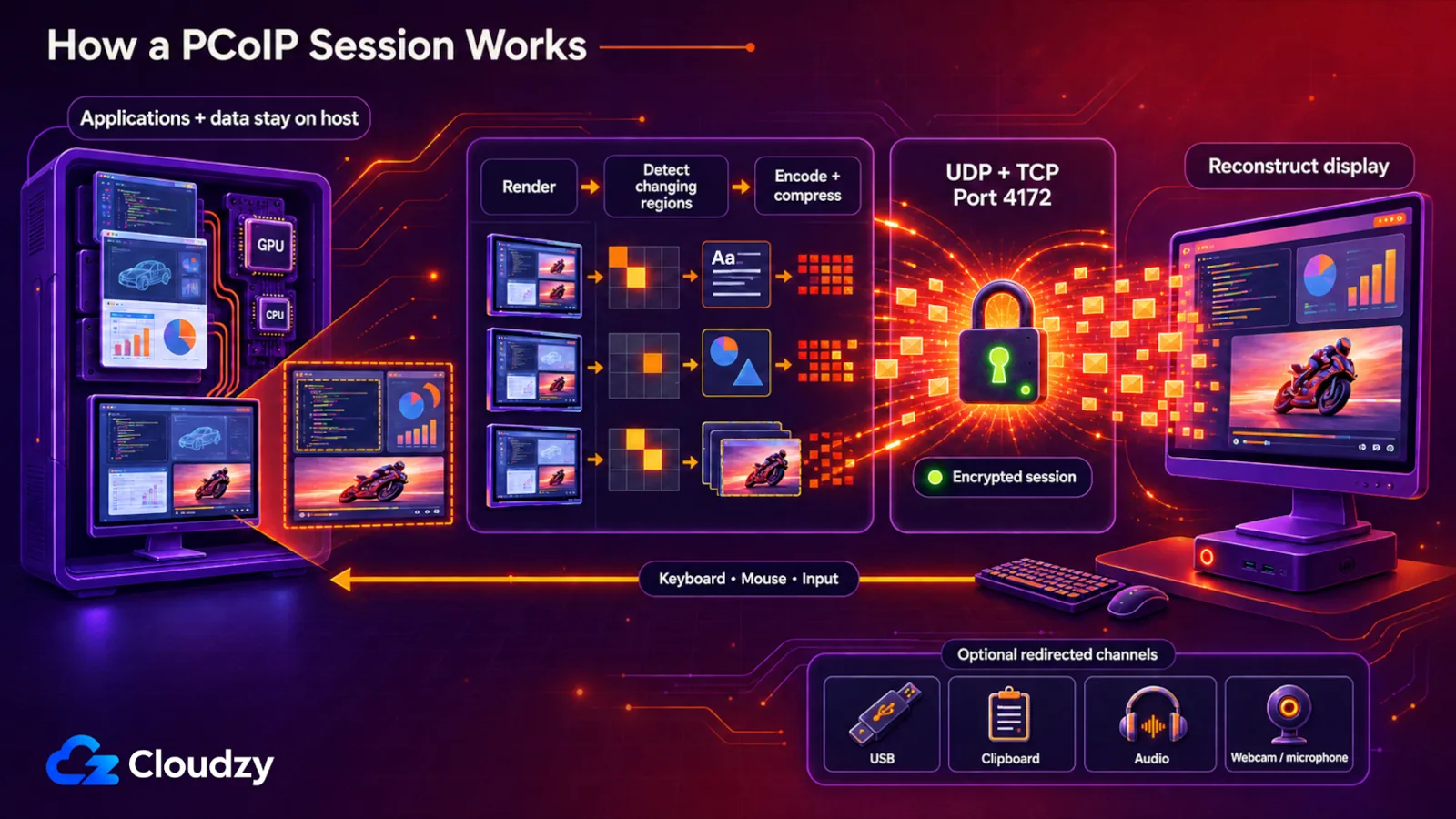
PCoIP is a display protocol that renders and compresses a desktop on the host, then sends the resulting display updates over an IP network to a client device. The applications keep running on the remote machine; the endpoint reconstructs the desktop and sends the user's input back.
PCoIP carries that display traffic over UDP alongside a TCP channel, both on port 4172. This gives PCoIP a loss-tolerant transport for time-sensitive display updates, with the host encoding changing regions of the rendered desktop and the client reconstructing them on screen.
The data is encrypted before it's sent to the target device, where it is decrypted and displayed. This encryption is one of the many reasons why platforms like Omnissa Horizon (formerly VMware Horizon) and Amazon WorkSpaces adopted the PC over IP protocol to stream virtual desktops to their clients, though both are now phasing it out, as you'll see below.
PCoIP's flexibility and accessibility also allow users to access cloud-hosted desktops from not only their own desktops but also their tablets and mobile phones, through a model known as desktop-as-a-service (DaaS).
This protocol also allows users to access virtual desktops through thin clients as well, which are desktops that use resources stored inside a central server rather than a hard drive.
Virtual desktops aside, PCoIP turns up elsewhere too. PCoIP session traffic is encrypted, so the display stream doesn't depend on a VPN for transport encryption. That doesn't replace authentication, network segmentation, a secure gateway, or a VPN where your network design requires one.
PCoIP adapts its display encoding to available bandwidth, which can preserve responsiveness on constrained WAN links; it doesn't make the underlying network faster. That behavior also made it useful for latency-sensitive remote workstation workflows, including trading, media, and engineering.
While most of these use cases can also be done with other protocols, PCoIP offers key features that set it apart from other protocols.
Key Features and Benefits of Using PCoIP
What PCoIP does well comes down to how much work it moves off the client. The host renders the whole desktop, compresses each region of the screen with whichever codec suits it, encrypts the result, and ships pixels instead of drawing commands. All of it follows from that one choice.
- Supports 32-bit color for virtual displays.
- Supports ClearType fonts.
- Dynamic audio quality adjustment for LAN and WAN through audio redirection.
- Supports real-time Audio-Video for webcams and microphones on some client types.
- Supports copying and pasting text and images between the client OS and a remote desktop or published application. However, copying and pasting images may not be available for some clients.
- Supports up to four displays, with a maximum resolution of 4K UHD (3840 x 2160) on current HP Anyware agents. The older figure you'll still see quoted, four displays at 2560 x 1600, describes PCoIP as VMware Horizon shipped it. Pivot display and autofit are supported too.
- USB and MMR redirection are also supported.
PCoIP Security Features
PCoIP keeps application execution and primary data on the host rather than moving the whole workload to the endpoint. The display stream is encrypted, while optional channels can redirect things such as clipboard data, USB devices, audio, and webcams, so endpoint exposure still depends on which redirection features you allow.
As for the encryption, current HP Anyware agents secure PCoIP communications with AES-256-GCM. Older agent releases also supported AES-128-GCM as a fallback, so if your deployment has been sitting untouched for a few years it's worth checking which cipher your sessions actually use.
Benefits of UDP Over TCP
PCoIP leans on UDP for time-sensitive display traffic because UDP doesn't impose TCP's ordered-delivery and retransmission behavior. A lost display packet doesn't have to hold newer visual updates behind it while the transport waits for that packet to arrive again.
The trade-off is that packet loss, jitter, and congestion show up in the session instead. PCoIP can adapt image quality as network conditions change, but a poor connection can still mean blur, lower frame rates, choppy video, or delayed input. That's the exchange: keep the session moving and let display quality absorb some of the damage.
Efficient Image Decomposition Through Multiple Codecs
Typically, handling tasks like displaying text, graphics, and video on different parts of the screen is handled by your workstation. However, since each area of the display may have different requirements depending on the task being run on that specific area, using the same compression for the entire display is slow and inefficient.
To fix this issue, PCoIP uses a multi-codec protocol that, as the name suggests, supports multiple image element types on a display. By actively analyzing and decomposing the image elements for graphics, text, icons, video, etc., PCoIP can transmit image elements much quicker and much more efficiently, saving bandwidth in the process.
For workflows that care about final image fidelity, HP Anyware also supports PCoIP's build-to-lossless mode. It can refine an image to a lossless state after the screen stops changing, but the feature is configurable rather than something every session does automatically.
Optimized Performance with Host-Based Rendering
PCoIP removes the need for the client to have high-grade equipment and specific hardware by having the images generated by applications processed on the host's side. This approach lets demanding applications render on the host and send the result to the client as pixel data, much like a TV broadcast sends finished frames to your screen.
This is also the part you shouldn't assume another protocol will reproduce identically. Modern RDP can use GPU-accelerated rendering and codecs such as H.264/AVC, AVC 4:4:4, and H.265/HEVC in supported deployments, so the gap isn't as simple as PCoIP for graphics and RDP for office work. For CAD, 3D, or color-sensitive workflows, test the actual application, client, display setup, and network before migrating.
Issues and Drawbacks with PCoIP
PC over IP isn't perfect, and depending on your use case it may not be the best protocol for you. Two things weigh against it now. It's sensitive to packet loss on an unreliable network, and every vendor that shipped it is winding it down, which turns any remaining deployment into a migration with a deadline on it.
Network Dependency and Packet Loss
As I mentioned earlier, PCoIP prioritizes speed over avoiding packet loss, and while PCoIP's adaptability allows it to function well under poor network environments, the packet loss may become too much. This can lead to many serious issues like reduced display frame rates, choppy video, and delayed input responses.
End of Support in Omnissa Horizon
Omnissa Horizon, called VMware Horizon before VMware's end-user computing division became Omnissa, has been moving away from PCoIP toward Blast Extreme for years. Omnissa's current retirement plan now gives that transition a concrete shape: Horizon 8 2603 is an Extended Service Branch released on April 14, 2026, and ESB releases receive three years of general support before moving into technical guidance.
The removal isn't happening to every component at once. Omnissa says Horizon Client 2606 removes the PCoIP code, while the Horizon Agent retains it for several more releases for compatibility. If you're staying on the 2603 ESB, that gives you a supported PCoIP path into 2029; if you're moving onto newer clients, Blast Extreme is the path forward.
Compatibility and Transition Issues
PCoIP isn't interchangeable with another display protocol, so migrating means validating the client, graphics behavior, peripherals, and network path again. If RDP is one of the candidates, how RDP works is the useful baseline: it's a different protocol stack, not a compatibility mode for PCoIP.
What makes this such a pressing issue is that there isn't one deadline to plan against, there are three, and only the one attached to your own platform matters. HP owns the protocol itself, and HP Anyware reached end of sale for new customers on May 7, 2026. Existing customers can continue purchasing renewals through October 31, 2027, while maintenance and support for qualifying multi-year terms continues through October 31, 2029. Omnissa Horizon's built-in PCoIP is capped at the 2603 ESB, whose three-year general-support window runs into 2029. Amazon WorkSpaces is the tightest of the three, and AWS stopped accepting new customers for PCoIP-based WorkSpaces Personal on July 31, 2026, and nobody will be able to create or connect to a PCoIP WorkSpace after October 31, 2027. If your account predates that July date, AWS says you can keep creating new PCoIP WorkSpaces right up to the 2027 cut-off, patched and supported the whole way.
The early sales and renewal deadlines aren't switch-off dates. AWS's October 31, 2027 deadline is different: after that date, AWS says you won't be able to create or connect to a PCoIP WorkSpace. Closed to new buyers isn't the same thing as stopped working, but every deployment still needs to work backward from the deadline attached to its own platform.
There's one more thing to check, and it's on the desks, not in the data center. AWS says plainly that PCoIP Zero Clients can't support Amazon DCV, because the protocol is built into them at the hardware level, so anyone connecting through a zero client needs a replacement endpoint before October 31, 2027. HP's end-of-life announcement gives that hardware its own, later date, December 31, 2029 for the Tera2 zero clients and the PCoIP Management Console, which doesn't extend the WorkSpaces deadline, so budget for the swap and not only the protocol change.
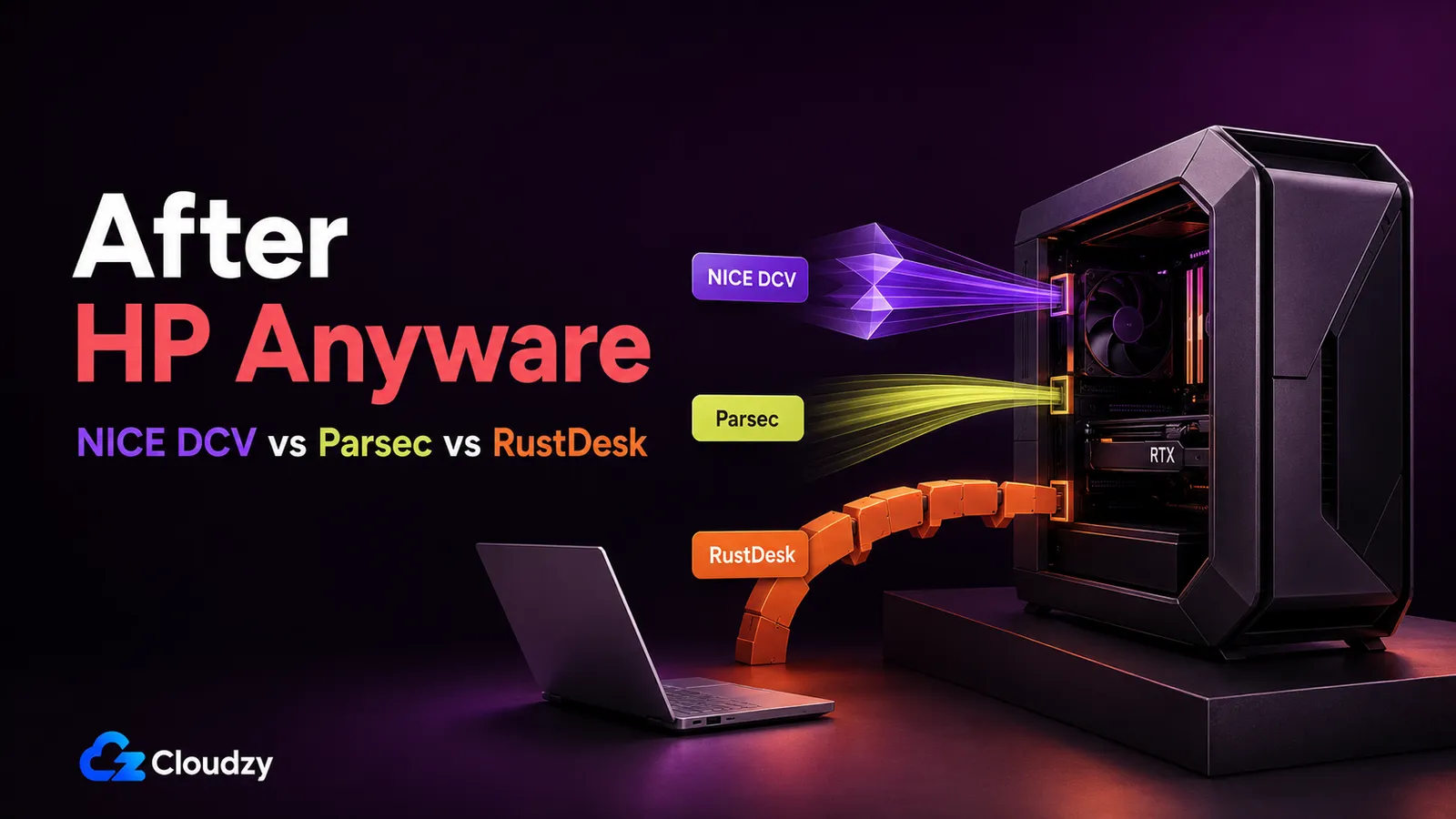
Where you land depends on what the desktop was for. Horizon shops move to Blast Extreme, WorkSpaces move to Amazon DCV, and if all you ever needed was a session on a Windows box, RDP has done that job for years. The awkward case is the fidelity-critical one, the CAD seat or the color-graded video work, where the answer is a self-hosted workstation protocol instead: we put Amazon DCV, Parsec and RustDesk head to head for that decision, and there's our PCoIP vs RDP comparison for the protocol-level detail.
Cloudzy's RDP - An Alternative to PCoIP
If what you need is a session on a Windows machine you control, RDP covers it. It's Microsoft's protocol and it's built into Windows. Clients are available across the major desktop and mobile platforms, and Microsoft continues to develop the protocol and its graphics stack rather than winding it down the way PCoIP's vendors are.
What RDP needs from you is a Windows host to point it at, which is the part that's easy to miss when a deadline lands and the platform that supplied the desktop is the thing going away. Cloudzy's RDP VPS is one way to cover that gap: full administrator access, so you can install whatever the old virtual desktop was running, and your pick of Windows Server version pre-installed, so you're not building an image from scratch before you can test anything. It carries a 99.95% uptime SLA, which the platform you're leaving used to be responsible for.

Get an RDP server with instant setup, full root access, and NVMe storage.
Buy RDPFinal Thoughts
PCoIP is a capable and efficient protocol for those who prioritize responsiveness over everything else, and what ended it wasn't a technical verdict. It was three business decisions taken by three separate companies, and none of them takes your running deployment away tomorrow, only the room to keep growing it.
So find the date that governs your platform, work backwards from it, and pick the replacement that matches what the desktop was for rather than the one that's quickest to stand up.
FAQ
Is PCoIP Still Available to Buy?
Not through HP Anyware or as a new PCoIP-based Amazon WorkSpaces customer. HP Anyware reached end of sale for new customers on May 7, 2026, and AWS stopped accepting new PCoIP WorkSpaces Personal customers on July 31, 2026. Omnissa Horizon is a separate case: PCoIP remains in the 2603 ESB while Omnissa removes it from newer components in stages. Existing WorkSpaces customers can still create new PCoIP WorkSpaces until October 31, 2027.
What Replaces PCoIP?
It depends on the platform. In Omnissa Horizon the successor is Blast Extreme, which is what new Horizon clients and agents ship with. In Amazon WorkSpaces it's Amazon DCV. For plain access to a Windows machine, it's RDP. And for fidelity-critical work like CAD or color grading, it's a self-hosted workstation protocol such as Amazon DCV, Parsec or RustDesk.
Is PCoIP Better Than RDP?
They overlap, but they're not the same tool. PCoIP was designed around adaptive remote display delivery, while RDP is Microsoft's general Windows remote desktop protocol and now supports modern GPU-accelerated graphics codecs too. Which performs better depends on the application, client, graphics settings, and network. Vendor lifecycle matters as well: PCoIP is on an end-of-life path while Microsoft continues to develop RDP.
What Happens to My PCoIP Zero Clients?
They need replacing. AWS states that PCoIP Zero Clients can't support Amazon DCV, because the protocol is integrated into the devices at the hardware level, so WorkSpaces users connecting through zero clients have to swap those endpoints before October 31, 2027. The devices don't stop working by themselves, but nothing keeps them talking to a migrated WorkSpace.
Discussion
Comments
Sign in to join the discussion.