50% off 所有套餐限时优惠,起价 $2.48/mo
2 min left
远程访问与工作区

如何从 Linux 连接到 Windows VPS?

Hannan By Hannan 2 min read Updated Jul 11, 2022
Linux Rdp 01

To connect to a Windows VPS 从基于 Linux 的机器(本地机器)使用 RDP 协议连接到(虚拟专用服务、远程主机),你需要 use Remmina.

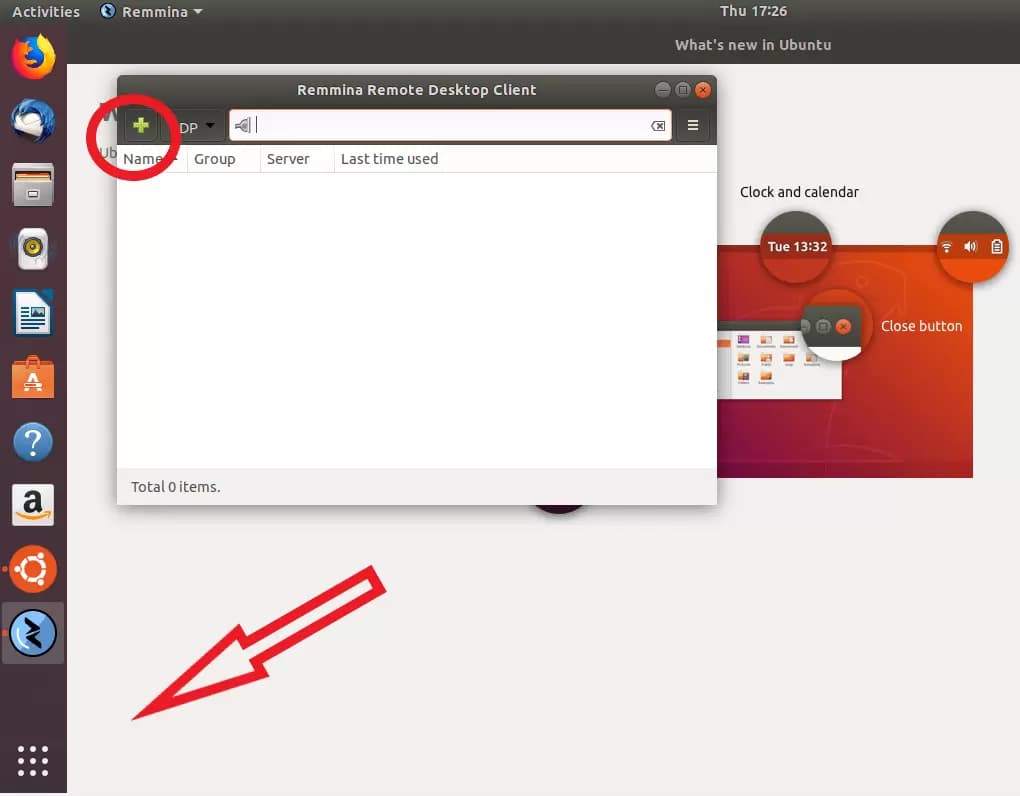
在默认 Ubuntu 布局中,这个免费的内置工具位于左下角的「显示应用程序」按钮下。

为了本指南的目的,我们假设你会经常使用新的 VPS 并希望保存连接设置以供将来使用。

如何连接到 VPS Linux?

Linux Rdp 01

因此,启动 Remmina 后,点击加号创建新的连接配置文件。

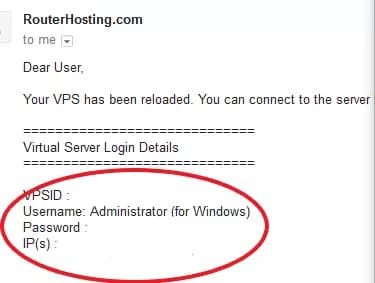
欢迎邮件包含你需要的所有信息: server IP, login (默认情况下始终是「Administrator」),以及 password.

Also Read: 如何在 Android 上通过 RDP 连接到 Windows VPS? 

如果没有收到邮件,请检查一下垃圾邮件文件夹。

Linux Rdp 02

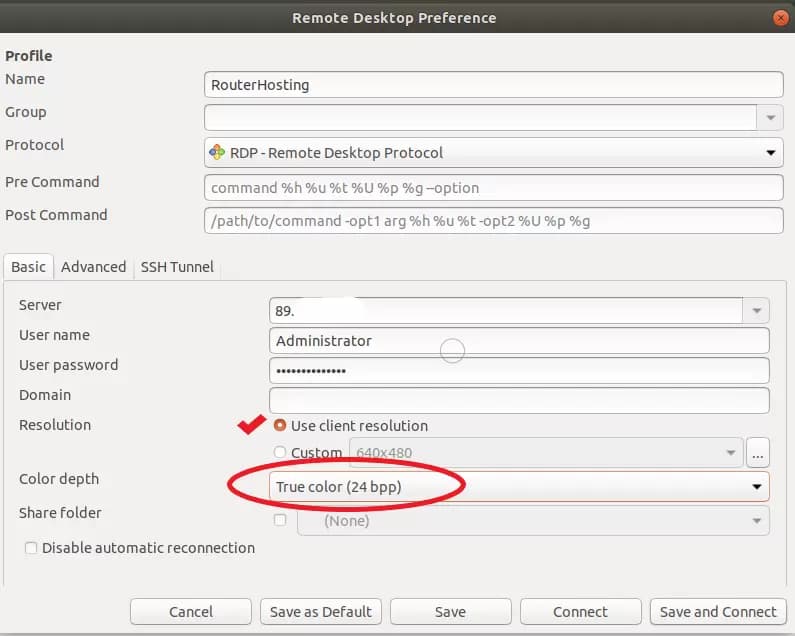
输入这些信息并为新连接命名后,配置文件应该如下所示:

Linux Rdp 03

Make sure to check the checkbox ‘Use client resolution’ and set the color depth to True color (24bit).

然后选择「保存」退出而不连接,或选择「保存并连接」立即连接到您的新 VPS。

Also Read: Linux bashrc 是什么以及如何使用它?

首次连接时,如果出现以下提示,点击「确定」继续。
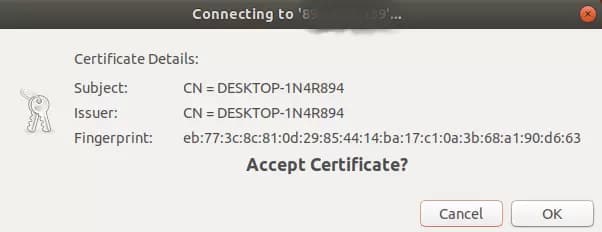
Linux Rdp 04

如果一切正常,你现在已经连接成功!

Linux Rdp 05

按照上述步骤操作,你应该能够连接到你的 Linux VPS。我们力求给出简明扼要的答案。如何从 Windows 连接到 Linux VPS问题。不过,如果你还有其他问题,欢迎留言,我们会很快回复。

Also Read: 在单个服务器上托管多个网站

Note: 点击下方按钮可下载本文的 PDF 版本:

[su_button url="https://cloudzy.com/wp-content/uploads/How-to-Connect-to-a-windows-VPS-From-Linux-1.pdf" target="self" style="default" background="#fac802" color="#2f3856" size="3" wide="no" center="no" radius="auto" icon="" icon_color="#FFFFFF" text_shadow="none" desc="" download="" onclick="" rel="" title="" id="" class=""]下载[/su_button]


Share

博客更新

Keep reading.

安全风险解析:Chrome 远程桌面安全吗?特色图片展示 Google 标志在未来感护盾和挂锁背景上,Cloudzy 品牌标识。
远程访问与工作区

Chrome 远程桌面安全吗?安全风险详解

You searched for Chrome Remote Desktop and found the phrase “security risk” attached to it. That is a fair question to raise, and it deserves a precise answer rather th

Rexa CyrusRexa Cyrus 12 min read
深蓝色科技横幅,展示服务器机架和浮动UI界面,标题为「完整指南 - VDI 与 VM 的区别」,带有 Cloudzy 标志。
远程访问与工作区

VDI 与 VM 有什么区别(2026 年指南)

企业在保护远程员工安全和扩展后端资源上花费巨大,预算不断流失。虚拟机(VM)是一个隔离的计算环境,充当独立的

Rexa CyrusRexa Cyrus 12 min read
AnyDesk 对比 TeamViewer 功能对照图,展示两个平台的并排对比+Cloudzy 标志+品牌口号+描述
远程访问与工作区

AnyDesk vs. TeamViewer:工作原理对比与 2026 年最佳选择

想象一下,你在世界的另一端,急需访问家里或办公室的电脑,但没有办法快速到达。有许多解决方案可

Jim SchwarzJim Schwarz 15 min read

Ready to deploy? From $2.48/mo.

独立云服务,始于2008年。AMD EPYC、NVMe,40 Gbps。14天退款保障。