

如果你想了解什么是 RDP 网关,以及如何在 Windows 服务器上配置它,你需要一份全面指南来解答这个领域的所有问题。
RDP 网关允许你增强 Windows 服务器安全性,让你在众多攻击和安全风险中感到自由。
然而,弱密码、加密方法不当和控制措施不力使得 RDP Gateway 容易受到恶意软件和勒索软件的攻击。
如果你依赖远程桌面访问,我们来添加强大的网络安全控制,尽可能保护你的远程工作安全。

获取即时配置、完整 root 权限和 NVMe 存储的 RDP 服务器。
购买 RDP什么是 RDP Gateway?
RDP 网关是一个远程桌面网关服务器,用于过滤来自外部资源的 RDP 连接。
此网关将优化所有传入的 RDP 访问,将其定向到私有或组织的远程桌面服务器,通过 RDP 来增强网络安全。 安全加密连接.
这个安全防护措施建立点对点远程桌面连接,让你能访问你的系统。
在高性能基础设施上托管你的 Windows 8 环境。
Windows 8 VPS如何在 Windows 服务器上设置 RDP 网关服务器角色?
首先,你需要从内部 CA 生成一个 SSL 证书。
1. 安装证书颁发机构
注意: 使用 Enterprise Admins 组和根域的 Domain Admins 组登录。
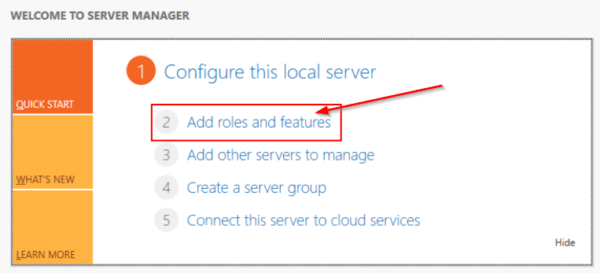
- 打开服务器管理器,然后点击「添加角色和功能」。向导会启动。
- 在"开始前"页面上,点击"下一步"。
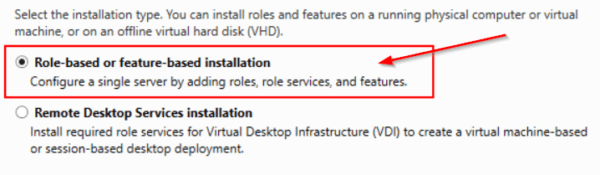
- 在「选择安装类型」中勾选基于角色或功能的安装,然后点击「下一步」。
- 应在"从服务器池中选择服务器"选项页面中检查"从服务器池中选择服务器"选项。
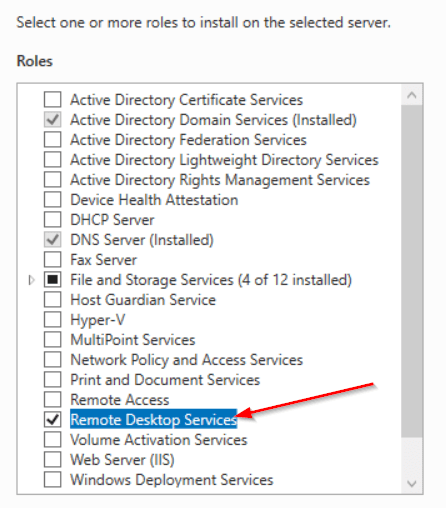
- 在"选择服务器角色"中选择"Active Directory Certificate Services",然后点击"添加功能",再点击"下一步"。
- 阅读关于 Active Directory Certificate Services 的信息,然后点击下一步。
- 点击安装以验证安装
- 安装完成后,在目标服务器上点击配置 Active Directory 证书服务。
- 阅读企业管理员组账户的凭证,然后点击下一步。
- 在 Role Services 中点击 Certification Authority,然后点击 Next
- 在"设置类型"页面上选择"验证 Enterprise CA",然后单击"下一步"
- 确认根 CA,然后点击下一步。
- 在私钥页面确认选择"创建新私钥",然后点击下一步。
- 点击配置以应用并关闭选项。
- 在密码学 CA 页面上,保留 CSP 的默认设置(以及哈希算法 (SHA2)),并考虑密钥长度字符
- 保持默认设置 2048,然后点击「下一步」。
- 在 CA 名称页面上,输入 CA 的通用名称
- 请确保 CA 名称与您的命名规范和用途一致,然后点击 下一步。
- 在「有效期」页面的「指定有效期」部分,输入数字并选择时间单位。然后点击「下一步」。
- 在 CA Database 页面中指定数据库位置。选择证书数据库和证书数据库日志的文件夹位置,然后点击 Next。
通过服务器管理器安装远程桌面网关角色服务
- 进入服务器管理器,安装远程桌面服务角色
- 设置完成后,打开远程桌面网关管理器
- 在策略部分中,创建你的授权策略
获取即时配置、完整 root 权限和 NVMe 存储的 RDP 服务器。
购买 RDP2. 如何配置连接和授权策略?
- 进入远程桌面网关管理器,指定允许的用户
- 展开左侧面板"名称>策略>连接授权策略。"
- 然后从窗口的右侧部分,"创建新策略>向导"。
- 一个"新建授权策略向导"窗口出现
- 继续选择"为远程桌面连接授权和远程桌面资源授权创建策略"选项。
- 然后单击"下一步"。
- 现在,为你的连接授权策略输入一个合适的名称
- 然后选择合适的身份验证方式 — 密码。
- 注意:您可以点击"添加组"按钮,添加组以连接此 RDP 网关。
- 在群组选择窗口中点击"更多选项"
- 点击"搜索"并找到"域的管理员",然后点击确定
- 选择"为所有客户端设备启用设备重定向",然后单击"下一步"。
- 指定超时、停机时间和会话时间值,然后点击"下一步"。
- 点击"下一步"完成设置
- 输入策略名称,然后点击"下一步"
- 下一步是设置群组成员资格,跳过此步骤并点击"下一步"。
- 选择需要进行RDP访问的用户组,然后点击"概述"。
- 选择"另外"
- 在打开的窗口中,点击"搜索"按钮,然后在结果窗口中找到"域控制器"
- 点击"确定"
- 检查所选项目,然后单击"确定"。
- 点击"下一步"
- 选择"仅允许连接到端口 3389"。
- 点击"完成"
- 通过点击「Close」按钮确认策略创建
- 点击"确定"
3. 如何配置 RDP 客户端与 RDP 网关通信?
要配置 RD Gateway 角色,请按照以下步骤操作:
- 前往服务器管理器,然后选择远程桌面服务。
- 在左侧面板中转到"服务器",右键单击服务器名称,然后选择"RD Gateway Manager"。
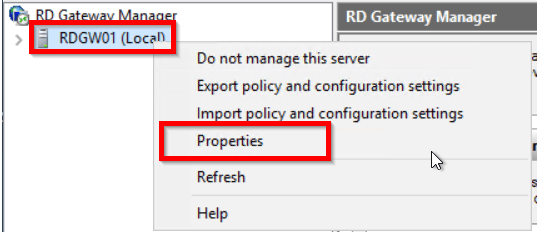
- 在RD Gateway Manager窗口中,右键单击您的网关名称,然后选择"Properties"。
- 打开 SSL 证书选项卡,选择"导入证书",然后点击浏览并导入证书。
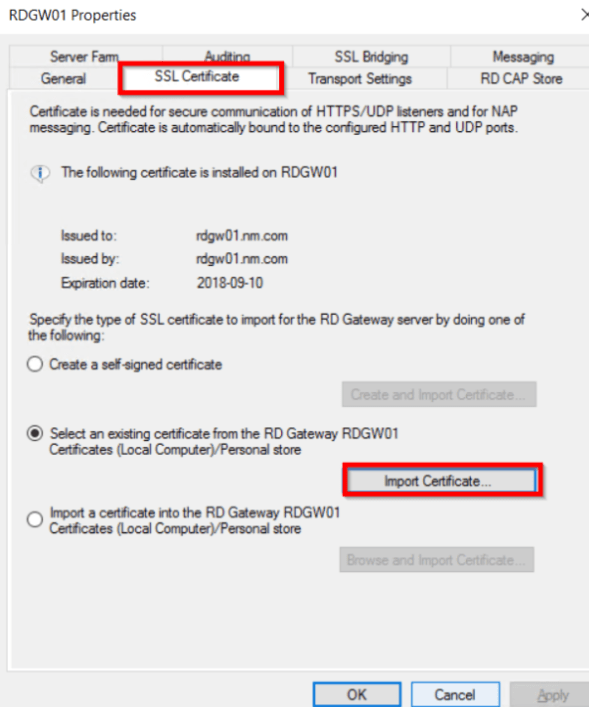
- 将 SSL 证书导入客户端设备,以建立 Windows 10 远程桌面网关连接。
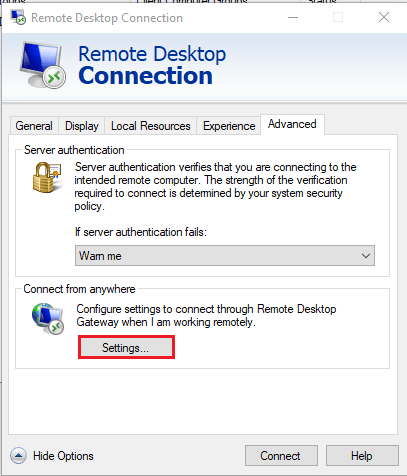
- 在客户端,运行"mstsc",然后切换到"高级"选项卡,点击"设置"以配置网关。
- 输入外部 RD Gateway 服务器的完全限定域名(FQDN)。
- 导入证书和私钥后,证书的属性将显示出来。
使用 RDP Gateway 的 5 个关键优势
使用 RDP 网关有几个优势。我们为你列出其中最重要的 5 个。
1. 在 RDP 网关上提供证书认证和 MFA
多因素身份验证和证书认证对 RDP 网关的效率和性能至关重要。UserLock MFA 可以实现这一点;所有通过网关的 RDP 连接都可以触发 MFA 验证。你也可以选择仅对来自外部网络的 RDP 连接进行 MFA 挑战。
2. 无需 VPN
RDP 客户端可以在没有 VPN 访问权限的情况下连接到 RDP 服务器。这意味着 RDP 网关为企业提供了安全的访问能力。这样,RD 网关无需将公司网络与 VPN 连接,只允许访问特定资源。
3. 建立稳定的连接
SSL 证书通过使用加密算法保护互联网上的数据传输,确保连接安全。这是防止黑客攻击和入侵的可靠方式。
另请阅读: 关于 Chrome 远程桌面的一切你需要知道的
4. RDP 网关作为 Windows 服务器中的服务提供
RDP 网关的优势在于它是 Windows 服务器上的内置服务,你可以直接使用,无需花费过多时间和精力。
5. 一条连接,多种用途
在远程桌面服务器访问中,一个连接就是一切。它充当接口,使你的员工或其他客户端可以同时连接到他们的工作区,并具有高安全性的远程访问选项。
我怎样购买 RDP?
涉及远程桌面访问和网关时,很少有人能真正帮助你考虑选择最佳 RDP 服务器时需要注意什么。
现在,你可以 购买便宜的 RDP 提供高效的远程桌面服务器解决方案,具有高服务器安全性和资源隔离。
好处是我们提供多种计划,不同的资源配置适应各种预算。这让你更容易找到符合需求的计划。如果你没有找到合适的,可以随时联系我们咨询定制方案。
获取即时配置、完整 root 权限和 NVMe 存储的 RDP 服务器。
购买 RDP结语
所以,"什么是 RDP 网关驱使我们进行这项深入的探索,了解其配置和优势。
由于 Microsoft RDP 网关是 Microsoft Windows 最重要的功能之一,它使用户能够控制互联网上的远程物理机或虚拟机。许多专业公司都在运行 RDP 网关,以通过安全连接提供远程资源访问。
讨论
评论
登录后参与讨论。