

如果您是转售商或最终用户,使用 Web Host Manager (WHM) 或控制面板(cPanel),你可能会遇到无效许可证的错误。
这些错误通常是由于许可证文件过期或服务器/账户主 IP 地址变更引起的,但你可以在几秒钟内解决它们。
本文将一步步指导你如何解决无法读取许可证文件错误。 那就别浪费时间了,我们现在就开始吧!
cPanel/WHM 许可证文件错误是什么?
假设您是一位使用 WHM 的系统管理员,或者是通过 cPanel 管理控制面板的用户,您可能会看到诸如"许可证文件已过期"或"无法读取许可证文件"之类的错误提示。
根据具体情况,错误信息可能类似于上文提到的错误。简单来说,许可证错误表示您的虚拟主机控制面板无法识别该许可证。WHM 无法读取许可证文件与 cPanel 无法读取许可证文件的原因相同。

借助搭载 AMD EPYC 的 cPanel VPS,轻松管理网站。
60 秒内部署 cPanel为什么我无法读取许可文件 cPanel?
导致 cPanel/WHM 许可证错误的主要原因有三种。你会看到这条消息,是因为:
- 许可证已过期;
- 许可证文件已过期;
- 中央 IP 服务器已更改。
那怎么解决呢?
继续阅读,别急!🙂
如何解决无法读取许可证文件错误?
步骤 1
首先,要解决 cPanel 许可证错误,你需要确认自己拥有服务器的主 IP。查找 cPanel IP 地址,运行以下命令:
curl -w '\n' -s http://myip.cpanel.net/v1.0/
curl -w '\n' -s http://myip.cpanel.net:2089/v1.0/
步骤 2
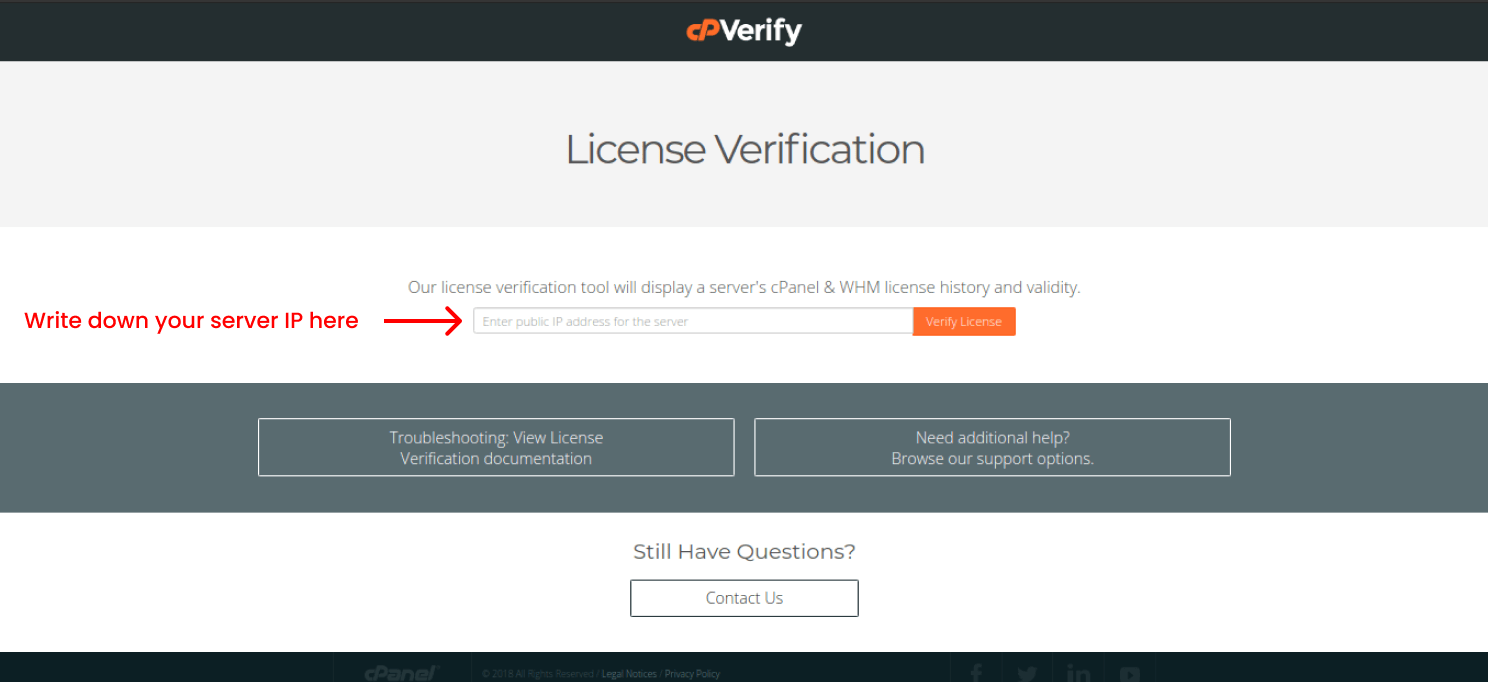
找到 cPanel 服务器的 IP 后,前往 这个地址 来检查您的许可证状态。输入您在上一步找到的服务器公网 IP 地址到占位符中,然后点击 验证许可证。这样你就能查看许可证历史记录。 完成后,你可以看到你的 cPanel/WHM 许可证文件记录。
步骤 3
从 cPanel 商店购买许可证后,你需要确认它已激活。请检查你的许可证状态,确保它处于活跃状态,然后继续按照指南进行。如果许可证已激活,你可以进行下一步。
第4步

打开你的安全外壳 (SSH)。输入服务器 IP 地址和端口号。使用用户名 "root" 登录你的账户,然后输入 root 密码。完成后,输入
/usr/local/cpanel/cpkeyclt
以更新许可证。
您现在应该会看到"更新成功"的提示,这表示问题已解决。通常情况下,从cPanel获取许可证后,应按照此方式完成激活和更新。
第5步
如果上一步没有解决问题,请尝试编辑 ""resolv.conf” 文件。 要编辑该文件,输入以下命令:
vim /etc/resolv.conf
然后输入:
nameserver 8.8.8.8
nameserver 8.8.4.4
你可以使用任何文本编辑器;我们使用 Vim 目前是这样。不过,如果你用的是 Linux 且刚开始接触 Vim 编辑器,你需要按 Esc,然后"Shift + ;" 并输入“我请求 保存并退出。
如遇其他问题,建议联系 cPanel 客户服务 因为有时候问题太敏感,不能在网上分享。
推荐阅读: 最佳免费 cPanel 杀毒软件选项
结语
要访问您的账户,需要确保 cPanel 许可证文件处于激活状态。如果未激活,通常有两个主要原因导致此问题。IP 地址变化和许可证过期是引发 cPanel 许可证错误的两个常见原因。
此外,您可能因为许可证已被停用或已过期而遇到此问题。总之,您可以使用上述提供的解决方案轻松修复 cPanel 或 WHM 的许可证问题。在上述步骤中,我们尽力涵盖了修复"无法读取许可证文件"错误的各种方法,按照操作即可顺利解决问题。
常见问题
什么是无法读取许可证错误?
cPanel 许可证错误表示您没有访问账户所需的许可证,这与 WHM 许可证错误的情况类似。
是什么导致了 cPanel 许可证文件错误?
cPanel/WHM 许可证文件错误通常由两个主要原因引起:许可证过期或版本过旧,或者服务器主 IP 地址变更后,控制面板会阻止你登录账户。
无法读取许可文件出错或收到 cPanel,该怎么办?
不用担心。首先检查一下 cPanel 的 网站 检查您的许可证状态。其次,打开 SSH 并进入 /usr/local/cpanel/cpkeyclt 来更新 cPanel 许可证。最后,喝杯咖啡,尽情享受。
如何避免账户许可证文件错误?
从 cPanel 网站查看许可证文件,确保一切正常运作。另外,保持账户主 IP 的稳定性非常重要。
我的问题还没解决。我应该怎么办?
此时,我们建议你联系 客服 因为每个人面对的问题都不一样,我们会帮你找到解决方案。



讨论
评论
登录后参与讨论。