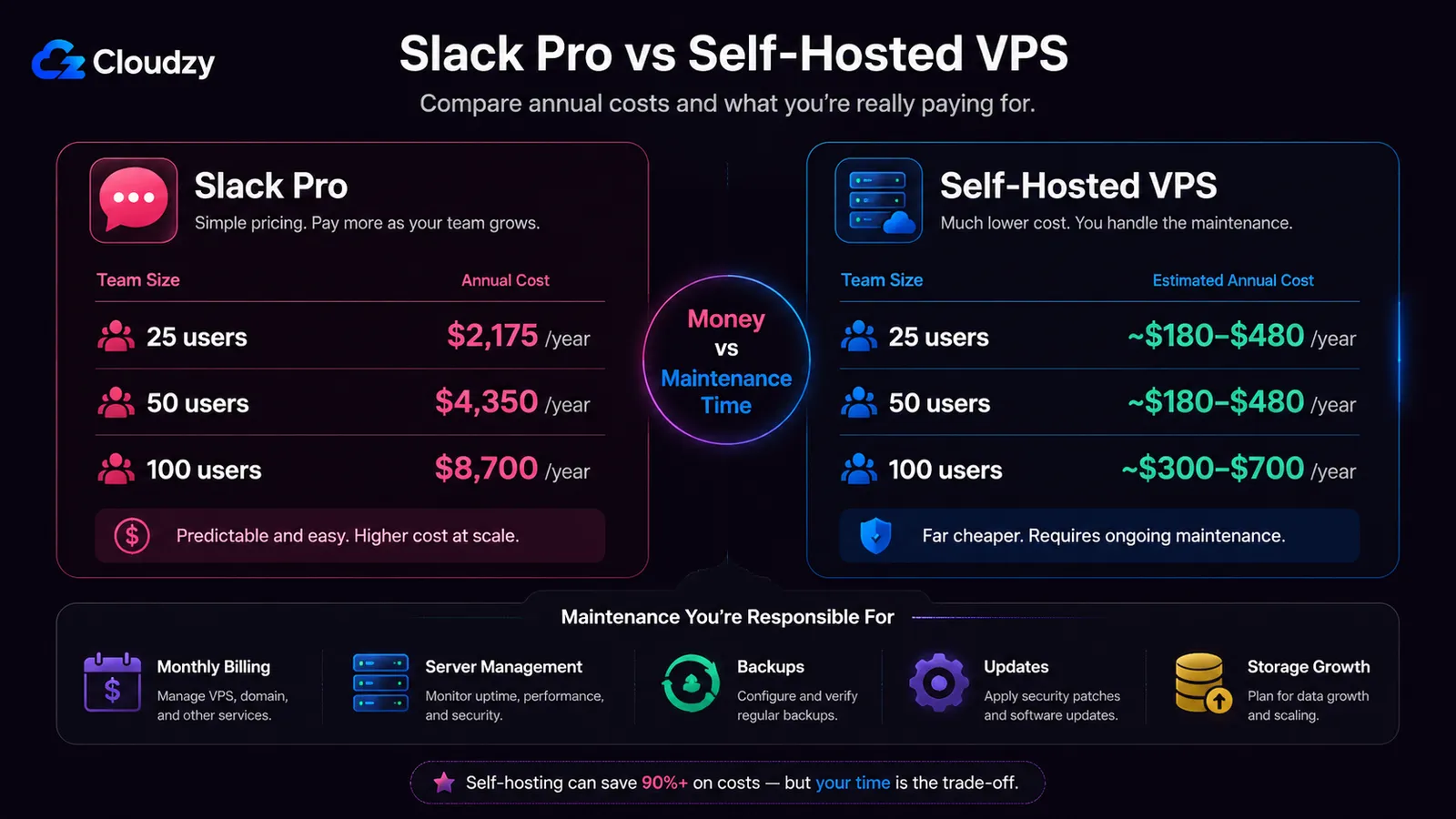
Slack Pro costs $7.25 per user per month on the annual plan. For a 50-person team, that is $4,350 a year. The same team can often run a self-hosted alternative on a generic VPS in the $15 to $40 per month range, depending on storage, backups, and expected traffic. Self-hosting also brings setup time, updates, storage planning, backups, and push-notification limits.
This calculation is not new. Self-hosted team chat has been a viable category for years. What changed is which option you should pick.
In October 2025, Mattermost shipped v11 after announcing changes to its free offerings, and that altered the recommendation most existing comparison articles still give. The community reaction was sharp. Reading those articles in 2026 means reading advice that no longer applies cleanly.
This comparison focuses on what changed, what still works, and where each option becomes painful in actual use.
简短版本
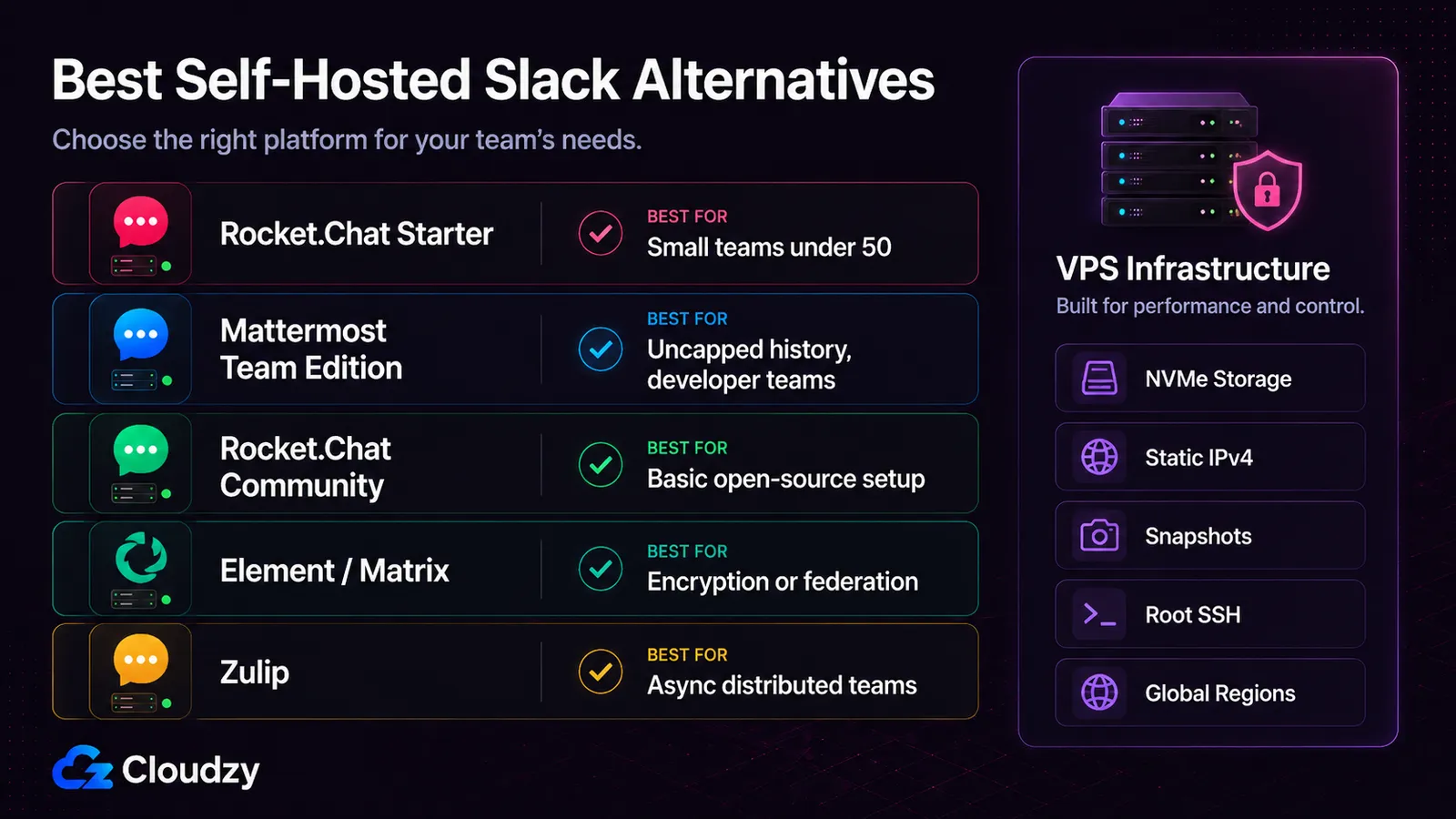
For small teams in 2026, Rocket.Chat Starter is the easiest free self-hosted Slack alternative if the 50-user ceiling works for you. Rocket.Chat Community is still open source and self-hosted, but its current limits mean it should not be treated as the clean default for every 5-to-200-person team.
- Pick Rocket.Chat Starter if you are under 50 users and want the simplest free Rocket.Chat path.
- Pick Rocket.Chat Community if you have outgrown Starter and can live with basic capabilities, a 100-concurrent-user ceiling, and the 10,000-push monthly cap.
- Pick Mattermost Team Edition if you want a developer-friendly stack, no message cap, and can live without SSO under the 250-activated-user limit.
- Pick Element/Matrix if encryption or federation is the main reason you are leaving Slack.
- Pick Zulip if your team works asynchronously and can commit to its topic-based chat model.
- Budget for setup time, not just server cost. Self-hosting is much cheaper than Slack, but it adds maintenance, updates, and push-notification tradeoffs.
Slack confirms three tiers worth caring about on its official pricing page: Free, Pro at $7.25 per user per month on annual billing, and Business+ at $15. At Pro, the annual cost scales linearly:

The infrastructure cost does not scale linearly with headcount the way Slack does, but it can still rise with media uploads, backups, database growth, monitoring, and push-notification needs.
A 2 vCPU, 4 GB RAM VPS is a safer starting point for small Rocket.Chat or Mattermost deployments, though Rocket.Chat also needs MongoDB planning and file storage decisions. Going from 25 to 100 users does not automatically multiply the hosting bill by four. In many cases, it only moves you up one server tier.
That said, the cost case is not the whole argument. Self-hosting costs time. Initial setup, security patches, backups, mobile push configuration, monitoring, and the occasional restart at an inconvenient hour are part of the trade.
Teams that value Slack's reliability and integration ecosystem more than data ownership and lower monthly cost may still decide Slack is the better fit. The point of running the math is to see the trade clearly, not to make the decision look simpler than it is.
Section takeaway: At 50 users, self-hosting can be far cheaper than Slack Pro, but the trade is money versus maintenance time. Decide which cost is easier for your team to carry.
What Changed in October 2025: The Mattermost v11 Story

The intro already covered the short version: Mattermost is still usable, but the free path now needs more care than it used to.
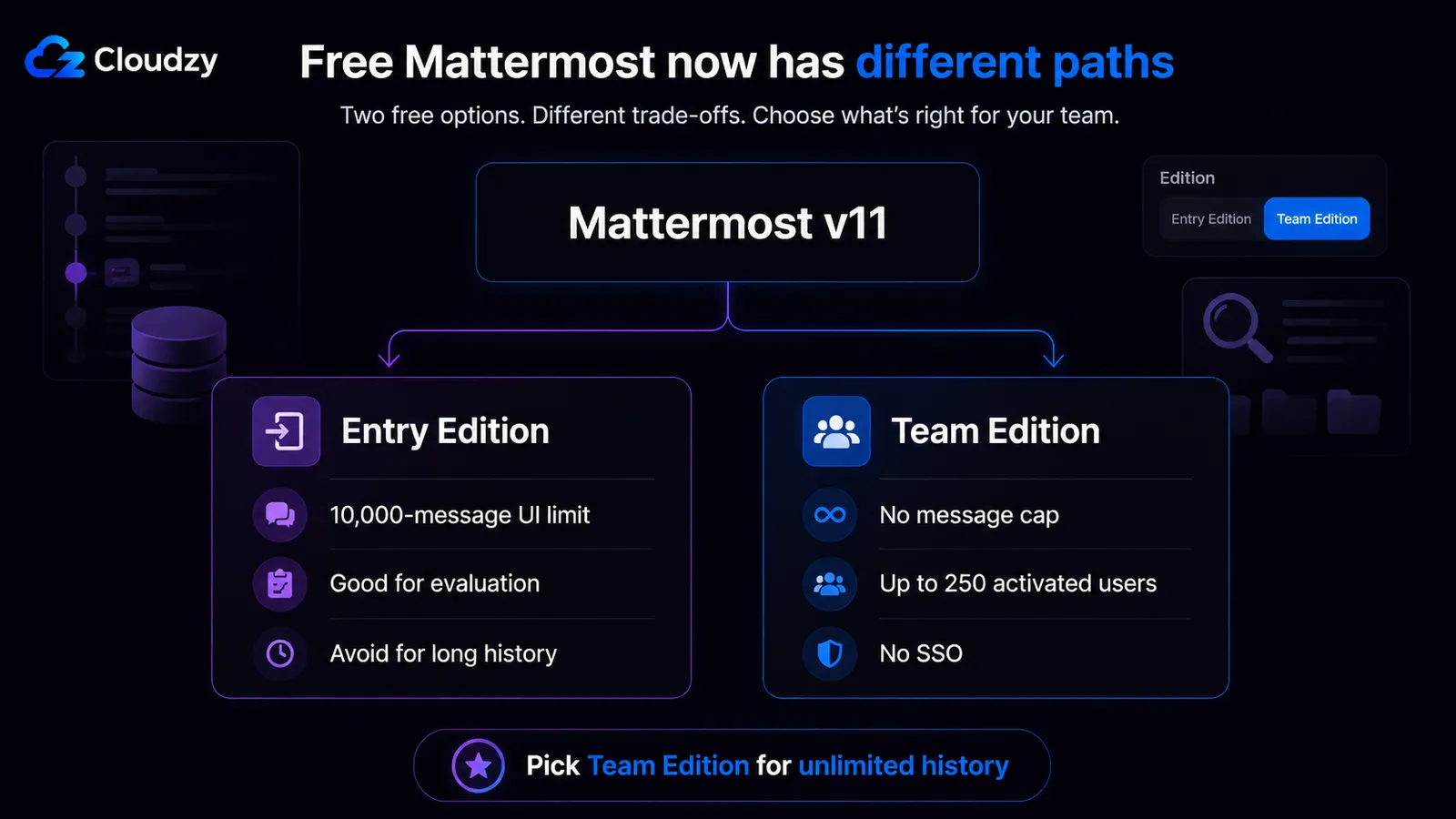
Mattermost v11, released in October 2025, changed the default free experience. Enterprise Edition without a paid license now runs as Entry Edition, which includes many Enterprise Advanced features but limits visible message history to 10,000 messages server-wide. Older messages remain in PostgreSQL, but they are not searchable or viewable in the UI under Entry.
For teams with years of channel history, that means loss of UI and search access unless they switch editions or upgrade. That is why the reaction across Mattermost and self-hosting discussion threads was sharp. On Hacker News, a thread tracking the change collected comments calling it a "rug pull." On Mattermost's own community forum, a thread titled "A Critical Response to Mattermost's Recent Changes" drew users who criticized the Entry Edition shift as a betrayal of open-source expectations.
Users who ran Mattermost to avoid SaaS-style limits saw the change as a break from the product's older self-hosted promise.
Now the asterisk that most articles miss.
Mattermost Team Edition still exists. It is MIT-licensed, has no message cap, and supports up to 250 activated users. The catch is that Team Edition is now a separate free binary that teams have to choose deliberately. If you install the wrong edition and accept the defaults, you can end up with the 10,000-message Entry limit.
So the practical advice is simple: Mattermost is still a valid Slack alternative, but do not treat "free Mattermost" as one thing anymore. Pick Team Edition if unlimited history matters. Pick Entry only if the 10,000-message UI limit is acceptable for your team.
专业提示: A Team Edition to Team Edition upgrade should keep you on Team, but older Enterprise Free/E0-style installs can land on Entry. Check the edition before and after upgrading.
Section takeaway: Mattermost v11 did not kill the free option, but it made edition choice much more important. Team Edition is the safe free path for unlimited history.
Rocket.Chat: Strong Under 50 Users, Less Automatic After That
Rocket.Chat is still one of the easiest Slack-like self-hosted tools to deploy. The Node.js plus MongoDB stack is heavier than Mattermost's, but at small scale this rarely matters. The important detail is that Rocket.Chat's free path now has two different options, and they are not interchangeable.
The free tier picture has two layers worth understanding.
The Starter plan is free, but capped at 50 users. It removes the push notification limit, adds read receipts, and includes a broader app selection than Community. The catch is the hard 50-user ceiling. Once your team crosses it, you are pushed toward another path.
Community Edition is the open-source version. It gives you self-hosting and no visible message-history cap, but it is not the full feature set. The main constraints are basic capabilities, limited support, fewer app/integration options, and the 10,000-push monthly cap through Rocket.Chat Cloud's gateway.
The gateway also requires registering the server with Rocket.Chat Cloud, which is a workspace-level setting but does mean the server has to phone home for push to function.
专业提示: If your team is under 50 and likely to stay there, Rocket.Chat Starter is the easier free path. If you are likely to cross 50 within 12 months, compare Community, a paid Rocket.Chat plan, Mattermost Team Edition, and Zulip before committing.
VPS sizing for Rocket.Chat:
- Small test or very light team: 2 vCPU, 4 GB RAM is a safer starting point.
- Small production team: plan for Rocket.Chat plus MongoDB, backups, and file storage, not only the app container.
- Storage grows mostly from uploads. Budget 20 to 40 GB per year as a rough example for an active 50-person team, and more if your team shares video or large files.
Rocket.Chat is also available in our Marketplace as a one-click install, so you can skip the manual setup and run it on a VPS with NVMe storage for uploads, a static IPv4 address for predictable DNS setup, and CPU and RAM you can scale up for growing team chat workloads.
Limitations to call out. Rocket.Chat's integration ecosystem is useful but smaller than Slack's. The mobile apps work, but push notification reliability is a known pain point if your team relies on after-hours alerts. Iframe-heavy integrations with third-party SaaS feel less polished than the Slack equivalents. None of these are dealbreakers for most teams, but they are real.
Section takeaway: Rocket.Chat Starter is a strong free pick for teams under 50. Community Edition is still useful, but it comes with enough limits that larger teams should compare it against Mattermost Team Edition, Zulip, and paid Rocket.Chat plans before choosing.
Mattermost: Still a Real Option If You Pick the Right Edition
Mattermost is still worth picking under the right conditions. The Go and PostgreSQL stack is more resource-efficient than Rocket.Chat's, the UX is keyboard-driven and developer-friendly, and the developer-integration story is strong.
A 2 vCPU, 4 GB RAM VPS can support a small Mattermost deployment comfortably, though actual capacity depends on active users, file uploads, integrations, and database growth. That is good efficiency for the price.
The decision tree is straightforward once you know the editions:
Entry Edition: v11 free commercial default, 10,000-message cap, broader Enterprise Advanced features with usage limits, and best suited for small teams or evaluation. Avoid if you need unlimited message history.
Team Edition: MIT license, no message cap, up to 250 activated users, no SSO. The "free Mattermost" most long-time users mean. Requires manual install or a deliberate switch from Entry.
Professional: paid plan for teams that need SSO, retention controls, support, and enterprise features for a regulated environment.
For a developer-heavy team that already runs GitLab self-hosted, Mattermost's tighter integration with that ecosystem is a genuine reason to pick it over Rocket.Chat. CI/CD integrations, incident response workflows, and GitLab/GitHub connections are stronger reasons to pick Mattermost.
For context on the GitLab side of that equation, see our companion post on Best Self-Hosted GitLab Alternatives.
Mattermost is available in our Marketplace as a one-click install, so you can skip the manual setup and run it on a VPS with NVMe SSD storage, a static IPv4 address, and CPU and RAM you can scale up for heavier team chat workloads.
If you go that route, check which edition you end up on before upgrading anything past v11, and follow the official forum guide to switch to Team Edition if you need uncapped history.
Section takeaway: Mattermost is still viable, especially for developer teams, but the edition decision is now load-bearing. Pick Team Edition deliberately if you want unlimited history.
Element (Matrix) and Zulip: The Other Two

Most comparison articles either oversell or skip these two. Both deserve a clear-eyed treatment.
Element (Matrix)
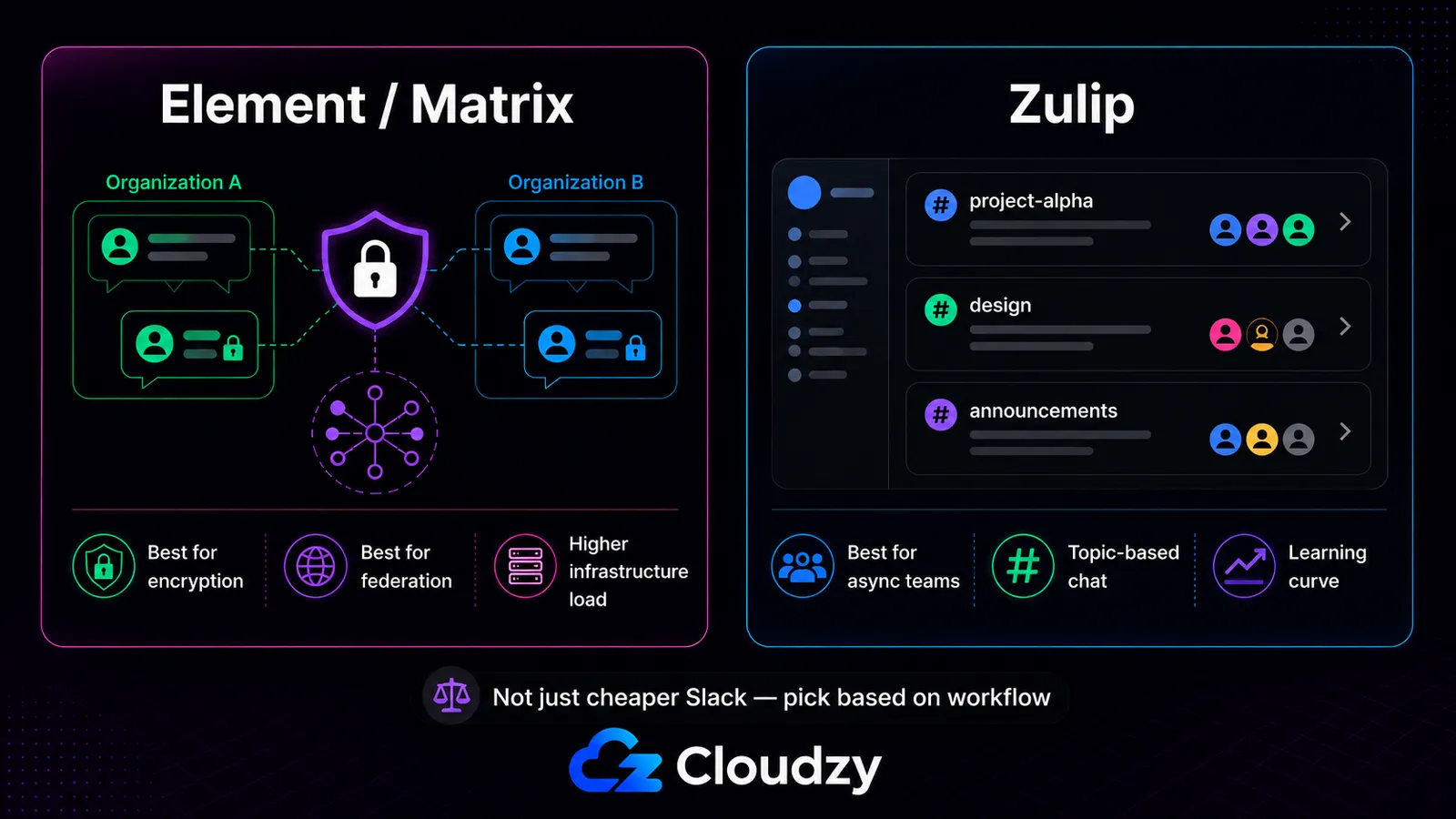
Element is the reference client for the Matrix protocol. It runs on Synapse, the most common Matrix homeserver. Its strongest argument is privacy. End-to-end encryption is real, audited, and the default for direct messages and private rooms. Federation across organizations is a first-class feature, which is genuinely useful for cross-company collaboration where neither side wants to live in the other's tenant.
The cost is operational. Synapse is heavy on resources. PostgreSQL tuning is required at modest scale. Media storage grows quickly because federated rooms can create more local database and media load than teams expect.
A 50-person team with active federation and media sharing can burn through tens of gigabytes quickly, especially if users join busy federated rooms and share attachments often. Federation amplifies CPU and memory consumption in ways that surprise teams who size for the local user count alone.
Sizing recommendation: for a raw Synapse deployment, start at 4 vCPU and 8 GB RAM, with 16 GB safer for active federation. Full Element Server Suite deployments can require much larger infrastructure, so do not treat this as an ESS sizing guide.
Pick Element if your team genuinely needs end-to-end encryption or cross-organization federation. Skip it if your reason for leaving Slack is "Slack is expensive." Element is not the right tool for that problem.
Zulip
Zulip is the underrated entry on this list. Its core difference from Slack and the Slack-likes is the topic-threaded model. Every channel has named topics, and conversations stay structured even when participants reply hours or days later. Teams that adapt to the topic model report it improves async work meaningfully. Teams that try to use Zulip like Slack get frustrated and bounce.
Zulip is open source, has no message cap, no user cap, and self-hosting is well-documented. The UX has a learning curve. The mobile apps are functional but not the strongest in the category.
Pick Zulip if your team is distributed, async-heavy, and willing to invest a week into adapting to the topic model. Skip it if your team chats in real time most of the day.
Section takeaway: Element is the right pick when you need encryption or federation specifically; Zulip is the right pick for async-heavy distributed teams; both are poor fits for "we want a cheaper Slack."
One Quick Honest Note on HumHub
HumHub appears on some "Slack alternative" lists. It is not a Slack alternative. HumHub is a private social network and intranet platform, closer to an internal Facebook or an employee community forum. It does some of those jobs well.
It does not do team chat in any way that compares meaningfully to Slack, Rocket.Chat, or Mattermost. If a list told you to look at HumHub for team messaging, that list is wrong about HumHub's category.
Push Notifications: The Self-Hosted Tradeoff

Mobile push is one of the easiest parts to underestimate when comparing self-hosted team chat with Slack. It is also one of the areas where Slack still works more smoothly in day-to-day use.
For the official mobile apps, Rocket.Chat and Mattermost usually route push notifications through vendor-managed gateways. Apple and Google's push services rely on app-specific credentials, so a normal self-hosted server does not simply send mobile pushes by itself.
You can change that setup with a compatible push service or a custom mobile-app path, but that is a larger engineering job.
- Rocket.Chat Community: 10,000 pushes per month via Rocket.Chat Cloud's gateway. Past the cap, Rocket.Chat stops sending push notifications until the next cycle. Running your own push path is technically possible, but it usually means building and maintaining a white-labeled mobile app.
- Mattermost free: TPNS, the Test Push Notification Service, is documented by Mattermost as not recommended for production and does not offer production-level SLAs. Paid deployments can use HPNS, the Hosted Push Notification Service.
- Element/Matrix: Push goes through a Matrix push gateway, such as Sygnal. This is less of a hard cap issue, but it still requires explicit configuration and adds another piece of infrastructure to maintain.
Practical implication: if your team relies on mobile push for after-hours alerts, on-call rotations, or simply expects messages to wake your phone reliably, factor this in. Slack is more reliable here without extra work. Self-hosting closes much of the gap, but not all of it.
Section takeaway: Mobile push on self-hosted chat is workable, but the free path usually comes with caps, non-production gateways, or extra infrastructure.
Which One Should You Actually Pick
A short decision matrix:
- Small team under 50 users: Rocket.Chat Starter.
- Open-source Slack-like setup with uncapped history and no SSO need: Mattermost Team Edition.
- Basic open-source Rocket.Chat setup with capped push and limited capabilities: Rocket.Chat Community.
- Privacy or federation requirements: Element on Synapse.
- Distributed async-first teams: Zulip.
Typical VPS sizing guide:
- Mattermost small team: 1 to 2 vCPU, 2 to 4 GB RAM.
- Rocket.Chat small team: start around 2 vCPU and 4 GB RAM, with MongoDB and file storage planned separately.
- Element/Synapse with active federation: start higher, often 4 vCPU and 8 to 16 GB RAM for raw Synapse, and more for full Element Server Suite.
- Zulip: depends heavily on message volume and storage, but small teams can start in the same general range as Mattermost.
As mentioned earlier, Rocket.Chat and Mattermost are both available in Cloudzy's Marketplace as one-click apps.
That means you can skip the manual install, then run either service on a VPS with:
- NVMe 存储 for faster uploads, message search, and shared files.
- DDR5 RAM and dedicated vCPUs for heavier team chat workloads.
- 静态 IPv4 for cleaner DNS setup and stable access.
- Root SSH 访问 for server-level control and troubleshooting.
- 快照 for safer upgrades, plugin testing, and rollback points.
- 40 Gbps networking for busy teams, file sharing, and smoother remote access.
- 13 global regions for lower latency across distributed teams.
- 全天候支持 if setup, access, or server-side issues get in the way.
You also get a 14 天退款保证 window, so you can test Rocket.Chat, Mattermost, and the VPS itself before making the final call.
For broader context on running self-hosted infrastructure on a VPS, see our companion post on 7 Self-Hosted Cloud Platforms With A Web UI.
结论
For small teams under 50 users in 2026, Rocket.Chat Starter is the easiest free self-hosted Slack-like option. For teams that want open-source control, uncapped history, and no SSO requirement, Mattermost Team Edition and Zulip deserve closer comparison.
Rocket.Chat Community is still useful, but its capability and push-notification limits make it less automatic than older comparisons suggest.
Element is the right pick for encryption or federation. HumHub is not on this list. The cost gap versus Slack at 50 users is still large, but self-hosting trades dollars for setup and maintenance time, and that trade is not free.
Pick the option that matches your team's profile, run it on a VPS sized for your user count, and budget a few hours for the initial setup. This is a 2026 snapshot. Vendor pricing, free-tier limits, and edition defaults can change sharply, so re-check the official docs every 12 to 18 months.
常见问题
Is There a Completely Free Self-Hosted Slack Alternative With Unlimited Message History?
Yes, but not all in the same way. Mattermost Team Edition is free, uncapped in messages, and capped at 250 activated users. Zulip has no message or user cap. Rocket.Chat Community has no visible history cap, but has push and capability limits.
What Changed in Mattermost v11 and Is Mattermost Still a Good Option?
Mattermost v11, released in October 2025, made Entry Edition the default free commercial path. Entry limits visible history to 10,000 messages server-wide. Team Edition still exists, with no message cap, up to 250 activated users, and no SSO.
How Much Does It Cost to Run a Self-Hosted Slack Alternative for 50 People?
A small self-hosted team chat setup often lands around $15 to $40 per month for the VPS before backups, storage growth, and admin time. Slack Pro for 50 users is $4,350 per year on annual billing.
What VPS Size Do I Need for Rocket.Chat?
Do not start from 1 vCPU and 2 GB RAM as a comfortable default. For a small Rocket.Chat setup, 2 vCPU and 4 GB RAM is safer, with MongoDB, backups, file storage, and push usage planned separately.
Can I Get Push Notifications Working Reliably on a Self-Hosted Slack Alternative?
Yes, with caveats. Rocket.Chat Community has a 10,000-push monthly cap. Mattermost free uses TPNS, which is not recommended for production. Element/Matrix needs a push gateway such as Sygnal. Slack remains smoother here with less setup.
Is Element/Matrix a Good Slack Replacement?
Usually no for simple cost savings. Element makes sense when you need end-to-end encryption or federation. Synapse brings heavier resource use, PostgreSQL tuning, and fast-growing media storage, so teams leaving Slack mainly for cost usually get an easier path elsewhere.