
When the security firm RedAccess went looking for apps built with AI coding tools and published on those tools' own hosting, it found more than 5,000 with virtually no security or authentication. Among the screens it shared with Wired were "assorted sales and financial records from a variety of other companies." AI-built apps for finance teams can end up on the same kind of open address, with the ledger, payroll and unannounced results behind it.
Replit's CEO, Amjad Masad, answered that "Public apps being accessible on the internet is expected behavior." He is right about the mechanism. In my reading, the exposure came from a visibility setting and a skipped review, and both sit within reach of the person who built the tool.
TL;DR
- An AI-built finance tool can leak data through six deployment mistakes, each within the builder's reach: a public link, passwords and keys left in code or chat history, admin-level database access, posting to the books with no second approver, data sent to outside services, and calculation changes nobody recorded.
- Each mistake has a fix, most of them applied through the same AI tool that built the app, and a plain check that proves the fix held, such as a write the database refuses or an old password that no longer works.
- Keep a finance tool on a private network by default, add company sign-in when people outside finance need it, and hand it to IT when it posts to the ledger without a second approver, touches card data or feeds numbers into SOX-scoped financial statements.
- The server region determines where the app's primary VPS storage sits, but backups, logs and third-party services can create copies elsewhere; whether the overall setup complies is a separate question. Take the frameworks for your region to your compliance team.
The Deployment Mistakes That Leak Financial Data
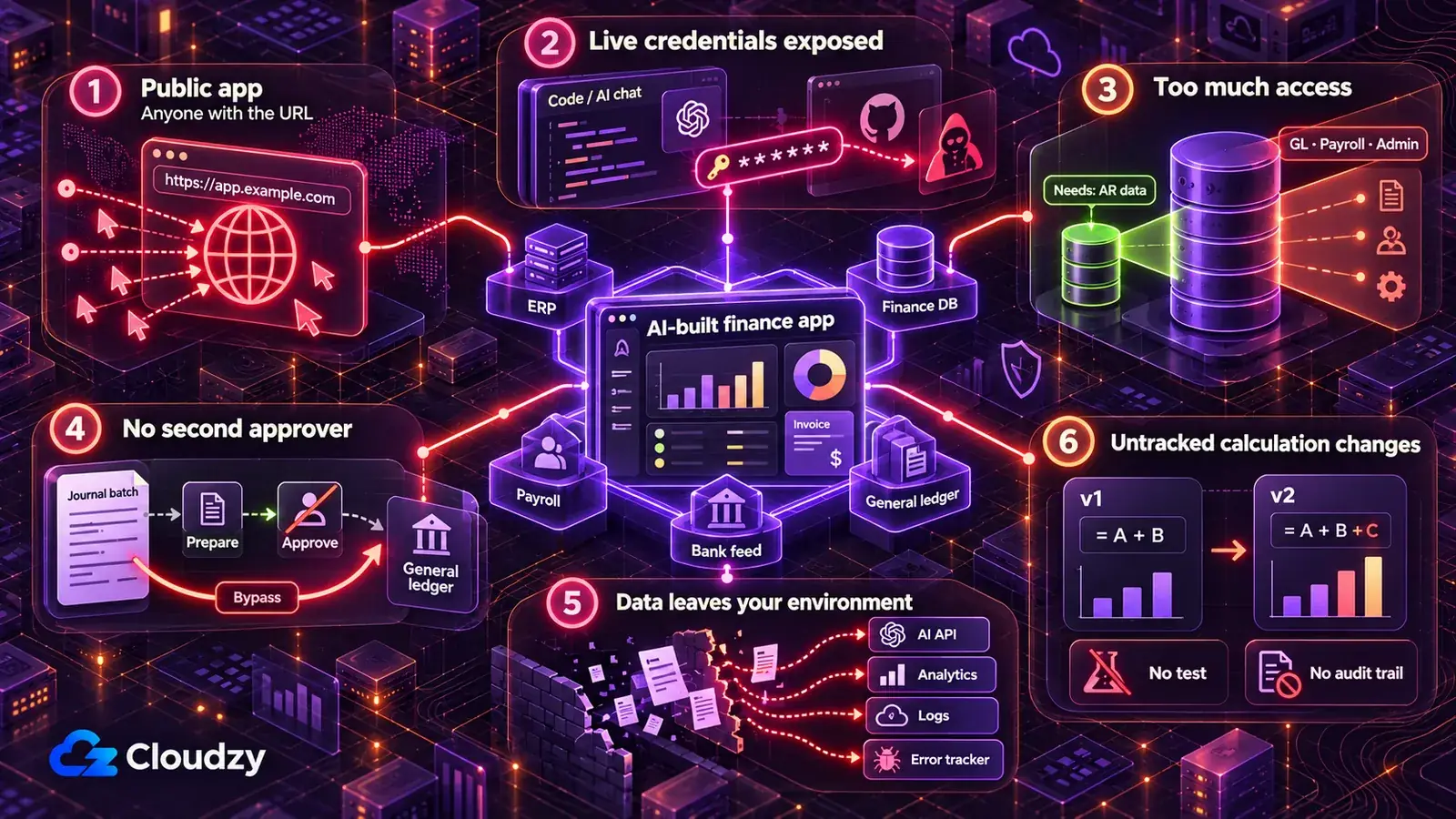
An AI-built finance tool can leak data through six deployment mistakes: leaving it on a public link, keeping credentials in code or chat, connecting with admin access where read-only would do, posting without a second approver, sending financial data to outside services, and changing calculations with no record. Each is a default a demo rewards.
Every fix below comes with a prompt for the AI tool that built the app; change the bracketed fields before you paste it. The prompts are untested starting points written for this article, and your AI tool reporting that it made a change proves nothing. The check under each prompt is the proof. Run the prompts against the code and a sample or synthetic dataset, and never paste real records or live keys into the chat.
Leaving the Tool on the AI Builder's Public Link
A cash-forecast dashboard left public on the AI builder's hosting can be opened by anyone who has its address, along with everything it shows: AP aging, budget against actual, the quarter's results before they are announced. Wired's report on RedAccess's findings describes the researchers locating such apps with straightforward Google and Bing searches of the AI vendors' domains.
Some of those apps only asked visitors to sign in with any email address. A login that accepts any email address is not access control.
Take live data off the vendor's hosting. Until the tool runs on a server you control (the next section covers where), build and demo it against a synthetic dataset or your ERP's sandbox or test company, if it has one, never a live export. Redeploy once the change is made, because the hosted address serves whatever version was last deployed.
Create a synthetic dataset for this app that matches the tables and columns it reads: [list the tables and columns, e.g. vendors, invoices, journal_lines].
Use invented vendor and customer names, invented bank account numbers, and amounts in [currency] that behave like real books: every journal entry balances, and the subledger totals tie to [the AP / AR control account].
Point the app at this dataset instead of any live export, and list every file or setting you changed.
Do not ask me for real records.
Confirm it worked: open the vendor-hosted address from a signed-out browser, or ask a colleague outside finance to, and confirm it shows only synthetic data, a sign-in wall or nothing at all. Then search the app's data files and the repository for three vendor or customer names taken from your live ERP and expect no matches. Finally, run the app's trial balance or summary view and confirm that total debits equal total credits.
Leaving ERP, Bank-Feed and Database Credentials in the Code or the Chat
If a live credential is stored there, anyone who can read the chat history, repository or MCP configuration file may also be able to use it to reach the ERP, the finance database or the bank-feed integration. MCP is the connector that lets an AI tool such as Claude talk directly to the ERP or a database, and its configuration file is one more place a password can sit.
GitGuardian's State of Secrets Sprawl 2026 found 24,008 unique secrets exposed in MCP configuration files, 14% of them PostgreSQL database connection strings. Across public GitHub commits, the same report found Claude Code co-authored commits leaking secrets at about twice the baseline rate, and it adds that the human factor also remains critical.
Deleting the chat message does not undo the exposure: anyone with a copy of the chat, the repository or its history still has the value. For every password, key or token that ever sat in one of those places, issue a new one in the ERP, database or bank-feed admin console and disable the old one. That is what rotating a credential means.
The app then reads its credentials at startup from environment variables (named settings kept outside the code), supplied by the deploy layer, which is the tool that builds and runs the app on your server. HashiCorp Vault is the step up when several tools share secrets and need rotating from one place.
The team's own copies of passwords belong in a password manager built for people, such as Vaultwarden; the running app reads its values from the environment. Start by finding every hardcoded secret the AI-generated code contains.
Audit this project for hardcoded secrets. Find every password, API key, access token and connection string, including in .env files, notebooks, MCP configuration files and the code that connects to [ERP name / bank-feed provider / finance database].
Replace each value in the code with a named environment variable and give me the list of variable names.
Make sure no file that holds real values is committed to the repository, and list every commit in the repository's history where one of these values appears.
Show me locations only. Do not print any secret value.
Confirm it worked: try the old password or token yourself, or ask IT to, and expect it to be refused. Then search the current project files for the old values and expect none. A match left in the history no longer grants access only after you have confirmed that the value has been revoked or expired.
Connecting With the Builder's Admin Login When the Tool Only Needs to Read
A dashboard that shows AR aging must not be able to edit the GL. If the tool connects with the builder's admin login, it inherits that account's privileges. A Supabase secret key, or the legacy service_role key, gives elevated access to the project's data and bypasses Row Level Security, so it should not be used for ordinary read-only access. A report built for one aging schedule then exposes the whole general ledger, payroll tables included.
The write side is where this turns expensive. Symbiotic Security's scan of 1,072 AI-built apps backed by Supabase found 172 that let anyone delete records without authentication, 172 that let anyone change existing records, and 39 with tables fully readable by anyone holding the public key.
Give the tool a read-only credential limited to the tables it reads. In the ERP or database, that means a dedicated integration user: a separate account created for the tool, with read access to the objects the report needs and nothing else. On Supabase, turn on Row Level Security (the database rule that decides which rows each request may see) for every exposed table the tool uses, and review the table grants as well: grants decide whether a role may select, insert, update or delete at all. For a read-only finance app, the role it uses should not have write operations it does not need. The publishable key can sit in browser code when RLS and least-privilege grants are correct. Secret and legacy service_role keys stay server-side and should be reserved for backend tasks that genuinely need elevated access and enforce their own authorization.
Note
A Supabase publishable key, or the legacy anon key, visible in the page's JavaScript is normal. Supabase's API key documentation says it only reaches what Row Level Security allows. The secret key bypasses Row Level Security, so it must never appear in anything sent to a browser.
List every read and every write this app makes to [ERP or database name], grouped by table or object.
Change the app so it only reads [the tables it needs] and connects with a separate read-only credential supplied through an environment variable, never my own login.
If the app uses Supabase: turn on Row Level Security for every exposed table it touches. List the select, insert, update and delete grants for anon and authenticated. For this read-only app, remove write grants that are not required; if another production app depends on one, flag it instead of changing it. Then write policies so signed-out visitors can read nothing and signed-in users can read only [rule, e.g. rows for their own cost center], and confirm that no secret or legacy service_role key appears in any file sent to the browser.
List the policies you created.
Confirm it worked: using the tool's credential, try one write, such as editing a test record, and expect a refusal. For Supabase, request a finance table's rows while signed out and expect an empty result or an error.
Letting the Tool Post to the Ledger With No Second Approver
A journal-entry importer that posts directly, or a payment-file generator that sends straight to the bank, makes whoever runs it both preparer and approver. One bug duplicates a month of accruals. One changed field sends a supplier payment to the wrong account. That is the segregation-of-duties break finance refuses to allow between two people, and software built with an AI assistant earns no exemption.
The damage does not stay in the app. A bad batch lands in the books, where undoing it takes a correcting entry and an explanation at close, and when the tool posts under the builder's own login, every duplicated entry carries the builder's name.
The AI-built tool reads and prepares; posting and payment release happen in the ERP's own approval workflow, approved by someone other than the person who ran the tool. Every accounting engine I have worked on treats the entry and its approval as two events with two owners, and an AI-built tool deserves the same treatment.
In practice, turn each direct post into a draft entry or a staged import that waits for approval inside the ERP. The tool still does the tedious part (mapping, validation, building the batch), and the approval stays in the ERP next to every other approval the close depends on. If the ERP has no approval step for imports, the tool's output becomes a file that a second person reviews against the batch summary and imports themselves.
A tool that has to post automatically, generate payment files or change vendor bank details belongs with IT, under the conditions in the next section.
List every place this app creates, edits or posts [journal entries / bills / payments] in [ERP name].
Change each one so the app writes a draft entry or a staged import that must be approved in [ERP name] before it posts. If [ERP name] has no approval step for imports, produce an import file instead and post nothing.
Remove any code path that posts, or releases a payment, without that approval.
For every batch, produce a summary with the row count, total debits and total credits.
List anything that still posts directly so I can review it.
Confirm it worked: run one batch from sample data. Nothing should appear as posted until a second user approves it in the ERP. Then compare the batch summary with what the ERP shows for that batch: row count, total debits and total credits must match exactly. A difference of one row is a failed tie-out, not a rounding issue.
Sending Financial Data to Services Outside Your Control
A variance-commentary feature that sends the full GL extract to an AI API ships every line to a third party. Two quieter routes carry data out: an analytics script on the page, which reports each visit to its vendor, and an error tracker or log that keeps full request bodies, where payroll lines, customer bank details and pre-release numbers can end up.
For a finance-built internal tool, keep pre-release results and payroll out of third-party calls unless the service and the exact data flow have been explicitly approved through your organization's vendor, security and compliance process. For everything else, list every destination and send each call only the fields it needs. Whether an outside service stores or trains on what it receives is a question for whoever signs vendor agreements, checked against that vendor's own terms. If the team wants to know how often the tool is used, a self-hosted analytics tool like Umami keeps those page views on your own server.
List every place this app sends data outside [our server], including AI APIs, analytics scripts, error tracking, email, webhooks and log files.
For each destination, list exactly which fields it receives.
Flag anything that contains [payroll amounts / bank account numbers / pre-release results / customer names].
For each flagged item, show how to send fewer fields or none, and make the change only after I confirm it.
Confirm it worked: trigger each feature once with sample data that contains a recognizable fake account number and a fake payroll amount. Search the error tracker and the logs for both values and expect nothing. For the AI API route, have the app log the outbound request body during that sample run, search the log for the same two values, and expect neither, with only the fields you approved present. Turn that logging off afterwards.
Changing the Calculations With No Record and No Tie-Out
In an accrual calculator or a revenue-waterfall validator, the code is the control. Change one formula and the numbers reaching the close change with it, and without version control nobody can say who changed what, or when.
Under a CPA firm's r/ClaudeAI thread about internal tools it built with Claude Code, one commenter put the limit bluntly: "'accountant + claude code' works until you hit audit trail requirements. that's the actual ceiling."
Lock down today's behavior before changing anything; once the outputs are locked, the logic can improve without the totals drifting unnoticed. Keep the code in version control, which records every change with its author and date.
Write tests that run the tool on a fixed sample file and compare the results with a recorded baseline, so the code has to pass a tie-out before any change ships. A locked test protects whatever it records, errors included, so tie the baseline totals to the ERP's totals for that period before trusting them.
Require a second person to review any change to calculation logic, and reconcile every production run to the ERP's own totals.
Put this project under version control if it is not already, and list which files contain calculation logic.
Write tests that run the app on [sample file] and record today's outputs: row counts and totals by [account / entity / period].
Before saving the recorded outputs, show me the totals so I can tie them to [ERP name] for [period].
Any change that alters one of those totals must make a test fail.
Do not change the calculation logic while writing the tests.
Confirm it worked: change one calculation on purpose, a rounding rule for example, and confirm that a test fails. Revert the change and confirm every test passes again.
Private by Default, Company Sign-In When More People Need It, IT for the Ledger
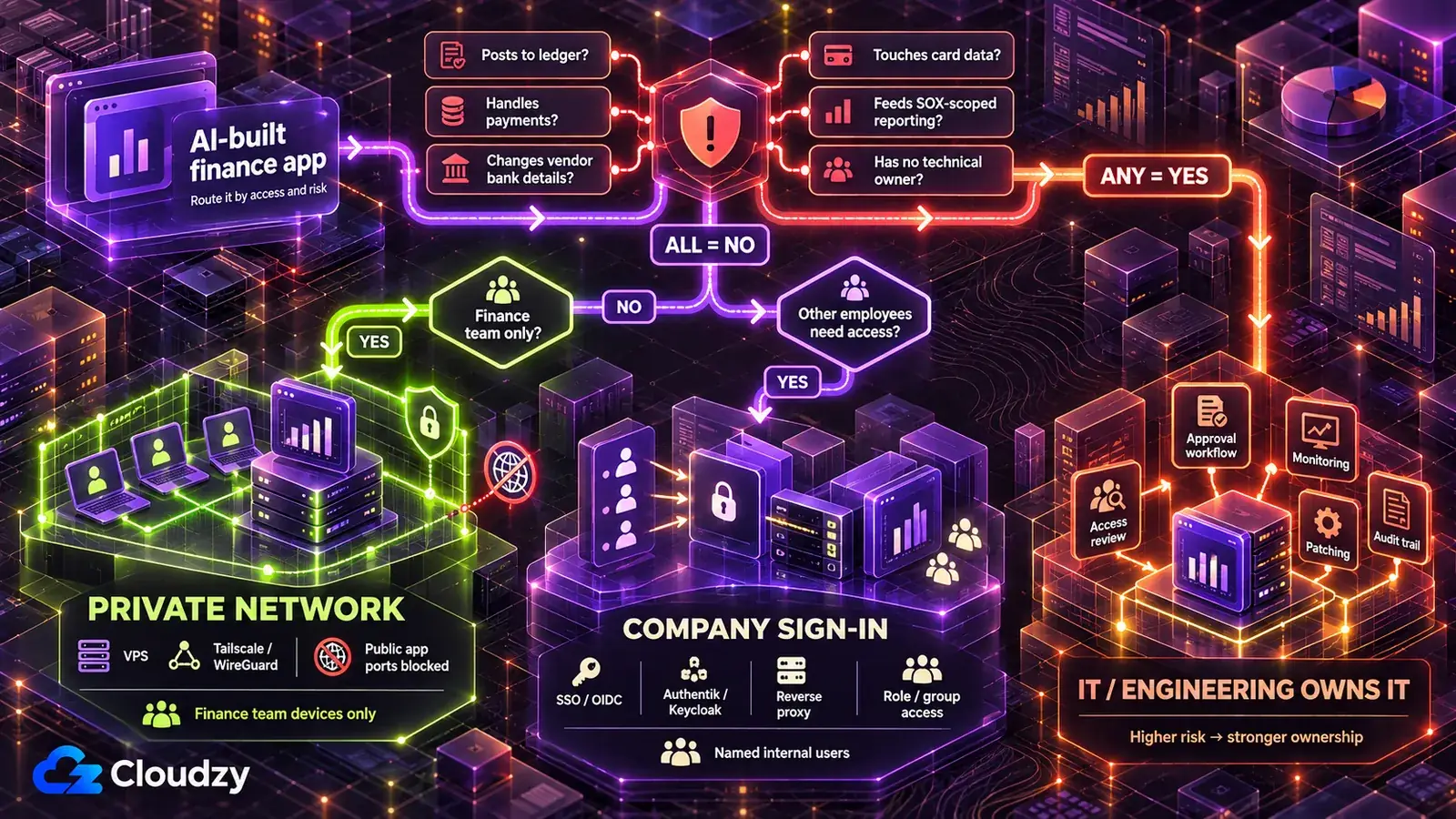
Live financial data never stays on the AI tool's hosting. To deploy an AI-built finance app safely for the finance team alone, put it on a server you control, reachable only on a private network. Add company sign-in when people outside the team need it, and hand it to IT when anything on the list below is true.
A VPS is a rented virtual server whose operating system and software stack you control. A private network (a tailnet, in Tailscale's terms) connects approved devices to that server. To keep the tool off the open internet, you still have to block public inbound access to the app, for example, with the server firewall, and expose it only over the VPN or tailnet interface. An identity provider holds the company's user accounts, and a reverse proxy is the gatekeeper in front of the app that sends every request through sign-in first.
| Deployment Tier | Who Can Reach It | Fits | What Runs It |
|---|---|---|---|
| Private network only | The finance team, on their own devices | Reconciliation helpers, cash forecasts, close checklists, anything showing pre-release numbers | A VPS with a deploy layer such as Coolify or Dokku, reachable only over Tailscale or WireGuard |
| Company sign-in in front | Named people across the company, such as budget owners and department heads | Budget-versus-actual views, spend requests | Tier 1 plus an identity provider (Authentik or Keycloak) behind a reverse proxy (Caddy or Nginx Proxy Manager) |
| IT or engineering owns it | Whoever IT decides | Any tool that meets a condition in the hand-to-IT list | IT's own platform |
The AI tool's own hosting stays out of the table for the reasons in the first mistake. So does an enterprise deployment platform such as Northflank, which suits larger organizations that already budget for platform vendors and the reviews they require. That is more contract than a departmental tool with a handful of users needs.
Tailscale is, in my experience, the quicker of the two private-network options to roll out, but Tailscale hosts the coordination service itself. WireGuard is the fully self-hosted option.
My reasoning for making the private network the default: a tool that does not answer from the internet cannot be found by a search or attacked at its login page, while a login page the AI tool wrote is only as good as the AI-written code behind it. If you need to expose the app beyond the private network, company sign-in adds a managed authentication layer in front of it, which is why it comes second.
When budget owners need access, replace the tool's own login with company sign-in, also called single sign-on (SSO): people use the company account they already have, so disabling that account blocks new sign-ins; configure session revocation, back-channel logout or suitably short session lifetimes so existing sessions do not linger. The prompt uses OIDC, a standard sign-in protocol that both Authentik and Keycloak support.
Replace this app's own login with company sign-in through [Authentik / Keycloak / our identity provider] using OIDC.
Read each user's group from the sign-in.
Allow [the payroll pages] only to members of [group name], and enforce that rule on the server for every page, every export and every API endpoint, not only in the menu.
Refuse every request that does not come with a valid sign-in.
Confirm it worked: sign in with a test account that is not in the group, request the restricted page and its export or API address directly, and expect a refusal on both. Then disable the test account in the identity provider and confirm it cannot start a new session. Also confirm that an existing session is revoked or expires within the window you configured.
Some tools should not stay with the team at all. Hand the tool to IT or engineering when any of these is true:
- It posts to the general ledger or another system of record without a person approving in the ERP.
- It generates payment files, releases payments or changes vendor bank details.
- Its output feeds the financial statements of an SEC registrant, which can bring the tool into internal control over financial reporting (ICFR). Raise it with internal audit before it is used in the close; for issuers subject to SOX Section 404(b), the external auditor may also test relevant controls.
- It stores, processes or transmits payment card data.
- It scores the creditworthiness of individual people.
- Nobody on the team will own patching, access reviews and retiring it.
The sixth condition carries more weight than it looks. With self-hosting you own updates, backups and monitoring, and a finance tool nobody maintains is safer with IT. IT may be slower; that is the price of the governance these conditions require.
For tiers 1 and 2, a server, a deploy layer, a private network and, for tier 2, an identity provider all have to be in place before anyone opens the tool, and a finance team without an engineer has to stand that up itself. On our Linux VPS you get root access. Coolify and WireGuard are available as one-click deployments; Tailscale installs with its official one-command installer, while Authentik runs from its official Docker Compose stack. The team's hours can then go into the fixes above instead of building the deployment stack from scratch. Our locations include Frankfurt and Amsterdam in the EU, London in the UK and several US cities, which lets you choose the region for the app's primary VPS storage; whether that choice is acceptable stays with compliance.
Rules to Check With Your Compliance Team, by Region
Which frameworks apply depends on what the tool touches and where the company and the people in the data are. A payroll table holding EU employees' salaries and a revenue schedule feeding a US-listed company's financial statements can fall under different frameworks.
Nothing in this article is legal advice. The table below lists frameworks to raise with your compliance team, and it does not decide whether any of them applies to you.
| Where / When | Compliance Framework | Question to Take to Compliance | Where to Read It |
|---|---|---|---|
| US, companies that report to the SEC | Sarbanes-Oxley Section 404, internal control over financial reporting (ICFR) | Does this tool's output feed the financial statements, and does it belong in our controls inventory? | PCAOB's AS 2201 |
| EU, personal data (payroll, employee expenses, customer bank details) | GDPR | What is our lawful basis for this data in this tool, and do its security measures meet Article 32? | EDPB guide to securing personal data |
| UK, personal data | UK GDPR | What is our lawful basis under UK GDPR, and does the tool meet the security principle? | ICO guide to the data protection principles |
| Anywhere card data is involved | PCI DSS (an industry standard, not itself a law) | Does this tool bring card data into scope, and can it avoid touching card data at all? | PCI Security Standards Council on PCI DSS |
| EU, if the tool evaluates individuals' creditworthiness (Annex III high-risk rules currently apply from Dec. 2, 2027) | EU AI Act, high-risk category (AI used to detect financial fraud is excepted) | Is this a high-risk AI system under Annex III? | European Commission's AI Act page; Annex III of the AI Act |
| EU or UK personal data made available to a separate recipient outside the applicable jurisdiction, or client contracts that fix where records sit | GDPR Chapter V, UK international-transfer rules, your client agreements | Can this data sit on a server in [location], and does any client contract restrict it? | EDPB guide to international data transfers; ICO guidance on international transfers |
For the SOX row, AS 2201 is the PCAOB standard for the auditor's attestation that Section 404(b) of the Sarbanes-Oxley Act refers to, and it names controls over journal entries and adjustments made in the period-end financial reporting process among the controls an auditor evaluates when addressing fraud risk. Outside these regions, start with your national data-protection regulator's own site. A server's location determines where its primary storage sits; it does not tell you where every backup, log or third-party copy lives, and it does not by itself satisfy any framework above.
Frequently Asked Questions
Is Vibe Coding Safe for Finance Tools?
It can be, once the gaps a demo leaves are closed; I read the evidence as a deployment problem more than a coding one. A finance tool is riskier than a personal project because it reads the ERP and can write to the books. Once it posts without a second approver, handles payments or touches card data, it belongs with IT.
What Is Shadow AI in Finance?
Shadow AI is AI tools or AI-built apps used on company data without IT's knowledge or approval, such as an ERP-connected forecast dashboard IT has never seen. IBM's 2025 Cost of a Data Breach Report found organizations with high levels of shadow AI averaged breach costs $670,000 higher than those with a low level or none, per IBM's announcement.
What Should We Show Internal Audit or the External Auditor?
Bring four things before the tool is used in the close: where it runs and who can reach it, the change history with its locked-output tests, how postings are approved in the ERP, and the tie-out evidence matching each batch to the ERP's totals. What the auditor requires is their call; these give them something concrete to assess.
Who Owns an AI-Built Finance Tool After the Person Who Built It Moves On?
Name an owner in finance and a technical contact before launch. Run the tool on a service credential instead of the builder's own login, and route access through company sign-in so disabling a leaver's company account blocks new sign-ins, with existing sessions revoked or allowed to expire according to your session policy. Retiring the tool means disabling its credentials, keeping what your retention policy requires, deleting the rest and shutting it down.

Discussion
Comments
Sign in to join the discussion.