
When RedAccess searched for apps built with AI coding tools and published on those tools' own domains, it found more than 5,000 with virtually no security or authentication of any kind. Among the screenshots the firm shared with Wired was a retailer's full log of its chatbot's conversations with customers, full names and contact information included. Wired couldn't confirm that the data it reviewed was genuine. The apps were open all the same.
Customer data in AI-built apps can leak well past the screen someone designed once the tool is connected to Salesforce, HubSpot, Pipedrive or Zoho. A pipeline tracker shows a dashboard's worth of accounts, but the key it holds can open far more. So before your team gets the link, check what that key can reach.
TL;DR
- The CRM credential sets the size of any leak. Give the tool its own narrow CRM credential, use a dedicated low-privilege user where the CRM ties access to a user, store the credential in server-side environment settings or a secret store, and let only server-side code use it.
- Each deployment mistake that leaks customer records, pipeline or pricing has a fix you apply through a copy-paste prompt. Your own AI coding tool makes the change, then you run a short test yourself to confirm it held.
- Where the tool runs depends on what it does to the CRM. Tools that only read can run on a server the team controls, on a private network or behind company sign-in. Tools that write back go to IT or the CRM admin first.
- Where GDPR and CCPA apply, they reach the tool's copy of customer data and every service it sends data to. Most sales and support tools are not high-risk under the EU AI Act. The main customer-facing exceptions are credit decisions about individuals, the risk assessment or pricing of their life or health insurance, and AI that reads a customer's emotions from their face or voice.
What a Leaked CRM Key Can Reach
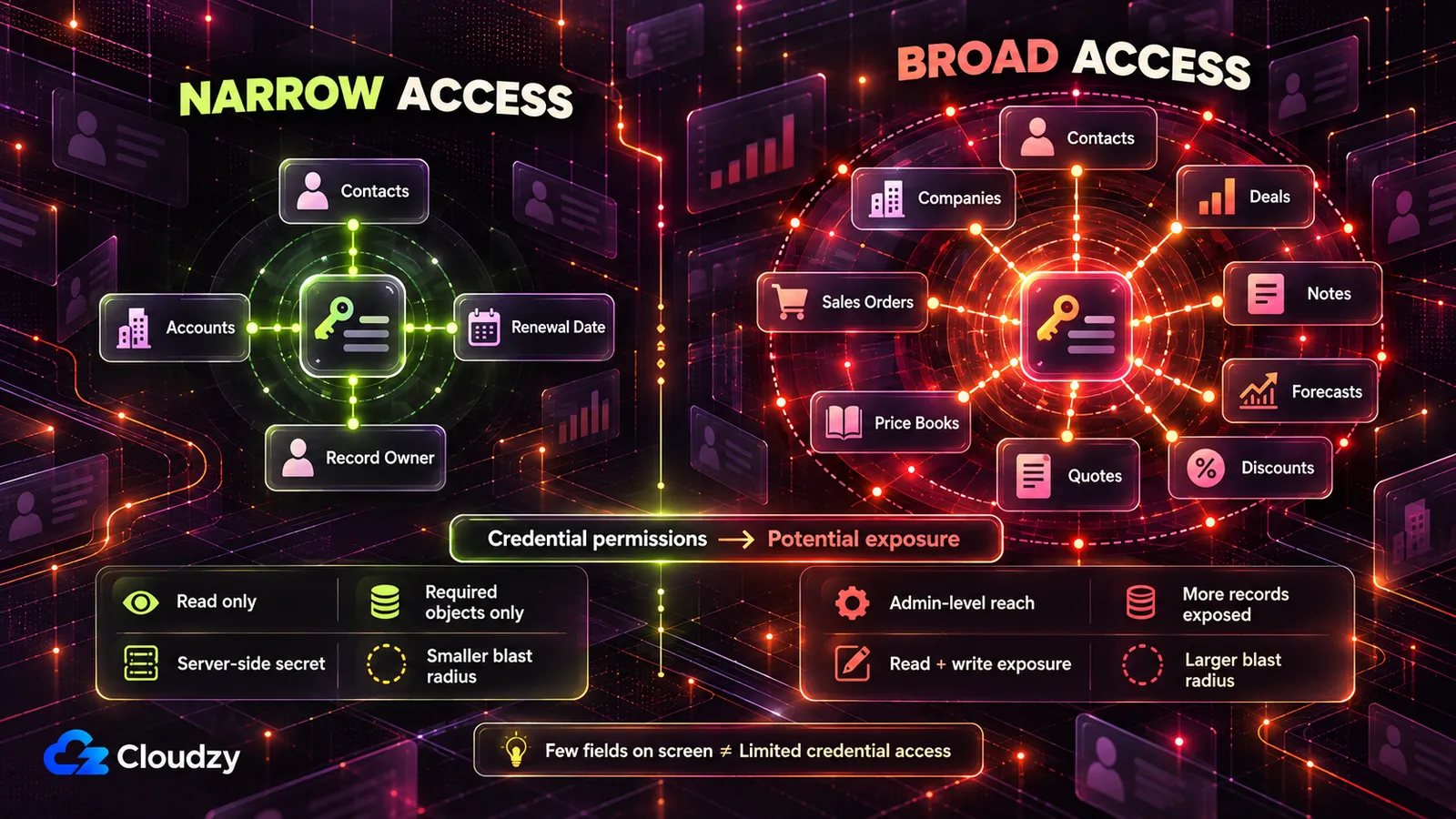
An exposed CRM API key reaches whatever its user or app can reach, not what your dashboard shows. In Salesforce and Pipedrive, a key from an admin's account can read, and usually change, every contact, account and deal that admin sees. HubSpot and Zoho keys carry their granted scopes, and a Zoho group scope covers everything its user can do.
Here's how each of the four hands out that reach, and how to shrink it. A scope, in the columns below, is the list of things a credential may do.
| CRM | The Credential and Whose Access It Carries | What a Broad One Opens | The Narrower Setup |
|---|---|---|---|
| Salesforce | An OAuth connection through a connected app or external client app, acting as one Salesforce user | With full, all data that user can access; with api, that user's account through REST API and Bulk API 2.0 |
A dedicated user whose permissions cover only the objects the tool reads; request api, not full |
| HubSpot | A Service Key for new in-account integrations, or an existing legacy private-app token | Whatever was ticked, for example read and write on contacts, companies and deals | Read-only object scopes such as crm.objects.contacts.read, only for objects the tool shows; sensitive and highly_sensitive scopes left off |
| Pipedrive | A personal API token, "tied to a specific user and company, giving access to all user's data" | Everything that user can see | A token issued from a dedicated Pipedrive user who can see only what the tool needs |
| Zoho CRM | An OAuth token whose scopes follow service_name.scope_name.operation_type |
With a group scope such as ZohoCRM.modules.ALL, read, create, update and delete across leads, contacts, accounts, deals, quotes, price books, sales orders and invoices |
Per-module read scopes, such as ZohoCRM.modules.contacts.READ |
Each row uses the vendor's own terms. Salesforce's scope reference adds that full "encompasses all other scopes." HubSpot now treats private apps as legacy and recommends Service Keys for new system-to-system integrations; existing legacy private apps still use the older scopes reference, including its sensitive-data scopes for Enterprise accounts.
The Pipedrive wording is from its authentication docs. Zoho's scope documentation says a group scope gives "complete access to all functions the user can perform on the record." Its own example request asks for ZohoCRM.modules.ALL.
The rule underneath all four is the same. A credential carries a user's reach or the scopes it was granted, so give the tool its own integration credential and make that reach as narrow as the CRM allows. Where access follows a user, use a dedicated low-privilege CRM user rather than a person's admin account.
Grant write access only if the tool must write, which moves it into IT's hands. Never use your own admin login or personal token.
Tying a legacy credential to a person can also break it when that person leaves. HubSpot's legacy private-app overview says that if the user who created a legacy private app is removed, some API calls using its token fail. HubSpot Service Keys avoid that problem because they are account-level credentials rather than credentials tied to an individual employee. Pipedrive allows one active API token per user, and changing it stops every integration that uses it.
A broad credential that opens contacts usually opens deals and forecasts too, and in Zoho's module list, quotes and price books. That puts pricing and discount structures within reach of anyone holding it.
You create the integration credential and narrow its permissions or scopes in the CRM's admin screens, or ask the CRM admin to.
The Deployment Mistakes That Leak Customer Records, and How to Fix Each
Seven defaults leak customer data from an AI-built sales tool: a CRM key in the code or browser, a public link, every rep seeing every account, fields the tool never needed, records sent to outside services, no record of exports, and a copy that outlives a deletion request. Each one makes a demo simpler.
| Mistake | What Leaks | Fix |
|---|---|---|
| The CRM key sits in the code, the browser or the chat | Whatever the key can reach. With a broad key, that's the whole customer database, contacts, deals and notes included, often changeable too | A narrow integration credential on the server only, with the old key switched off |
| The tool is published on a public link | Customer contact records (emails, phone numbers, addresses, purchase history) and pricing and discount pages, open to anyone with the address, competitors included | A private network or company sign-in in front |
| Every rep sees every account | The full pipeline, forecasts and deal values across the company. A departing rep can export the whole book of business | Roles keyed to the CRM record owner, enforced on the server for views, search and export |
| The tool pulls every field when it needs a few | Purchase history, payment status, account value and support tickets with account details, in a tool built to show renewal dates | Pull only the named fields |
| Customer records go to AI APIs and other services | Customer data, segments and lead or health scores copied to a provider with no contract in place | Audit what leaves, cut it back, get a contract for what stays |
| No record of who exported what | A customer list or segment leaves the company, and nobody can say when or by whom | An export log the app can't edit |
| The tool keeps its own copy of customer records | A deletion handled in the CRM misses the tool's copy, its exports and the scores derived from it | Keep as little as possible; make the copy follow the CRM |
The AI coding tool that built the app can make most of these fixes when you ask. Treat each prompt below as a starting point to edit for your own CRM, objects and roles.
The AI tool's report that it made a change proves nothing. The Test under each prompt is your proof. Run the prompts against the code, and never paste live keys or real customer records into the chat.
Get the CRM Key Out of the Code, the Browser and the Chat
A key pasted into the code or the chat is exposed. So is a key stored as an environment variable (a value the server hands the app when it starts, so the code names it without containing it) if the code that uses it runs in the browser. A key the browser can read is a key anyone who opens the page can copy.
Vite's documentation says variables prefixed with VITE_ "will be exposed in client-side source code." Next.js's environment-variable docs say the same prefix trick with NEXT_PUBLIC_ bundles a variable into what the browser downloads.
A key written into a committed file stays in the history, the same way secrets hardcoded into Compose files outlive the container. A private repository is no shelter. GitGuardian's 2026 secrets report found internal repositories roughly 6× more likely than public ones to contain hardcoded secrets. It also found about 28% of incidents starting entirely outside repositories, in tools like Slack, Jira and Confluence.
Find every API key, token, password or connection string for Salesforce, HubSpot, Pipedrive, Zoho or any other CRM or sales tool in this project. Check the code, every .env file and the project's commit history.
For each one, list:
- the file and line where it appears
- whether it is written directly into the code or read from an environment variable
- whether the code that uses it runs on the server or in the browser (flag any variable whose name starts with VITE_ or NEXT_PUBLIC_)
Do not print full key values. Show only the first four characters of each.
Then move every call to the CRM into server-side code that reads the key from a server-only environment variable. Remove every key from the code, make sure files holding real values are excluded from the repository, and report exactly what you changed. If you are unsure about any item, say so instead of guessing.
Note
Deleting the chat message or the commit doesn't un-share a key. Once it has been pasted or committed, the only fix is switching it off in the CRM.
Rotating the key (issuing a new one and switching off the old) is a human step. Create the tool's narrow integration credential in the CRM, and have IT help put it in the server's environment settings. Then switch off the old key.
For a compromised private-app token, HubSpot offers Rotate and expire now. In Pipedrive, check what else runs on the old token before you change it.
Human copies of CRM admin passwords belong in a password manager such as Vaultwarden, a Bitwarden-compatible server. It's built for people signing in. For central rotation of the secrets your apps use, look at HashiCorp Vault.
Test: Open the running tool in a browser, open developer tools, and search across all loaded files (Ctrl+Shift+F, or Cmd+Option+F on a Mac) for the first eight characters of the new key. You should get no match. Then trigger a CRM-backed action and inspect the browser's Network tab. The CRM credential should not appear in request URLs, headers or bodies. Then ask the CRM admin to confirm the old key is refused, or check its status in the CRM's integration settings.
Take the Tool Off the Public Link
When the AI tool hosts the app, publishing puts it on the vendor's own domain. RedAccess found its apps with straightforward Google and Bing searches of those domains. A pricing page or discount calculator on that link is as readable to a competitor as to a rep.
Lovable's statement to Wired puts the setting on the builder, and it has a point. The platform "gives builders the tools to build securely, but how an app is configured is ultimately the creator's responsibility." The publish setting is yours to change.
List every page, API route, file download and export in this app. For each one, tell me:
- whether it can be opened without signing in
- whether it returns customer data, deal data or pricing data
Flag every route that returns data to a request that is not signed in. Do not change anything yet; I want the list first.
Test: On a phone using mobile data, off any private network, open the tool's address in a private browser window. It should either not load or stop at the company sign-in page. Try every route from the list that returns customer, deal or pricing data the same way and expect no data.
Show Each Rep Only Their Own Accounts
A tool with no roles shows every user the whole pipeline, every deal value and every discount. It also lets anyone export the full book of business before they leave. The fix is roles checked on the server and keyed to the CRM's record owner, with search and export obeying the same rule.
Add role-based access with three roles, checked on the server for every request. Hiding buttons, menu items or columns does not count as a check.
- Admin (the tool's owner and sales ops): all records.
- Manager: records owned by members of their team.
- Rep or account manager: only records where they are the owner in the CRM's record owner field.
Take each user's identity and role from their signed-in account, never from anything the user can type or change in the page. Apply the same rule to search results, list views, exports and API responses. Refuse anything else with an "access denied" (403) response.
When you're done, report which role check covers each page and route, and flag any you are unsure about.
Note
Hiding a menu item or a column isn't a permission check. If the server doesn't check, the data is still one request away.
The role names and team definitions are yours to edit. Some teams let managers see every region during forecast calls.
Test: Create a test rep account. Signed in as that rep, search for an account you know belongs to another territory, and expect no result. Export the account list and confirm the file holds only the test rep's accounts. Repeat the search as a test manager, for an account outside that manager's team.
Pull Only the Customer Fields the Tool Needs
A renewal tracker needs renewal dates, owners and account names. A tool built by asking for "all the account data" pulls purchase history, payment status and support-ticket text as well. Fewer fields means less to leak, fewer places a deletion request has to reach, and less to send to outside services.
List every field in this app's database, code, screens, exports and API calls that could hold customer personal data or commercial data: names, email addresses, phone numbers, addresses, company, job title, purchase history, account value, payment status, deal amounts, discounts, lead or health scores, support-ticket content and any unique identifier.
For each field, say which screen or feature uses it and whether the tool's main purpose needs it. Mark anything you are unsure about instead of guessing.
Then change the app so its CRM queries request only these fields: [the fields you approve]. Remove every other field from the app's stored copy, its screens and its exports, and report exactly what you changed.
The integration credential's permissions or scopes are the second lock. Data it can't read can't leak through a bug in the AI-written code. Whether the database encrypts what it stores is a question for IT, since an assistant reading the code can't reliably see it.
Test: Export the tool's data as an admin and compare the columns with your approved field list. Nothing extra should appear. Open every screen and confirm the removed fields are gone. Keep the approved field list, because the next Test checks against it.
See Which Customer Data Leaves the Tool
A churn calculator that sends account notes to an AI API, passes account fields to an analytics script, or fires a webhook into another tool copies customer records out of the tool. Where GDPR applies, an outside service that handles that data on the company's behalf is a processor, and it needs a contract (covered below).
Audit every external call this app makes: to OpenAI, Anthropic or any other AI API, to the CRM, to email, chat or analytics tools, and to any webhook.
For each call, list exactly which customer or commercial fields are sent, in the request body or in the address. Flag any service that may store, log or train on what it receives. Then say which calls could work with fewer fields, or with no customer data at all.
Test: In each service that still gets data from the tool, open the screen where it lists the fields or properties it has received, such as an analytics tool's list of user properties or a webhook's field mapping. Compare that list with your approved field list. Anything outside it is still leaving the tool. Where a service shows no such list, take its name and data-handling terms to the DPO or privacy lead.
Log Every Export and Bulk Download
The export button is how a customer list or a price book leaves in one click, and without a log nobody can say who took what. Logging every dashboard view buries that signal. Record exports, bulk views and deletions.
Add a log that records every export, every file download, every view that returns more than [a number you choose] records, and every deletion. For each event, record the user, the action, which records or segment, how many rows, and the time.
Set it up so the app's database login can add rows to the log but cannot change or delete them. Only admins can read the log. Tell me which database permissions you set to enforce this, and flag anything you could not enforce at the database level.
"Can't be changed" has to come from the database login's permissions (the account the app uses to talk to its database, which can be limited like any other), not from the app behaving well. The log is itself personal data, since it shows who took whose records, so reading it stays with admins.
Test: Export a small list as a test rep, then open the log as an admin and find the entry with the right row count. Ask IT, or the AI tool with the output shown to you, to try deleting that row using the app's database login. You should see a permission error.
Make the Tool's Copy Follow the CRM When a Customer Asks for Deletion
If the CRM is your system of record, handle the deletion there first. A tool that keeps its own copy of customer records (a cache, exports on disk, scores computed per customer) is a second place the data lives, and a deletion in the CRM doesn't reach it.
The obvious fix, a one-call "delete everything about this customer" button, is a risk of its own if any user can press it. My view: keep as little of a copy as possible, so there's less for any deletion to chase.
Change this app so it reads customer records from the CRM when it needs them and stores only [the fields from your approved list that the tool must store].
List every place the app still stores customer data: database tables, caches, exported files, derived scores and logs.
Then add an admin-only deletion tool. Given a CRM record ID, it shows every place that customer's data exists in the app. After an admin confirms, it deletes the data from all of those places, including derived scores and stored exports. It records only the record ID, the time, who confirmed, and which places were cleared. Any non-admin who opens it gets "access denied".
The DPO or privacy lead decides the exceptions, meaning what the company must keep, so the prompt leaves them out.
Test: Create a test contact in the CRM and let the tool pick it up, including a score or an export if the tool makes them. Delete the contact in the CRM, run the deletion tool as an admin, and confirm the contact is gone from every place the tool listed. Then open the deletion tool as a test rep and expect "access denied".
Where a CRM-Connected Tool Should Run
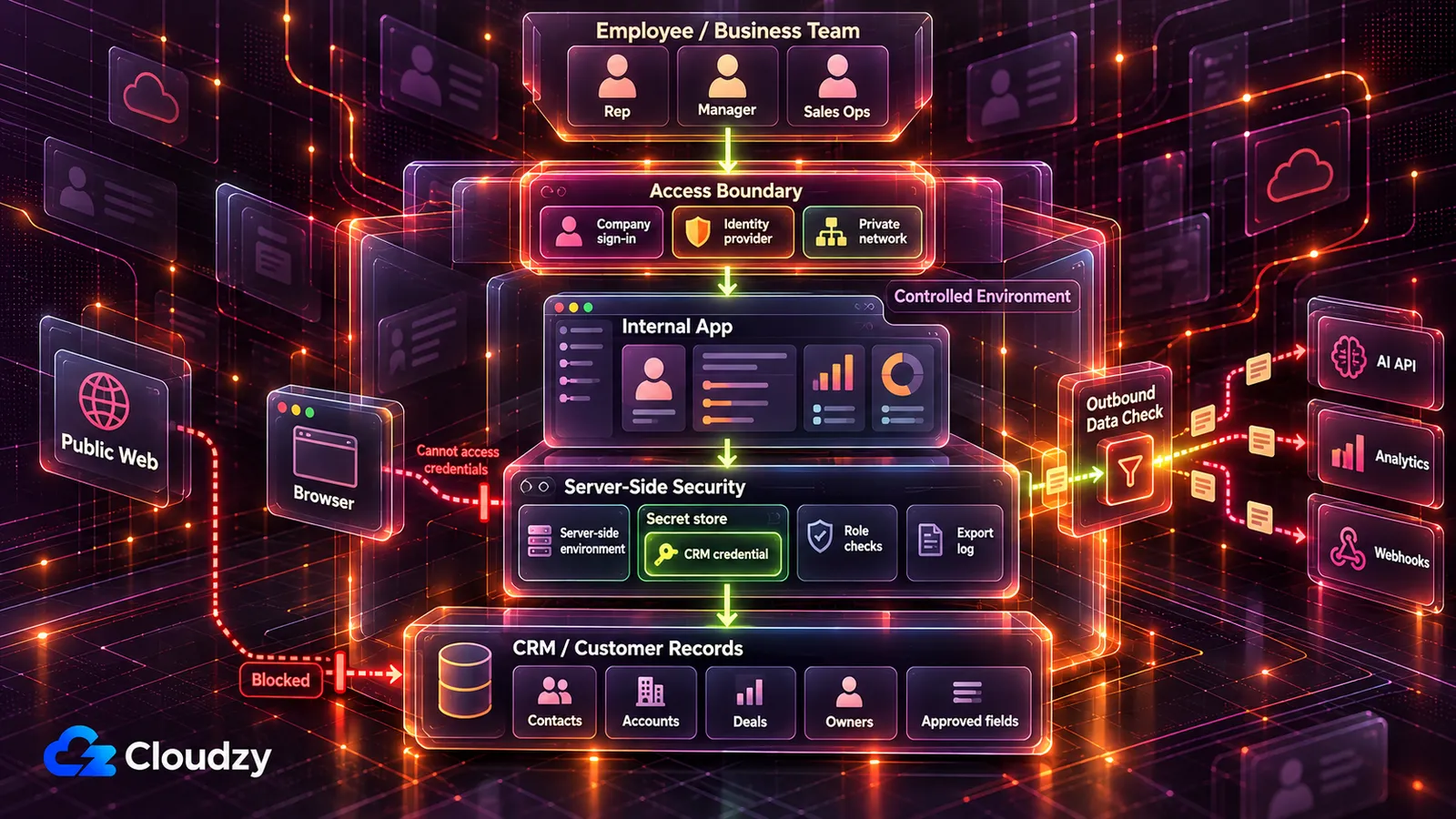
Where the tool runs depends on what it does to the CRM. A read-only tool can run on a server the team controls, reachable only on a private network or behind company sign-in. A tool that writes back to the CRM goes to IT or the CRM admin before anyone uses it.
| What the Tool Does With the CRM | Where It Runs | Who Signs Off Before Launch |
|---|---|---|
| Runs on sample or synthetic records (made-up records shaped like real ones) | The AI tool's own hosting, for building and demos | Nobody yet; real records stay out |
| Reads live customer records for a small, fixed team | A server the team controls, reachable only on a private network (Tailscale or WireGuard) | The CRM admin, who issues or approves the read-only integration credential |
| Reads live records for reps in several places or on the road | The same server, with company sign-in (an identity provider such as Authentik or Keycloak) in front | The CRM admin, plus IT to connect sign-in |
| Writes back to the CRM: stage changes, owner reassignments, field updates, bulk edits | Built and tested against a CRM sandbox or test account, reviewed before it touches production | IT or the CRM admin, before launch |
| Decides an individual customer's credit, assesses or prices an individual's life or health insurance, or reads a customer's emotions from their face or voice | Nowhere until reviewed | IT and legal, the DPO or the privacy lead |
Build and test with sample records until the tool runs on the team's own server. A managed deployment platform that provides sign-in, secrets and logs is a reasonable choice for teams that already budget for one and run vendor reviews.
A private network means the tool doesn't answer from the public internet at all. Single sign-on means reps log in with the company account they already have, checked by an identity provider. A login page the AI tool wrote is still reachable from anywhere, and it's only as strong as the code behind it.
Georgia Tech's Vibe Security Radar scans public vulnerability databases and flags flaws traced to an AI coding tool's signature. It counted 35 cases in March 2026 alone, more than all of 2025 combined, and lists authentication bypass among the flaw types found (figures as of Georgia Tech's April 2026 write-up).
Its researcher Hanqing Zhao said: "When an agent builds something without authentication, that's not a typo. It's a design flaw baked in from the start." My read is that the lock belongs in front of the tool, outside the code the AI wrote.
Hand the server side to IT help. The tool runs on a VPS (a rented server the team fully controls) under a deploy tool such as Coolify or Dokploy. That deploy tool runs the app from its code and holds its environment variables, CRM key included.
Tailscale is the quicker private network, but it runs its own coordination server. Headscale, an open-source stand-in, lets you run that server yourself, and WireGuard is fully self-hosted.
For company sign-in, Authentik fits most small internal stacks. Keycloak suits a company with an existing directory to connect. A reverse proxy such as Caddy or Nginx Proxy Manager adds HTTPS where sign-in faces the web. Whatever the stack, one named person owns the server and the integration credential.
That owner still needs a server to run it all on. Our Linux VPS comes with root access, and Coolify, Tailscale, WireGuard, Authentik and Keycloak deploy as one-click apps, so IT help can spend its hours on the Tests. Locations include Frankfurt and Amsterdam in the EU, London in the UK and several US cities. Bring that choice to the DPO or privacy lead as an input.
GDPR, CCPA and the EU AI Act for Customer Data
A server's location decides where that server's copy of the records sits. It does not decide where outside services store data they receive. It doesn't by itself make the tool compliant with any rule below. In the UK, the equivalent law is UK GDPR, and the regulator is the ICO.
GDPR: Lawful Basis, Processors and Erasure
If GDPR reaches your company, the tool's copy of customer data is covered like any other processing of personal data "wholly or partly by automated means".
Every use of personal data needs a lawful basis, the legal ground GDPR accepts for it. Contract can apply when the processing is necessary to perform a contract with the person whose data is being processed, or to take steps they requested before one. In CRM data, especially B2B contacts, legitimate interests may be the relevant basis instead, and it must be weighed against the person's rights. Both are in Article 6.
The tool is a new use of data the company already holds, so ask the DPO, privacy lead or counsel whether the existing basis covers it.
An outside service that processes customer data on the company's behalf is a processor for that processing. An AI API, analytics service or hosting provider often fills that role, but the DPO, privacy lead or counsel should confirm each service's role. Article 28 requires processors "providing sufficient guarantees" and a contract governing the processing with each one. Your outbound-data audit is the list to bring.
When a customer's right to erasure applies under Article 17, it reaches every copy the company holds, the tool's included. That's why the tool's copy has to follow the CRM.
CCPA: The Right to Delete Reaches the Tool's Copy
California consumers can ask a business the CCPA covers to delete the personal information it collected about them, and that includes the tool's copy and its exports. The right has exceptions in Civil Code sections 1798.105(d) and 1798.145, per the California Attorney General's CCPA page.
The CCPA also requires written contracts with service providers and contractors that limit how they may use personal information. The business still handles the consumer request, with service providers or contractors assisting where required. Whether your company is covered at all turns on the thresholds in the FAQ.
The EU AI Act: Most Sales and Support Tools Are Not High-Risk
Lead scoring, pipeline forecasts, customer health scores, campaign dashboards and CRM automation aren't among the high-risk uses the EU AI Act lists in Annex III. The customer-facing exceptions a sales or support tool is likely to meet are narrow: AI that judges a person's creditworthiness, AI that assesses risk for, or prices, life or health insurance, and AI that infers a customer's emotions from biometric data.
High-risk is the Act's category for uses that carry its heaviest obligations. As of October 2026, the rules for Annex III high-risk systems are scheduled to apply from December 2, 2027. Article 50's transparency requirements already apply. At point 5(b), Annex III of the EU AI Act lists systems used "to evaluate the creditworthiness of natural persons or establish their credit score, with the exception of AI systems used for the purpose of detecting financial fraud."
Point 5(c) lists systems for "risk assessment and pricing in relation to natural persons in the case of life and health insurance." A tool doing either may be high-risk, and it goes to IT and legal before launch. A tool that scores your own reps' performance may fall under the employment category at point 4(b), a separate question for HR and legal.
Point 1(c) of the same annex lists emotion recognition, which Article 3 of the Act defines as "identifying or inferring emotions or intentions of natural persons on the basis of their biometric data." A support or call tool that reads a customer's mood from their voice or face may be high-risk too, and it follows the same route to IT and legal.
The Act regulates AI systems. A dashboard running ordinary code isn't one just because an AI coding tool wrote it. The question is whether the deployed tool itself meets the Act's definition of an AI system, not whether AI helped write its code.
Not high-risk isn't the same as no rules. Under Article 50, systems that "interact directly with natural persons" must tell people they're dealing with an AI system unless that's obvious. A chatbot that talks to your customers still has to say what it is.
Separately, Article 4 already requires providers and deployers of AI systems to take measures to support AI literacy among staff and others using those systems on their behalf.
Frequently Asked Questions
Is It Safe to Build a CRM Tool With ChatGPT or Claude?
Building it on sample data is the low-risk part. The risk starts when live credentials or customer data enter the project, and rises again when the tool is opened to other users. Before anyone else uses a vibe-coded CRM tool, give it a narrow CRM credential stored in server-side environment settings or a secret store, let only server-side code use it, and put the tool where nobody outside the company can get in: a private network or company sign-in. Until both are done, keep it on sample records.
Does GDPR Cover an Internal Dashboard Customers Never See?
If GDPR applies to your company at all, an internal dashboard that holds customer personal data is no exception. The Regulation attaches to the processing, not to who views the screen, and personal data is "any information relating to an identified or identifiable natural person" under Article 4. Whether it applies, and whether your existing lawful basis covers the new tool, is a call for your DPO, privacy lead or counsel.
Are Deal Values and Discounts Personal Data?
Mostly not. Pipeline amounts, forecasts and price books are company data. Roles and an export log are what protect them. But a deal value or discount can be personal data when it relates to an identifiable person, for example a consumer purchase or a sole trader, under Article 4's definition.
Which Businesses Does the CCPA Apply To?
For-profit businesses doing business in California that meet at least one threshold. The California Privacy Protection Agency puts the 2025 inflation-adjusted revenue line at $26,625,000. The Attorney General's CCPA page lists the other two: buying, selling or sharing the personal information of 100,000 or more California residents or households, or earning 50% or more of annual revenue from selling or sharing consumers' personal information. Your DPO, privacy lead or counsel confirms whether that includes you.
Discussion
Comments
Sign in to join the discussion.