

A free personal booking link can replace your own calendar page and still lose the shared event types your team needs. Pick a Calendly alternative by the booking behavior you must preserve, then compare the bill and who'll operate it. Cal.com and Cal.diy now require separate evaluations.
Keeping Calendly is reasonable when its booking workflow already fits and the subscription costs less than the work of replacing it. Switching earns its place when you can name the cost or control problem it solves without breaking appointments.
TL;DR
- Hosted personal plans can remove a separate scheduling bill without adding server work. Check collaborative entitlements before moving team links.
- Cal.diy gives you a public self-hosting project; commercial Cal.com is a separate route. Their intended uses and feature sets differ.
- Easy!Appointments fits service/provider booking. Rallly fits choosing a time by vote; check organizer access separately from guest voting.
- Self-hosting moves operating responsibility to you. Validate the workflow and external dependencies before changing a public link.
Calendly Alternatives at a Glance
A customer reserving an available appointment and a group voting on proposed times need different software. The table separates those jobs, deployment routes, and free-plan boundaries. This is a bounded shortlist: each candidate supports a relevant booking-link, provider-scheduling or group-meeting workflow described in its linked sources.
| Tool | Best-Fit Scheduling Job | Deployment Route | Free/Paid Boundary |
|---|---|---|---|
| Calendly, the baseline | One-on-one booking and paid team coordination | Hosted | Calendly's pricing table lists Free with one event type, one calendar connection and unlimited one-on-one meetings; collaborative and round-robin scheduling require paid plans. |
| Cal.com | Personal links and collaborative booking | Hosted; commercial Enterprise self-hosting by agreement | Cal.com's plan comparison gives Individuals one user with unlimited event types and calendars; collaboration is paid. |
| Cal.diy | Community self-hosted booking | Your own instance | Its README requires no license key or Cal.com account. Hosting and operating work remain your costs; this isn't a team-feature entitlement. |
| Easy!Appointments | Services and provider schedules | Self-hosted; optional paid hosting | The software and service terms separate free software from paid hosting, support and custom work. Check host assignment separately from provider accounts. |
| TidyCal | Hosted booking with lifetime and subscription choices | Hosted | Its plan guide lists unlimited booking types/bookings and one calendar connection on Free, with no teams; paid tiers cover individual/team needs. |
| Google Calendar Appointment Schedules | A booking page within an existing calendar account | Hosted | Google's subscription comparison permits one booking page with a personal account or Business Starter; extra functionality requires an eligible subscription. |
| Rallly | Group availability polls | Hosted or Docker self-hosting | Its licensing documentation lists one Space seat for the free Personal tier; joint poll management needs a separate organizer-entitlement check. |
Treat shared event types as a requirement you can demonstrate. Independent personal accounts don't prove that colleagues can maintain the same event definition or receive bookings through a shared link. Ask who owns the event, who can change it, and how the host is selected.
Cal.com and Cal.diy Serve Different Needs
Cal.com's commercial production code is private; Cal.diy is the public community project. Cal.com's engineering announcement describes the separation and the change from AGPL 3.0 to MIT. For a replacement decision, the distinction is practical: the public project no longer carries the commercial product's team and enterprise scope.
The announcement identifies the retained core: scheduling logic, booking flows, the app-store framework and API v2. It also lists removed Teams and Organizations functionality, including related booking flows, plus routing forms, workflows, SAML/SSO sign-in, Insights and API v1. You can't infer today's public feature set from an older Cal.com deployment description.
That affects an ordinary shared link. Suppose a booking should go to whichever colleague is available, or should reserve time with several colleagues together. Those are collaborative requirements even when everyone also has a personal link. The number of accounts you can create doesn't answer whether the shared booking behavior survives.
Cal.diy's current deployment warning strictly recommends personal, non-production use and says self-hosting requires advanced server, database and sensitive-data administration knowledge. If you need a service-level agreement, or SLA (a contractual service commitment), ask who will sign one. Treat that recommendation separately from the license permissions discussed in the FAQ.
Commercial self-hosting remains available. Cal.com's Enterprise deployment description says the full product's commercial self-hosting goes through its team. It's an agreement-led deployment, so don't assume a standard hosted subscription includes the same arrangement. Ask for the required features, deployment responsibilities and support terms in writing.
For hosted collaboration, Cal.com's Teams feature breakdown lists shared availability, round robin, managed/collective event types and routing forms. Round robin rotates bookings among hosts; collective booking reserves a time when the required hosts attend together. Those are different acceptance tests, and a replacement may need both.
Before accepting an Enterprise proposal, ask who handles application upgrades and integration changes after deployment. Get the ongoing work assigned while you're agreeing to the initial setup.
Where the Other Alternatives Fit
A service appointment with a named provider, a personal consultation link, and a group poll can look similar on a booking page. Their selection rules differ. Easy!Appointments, TidyCal, Google Calendar and Rallly merit consideration when their workflow matches yours; adding more names won't resolve a mismatch in who gets booked.
Easy!Appointments for Service and Provider Schedules
Easy!Appointments lets you direct a customer to a particular service and provider. Its free feature list documents provider working schedules, dedicated URLs, and admin, provider and secretary roles. That model deserves a pilot when appointments belong to specific staff members or services and administrative access needs to differ.
The feature list includes Google Calendar and CalDAV sync. CalDAV lets compatible calendar servers exchange calendar information; it can matter when your calendar isn't Google. Group sessions allow several customer attendees. If you need bookings rotated among colleagues, ask to see that host-assignment behavior before choosing this route.
The commercial-use terms preserve free GPL-3.0 software rights separately from optional paid services. A branding or support purchase isn't the prerequisite for commercial software use. Request a service agreement if you need a support commitment.
TidyCal for a Hosted Alternative to Seat Subscriptions
TidyCal's lifetime plans change how you pay while leaving the service hosted. Its purchase-model explanation separates a one-time purchase from Pro's subscription. Choose between them by required settings and collaboration, since paying once for an individual account doesn't create a team license.
The same guide distinguishes paid customization and automatically created video links from the free feature set. Verify the settings your booking needs against the plan you'll buy. It lists email support, with priority for Pro; that isn't a guaranteed response time.
I'd put TidyCal on the hosted shortlist when the recurring scheduling bill drives the move. Keep the purchase-date rules in view before treating a legacy customer's entitlement as today's offer.
Google Calendar for an Existing Booking-Page Need
Google Calendar appointment schedules deserve a check before you buy another tool for personal links. Google's premium-feature comparison identifies subscription-dependent functionality. Multiple schedules, reminders, payments and checking multiple calendars require attention to the eligible account and feature combination, beyond having Calendar open.
Try reminders and multi-calendar conflict checks in the account you'll use before counting an existing subscription as sufficient. If you need rotating hosts or centrally maintained shared event types, request a demonstration of that behavior. I'd choose this route when the calendar-native booking page covers the job without another subscription.
Rallly for Choosing a Time by Vote
Rallly's polling workflow starts with proposed times, collects availability votes, and ends with a chosen time and calendar invitation. Use it when the meeting time needs agreement. A poll doesn't automatically reserve whichever host's slot is available, so it can't replace a customer booking link on that basis.
For self-hosting, Rallly's Space-seat code defaults each Space to one seat without an instance license, and its invitation code enables member invitations only for pro Spaces. Its instance-user limit is separate from Space membership. Check organizer entitlement before colleagues jointly manage polls.
Keep the repository's AGPL license distinct from configured collaborative entitlements. Shared-organizer access depends on the Space’s seat allowance; administering the instance requires an account with the admin role.
Choose by the Workflow You Must Keep
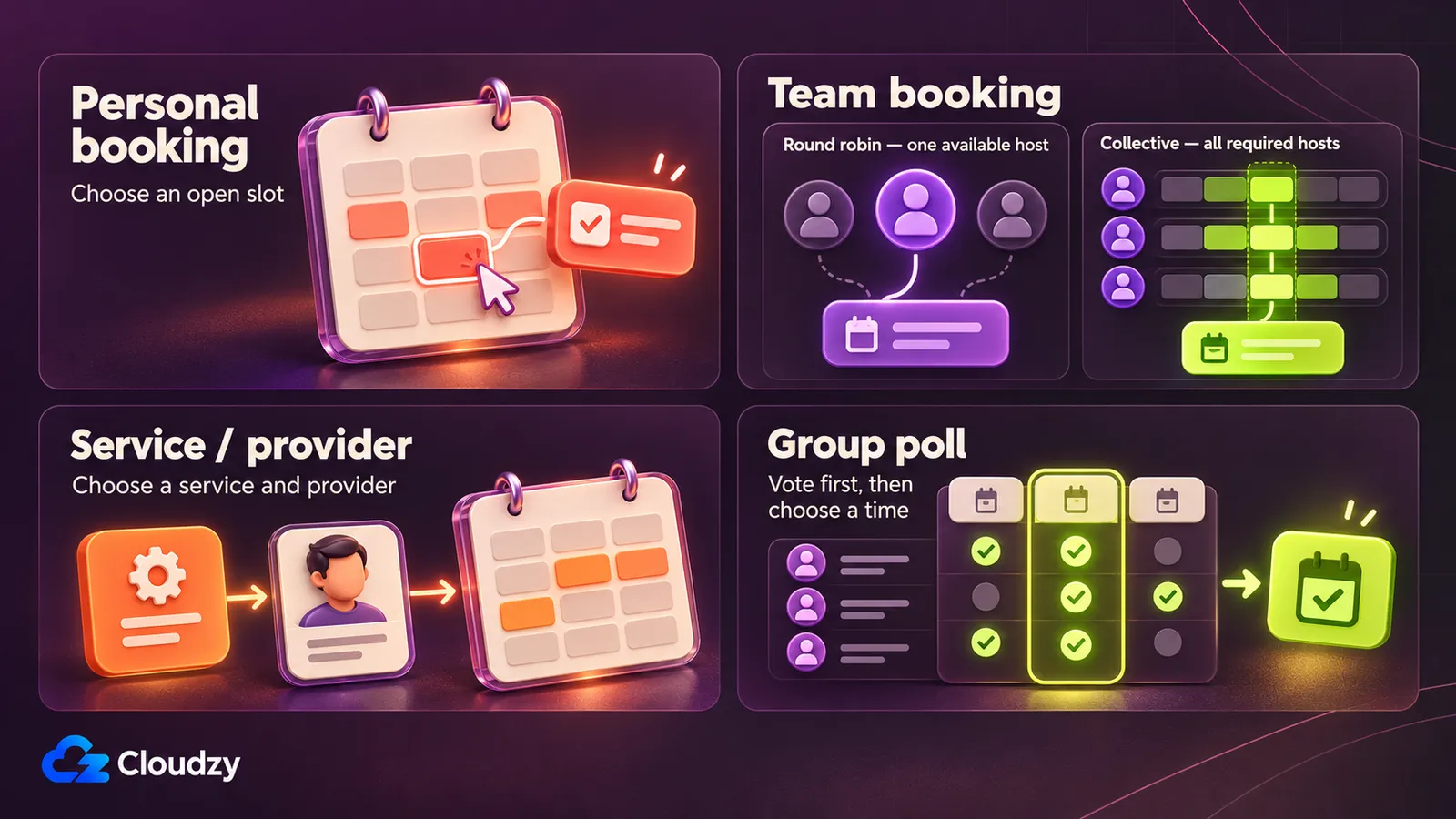
If a shared link must rotate hosts or book several colleagues together, evaluate commercial Cal.com and TidyCal's applicable team tier first. Retain Calendly when a switch loses required behavior. I'd avoid selecting a public self-hosting project solely because its personal booking page resembles the one you're replacing.
For service/provider appointments, put Easy!Appointments through a pilot using a provider-specific link. The recommendation flips if your requirement is automated host selection that the proposed configuration hasn't demonstrated. Ask for the exact assignment behavior before accepting "several providers" as sufficient.
For personal booking, try a free scheduling tool that's hosted, or an existing Google booking page, before taking on server work. A free Calendly alternative can be enough when you need personal links without shared ownership. Cal.diy belongs in the evaluation only when its project recommendation and your intended use fit. If nobody will own updates and recovery, keep this branch hosted.
For a group vote, choose Rallly and check the entitlement for whoever jointly manages polls. Change direction if invitees must immediately reserve an appointment without an organizer selecting a result.
The category is thinner than the number of scheduling products suggests. Within this shortlist, requiring free self-hosting, shared team booking and a supported production route leaves few paths to evaluate. If internal processing is mandatory, use the component map below and keep commercial Enterprise self-hosting among the possible routes.
Check Data Flows and Operating Responsibilities
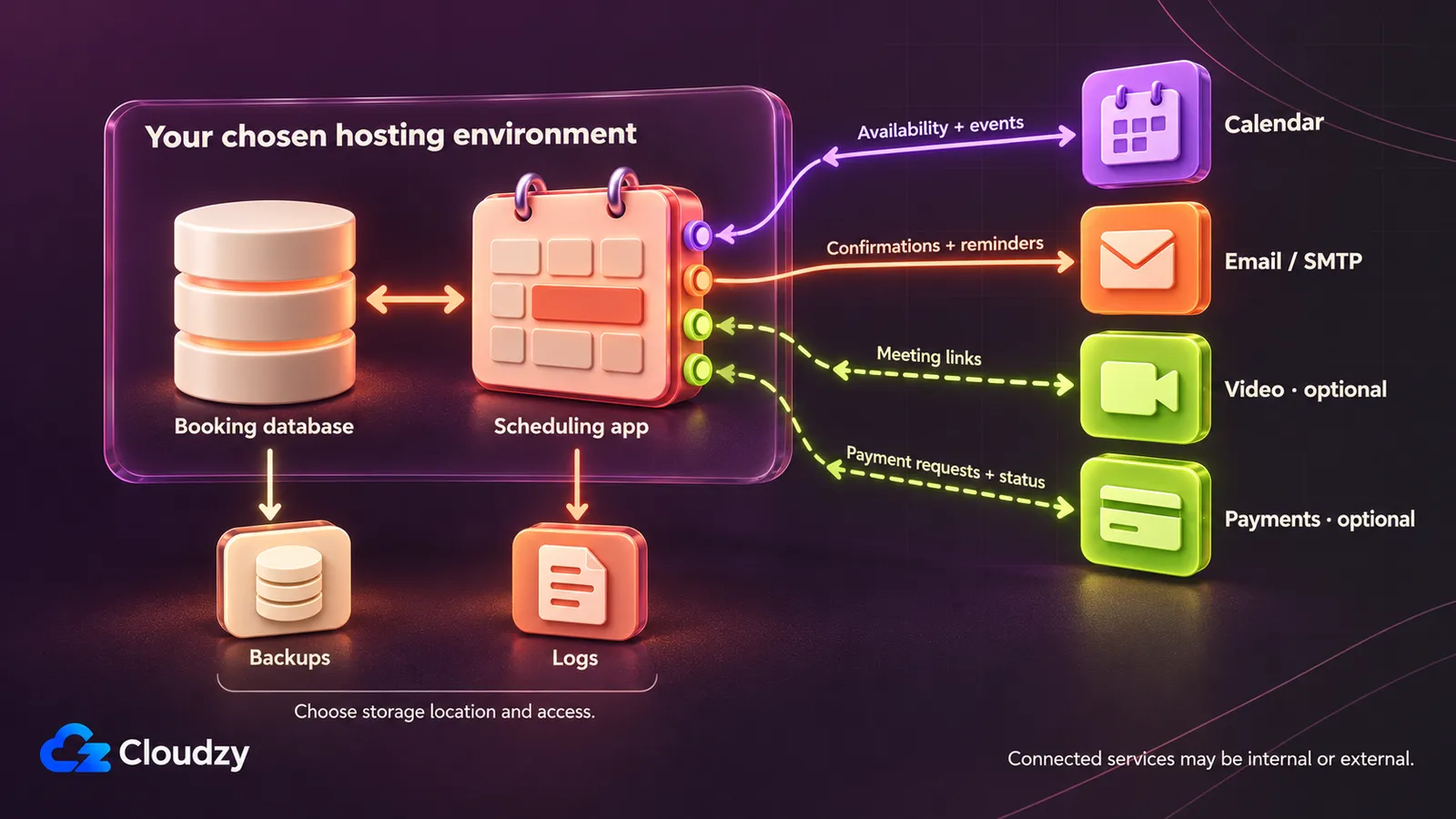
A booking database on your server can still exchange information with an external calendar or email service. Cal.diy's integration configuration describes additional credentials for connected services. To keep processing in-house, trace where each calendar request, message and backup goes; the application server's location covers only one component.
Use this as a dependency checklist, not a telemetry audit:
| Component | Decision to Make |
|---|---|
| Booking database | Where will appointment/customer records live, and who can administer them? |
| Connected calendar | Which calendar service receives or supplies event and availability information? |
| Outgoing email | Which SMTP service sends messages, and who holds its credentials? SMTP is the outgoing-mail protocol. |
| Video and payments | Which optional services receive meeting or transaction details? |
| Logs and backups | Where will copies and diagnostic records live, who can read them, and when will you delete them? |
A database hosted elsewhere in the cloud and a server on company premises are different control arrangements. Specify the boundary you require for each component; a VPS location alone doesn't settle it. For self-hosted appointment scheduling, record both the component's location and the person responsible for it. That makes an unassigned mail or recovery task visible before cutover.
Then match the host to the documented stack. Easy!Appointments' installation requirements describe Apache or NGINX, PHP 8.2+ and MySQL, so compatible web hosting can be a rational option. Its CalDAV sync instructions describe backend-triggered changes or scheduled synchronization through a cron job. Check that your host permits the required background work.
Cal.diy documents Node.js/PostgreSQL and a Docker/Compose path in its setup requirements. An existing server or on-premise deployment can be viable when networking and administration fit; a separate reachable VPS is another option. Choose a compatible host after selecting the application, without treating a README example as a universal resource minimum.
Name who renews an expired calendar credential and who investigates when mail stops arriving. A host's managed or unmanaged responsibilities affect what you must cover. Budget for the administrative work of self-hosting, including application updates, monitoring and recovery, alongside the hosting bill.
For the polling branch, we provide a one-click Rallly deployment option with a guide covering persistent PostgreSQL storage, outgoing mail and domain/TLS setup. It's a starting route when you've chosen a separate host for polls. Rallly's license-validation code requires an external HTTPS connection for a paid license; include that in any internal-processing assessment.
Pilot the Replacement Before Changing Booking Links
An appointment already booked through your old link needs an explicit transition plan. Before moving public links, recreate representative bookings in the replacement and decide where existing appointments will be managed. Perform the proposed checks below and record the results; a matching feature name doesn't prove parity.
- Inventory event types, durations, buffers, lead times, provider/team assignments, shared settings and every public link or embed. Record who can edit each shared event type and who should receive its bookings.
- Test a personal link and each required shared pattern. Create an independent busy calendar event and confirm that conflicting slots disappear. Try a second time zone and a daylight-saving-time boundary.
- Check confirmation and required reminder delivery, then cancellation and rescheduling from both sides. Verify video links and payment behavior when required; record what happens when a connected-calendar sync fails.
- For self-hosted deployments, back up the database and configuration, restore them to a test copy, and rehearse an upgrade there. Record who performs recovery and how you'll recognize a failed update. For hosted services, check the available export and recovery options.
- Decide whether existing appointments stay in the old service until completion or need individual handling. Keep required cancellation/rescheduling access working, communicate the new link, and update its known placements. Don't assume a bulk importer, redirect, or cross-product appointment control.
Approve the replacement after completing the applicable pilot checks before changing the public booking link.
Frequently Asked Questions
Can I Self-Host Calendly Itself?
Calendly's published plan options describe a hosted service, with no customer-installable package identified among those options. For a self-hosted Calendly alternative, evaluate an own-server route such as Easy!Appointments, Cal.diy within its recommended scope, or commercial Cal.com Enterprise. These are separate products and arrangements, with different feature and support boundaries.
Can I Use Cal.diy Commercially Under Its MIT License?
Yes. Cal.diy's MIT license permits use, modification, distribution and sale, subject to including the copyright and permission notices in copies or substantial portions. It also disclaims warranty. Those permissions don't create commercial support or override the project's personal, non-production deployment recommendation; license rights and suitability are separate questions.
Do People Booking a Calendly Meeting Need Paid Seats?
No. Calendly's seat explanation distinguishes people hosting meetings and connecting calendars from meeting invitees, who don't require paid seats. When comparing costs, count the hosts who need licensed scheduling functionality. Don't multiply the host-seat requirement by every customer or attendee using a booking link.
Can I Create Google Appointment Schedules on My Phone?
Google's schedule-creation requirements specify a computer with a supported browser. You can't create an appointment schedule in the Calendar app for Android, iPhone or iPad. Creating the schedule is a separate task from sharing or using a booking link, so plan to configure the page at a computer before distributing it.
Does Adding a Google Co-Host Check Their Availability?
No, not by default. Google's co-host availability instructions say appointment schedules don't automatically check co-host availability. Include the required hosts' calendars in availability checks before sharing the page. If you need bookings rotated among colleagues, test that assignment separately; adding a co-host's name isn't a substitute for choosing who receives each meeting.
Are Scheduled Reminders Free in Easy!Appointments?
Easy!Appointments' free and custom feature lists distinguish booking, modification and cancellation email notifications from scheduled reminders. The former are free-release functionality; reminders and SMS are listed as paid custom development. If you need an advance message, confirm that delivery requirement explicitly instead of accepting a booking-change notification as the same feature.
Can Easy!Appointments Manage Recurring CalDAV Events?
Easy!Appointments can sync recurring CalDAV events, but its recurrence instructions say you can't create or manage them there. Each provider can sync with one CalDAV calendar. Keep recurrence editing in the calendar system that owns it, and validate representative recurring events against your chosen server before depending on that synchronization for booking availability.
Do Rallly Poll Participants Need Accounts or Paid Seats?
Rallly permits account-free voting, and its registered-user counting code excludes anonymous participants from that count. A guest responding to a poll differs from a registered organizer collaborating in a Space. Count the people who'll create and jointly manage polls separately from the guests answering them, then check the organizer entitlement you need.
Does a New TidyCal Lifetime Team Purchase Include Unlimited Seats?
No. TidyCal's purchase-date entitlement rules limit Agency Lifetime purchases from September 1, 2026 to four seats including the owner and ten calendar connections. Earlier licenses differ, while Individual Lifetime has no teams. Check the terms applying to a new purchase instead of treating an older unlimited entitlement as the current offer.



Discussion
Comments
Sign in to join the discussion.