

A contract workflow needs replacing, but the replacement cannot send contracts to a signing SaaS. DocuSeal, Documenso and OpenSign belong on that DocuSign alternative shortlist. Each has a self-hostable core; the useful comparison is the edition you can operate, the evidence you can export and the services the deployment still calls. Permission to rent a server and permission to send documents to a processor are separate decisions.
Keeping an already approved DocuSign workflow can remain rational while replacement evidence or operations are incomplete, provided that workflow meets your organization’s requirements. If policy prohibits its processing model, familiarity does not resolve the restriction. Establish the replacement’s acceptance criteria before moving live contracts.
TL;DR
- DocuSeal: Its free self-hosted edition supports multiple signers and your own SMTP server. Pro adds features such as automated reminders, SAML SSO, user roles and teams, and advanced API/embedding capabilities. See the on-premises comparison.
- Documenso: Community Edition includes core signing, templates and API access. Commercial features include the organisation authentication portal, document-action reauthentication and embedded authoring. See the edition comparison.
- OpenSign: Its repository documents reusable templates, signing sequences, guest email codes and completion certificates. Its API-token documentation distinguishes paid live API tokens from free sandbox tokens. Confirm self-hosted API entitlement for the selected build; this page does not clearly establish it.
Compare the Free Editions and Their Operating Requirements
The table below compares each tool’s free-code boundary, deployment requirements and commercial features.
| Tool | Free-Code Boundary | Deployment Components | Commercial or Unresolved Gates |
|---|---|---|---|
| DocuSeal | Its repository license is AGPLv3. The DocuSeal pricing page separates free Open Source on-premises from commercial Pro on-premises. | Docker/Compose; SQLite by default, or PostgreSQL/MySQL, as documented in its installation options. Plan persistent files/database and mail delivery. | The Pro setup guide places branding, reminders, SSO, roles/teams, webhooks and API/embedding in its commercial offering. Confirm the exact integration entitlement and usage charges; general repository integration language does not settle them. |
| Documenso | Its edition comparison distinguishes free Community Edition, a yearly Business Edition license and tailored Enterprise Edition. The repository also contains separately licensed commercial code. | Its requirements document specifies PostgreSQL, email transport, a reverse proxy and a signing certificate, with optional S3-compatible storage. Include database documents and audit records in the persistence design. | Its commercial feature list lists organization authentication and document-action reauthentication. The edition documentation also lists embedded authoring/embedded white-label authoring and CSC remote signing. Resolve required exports, timestamp configuration and free API scope for the selected edition. |
| OpenSign | The self-hosting page describes a free self-hosted core. Its root AGPLv3 license has directory and third-party exceptions. | Its Docker guide configures MongoDB, local or external file storage, SMTP/Mailgun and a signing certificate. Review the selected deployment’s persistence and database exposure. | The API-token guide distinguishes paid live tokens from free sandbox tokens, while the self-hosting page advertises a REST API. Confirm the selected self-hosted edition’s entitlement before depending on it. OpenSign’s template guide documents a “Merge Certificate to PDF” setting: enabling it includes the completion certificate in the final PDF, while disabling it provides a separate certificate PDF. Verify the export settings available in your installed build. |
An open source e-signature application can have a usable free core alongside commercial packages. Treat each proposed workflow as an entitlement check: identify the action, the edition that permits it and the service it invokes. A public repository is insufficient evidence for a required feature being free.
Keep a small selection record: selected package, required workflow, unresolved gate, and the person responsible for obtaining an answer. Avoid filling an unanswered field with “yes” because a similarly named cloud feature exists. An unresolved requirement should delay that workflow’s adoption, even when the rest of the application looks suitable.
Match a Candidate to Your Signing Workflow
My starting shortlist would be DocuSeal for a manually managed PDF-template workflow, Documenso Community when free API access is a requirement, and OpenSign when its template and guest email-code workflow fits the process. These are starting points for a pilot, based on official documentation; I have not performed installation or signing tests.
DocuSeal for a PDF and Template Workflow
DocuSeal is a sensible first pilot for preparing PDFs and reusing signing templates when its free core covers the workflow. Its audit-certificate FAQ describes a downloadable completion record with per-party events and conditional verification fields. Judge the recorded method against your requirement before treating the certificate as evidence of a particular identity level.
The certificate records party email addresses, event times, IP address, session ID, browser information and time zone. Email or phone verification depends on the method used; a field’s presence is not proof that a stronger method ran. Ask for a sample generated by your intended configuration, including a declined or delegated request if those paths are relevant.
Stop selection if necessary authentication or integration falls across a commercial boundary you have not approved. The document editor can meet the visible requirement while an essential downstream action remains unresolved.
Documenso for an Existing PostgreSQL Operating Model
Documenso is worth piloting when you can operate its database, mail and certificate dependencies together. Its self-hosting requirements identify a specific trap: the application can start without a signing certificate while document signing fails. A responsive interface therefore cannot serve as the acceptance test for this deployment.
The requirements describe X.509 digital signing using a supplied or generated .p12 certificate and storage of audit logs in the database. That describes the signing infrastructure; it does not establish which human credential a recipient used or what a particular export contains.
Documenso’s document lifecycle describes a completed signed PDF with an attached audit log. Its v2.14.0 changelog also documents separate certificate and audit-log PDF downloads through the API. During the pilot, export these records from the installed build, inspect their contents and validate the signed PDF independently.
OpenSign for Template and Signing-Order Requirements
OpenSign is a candidate when reusable templates and ordered participation are central requirements. Its project README documents multiple signers, signing sequences and guest email codes. Pilot those paths using the complete backend and your selected storage configuration; an email code records access to a mailbox, not independently verified personal identity or organizational authority.
Its development installation instructions say the frontend-only route uses the project’s staging backend, including document uploads. Exclude that route from a private contract deployment. Running a frontend on your machine does not establish where its backend processes documents.
Inspect the Evidence Behind a Completed Signature
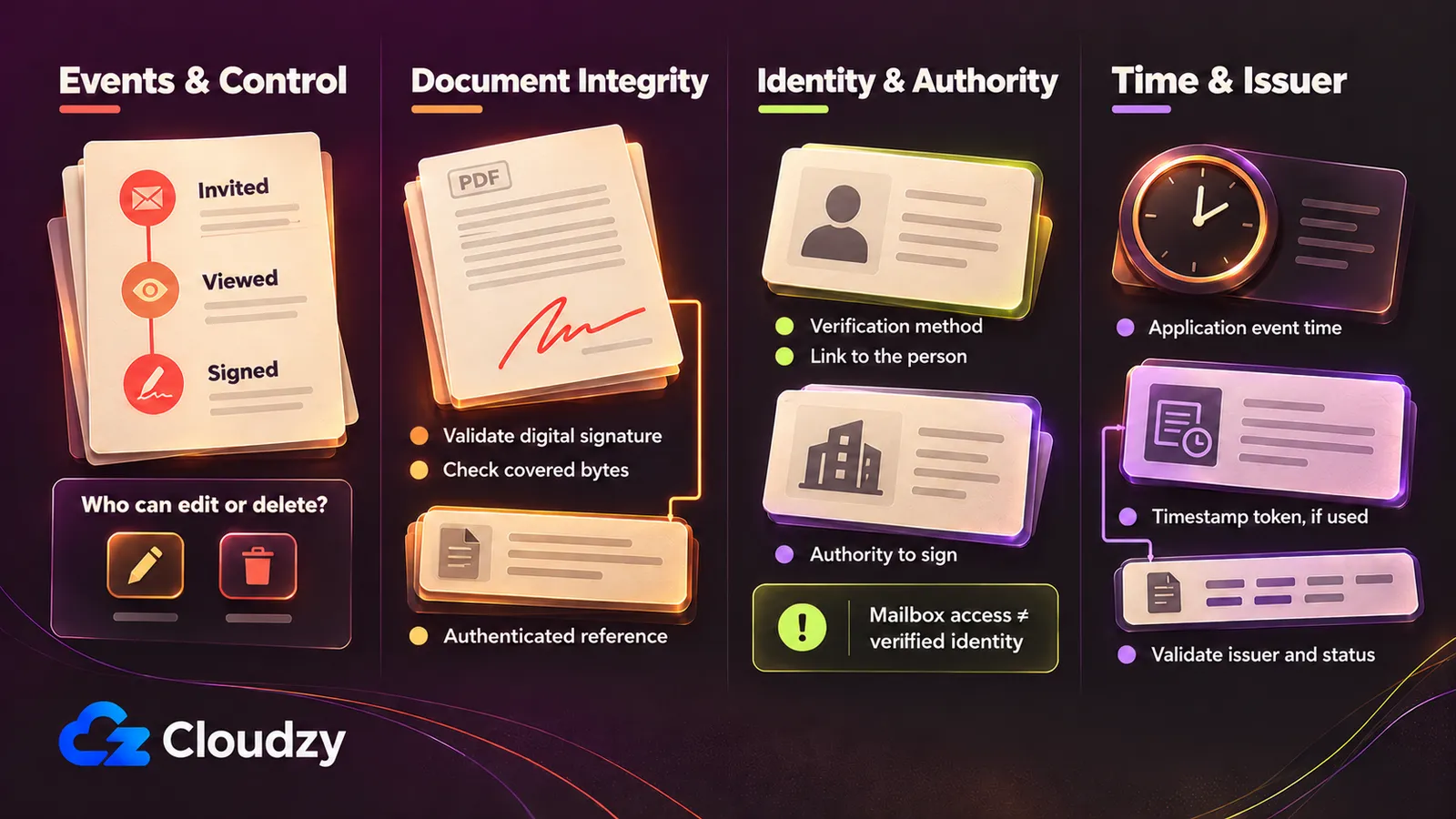
A completed PDF and an event report answer different questions. Collect evidence of the signing actions, document integrity, signer identity and authority, and time. The European Commission’s eSignature FAQ and the ESIGN statute distinguish recognition of electronic signing from broader requirements. No single export or technical field determines a particular contract’s legal outcome.
For US transactions in or affecting interstate or foreign commerce, ESIGN §7001 limits denial of effect solely because a signature or record is electronic. This electronic-signatures statute preserves other obligations and does not require everyone to accept electronic records. Consumer-disclosure conditions apply in specified circumstances. Section 7003’s exceptions include testamentary/family-law records, specified commercial-code matters, court documents and certain notices; these exclusions do not themselves prohibit electronic use.
The Commission’s eSignature FAQ distinguishes electronic signing from its digital, cryptographic implementation. Under EU eIDAS, electronic or nonqualified form alone cannot justify denying a signature legal effect. Qualified signatures have handwritten-equivalent effect. Advanced signatures require identity linkage, signatory control and change detection; qualified signatures add a qualified certificate and qualified creation device. These rules do not settle formation, authority, document formalities or an individual dispute, or classify a named tool.
Use four checks when inspecting a sample evidence package:
- Events and control. An e-signature audit trail should let you inspect who acted, what they saw or accepted, which verification ran and when the workflow completed. Record the evidence of consent relevant to that process. Identify who can edit or delete events, whether changes are recorded, and what protects the retained copy independently of the application administrator. An event log alone does not establish resistance to alteration.
- Document integrity. Retain the original completed PDF and validate any digital signature, its certificate chain and the bytes it covers. NIST’s hash-function definition describes a condensed representation of input. A tamper-evident hash check needs an authenticated reference: a digest whose origin and protection you can establish. Replacing both a PDF and its adjacent hash defeats a bare comparison. A hash alone does not establish signer identity. Ask whether the separate audit record is also protected.
- Identity and authority. Record the verification method and how it links to the named person. Mailbox access or a one-time code does not by itself establish that person’s identity or permission to bind a company. NIST’s digital-signature definition ties origin authentication and integrity to proper implementation. A server’s signing certificate must not silently become a claim that each recipient held an individual credential.
- Time and its issuer. Separate an application event date from an independently issued timestamp token. RFC 3161 defines a timestamp protocol using a message imprint, a digest of the data being timestamped. Verify the token against the retained document and inspect the issuer. Qualified timestamp status is a further distinction: the Commission describes presumptions of date/time accuracy and linked-data integrity, with qualified services listed in Trusted Lists. RFC support alone does not establish that status or guarantee an outcome for the document.
Map Where Documents, Metadata and Digests Go
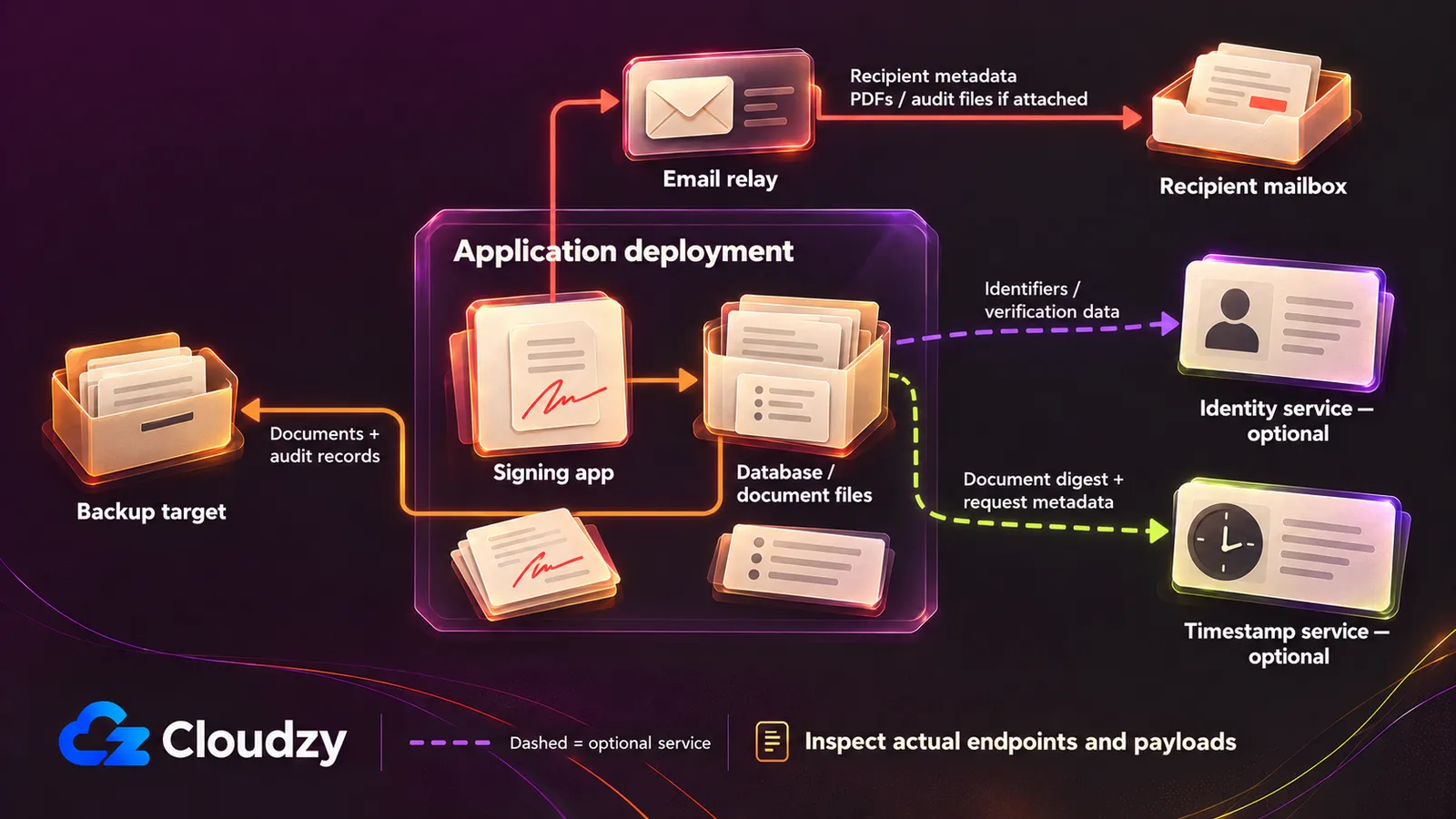
A self-hosted e-signature application can still send completion PDFs through an external relay, as DocuSeal’s completion-email settings illustrate. Self-hosting identifies who operates the application; each configured service needs its own review. Distinguish contract content, personal metadata and digests, then record the endpoint and permitted processing for each route before real documents enter the system.
If the restriction prohibits signing SaaS but permits approved rented infrastructure, company hardware and an approved VPS/private cloud remain options. A rented VPS is third-party infrastructure. A literal ban on all third-party infrastructure cannot be met by buying one; use company-controlled infrastructure and review every supporting service against that boundary.
Our one-click DocuSeal VPS comes with DocuSeal preinstalled, so you can skip manual application installation and focus on configuring your signing workflow. Choose from our global VPS locations to match your deployment’s data-placement needs.
An explicitly approved trust service may still be useful where SaaS document processing is forbidden. Evaluate its payload and purpose under the policy instead of assuming an application you administer automatically supplies stronger evidence.
| Data Route | Documented Data or Capability | Questions to Resolve in Your Configuration |
|---|---|---|
| Email and recipient mailbox | DocuSeal’s completion-email settings can attach signed PDFs and audit PDFs. OpenSign’s email-template documentation describes request details/signing links and completed-document/certificate attachments. These routes can carry content and personal metadata. | Which relay and mailbox receive them? Inspect subject, body, links and attachments. Disabling attachments does not eliminate recipient, title or link metadata. Confirm Documenso’s actual email payload separately. |
| Primary files and backups | The deployment documents describe database/file storage and optional external stores. Copies can include full documents and personal audit metadata. | Where are files, replicas and backups retained? Who can read them, how long are they retained, and where will a restore place them? |
| Identity, SMS and SSO | Documented authentication options vary by product and edition; OpenSign documents guest email codes. | Which method is enabled? Does an approved service receive identifiers, phone numbers or identity material? Do not assume identity-document uploads are the default. |
| Timestamp service | DocuSeal’s timeserver configuration accepts your own or an external RFC 3161 endpoint. The protocol uses a digest; this does not establish every request the application makes. | Which edition enables it, which issuer answers, and is qualified status required? Inspect actual requests and network metadata. |
| Certificates, remote signing and licensing | Certificate configuration, Documenso’s commercial remote-signing option and DocuSeal Pro registration create separate configuration questions. | Does the selected path transmit a PDF, digest, identifiers or usage data? Obtain the license/metering payload details; do not assume digest-only processing. |
| Integrations and optional automation | Webhooks and integrations are configurable paths, not evidence of a complete egress inventory. | Inventory endpoints, event bodies and service logs, including enabled AI or analytics. Check for document URLs, content and personal metadata. |
| Hosting and support | A rented server adds an infrastructure relationship beyond the signing application. | Approve physical placement, backups, administrative access and support access separately. |
Apply the same external-call inventory used for other business applications: trace each connection beyond the user interface. Inspect configured endpoints and payloads with synthetic files. A successful local login supplies no evidence about uninspected outbound routes.
Budget for the Edition and the Work You Keep
A license-free deployment still needs storage, mail delivery and someone responsible for recovery. DocuSeal’s Pro guide and Documenso’s edition comparison separate software entitlement from infrastructure ownership. Budget the exact workflow, including paid actions and supporting services, then assign operating responsibility. “Unlimited” document or user language does not provide unlimited server capacity or free operations.
Budget for compute, database and document storage, backups, mail delivery, certificates or trust services, commercial licenses, usage fees and administrator time.
| Budget Line | What to Enter Before Approval |
|---|---|
| License and usage | Required edition, renewal terms, integration charges and the unit that triggers each fee. Obtain confirmation for ambiguous exports or authentication options. |
| Compute and retained data | Application/database hosting, primary files, backup capacity, retention growth and restore infrastructure. Company hardware also has capacity and upkeep costs. |
| Supporting services | Mail delivery, identity/SMS, signing certificates and timestamp or remote-signing services that the workflow needs. Include any usage-based charges. |
| Operating time | Updates, access reviews, security configuration, delivery failures, monitoring and isolated restore exercises. Name a primary operator and cover for their absence. |
Estimate against your document size, retention period and signing peaks. Avoid comparing a SaaS subscription with only the replacement’s compute bill; they contain different work. If the required commercial gate or service remains unknown, the budget is incomplete even when the application license is free.
A smaller approved workflow is a reasonable starting point. Defer optional automation until its entitlement, data route and owner are clear.
Run a Synthetic Pilot Before Switching Contracts
Use a fictional agreement and test recipients to evaluate the chosen edition before moving contracts. Documenso’s requirements and OpenSign’s Docker guide identify dependencies; your proposed pilot must exercise signing, evidence export and recovery together. This is an acceptance plan, not a report of tests performed. Record failures and unanswered questions alongside the configuration being evaluated.
- Pin the release or image and record the edition, license and installed version. Define required actions and acceptable evidence before installation. Keep this record with the deployment configuration so a later update can repeat the same checks.
- Approve endpoints and storage destinations. Include the external routes in the worksheet, then inspect synthetic invitation and completion emails, attachments and observed payloads. Verify that the selected OpenSign route includes your backend, if applicable.
- Complete a representative invitation with external test recipients. Exercise the required verification method, signing order, rejection or expiry, and completion. Confirm recipient reachability outside the company network and inspect delivery failures.
- Export the completed PDF and audit record in the required form. Validate signatures, certificates and any timestamp token independently of the application’s success screen. Compare integrity against the retained authenticated reference; alter a separate copy and check what validation detects. This is a technical check, not a legal-outcome test.
- Restart the deployment and confirm the records remain accessible. Restore into an isolated environment and repeat retrieval and validation. Give backup targets and recovery ownership explicit acceptance criteria; a backup job reporting success is insufficient.
- Plan a controlled cutover. Preserve completed PDFs and their original evidence separately from new templates. Decide how open requests will finish. Do not treat importing a PDF into a new application as reconstruction of its original signing history.
Our one-click DocuSeal deployment helps with initial application setup when approved rented infrastructure suits recipient access; manual installation on company hardware or any approved provider remains available. Choose from our global VPS locations to match your deployment’s data-placement needs.
FAQ
Billing units, package licenses and installed builds need separate records even after the workflow is selected.
Are Signing Recipients Billed as Platform Users?
No. DocuSeal’s Pro billing explanation distinguishes platform users from signing recipients. Its API/embedding usage unit is a completed submission, which can contain multiple files and parties. Record both the platform-user entitlement and applicable usage fees; do not apply that billing model to another project.
Does One License Cover Every Repository Component?
Inspect the selected files and packages. Documenso has a separate commercial-directory license; OpenSign’s root-license exceptions exclude a specified server route directory when present. For a custom build, record which components you include and their applicable licenses before assuming the repository’s headline license describes every component.
Does an Upstream Release Identify My Installed Build?
No. An upstream release identifies upstream software, while an installation has its own deployed build and edition. Record the version exposed by the running application or its deployment metadata before the pilot. Do not infer that mapping from a release announcement, and repeat the acceptance checks when the installed build changes.



Discussion
Comments
Sign in to join the discussion.