

Adding an occasional responder shouldn’t force a support-software decision every time someone needs access. A self-hosted Zendesk alternative can remove the core license charge for handling customer support tickets. FreeScout is a sensible starting point for shared email; Zammad deserves a look when mailbox-to-team routing drives the choice. Both leave someone responsible for keeping email moving.
Keeping Zendesk, or choosing another managed helpdesk, can still be the better purchase. If your required workflow already works and nobody can own patches, backups and mail processing, replacing the subscription may buy you a second job.
TL;DR
Start with FreeScout for occasional email responders, Zammad for team routing, or Chatwoot Community Edition when email and live chat need a shared queue. UVdesk and osTicket suit specific notification and department-routing jobs; Peppermint needs maintenance and license clarification before a new production deployment. Budget the operating work and prove a complete email round trip before moving your support address.
Compare License Fees and Operating Cost per Agent
A helpdesk with a free core license still needs a host, working email, backups and maintenance. Your effective cost per support agent is the total operating budget divided by the number of agents. Adding responders can spread fixed costs, but extra traffic and operator work can also increase that budget.
The table below uses an illustrative USD monthly budget, not vendor quotes or equal-capacity estimates. Every priced row assumes hosting of $40, backups of $5, mailbox/outbound email of $5, and maintenance of two hours at $30 per hour. That’s $50 in cash operations plus $60 in labor, totaling $110.
The hypothetical team sizes are three, ten and twenty-five agents. They represent a calculation, not evidence that one host supports all those workloads. The separate operating inputs appear as H (hosting), B (backups), E (email), and L (labor) to keep the table readable.
| Exact Edition and Core License per Agent/Month | Paid Boundary | Assumed Monthly Operations | Total: 3 / 10 / 25 Agents | Effective per Agent: 3 / 10 / 25 |
|---|---|---|---|---|
| Zammad open-source self-hosted: $0 | Paid hosting/support separate | H $40; B $5; E $5; L $60 | $110 / $110 / $110 | $36.67 / $11.00 / $4.40 |
| FreeScout core: $0 | Optional modules excluded | H $40; B $5; E $5; L $60 | $110 / $110 / $110 | $36.67 / $11.00 / $4.40 |
| Chatwoot Community Edition: $0 | Premium Support/Enterprise excluded | H $40; B $5; E $5; L $60 | $110 / $110 / $110 | $36.67 / $11.00 / $4.40 |
| UVdesk Community: $0 license-fee scenario | Commercial apps/SaaS/services excluded | H $40; B $5; E $5; L $60 | $110 / $110 / $110 | $36.67 / $11.00 / $4.40 |
| osTicket open-source: $0 | Commercial hosting/support separate | H $40; B $5; E $5; L $60 | $110 / $110 / $110 | $36.67 / $11.00 / $4.40 |
| Peppermint archived upstream: unknown for intended production use | License clarification needed | Hosting, backup and email not quoted; labor not established | Not priced for production | Not calculated |
Calculate total cost as license charges + required modules + hosting + backups + email + labor. Divide that total by your modeled agent count. Round the displayed result, keeping the unrounded values for subsequent calculations.
Maintenance is the sensitive input here. At four hours instead of two, the same scenario totals $170 monthly: $56.67, $17.00 and $6.80 per agent at the respective team sizes. These hours are allowances you can replace, not measured maintenance requirements for any product.
FreeScout’s module licensing terms specify lifetime licenses for one instance, including lifetime updates. If a required module costs M, add M to first-period cash spending. You can alternatively show M/12 as monthly amortization over a stated twelve-month ownership scenario. Calling that amount a monthly subscription would misstate the purchase.
For a paid self-hosted edition charging p per agent monthly, the base scenario becomes $110 + pN, where N is the number of agents. Effective cost becomes $110/N + p. In a fuller model, hosting is H(N): it can grow with workload, attachment storage and service requirements.
The identical totals isolate license arithmetic. They don’t rank the products by cheapness or predict equal administration time. Compare your current helpdesk bill against the scope you need, including any missing paid enhancements, before deciding that switching saves money.
Choose a Zendesk Alternative by Its Deciding Function
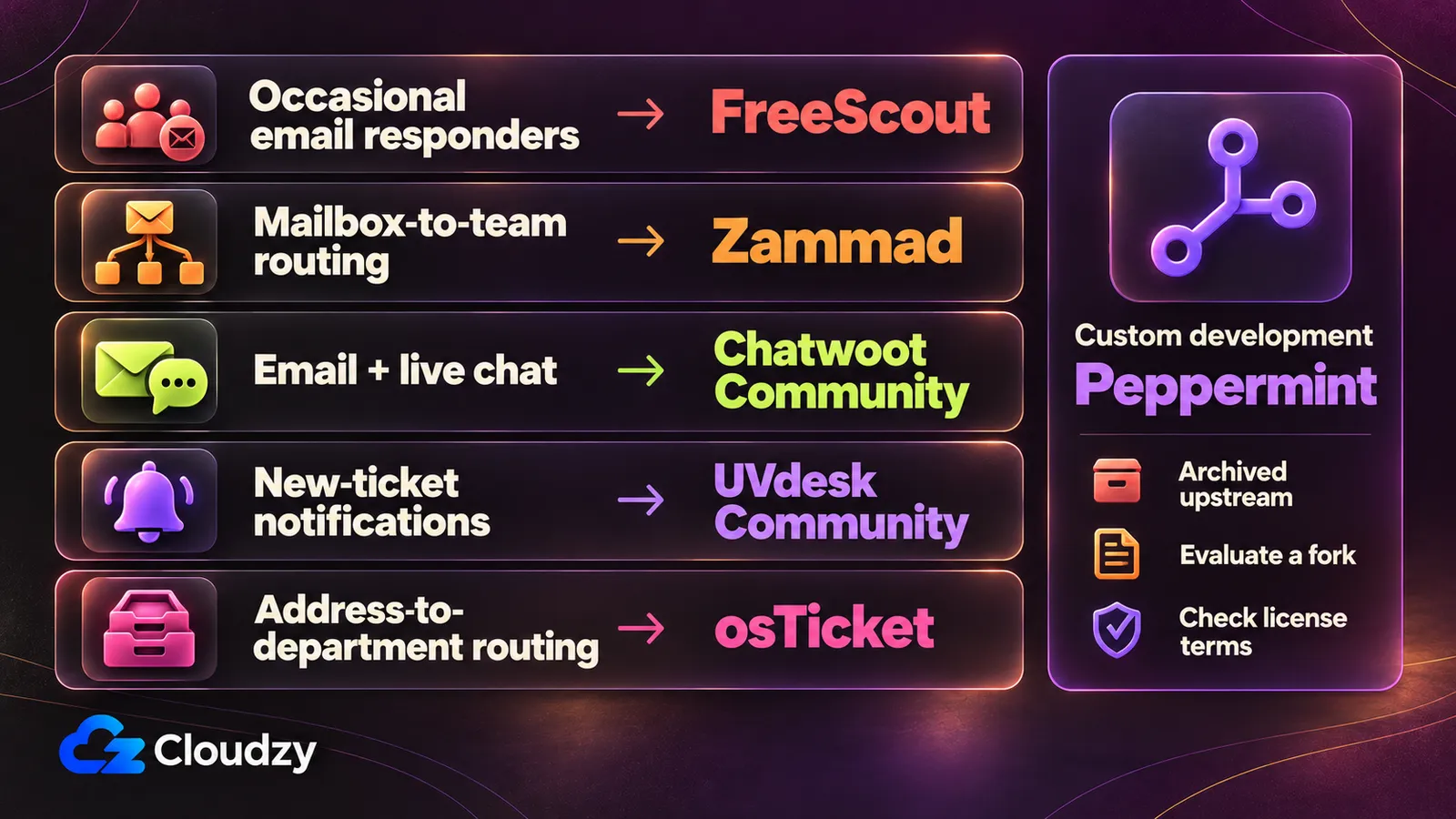
If requests arrive at two support addresses but still need manual sorting, start by testing routing. If occasional responders cause the purchase problem, test agent access. The best Zendesk alternative depends on the support job you need to change, the edition that handles it, and the limit you can accept.
FreeScout for Occasional Email Responders
Choose FreeScout core when you need colleagues to answer the support mailbox occasionally without buying another core-license seat. Its official repository lists unlimited support agents. Check required enhancements separately, and size the server for activity; unlimited agent accounts aren’t a capacity guarantee.
Decide who should receive access and which conversations they should handle.
Write down the enhancements you require before committing. Check workflow, tagging and customer-portal requirements against the paid-module selection in the cost section. An attractive core can become the wrong purchase if the workflow depends on additions you haven’t priced.
I’d shortlist FreeScout first for shared email with occasional responders. Make the mailbox test below the deciding step; adding accounts is easier than proving replies return to the right conversation.
Zammad for Mailbox-to-Team Routing
Choose Zammad’s open-source self-hosted edition when incoming requests need to reach a specific team queue. Its email account setup guide documents a destination group and filters for finer sorting. The limiting condition is ownership of account configuration and historical-mail import behavior, alongside the application stack.
A support address and a billing address shouldn’t depend on one person redistributing each message. Configure the destination group, then use representative messages to check the routing you intend. A rule that matches your example should also leave unrelated requests in the appropriate queue.
Skip the manual installation with our one-click Zammad deployment on a Cloudzy VPS. With the application stack installed, you can move straight to connecting your support mailbox and configuring team routing.
Connecting an old mailbox deserves care. By default, Zammad deletes imported messages from the source mailbox. To retain them, use IMAP and set “Keep messages on server” to “yes”; Zammad then marks imported messages as read and imports only unread messages. Use archive mode for historical mail to suppress automatic actions such as replies. Agree on these settings before connecting a busy address.
This is a routing recommendation, not a promise that a Zendesk migration will preserve every workflow or record. Keep migration requirements separate from a successful new-mail test.
Chatwoot for a Shared Email and Chat Queue
Choose Chatwoot Community Edition when email and live chat conversations need one shared inbox. Chatwoot’s Community page explicitly includes the shared inbox, live chat and email. Check the paid controls your workflow needs; sharing an inbox alone doesn’t guarantee full Zendesk ticket-workflow parity.
A conversation arriving through chat and a request arriving by email can otherwise create separate places to watch. The case for Chatwoot is reducing that split. Evaluate how your agents receive and continue those conversations before treating it as a replacement for your existing ticket process.
The self-hosted plan comparison reserves SSO/SAML and SLA policies for Enterprise. Check those requirements before choosing Community Edition. They’re different purchases even though both run on your infrastructure.
If the main decision is the chat experience, the broader self-hosted live-chat comparison covers that adjacent choice. Keep email intake and reply continuity in your acceptance test here.
UVdesk for Ticket-Created Notifications
Shortlist UVdesk Community when new tickets should trigger agent notifications automatically. Its Community distribution includes an Automation Bundle, and UVdesk’s workflow example emails an agent when a ticket is created. Validate that rule in Community; an ecommerce connector, commercial app or SaaS workflow needs its own edition check.
The documented workflow uses an event, conditions and an action. Start with that one notification, using the recipient and matching condition your queue needs. Check both a message that should trigger it and one that shouldn’t, so an overbroad rule doesn’t become another source of unwanted email.
The operational commitment includes its PHP application and mailbox-refresh configuration. Choose it when that notification job earns the setup work, and require the rule to survive the same restart and mail checks as the rest of the queue.
osTicket for Address-Based Department Routing
Choose open-source osTicket when the receiving support address should determine the ticket’s department and default priority. Its Email Settings documentation describes that routing directly. The limit is how mail reaches the application: actual piping requires mail-server access, while polling requires a scheduled fetcher that keeps running without staff activity.
An address such as [email protected] can carry the intended destination into ticket creation. Test the address-to-department mapping with distinct requests, then reply to one of those tickets and check that it stays in the original conversation.
Compare that job with Zammad’s group/filter approach using your actual incoming messages.
The intake route is part of the purchase decision. Access to a web hosting account alone doesn’t tell you whether mail-server piping or unattended scheduled polling is available.
Peppermint as a Starting Point for a Custom Helpdesk
Peppermint combines ticket management, a Markdown editor and file uploads in a self-hosted helpdesk. Although its upstream repository was archived in July 2026, the source remains available. If you like its approach and have the development resources, it could provide a starting point for a fork tailored to your team’s workflow.
Taking that route means owning the build, dependency updates, security fixes and email integration. Confirm the applicable license terms before adapting or deploying your version, and test the complete email round trip before using it for live support.
Our one-click Peppermint deployment gets the existing application installed on our VPS without the manual setup. Explore its ticket workflow, identify what you want to change, and use that evaluation to plan your own fork.
How to Check Email Piping and the Reply Round Trip
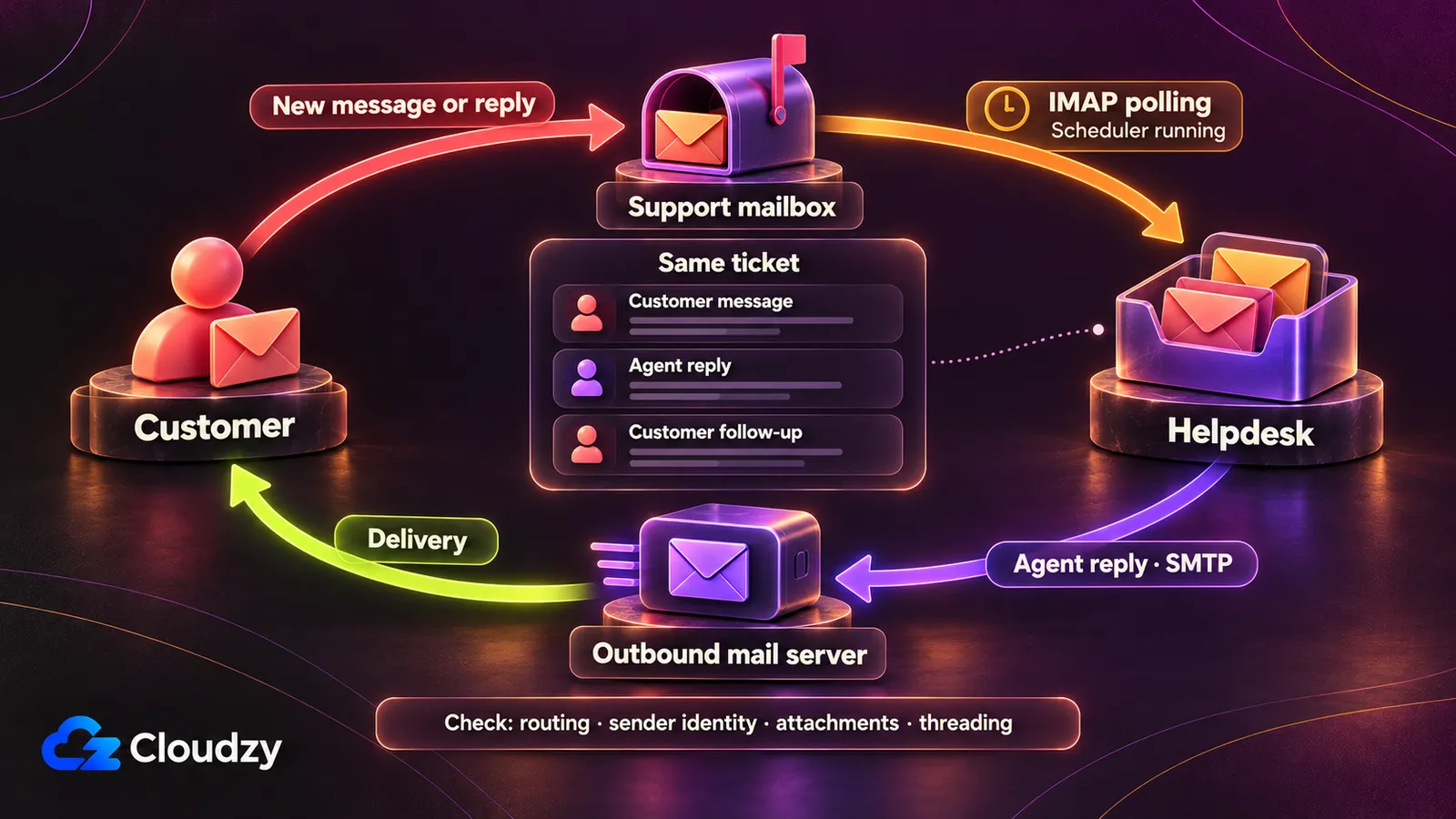
Email piping setup is the operational catch, but many helpdesks retrieve messages by polling a mailbox. You must prove incoming email creates a ticket, an agent’s outgoing reply reaches the customer, and the customer’s next reply joins that ticket. A working login page or password-reset notification proves neither customer-mail direction.
Piping hands a raw message from a mail server to an application handler. IMAP polling retrieves mail on a schedule. Forwarding delivers mail to another receiving address. SMTP handles outbound sending. These mechanisms have different configuration needs, even when the result looks like the same inbox.
The documented routes differ by product:
- Zammad’s email channel documentation separates generic IMAP/POP3 accounts from dedicated Google and Microsoft channels, including Microsoft IMAP/Graph and XOAUTH guidance. Customer-account sending and system notifications need separate attention.
- Chatwoot’s email integration description distinguishes forwarding from IMAP. Forwarding instructions don’t prove that a new self-hosted receiving service is configured.
- UVdesk’s SMTP/IMAP setup instructions separate mailbox retrieval, SMTP Swift Mailer and customer-reply Email Settings. The mailbox-refresh command needs repeated execution. Older password examples aren’t universal current Microsoft instructions.
- osTicket’s polling documentation requires scheduled
cron.phpexecution; auto-cron depends on staff activity. Its mail OAuth2 guide requires plugin/provider configuration, separately from staff sign-in. Configure outgoing SMTP too. - Peppermint’s current authentication and job behavior aren’t verified sufficiently for a production setup recommendation.
FreeScout can poll an existing suitable mailbox; you don’t need to build a complete mail server for that route. Its installation guide documents provider OAuth, minute scheduling and conversation association. Its fetching guide supplies provider-specific settings.
Use this proposed FreeScout acceptance procedure before cutover. These are checks to perform, not completed test results.
- Create a test support mailbox for IMAP polling. Record the provider, folder and TLS settings. Prevent other clients from marking the test messages read: FreeScout’s default fetching skips read messages. Avoid forwarding and autoresponder loops.
- Follow the provider’s authentication path. FreeScout documents OAuth authorization for Microsoft 365 and Google Workspace; its personal Gmail instructions use an app password. Don’t apply Workspace instructions to every Gmail account or confuse mailbox OAuth with an agent social-login purchase.
- Configure outgoing customer replies separately from system email. Check SMTP connectivity and credentials, then the intended From and Reply-To identities. An administrator invitation isn’t a customer-reply delivery test.
- Verify the every-minute
schedule:runtask with the correct installation path, PHP executable and operating user. Check the background queue, logs and System status. Cron is the scheduler; a saved mailbox setting doesn’t demonstrate that scheduled work is running. - Send a message from an external address with a unique subject and harmless attachment. Require exactly one conversation containing the correct sender, body and file. Confirm that the intended responder can take ownership.
- Reply inside FreeScout and confirm delivery externally, including sender identity. Reply externally with another harmless attachment and require the same conversation. FreeScout checks the References header and a body marker for association; don’t assume subject changes or header rewriting will always preserve threading.
- Inspect fetching/send errors and attachment limits. Repeat the round trip after a service restart and after a safe backup restore. Record failures before switching the live support address. These final readiness checks are recommendations, not vendor-certified outcomes.
Pick a Deployment You Can Keep Running
If nobody is assigned to notice a stopped mail job or restore a lost attachment, keep managed operation on the shortlist. Self-hosting needs an owner for patches, credential renewal, job monitoring, backups and storage growth. Choose the deployment after assigning that work and checking the selected application’s requirements.
Staying with Zendesk, choosing another managed desk, or buying vendor-managed operation can be rational. Check the actual support scope: hosting management and application management aren’t interchangeable. The managed-versus-unmanaged responsibility split describes which work remains yours.
FreeScout’s server requirements permit compatible shared PHP hosting, provided the database, minute scheduler and mail connections work. A VPS or suitable on-premises server is another route when the stack needs more control. Use a local proof of concept to check workflow fit; production still needs its own readiness checks.
Zammad’s upstream hardware guide specifies two cores and 6 GB RAM, plus 4 GB when Elasticsearch runs on the same server. Size the complete stack and attachment growth; a small host that displays a login screen hasn’t passed a capacity test.
Choose one workflow, replace the budget assumptions with your inputs, and require the mailbox acceptance test before changing addresses.
Frequently Asked Questions
What Is the Best Free Zendesk Alternative?
FreeScout core is a practical starting point when shared email and occasional responders are your main requirements. Check essential paid modules before choosing it. A free software license still leaves hosting and administration costs, so the best free Zendesk alternative depends on the workflow you can afford to operate.
Which Self-Hosted Helpdesk Fits Email Tickets?
Choose a self-hosted helpdesk by the email job: shared responder access, mailbox-to-team routing, or address-based departments. Confirm the exact edition supports that job and validate its incoming route and outgoing replies. Test queue placement and conversation continuity with customer messages; a successful notification email exercises a different path.
Can Zendesk Be Self-Hosted?
No. Zendesk’s self-hosting policy says it provides its products through Zendesk servers and doesn’t let you host them on your own servers. For an own-server deployment, you need a different product whose self-hosted edition meets your requirements. Don’t assume that replacing the hosting model preserves every Zendesk workflow.
How Do I Choose an Open-Source Ticketing System?
Start with an essential support job and identify the exact edition that handles it. Check applicable license terms and current maintenance, then assign an operator and budget required additions. The best help desk software for your queue should pass a representative mailbox test before you switch your support address.



Discussion
Comments
Sign in to join the discussion.