
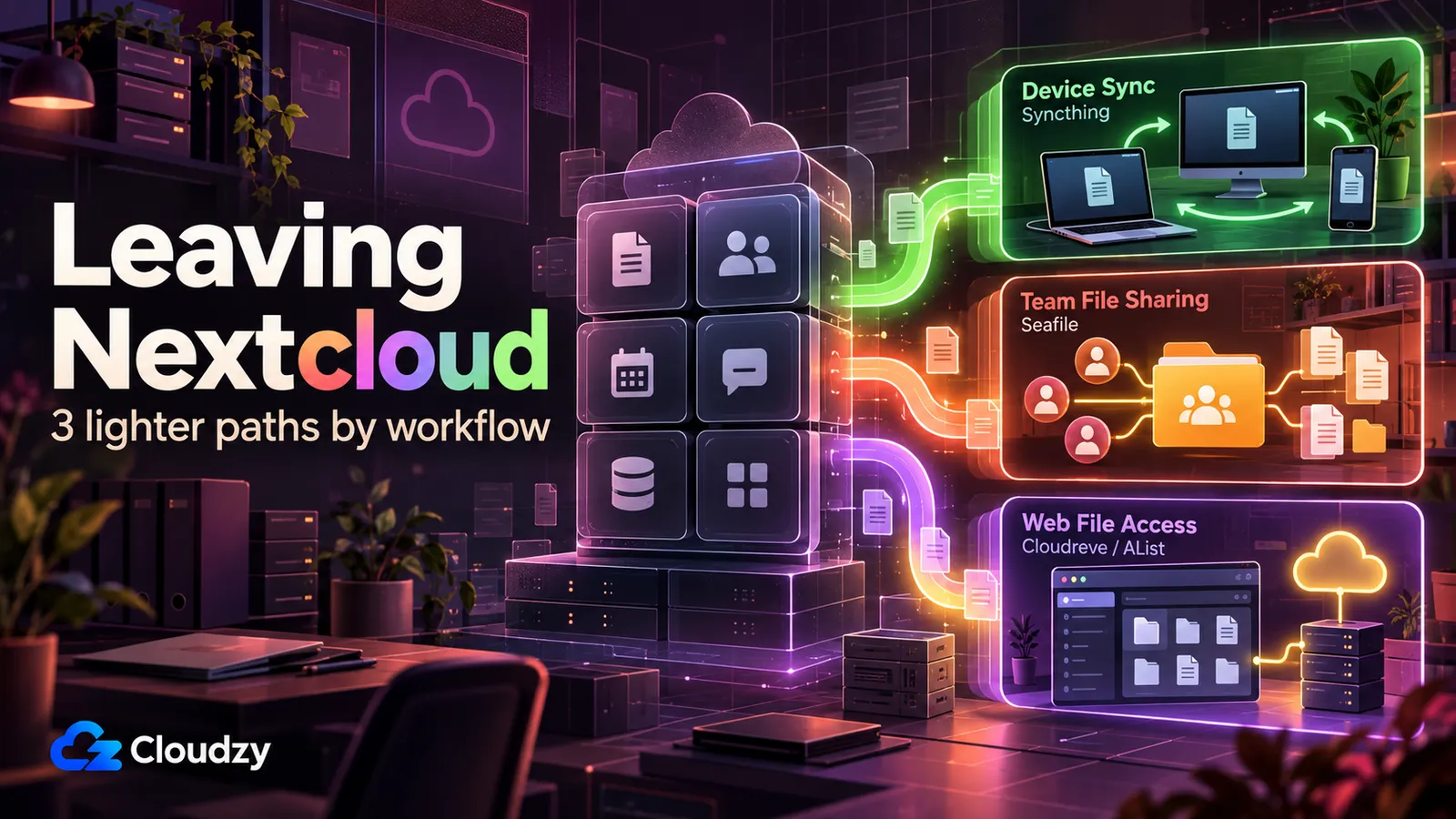
The story I keep reading from people leaving Nextcloud is the same story. A sync client says "fully synced," but files are missing. An upgrade hits a database problem. A photo upload behaves in a way the user did not expect.
The complaint underneath all three is the same: they wanted one dependable workflow from a suite built to cover many of them.
I have a Nextcloud instance on a Frankfurt VPS that I set up one weekend two years ago and have used maybe four times since. The setup worked. The instance is still running. I just stopped opening it, because it turned out I never needed nine of the ten things Nextcloud does.
The official All-in-One distribution requires at least 2 GB of RAM when any optional container is enabled, and its performance guidance recommends adding roughly 1 GB of RAM per active user on top of the base requirement. Team deployments therefore need more headroom as concurrent usage grows. The community also has an open thread on help.nextcloud.com asking the project to consider a lighter version.
What follows is three exit paths matched to three workflows. Where official resource requirements exist, I use them. Where they do not, I leave the hard numbers out. The migration map covers what you keep, what you lose, and where each move gets complicated.
The Short Version
- If you used Nextcloud only to sync files between your own devices, Syncthing is a strong option: peer-to-peer, no central server required, with some important mobile-platform caveats.
- If you used Nextcloud as a multi-user team file share, Seafile CE is a strong option. Its documented minimum is 2 GB RAM and 2 CPU cores, and its narrower scope makes it easier to size when file sharing is the main job.
- If you used Nextcloud mainly as a web file browser, Cloudreve or AList gives you a much narrower stack without carrying Nextcloud's full collaboration suite.
- The two friction points in any move are the CalDAV/CardDAV gap (calendar and contacts) and iOS photo backup. Both are covered in the migration map below.
Why Nextcloud Feels Heavy (and Why That Is Not a Bug)
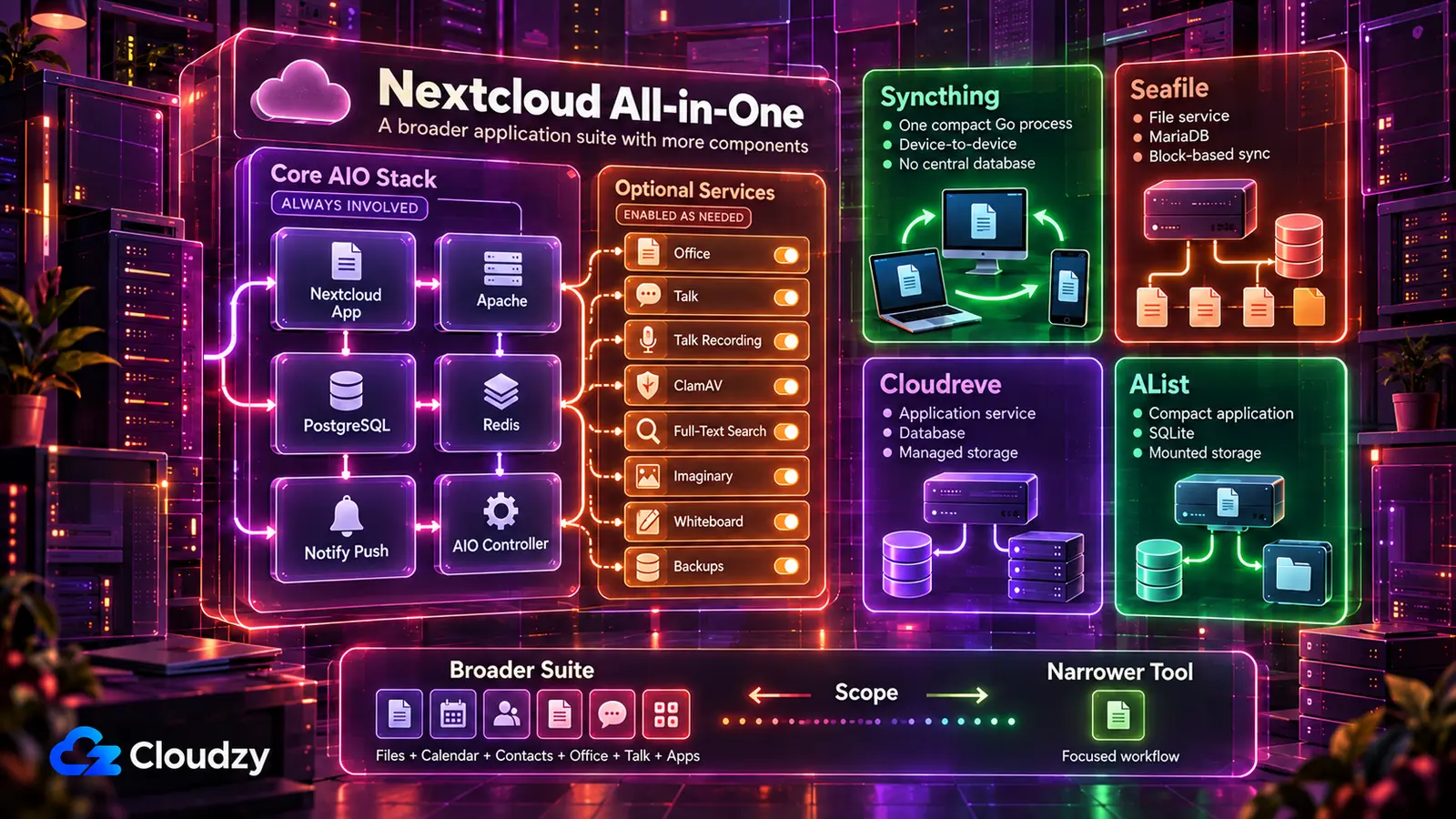
On a fresh Nextcloud All-in-One install, htop shows a real multi-container stack: the AIO master container, Apache, the Nextcloud app server, PostgreSQL, Redis, and Notify Push. Office, Talk, Talk Recording, ClamAV, full-text search, Imaginary, Whiteboard, and Borg-based backups are optional. The core is heavier than a single-purpose sync daemon, but those optional services only cost you RAM if you enable them.
The official All-in-One discussion on GitHub puts the documented minimum at 2 GB of RAM, but it climbs quickly: 3 GB once ClamAV, Talk Recording, or full-text search are enabled, 5 GB with everything turned on, plus roughly 1 GB per active user on top of the base.
Those are sizing recommendations rather than measured steady-state RAM usage: AIO requires more memory as optional services are enabled and recommends additional headroom for each active user. That is the architectural cost of bundling thirty-plus features into a single self-hosted suite. Source: github.com/nextcloud/all-in-one/discussions/1335.
The Nextcloud community itself has noticed. A thread on help.nextcloud.com titled "Nextcloud Lite, discuss" was opened in December 2024, asking whether the project should ship a stripped-down distribution for users who only want files and shares. Some users, including ones who otherwise like Nextcloud, have asked for a lighter build. Most of the replies pushed back, arguing that unwanted features can simply be disabled and that trimming security apps would be a bad trade. The thread is open and the maintainers have not committed either way. Reference: help.nextcloud.com/t/nextcloud-lite-discuss/213611.
The counterpoint matters. AIO already ships PostgreSQL, Redis, and APCu. Its own performance guidance recommends disabling optional containers and Nextcloud apps you do not need. If your instance feels heavy because you enabled Office, Talk, ClamAV, full-text search, or other services you no longer use, trim those first. If you actively use those services together, the larger footprint is doing useful work.
But if you installed Nextcloud and then only ever opened it to drop files into a synced folder, the tuning conversation does not apply to you.
For background on how Nextcloud sits next to its closest fork, see our Nextcloud vs ownCloud comparison.
Section key takeaway: Nextcloud is over-spec'd for the one workflow most self-hosters actually use it for.
The Three-Archetype Diagnostic: Which Exit Is Yours?
Before you pick a tool, pick a workflow. Almost every Nextcloud user I have talked to maps cleanly onto one of three patterns.
Archetype A. Device sync only. "I installed Nextcloud to keep my laptop, desktop, and phone in sync. I never used the web UI for anything serious. I do not share files with other people."
Archetype B. Team file share. "I installed Nextcloud because I needed multiple people uploading to and downloading from a shared file space. Sometimes from a browser, sometimes from a desktop client. I cared about performance with large files."
Archetype C. Web portal only. "I installed Nextcloud as a web file browser. A way to log in and grab my files from anywhere. I might have installed the desktop client. I rarely used it. Real-time sync was not the point."
If two of these describe you, pick the one that gets you to "if this stops working tomorrow, I will notice within an hour." That is the workflow you depend on. The others are nice-to-haves you can replace later or live without.
The resource floors for each path:
| Tool | RAM guidance | Underlying architecture | Sync model |
|---|---|---|---|
| Nextcloud AIO | From 2 GB with optional containers, plus roughly 1 GB per active user | PHP + PostgreSQL + multi-container | Client-server, whole-file sync |
| Seafile CE | Documented minimum of 2 GB | C/Python + MariaDB | Client-server, block-level dedup |
| Syncthing | No official fixed minimum; varies with library size and scans | Go single binary | Peer-to-peer |
| Cloudreve | No official hard minimum published | Go + database | Client-server, multi-backend storage |
| AList | No official hard minimum published | Go + SQLite by default | Web portal over mounted storage |
The Nextcloud AIO and Seafile CE figures above are documented requirements or recommendations. Syncthing, Cloudreve, and AList do not publish comparable hard RAM minimums that make a clean side-by-side comparison possible, so size those tools around your actual library, storage backend, and workload rather than treating community idle-memory figures as requirements.
Section key takeaway: Pick the tool that matches the workflow you used Nextcloud for, not the one with the longest feature list.
Archetype A. Syncthing for Device Sync
A laptop, a desktop, and a phone. You drop a file into a folder on the laptop, and twenty seconds later it appears on the other two. No web portal. No shared library. No team. That is what Syncthing was built for, and it is the only thing it does.
Syncthing is peer-to-peer. There is no server in the architectural sense. Each device runs the same binary, and the devices discover each other over a global relay network or a LAN. You can add a VPS to the mesh, but it is one peer among others, not a central authority. There is no web file browser. There is no CalDAV. There are no team permissions. If your Nextcloud usage was only "keep my own folders in sync," none of those losses matter.
Resource cost is the part that gets the attention. On a small library, say a few thousand files under 50 GB, Syncthing typically idles between 50 and 100 MB of RAM. Once the library climbs into hundreds of thousands of files, RAM use can climb past 700 MB. Most self-hosters never hit that. If you have a quarter-million files in one folder, you will.
Two primary sources document that scaling behavior:
- The Syncthing forum's long-running thread on RAM utilization: forum.syncthing.net/t/ram-utilization/9769
- The project's own GitHub issue on the scaling cliff: github.com/syncthing/syncthing/issues/468
A VPS still matters even in a peer-to-peer model. Your laptop and your phone are not online at the same time. If you want changes to propagate when one device is asleep, you need a third device that is always on. A VPS with Syncthing running fills that role and serves the latest copy to whichever device wakes up next. A small library runs comfortably under 512 MB of RAM; give it 1 GB if your library grows past a few hundred thousand files.

Build on a Linux VPS with root access, NVMe, and AMD EPYC power.
View Linux PlansThe iOS caveat is the one Syncthing tutorials gloss over. There is no official Syncthing iOS client with reliable background photo upload. Several third-party clients exist; none of them match what Nextcloud's iOS app does for camera roll backup. If iPhone photo sync was your reason for running Nextcloud, Syncthing on its own will not replace it. The workarounds are paid apps like PhotoSync that push to a Syncthing folder, or keeping Nextcloud running purely for that one workflow while you migrate everything else.

Migration friction in this direction is low. Syncthing operates on the regular filesystem. You point it at the folder where your files already are, add the device IDs of your other machines, and the sync starts. Nothing to convert, nothing to import. The data is whatever was already on disk.
Section key takeaway: Syncthing wins on resource floor and reliability for device-to-device sync, but loses on iOS photo backup and gives up the web portal entirely.
Archetype B. Seafile for Team File Sync
A four-person team. A shared library called "Operations" that holds 60 GB of contracts, design files, and exports. Three of the four use the desktop sync client; one prefers the browser. Someone occasionally uploads a 4 GB video.
A file-sharing-only Nextcloud deployment can need more headroom as active users and optional services are added. Seafile is narrower by design, which makes it easier to size when file sync and sharing are the only jobs you need.
Seafile is built in C and Python with a MariaDB backend. There is no PHP layer. The sync model is block-level deduplication: when you change a file, only the modified blocks transfer, and identical blocks across users are stored once. Nextcloud's default sync is whole-file for most scenarios.
The community reports of Seafile being faster on large libraries are widely circulated, and the architecture is the reason. I will not quote the magnitude numbers that get repeated in comparison articles. The trail does not lead to a primary source. What I can say is that block-level deduplication, documented in the Seafile manual, is the structural reason the speed difference exists.
Current Seafile Community Edition documentation lists 2 GB of RAM and 2 CPU cores as the minimum. That matches Nextcloud AIO's 2 GB minimum when any optional container is enabled. Seafile's narrower scope can still make it easier to size for file sharing, but the exact memory difference depends on workload, active users, library size, and which Nextcloud services are enabled.
For a team that only needs file sync and sharing, Seafile lets you avoid the extra Nextcloud services you are not using. That can reduce the server footprint, but the exact gap depends on workload rather than a fixed 2 GB-versus-5 GB rule.
Migration takes some planning because there is no native Nextcloud-to-Seafile importer. Stand up the Seafile server, install the Seafile desktop client on a machine that can access your existing files, create the destination library, and let the client upload them. How long the move takes depends on library size and available upload throughput.
Seafile stores library data as blocks and internal objects rather than ordinary browsable files. Listing the data directory with ls shows Seafile's internal object structure instead of your original folder tree. Encryption is a separate feature, not the reason those objects are opaque. That means you cannot recover a Seafile library by simply copying normal-looking files out of its backend storage.
Seafile CE also requires manual garbage collection. You run a script to clean up unreferenced blocks after deleting libraries or files. The Pro edition automates more of this. The Community Edition does not. Seafile will feel uncomfortable if your operational comfort comes from being able to copy your data out at any time with cp -r.
The other loss to plan for: calendar and contacts. Seafile does not implement CalDAV or CardDAV. If your Nextcloud was the address book backing your phone, you will need a separate light service to fill that gap. Radicale and Baikal are the standard answers.
Section key takeaway: Seafile is a strong fit if you used Nextcloud primarily as a multi-user file share. Its file-focused architecture avoids carrying Nextcloud's broader collaboration stack. The trade-offs are its block/object storage model and the loss of CalDAV/CardDAV.
Archetype C. Cloudreve or AList for the Web Portal
The most overlooked exit path. This user wanted a web page where they could log in from any device and grab their files. They almost never used the desktop client. They did not care about real-time sync. For that job, Nextcloud's full feature stack was far more than they needed.
For that user, neither Nextcloud nor Seafile nor Syncthing is the right answer. The right answer is a web portal. Two projects fit cleanly here, and they split on one axis: whether the tool manages your storage or just reads it.
Cloudreve is a web portal plus a managed storage layer. Files live in storage that Cloudreve controls (local disk, S3-compatible object storage, or other backends). It has user accounts and quotas, and Cloudreve Pro now includes an official Windows desktop client with real-time bidirectional sync. The architecture is a Go binary plus a database, and the project repository is active at github.com/cloudreve/cloudreve.
AList puts a web interface over existing storage. It can browse and operate on mounted backends such as local disks, S3, Google Drive, OneDrive, SMB, and WebDAV, including file operations where the backend supports them. It runs as a Go binary and uses SQLite by default, so a basic deployment does not need a separate database server. If your files already live as ordinary files on supported storage, AList can expose them without importing them into a new file format.
When to pick which:
- AList if your files are already organized on disk or in cloud storage and you only want a unified web UI on top of them. Migration is essentially zero. Point AList at where the files live.
- Cloudreve if you want a managed layer with user accounts, quotas, and a single storage backend that the portal owns end-to-end. Migration is low: configure a backend, copy files, done.
One thing to be clear about before picking either: AList is not a sync replacement, and Cloudreve's sync story is narrower than Nextcloud's. Cloudreve Pro has an official Windows desktop sync client, but neither tool gives you Nextcloud's CalDAV/CardDAV ecosystem or an equivalent all-platform photo-backup workflow. If those are essential, you are closer to Archetype A or B than C. AList and Cloudreve are not lighter Nextclouds. They are narrower tools for narrower jobs.
Section key takeaway: Cloudreve and AList are strong options if you mainly used Nextcloud's web file browser. AList keeps the setup simpler when you only need a web layer over existing storage. Cloudreve makes more sense when you want managed storage, user accounts, and Windows desktop sync.
Migration Friction Map: What You Keep, What You Lose
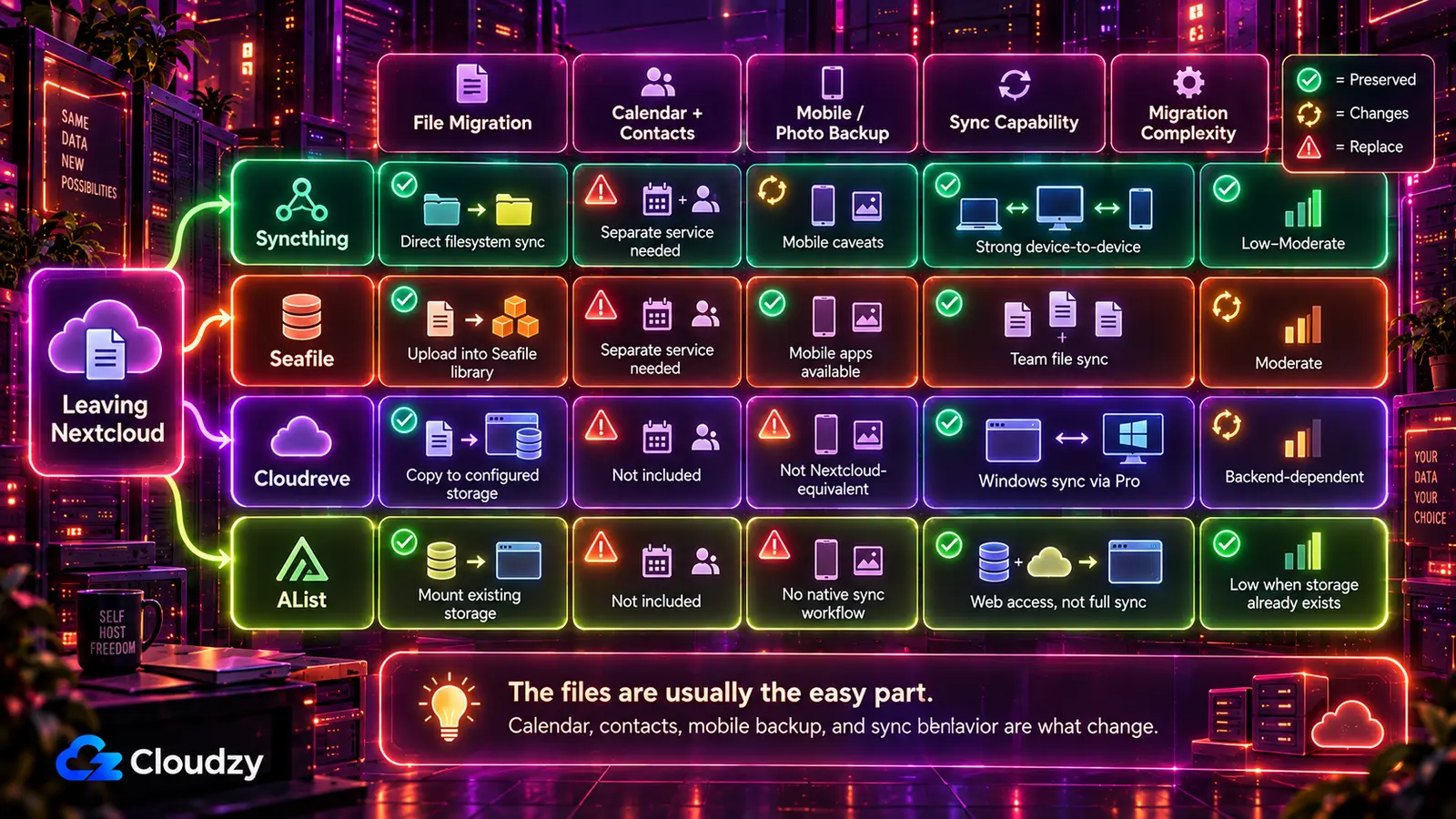
This is the table to read before you pull the plug. It is where most moves go wrong.
| From Nextcloud to | Files migrate? | Calendar / Contacts | iOS photo backup | Notes / Tasks / Talk | Migration effort |
|---|---|---|---|---|---|
| Syncthing | Yes, direct copy | Separate CalDAV/CardDAV service needed | No official iOS client | Not included | Depends on data size and device count |
| Seafile | Yes, upload via desktop client | Separate CalDAV/CardDAV service needed | Supported through Seafile mobile apps | Not included | Depends on data size and upload speed |
| Cloudreve | Yes, copy to configured storage | Not included | No equivalent Nextcloud camera-backup workflow | Not included | Depends on backend and data size |
| AList | Existing ordinary storage can be mounted in place | Not included | No native mobile sync | Not included | Low if files already live on a supported backend |
The CalDAV/CardDAV gap is the single most-overlooked migration cost. If your phone's address book was synced to Nextcloud, that pipeline breaks the moment you stop running Nextcloud, regardless of which file tool you replace it with. Radicale and Baikal are the standard light replacements, and both are far smaller services than a full Nextcloud install. They are the gap-fillers to have on your radar before you pull the plug on the Nextcloud instance.
If you want a separate environment to test the migration before committing your data, Cloudzy's Linux VPS gives you a clean place to do it. A separate test server lets you trial the move without touching the live instance, and you can deploy any of these in one click:
When You Should Stay on Nextcloud
The diagnostic cuts both ways. Here are three reasons to stay, in order of weight.
You actively use the calendar, contacts, tasks, and notes ecosystem. Nextcloud bundles all four behind a single login with a working CalDAV/CardDAV implementation, a working web UI, and working mobile clients. Replacing that with separate services means running Radicale or Baikal for calendar and contacts, a separate notes app, and a separate task manager. Two or three services instead of one. Two or three failure modes instead of one. If this is your daily workflow, Nextcloud is paying its own RAM cost.
You rely on Nextcloud's integrated collaboration stack. Nextcloud keeps files, Office editing, calendar, contacts, tasks, notes, and other collaboration features behind one account and interface. Seafile can integrate Collabora or OnlyOffice for simultaneous document editing, so collaborative Office work alone is not a reason to rule it out. The difference is that replacing the broader Nextcloud ecosystem still means piecing together separate services for the features Seafile does not cover.
Your Nextcloud is heavy because of services you do not use. AIO already ships PostgreSQL, Redis, and APCu, so switching databases or enabling APCu is not the tuning step here. Start by disabling optional containers and Nextcloud apps you do not need. If Office, Talk, ClamAV, full-text search, or preview services are running without a real purpose, remove that load before deciding to migrate.
The logic that says "leave if you only used 10% of the features" says "stay if you actually use the features." Be honest about which one is you.
Section key takeaway: If your workflow includes calendar, contacts, and collaborative office, Nextcloud is still the right tool. Fix the tuning before fleeing.
Frequently Asked Questions
What Is the Lightest Alternative to Nextcloud?
It depends on the workflow. AList is one of the simplest options for web-only file access because it can sit on top of existing storage and use SQLite by default. Syncthing is the narrower option for device-to-device synchronization. Seafile Community Edition is the more complete replacement when you need multi-user file sharing; its documented minimum is 2 GB RAM and 2 CPU cores.
Does Seafile Use Less Memory Than Nextcloud?
Seafile can require fewer resources for a file-sharing-only workload, but there is no fixed RAM gap that applies to every deployment. Both Seafile CE and Nextcloud AIO can start around a 2 GB baseline depending on configuration. Nextcloud's recommended capacity then grows with active users and enabled services, while Seafile is built around a narrower file-sync and sharing workload.
How Do I Migrate From Nextcloud to Seafile?
There is no automated importer. The working path: install Seafile, install the Seafile desktop client on a machine that can read your Nextcloud data directory, create a library on the Seafile server, and let the desktop client push files into it as blocks. Calendar and contacts do not move with the files. You will need to set up a separate CalDAV server like Radicale or Baikal and re-sync from your phone. How long the migration takes depends on the amount of data and your available upload throughput.
Is Syncthing Better Than Nextcloud for Photo Backup?
Not cleanly on mobile. Syncthing's official Android app was discontinued after its December 2024 release, although community-maintained Android options remain. iOS still has no official Syncthing client with Nextcloud-style background photo backup. If automatic camera-roll backup is central to your setup, treat mobile support as a separate decision instead of assuming Syncthing replaces the Nextcloud app.
Can I Run Nextcloud Alternatives on a Low-Cost VPS?
Yes, but size the VPS around the specific tool and workload rather than assuming one memory target fits all four. Seafile CE officially recommends at least 2 GB RAM and 2 CPU cores. Syncthing, AList, and Cloudreve do not provide directly comparable hard RAM minimums for the workloads discussed here, so start from their deployment requirements and leave headroom for your library size, database, and storage backend.



Discussion
Comments
Sign in to join the discussion.