
Five dollars per channel, per month. That was the number I kept staring at on the renewal screen, because it quietly decided how many places I was allowed to post. Four channels meant four times five. Add a second brand later and the bill would rise again for the same scheduled posts I was already writing myself.
I already had n8n running on a VPS for two unrelated automations, so I gave myself a weekend to see whether I could turn it into an n8n social media scheduler for X, LinkedIn, Instagram, and Facebook. It has now been running for four months. Here is what the switch actually cost me, what broke, and where I still would not recommend it.
The Short Version
- I got X, LinkedIn, Facebook, and Instagram publishing from the same workflow, but the four branches did not require the same amount of work.
- Instagram was the problem: the professional-account requirement, media rules, publishing limits, and token lifecycle all created maintenance I did not have with Buffer.
- I left TikTok out because n8n's built-in app-node catalog does not list it, and I was not willing to make a custom or community integration part of my posting schedule.
- Community Edition removed the software fee, not the cost. I still paid for hosting and owned the updates, credentials, backups, monitoring, and failed-post recovery.
- My verdict: the switch was worth it because I wanted drafting and publishing in one pipeline. If I had wanted only a visual calendar and dependable queues, I would have stayed.
What I Was Paying For, and What Finally Tipped It
Buffer's current pricing lists Essentials at $5 per channel per month when billed yearly, while the free plan supports up to three channels and ten scheduled posts per channel. My four paid channels therefore listed at $20 per month on annual billing. That is a reasonable way to sell a polished scheduler, but it charged me for exactly what I wanted to expand: reshaping one idea for several places at once.
Price was not what finally tipped me. I was already drafting posts with a model in a separate window and then pasting them into the scheduler by hand. Two tools were doing one obvious pipeline. Once I could see the workflow I wanted, paying a subscription to keep drafting and publishing in separate halves stopped making sense for me.
What My Workflow Does
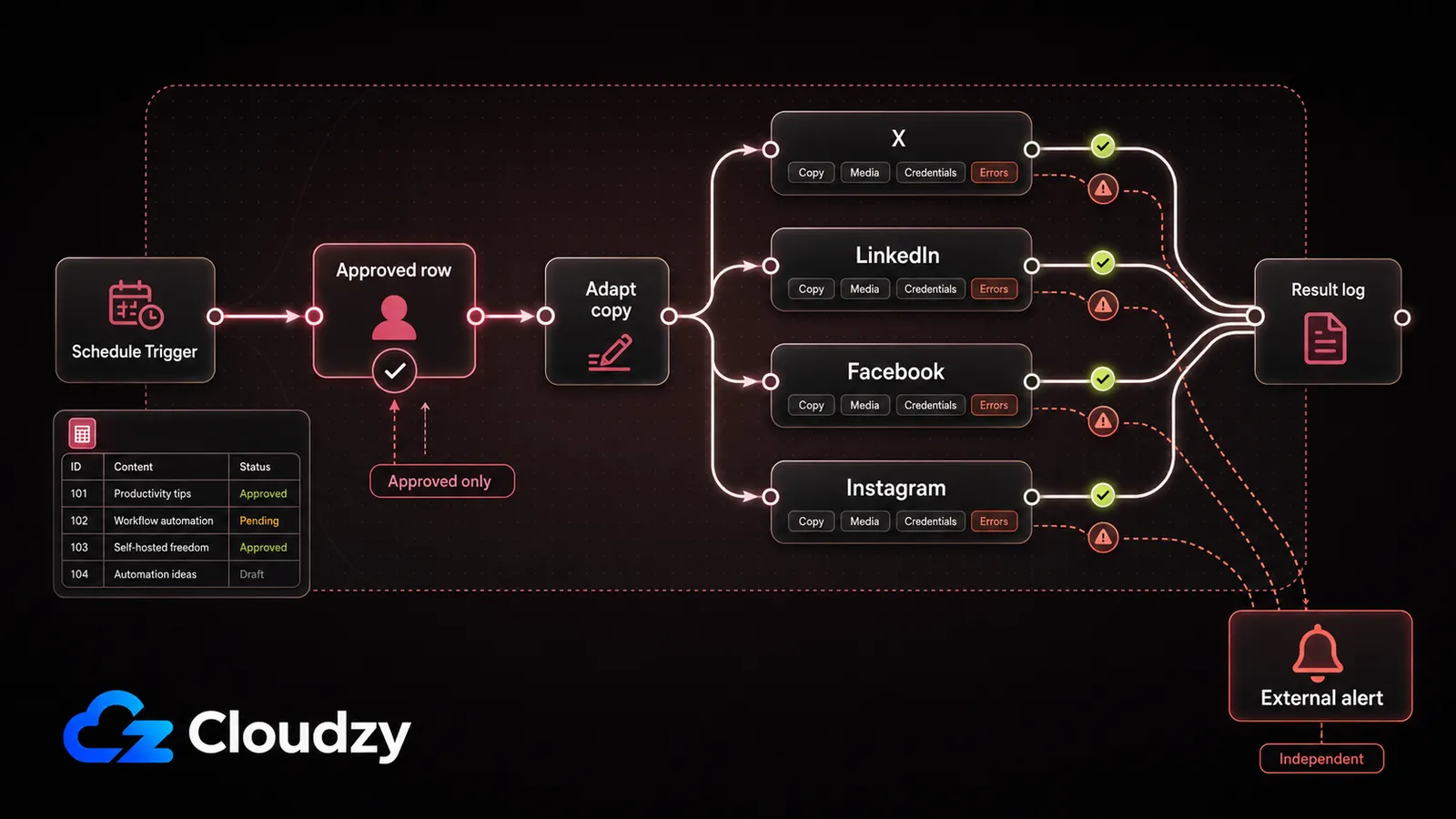
My workflow is deliberately boring. A Schedule Trigger fires a few times a day, reads the next approved row from my Google Sheet, adapts the copy for each platform, sends each version down its own publishing branch, and records the result. I keep a human approval state in the sheet, and I publish only rows I have approved. Failed branches trigger an alert outside n8n so a broken credential cannot disappear inside an execution log.
The drafting step calls a hosted model API. I briefly considered running a model on the same box, but at a few dozen posts per month the self-hosted model cost factors were larger than my API bill. Usage, privacy, or latency could change that decision, but I had no reason to operate extra infrastructure just to rewrite social posts. The workflow is not clever; that is part of why I trusted it.
The Platform-by-Platform Reality (Instagram Is the Problem)
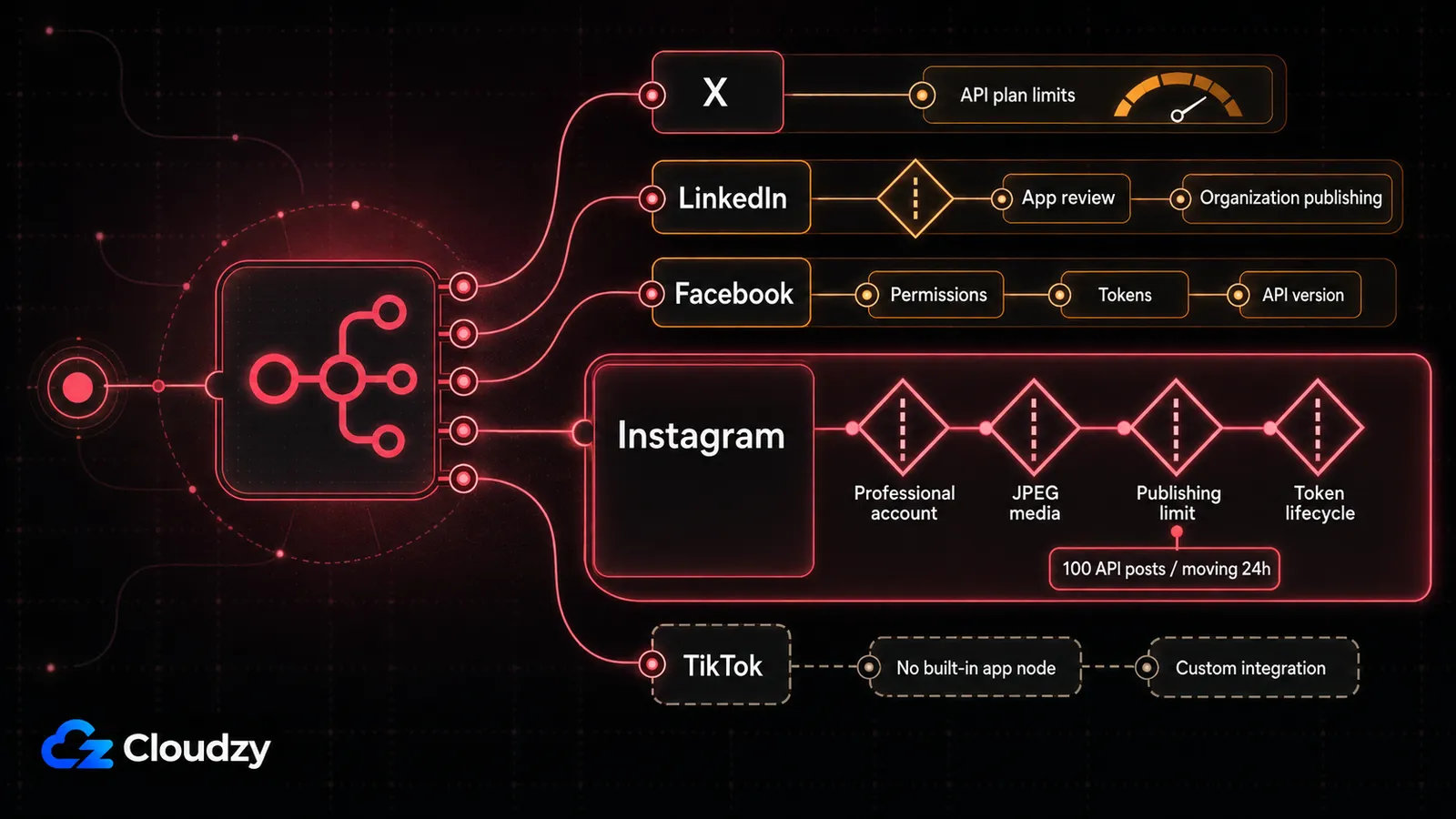
Three of my four branches were mostly uneventful. Instagram consumed more time than the rest of the project combined, and it was the platform where missed posts were hardest for me to ignore. The table shows the routes I used or evaluated; the details underneath are the parts that affected my setup.
| Platform | n8n route | Main constraint | Verdict |
|---|---|---|---|
| X | Built-in X node | Endpoint limits depend on the X developer plan | Works with API access |
| Built-in LinkedIn node | Organization posting requires LinkedIn app review | Works after approval | |
| Facebook Graph API node | Page permissions, tokens, and Graph API versions | Works with setup | |
| Meta Graph API | Professional account, media rules, quotas, token lifecycle | Works with maintenance | |
| TikTok | No built-in app node listed | Requires HTTP, custom, or community integration | Use a scheduler if essential |
For LinkedIn, the LinkedIn node documentation covers post creation for people and organizations, and n8n's LinkedIn credential guide states that posting as an organization means putting your app through LinkedIn's Community Management App Review. That covered what I needed. The X credential documentation says X applies time-based rate limits per endpoint based on your developer access plan level. At my posting volume, I did not hit the ceiling, but I still treat it as a limit X can change rather than a promise from n8n.
Meta's content publishing guide documents JPEG as the only supported image format and a limit of 100 API-published posts within a moving 24-hour period for the documented route. The JPEG rule cost me an evening because my exports were PNG by default and the failure was not obvious from inside n8n. I keep the publishing limit tied to the current API route and version instead of treating it as permanent.
It broke twice in four months. Both times, Instagram. Long-lived access tokens are not permanent, and Meta's token refresh reference says a token can be refreshed only while it is unexpired and at least 24 hours old. Miss that window and refreshing is no longer the recovery path. My mistake was treating authentication as setup work instead of ongoing maintenance. A posting workflow needs expiry monitoring, an early refresh, and an alert when renewal fails.
TikTok simply was not part of my replacement. The built-in app-node catalog does not list it. I could have used the HTTP Request node, a custom node, or a community node, but that would have made me responsible for more credential handling and breakage. I was replacing a scheduler, not volunteering to maintain another platform integration.
The Cost Math, Including My Time
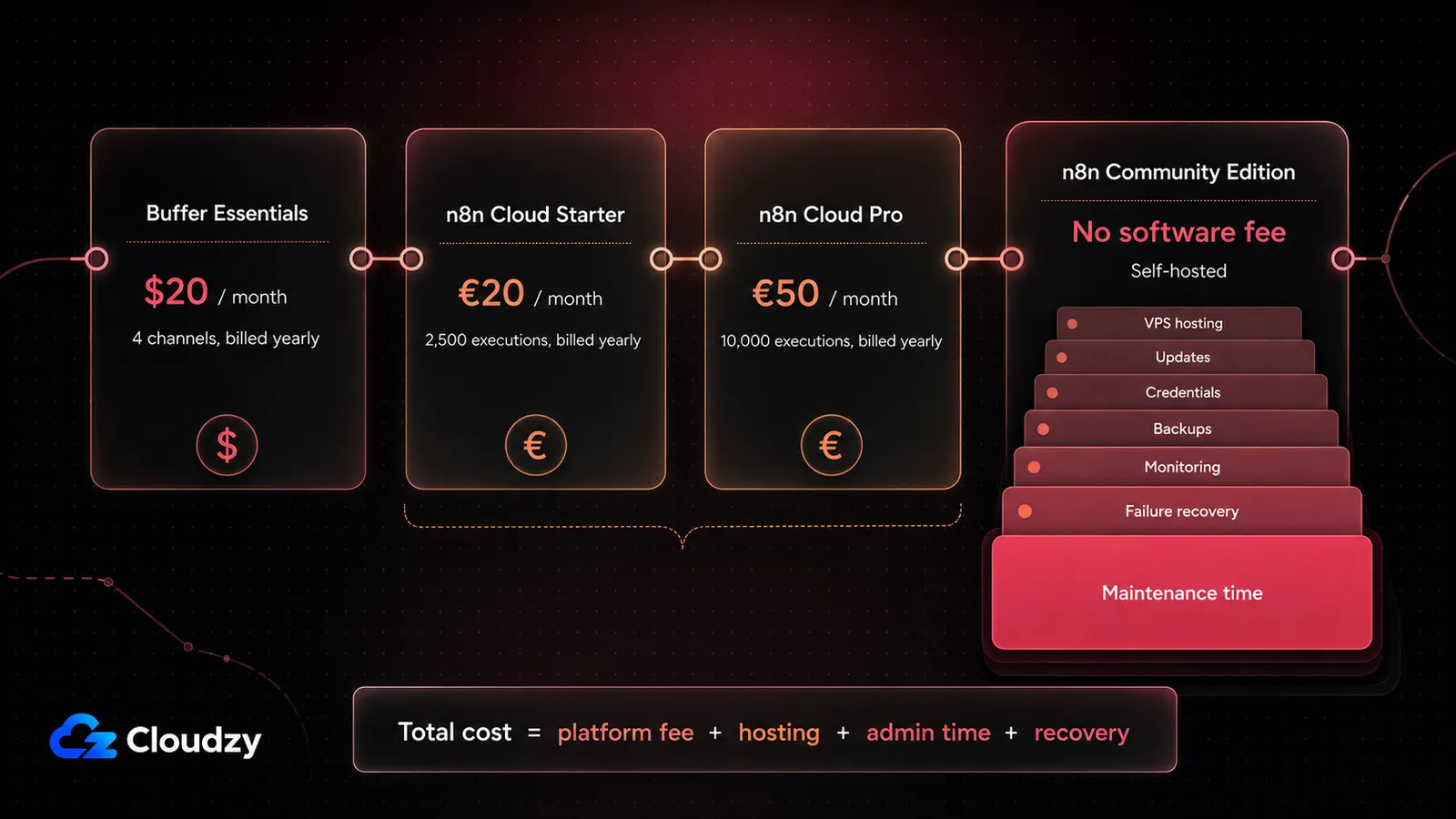
I used Buffer Essentials across four channels as the baseline. The published prices below use annual billing and were verified in August 2026; I have left the dollar and euro amounts in their published currencies rather than pretending they are directly identical.
| Option | Published monthly price | What it includes | What you operate |
|---|---|---|---|
| Buffer Essentials, 4 channels | $20, billed yearly | Scheduler UI and unlimited scheduled posts | No infrastructure |
| n8n Cloud Starter | €20, billed yearly | 2,500 workflow executions | Workflow and credentials |
| n8n Cloud Pro | €50, billed yearly | 10,000 workflow executions | Workflow and credentials |
| n8n Community Edition | No software fee | Self-hosted workflow engine | Server, updates, data, backups, monitoring |
n8n's cloud pricing put Starter in roughly the same entry-price range as my four Buffer Essentials channels. That killed the managed option for my use case: I would have paid a similar monthly amount for a workflow engine and lost the nicer publishing interface. The Community Edition comparison confirmed that I could keep the basic self-hosted edition without a software fee, but it did not make the server or my time free.
I also would not turn the size of my box into a universal 4 GB RAM and 2 vCPU production floor. n8n's deployment prerequisites give a broad resource range. My workload is small, but another setup can change quickly with concurrent executions, media payloads, code steps, database load, and longer execution history. The honest answer is to start from the workload and watch memory and CPU.
SQLite is n8n's default and can be fine for a low-volume single-instance setup. I still prefer PostgreSQL once execution history matters or the deployment is expected to grow. It is also required for a supported distributed queue-mode setup, because n8n does not support that architecture over SQLite. I would rather make that decision at setup than migrate a database after the workflow becomes important.
The VPS was never the expensive part. My weekend was. Then came the evening lost to JPEG, the token failures, and the recurring check that posts had actually gone out. If I price my own hours at all, the savings shrink quickly and can turn negative. That is the point where self-hosting stops being cheap. I still think the switch was worth it, but I would not have said that in week one.
What Broke and What I Changed
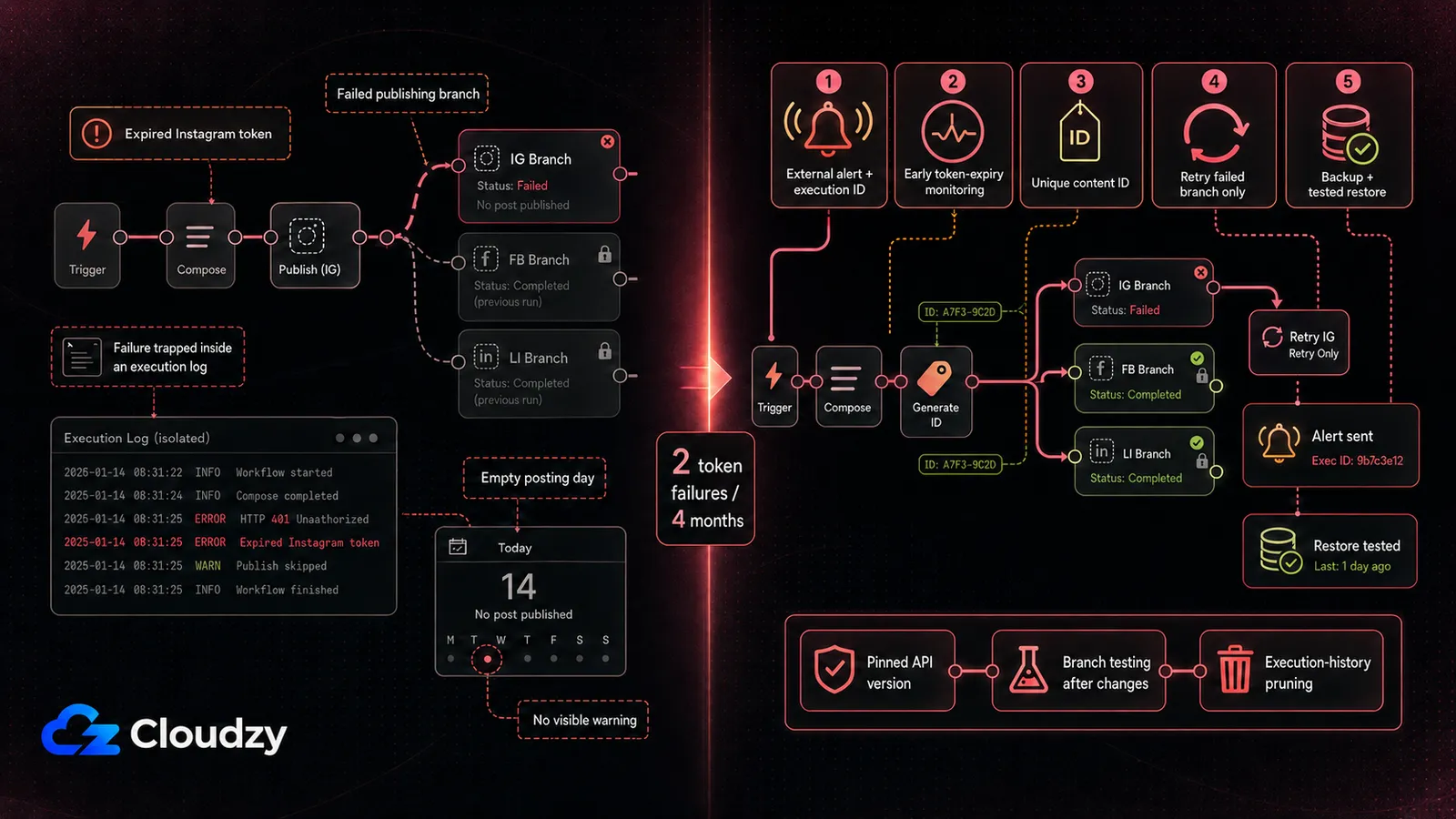
The two visible failures were Instagram token failures, but the deeper problem was silence. A subscription scheduler gives me a product surface that is designed to show account problems. My first workflow could fail inside n8n while the public symptom was simply an empty posting day. That taught me that a self-hosted publisher has to fail loudly and recover without duplicates.
- I send failure alerts to a channel outside n8n and include the platform response plus the workflow execution ID, so I do not need the same system to tell me that it is broken.
- I track token expiry dates and app-review status, and I test renewal early enough to reauthorize before a scheduled post becomes the first warning.
- I record a unique content ID before publishing, which lets a failed platform branch retry without reposting to branches that already succeeded.
- I back up the n8n data volume and database, and I treat a restore test as part of the backup instead of assuming copied files will save me.
- I pin API versions where the provider allows it, read the changelogs, and test every platform branch after an n8n or provider-side change.
- I prune execution history and media files according to the retention I actually need, because social assets can turn a tiny automation into an unnecessarily large backup.
I would not run this from a box in my house. A post scheduled for 9 a.m. needs the workflow up at 9 a.m., and residential power, connectivity, NAT, and inbound callbacks add variables I do not want in a content calendar. A VPS removes those home-network variables; it does not remove my responsibility for TLS, backups, monitoring, updates, or recovery.

Build on a Linux VPS with root access, NVMe, and AMD EPYC power.
View Linux PlansWho Should Not Do This
Stay with the paid scheduler if what you want is a scheduler. That is not a consolation prize. If a calendar, previews, simple approvals, broad channel coverage, and minimal maintenance are worth the subscription to you, buying them is the correct decision. Without a need for custom automation, replacing that interface with a workflow canvas is a downgrade with extra steps.
If you want a Buffer-shaped product that you happen to own, I would look at Postiz before n8n. Its open-source version can run on your own server, and its platform list includes TikTok among more than 30 supported channels. It is a publishing calendar instead of a workflow canvas, which makes it the more natural landing place for many people leaving a paid scheduler.
I would do this again only because I wanted research, drafting, approval, publishing, and logging in one pipeline. That is the trade I accepted: not free scheduling, but control paid for with attention. If all I needed was scheduling, I would go back to the subscription.
If you want to follow the same self-hosted route, our one-click n8n deployment removes the initial server-install step. It does not remove the work I found more important: workflow credentials, platform approvals, updates, backups, monitoring, and failed-post recovery.
Frequently Asked Questions
Do Buffer Authorizations Carry Over to n8n?
No. The platform connections I had granted to Buffer belonged to Buffer's app and authorization flow. My n8n workflow needed its own credentials, tokens, scopes, and any platform review required for the account or publishing route.
Should Every Social Platform Use Its Own Branch?
Usually. I used separate branches so I could adapt copy, media, credentials, and error handling for each platform. That also let a failed Instagram request retry without republishing a post that had already succeeded on X or LinkedIn.
Can One n8n Workflow Publish for Multiple Clients?
Yes, but I would isolate credentials, content sources, approval states, and logs by client. Platform permissions and quotas still apply to the relevant app and account, so one successful connection should never be treated as universal access.
How Should a Workflow Recover Missed Posts?
I query for approved posts whose scheduled time has passed, then publish only records without a successful result. A unique content ID and stored platform response prevent a restart or retry from duplicating posts that already went out.

Discussion
Comments
Sign in to join the discussion.