
Anaconda's own documentation puts the full install at roughly 9.7 GB. A server running one scheduled scikit-learn job touches a sliver of that, and never once opens the desktop app bundled inside it.
That gap is what this Anaconda review is about. The distribution works, and it's worked for a decade. The question is whether it's still the thing you should be installing, and what to run instead when it isn't.
TL;DR
- On a personal machine, Anaconda is a fair deal: one installer, zero decisions, a complete working environment. On a server, it's the wrong installer. Overall: 3 out of 5.
- The size is the part that stops being free when you move it off a laptop, where disk is cheap and the graphical tooling actually gets used.
- Anaconda's current terms allow personal, non-commercial use and free use by for-profit organizations with 200 or fewer total employees or contractors. Above that line, the Anaconda Distribution Installer requires a commercial license, and Miniconda can also trigger payment requirements when it accesses Anaconda-hosted repositories.
- For headless deployment, install Miniforge instead: the same conda tooling, defaulting to the community-run conda-forge channel.
Is Anaconda Still Worth Installing?
Two answers, and which one's yours turns on where the thing is going. On a laptop or a desktop, yes: Anaconda still earns its install for anyone who wants a working data-science environment without making a single decision about what goes in it. On a server, no. Miniforge ships the part you want. I put it at 3 out of 5.
None of that makes Anaconda a bad product. It's a good product being asked to do a job its smaller sibling does better, which is a different complaint and a much more fixable one.
The other variable is quieter, and it decides almost as much as the deployment target: which installer you use, and which package channel it pulls from.
What Anaconda Gets Right
Download one file, click through an installer, and you're in a notebook with the standard numeric and plotting stack already present. You chose nothing. You resolved nothing. For a lot of people that's worth more than every optimization argument that follows, and I think it gets undersold by the kind of person who enjoys assembling environments by hand (I've been that person; it isn't a virtue).
The numbers behind that: Anaconda ships 600+ pre-installed packages, and its current release, 2026.07-1, dated July 29, 2026, bundles Python 3.14.6. That reads to me like something somebody is still actively maintaining, not a legacy artifact nobody got around to retiring.
The deeper thing conda does, and the reason it still exists in a world full of faster Python installers, is that it resolves dependencies that aren't Python. The compiled C and Fortran libraries underneath the scientific stack, the binary toolchains, the pieces a pip-based installer expects to already be sitting on the machine: conda treats those as packages it manages and resolves alongside your Python ones. If your dependency graph runs into that territory and those native pieces aren't available as compatible wheels, no amount of installer speed helps you, because it isn't solving the same problem.
Anaconda Navigator sits on top of all this as a desktop application built on conda, which is a genuine convenience if you're not a command-line person (and plenty of very good data scientists aren't). On these two axes, out-of-the-box completeness and cross-language dependency resolution, Anaconda is at the top of its class and I wouldn't argue otherwise.
Where Anaconda Costs You
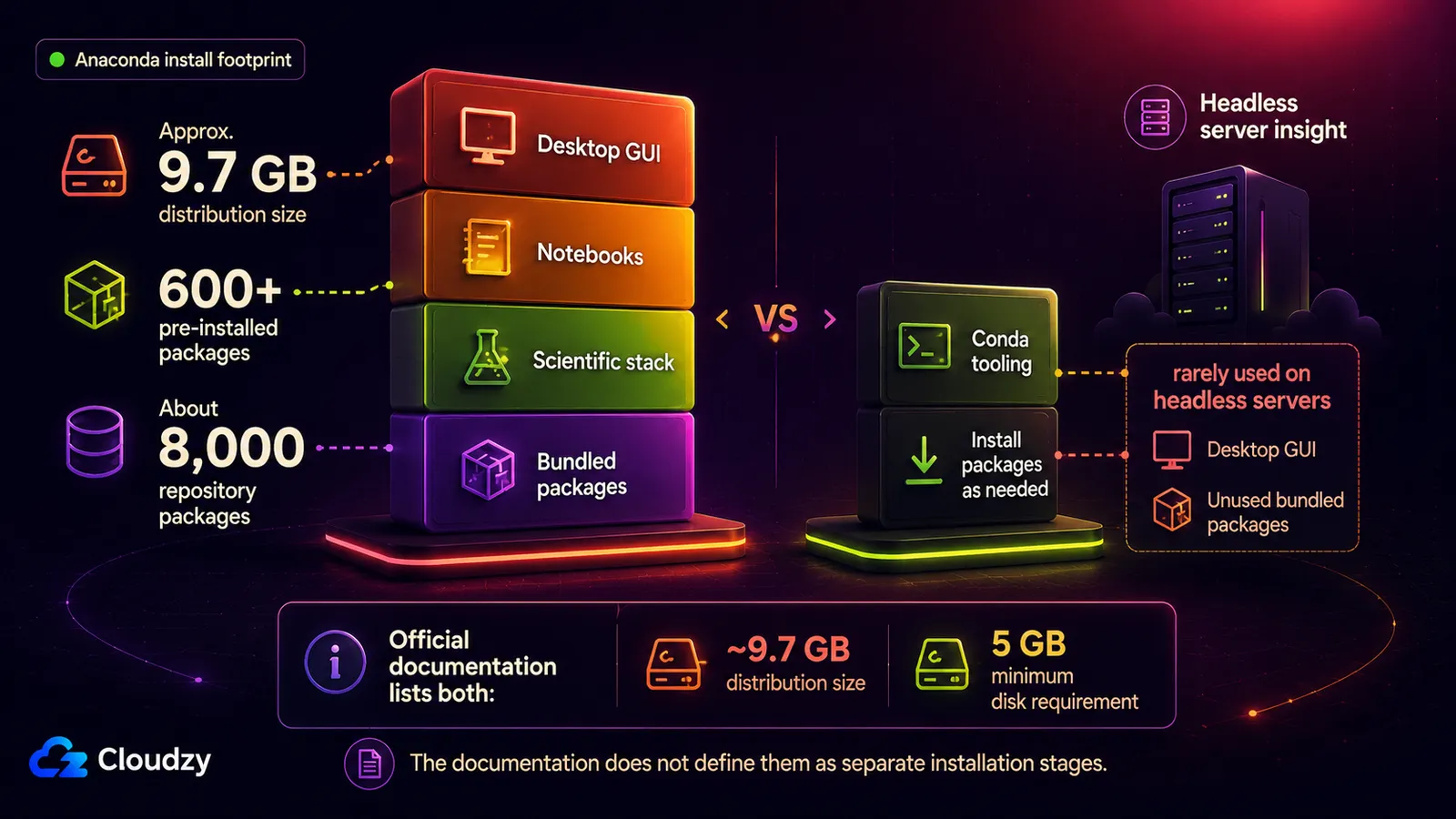
Roughly 9.7 GB installed, and the system requirements ask for a minimum of 5 GB free disk just to download and install. On a workstation with a terabyte of SSD, neither number is a problem. On a small cloud instance, both are a line item, and they buy you a pile of things that instance will never call.
The awkward part is that Anaconda gives you both numbers without explaining how they fit together. I can't support a neat before-and-after distinction from those pages, so treat them as two official planning figures, not two stages of the same install.
Navigator is the clearest case. It's a desktop GUI. On a headless box there's no display for it to draw on, so it sits in the filesystem as payload that never executes. That isn't a knock on Navigator (it's a good GUI), it's a statement about what a GUI is for. Same goes for a meaningful share of the 600+ bundled packages: a server running one inference job or one nightly ETL imports a handful of them and carries the rest.
So I score this one on fit, not quality. Anaconda isn't carrying dead weight on the machine it was designed for. It's carrying dead weight on the machine a lot of people are now pointing it at, and that puts it in the middle of the scale rather than the bottom.
What Anaconda's Licensing Actually Requires
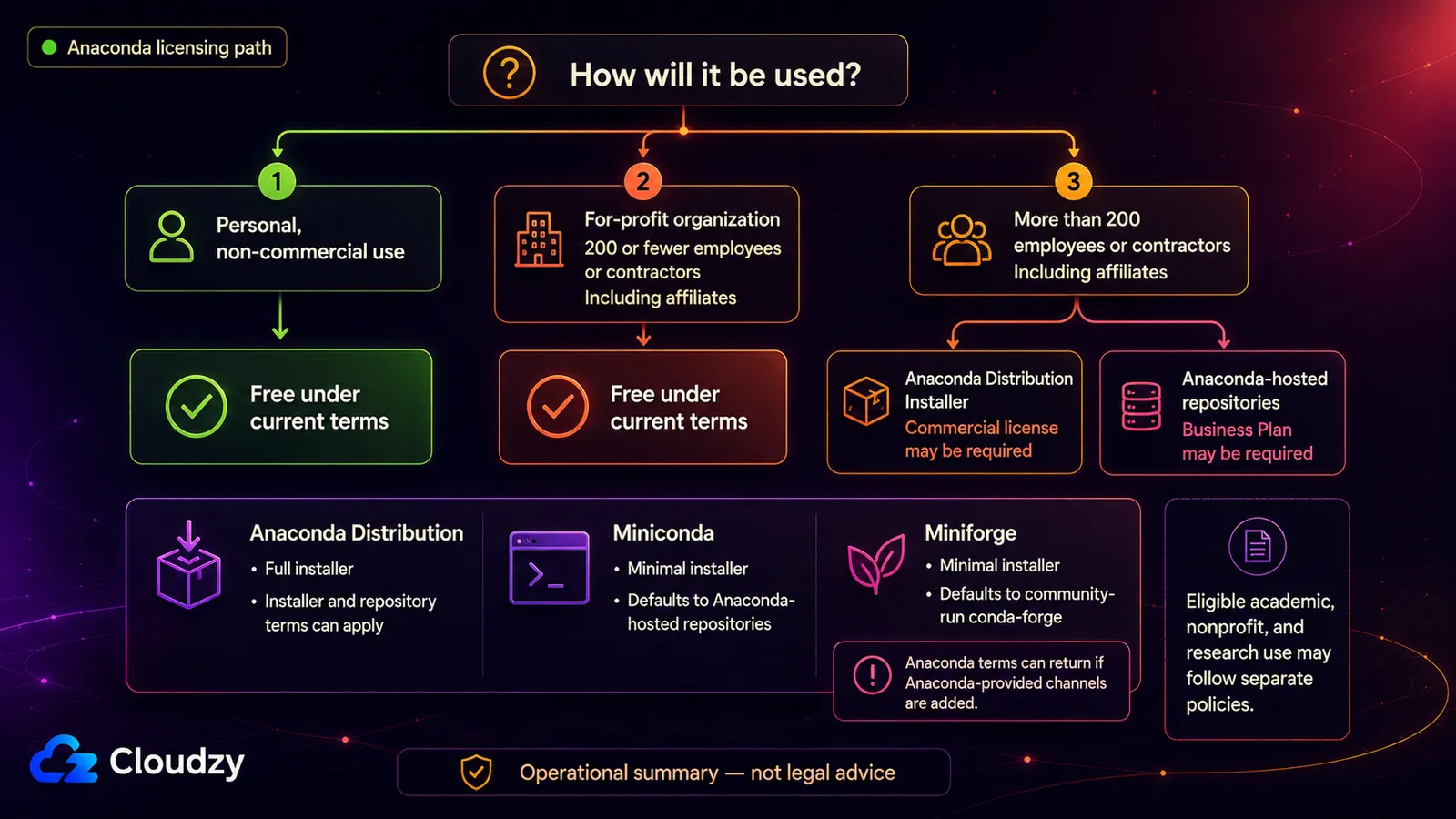
The number is 200. Anaconda's terms of service grant free use when "you are using the Platform on behalf of a for-profit organization with 200 or fewer total employees or contractors (including all Affiliates)." The version on the site today is effective July 15, 2025. Above that headcount, the full Anaconda Distribution installer and access to Anaconda-hosted repositories can require a paid Business Plan; Anaconda's pricing page carries the current tiers.
Which means: if you are one person, a five-person startup, or a forty-person agency, this section is not about you. Most individual and small-team readers are not commercially exposed by these terms. The section matters for the people choosing what a large organization standardizes on, and for the people who will have to answer a procurement question about it later.
The part that trips people up: switching from Anaconda to Miniconda changes half the licensing answer. Miniconda doesn't itself require a commercial license, but it still points at Anaconda's default repository, and that repository is where the payment requirement comes back. Miniforge is the one that moves the needle, because it defaults to the community-run conda-forge channel instead. The channel is part of the answer, but it isn't the whole answer. Anaconda's current legal guidance also treats the full Anaconda Distribution installer as commercially licensed above the threshold. Miniconda changes the installer; Miniforge changes the installer and the default channel.
The dates are worth handling carefully, because the sources do not tell one continuous story and I'm not going to stitch them into one. Lawrence Livermore National Laboratory's technical bulletin says Anaconda changed its licensing terms in 2020, and separately describes the current terms as free for organizations smaller than 200 people. Anaconda's own blog addresses an update to the terms in March 2024. The version published today is effective July 15, 2025.
Those are separate dated claims from separate sources, each accurate to the source that makes it, and nobody I can cite connects them into a single chronology. Treat them as three data points, not as a sequence with a cause.
What Anaconda does say about the 2024 revision is unusually direct:
"We recognize that an update to the Terms of Service in March 2024 was not communicated as clearly as it should have been, causing confusion, concern, and unintentional exclusion of a large number of free users, particularly among our valued academic and research users."
And at least one named institution has acted on the cost. LLNL's bulletin says plainly that the Anaconda license "has become increasingly expensive", and it publishes the schedule: the lab lets its Anaconda license expire in 2027, and begins blocking Anaconda's paid channels site-wide in February 2027.
The same bulletin names the replacements the lab is steering its users toward: conda-forge with Miniforge, Pixi, pip and uv, and Spack for HPC compilation needs. That is a research lab publishing its migration plan, not a rumor about sentiment.
One boundary, stated plainly: I'm reading these terms the way a deployer reads them, not the way a lawyer reads them. If your headcount is close to the line, or your corporate structure makes "including all Affiliates" a live question, that conversation belongs with someone whose job it is.
What to Install on a Server Instead
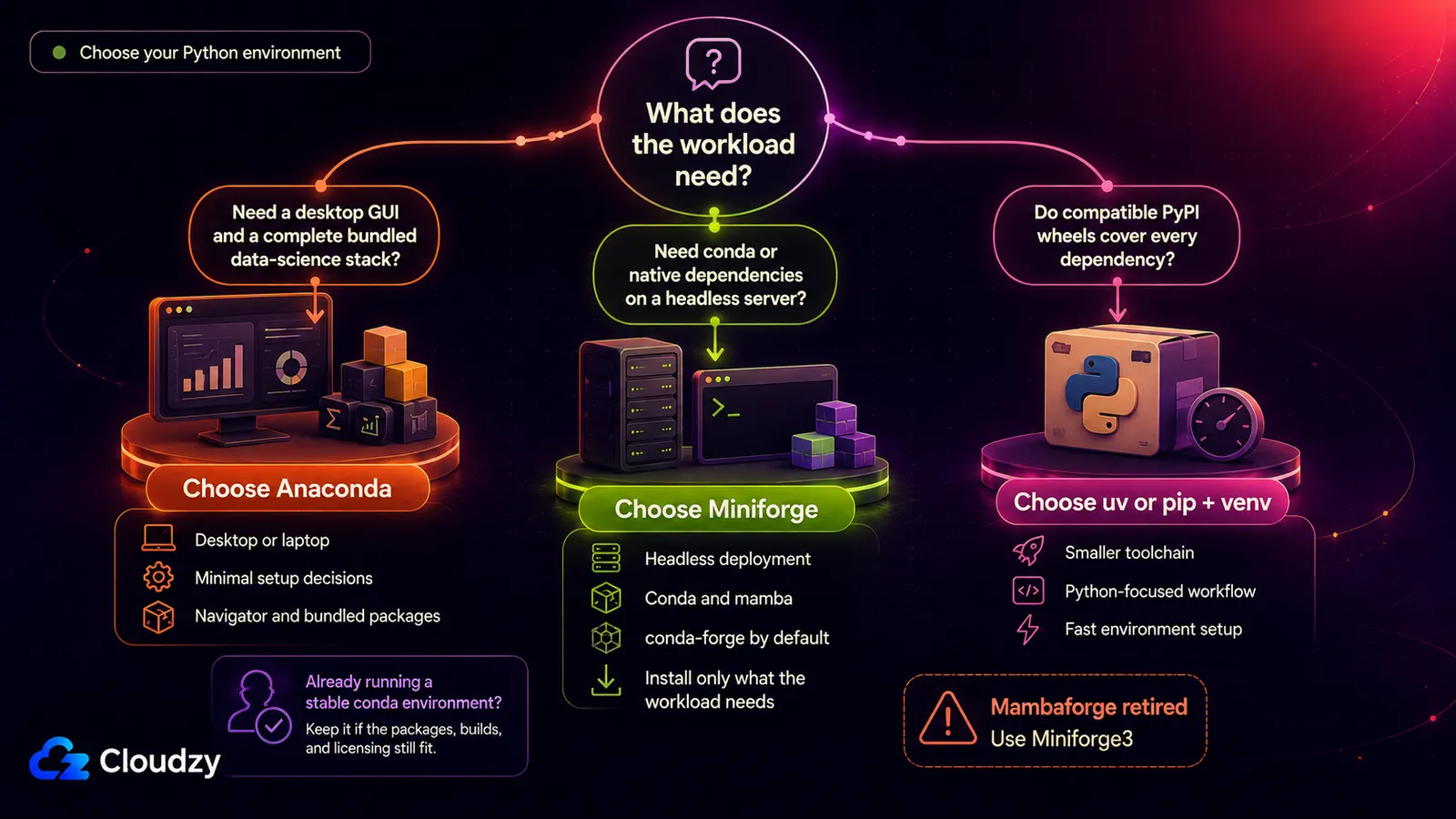
Swap Anaconda for Miniforge on a headless box and almost nothing about your workflow changes. The conda commands are the same, the environment files are the same, and the solver is the same or faster, because Miniforge3 now ships mamba by default. LLNL's bulletin calls Miniforge "a drop-in replacement" for existing Anaconda workflows for most of its users.
Miniforge is published by the conda-forge community under a BSD 3-Clause license, and it sets the conda-forge channel as the default, rather than Anaconda's repository. That single configuration difference removes the Anaconda licensing question as long as you stay on conda-forge and don't add an Anaconda-provided channel, and it's why I'd point a server at Miniforge rather than at Miniconda.
If you arrived here planning to install Mambaforge, don't. It's retired. The Miniforge repository records that Mambaforge is deprecated as of July 2024 and was dropped from new releases after January 2025, with its functionality folded into Miniforge3. Any guide still recommending it is out of date.

Deploy Python apps on fast VPS infrastructure built for developers.
Get Python VPSThen there's the case where you don't need conda at all. If every dependency in your project has a wheel on PyPI, conda's cross-language resolution is solving a problem you don't have, and a pip-based workflow is lighter and faster.
That path is stronger now than it was a year or two ago, mostly because of uv, which Astral describes as "an extremely fast Python package and project manager, written in Rust" and claims is 10-100x faster than pip. That multiplier is Astral's own claim about Astral's own product, and I haven't benchmarked it. The consolidation is the part I'd weigh more heavily anyway: uv folds dependency management, virtual environments, and Python version management into one tool, which cuts a lot of moving parts out of a project.
One more thing worth knowing before you standardize a team on it for three years: Astral announced it is joining OpenAI on March 19, 2026, and said OpenAI will continue supporting the open-source tools. That's a stated intention rather than a guarantee, and it's the sort of thing I'd want in front of me before betting a multi-year toolchain decision on it.
The limitation is the same one pip has: uv isn't a cross-language resolver either. It's a much better version of the PyPI path, not an escape from the reason conda exists.
Who Should Use Anaconda, and Who Shouldn't
One question sorts almost everybody: does anything in your dependency tree live outside Python, and is this running on a machine with a screen? Those two answers together decide the installer, and they matter more than team preference or whatever you happened to use at your last job.
Who Anaconda Is Right For
The clearest fit is a practitioner working on a desktop or a laptop who wants a complete environment and doesn't want to spend an afternoon curating one. Nothing about the size hurts you there, the graphical tooling is a benefit, not dead weight, and if your organization sits under the headcount line the terms cost you nothing. That isn't a consolation prize; it describes a lot of working data scientists.
The second fit is a team already deep in conda whose workloads genuinely depend on compiled and native libraries (GPU stacks, scientific toolchains, anything where the hard part of the install isn't the Python). Ripping out a working conda setup to chase a faster installer that can't resolve your dependencies is a bad trade, fast at the wrong job is still the wrong job. Stay where you are, assuming you're under the threshold and not deploying this headless.
Who Should Install Something Else
Anyone deploying a conda-based workload to a headless server or a cloud instance should install Miniforge. I don't think this one is close: you get the same tooling, you skip the payload that will never run, and the channel question resolves itself.
Any organization above the headcount line that's pulling from Anaconda's default channel has two legitimate answers, and it's worth naming both rather than pretending there's one. Buy the Business Plan if the distribution is genuinely what your teams need, or repoint your environments at conda-forge and stop pulling from the paid channel. Picking one deliberately is fine. Discovering the question during an audit is not.
And if your project is pure Python with wheels available for everything you import, use pip with venv, or use uv. Conda's differentiator buys you nothing in that scenario, and you're carrying a heavier toolchain for a capability you never call.
A Note on How This Review Was Put Together
Nobody paid for this and nobody at Anaconda was involved. The numbers here come from Anaconda's own documentation, terms of service, and blog, plus Lawrence Livermore National Laboratory's published bulletin and the Miniforge repository, all linked above. I didn't run a fresh install of the current release for this piece, didn't benchmark environment-solve times, and didn't evaluate the hosted notebook tier, so treat the size and licensing facts as documented, not measured.
Frequently Asked Questions
Is Anaconda Free for Commercial Use?
For many companies, yes. Anaconda's current terms allow personal, non-commercial use and free use by for-profit organizations with 200 or fewer total employees or contractors, including all affiliates. Above that headcount, the full Anaconda Distribution installer and access to Anaconda-hosted repositories can require a paid Business Plan. The conda package manager itself and the community-run conda-forge channel remain free regardless of organization size.
What's the Difference Between Anaconda, Miniconda, and Miniforge?
Anaconda is the full distribution: conda plus hundreds of pre-installed packages and a desktop GUI. Miniconda is a minimal installer with conda and little else, but it still defaults to Anaconda's own package channel. Miniforge is also minimal, and it defaults to the community-run conda-forge channel instead. Miniconda changes the installer licensing question, but not the default repository. Miniforge changes both.
Do I Still Need Conda, or Is Pip Enough?
It depends on what your dependencies are made of. Conda's advantage is resolving non-Python dependencies and native libraries under scientific and GPU stacks when compatible wheels don't cover them. If every package you need has a wheel on PyPI, pip with venv, or uv, is lighter and faster and gives up nothing you were using.
Should I Use Mambaforge?
No. Mambaforge was deprecated in July 2024 and dropped from new releases after January 2025. Install Miniforge3 instead, which ships mamba by default and is the maintained successor.



Discussion
Comments
Sign in to join the discussion.