
The best Trello alternatives solve a specific problem: personal task capture, more collaborators, approval workflows or control over your shared board. Start with the function you need and the operating responsibility you can accept.
Keep Trello when its existing board and limits still fit. A replacement should justify the work of moving cards and changing habits.
Best Trello Alternatives by Function
A board that needs approval steps calls for a different replacement than one that needs more collaborators. Compare the exact edition before choosing. Hosted free plans include access to a service; free self-hosted software means you operate the application and cover its infrastructure and maintenance costs.
| Tool | Best For | Free Access | Main Boundary |
|---|---|---|---|
| Todoist | Beginner-friendly personal tasks | Hosted Beginner: five personal projects | Personal tasks, not a full business workflow replacement |
| ClickUp | Free hosted collaboration | Free Forever: unlimited members/tasks | 60 MB storage; advanced-feature trials |
| Asana | Structured business workflows | Personal: two users | Approvals and organization controls require specific paid editions |
| WeKan | Open-source Kanban | MIT-licensed self-hosted software | You operate the service |
| PLANKA | Familiar self-hosted boards | Source-available Community; license conditions apply | Some functions require Pro |
| OpenProject | Formal project planning | GPLv3 Community; unlimited users/projects | Community is self-managed; Enterprise trial lasts 14 days |
Pick the Function Your Board Needs
Take one recurring assignment or approval request through the candidate workflow. Count the steps people must remember, including any manual handoff. Extra features only help when they remove work you already do; a personal-task app belongs on the shortlist only when its collaboration model fits that assignment.
Todoist for Simple Personal Tasks
For quickly capturing your own recurring tasks, Todoist is my beginner-friendly pick. Its Quick Add documentation shows natural-language dates such as tomorrow at 4 PM and recurring-date input. Combined with list and board layouts, that supports a straightforward capture-and-review routine without requiring a more elaborate workflow.
Use the pilot to check whether you can capture and review a task with fewer steps than on your current board. Keep shared approval requirements separate from that personal routine.
ClickUp for Broader Free Collaboration
Choose ClickUp when tasks need supporting notes in the same workspace: Board view and Docs provide that combination. Free Forever includes unlimited free members and 60 MB of storage. Its pricing comparison marks Gantt charts, custom fields and time tracking as trial access on Free. Build the pilot around the functions you can keep after those trials end.
I would prioritize that breadth over a claim of simplicity. More views and settings can add decisions to routine work; start with the board and notes your team needs.
Asana for Structured Business Workflows
Asana fits a workflow where requests need a defined intake and sign-off. Its plan comparison puts forms, custom fields and timeline planning in Starter, and approvals in Advanced. For centralized sign-in and account administration, Enterprise controls include SAML SSO, SCIM provisioning and guest invitation permissions.
SAML SSO centralizes sign-in; SCIM provisions accounts. Those are concrete business-ready requirements. Budget for the edition that contains them.
WeKan for Open-Source Kanban
WeKan suits a shared board that should retain familiar lists and cards. Its documented board functions include due dates, labels, comments, attachments and checklists, with access controls for boards and individual users. That combination supports everyday assignments while letting you decide who can see and edit the work.
Separate daily usability from administration: moving a card can be familiar even when running the application is new. Choose this option when control of the service is worth that additional responsibility.
PLANKA for Familiar Self-Hosted Boards
PLANKA Community's boards, lists, cards and real-time collaboration make it a candidate for keeping the board workflow familiar. Its repository's Community/Pro comparison puts recurring cards, guest roles and OIDC single sign-on in Pro. Include those requirements in the edition decision before inviting the team to a pilot.
Community v2.2.1 uses Fair Use License 1.1: source-available means visible source with restrictions. Its use terms permit internal organizational use but restrict third-party commercial hosting and shared use across organizations. Check those terms before using it with clients.
OpenProject for Formal Planning
When one task must finish before another starts, OpenProject's Gantt documentation describes start and finish dates plus dependencies. That makes it a useful choice when sequencing work has outgrown a board alone. Community deployment requires server-administration knowledge, so include that operating requirement in the selection.
The 17.3 release notes make Action boards, including Kanban, available in Community. If issue tracking is also central, compare the self-hosted Jira alternatives before committing.
Choose and Switch With One Board First
Move a representative board into a pilot before committing the rest of the workspace. If you’re ready to self-host, we offer WeKan and PLANKA as one-click apps for familiar list-and-card workflows, plus OpenProject for teams that need Gantt charts and dependencies. Deploy your choice on our VPS to get the application stack in place, then use the checklist below to test your workflow. Choose a hosted service if nobody on the team can take responsibility for operating the application.
- Name the one missing function. If it is shared documentation, compare documentation workspaces before choosing another task board.
- Check the exact edition against your collaborator and guest counts, including what happens when trials expire.
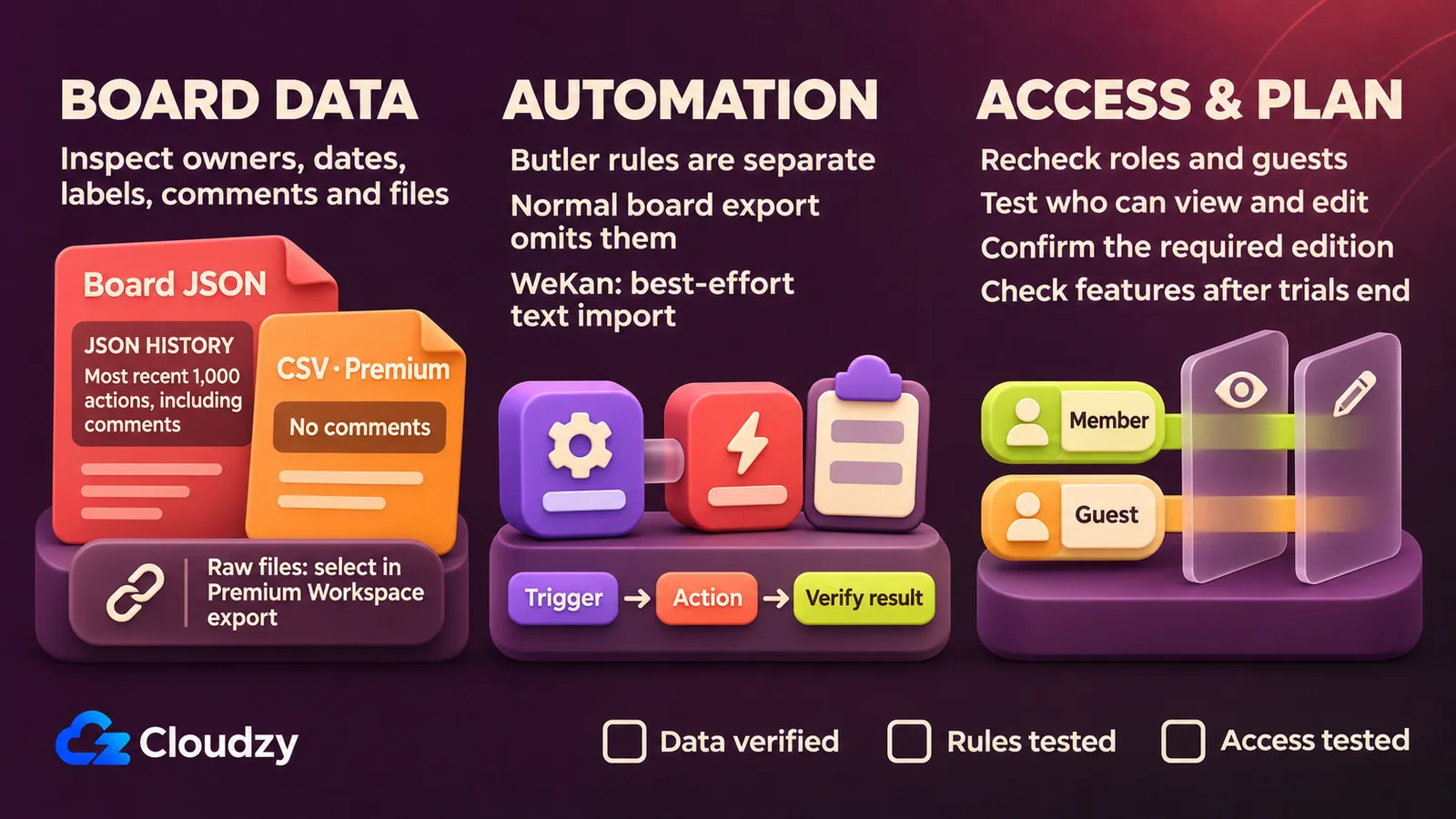
- Pilot a representative board. Inspect owners, dates, labels, comments and attachments; test permissions and automation against expected outcomes.
- Retain the original board and export until the pilot passes those checks. Do not assume an import preserves everything.
- For self-hosting, assign updates, access management, backups and restore checks to a named operator.
FAQ
Do I Need to Leave Trello for Recurring Work?
No. Trello's Free plan includes 250 Workspace command runs per month. Check the rule you need and its expected monthly usage before switching solely for recurring work. Command runs are the documented allowance; they do not mean you can run unlimited actions or automations.
Can I Use a Trello Export as a Restore Backup?
Trello's export documentation says board members can export JSON; CSV requires Premium and excludes comments. Board JSON exports include only the 1,000 most recent actions, including comments. Use a Premium Workspace export to include all comments. Keep that distinction in mind when treating an export as a backup.
Will My Trello Butler Rules Move to WeKan?
A normal Trello board export does not automatically transfer Butler rules. WeKan's rules documentation describes a separate, best-effort importer for pasted Butler command text that reports unrecognized lines. Verify each imported rule's trigger and action behavior; a recognized command still needs to produce the intended result on your board.


Discussion
Comments
Sign in to join the discussion.