

“Somebody from a marketing team wants to create a website. They’re not an engineer and they probably have little to no security background or knowledge,” security researcher Joel Margolis told Wired. The same Wired report describes the security firm RedAccess finding more than 5,000 vibe-coded apps with virtually no security or authentication, and around 40 percent of those apps exposed sensitive data. Wired could not confirm that the personal or corporate data it reviewed was genuine.
AI-built apps for marketing teams carry a specific version of that problem. The tools worth building (a segment builder, a campaign dashboard, an A/B analyzer, an audience sync) are the ones connected to the subscriber list, and often to the ad account as well.
TL;DR
- Give each email-platform API key and ad-account token the narrowest access the tool uses, kept in server-side code. Mailchimp’s Marketing API has no narrower key type, so a read-only Mailchimp job gets a limited export containing only necessary data instead of a key.
- The email platform remains the source of truth for subscription status. The tool never re-subscribes people who opted out, forwards unsubscribe requests to the platform, and includes a working unsubscribe link in any marketing email it sends itself.
- A hashed custom-audience upload is still personal data: decide what goes to ad platforms and AI services before it goes, and make every unsubscribe reach the ad audience.
- GDPR governs keeping and using the list (breach notification, an unconditional right to object to marketing); ePrivacy/PECR, CAN-SPAM or CASL govern sending the email, even when an internal tool sends it.
The Deployment Mistakes That Leak Subscriber Data or Break Consent
An AI-built marketing tool that goes wrong with the list usually does so in one of two ways: the list gets out (through a key, a public link or an upload), or it gets used on people who said no. A manage-level ad token adds a separate risk: spend on the company’s ad account.
| Mistake | What it exposes or breaks | What it runs into |
|---|---|---|
| A full-access email-platform key in the code, the browser or the AI tool’s chat | The whole list readable and exportable; subscribers changeable; campaigns sent in the company’s name | A personal-data breach where GDPR applies (Article 33 notification); the sending laws if mail goes out |
| An ad-account token with manage access, or the builder’s own token | Campaigns created or changed on the company’s ad bill; spend data; audience membership by hash; lead-form data with leads_retrieval. Not the uploaded list | The ad platform’s terms and the company’s ad bill; a breach if lead-form data is read |
| The tool on a public link, with everyone seeing everything | Subscriber rows, consent details and engagement history open to anyone with the address; campaign and A/B test results seen by outsiders and staff with no need | A breach for the rows; lost confidentiality for the campaign numbers |
| A sync or re-import that writes back to the list | Unsubscribed contacts subscribed again; where, when and how people signed up lost | The GDPR right to object and the CAN-SPAM and CASL opt-out rules at the next send; unprovable consent where consent is the basis |
| The tool sends marketing email itself | No unsubscribe link, no sender postal address, no suppression check | CAN-SPAM and CASL message rules; ePrivacy/PECR consent to send |
| Audience uploads and AI calls send the list out by default | Hashed lists at Meta or Google; subscriber fields at AI and analytics services nobody approved | GDPR (hashed data is still personal data; an objection reaches the audience); Meta’s and Google’s customer-list terms |
The AI coding tool that built the app can make most of these fixes when asked. Treat each prompt below as a starting point to adapt, and keep the ones you use in a rules file the AI tool reads every session. The AI tool’s report that it made a change is not proof; the Verify: step under each prompt is. Ask it to flag uncertainty instead of guessing, and never paste a live key or a subscriber export into the chat.
Swap the Full-Access Email Platform Key for the Narrowest One
A segment builder that only displays counts does not need a key that can export the list or send a campaign, yet the broadest key on each platform below can do both. Placement matters too: browser code needs the key value itself to make its call, so anyone who loads the page can read it (Mailchimp does not support client-side use of its API at all).
| Platform | What the standard key can do | Narrowest documented option |
|---|---|---|
| Mailchimp (Marketing API) | “API keys grant full access to your Mailchimp account” | None on its help page |
| SendGrid | Full Access: most account API endpoints, excluding billing and Email Address Validation | Custom Access: chosen endpoints at chosen levels, never above the creator’s own permissions |
| Klaviyo | Full Access private key: create, delete or change anything on its endpoints | Read-Only key, or a Custom key with chosen scopes |
| Mailgun | Account API keys: complete account access | Domain Sending Key (one domain, sending only); a read-only Analyst role on some plans |
| Listmonk (v4.0.0 and later) | Whatever its user role and list roles grant | Per-list view or manage roles, with sending granted separately |
Each row follows the platform’s own documentation: Mailchimp’s help page on API keys, SendGrid’s API key permissions, Klaviyo’s authentication guide and Mailgun’s API key docs. Listmonk’s permissions are in the Listmonk section further down.
The tool gets the narrowest key its job allows, or none. On Mailchimp, a read-only job (a report, a segment count) is better served by the platform’s own reporting tools or a limited export the account owner runs, containing only the fields the task needs, at the cost of a person’s time and data only as fresh as that export; change and send jobs go to IT or stay in Mailchimp. On other platforms, ActiveCampaign or Brevo for example, look for a restricted key option first.
The key then lives only in server-side code (the tool’s own back end, which the browser never downloads), stored as an environment variable: a value the server hands the app at start-up, kept out of the code and the repository.
Find every API key, access token, password or secret in this project for our email platform (Mailchimp, Klaviyo, SendGrid, Mailgun, Listmonk or any other) and for any ad platform (Meta, Google Ads, LinkedIn or any other). Use a local secret scanner or an IT-approved method to check the code, environment files and repository history. Never send raw secret values, environment-file contents or credential-bearing history to an external AI service. Give the AI only redacted findings, including file locations and the type of credential found. For each one, tell me:
- the file and line
- whether the value is written into the code or read from an environment variable
- whether the code that uses it runs on the server or in the browser
Show only the first four characters of any value. Never print a full key or token.
Mark as top priority any credential that can send email, change subscribers or manage an ad account.
Then move every call that requires a private API key or access token into server-side code that reads its credentials from a server-only environment variable. Keep only documented public client-side API calls in the browser, remove exposed private keys from the code, and exclude files containing real secrets from the repository. Report exactly what you changed, and tell me where you were unsure instead of guessing.
Note
Deleting a pasted key from the chat or the code does not un-share it. Revoke it (disable it in the platform’s settings so it stops working) and create a new one.
Verify: open the tool, press F12, select the Network tab, and use the tool the way the team will, reading the domain of each request. A browser request that directly calls an email platform’s private API is a warning sign, but the destination alone does not prove a secret is exposed. Inspect the request headers and code for private credentials, without copying their values into an AI chat. Public client-side SDK requests are different: they may legitimately use public identifiers rather than secret API keys. On Klaviyo, requests to a.klaviyo.com/client/ use a public key and belong in the browser, while a browser request to a.klaviyo.com/api/ needs investigation, because that endpoint normally requires private-key authentication. Confirm whether a private credential was actually transmitted.
A person handles the rest: create the narrow key from an account that does not belong to one person (Mailchimp removes a user’s API keys when that user’s access is revoked), name it after the tool (Mailchimp advises one key per integration), and have IT help store it wherever the tool’s keys are kept. For a planned rotation, switch the tool to the new key before revoking the old one, because a revoked Mailchimp key can’t be reactivated. If a key is already compromised, revoke it immediately and replace it. Also plan for expiration: Mailchimp API keys generated on or after June 22, 2026, expire one year after creation.
Give the Ad-Account Token Only the Permissions the Tool Uses
I treat the ad-account token as the highest-impact credential a marketing tool can hold, because it is the one tied to spend. A Meta token with manage access can create, change or pause campaigns billed to the company’s ad account, and it can read spend and performance.
What such a token does not hand back is the subscriber list uploaded to a custom audience. Meta’s Custom Audiences guide works on SHA-256-hashed values (a one-way scrambling of each address that the platform compares with its own records) for adding and for removing people, and no documented endpoint returns a readable list from an existing audience.
| What the tool does | Meta permission it needs | What a leaked token reaches |
|---|---|---|
| Reports on campaigns | ads_read | Ads Insights reporting data for the ad accounts it can see |
| Creates or changes campaigns | ads_management | Campaigns and ads on that account, billed to it; spend and metrics |
| Syncs a segment to a custom audience | Manage-level access to the ad account | Adding and removing people by hash; not a readable list |
| Pulls lead-ads submissions into the list | leads_retrieval (Meta lists ads_management among its dependencies) | Every field people filled in on the company’s lead forms, readable, on top of manage-level access |
Meta’s permissions reference describes each permission and tells developers to select only the ones an app needs. Each tool gets its own token from a system user, Meta’s term for an account inside Business Manager that software uses, assigned only to the ad account that tool works on. Keep the builder’s personal login token out of the tool and the system-user token on the server, like the email key; the same inventory applies to any Google Ads or LinkedIn access.
List every call this tool makes to Meta’s Marketing API, Google Ads or any other ad platform, including calls made through helper libraries or SDKs. For each call, give:
- the file and line
- the endpoint or SDK method
- a label: REPORT (reads metrics or spend), MANAGE (creates or changes campaigns, ads, budgets or audiences) or LEADS (reads lead-form submissions)
- the permission that label needs on the platform
Flag any token that more than one tool uses, and any code that sends a token to the browser. Do not print token values. If you cannot tell which label a call needs, say so.
Verify: check the dashboard’s token in Meta’s token debugging tool, which reports the permissions a token holds, and compare them with the prompt’s labels. A reporting dashboard’s token should show ads_read and nothing that manages the account; a MANAGE or LEADS label on a reporting tool is a finding. Then confirm in Business settings that the tool uses its system-user token, not the builder’s personal one.
Close the Open Address and Show Subscriber Rows Only to List Admins
An app on the AI tool’s own hosting can be opened by anyone who finds its address. Some of the apps RedAccess examined had only trivial barriers, such as requiring that a visitor sign in with any email address, Wired reports. That kind of hosting suits a demo on made-up addresses, the job free hosting and tunnels are built for.
The other half is what each person sees once inside. A campaign dashboard’s job is campaign-level numbers: open rates, click rates, A/B results and segment sizes. The subscriber rows behind them, each address with its consent details and engagement history, are personal data.
Properly anonymized aggregate numbers generally aren’t personal data, but small segments or detailed breakdowns may still make individuals identifiable. Even when the numbers are anonymous, they can reveal the company’s competitive information, and an A/B analyzer that stores opens and clicks per person holds personal data too. The team sees aggregates; only the people who manage the list see rows, and the server enforces that on every request.
List every field in this app’s database, screens, exports and API responses that holds subscriber personal data: email address, name, phone, postal address, IP address, location, subscription status, consent source and time, subscription date, unsubscribe status, and per-person opens and clicks. For each field, say which screens and exports show it. Mark anything you are unsure about instead of guessing.
Then add two roles, taken from the signed-in account and checked on the server for every page, export and API route:
- list admin: can see subscriber rows and run exports
- marketer: sees campaign-level numbers, segment counts and A/B results only, with no per-person rows and no exports
Refuse anything else with an “access denied” (403) response. Report which check protects each page and route.
Whether stored data is encrypted on disk is a question for IT; the AI tool cannot confirm it by reading the code.
Verify: create a test account with the marketer role. Signed in as that account, open the campaign dashboard (it loads), then the subscriber list page and the export (both stop at “access denied”). Then open the tool’s address from a phone on mobile data while signed out: nothing loads, or it stops at the company sign-in page.
Leave Unsubscribes and Consent Records to the Email Platform
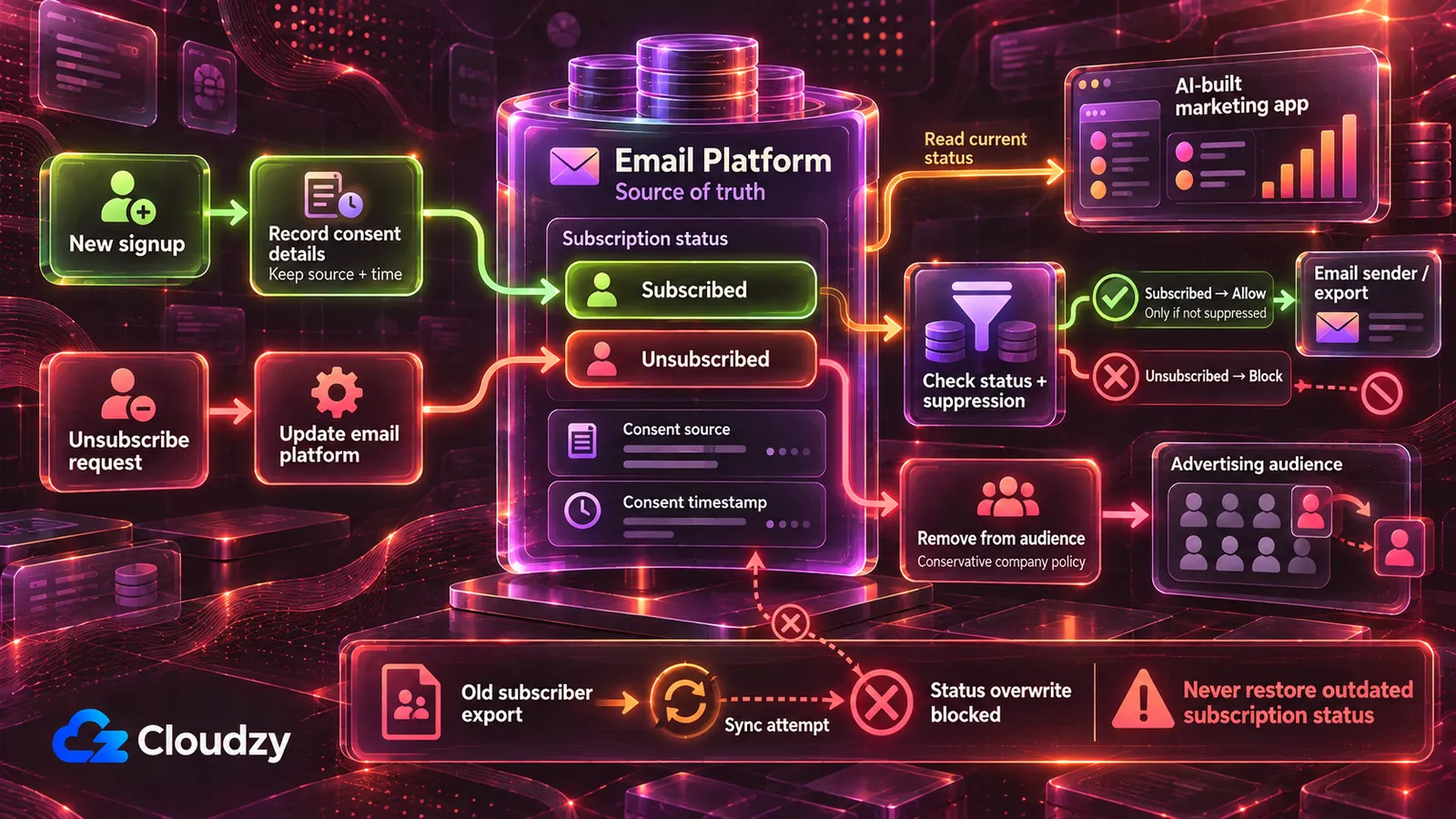
A tool that keeps its own copy of the list and pushes it back, through a two-way sync or a re-import of last month’s export, can mark an unsubscribed person as subscribed again and drop the record of where, when and how each person signed up. The tool usually shows no sign until that person gets the next campaign, when the sending rules below apply. Four rules prevent it:
- The email platform is the source of truth for subscription status. The tool reads that status and never re-subscribes or overwrites an existing subscriber. It may forward an explicit unsubscribe request through the platform’s designated unsubscribe process.
- No bulk import or sync replaces existing subscriber records or overwrites their subscription and consent information. A reviewed tool may update explicitly approved fields, such as tags, without changing subscription status. New signups enter through the platform’s own signup form or import path, so its opt-in handling applies; the tool’s own signup form, once reviewed, may add new subscribers with source, time and form, but never re-subscribes an existing contact or overwrites their subscription or consent information.
- Anything the tool sends or exports reads status from the platform at that moment, not from its own copy. Exports leave out unsubscribed and suppressed contacts, or mark them as a do-not-send list that is never used for sending.
- Consent fields (source, time, form or method) travel intact with any record the tool copies, or the tool does not copy them and does not claim to have them.
List every place this tool writes to the email platform or to any copy of the subscriber list: API calls that create or update subscribers, imports, syncs and file exports. For each one, say whether it can:
- change an existing subscriber’s subscription status
- overwrite existing subscriber records
- include unsubscribed or suppressed contacts
For every path that sends email or exports a list for sending, say where it reads subscription status from: the email platform at that moment, or the tool’s own copy.
Then change the tool so that it never re-subscribes an existing contact or overwrites their subscription status, except to forward an explicit unsubscribe request through the email platform’s designated process, never replaces existing subscriber records wholesale, reads status from the email platform immediately before any send or export, and keeps consent source, time and form attached to any record it copies. Report what you changed and flag anything you are unsure about.
Note
An old export re-imported over the list carries its old statuses with it, so anyone who unsubscribed after that export can come back as subscribed, depending on how the platform and the tool handle the import.
Verify: add a test subscriber in the email platform, then unsubscribe them there. Run the tool’s sync, its segment builder and its export. In the platform, the test subscriber is still unsubscribed; in the tool’s export, they are absent or marked do-not-send; in any send list the tool builds, they do not appear.
Send Through the Email Platform, or Build the Unsubscribe Path First
A re-engagement sender that mails the list directly, through an SMTP account or a transactional-email API, does not get what the email platform adds to marketing mail (an unsubscribe link, a postal address, a suppression check) unless the tool’s code adds each one. The fix is to let the platform (or Listmonk) send, with the tool building the segment or triggering the platform’s campaign. A tool that must send on its own is a send tool, which the next section routes to IT.
Such a tool needs an unsubscribe link in every marketing message that keeps working after the send, and the sender’s identity and postal address in the footer, to the deadlines in the sending-laws table below. It also needs its own suppression list, checked before every send and maintained as a durable suppression record, with backups and restore procedures that prevent an older subscriber database from overriding newer opt-outs. CAN-SPAM treats transactional messages differently.
For high-volume senders, a link in the email footer may not be enough. Gmail requires senders sending 5,000 or more messages in a day to personal Gmail accounts to include RFC 8058 one-click unsubscribe support for marketing and subscribed messages. This means adding List-Unsubscribe and List-Unsubscribe-Post email headers, alongside the visible unsubscribe link. The one-click endpoint must process a POST request; merely opening the URL with a GET request should not unsubscribe someone. Ask IT to verify these requirements before sending at that scale.
Add an unsubscribe link to every marketing message this tool sends, with an unsubscribe endpoint behind it.
If the tool is subject to Gmail’s bulk-sender requirements, also implement RFC 8058 one-click unsubscribe headers, covered by a valid DKIM signature, and a POST-based endpoint. Never trigger an unsubscribe merely because a URL was opened. Flag any uncertainty for IT review.
When the unsubscribe endpoint receives a valid request (link click, form submission or API call):
- immediately add the address to a suppression list stored separately from the subscriber tables
- record the time and the channel the request came through
- if our email platform holds the list, tell the platform to unsubscribe the address too
Check the suppression list before every send and skip any match. Never automatically remove an address from the suppression list during an import, sync or database restore. Retain only the minimum suppression information needed to honor the opt-out, following the company’s approved retention policy, and never let an import or sync re-add a suppressed address. Make sure backups include the suppression list, and that restoring the subscriber tables leaves it untouched. Add our sender name and postal address to the footer of every marketing message, using placeholders I will fill in. Report what you changed and which sends it covers.
Verify: add a seed address you control to a test list, send a test campaign through the tool, and click the unsubscribe link in the message the seed address receives. The address now appears on the suppression list (and as unsubscribed in the email platform, if the platform holds the list). Send to the same test list again: the seed address receives nothing.
Whoever owns the company’s email compliance supplies the sender name and postal address for those placeholders.
Decide What Leaves for Ad Platforms and AI Tools Before It Leaves
Two code paths send subscriber data out by default: a sync that uploads a segment to a Meta or Google custom audience, and calls that pass subscriber fields to an AI API (to write subject lines or score leads) or to analytics scripts and webhooks.
Meta and Google can match customer audiences using SHA-256-hashed contact identifiers. Google’s Data Manager API requires email addresses and phone numbers to be normalized and hashed before submission, while some Google Ads interface-based uploads can handle hashing during the upload process. Hashing is how the platform matches an address to a profile; it does not make the person anonymous (see the FAQ).
For new Google Customer Match integrations, check which upload API is supported before building the sync. Since April 1, 2026, Google has restricted older Customer Match upload methods for new adopters and directs those integrations to its Data Manager API.
Meta’s customer-list audience terms make the advertiser warrant that it has the necessary rights, permissions and a legal basis to share the data. Google’s Customer Match policy requires the sharing to be disclosed in the privacy policy, with consent obtained where the law requires it.
For simplicity, this tool treats every unsubscribe as a request to stop ad matching as well. This is a conservative company policy, not a claim that every channel-specific email unsubscribe legally requires removal from all advertising audiences.
The upload path should therefore take only the segment the company has approved for ad matching; the company must establish an appropriate legal basis, with guidance from its privacy lead or designated data protection officer (DPO), where one has been appointed. Unsubscribed and suppressed contacts stay out of every upload, and an unsubscribe triggers a removal by hashed value from each audience (the GDPR section below explains why).
Every AI or analytics service receiving subscriber data must be approved by the company. Before sharing personal data, confirm whether the provider acts as a processor or an independent controller and put the appropriate contractual safeguards in place, including a data-processing agreement when required.
Audit every outbound call this tool makes: email platforms, ad platforms (including audience uploads), AI APIs (OpenAI, Anthropic or any other), analytics tools and webhooks. For each call, list exactly which subscriber fields appear in the request body or in the URL. Say which calls could do their job with fewer fields, or with no subscriber data at all. Finish with a list of every outside service by name, so it can be checked against our approved vendors.
Verify: every subscriber field the report lists for an AI or analytics service should be one the task needs, and every service named should be on the company’s approved list; any that is not goes to whoever signs vendor contracts.
For every path in this tool that uploads contacts to Meta, Google Ads or any other ad platform:
- hash email addresses and phone numbers with SHA-256 on the server before upload, following each platform’s normalization rules
- upload only contacts in [the segment your company approved for ad matching]
- exclude unsubscribed and suppressed contacts at the moment of upload
- when a contact unsubscribes, send a removal for their hashed value to every audience they were uploaded to
- log every upload and removal with the time, the audience, the number of contacts and the user or job that triggered it
Report what you changed and flag anything you are unsure about.
Verify: unsubscribe a test contact who belongs to an uploaded segment. After the tool’s next sync, check that a removal request was sent to every relevant audience. Verify that each ad platform successfully processed the removal, not merely that the tool logged or submitted it. Flag failed or partially completed removals for retry and IT review.
What the Tool Does to the List Decides Where It Runs
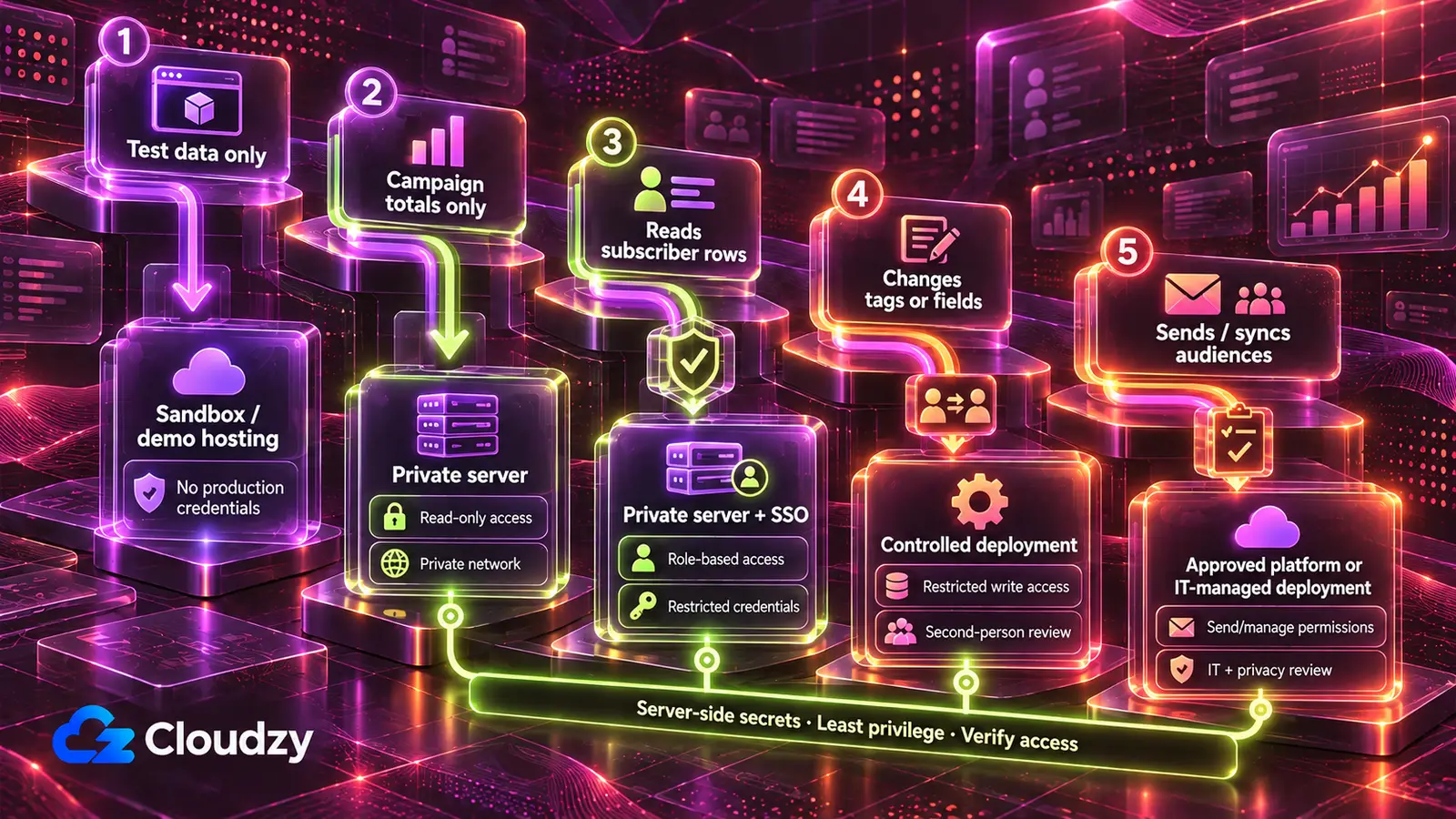
A tool that shows only campaign numbers runs on a server the team controls, reachable only on a private network; one that shows subscriber rows adds company sign-in, because the roles depend on it. A tool that sends marketing email or syncs ad audiences stays inside the platforms’ own features, or goes to IT before anyone uses it.
| What the tool does to the list | The key or access it gets | Where it runs |
|---|---|---|
| Works on test subscribers only | No production key; a test list or sandbox account | The AI tool’s own hosting, for building and demos only |
| Shows campaign-level numbers only | A read-only or reporting key: ads_read on Meta, a Klaviyo Read-Only key, narrow SendGrid Custom Access; on Mailchimp, an export | A server the team controls, reachable only on a private network (Tailscale or WireGuard) |
| Reads or segments subscriber rows | A read-scoped key restricted to the necessary data and endpoints, with per-list restrictions where the platform supports them | The same server, with company sign-in and the list-admin and marketer roles |
| Changes the list (tags, custom fields, a signup form adding subscribers) | A write-scoped key restricted to the necessary actions and, where supported, the relevant lists | The same server, after a second person reads the credential, status and unsubscribe audits; a public signup form faces the internet, so that review and a server-held key are its protection |
| Sends marketing email or syncs ad audiences | A send key or a manage-level token | The email platform’s own campaigns and automations, Listmonk, or IT before launch; audience syncs also need privacy review of the approved segment |
Sign-off follows the rows: the two read-only rows need the email platform’s admin to issue the key, the list-changing row needs a second reader, and the sending row needs IT, plus privacy review for audience uploads.
A private network means the tool does not answer from outside at all. A login page the AI tool wrote is reachable by anyone and only as strong as the code behind it, which is how RedAccess could find apps whose sign-in accepted any email address.
My rule here: start from the private network, and add company sign-in on top of it wherever the roles need one. A managed deployment platform with built-in sign-in and secret storage also works, for a team that already pays for one and reviews its vendors.
The server side is the part to hand to IT help, with one named owner for the server and the keys. The tool runs on a VPS (a rented server the team fully controls) under a deploy tool like Coolify or Dokploy, which runs the app from its code and holds its environment variables, platform keys included.
The private network comes from Tailscale, quicker to set up but dependent on its own coordination service (Headscale can replace it), or from WireGuard, fully self-hosted. Company sign-in (single sign-on with the company account) comes from Authentik or Keycloak, and a reverse proxy (Caddy or Nginx Proxy Manager) adds HTTPS wherever the tool faces the web.
Moving the Email Engine to Listmonk
Instead of narrow keys on the current platform, the other route removes the commercial platform’s key by moving the list and the sending into a self-hosted list manager. Listmonk (v4.0.0 and later) lets each tool have its own API user, with a list role limited to the lists that tool touches.
A read-only tool gets view access to its lists and no sending; campaigns:send and tx:send (transactional messages) go only to a send tool. Three particularly risky permissions should stay off restricted tools’ roles: lists:get_all and lists:manage_all, which override per-list roles, and subscribers:sql_query, which Listmonk’s roles and permissions docs warn allows “querying of all lists and subscribers directly from the database superceding individual list and subscriber permissions”. Also review broad permissions such as subscribers:get_all, campaigns:get_all and campaigns:manage_all before calling a tool list-restricted. Give each API user only the permissions its task needs. Listmonk is built for campaigns rather than multi-step automation (when Listmonk is the wrong tool); Mautic covers that automation on the same kind of server.
The trade is ongoing work: the team then owns sending-domain authentication (SPF, DKIM and DMARC), an SMTP relay to deliver the mail, patching, backups and deliverability. When the list is small, nobody can own a server, or the current platform’s sending reputation and automations carry work the team relies on, staying on the platform with narrow keys is the better call.
Either route needs a server someone owns, running the deploy tool and the private network and, on the self-hosted route, Listmonk with an SMTP relay. Our Linux VPS gives root access, and Listmonk, Mautic, Tailscale, WireGuard and Authentik deploy as one-click apps. IT help then spends its time on configuration and review rather than installation; keeping everything patched stays with the team.
Locations include Frankfurt and Amsterdam in the EU, London in the UK and several US cities; the one you pick sets where the tool and any copy of the list sit (and, on Listmonk, the list itself). A location is an input to the conversation with the DPO, not a substitute for it, and it does not by itself make the tool compliant.
Consent and Anti-Spam Rules for Marketing Email
GDPR for the Subscriber List
GDPR does not require consent as the basis for direct-marketing processing: Recital 47 says such processing “may be regarded as carried out for a legitimate interest”. Where marketing relies on consent instead, Article 7 requires the company to “be able to demonstrate” that each person consented, and makes withdrawing consent as easy as giving it. That is the job the consent source and time do in the email platform.
The stricter rule sits in Article 21 of the GDPR. Whatever the basis, a person can object to direct marketing at any time, including profiling related to it, and once they do, “the personal data shall no longer be processed for such purposes”. For marketing there is no balancing test, unlike other objections under the same article. For this tool, the safest default is to treat a general direct-marketing objection as applying across marketing uses of that person’s data: the send list, the tool’s segments and the ad audiences. A channel-specific unsubscribe may have a narrower scope, so the company should define its preference rules with its privacy lead and ensure each request is honored appropriately.
A leaked or wrongly changed list can be a personal data breach. Article 33 requires notifying the supervisory authority (the national data-protection regulator) without undue delay and, where feasible, within 72 hours of becoming aware of it, unless the breach is unlikely to result in a risk to people. In the UK, the equivalent law is the UK GDPR, enforced by the ICO.
The Sending Laws: ePrivacy and PECR, CAN-SPAM and CASL
The EU’s ePrivacy rules and the UK’s PECR require prior consent for marketing email to individuals, with a narrow “soft opt-in” for existing customers. The UK also has a separate charitable-purposes soft opt-in, subject to specific conditions; this article focuses on commercial marketing. Canada’s CASL requires express or implied consent. US CAN-SPAM does not require consent to send; it requires a working opt-out honored within 10 business days, plus accurate sender details and a postal address in every message.
| Law | Consent to send | Every marketing message must | Unsubscribe deadline | Maximum penalty |
|---|---|---|---|---|
| ePrivacy (EU) and PECR (UK) | Prior consent to email individuals; customer soft opt-in; a separate UK charitable-purposes exception has specific conditions | Not disguise the sender; give a valid address for opt-out requests; with the soft opt-in, a free, easy way to refuse in every message | No fixed deadline in the text | No figure given here |
| CAN-SPAM (US) | Not required; covers all commercial email, including B2B | Accurate header and “From” details, a subject line that is not deceptive, ad disclosure unless the recipient gave prior affirmative consent, a valid physical postal address, a working opt-out | 10 business days; the opt-out must keep working for at least 30 days after sending | Up to US$53,088 per email; criminal penalties only for specific aggravated practices |
| CASL (Canada) | Express or implied consent | Identify the sender and anyone it is sent for; contact information and an unsubscribe mechanism, both valid for at least 60 days | Without delay, no later than 10 business days | Up to C$1 million for individuals and C$10 million for businesses, for the most serious violations |
The soft opt-in in Article 13 of the ePrivacy Directive covers contact details obtained in a sale, used for your own similar products, with a free chance to refuse at collection and in every message. The UK version is PECR Regulation 22, explained in the ICO’s email marketing guidance. Article 13 also bans marketing email that disguises the sender or has no valid address for opt-out requests, and PECR Regulation 23 does the same in the UK.
The CAN-SPAM figures are from the FTC’s CAN-SPAM guide, which adds that opt-out addresses cannot be sold or transferred, except to a company hired to help comply with CAN-SPAM. The CASL rules are in Section 6 of CASL and Section 11, and the penalties in ISED’s CASL overview.
Frequently Asked Questions
Does GDPR Apply to a Newsletter Tool I Built Myself?
Where the company operates and whose data the tool holds answer it; how the tool was built does not. Under Article 3, GDPR applies to a company established in the EU, and to one outside it that offers goods or services to people in the EU or monitors their behavior there. Whether a given company is in scope is a question for its DPO.
What Happens if Our Klaviyo API Key Leaks?
Whoever holds a Full Access key can change the list; a Read-Only key only lets them view it. Create a replacement with only the scopes the tool uses (Klaviyo can’t add a scope to an existing key later, so choose them now), revoke the leaked key immediately, switch the tool to the replacement, and check for exports or list changes nobody made. If the list may have been read, treat it as a possible GDPR breach.
Is a Hashed Email List Still Personal Data?
Under GDPR, yes when it can be linked back to a person. Recital 26 treats pseudonymised data that “could be attributed to a natural person by the use of additional information” as information about an identifiable person. My reading is that ad matching works for exactly that reason: the platform can compute the same hash from an address it already holds.
Do B2B Marketing Emails Follow the Same Rules?
Not everywhere. CAN-SPAM makes no exception for business-to-business email, according to the FTC. PECR’s email rule covers individuals, and the ICO confirms you can send marketing emails to companies. For EU countries and Canada, ask counsel.



Discussion
Comments
Sign in to join the discussion.