
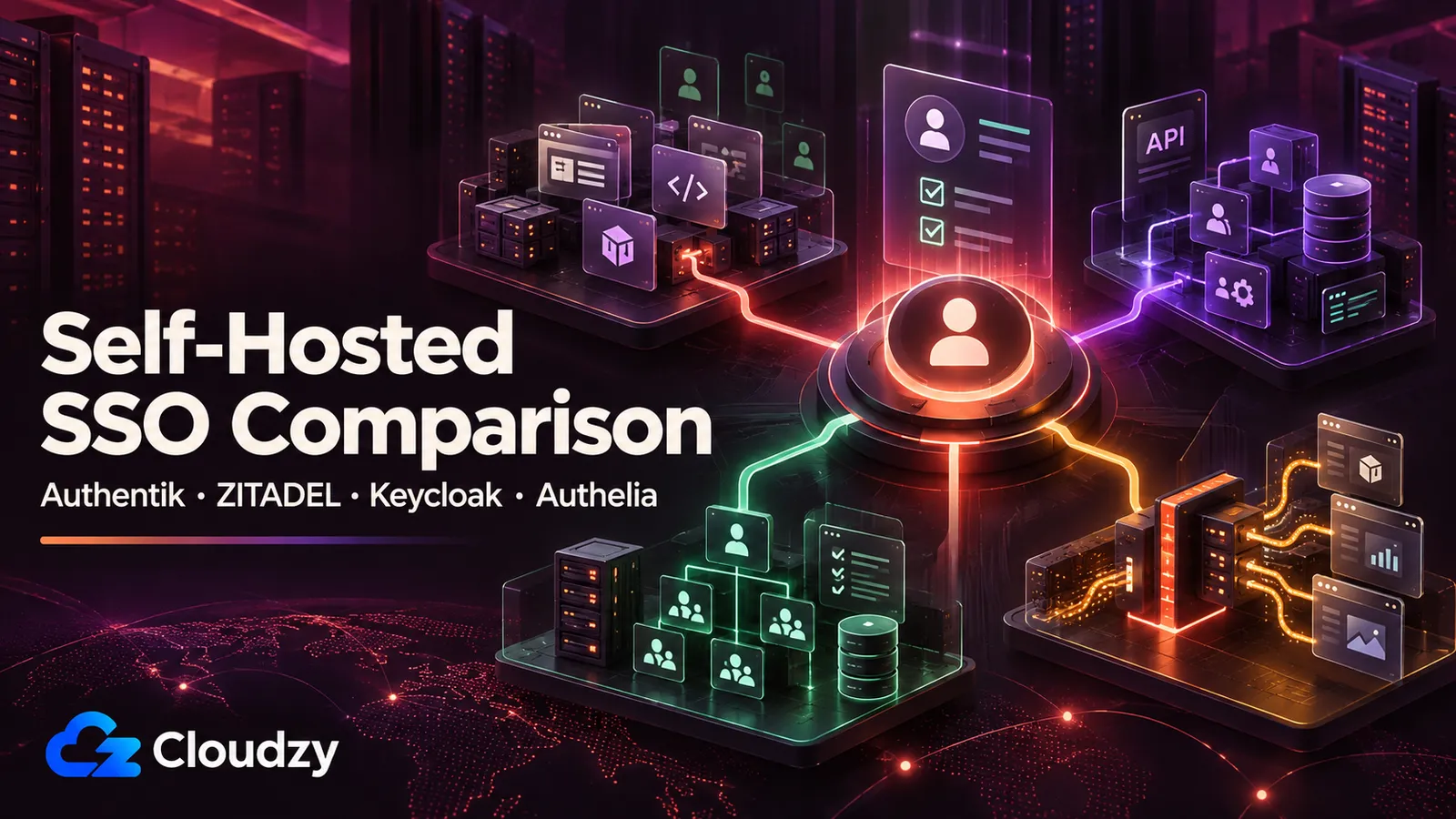
You have eight Docker containers running on a VPS. Gitea, Nextcloud, Grafana, Vaultwarden, n8n, Portainer, a status page, and one internal app you wrote yourself. Each one has its own login. You copy and paste passwords from your password manager every morning, and you have started to wonder whether single sign-on is worth the operational cost.
It usually is. The question is which identity provider to run.
Keycloak is the familiar default, but the better fit depends on what your stack looks like, how many users you manage, and whether you are integrating software you already run or building authentication into your own applications.
This self-hosted SSO comparison looks at Authentik, ZITADEL, Keycloak, and Authelia through the decisions that matter once you deploy them: protocol support, user management, developer workflow, resource requirements, and what happens when your identity provider goes down.
Why Self-Hosted SSO Matters
Once several applications depend on the same people and groups, separate logins stop being convenient. A self-hosted identity provider gives you one place to manage accounts, MFA, group membership, and access policies instead of configuring those controls independently in every application.
The trade-off is equally important: the IdP becomes infrastructure that other applications depend on. New logins and token refreshes can fail when it is unavailable, so backups, recovery access, upgrades, and uptime matter more here than they do for an ordinary self-hosted app.
TL;DR
Choose Authentik If You Want the Best Default Option
For a homelab, internal tool stack, or small team connecting existing applications through OIDC or SAML, Authentik is the strongest default. Its admin workflow is easier to approach than Keycloak's, it supports several integration methods, and its official Docker Compose setup starts at 2 CPU cores and 2 GB of RAM.
Choose ZITADEL If You Are Building Apps
Choose ZITADEL when authentication is part of the product you are building. Its organization model, APIs, multi-tenancy, OIDC, SAML, passkeys, MFA, and LDAP identity-provider support make more sense for SaaS and B2B application teams than for a typical homelab.
Choose Keycloak If You Need Enterprise Identity Features
Choose Keycloak when you need deeper LDAP or Active Directory federation, multiple realms, fine-grained authorization policies, or an environment already built around Keycloak. Its documentation recommends a 2 GB memory limit for smaller production-ready Keycloak containers; an all-in-one VPS also running PostgreSQL needs additional headroom.
Alternative Choice: Choose Authelia If You Mainly Need a Login Wall
Choose Authelia when your main problem is protecting applications at the reverse-proxy layer rather than running a full identity platform. It can also act as an OpenID Connect provider, but reverse-proxy authentication remains its center of gravity.
What to Check Before Choosing an SSO Tool
Before you compare features, map each tool against the applications, protocols, and identity sources you already need to support.
How Many Apps Need SSO?
Start with the applications, not the identity provider. A stack with six applications that already support OIDC or SAML is a different problem from a stack of old internal tools that know nothing about either protocol. The first case points toward a full IdP. The second may need authentication at the reverse-proxy layer.
Do Your Apps Support OIDC or SAML?
OIDC is the common choice for modern web applications. SAML still matters in enterprise software and older integrations. LDAP can matter when the application expects a directory rather than a web-based SSO flow. Check what each application actually accepts before you choose the IdP that will sit in the middle.
Are You Managing Users or Building Login Into an App?
If most of your work will happen in an admin interface while you connect existing applications, Authentik is the natural starting point. If authentication is part of a product you are building and you expect to provision organizations, users, and permissions through code, ZITADEL is much closer to that workflow.
Do You Need LDAP, Active Directory, or Advanced Policies?
Authentik, ZITADEL, and Keycloak can all connect to LDAP-backed identity sources in some form, so LDAP alone no longer decides the comparison. Keycloak becomes more interesting when directory federation is combined with multiple realms, detailed mappers, synchronization requirements, or resource-level authorization policies.
Authentik vs ZITADEL vs Keycloak vs Authelia
The four tools overlap on SSO, but they approach identity from different directions: application integration, product identity, enterprise IAM, and reverse-proxy access.
Authentik
Authentik runs its core deployment as a server, worker, and PostgreSQL database. Redis is no longer part of the stack: Authentik removed the dependency completely in the 2025.10 release. The current Docker Compose documentation requires a host with at least 2 CPU cores and 2 GB of RAM.
The defining trait is the admin UI. Authentik's flow engine, application provisioning, and group-based policies are easier to approach than Keycloak's broader configuration model. If you have ever set up an OIDC application in Keycloak and then spent time figuring out why your token claims were missing, the difference is noticeable quickly.
It supports SAML, OAuth2/OIDC, LDAP, and RADIUS. It is the right default for a homelab or a small engineering team running a stack of self-hosted apps.
ZITADEL
ZITADEL is written primarily in Go, AGPL-3.0 licensed, and on the v4.x release line. The deployment ships a Go API, a Next.js login UI, and PostgreSQL; current requirements support PostgreSQL 14 through 18. Official documentation requires 2 GB of RAM minimum.
The defining trait is the API. ZITADEL exposes a complete identity surface over gRPC and REST and is built on a multi-tenant model from the start. If you are building a SaaS product and you want the login layer to be programmable, automatable, and multi-tenant by default, ZITADEL is closer to what you want than the alternatives.
It supports OIDC, SAML, passkeys, MFA, LDAP identity providers, and a SCIM v2 interface that is currently marked Preview. Its organization model and API-first workflow make it a stronger fit for product teams than for a simple homelab.
Keycloak
Keycloak is a Java identity and access management platform running on Quarkus. It has a larger configuration surface than the other options here, especially once Realms, Clients, Roles, user federation, and Authorization Services enter the picture.
Its official container documentation recommends a 2 GB memory limit for smaller production-ready deployments. That figure covers the Keycloak container itself; if PostgreSQL shares the same VPS, give the host more headroom.
The reason to accept that complexity is concrete. Keycloak can federate LDAP and Active Directory directories, record user and administrator events, and enforce fine-grained authorization using RBAC, ABAC, user-based, context-based, and other policy types. If you need those controls, the extra configuration has a purpose.
Authelia
Authelia is the smallest of the four. Apache 2.0 licensed, single Go binary, currently on v4.39.x. The architecture is different from the other three: Authelia sits in front of a reverse proxy (nginx, Traefik, Caddy, HAProxy) and decides whether requests are allowed to reach the backend.
Authelia also includes an OpenID Connect provider. Its documentation still describes the OIDC implementation as open beta, but the provider is OpenID Certified for the Basic OP, Implicit OP, Hybrid OP, Form Post OP, and Config OP profiles. Its OIDC feature set is narrower than what Authentik or Keycloak provide for identity management, which is why Authelia still makes the most sense when reverse-proxy authentication is the main job.
We will come back to Authelia in its own section. The short version: Authelia's center of gravity is reverse-proxy gating, not full identity management.
Feature Comparison
The table below keeps the comparison to the differences that affect deployment and day-to-day administration.
| Feature | Authentik | ZITADEL | Keycloak | Authelia |
|---|---|---|---|---|
| Supported protocols | OAuth2/OIDC, SAML, LDAP, RADIUS, proxy authentication | OAuth2/OIDC, SAML, LDAP identity provider, SCIM v2 Preview | OAuth2/OIDC, SAML, LDAP and Active Directory federation | OIDC provider plus reverse-proxy authentication |
| User and group management | Users, groups, policies, flows, application bindings | Users, organizations, projects, roles, grants | Users, groups, realms, client roles, realm roles, federation | Lightweight user management, commonly backed by files or LDAP |
| Developer experience | API available, but admin UI is the main strength | API-first, strong organization and multi-tenant model | Mature REST APIs with a larger IAM model to learn | Primarily configuration-driven |
| Enterprise features | Policies, federation, outposts, application access controls | Organizations, projects, passkeys, federation, SCIM v2 Preview | Deep federation, multiple realms, events, Authorization Services | Access-control rules and strong reverse-proxy integration |
| Ease of setup | Easier starting point for most self-hosted application stacks | Best when the team thinks in APIs and product identity | More concepts and configuration, but deeper controls | Simplest when the job is mainly reverse-proxy authentication |
| Resource guidance | Official Compose floor: 2 CPU cores and 2 GB RAM | Official Compose host floor: 2 GB RAM | Recommended container memory of 2 GB for smaller production deployments | No directly comparable official RAM floor |
Which Tool Fits Which Stack?
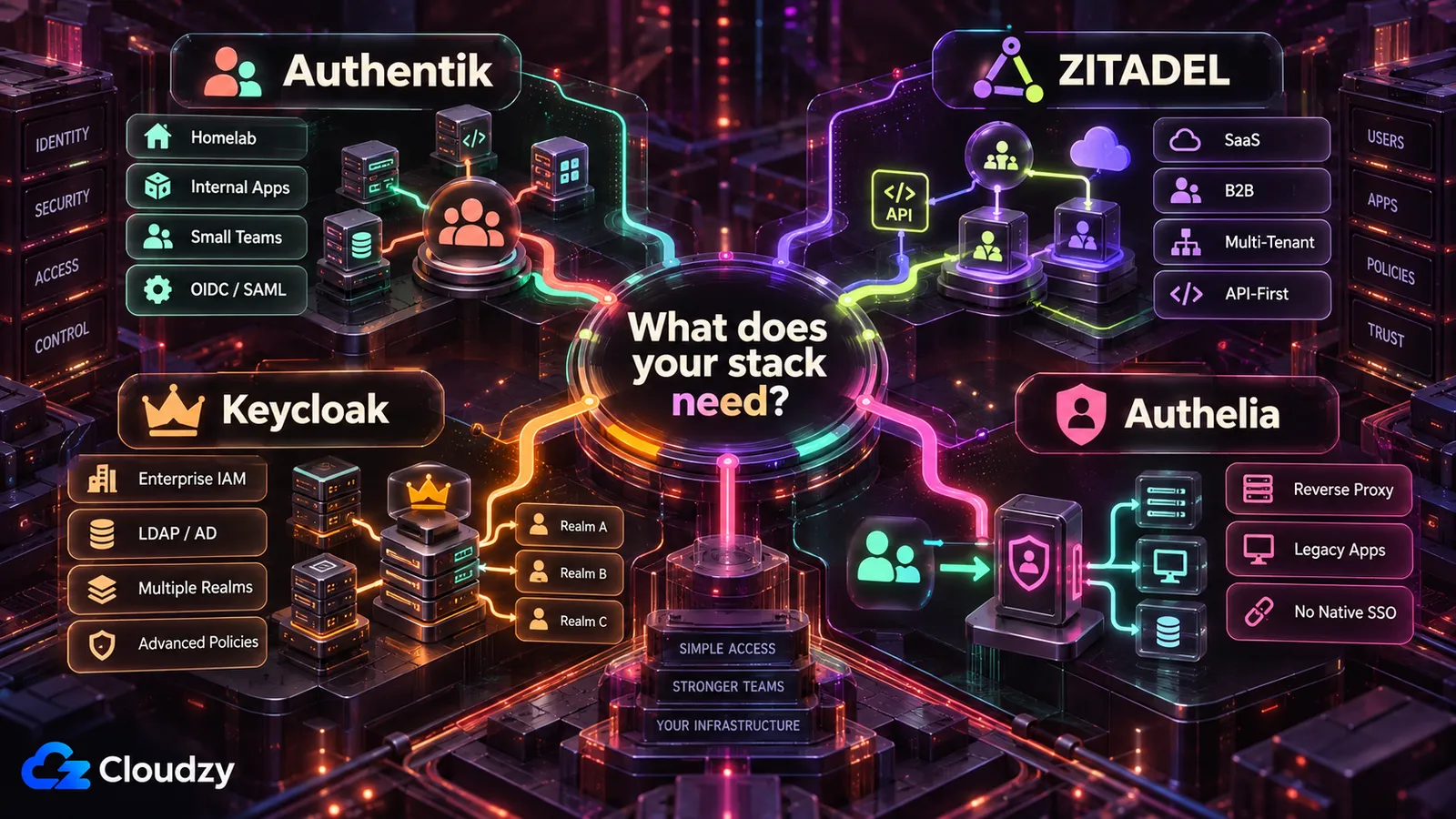
The best fit changes with who is operating the IdP and how the applications integrate with it.
Best Option for a Homelab
Authentik is the default for a homelab where most applications already support OIDC or SAML. It gives you a full identity provider without requiring you to adopt Keycloak's broader IAM model. If most of the stack needs a login screen at the reverse proxy instead of native SSO, Authelia may be the simpler choice.
Best Option for a Small Business Stack
Authentik fits most small internal application stacks, especially when the goal is one identity layer for tools such as Grafana, Gitea, Nextcloud, and Vaultwarden. Keycloak becomes more attractive when an existing directory, multiple realms, or deeper authorization policies are part of the requirement.
Best Option for Developers and SaaS Products
ZITADEL is the strongest fit when authentication is part of the product you are building. Its organization model, multi-tenancy, APIs, and automation surface make more sense when users and tenants need to be provisioned from application code rather than primarily through an admin panel.
Best Option for Enterprise or Compliance-Heavy Teams
Keycloak makes sense when the requirement list includes complex directory federation, multiple realms, detailed authorization policies, and a team that can operate the extra IAM complexity. Self-hosting Keycloak does not make an environment compliant by itself; backups, availability, logging, access reviews, and change controls still belong to your team.
Best Option for Apps Without Native SSO
Authelia is the clearest fit when authentication needs to happen before requests reach the application. It works especially well with reverse proxies protecting older internal tools, dashboards, and services that do not support OIDC or SAML themselves.
The Hard Part of Self-Hosting SSO
Once SSO is mandatory, a configuration mistake or failed recovery can affect several applications at once.
Installation and Configuration
Getting the containers running is only the first step. DNS, TLS, redirect URIs, token claims, group mappings, email delivery, and recovery access are where an SSO deployment starts to become infrastructure rather than another Docker app.
Server Resources
The IdP is only part of the resource budget. PostgreSQL, reverse proxies, workers, password hashing, logs, and directory synchronization can all compete for CPU and memory when they share one VPS.
Database and Backup Management
Authentik, ZITADEL, and normal production Keycloak deployments depend on a database. Back up that database outside the server, document how to restore it, and test the restore. A successful backup job is not the same thing as a working recovery procedure.
Lockout and Recovery Risks
A bad redirect URI, expired client secret, broken directory connection, or overly strict policy can lock administrators out along with everyone else. Keep a recovery path that does not depend on the authentication flow you are trying to repair.
Keeping the IdP Available
An IdP outage does not necessarily end every existing application session immediately. Existing sessions may continue until their own tokens or cookies expire, but new logins and token refreshes can fail. Test that failure mode before you make SSO mandatory across the stack.
When You Should Not Self-Host SSO
Self-hosting stops being a good trade when your team cannot restore and operate the identity layer at the reliability your applications require.
When Managed Identity Is Safer
Managed identity is worth paying for when the cost of operating the IdP is higher than the control you gain from self-hosting it. Services such as Auth0, Clerk, WorkOS, and Microsoft Entra ID move much of the platform availability, patching, and infrastructure maintenance to the provider.
You still own application configuration, permissions, and recovery planning, but you are no longer responsible for keeping the identity platform itself online.
When Your Team Cannot Handle Downtime
If nobody on the team can restore the IdP, repair PostgreSQL, replace an expired secret, or diagnose a failed federation connection during an outage, self-hosting identity may be the wrong operational trade.
The failure is broader than one unavailable application. New logins and token refreshes across several applications can fail at the same time.
When Compliance Needs Are Too High
Self-hosted identity can be used in regulated environments, but running the software yourself does not automatically produce the controls or evidence an auditor expects. Your team still owns logging, access reviews, backups, change management, availability, incident response, and whatever documentation the applicable framework requires.
Self-hosted SSO is not a status symbol. If your team cannot safely operate the identity layer, paying for managed identity can be the better engineering decision.
Where Cloudzy Helps
Cloudzy changes the deployment layer; it does not remove the identity configuration or operations work described above.
The Problem With Manual SSO Deployment
A manual SSO deployment means preparing the server, installing the application and database, configuring the reverse proxy, setting DNS and TLS, and only then starting the identity configuration itself. None of that replaces the OIDC, SAML, directory, or policy work that comes afterward.
One-Click SSO Deployment on Cloudzy
Cloudzy has one-click deployments for Authentik and Keycloak. ZITADEL is not in the marketplace today, so deploy it with its Docker Compose setup on a standard VPS. The one-click install gets the base application running, while identity configuration, DNS, backups, upgrades, policies, and recovery testing remain under your control.

Build on a Linux VPS with root access, NVMe, and AMD EPYC power.
View Linux PlansWhen to Use a Separate VPS for Your IdP
Co-hosting the IdP with your applications is reasonable for a homelab where downtime is acceptable. For a business-critical stack, separating the identity provider removes an obvious shared failure domain: restarting, exhausting, or compromising the application server no longer means taking the identity layer down with it.
A separate VPS is not the same thing as high availability, but it gives the IdP its own resource budget, maintenance schedule, and recovery boundary.
VPS Sizing Recommendations
Size the whole stack, not just the IdP process, especially when PostgreSQL and a reverse proxy share the same VPS.
Authentik VPS Requirements
Authentik's official Docker Compose documentation requires a host with at least 2 CPU cores and 2 GB of RAM. That is the correct starting point for a small deployment. Give the server more headroom when PostgreSQL, additional outposts, directory synchronization, or heavier login traffic share the same host.
ZITADEL VPS Requirements
ZITADEL's official Docker Compose deployment requires at least 2 GB of RAM for the host. Size an all-in-one VPS for ZITADEL, its Login UI, PostgreSQL, and the reverse proxy together rather than treating the Go service in isolation.
Keycloak VPS Requirements
Keycloak's container documentation recommends a 2 GB memory limit for smaller production-ready Keycloak deployments. That figure applies to the Keycloak container itself, not an entire VPS that also runs PostgreSQL.
If Keycloak and PostgreSQL share one VPS, 4 GB of system RAM is a sensible starting point. Treat that as practical host guidance rather than Keycloak's official minimum.
Authelia VPS Requirements
Authelia does not publish a directly comparable 1 GB or 2 GB server minimum. Size the host for Authelia together with the reverse proxy, storage backend, user directory, and any other services sharing the machine.
Authelia generally has a smaller deployment footprint than running a full IdP alongside PostgreSQL, but actual VPS requirements depend on the rest of the stack.
Example Setup: Authentik With Vaultwarden
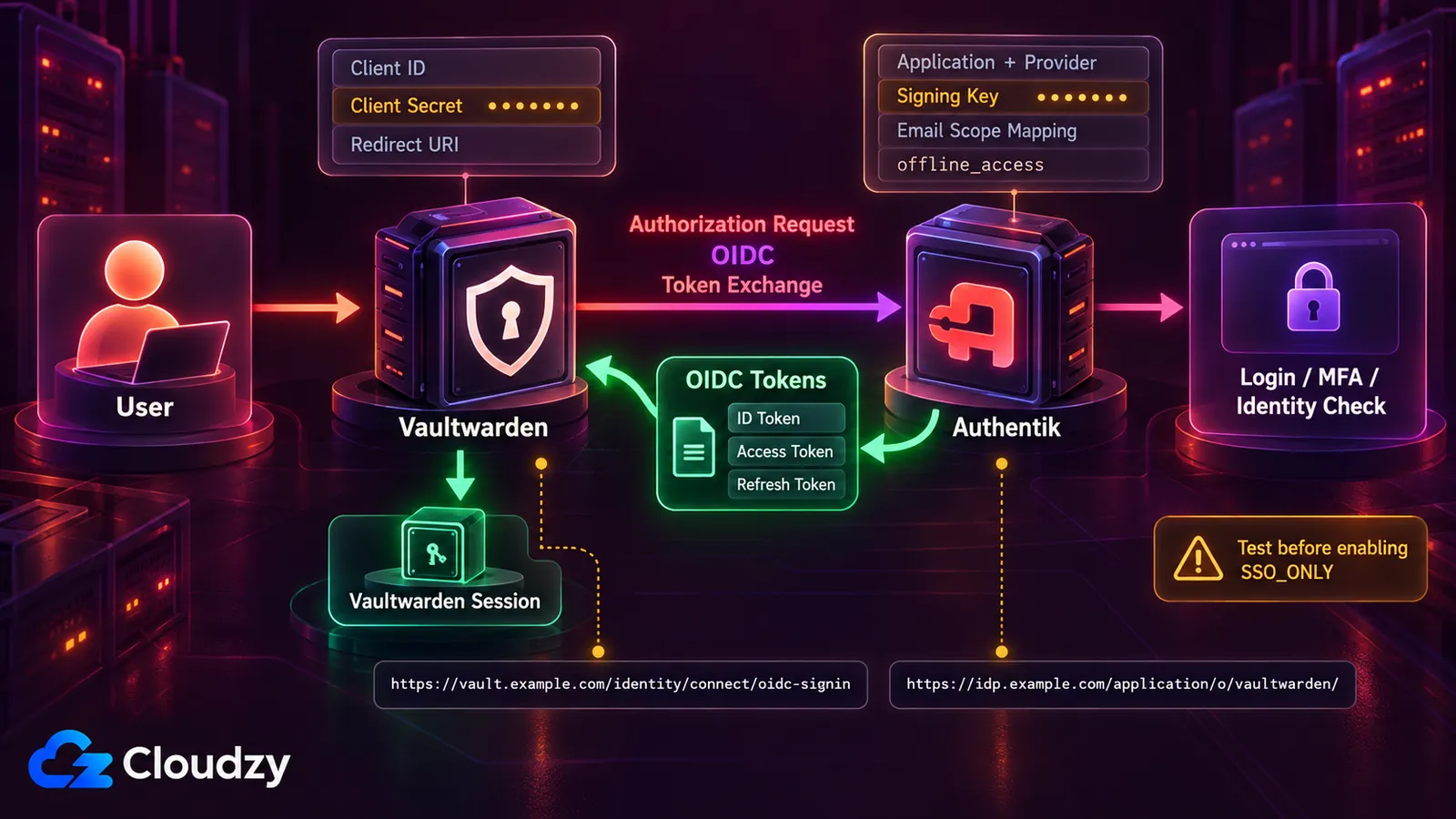
Vaultwarden added native OpenID Connect SSO support in version 1.35.0 in December 2025. Authentik is a useful example because the integration exposes the OIDC pieces you will also encounter with other applications: redirect URIs, client credentials, scopes, issuer URLs, and recovery access.
Basic Authentik Setup
In Authentik:
- Create a custom email scope mapping for Vaultwarden. Vaultwarden requires the email scope to return either email_verified: true or no email_verified value at all, while Authentik's default email scope currently returns false.
- Create an OAuth2/OpenID Connect application and provider pair.
- Add https://vault.example.com/identity/connect/oidc-signin as the strict Authorization redirect URI.
- Select any available signing key.
- Note the Client ID, Client Secret, and application slug.
- Set the access-token validity to more than five minutes.
- Add Authentik's offline_access mapping to the selected scopes.
- Replace the default email mapping with the custom verified-email mapping from step 1.
Basic Vaultwarden OIDC Setup
Use:
DOMAIN=https://vault.example.com
SSO_ENABLED=true
SSO_AUTHORITY=https://idp.example.com/application/o/vaultwarden/
SSO_CLIENT_ID=vaultwarden
SSO_CLIENT_SECRET=<paste-secret-from-authentik>
SSO_SCOPES=email profile offline_access
SSO_ALLOW_UNKNOWN_EMAIL_VERIFICATION=false
SSO_CLIENT_CACHE_EXPIRATION=0
SSO_ONLY=false
SSO_SIGNUPS_MATCH_EMAIL=true
Replace the example domains, application slug, client ID, and client secret with values from your own deployment, then restart Vaultwarden.
What to Test Before Enforcing SSO
Leave SSO_ONLY set to false while you test login, logout, token refresh, account matching, and recovery. Also test what happens when Authentik is temporarily unavailable.
Once both SSO and recovery work as expected, you can decide whether requiring SSO for every login makes sense for your deployment.
The same OIDC concepts apply to other self-hosted applications, but redirect URIs, scopes, claims, and licensing differ. Check each application's SSO documentation instead of copying the Vaultwarden configuration directly.
When Authelia Is Better Than a Full IdP
Authelia becomes more attractive when the application does not need to understand the identity provider at all.
Reverse Proxy Authentication
Authelia is mainly designed to protect applications at the reverse-proxy layer. You define access-control rules, and Authelia decides whether a request should reach the backend before the application itself handles authentication.
Protecting Apps Without OIDC
This is useful for older internal tools, dashboards, and services that do not support OIDC or SAML. Instead of modifying each application, you can put authentication in front of it at the reverse proxy.
Authelia can also act as an OIDC provider, but reverse-proxy authentication remains its main strength.
Using Authelia Together With Authentik
You can use Authentik for applications that support OIDC or SAML and Authelia for applications that need authentication at the reverse proxy.
You do not necessarily need both. Authentik also supports proxy-based application protection, so using Authelia alongside it only makes sense when Authelia's reverse-proxy workflow solves a specific part of your stack more cleanly.
Frequently Asked Questions
Is Authentik Better Than Keycloak?
For most homelabs and small self-hosted application stacks, Authentik is easier to approach. Its admin workflow focuses on applications, providers, groups, and policies without exposing as much IAM complexity at once.
Keycloak makes more sense when you specifically need its deeper federation, realm model, or Authorization Services. Authentik is the stronger default for simpler self-hosted SSO; Keycloak fits environments that need those additional controls.
Is ZITADEL Better Than Keycloak?
ZITADEL is a better fit when you are building a product and want API-driven identity, organizations, and multi-tenancy. Keycloak is a stronger fit when you need its deeper authorization model, extensive federation controls, or an existing environment already built around Keycloak.
What Is the Difference Between Authentik and Authelia?
Authentik is a full identity provider built around users, groups, applications, providers, flows, and policies. Applications can integrate with it directly through protocols such as OIDC and SAML.
Authelia is centered on authentication and access control at the reverse proxy. It also includes an OIDC provider, but reverse-proxy protection remains its primary use case.
Choose Authentik when applications integrate directly with an IdP. Choose Authelia when authentication mainly needs to happen before traffic reaches the application.
Can I Run Authentik on a 1 GB VPS?
Not as a supported starting point. Authentik's current Docker Compose documentation requires at least 2 CPU cores and 2 GB of RAM. The current core deployment uses the Authentik server, worker, and PostgreSQL; Redis was removed completely in Authentik 2025.10.
Use 2 GB as the minimum starting point for a small installation and add headroom when other services share the machine.
Does Vaultwarden Support OIDC SSO?
Yes. Vaultwarden added OpenID Connect SSO support in version 1.35.0 in December 2025. It requires an external OIDC provider such as Authentik, Keycloak, or ZITADEL.
The exact configuration depends on the provider. With current Authentik releases, the documented integration includes a custom verified-email scope mapping, offline_access, client credentials, and the Authentik application issuer URL.
Should I Run My IdP on the Same VPS as My Apps?
For a homelab where downtime is acceptable, co-hosting can be reasonable. For business-critical applications, a separate VPS gives the identity provider its own resource budget and removes the application server as a shared failure domain.
That does not create high availability by itself, but an application-server restart, resource problem, or compromise no longer automatically takes the IdP down with it.
Which Self-Hosted SSO Is Easiest to Use?
Authentik is the easiest starting point for most people connecting existing self-hosted applications. Its admin UI makes applications, providers, groups, and policies easier to approach than Keycloak's broader realm and authorization model.
Authelia can be simpler when you only need reverse-proxy authentication. ZITADEL makes more sense when the person configuring identity is a developer working primarily through APIs.


Discussion
Comments
Sign in to join the discussion.