
Every push runs the same ritual: SSH in, pull the repo, bring the Compose stack back up, hope nothing broke, and try to remember whether you ran the migration. That manual loop works until you need repeatable deployments, a clear record of what is running, or recovery from drift.
Doco CD is one direct answer. It's a small Go service that watches your Git repo and applies Compose changes when you push: webhook or polling, your call. ArgoCD and Flux do this for Kubernetes, but Doco CD bypasses Kubernetes, since it doesn't need a control plane.
This review covers what Doco CD does, what it doesn't, and how it stacks up against Komodo, Portainer's GitOps mode, Dokploy, and a plain GitHub Actions + SSH script. By the end you'll know whether it fits your setup and what to pick if it doesn't.
TL;DR
- Doco CD is a tiny Compose-native GitOps agent: it watches a Git repo (GitHub, GitLab, Gitea, Forgejo and others) and reconciles your stack when something changes.
- Built-in external secret-provider support, plus SOPS-based encryption support, is the differentiator versus rolling your own deploy script.
- It positions itself, per its README, as "a simple Portainer or ArgoCD alternative for Docker." That's roughly the right frame.
- Real limits: one code owner, pre-1.0 versioning, no fleet-management UI, and reconciliation state that is rebuilt only after the next poll or webhook event.
- Pick it when you run one or a few Compose hosts and want Git as the source of truth without a UI. Pick Komodo for fleets, Portainer when you want a UI, Dokploy for a PaaS feel, or GitHub Actions + SSH when it's truly one service on one host.
The Gap Doco CD Tries to Fill
There's a strange middle for anyone running Docker Compose in 2026. Major GitOps tools such as Argo CD and Flux target Kubernetes, while Watchtower's registry-polling model reacts to image changes rather than applying versioned Compose state. Watchtower's repository was archived on December 17, 2025, and now states that the project is no longer maintained.
GitHub Actions plus an SSH deploy step works. For one service on one host it's the right call. The trouble shows up when you add a second host, or a second stack, or want to know which commit is currently deployed. You still get workflow logs, but not Compose-native reconciliation, drift recovery, or a persistent view of whether the host still matches the repo.
Doco CD's pitch, direct from the README, is "a simple Portainer or ArgoCD alternative for Docker." That framing is the point: small, Compose-native, no Kubernetes, no UI to maintain, no central control plane to babysit. If you don't run K8s and didn't want to, this is the category you've been looking for.
How Doco CD Actually Works
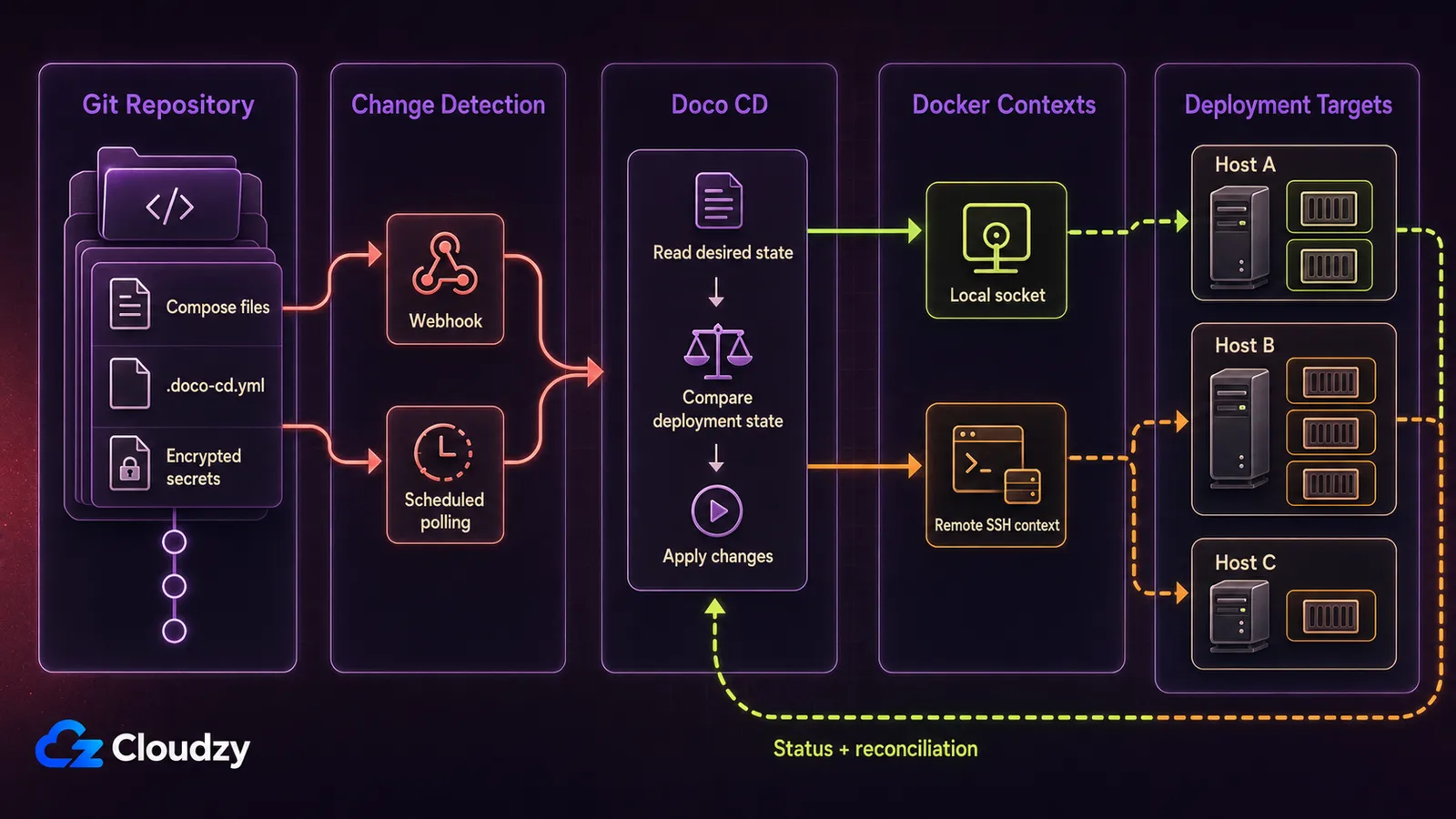
Doco CD is a single Go binary that runs in a Docker container, watches a Git repository, and applies Compose changes when the repository state changes. That's the whole concept. The interesting parts are in the defaults and the integrations.
Triggers. Two modes: webhook or polling. Webhook is near-instant but needs an exposed port, or more realistically a reverse proxy in front of Doco CD. Polling is a periodic fetch: slightly delayed, no inbound port required. Polling is the simpler default, and per the official docs both are first-class. Pick based on whether your host has a reachable public endpoint and how fast you need deploys.
Per-repo config. A .doco-cd.yaml file (or .doco-cd.yml) lives in the repo root next to your Compose file. The only required field is the deployment name. A minimal config looks like this:
# .doco-cd.yaml
name: my-stack
# Everything below is optional. These are the defaults.
timeout: 180          # seconds
remove_orphans: true
prune_images: true
force_recreate: false
Defaults documented here: 180-second timeout, orphans removed, images pruned, no force-recreate.
Auto-discovery. Doco CD can scan subdirectories for Compose files when auto-discovery is enabled, so a single repo can hold multiple stacks. It also supports multiple deployment configs in one config file, written as YAML documents separated by a triple-dash line. The cleanup defaults are conservative, and worth reading before you rely on them:
| Setting | Default | What it means |
|---|---|---|
delete | false | An obsolete deployment is left in place when its app disappears from the working directory. |
remove_volumes | false | Volumes survive when an auto-discovered stack is deleted. |
remove_images | true | Unused images are removed when an auto-discovered stack is deleted. |
In other words, nothing gets torn down behind your back until you turn deletion on, and even then your data volumes are the last thing to go.
Supported Git providers. GitHub, GitLab, Gitea, Forgejo, Gogs and Azure DevOps are supported. Azure DevOps is the exception for webhooks, because Azure Service Hooks are not supported. Gitea and Forgejo support matters if you self-host your forge.
Docker Swarm. Supported as a target. What the deploy settings page flags explicitly: reconciliation in Swarm mode doesn't check container restarts or health status, and image pruning is unsupported in Swarm. If Swarm is your target, you're getting deploys but not full health reconciliation.
Reconciliation. A restart limit of 5 within a 300-second window by default, which is there to stop flappy health checks from looping forever. Same repo with a different ref runs sequentially; same repo with the same ref runs in parallel. That last bit is subtle but useful: multiple deploys of the same ref don't queue behind each other.
Built-in external secret providers. This is one of the stronger reasons to consider Doco CD over a plain deploy script: it supports AWS Secrets Manager, Bitwarden Secrets Manager, Bitwarden Vault / Vaultwarden, 1Password, 1Password Connect, Infisical, OpenBao and Webhook. Separately, it supports SOPS-based encryption for sensitive deployment data. That gives you a cleaner path away from plaintext env files in Git without building the whole secret-resolution flow yourself.
The rest. Doco CD provides Prometheus metrics, job scheduling, notifications, a distroless container image, and an Apache-2.0 license. According to its release history, as of August 20, 2026, v0.109.2 is the latest stable release and v0.110.0-rc.1 is the newest pre-release.
Doco CD's job stops at "apply the manifest"; from there it's regular Docker. Compose's own log commands are how you'll inspect what's running.
Pro tip on secrets. If your private repo still has plaintext env files, prioritize Doco CD's external secret providers or SOPS support. The goal is simple: keep plaintext secrets out of Git while still letting deployments resolve the values at runtime.

Build on a Linux VPS with root access, NVMe, and AMD EPYC power.
View Linux PlansWhere Doco CD Falls Short
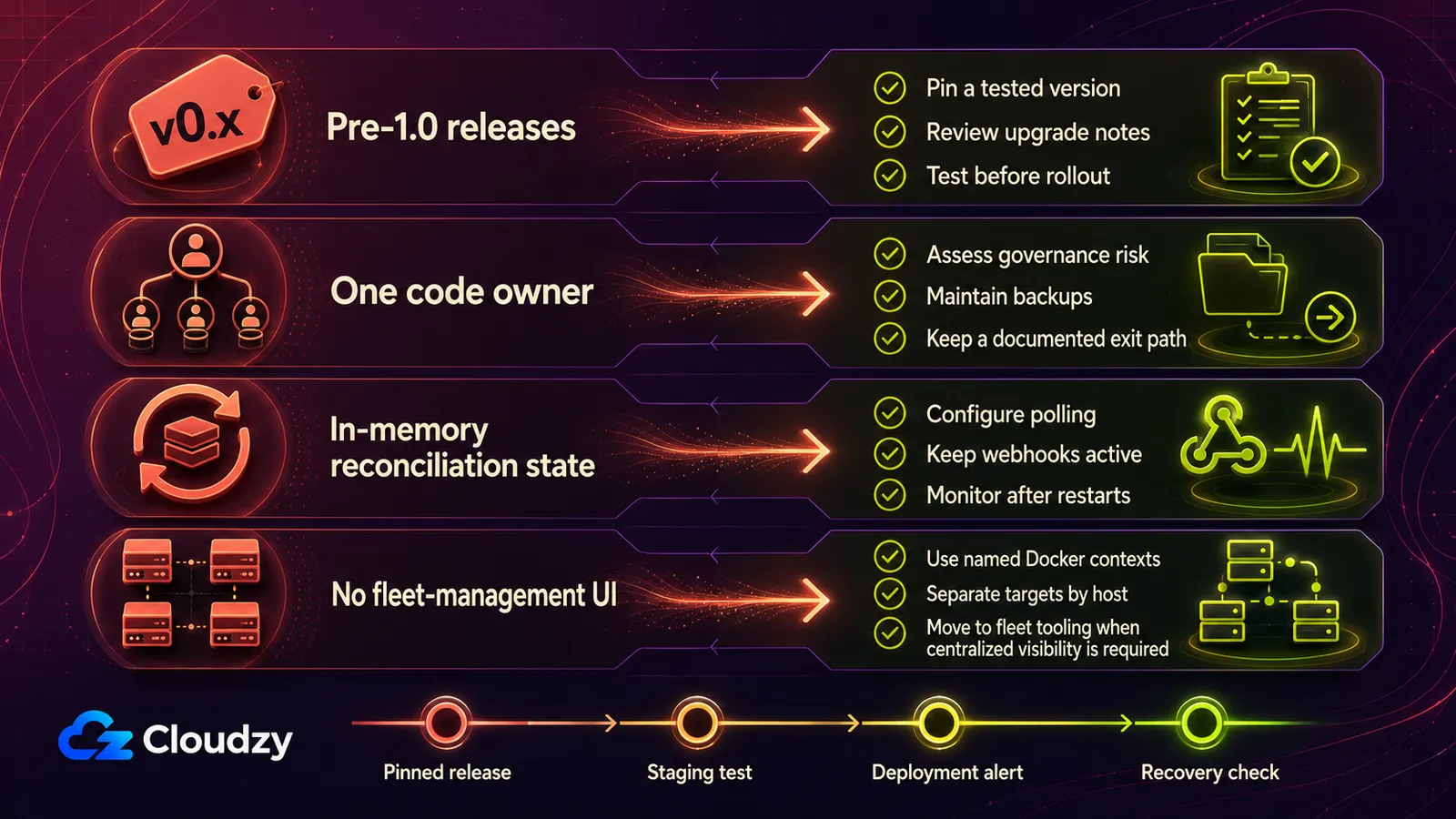
Every tool has limits, and Doco CD's are worth knowing before you commit a weekend to setting it up.
Single code owner. The repository's CODEOWNERS file assigns all paths to kimdre. Release activity remains frequent, but governance is concentrated in one person.
Pre-1.0. Doco CD still uses 0.x versioning, so pin a tested release and read the upgrade notes before rollout. Closed GitHub issue #851 illustrates why: Docker v29 required the project to move away from deprecated Docker Go modules.
No shell inside the Doco CD container. For security, Doco CD does not provide a shell environment or run arbitrary host scripts. Pre- and post-deployment tasks must run through init containers, sidecars, or Compose lifecycle hooks, which adds configuration compared with tools that execute a deploy script directly.
State loss on restart. Reconciliation state is in memory. When Doco CD restarts, that state is rebuilt only after the next poll or webhook event, so the gap depends on your polling interval or how soon another webhook arrives.
No fleet-management UI. Multi-host no longer requires one agent per host. Since v0.102.0, deployment configs can target remote Docker contexts, including SSH contexts, and one repository can define multiple deployment targets. Running one Doco CD instance per host is still valid, but a central instance can now deploy to remote Docker hosts. What Doco CD still lacks is Komodo's fleet-management UI and centralized host inventory.
RAM and CPU footprint is not numerically documented. The official docs describe the requirements as "tiny" but publish no baseline. Size the VPS for the applications it will run, leave operational headroom, and validate Doco CD's actual usage in your own environment.
Pro tip on multi-host. Use a separate Docker context and deployment target per host, restrict SSH access, and keep webhook or API secrets unique. If you prefer isolated agents, one Doco CD instance per host remains valid.
Doco CD vs the Alternatives
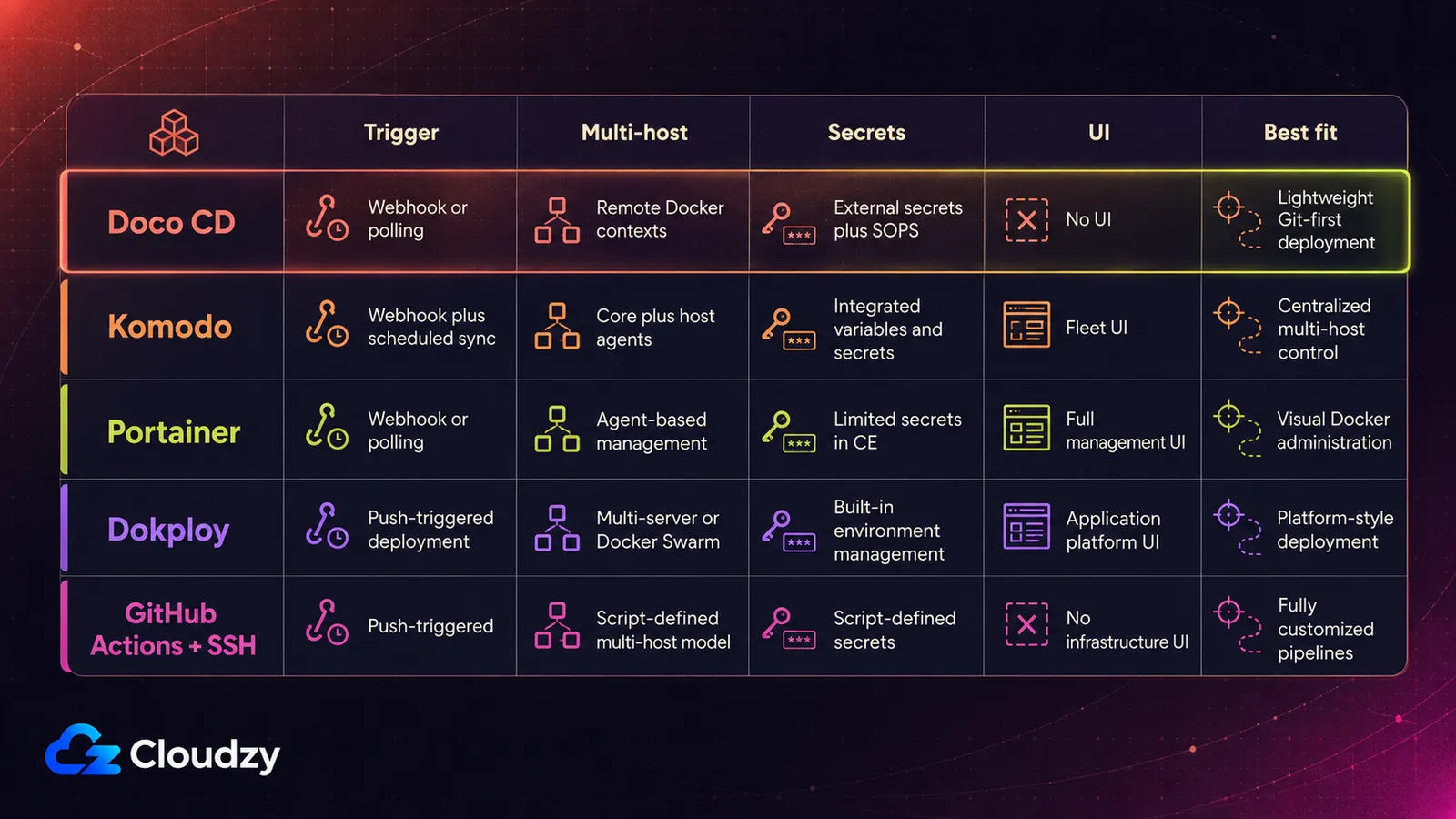
The four other tools I'd put on the shortlist all try to solve "auto-deploy Compose from Git," but with very different tradeoffs. The decision isn't whether to do this; you've already decided. The decision is which shape of tool fits your setup. Here's the side-by-side.
| Tool | Trigger | Multi-host model | Secrets | Web UI | License |
|---|---|---|---|---|---|
| Doco CD | Webhook or polling | Remote Docker contexts, no fleet UI | External providers plus SOPS | None | Apache-2.0 |
| Komodo | Webhook plus scheduled sync | Central Core plus Periphery agents | Variables and secret management | Yes | GPL-3.0 |
| Portainer (CE/BE) | Webhook or polling | Portainer Agent | Limited, more options in BE | Yes | Zlib, commercial terms for BE |
| Dokploy | Push-triggered | Multi-server or Docker Swarm | Built-in environment management | Yes | Apache-2.0, with proprietary components |
| GitHub Actions + SSH | Push-triggered | Whatever you script | Whatever you script | None | Not applicable |
A brief on each, since the table is the shape and the commentary is the why:
Komodo. The serious multi-host alternative. A central Core service plus a Periphery agent on every host, one UI that sees all of them, Git-driven builds as well as deploys, and Docker Swarm support. Heavier to set up, since you're running a database and a control plane, but it's the right shape if you have a fleet. Komodo is the stronger fit when centralized fleet control matters.
Portainer (CE or BE) with GitOps. Full visual UI on top of Git sync. The right choice when the team wants point-and-click container management alongside CD. When somebody's going to be in the UI looking at logs and restarting containers anyway, you may as well have CD in the same place. Heavier resource footprint than Doco CD. OIDC/SSO and granular RBAC are paywalled in Business Edition. Our Portainer alternatives guide covers the broader Docker-management landscape.
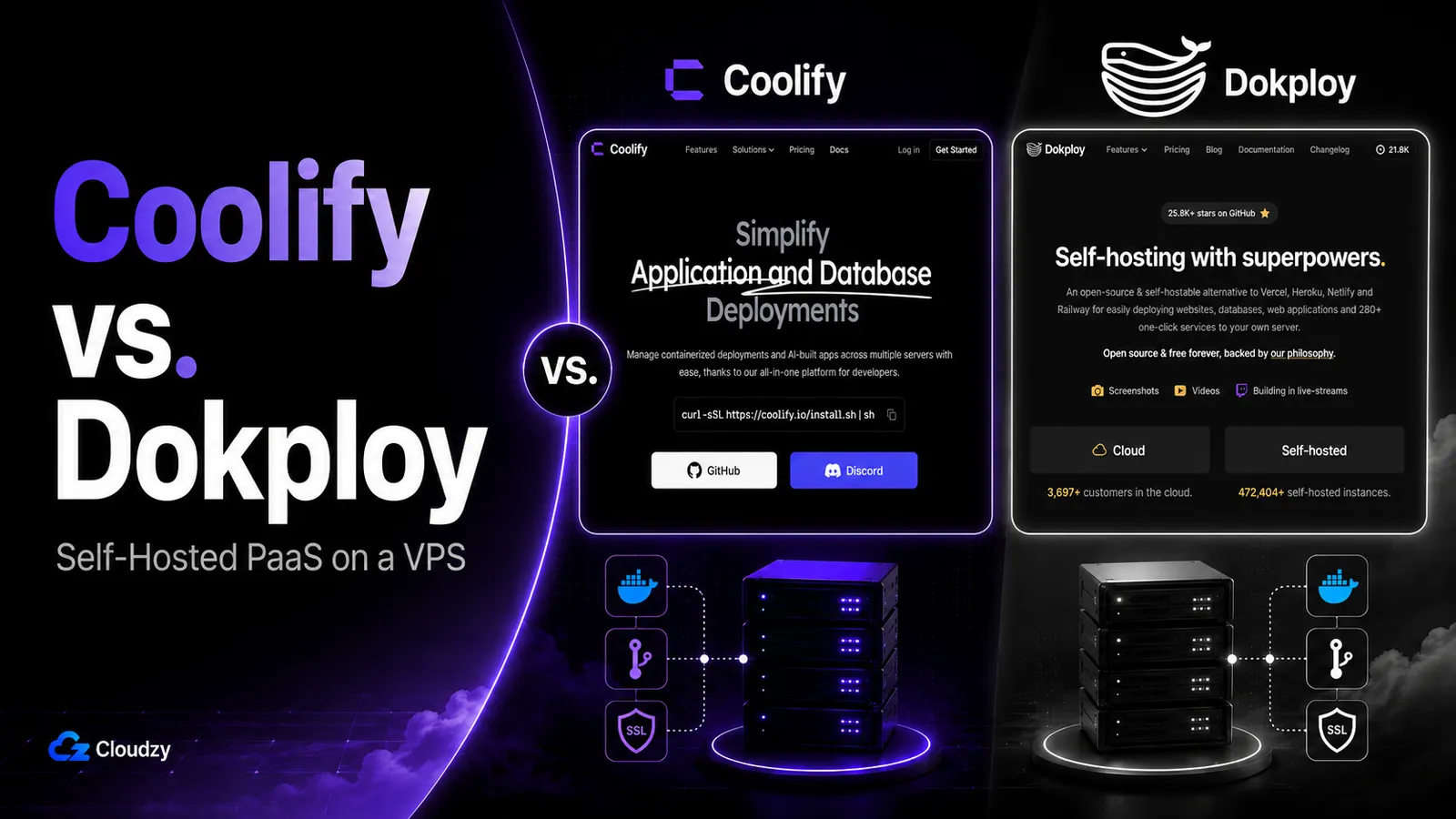
Dokploy. PaaS-style. Opinionated, auto-deploys on push, has a web UI for everything, sets you up with Traefik and a clean URL story out of the box. Better for teams that want a Heroku feel and are willing to trade raw Compose flexibility for it. If you're allergic to YAML, this is the lightest path to "git push, app deploys."
GitHub Actions + SSH. Zero extra infrastructure. The deploy job lives in the workflow you already have. You get workflow logs, but no Compose-native reconciliation, no drift recovery, and no persistent host-state view unless you build those pieces yourself. Fine for one service on one host. Breaks down once you add a second target or want to know what's running where without SSH-ing in. For the bottom slice of the audience, GitHub Actions + SSH is still the right answer.
There's a newer entrant called stackd framing itself in similar "GitOps without the Kubernetes tax" language. Worth knowing the category is active, not worth picking over Doco CD on a coin flip today.
When Doco CD Is the Right Pick (and When It Isn't)
Pick Doco CD when:
- You run one or a few Docker Compose hosts and want Git as the source of truth.
- You'd rather edit YAML in your editor than click through a UI.
- You want external secret-provider support and SOPS-based encryption support without building the whole flow yourself.
- You're OK with a single-maintainer, pre-1.0 project that's actively developed.
Komodo. Pick it when you're managing many hosts and want centralized fleet control, or you need Git-driven builds, not just deploys, under one roof.
Portainer (CE or BE). Pick it when the team wants a UI for day-to-day container ops alongside CD, when the visual layer is the real reason you're considering the tool.
Dokploy. Pick it when you want a PaaS-style deploy experience and don't need raw Compose control.
GitHub Actions + SSH. Stick with it when it's one service, one host, and you don't need reconciliation or drift recovery.
For people in the post-Watchtower, pre-Kubernetes middle, Doco CD is a strong lightweight pick. My read: for a new homelab or small SaaS, I'd start with Doco CD when Git-first, UI-free operation fits, then move to Komodo when centralized inventory, permissions, and fleet visibility become requirements.
Whichever tool you choose, run it on a Linux VPS sized for the Compose workloads it will host. Cloudzy's Linux VPS is a reasonable home for this, with root access by default. If you want to skip the apt dance, you can also deploy Docker with one click from our marketplace.
Our marketplace also has one-click images for Gitea, which Doco CD integrates with natively. There are images for Komodo too, and for Portainer, if you decide one of those is the shape you want instead.
Frequently Asked Questions
Is Doco CD Production-Ready?
Doco CD can be used in production if its risk profile fits your workload. It is actively developed, but it still uses pre-1.0 versioning and its CODEOWNERS file assigns the project to one person. Pin a tested release, test upgrades before rollout, and consider broader governance for critical infrastructure.
How Do I Manage Multiple Hosts With Doco CD?
Use a separate Docker context and deployment target for each host. One Doco CD instance can deploy to multiple remote Docker hosts over SSH or TCP; one instance per host remains an optional isolation model. Choose Komodo if you need centralized inventory, permissions, and fleet visibility.
What's the Difference Between Webhook and Polling Mode?
Webhook mode deploys near-instantly when Git pushes to the repo, but requires an internet-accessible port, or a reverse proxy in front of Doco CD. Polling mode checks the repo on a schedule, so deploys are slightly delayed but no port needs to be exposed. Polling is the simpler default; webhooks are worth it when you push often or need fast feedback loops.
How Does Doco CD Compare to Komodo?
Doco CD is lighter and UI-free, and it can manage multiple hosts through remote Docker contexts. Komodo uses a central Core service plus Periphery agents and adds a fleet UI and Git-driven builds. Pick Doco CD for UI-free Compose deployment; pick Komodo when centralized fleet control matters.
Can Doco CD Replace Watchtower?
For the use case most Watchtower users wanted, "deploy what's in Git, when Git changes," yes, that's what Doco CD does. For Watchtower's literal model, polling a registry and pulling when a new image tag appears, no; Doco CD is Git-triggered, not registry-triggered. The Git-triggered model is the safer and more auditable choice for anything beyond toy services.

Discussion
Comments
Sign in to join the discussion.