
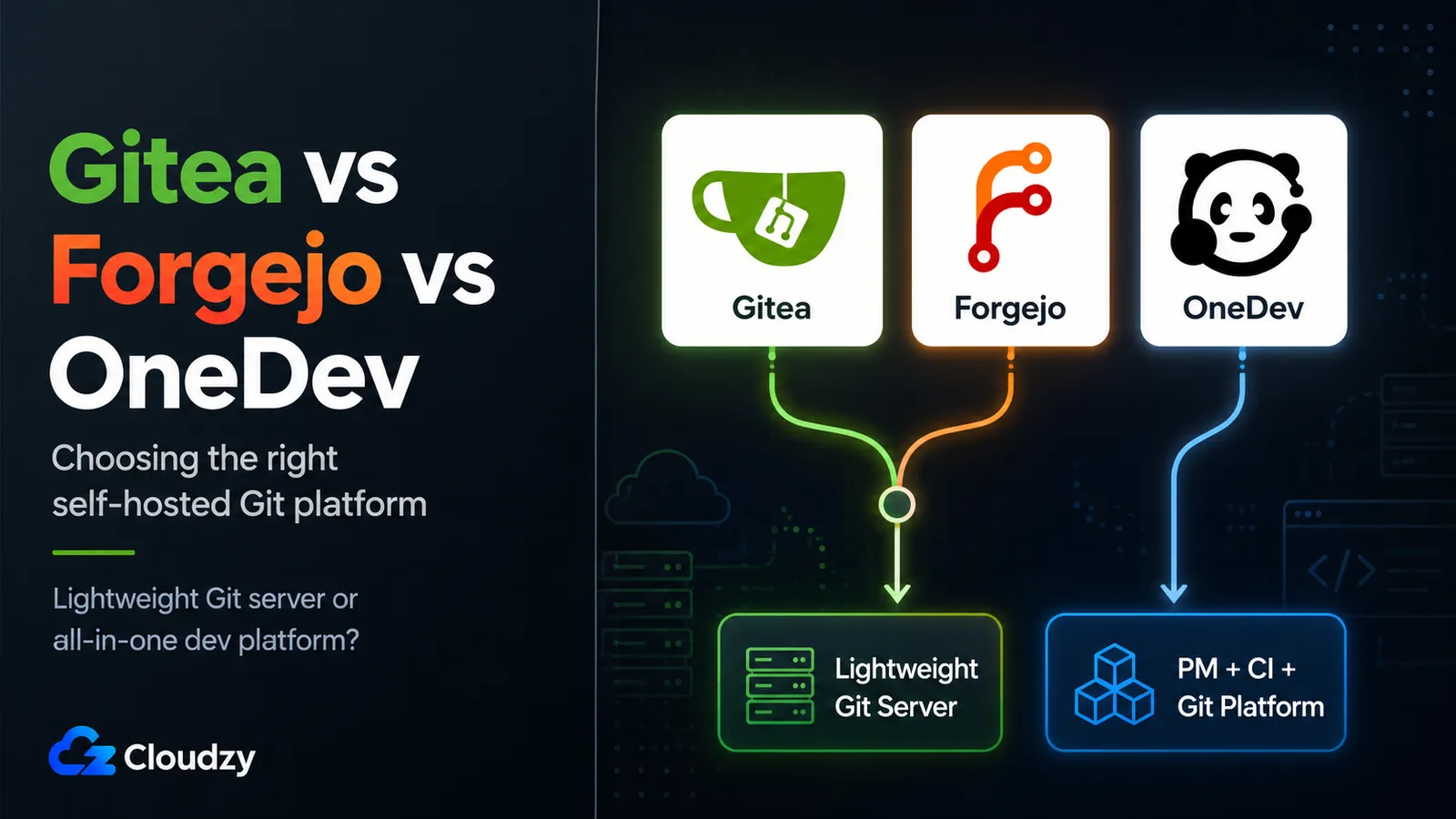
In a gitea vs forgejo vs onedev comparison, you're looking at three tools that answer two different questions. Gitea and Forgejo are git servers that bolt on project management. OneDev is a project-management-and-CI platform that happens to host git really well. So the decision isn't "which of these three is best." It's "do I want a small git server, or an all-in-one platform, and can I afford the RAM the all-in-one costs?"
That last part is the tension. OneDev does more out of the box, and nodatools.com's testing measured it idling at roughly 3x the memory of a bare Forgejo install, which on a small VPS can double your monthly bill. That trade-off is the whole ballgame. (And no, GitLab isn't in this comparison. If you wanted GitLab's footprint, you wouldn't be reading about these three.)
I've run all three. Below is what actually matters when you pick one for a team: the governance and license differences that separate Gitea from Forgejo, the features that justify OneDev's existence, the tested RAM numbers, and a straight "pick this if…" for each.
TL;DR
- Want a lightweight git server with Actions-style CI? Gitea or Forgejo. Choose Gitea if closer GitHub Actions compatibility matters; choose Forgejo if GitHub-like workflow syntax with some migration tweaks is acceptable.
- Care about non-profit governance or a copyleft license? Forgejo. It's the community-governed fork, and it's my default pick for most teams.
- Want the MIT license, the biggest forge community, or a paid Enterprise tier with SLA/SSO? Gitea.
- Want built-in project management, bundled CI, and code intelligence in a single install, and have RAM to spare? OneDev. Just know it needs ~4 GB minimum where Forgejo is happy on 1 GB.
Quick verdict: For most teams, Forgejo is the right small-footprint default: same core as Gitea, cleaner governance, and Forgejo Actions with GitHub-like workflow syntax. Reach for OneDev only when you genuinely want the bundled PM-plus-CI experience in one box and you're not migrating a pile of existing GitHub Actions workflows.
The Two Questions These Three Tools Answer
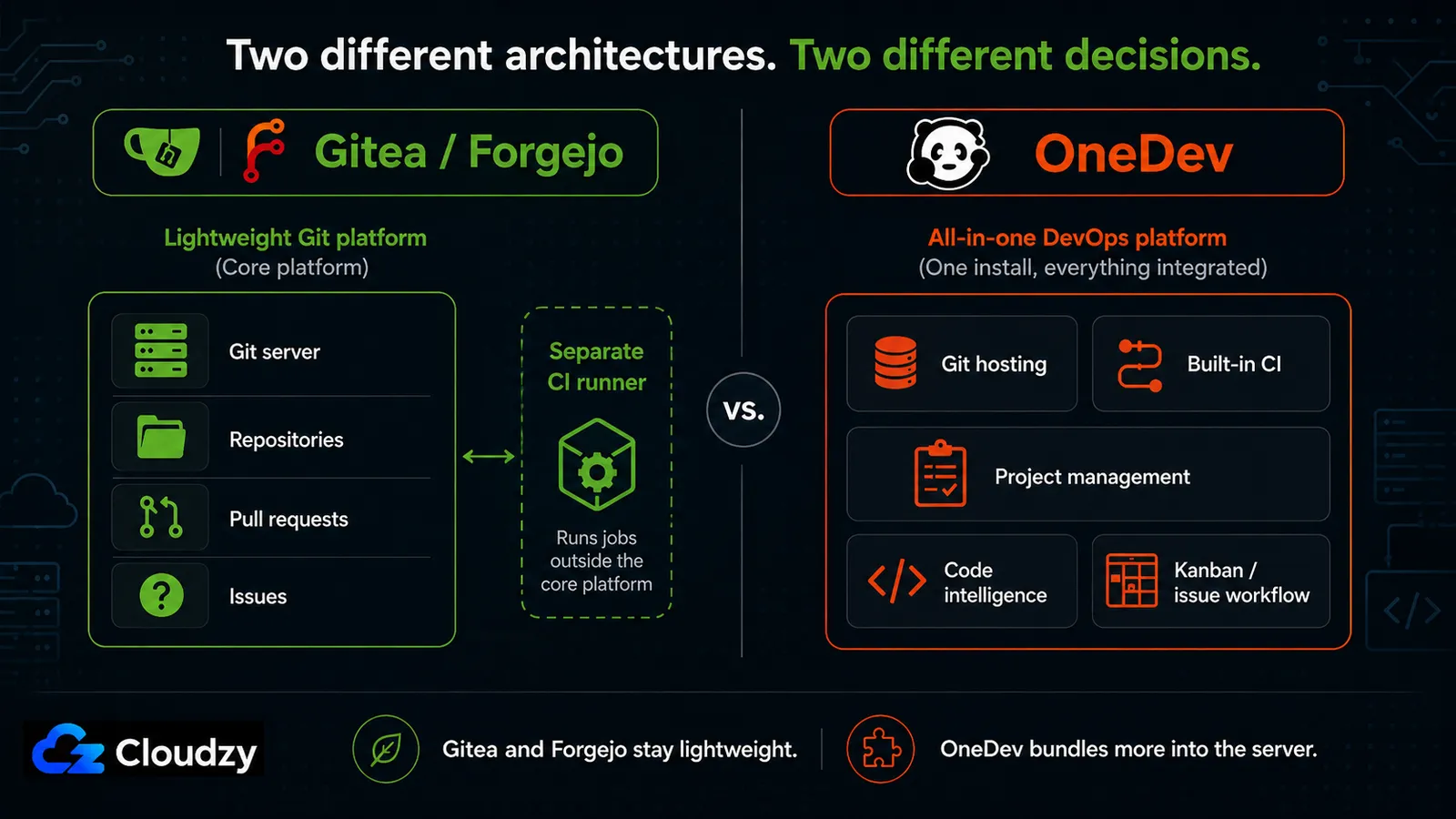
OneDev runs its CI build daemon inside the OneDev process, so there's no separate runner to deploy. Gitea and Forgejo do the opposite: the git server is one thing, and you deploy a CI runner as a separate process next to it. That single architectural fact is the tell for how each tool thinks about itself.
Gitea and Forgejo are git-first. Repositories, pull requests, and code review are the core; issues and kanban are useful add-ons; CI is something you attach. The whole thing is built around hosting git and staying out of your way. That's why they're small, fast, and cheap to run.
OneDev is built the other way around. It's a project-management and CI/CD platform where git hosting is a first-class component but not the organizing principle. The kanban boards are automated, the CI is embedded, code intelligence is built in, and it expects to be the place your team lives, not just the place your code sits. That's a genuinely different product, which is why comparing it to Gitea on "who hosts git better" misses the point. They host git about equally well. OneDev just wants to do a lot more, and it charges you in resources for the privilege.
Everything downstream maps to this split. The Gitea-vs-Forgejo choice is a sub-decision inside the "lightweight forge" branch. The "is OneDev worth it" question is the other branch entirely.
Gitea vs Forgejo: The Near-Twin Decision
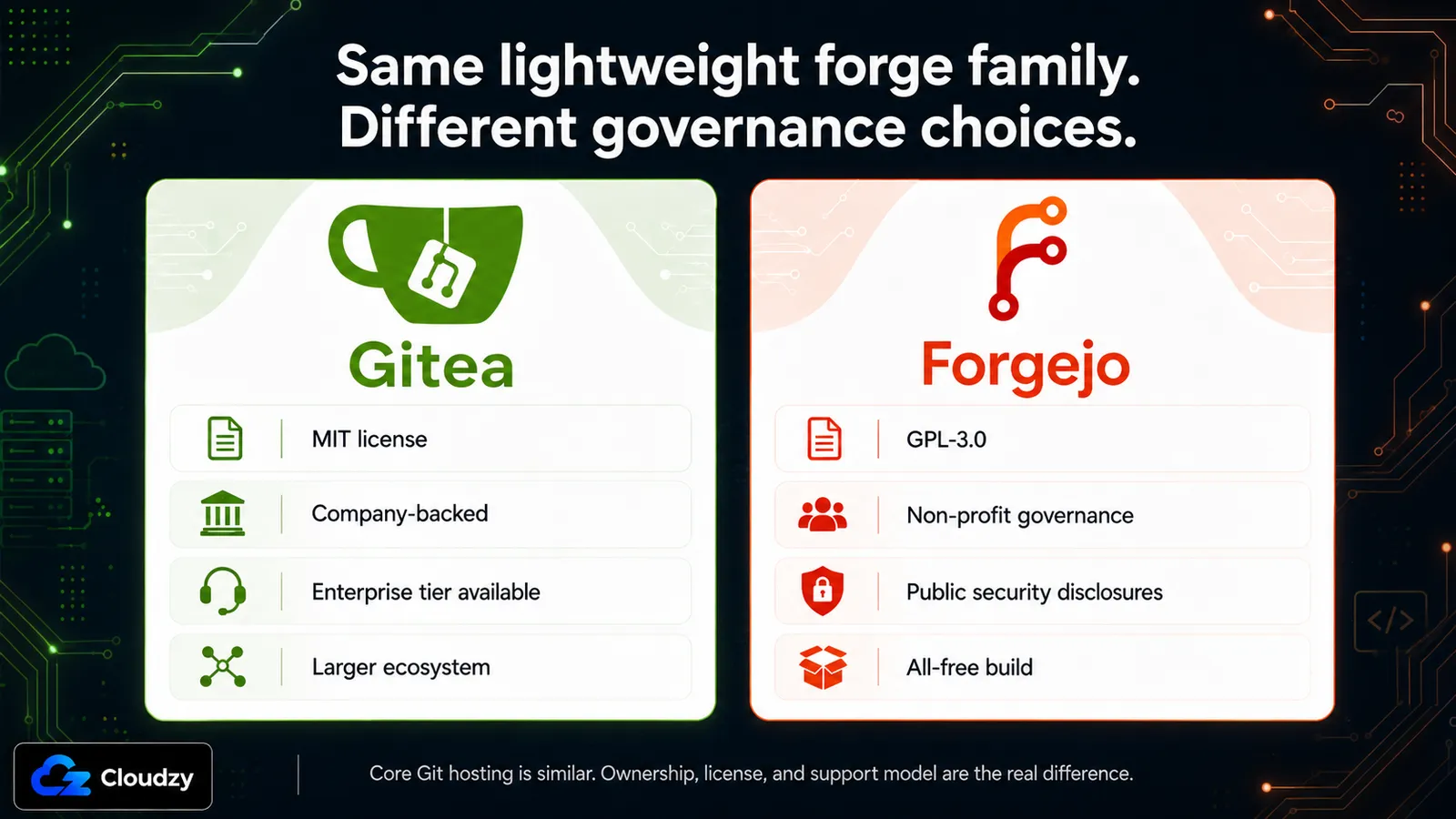
Both sit around 180–350 MB of RAM, both share the same codebase up to the fork point, and both do core git hosting the same way. For repositories, pull requests, code review, issues, and Actions-style CI, you will struggle to find a meaningful difference in daily use unless you are migrating existing GitHub Actions workflows. So let's be clear up front: this isn't a feature fight. The onedev vs gitea gap is wide; the gitea vs forgejo gap is about who controls the project and what license it ships under.
Here's the background you actually need. In October 2022, the Gitea domain and trademark became the center of a governance dispute, and Forgejo was created in response. Forgejo now lives under Codeberg e.V., a non-profit organization in Germany, and ships under GPL-3.0. Gitea remains MIT-licensed and has a free open-source self-hosted edition, while CommitGo sells Gitea Enterprise alongside it. Forgejo describes that arrangement as Open Core; Gitea/CommitGo disputes that label and says the open-source Gitea project itself does not include proprietary code. For readers, the practical difference is simpler than the politics: Forgejo optimizes for non-profit, copyleft, all-free governance; Gitea offers the permissive MIT core plus a vendor-backed Enterprise path.
Three things follow from that, and each one is decision-relevant:
- License. GPL-3.0 copyleft (Forgejo) means if you modify Forgejo and distribute the modified version, you have to share your changes under GPL. MIT (Gitea) doesn't require that. For most teams running an unmodified instance internally, this never comes up. But if you're building on top of the forge and shipping it, it matters.
- Security disclosures. Forgejo notifies everyone of security advisories through public channels. Gitea reserves advance security notices for paying Enterprise customers, which means self-hosted admins on the free tier can be exposed to a known vulnerability longer than paying customers are. If you're running the free version, that asymmetry is worth knowing.
- A paid tier exists on one side. Gitea has a commercial Enterprise Edition ($9.50–$19/user/month) that adds SSO, audit logs, priority support, and an SLA. Forgejo has no paid tier, every feature is in the free GPL build.
If you're on Gitea today and this pushes you toward Forgejo, the good news is there's a supported migration path (with a version cliff at Gitea 1.22 that's worth understanding before you start). I've written that up separately, see the full migration walkthrough for the version-by-version breakdown. If you're coming off GitHub and haven't picked a forge yet, that's a separate decision with its own trade-offs and worth working through on its own terms.
Section takeaway: For core git hosting, Gitea and Forgejo are a tie. Pick Forgejo if you want non-profit ownership, copyleft, and public security disclosures. Pick Gitea if you want the MIT license, the larger community, or the commercial Enterprise tier.
Where OneDev Is Genuinely Different
Run OneDev (16.0.1 as of this writing) for a day and the first thing you notice is that you never deployed a CI runner. The build daemon lives inside the OneDev server, so CI works the moment the platform is up. You can build a pipeline in a GUI without writing a line of YAML, debug a job through a web terminal, and test a build against uncommitted local changes before you even push. That's a genuine operational simplification over the "install the server, then install and register a separate runner" dance that Gitea and Forgejo require.
The catch, and it's a big one for existing teams, is that OneDev uses its own YAML dialect. It is not GitHub Actions-compatible. Every workflow you've written for GitHub, Gitea, or Forgejo has to be rewritten to run on OneDev. If you've got a stack of .github/workflows files you rely on, that's a genuine migration cost, not a footnote. Gitea and Forgejo both inherit the GitHub Actions ecosystem, but they don't inherit it the same way. Gitea Actions is designed as a GitHub Actions drop-in, so most workflows transfer without changes. Forgejo's runner is compatible in practice but has documented gaps: a missing permissions subkey, continue-on-error ignored, different OIDC syntax. Check those before you assume full portability.
The second thing OneDev does that the smaller forges just don't: code intelligence in the web UI. Symbol search, go-to-definition, and find-references work across a range of languages (the official list includes Java, JavaScript, C, C++, C#, Go, PHP, and Python) without cloning the repo locally. Gitea and Forgejo have nothing equivalent built in, so you'd reach for an external tool. If your team does a lot of code review in the browser, this is legitimately nice.
Round it out with fully automated kanban (rule-based task movement, custom states and fields, transition rules), a service desk that turns inbound email into issues without the sender needing an account, and confidential issues inside public projects, and you've got the picture: OneDev is trying to be your issue tracker, your CI system, your code browser, and your project board all at once.
One clarification on package registries worth making. OneDev has a built-in registry; that part is clear. Its package tutorial lists Docker, npm, NuGet, Maven, PyPI, and RubyGems, while current product copy also mentions Helm. Gitea and Forgejo still cover a much wider set of package formats, including Alpine, Arch, Cargo, Composer, Conan, Conda, Debian, Go, Helm, Maven, npm, NuGet, PyPI, RPM, RubyGems, Swift, Vagrant, and more. If your team relies on package formats outside OneDev's narrower registry set, Gitea or Forgejo is the safer choice.
Section takeaway: OneDev buys you built-in CI, code intelligence, and a full PM suite in one install. You pay for it by rewriting any GitHub Actions workflows, accepting a smaller ecosystem, and (as the next section covers) feeding it a lot more RAM.
The Resource Cost: What Each One Actually Needs
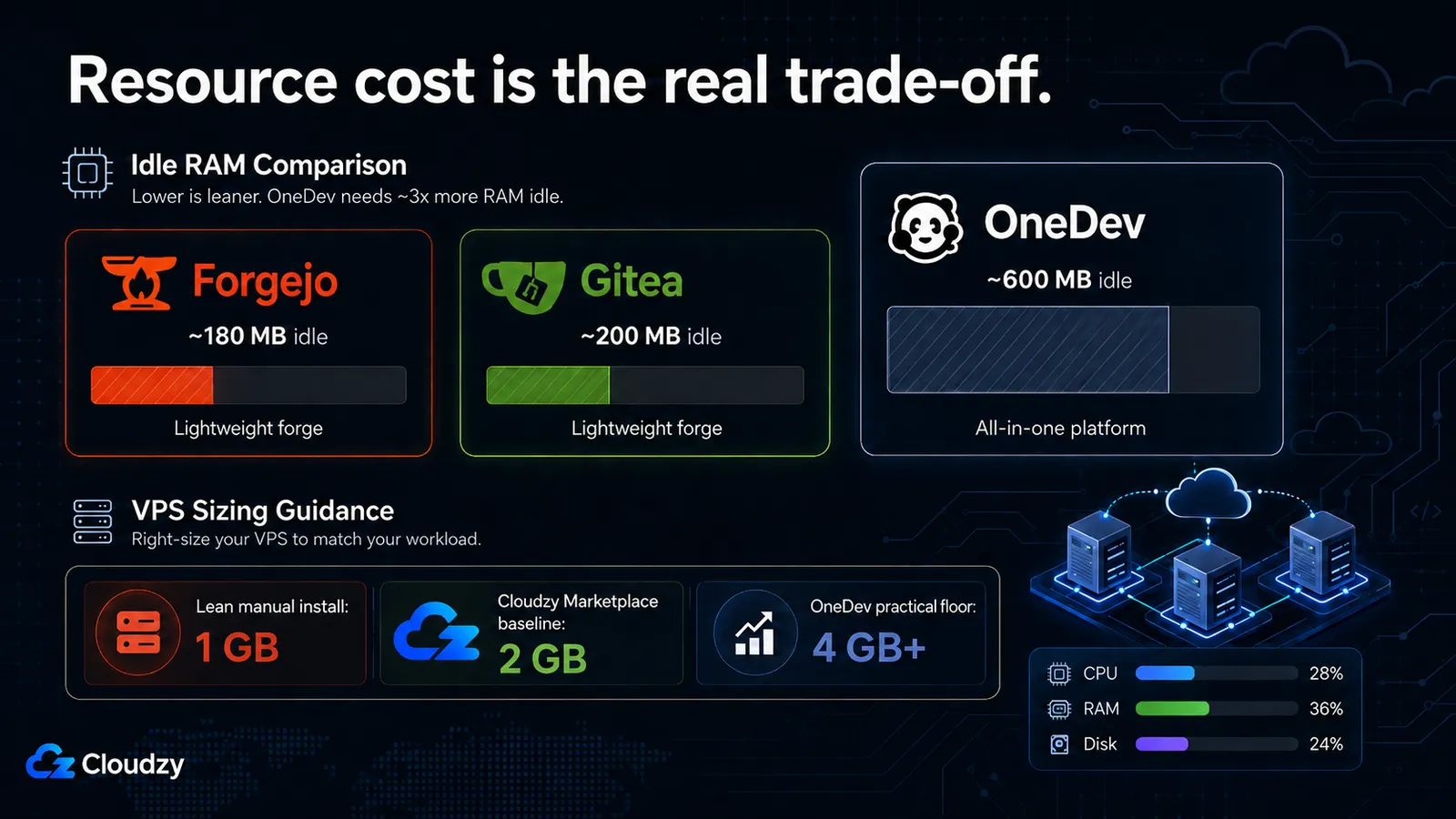
The number that decides this whole comparison for a lot of teams comes from nodatools.com's testing: OneDev idled at roughly 600 MB of RAM where Forgejo idled at about 180 MB. That's more than 3x, and it scales up under load. Here are their tested figures from nodatools.com's measured comparison, run on a fresh VPS:
| Tool | Current version | Idle RAM (tested) | Active RAM under load (tested) | Official minimum |
|---|---|---|---|---|
| Forgejo | v15.0.3 LTS | ~180 MB | ~320 MB | 512 MB |
| Gitea | 1.26.4 | ~200 MB | ~350 MB | 512 MB |
| OneDev | 16.0.1 | ~600 MB | ~950 MB | 2 GB |
Why the gap? OneDev is written mostly in Java, so the JVM carries a heap overhead that Go-based Gitea and Forgejo simply don't have. On top of that, OneDev indexes code for its intelligence features, and that initial indexing is memory-hungry. When I first stood it up, the boot-time spike was the scariest part, and it isn't the steady state.
Pro Tip
Don't panic at OneDev's startup memory. It can spike higher right after boot while the JVM warms up and the initial code index builds, then settle back toward the idle figure once things stabilize. That said, plan for the realistic working number, not the idle one. With CI actively running jobs, budget 1–2 GB consistently. The 2 GB official minimum exists for a reason.
For sizing, that translates cleanly into VPS tiers:
- Forgejo or Gitea, base install, no CI runner on the box: 1 GB RAM / 1 vCPU is comfortable.
- Forgejo or Gitea with a CI runner on the same server: bump to 4 GB RAM / 2 vCPU so the runner has room.
- OneDev, base install: 4 GB RAM is the practical floor. Go to 8 GB if code indexing is heavy or CI is busy.
So the cost delta isn't subtle. A stripped-down git server that's happy on a 1 GB box versus an OneDev instance that wants 4 GB is roughly a doubling of your monthly VPS bill. For a solo dev or a small team, that's the difference between "basically free to run" and a line item you'll notice. For a larger team that's going to lean on the bundled CI and PM every day, it can absolutely be worth it. But it's a genuine trade: OneDev's overhead is the JVM, and that cost buys you what the JVM runs.
Gitea, Forgejo, and OneDev are all one-click deploys in Cloudzy's marketplace, so once you've sized it, standing up a forge is a couple of minutes rather than an afternoon of Docker wrangling. If you're running a CI runner or OneDev's code indexing, the extra headroom lives on a Linux VPS with root access, so you can tune the JVM heap and runner concurrency yourself.
One Cloudzy-specific note: the Marketplace app cards currently start Gitea, Forgejo, and OneDev at 2 GB RAM. The 1 GB recommendation above applies to lean manual installs without a local CI runner. If you deploy through the Cloudzy Marketplace, follow the app card minimum so the OS, database, package updates, and background services have breathing room.
Which Should You Choose?
You've seen the table and the trade-offs, so here's my straight call for each reader profile, from running all three.
Pick Forgejo if you want a lightweight, community-governed forge with Actions-style CI and you can tolerate small workflow differences from GitHub Actions. This is my default recommendation for most teams. You get the same core git hosting as Gitea, cleaner non-profit ownership, public security disclosures, a copyleft license, and the lightest RAM footprint of the three. If you don't have a specific reason to choose one of the others, choose this.
Pick Gitea if you specifically want the MIT license (more permissive than Forgejo's GPL-3.0), the largest forge community and ecosystem, or a commercial Enterprise tier with SSO, audit logs, and an SLA. On raw git hosting it's a tie with Forgejo, so you're choosing on license and ownership preference, plus the paid-support option if your org needs a vendor to call.
Pick OneDev if you want built-in project management, bundled CI, and code intelligence in a single install, you're starting fresh (no existing GitHub Actions workflows to migrate), and you have the RAM budget for a 4 GB-plus box. The forgejo vs onedev decision really comes down to this: are you buying a git server, or a platform? If the answer is "platform, and I don't want to bolt CI on myself," OneDev earns its overhead.
One decision input that's easy to overlook: there is no migration path between the Gitea/Forgejo family and OneDev. Different data model, different CI format, different schema. If you start on Forgejo and later decide you want OneDev (or the reverse), you're looking at an API-based, repo-by-repo move that loses your CI history and project-management data. So if OneDev's all-in-one approach appeals to you at all, it's much cheaper to start there than to switch into it later. Between Gitea and Forgejo, migration does exist (that's the migration path covered above), but crossing the lightweight-forge-to-OneDev line is a one-way, lossy trip. Factor that into the decision now, not in eighteen months.
Frequently Asked Questions
Is Gitea Still Open Source?
Yes. Gitea's core is MIT-licensed and free to self-host with unlimited users and repositories. The practical caveat is governance, not source availability: Gitea is company-controlled and has a vendor-backed Enterprise offering through CommitGo, while Forgejo is the community-governed, GPL-licensed fork under Codeberg e.V. Forgejo describes Gitea's commercial arrangement as Open Core; Gitea/CommitGo disputes that label and says the open-source project itself does not include proprietary code. So Gitea is still open source, but it is not community-governed in the same way Forgejo is.
Is Forgejo Better Than Gitea?
For core git hosting, they're near-identical: Forgejo forked from Gitea and shares the same base. Forgejo differs on governance (non-profit Codeberg e.V.), license (GPL-3.0 copyleft versus Gitea's MIT), and security disclosures (public to everyone, versus Gitea's Enterprise-customers-first policy). "Better" depends on whether those things matter to you; on features alone it's a tie.
How Much RAM Does OneDev Need?
OneDev's official minimum is 2 GB of RAM. In nodatools.com's testing it idled around 600 MB and hit roughly 950 MB under load. Boot can run higher while the JVM warms up and indexing completes, but with CI actively running you should budget 1–2 GB consistently. For comparison, that same testing put Forgejo and Gitea at ~180–200 MB idle.
Can I Migrate From Gitea to OneDev, or From OneDev to Forgejo?
No direct migration path exists between the Gitea/Forgejo family and OneDev. They use different data models, CI formats, and schemas, so moving would require an API-based, repo-by-repo migration that loses CI and project-management history. Migration between Gitea and Forgejo does exist (see our Gitea-to-Forgejo migration guide), because they share a lineage.
Does OneDev Support GitHub Actions?
No. OneDev uses its own YAML dialect plus a GUI pipeline editor, so workflows written for GitHub, Gitea, or Forgejo have to be rewritten to run on it. Gitea Actions is designed as a drop-in replacement, so most existing workflows run without changes. Forgejo's runner is compatible in practice but is not designed to mirror GitHub Actions exactly; check the official Forgejo docs for documented incompatibilities before assuming full portability.


Discussion
Comments
Sign in to join the discussion.