

A virtual private server, or VPS, is a virtual machine you rent. It has an operating system, an allocation of processing power and memory, storage, and network connectivity. You can install software and run services much as you would on a physical server, without owning the hardware.
“Cloud” describes the platform around that virtual machine. Instead of administering each host as a separate destination, a provider can use a management platform to provision instances across a pool of hosts, attach storage, configure networking, and manage their lifecycle.
The label is looser than it sounds. The cloud VPS providers can market different architectures as "cloud VPS", and traditional VPS services can offer automation, migration, and redundancy too. The useful distinction is what the platform actually does: how it provisions your machine, stores your data, handles failures, and changes your resources.
You might use a cloud VPS to host a website, run an API, operate a database, or maintain a development environment. Those applications do not become distributed or highly available simply because the machine hosting them is called cloud.
How Does a Cloud VPS Work?
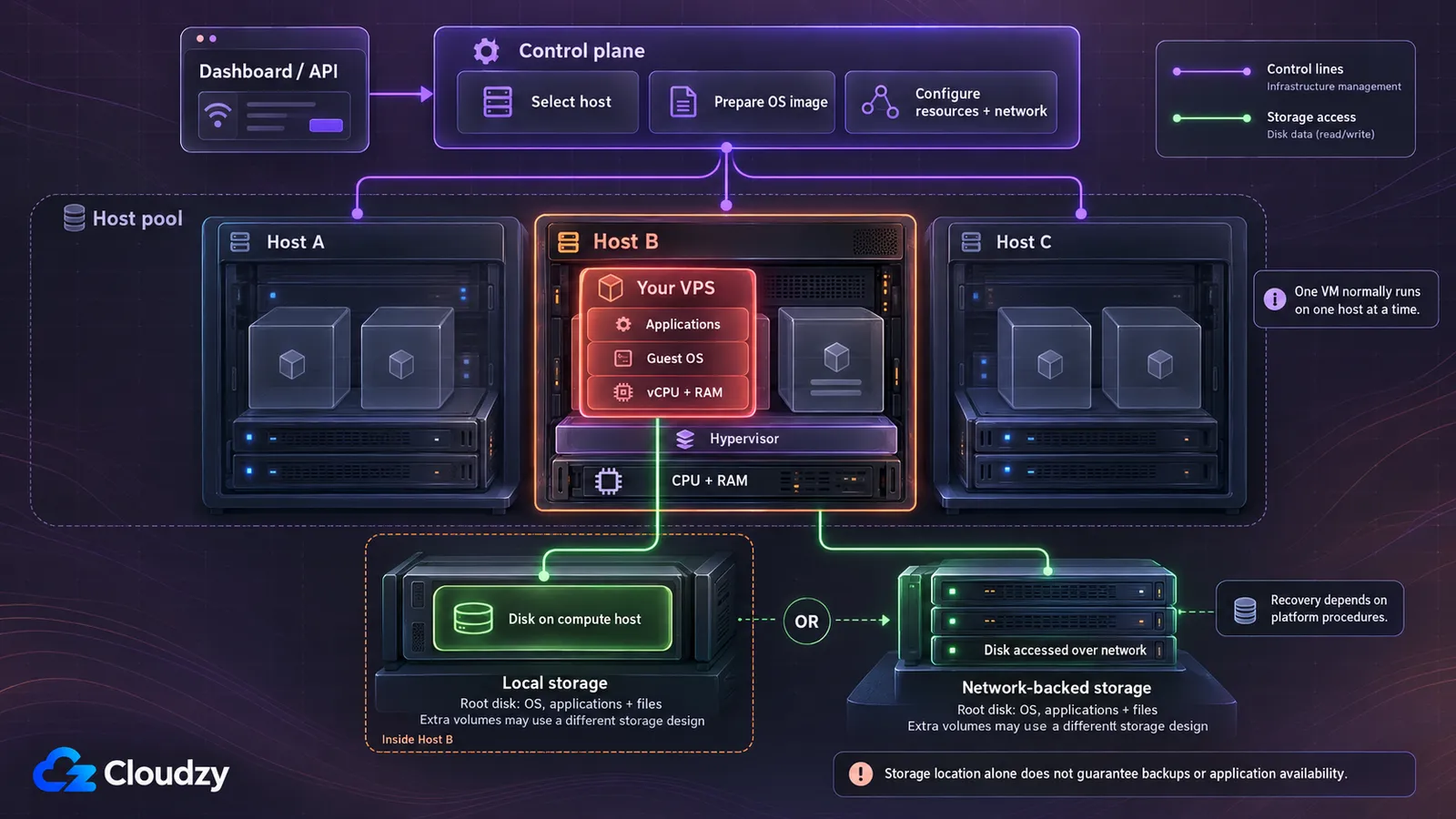
Three layers explain most of the behavior you will encounter: the physical host, the virtual machine, and the platform managing it.
Physical Hosts and Virtual Machines
A physical host contains processors, RAM, network interfaces, and access to storage. A hypervisor, such as KVM, lets multiple virtual machines use that hardware while maintaining isolation between their operating systems.
Your VPS normally runs on one physical host at a time. A plan with four vCPUs does not usually combine processors from four different servers. Its virtual processors execute on the host currently running the VM.
That distinction matters when interpreting the word “pool.” The platform can choose from pooled capacity; a single instance does not automatically execute across the whole pool.
The Platform That Provisions Your Server
The control plane is the software that accepts requests from the dashboard or API and coordinates the infrastructure. When you create an instance, it selects an eligible host, prepares the operating-system image, and configures the requested resources and network connections.
The same platform may support snapshots, resizing, additional disks, private networks, and migration. Each capability has its own requirements and limits. Having a dashboard or API does not establish that the service supports every cloud feature.
Where Your Data Is Stored
The root disk holds the operating system and, unless you separate them, your applications and files. That disk may use storage local to the compute host, or it may be backed by a storage system reached over the network. Additional volumes may follow a different architecture from the root disk.
Local storage ties access to data more closely to the host. Network-backed storage can make it possible for another host to access a VM's disk, subject to the platform's recovery procedures. Neither arrangement alone establishes backup coverage or application availability.
For the underlying terminology, see how a cloud server is built.
Cloud VPS vs Traditional VPS: What's the Difference?
The difference is primarily in infrastructure management and the services around the VM. Both products can provide an isolated operating system and administrator access. The table describes typical models, rather than mandatory properties of every product bearing either label.
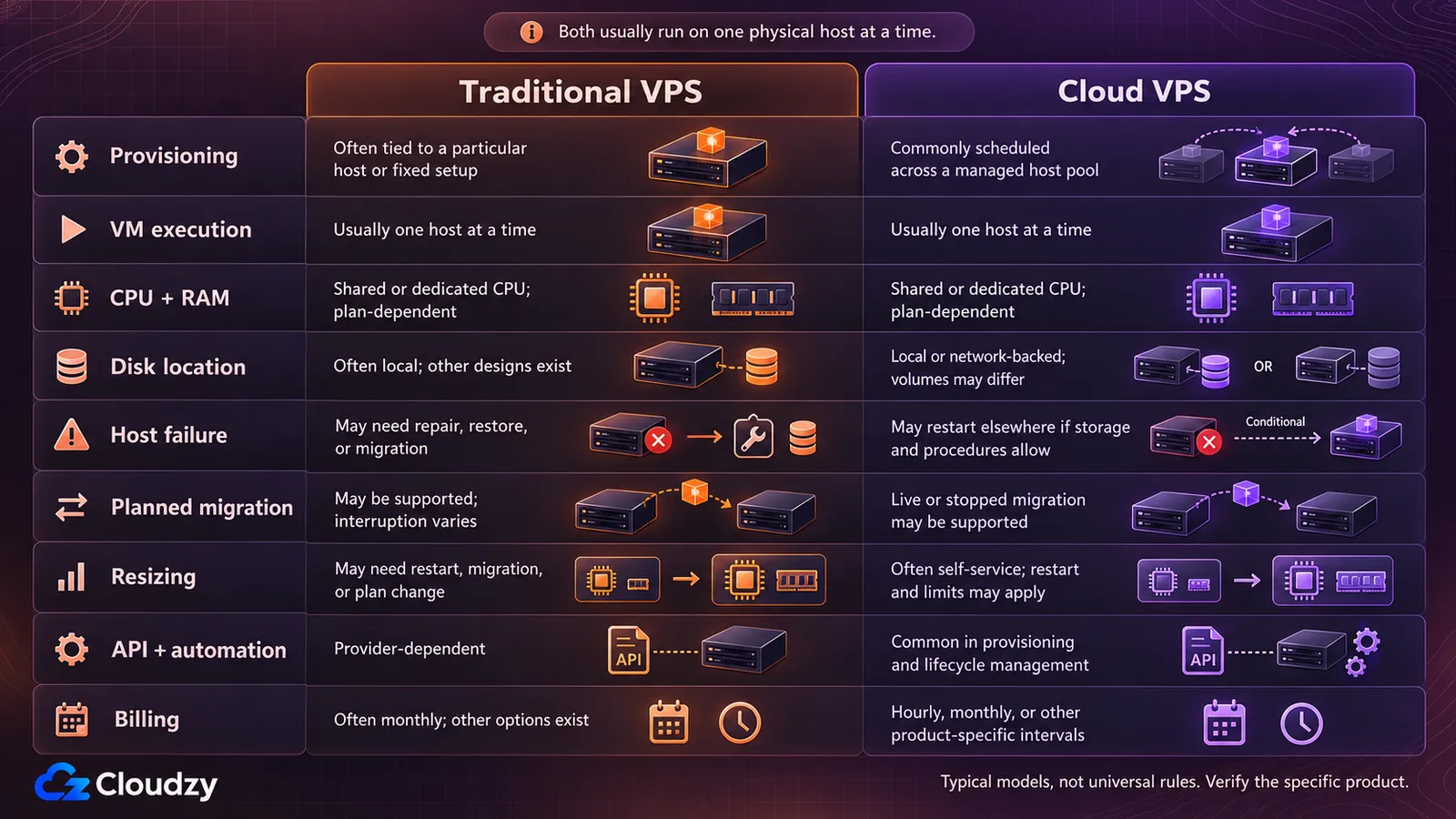
The word “cloud” therefore does not settle whether a product is faster, safer, or more resilient. Those conclusions require details about CPU allocation, storage, failure handling, and the service commitment.
The broader terminology is covered in cloud hosting versus VPS hosting. For named-provider comparisons and performance evidence, use our VPS provider comparison.
What Happens If a Server or Disk Fails?
A cloud VPS is still an instance that can become unavailable. Understanding recovery means asking what failed and which parts of the system remain accessible.
If the Physical Host Fails
Live migration covers a host being drained in a controlled way; it does not mean your application survives a sudden failure by itself. During planned maintenance, a platform may transfer a running VM to another host. A host that has already failed cannot participate in the same transfer.
After an unexpected failure, a platform may restart or evacuate the instance elsewhere. Whether that preserves the latest disk contents depends on the storage architecture and recovery mechanism. If the only usable copy of the root disk is on the failed host, another host cannot simply resume using it.
OpenStack's evacuation documentation, for example, explains how access to shared storage affects preservation of server-disk data during recovery. The relevant question for a purchased service is what its own platform and procedures support.
Recovery can involve downtime even when it is automatic. Application high availability usually requires redundant application components across suitable failure domains, plus traffic routing and a data strategy that can tolerate a component failing. Buying a larger single VM does not provide that architecture.
If a Disk Fails
Redundant storage can allow the platform to tolerate some drive or storage-node failures. Its protection depends on where copies are kept, how many failures the system can withstand, and whether other dependencies remain available.
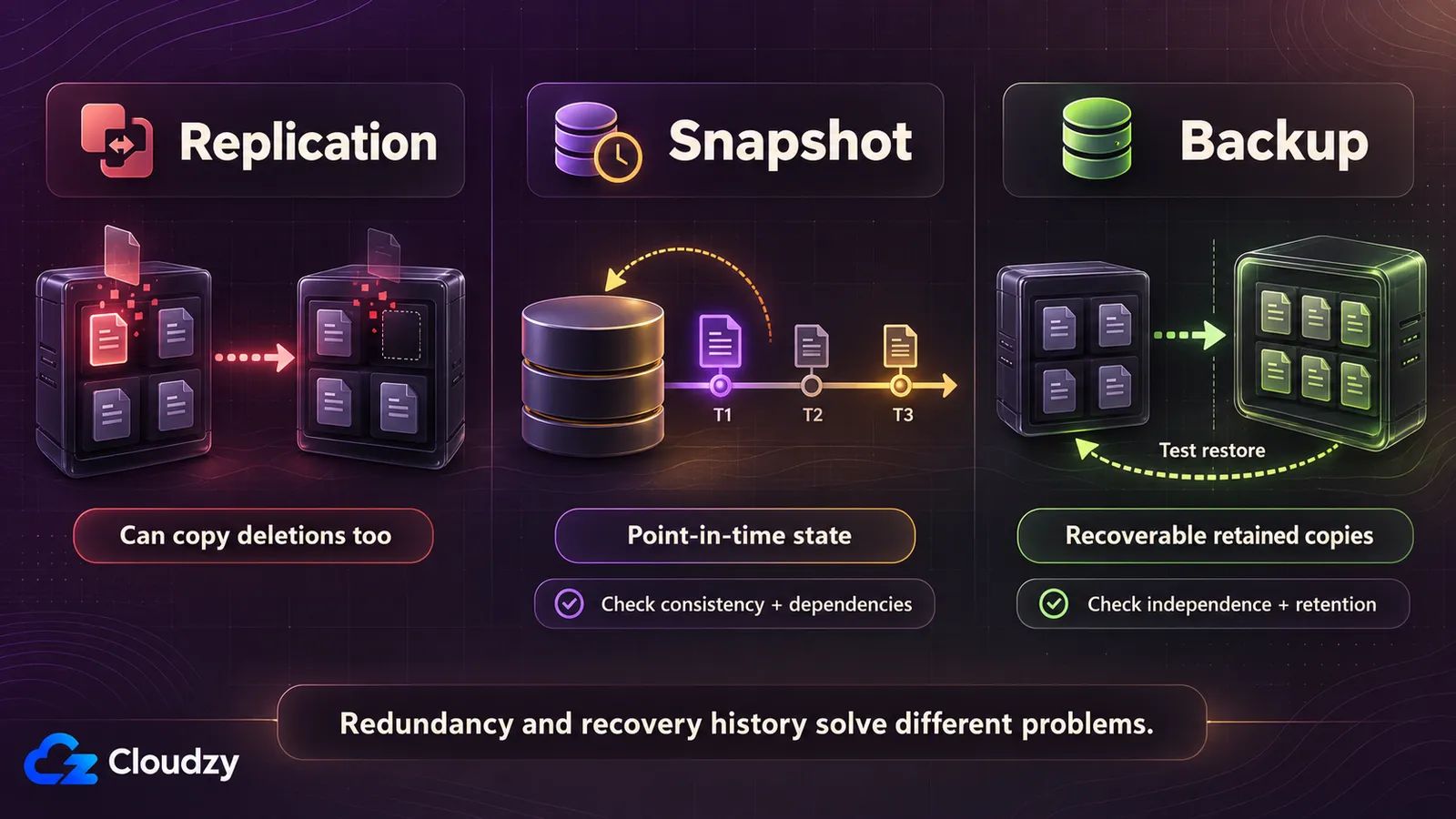
Replication can also reproduce an unwanted change. If an application deletes a file or writes corrupted data, another current replica may contain the same deletion or corruption. Storage redundancy and recovery history solve different problems.
Replication, Snapshots, and Backups
| Mechanism | What it does | What to verify |
|---|---|---|
| Replication | Maintains copies of data to tolerate specified infrastructure failures | Failure domains, replication behavior, and failure limits |
| Snapshot | Captures a point-in-time view of a disk or volume | Application consistency, retention, dependencies, and restore procedure |
| Backup | Keeps recoverable data for restoration after loss or unwanted changes | Schedule, retention, independence, access controls, and tested restores |
A snapshot can be part of a backup system, but the name alone does not establish independence from the source platform. Keep a recoverable copy outside the same account or provider when account loss or a platform-wide incident is a risk you need to cover.
For any service, ask two concrete questions: how much recent data could be lost, and how long would restoration take? An uptime percentage does not answer either one. The SLA also needs reading: covered events, exclusions, reporting requirements, and remedies determine what the commitment means.
Can You Scale a Cloud VPS Without Downtime?
Scaling and reliability are separate problems. A bigger tier covers a workload that needs more capacity. It does not add redundancy: a larger instance can fail in the same way as a smaller one.
Resizing One Server
Vertical scaling changes the CPU, RAM, or storage assigned to one instance. Many platforms let you request this from a dashboard or API without reinstalling the operating system.
Without reinstalling does not mean without interruption. A change may require a shutdown, reboot, or move to another host. DigitalOcean's resize procedure, for example, requires powering down the Droplet.
Confirm whether the change needs a reboot, whether the destination plan is available in your region, and whether your IP address and attached volumes are preserved. Disk growth can restrict later downsizing: reducing a filesystem and reducing the underlying virtual disk are separate operations, and some platforms do not support shrinking the disk at all.
Adding More Servers
Horizontal scaling adds instances instead of making one instance larger. It can distribute traffic and reduce dependence on one VM, but the application has to support it. Sessions, uploaded files, background jobs, and database writes need deliberate handling.
Autoscaling adds another layer: rules and automation that change capacity in response to a metric or schedule. A cloud VPS subscription does not necessarily include those rules, a load balancer, or an application prepared to use extra instances.
Find the largest configuration your instance can resize into before it must change product line. If growth is why you are moving, that ceiling matters: reaching it may mean another migration.
Are Cloud VPS Resources Shared or Dedicated?
The word “private” refers to the virtual environment; it does not necessarily mean exclusive physical hardware.
Shared-vCPU plans share processor execution capacity with other tenants. Dedicated-vCPU plans reserve processor capacity according to the provider's definition. Check whether that means a hardware thread, a core, or another allocation policy, and whether sustained usage is restricted.
The distinction becomes visible under sustained load. A short burst of activity may run well on shared CPU, while a continuously busy application needs predictable access to processor time. CPU model, allocation policy, and contention can matter more than the vCPU count alone.
RAM is presented as an allocation to the instance, while storage capacity is presented as a disk or volume size. Those figures do not establish exclusive memory bandwidth, disk throughput, or storage I/O. Resource guarantees and overcommit policies still need checking.
Other tenants can affect shared CPU, storage, or network performance even when the hypervisor maintains operating-system isolation. For networking, distinguish port speed from included transfer: a fast connection does not mean unlimited traffic or guaranteed throughput.
Placement matters too. A short region list with a location near your users can be more useful than a long list without one. Test latency from the places that will actually connect to the service.
Who Manages and Secures a Cloud VPS?
Unmanaged means you receive the virtual machine and administrator access, while operating-system maintenance, application setup, monitoring, and incident response remain your responsibility. Root access on Linux, or administrator access on Windows, lets you change the machine; it also lets you break it.
A managed service adds an agreed scope of administration. That scope might cover operating-system updates, a hosting control panel, backups, or selected application services. Read the service description rather than assuming “managed” includes every software problem.
Provider support and server management are different. An infrastructure support team may investigate an unreachable host or a platform fault without debugging your database or deploying your application. Opening hours are the weaker signal; the response commitment and supported tasks are the ones to verify. A queue staffed at 3am is not necessarily a queue that answers immediately at 3am.
The provider generally maintains the physical infrastructure and virtualization platform. Customer duties depend on the service, but an unmanaged customer normally configures access controls, installs security updates, protects credentials, and maintains recoverable application data.
Hypervisor isolation reduces exposure between tenants; it is not an absolute security guarantee. DDoS protection also has a defined scope: ask which attack types it covers, whether it is included, and whether it applies in your selected region.
Before putting a live workload on the server, establish monitoring, an update schedule, and a tested restore process. Keep the configuration portable. If the stack rebuilds from a script or a Compose file, moving becomes easier than reconstructing a server from memory.
How Does Cloud VPS Billing Work?
Cloud VPS billing commonly charges for allocated capacity over time. An idle instance can cost the same as a busy one because its resources remain provisioned. “Pay as you go” does not automatically mean a bill calculated from actual CPU utilization.
Hourly or finer billing can help with short-lived test environments and temporary workers. For a server running all month, compare the full-month charge, including any cap, minimum, or commitment. Billing granularity alone does not determine which service costs less.
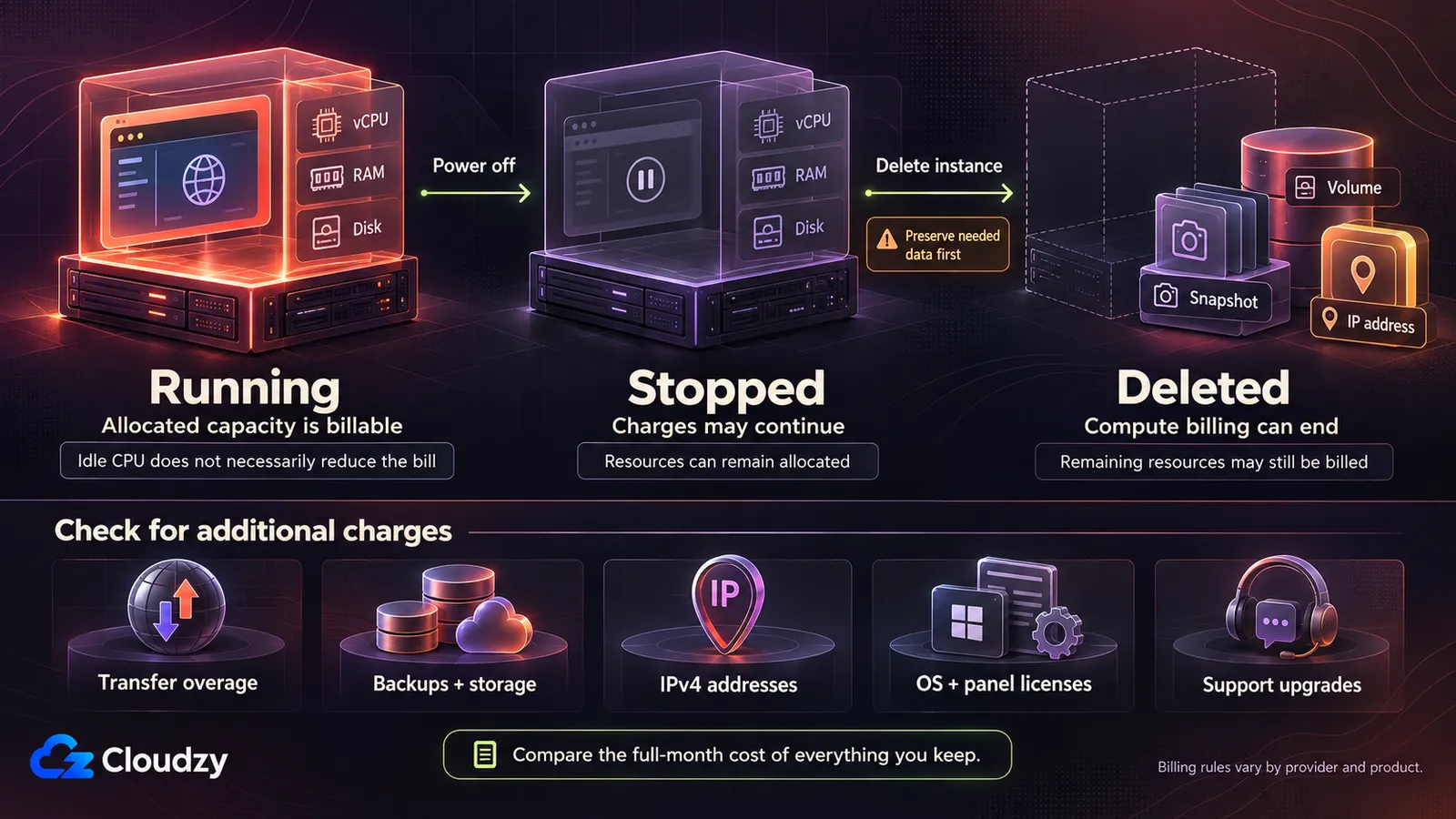
Does Turning the Server Off Stop Charges?
Do not assume it does. A stopped instance may retain its allocated resources and disk, which remain billable. Deleting an instance can end its compute charge while leaving separately billed volumes, snapshots, backups, or IP addresses behind.
Check the product's billing rules before stopping or deleting anything, and preserve needed data before removing resources.
What Can Cost Extra?
The advertised figure may exclude bandwidth overage, backup storage, additional volumes, IPv4 addresses, operating-system or control-panel licenses, and support upgrades. Rates can also vary by region or change after an introductory term.
Compare the bill for the resources you expect to keep, rather than the smallest advertised instance. What drives cloud pricing explains the cost components in more detail.
Four Cloud VPS Providers to Consider
These are unranked starting points. Match the specific product to the architecture and operating responsibilities described above; a company can sell several different kinds of virtual server.
DigitalOcean
DigitalOcean calls its virtual machines Droplets. They provide a server environment you administer, with different resource configurations and dashboard/API controls. Its documented resize process is a useful example of self-service scaling that still requires downtime. Check the selected CPU class, region, backup options, and disk-resize restrictions rather than treating all Droplets as interchangeable. Start with the Droplet documentation.
OVHcloud
OVHcloud sells both VPS products and Public Cloud instances. They are separate product lines, so a feature documented for one should not be attributed to the other. Identify which service you are evaluating, then check its storage, resize options, networking, billing, and recovery arrangements. The Public Cloud instance documentation explains the concepts behind that offering, including instance families and associated services.
Vultr
Vultr offers cloud virtual machines across different compute categories. Its standard Cloud Compute documentation describes shared-CPU instances, while other categories offer different resource allocation. Choose the CPU class before comparing the memory figure, then verify regional availability, included transfer, backups, and attached storage. The Cloud Compute provisioning guide describes deployment choices and the instance model.
Cloudzy
Cloudzy offers cloud VPS instances with administrator access, allowing you to install and manage your own software. For an unmanaged deployment, plan for operating-system updates, monitoring, and application maintenance on your side. Review the selected plan's CPU allocation, location, storage, backup arrangements, and support scope against your workload. The Cloudzy Cloud VPS page provides the current product information and available configurations.
For rankings, provider comparisons, and benchmark evidence, continue to our VPS provider comparison.
Frequently Asked Questions
Is a cloud VPS the same as cloud hosting?
Cloud hosting is a broader term. It can describe virtual machines, managed website hosting, or application platforms. A cloud VPS specifically gives you a virtual server environment. Check administrator access and management responsibilities to understand what a particular service includes.
Does a cloud VPS run on multiple physical servers at once?
A typical cloud VPS runs on one physical compute host at a time. The platform may select or change that host, and the VM's storage may use several storage nodes. Neither means the VM's CPU and RAM execute across all the platform's servers simultaneously.
Is a cloud VPS automatically faster or more reliable than a traditional VPS?
No. Performance depends on hardware, resource allocation, contention, networking, and the workload. Reliability depends on infrastructure, storage, recovery procedures, and application design. Compare those properties rather than inferring them from the product name.
Does cloud VPS hosting include backups?
Only when the service explicitly includes them. Verify the schedule, retention, restore process, and additional charges. Redundant storage is not a substitute for recovery history, and a snapshot in the same account may not protect against losing access to that account.
Can beginners use a cloud VPS?
Yes, but an unmanaged VPS requires learning server administration. You normally receive an IP address and an authentication method, then connect through SSH for Linux or an appropriate remote-access method for Windows. A managed service can reduce that work, provided its support scope covers the tasks you need.
Can a cloud VPS run Linux or Windows?
Either can run on suitable virtual infrastructure, but available images and licensing depend on the provider and product. Choose an operating system supported by your applications and administration tools. Windows licensing may add to the plan's cost.
Can I host a website on a cloud VPS?
Yes. A cloud VPS can run a web server, your website’s application, and a database if needed. On an unmanaged service, you handle installation, security, and maintenance. See our website-hosting software guide for the components you may need.
Can I migrate an existing website or application to a cloud VPS?
Usually, if the destination supports the required operating system, software, resources, and network access. Migration involves copying configuration and data, testing the new deployment, synchronizing changing data, and switching traffic. Provider migration assistance and acceptable downtime vary; cloud provisioning does not perform the application migration automatically.
Discussion
Comments
Sign in to join the discussion.