

The bot answers every message until the laptop lid closes, and then its users get silence. A small VPS fixes that for a few dollars a month. The best VPS for a Telegram bot depends on how the bot gets its updates. Either it asks Telegram for them, or Telegram sends them to the bot.
That choice decides the ports and certificate you need, and whether public IPv4 connectivity is required.
The Short Version
- For one bot on a VPS, run long polling. It needs no domain, certificate or open port.
- Webhooks need HTTPS on port 443, 80, 88 or 8443 and a public IPv4 address. Telegram does not deliver webhooks over IPv6.
- 512 MB of RAM is a workable start for one bot with no local database.
- Keep the bot alive with systemd, or Docker's restart policy if you already ship containers.
- Pick a provider on IPv4 and RAM headroom, not on list price alone.
Polling or Webhooks: The Choice That Sets Your Server Requirements
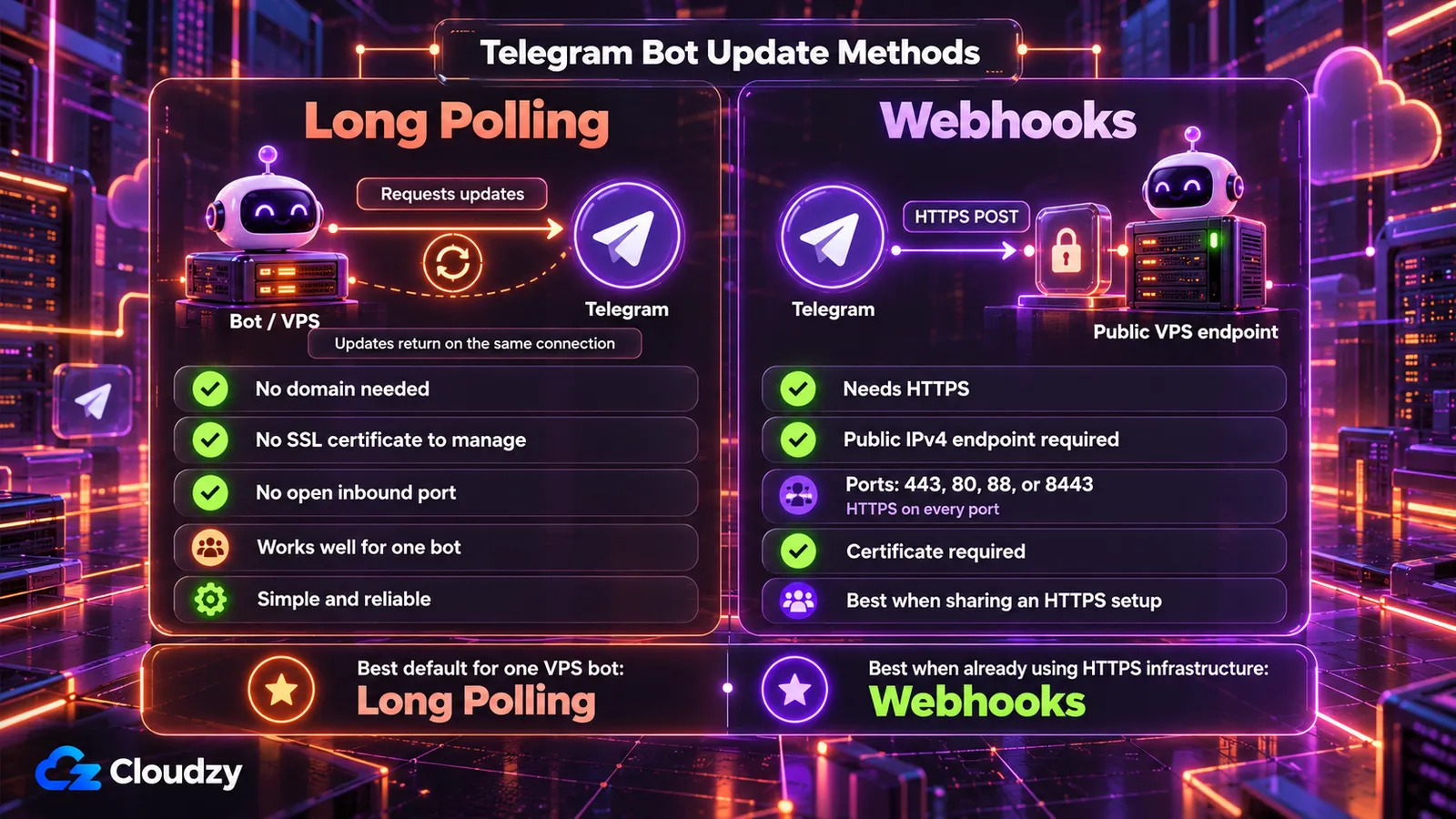
A Telegram bot gets updates one of two ways. With long polling, the bot calls getUpdates and Telegram holds the request open until an update arrives or the timeout ends, so every connection starts from your server. With a webhook, you register a URL once with setWebhook, and Telegram POSTs each update to it over HTTPS.
| Requirement | Long Polling (getUpdates) |
Webhook (setWebhook) |
|---|---|---|
| Inbound port | None; outbound requests only | HTTPS on 443, 80, 88 or 8443 |
| Public IPv4 | Not required | Required; IPv6 is not supported for webhooks |
| Domain and certificate | Not needed | Certificate required; a domain is typical, but a self-signed certificate can use the IP as its CN |
| Process | Runs continuously | Answers HTTPS requests continuously |
The webhook column follows Telegram's webhook requirements.
To see which method your bot uses, ask the Bot API:
curl "https://api.telegram.org/bot<YOUR_TOKEN>/getWebhookInfo"If the response contains "url":"", no webhook is configured, so the bot can use long polling. grammY's bot.start() long-polls by default; python-telegram-bot uses run_polling() or run_webhook().
For one bot on its own VPS, I would poll, which is also grammY's default advice. Webhooks win when the box already runs a reverse proxy (a web server that forwards HTTPS requests to your bot), when several bots share one HTTPS endpoint, or on a serverless platform. For that route, Caddy fetches and renews the certificate without a cron job.
A short outage delays messages without losing them. Per the Bot API's update rules, Telegram stores updates for up to 24 hours until the bot receives them, by either method, and it repeats failed webhook requests before giving up.
If the webhook owns its port directly, restrict that port to Telegram's published source ranges. If port 443 is shared by a reverse proxy serving other sites, apply the restriction only to the webhook path or rely on Telegram's secret token instead of blocking all other HTTPS traffic. The webhook guide lists two source ranges and warns they may change. With UFW as the host firewall:
sudo ufw allow 22/tcp    # keep SSH open before you enable the firewall

sudo ufw allow proto tcp from 149.154.160.0/20 to any port 443

sudo ufw allow proto tcp from 91.108.4.0/22 to any port 443

sudo ufw allow 80/tcp    # if your HTTPS setup uses HTTP validation or redirects HTTP to HTTPS

sudo ufw enable
Change 443 if the webhook listens on 80, 88 or 8443. These rules protect a bot that runs directly on the host. Docker's firewall docs say a published port skips UFW, so a webhook container started with -p 443:443 stays open to everyone. Also set a secret_token in setWebhook. Telegram echoes it in the X-Telegram-Bot-Api-Secret-Token header of every request, and your handler rejects requests without it.
Keeping the Bot Alive: systemd or Docker
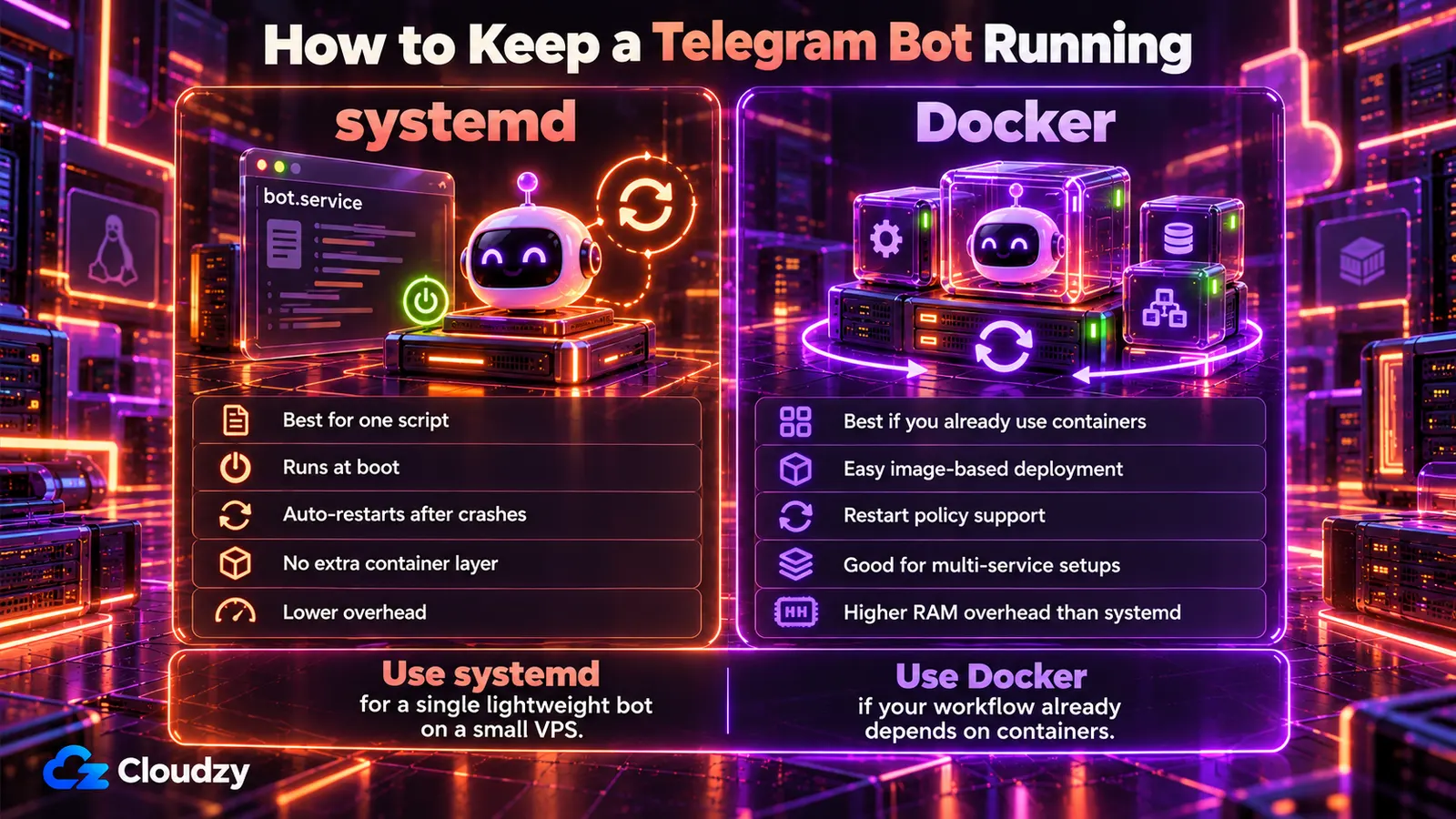
Running a Telegram bot 24/7 means restarting it after crashes and reboots. On a VPS, systemd does that, or Docker if the bot ships as an image.
A systemd unit is a short config file that tells the init system how to start and restart a program. Create /etc/systemd/system/telegram-bot.service:
[Unit]
Description=Telegram bot
After=network-online.target
Wants=network-online.target

[Service]
User=bot
WorkingDirectory=/opt/bot
EnvironmentFile=/opt/bot/.env
ExecStart=/opt/bot/venv/bin/python bot.py
# Node: ExecStart=/usr/bin/node bot.js
Restart=always
RestartSec=5

[Install]
WantedBy=multi-user.target
Put the token in a .env file in the project folder as BOT_TOKEN=... and read it with os.environ["BOT_TOKEN"] (Node: process.env.BOT_TOKEN), so it stays out of the code. Then copy the project into place and start it:
sudo mkdir -p /opt/bot

sudo cp -r ~/your-bot/. /opt/bot/        # your project, after git clone or scp from your machine; include .env and requirements.txt

sudo apt install -y python3-venv         # Debian/Ubuntu

sudo useradd --system --no-create-home bot

sudo chown -R bot:bot /opt/bot

sudo -u bot python3 -m venv /opt/bot/venv

sudo -u bot /opt/bot/venv/bin/pip install -r /opt/bot/requirements.txt

# Node: skip the venv and pip commands above, then run:

cd /opt/bot && sudo -u bot npm ci

sudo chmod 600 /opt/bot/.env

sudo systemctl daemon-reload

sudo systemctl enable --now telegram-bot

systemctl status telegram-bot    # look for: Active: active (running)

sudo journalctl -u telegram-bot -f    # follow the bot's logs
Restart=always restarts the bot whether it exited cleanly or crashed; on-failure skips clean exits, per the systemd.service manual. RestartSec=5 spaces out attempts, and WantedBy=multi-user.target plus enable starts the bot at boot. If it keeps restarting, sudo journalctl -u telegram-bot -n 50 shows the traceback. Check for a missing BOT_TOKEN first.
The Docker equivalent is one flag:
docker run -d --name telegram-bot --restart unless-stopped --env-file .env your-bot-image

docker logs -f telegram-bot
In Compose, the line is restart: unless-stopped. Docker's restart-policy docs say the container comes back when it exits or the daemon restarts, not after you stop it yourself. That covers reboots when Docker itself starts at boot, which it does by default on Debian and Ubuntu. Elsewhere, run sudo systemctl enable docker.service.
My rule: one script on a small box gets systemd, with no extra daemon in memory. If you already build images or run other containers, use Docker and accept that its daemon takes a share of the RAM.
Neither tool tells you the bot is down. An Uptime Kuma push monitor on a second server can. The bot calls the monitor's URL on a timer, and Uptime Kuma alerts you in Telegram when the calls stop.
Where Free Hosting and Home Servers Break
Render spins down a free web service after 15 minutes without inbound traffic, and Render's free-tier docs put the wake-up at about a minute. A polling bot receives no inbound traffic, so it gets stopped. A webhook bot gets woken by Telegram's POST, with a cold start after quiet spells. So whether free hosting for a Telegram bot works depends on which method the bot uses.
grammY's guide lists serverless platforms as a good fit for webhooks, while long polling needs a machine that runs around the clock. Fly.io bills by usage and requires a card on file.
A Raspberry Pi or an old PC can run a polling bot while the machine, power and connection stay up. Webhooks from home also need a public address and port forwarding. For a hobby bot, either free path can be enough.
A VPS fits both methods at a fixed monthly price.
Five VPS Providers Compared for a Telegram Bot
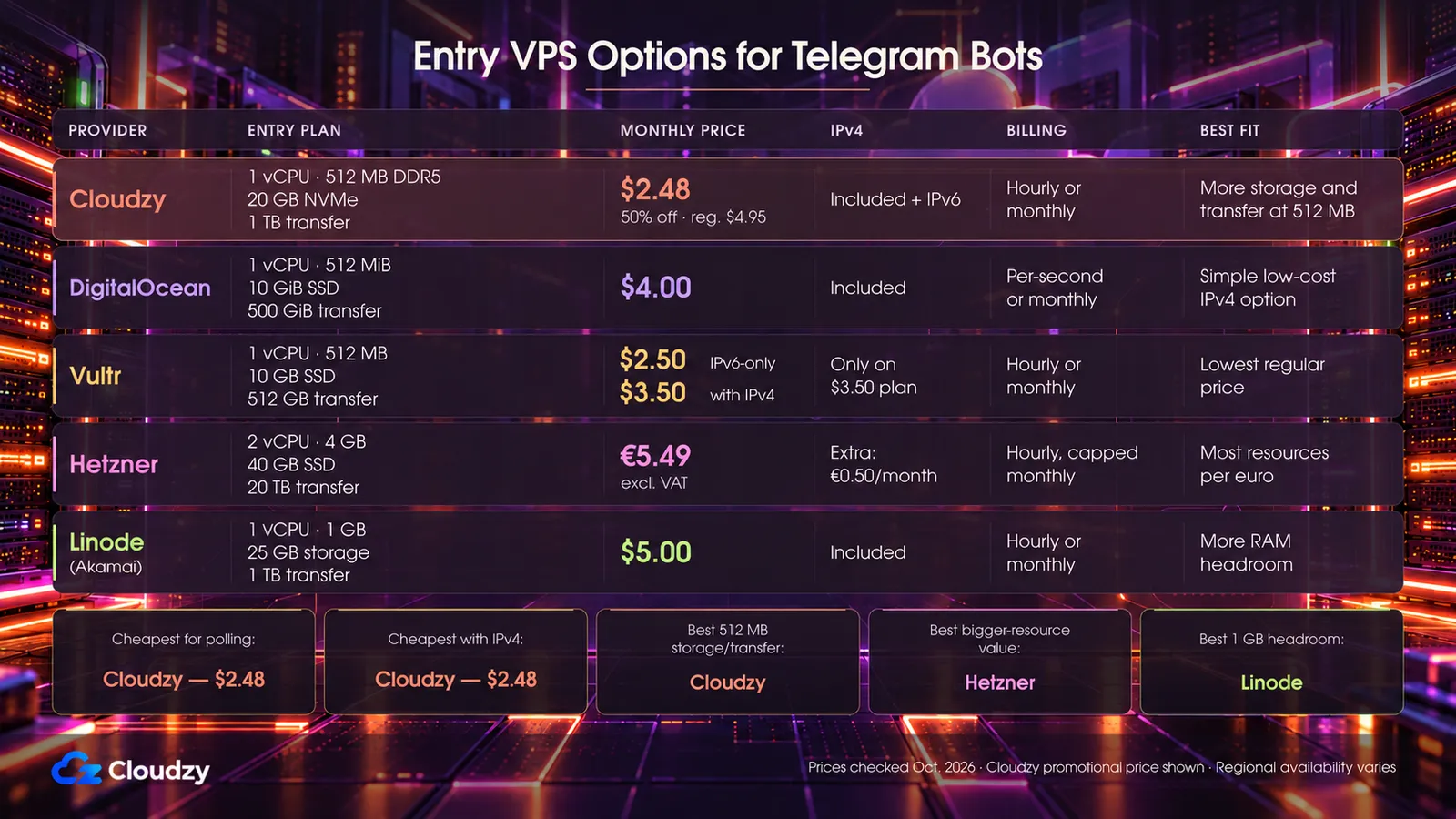
The table compares five paid entry plans for Telegram bot hosting at advertised monthly prices as of October 2026, before tax. Promotional pricing is noted where applicable.
| Provider | Entry Plan Specs | Monthly Price | Public IPv4 | Billing |
|---|---|---|---|---|
| Cloudzy | 1 vCPU (AMD EPYC), 512 MB DDR5, 20 GB NVMe, 1 TB transfer | $2.48 promo ($4.95 regular) | Included, plus IPv6 | Hourly or monthly |
| DigitalOcean | 1 vCPU, 512 MiB, 10 GiB SSD, 500 GiB transfer | From $4 | Included | Per-second, capped at the monthly price |
| Vultr | 1 vCPU, 512 MB, 10 GB SSD, 512 GB transfer | From $2.50 IPv6-only; from $3.50 with IPv4 | Only on the $3.50 plan | Hourly or monthly |
| Hetzner (Germany/Finland) | 2 vCPU, 4 GB, 40 GB SSD, 20 TB transfer | From €5.49 excl. VAT | Extra, from €0.50/month excl. VAT (IPv6 free) | Hourly, capped at the monthly price |
| Linode (Akamai) | 1 vCPU, 1 GB, 25 GB storage, 1 TB transfer | From $5 | Included | Hourly or monthly |
Vultr's IPv6-only plan has no IPv4, and Hetzner's price excludes the IPv4 address. Without one, neither can take a webhook.
A polling bot can run IPv6-only, since api.telegram.org has an IPv6 address. Everything else it reaches needs one too, including package registries, your Git host and every API it calls. Check each host before you choose:
dig +short AAAA api.telegram.org

dig +short AAAA github.com

dig +short AAAA pypi.org    # repeat for every host your bot or its installs reach
An empty answer means that host has no IPv6 address.
Is 512 MB Enough for a Telegram Bot?
I would start one bot with no local database on 512 MB. The python-telegram-bot documentation lists no memory requirement. What shares the box decides it: the OS, the Docker daemon if used, and any local database. Measure it.
free -m                   # "available" is your headroom; the Swap row shows swap use

ps -o rss,cmd -p "$(systemctl show -p MainPID --value telegram-bot)"   # bot's resident memory, in KB

docker stats --no-stream  # per-container memory, if the bot runs in Docker

journalctl -k | grep -i "out of memory"   # kernel OOM kills
An out-of-memory (OOM) kill is the kernel ending a process to free RAM. systemd restarts the bot, so that log line may be all the evidence you get. Move to 1 GB when OOM kills show up, when swap is in steady use, or before you add a local database or a second bot.
Which One to Pick
For one bot, I would take a 512 MB plan with public IPv4 included. The provider then comes down to price, headroom and where your users are.
- Lowest current monthly price: Cloudzy at $2.48 during its 50% promotion, with IPv4 and IPv6 included.
- Lowest current price with IPv4: Cloudzy at $2.48 during the promotion. Its dedicated IPv4 and IPv6 are included.
- 1 GB of headroom for Docker or a small database: Linode, from $5 a month.
- Several bots or a database, users in Europe: Hetzner, the most resources per euro in this table when the plan is in stock (it was listed as unavailable in October 2026). Add the IPv4 fee for webhooks.
- More disk and transfer at 512 MB: Cloudzy. Of the 512 MB plans it has the most storage (20 GB NVMe against 10) and transfer (1 TB against about 500 GB), with IPv4 and IPv6 included. At the current promotional price, Cloudzy also undercuts the other entry plans in this comparison.
At the current promotional price, Cloudzy combines the lowest monthly price in this comparison with more storage and transfer than the other 512 MB plans. Cloudzy's 512 MB plan bills hourly with a 14-day money-back guarantee, so you can run the bot on it for a few days before you commit. Pick the location closest to your users, deploy a Cloudzy Linux VPS, and drop in the systemd unit from above.
Frequently Asked Questions
What Is the Cheapest VPS That Can Run a Telegram Bot?
As of October 2026, Cloudzy's 512 MB plan is the cheapest of the five at $2.48 a month during its 50% promotion, with dedicated IPv4 and IPv6 included. Its regular price is $4.95 a month. Vultr's IPv6-only option starts slightly higher, from $2.50.
Why Do Telegram Webhooks Need HTTPS?
Telegram requires SSL/TLS for webhooks no matter which port is used, per its webhook guide. It rejects plain HTTP and accepts TLS 1.2 or newer. Without TLS, each POST would carry your users' messages unencrypted. A Let's Encrypt certificate works, and so does a self-signed certificate uploaded with setWebhook.
Can a Telegram Bot Run on 512 MB of RAM?
Usually, yes, for one bot with no local database. Watch the kernel log for out-of-memory kills, and move to 1 GB if they appear or when you add a database.
How Do I Keep a Telegram Bot Running After a Reboot?
Enable its systemd service with sudo systemctl enable --now telegram-bot, or run the container with --restart unless-stopped and enable docker.service so Docker starts at boot.
Does Telegram Rate-Limit Bots by IP Address?
Telegram's bot FAQ on limits describes them per bot and per chat; moving to a new server should not be treated as a way to bypass those limits. Over a limit, the API returns HTTP 429 with a retry_after value. Wait that many seconds before retrying.
Which Server Region Should I Pick for a Telegram Bot?
Pick the location nearest your users and the services your bot calls, then time the connection from each candidate with curl -o /dev/null -s -w '%{time_connect}\n' https://api.telegram.org.


Discussion
Comments
Sign in to join the discussion.