
You buy a cheap VPS to terminate WireGuard from a router stuck behind CGNAT. The panel's upload page asks for an .iso file. MikroTik's CHR download page offers .img, .vmdk, .vhdx, .vhd, .vdi, and .ova. There is no ISO.
That mismatch is the first filter when picking the best VPS for MikroTik CHR, ahead of price. Three checks settle the rest: the CHR license cost, IPv6, and whether the host's rules allow your tunnels.
The Short Version
- MikroTik ships CHR only as disk images, never as an ISO, so check how a host gets that image onto the disk before you compare prices.
- The free CHR license caps upload at 1 Mbps per interface. A tunnel hub that forwards traffic needs at least a P1 license, a one-time $45 paid to MikroTik.
- For a documented rescue-system install, pick Vultr for a low bill. Hetzner Cloud’s CX23 offers more RAM and transfer per euro in Germany and Finland, but is subject to availability; check stock before choosing it.
- For a pre-installed CHR without writing the image yourself, pick MonoVM, MVPS (Europe only, and its terms ban GRE tunnels), or Cloudzy.
How CHR Gets Onto a VPS Disk
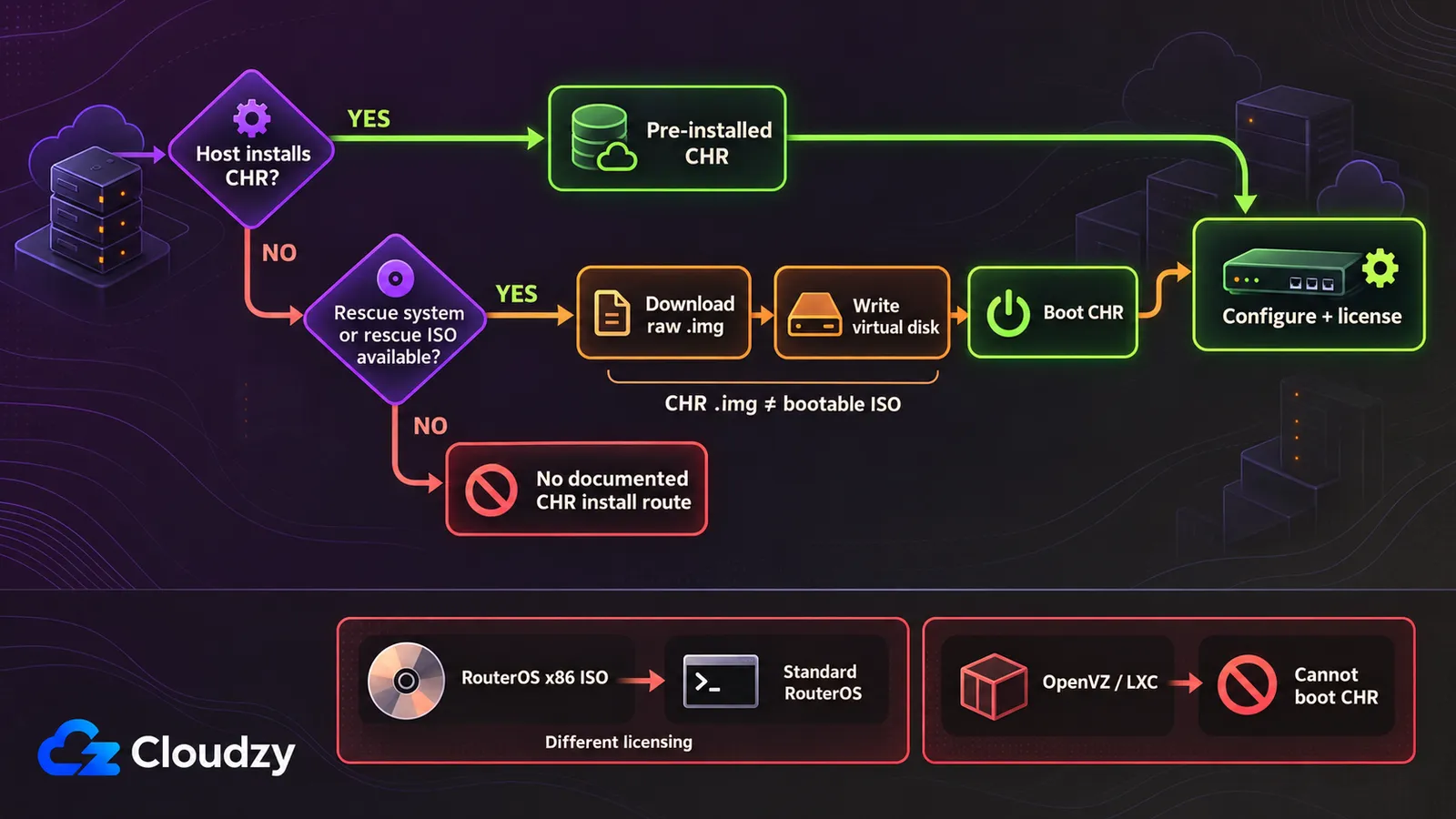
MikroTik's CHR documentation is direct about the downloads: "they are only disk images." The CHR image itself cannot be uploaded as an ISO, which leaves four cases. The host pre-installs CHR, or you write the image from a rescue system with dd. MikroTik's own ISO installs standard RouterOS, not CHR. A container VPS cannot boot CHR at all.
The fastest is a pre-installed CHR, set up by the host at order time or as a one-click app. The host picks the RouterOS version. The license is still yours to buy unless the host says otherwise.
The most flexible is a rescue system plus dd, and you choose the CHR version. You boot a rescue Linux, either the host's rescue mode or a rescue ISO such as SystemRescue.
Record the server’s IPv4 address, netmask, and gateway first. Restrict public management access with the provider’s firewall before booting the raw image, where available. Then download the image, write it over the virtual disk, and reboot. Use the console for the first login: MikroTik’s raw CHR image starts with the admin account and no password. Set a strong password and configure IPv4 and IPv6 firewall rules before opening remote management. If the host does not hand out addresses by DHCP, set them by hand from the console.
The third case is MikroTik's own ISO. It is the RouterOS x86 installer, so uploading it gives you standard RouterOS on x86 licensing, a different product from CHR, covered in the license section below.
The fourth case ends the search early: if the plan is container-based, move on. The virtualization requirement is in the FAQ.
CHR License Tiers and What They Add to the Bill
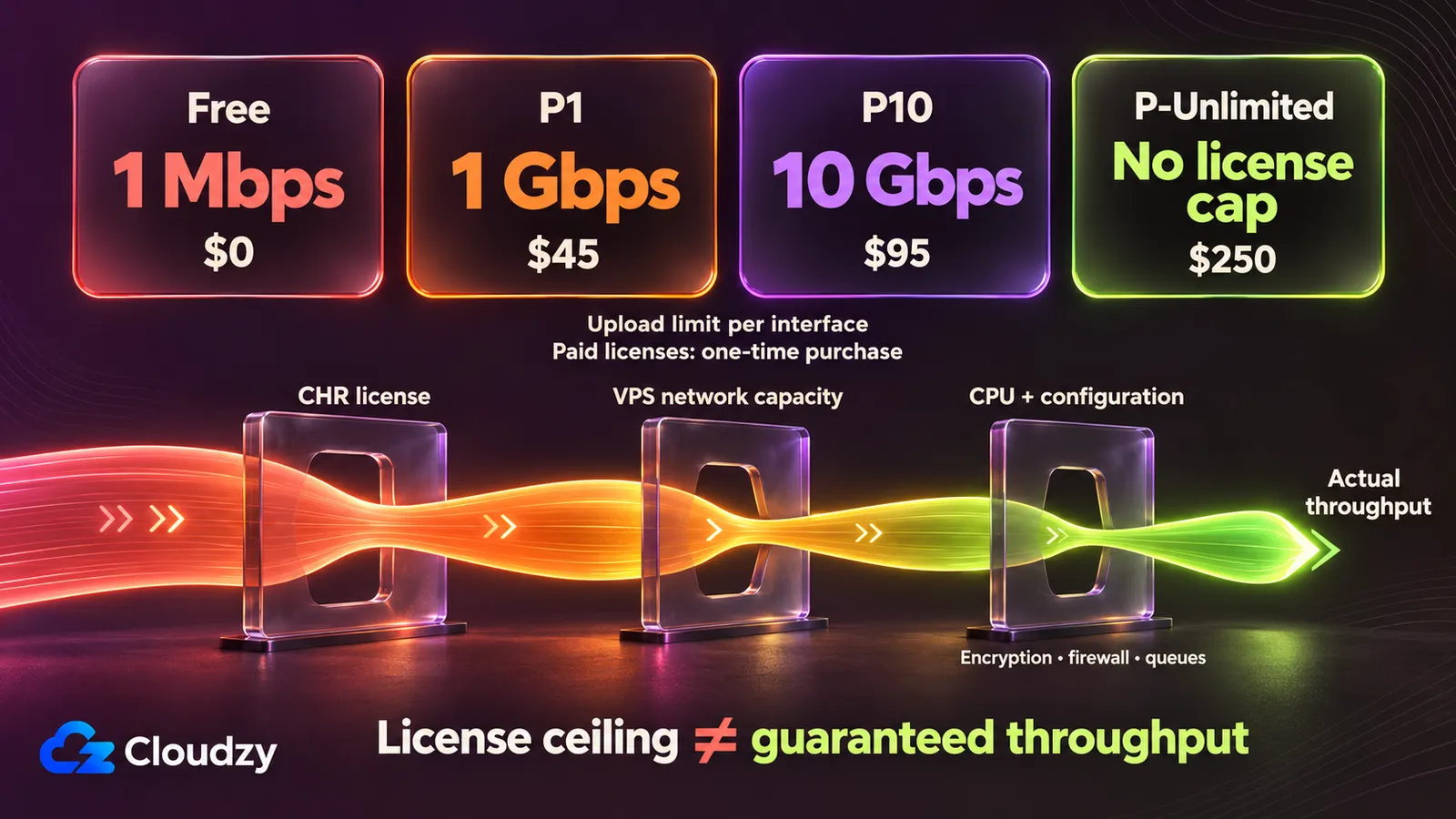
A CHR license comes from MikroTik, not from the host. On a VPS it is a separate line on the bill, from $0 to $250 one-time. MikroTik's licensing section sets four tiers, defined by the upload limit per interface:
| License | Upload Limit per Interface | Price (One-Time) |
|---|---|---|
| Free | 1 Mbps | $0 |
| P1 | 1 Gbps | $45 |
| P10 | 10 Gbps | $95 |
| P-Unlimited | No enforced limit | $250 |
The paid tiers are perpetual. MikroTik's words are "buy once, use forever", and a perpetual license can move to another CHR instance, so a host change later does not cost a second license. Upgrades run from P1 to P10 or P-Unlimited, and from P10 to P-Unlimited.
My view: the free license is for testing and management. At that cap, a hub forwarding a NAS backup or a remote desktop session is too slow to be practical.
License P1 for any hub that carries traffic. Choose P10 only when a single interface must push more than 1 Gbps. MikroTik charges the full price for a tier upgrade; it is not a $50 difference payment.
Every paid tier has a 60-day trial, and you need a MikroTik.com account to request it.
Note
On some clouds, a cloned instance can boot with the same SystemID as the original. MikroTik's license keys page says to run /system license generate-new-id after first boot, while the CHR is still on the free license, and before you request a trial.
Then request the trial from the CHR itself with /system license renew.
A lapsed trial keeps running. In MikroTik's words, the router "continues operating at the same tier, software updates and package changes are disabled." An instance that cannot reach MikroTik's account server to renew behaves the same way.
A public-facing router that cannot take updates should not stay in that state. Buy and activate the license before the trial’s deadline-at time. After you buy, run /system license renew again to activate it. If the deadline has already passed, MikroTik documents licensing the expired instance with a Prepaid key. An existing perpetual license cannot be transferred onto an expired instance; for that route, deploy a fresh CHR, register it under the same account, and transfer the license before its trial expires.
A $5.00-a-month VPS costs $60 over twelve months. Add P1 at $45 and the first year is $105. From year two, only the VPS bill continues. On a €5.99-a-month EU server, the year is €71.88 plus the same $45 to MikroTik.
An ISO install is a different deal. A RouterOS VPS built from MikroTik's x86 installer runs a 24-hour trial, then needs a level key, the license tied to that x86 install. Level 1 is a free demo with one tunnel of each type and one HotSpot user. Level 4 costs $45, Level 5 $95, and Level 6 $250. MikroTik's license keys page draws the line:
"License levels described until now do not apply to Cloud Hosted Routers (CHRs)." MikroTik, RouterOS license keys
IPv6 on a CHR VPS
A fresh CHR has forward=yes under /ipv6 settings, and accept-router-advertisements defaults to yes-if-forwarding-disabled. A hub forwards traffic. So it ignores the host's router advertisements, the messages SLAAC uses to configure an address, and the uplink does not pick up a global address from them.
MikroTik's IP settings reference lists both defaults. On a host that announces IPv6 by router advertisement, enable acceptance only on the provider-facing uplink. For a fresh CHR whose uplink is ether1, create a dedicated interface list:
/interface list add name=CHR-UPLINK
/interface list member add list=CHR-UPLINK interface=ether1
/ipv6 settings set accept-router-advertisements=yes accept-router-advertisements-on=CHR-UPLINK
This is safe on the uplink because the CHR is a client of the host's router on that link. To accept advertisements only there, set accept-router-advertisements-on, which takes an interface list and defaults to all interfaces.
Reboot the CHR after changing these IPv6 settings, then run /ipv6 address print. If the provider advertises a prefix suitable for SLAAC, the learned address appears on the uplink with the DG flags, meaning dynamic and global.
Some hosts assign IPv6 statically instead. Add the address the panel shows to ether1, then add a default route through the gateway the panel names. Do not assume a gateway such as fe80::1. Use what your host documents.
Five VPS Hosts Compared for CHR
You can run a MikroTik CHR VPS on each of the five by a documented route. MikroTik documents a rescue-system install on Vultr and Hetzner Cloud, while MonoVM and MVPS sell MikroTik VPS hosting with CHR pre-installed. Each entry spec meets MikroTik's 1,024 MiB RAM recommendation. Prices are as checked in October 2026, monthly, before tax, in each provider's own currency.
| VPS Provider | How CHR Gets on the Disk | Entry Spec (Meets 1 GB Recommendation) | Monthly Price | IPv4 / IPv6 | Tunnel Traffic in the Host's Terms |
|---|---|---|---|---|---|
| Vultr | Your own ISO from a URL, or SystemRescue from its ISO library, then dd |
1 vCPU, 1 GB, 25 GB SSD, 1 TB transfer | $5.00 | IPv4 included; IPv6 enabled at deploy | VPN documented; confirm tunnel policy |
| Hetzner Cloud | Rescue system, then dd; ISO only by support ticket |
CX23: 2 shared vCPU, 4 GB, 40 GB NVMe, 20 TB (Germany/Finland; check availability) | €5.49 + €0.50 for IPv4 | IPv4 extra; IPv6 /64 free | No VPN or tunnel ban |
| MonoVM | Pre-installed CHR, version chosen at setup; no custom ISO | 1 core, 1 GB, 15 GB SSD | $12.99 | 1 IPv4 + IPv6 included | No VPN or tunnel ban |
| MVPS | Pre-installed default CHR (unlicensed); ISO boot from its library only | 1 core, 2 GB, 25 GB NVMe, 2 TB (Europe only) | €4.00 | 1 IPv4 + IPv6 /124 | Bans GRE tunnels |
| Cloudzy | Pre-installed CHR (one-click) or your own ISO upload | 1 vCPU, 1 GB, 25 GB NVMe, 1 TB | $3.48 | IPv4 + IPv6 included | No VPN or tunnel ban |
Vultr
MikroTik documents the Vultr install itself. Its Vultr guide deploys the server with SystemRescue from Vultr's ISO library. It then downloads the raw CHR image, writes it to /dev/vda with dd, and removes the ISO. The same guide states that Vultr requires RouterOS 7.2.3 Stable or later. Vultr also boots your own .iso from a public URL.
The $5.00 spec sits in Vultr's previous-generation group, older Intel CPUs and regular SSD rather than NVMe. A tunnel hub reads little from disk, so I would not pay more to avoid it. Hourly billing at $0.007 an hour makes a throwaway boot test cheap.
Vultr is the host here that offers customer BGP sessions, meaning Vultr's own routers peer with yours. You request them in the console with your own ASN and IP space, or a Vultr private ASN, and you need at least one active instance. Vultr documents VPN connections between its cloud and on-premises networks. Confirm the current acceptable-use policy for your tunnel protocol before ordering.
Hetzner Cloud
On Hetzner Cloud, you write the CHR image yourself from the rescue system. There is no pre-installed CHR, and a custom ISO needs a support request with a direct-download link. MikroTik's Hetzner guide documents the route: enable rescue with linux64, log in over SSH with the credentials the console shows, and write the image in one pass:
# Run inside Hetzner's linux64 rescue system; this overwrites the server's disk
curl -L https://download.mikrotik.com/routeros/7.25/chr-7.25.img.zip | funzip | dd of=/dev/sda bs=1M
RouterOS 7.25 is the latest stable release as of 29 October 2026; check MikroTik’s download page for a newer stable build before installing, then reboot after the image write completes.
The €5.49 listed CX23 price applies in Germany and Finland and excludes the €0.50 IPv4 address and VAT. Check current CX23 availability in the Hetzner Console before ordering. In the US, the cheapest comparable server is 2 vCPU AMD, 2 GB, 40 GB NVMe, and 1 TB for €17.49, also before IPv4. That makes Hetzner the most expensive option here for a US location.
Billing is hourly, invoiced at the smaller of the hourly or monthly total. Prices changed on 15 June 2026, so older forum figures are out of date.
MikroTik's guide says any server option will work. A 2026 r/hetzner post disagrees. The poster reports fresh CHR installs failing to boot on Hetzner's AMD-based shared and dedicated-vCPU families, while the Intel/AMD shared line in the table boots. They also report that resizing a working install onto the AMD-based family boots normally. It is one user's report, not a confirmed fault, but the US server above belongs to that AMD-based family.
Hetzner's cloud terms ban crypto mining, scanning foreign networks, and fake source IPs. They do not prohibit VPN or tunnel traffic.
MonoVM
MonoVM installs CHR for you. Its page says it provides "the official RouterOS versions, ready for you to choose during setup," and that custom ISO uploads aren't supported. You start from a version MonoVM offers and cannot boot your own build.
The table uses the 1 GB spec because MonoVM's 512 MB tier, at $8.99, sits below MikroTik's recommendation. The page lists a port of up to 10 Gbps. On a P1 license the CHR still caps upload at 1 Gbps per interface, so that headroom needs P10 or above.
Its terms ban port scans, DDoS attacks, spam, BitTorrent copyright violations, and IRC. They do not prohibit VPNs or tunnels.
MVPS
MVPS deploys "the default Mikrotik CHR image, without any configuration and without any license" in about two minutes. You buy the license from MikroTik or a distributor. Its ISO product boots only from MVPS's own library: "Custom ISO images are not supported." Locations are Europe only, and IPv6 comes as a /124 block of 16 addresses.
The terms decide this one. MVPS's prohibited-activities list includes "GRE Tunnels", along with open proxies, Tor exit nodes, open DNS resolvers, UDP fragmentation, and IP spoofing. EoIP is out as well, since MikroTik bases it on GRE.
WireGuard or IPsec avoids the GRE restriction, but the hub must still comply with MVPS’s other terms, including its ban on UDP fragmentation. If you enable allow-remote-requests on the CHR's DNS, firewall port 53 on the public interface, or the router counts as an open resolver under those terms.
Cloudzy
We are the one host of the five where the same plan gives you a pre-installed CHR and also lets you upload your own ISO. The one-click puts a working CHR on the disk without a rescue session. The ISO slot lets you boot SystemRescue to write a specific CHR build, or MikroTik's x86 installer for standard RouterOS, without moving to another server.
Our one-click CHR ships locked down. Management is Winbox on TCP 8291 and the panel's VNC console only; SSH, Telnet, API, WWW, and FTP start disabled. You log in as admin (or root) with the server's initial password, and the panel's password reset does not change that login.
The one-click needs at least 1 GB of RAM. Check the RouterOS version after deploy, before you request a trial.
The second path runs through Our Custom ISO upload. It takes bootable x86_64 .iso files from a URL or a local file, with BIOS and UEFI boot.
Our network comes with 40 Gbps shared uplink with dedicated capacity per VPS via hypervisor QoS. For a P10 hub that uses it we suggest starting at 2 vCPU, 4 GB, 120 GB NVMe, and 5 TB, which lists at $14.48 a month.
Which Host Fits Which CHR Job
The five hosts split on two things. The first is who writes the CHR image to the disk: you, from a rescue system, or the host, at order time. The second is the monthly bill in the region you need. The tunnel protocol can override both, because one host bans GRE outright.
- Most RAM and transfer per euro, and a rescue shell does not bother you: Hetzner Cloud in Germany or Finland. It flips if you need a US location, where the comparable server costs about three times as much, or want CHR without writing the image yourself.
- Low bill for a rescue-system install, or a BGP session with the provider: Vultr. It flips if you want NVMe storage or a pre-installed CHR.
- Lowest regular listed price for pre-installed CHR in Europe for a WireGuard or IPsec hub: MVPS. It flips the moment the hub carries GRE or EoIP, or you need your own ISO.
- Pre-installed CHR on a RouterOS version you pick at order time: MonoVM. It flips if you need a build MonoVM does not offer, or price comes before the version choice.
- A CHR running from the panel today, with no rescue session, and room to change the RouterOS build later on the same server: Cloudzy. It flips if you need a BGP session with the provider.
Before that hub carries your sites' traffic, you want to see it boot, take a license trial, and terminate the tunnels from your CGNAT sites. Our MikroTik VPS includes a dedicated IPv4 and IPv6 address, lists tunnel termination as a use, and bills hourly with a 14-day money-back guarantee. Pick a location and spec on our MikroTik VPS page.
Frequently Asked Questions
Which CHR License Do I Need for a VPS?
For a CHR on a VPS that forwards traffic, I would buy P1, which MikroTik's licensing table sets at 1 Gbps of upload per interface for a one-time $45. The free license suits testing and management only. P10 ($95) or P-Unlimited ($250) make sense only when a single interface must exceed 1 Gbps.
Does MikroTik CHR Need KVM?
CHR needs full hardware virtualization, such as KVM. MikroTik tests CHR on VirtualBox, VMware, QEMU, Hyper-V (Generation 1 only), and Xen. Its documentation warns that "hypervisors that provide paravirtualization are not supported." An OpenVZ or LXC container runs on the host's kernel, not its own, so it has no way to boot a CHR disk.
Can I Upload the CHR Image to My VPS Myself?
Not as an ISO, because MikroTik publishes CHR only as disk images such as raw .img and .vmdk. Where the host offers a rescue system, or lets you boot a rescue ISO such as SystemRescue, you can download the raw image and write it over the virtual disk with dd. Otherwise, use a host that pre-installs CHR.
What Is the Speed Limit on the CHR Free License?
MikroTik limits the free CHR license to 1 Mbps of upload per interface. The cap applies to traffic the CHR sends out of each interface, so on a tunnel hub it governs everything the router forwards. A P1 license, a one-time $45, lifts it to 1 Gbps.
Should I Use MikroTik CHR or a VPN Server App?
If your devices only need to reach your network through a WireGuard endpoint, a WireGuard server app on any VPS does the job with no license cost. CHR earns its place when your sites already run RouterOS and you want the same firewall, routing, and scripts at the hub. That covers site-to-site links between MikroTiks, GRE or EoIP, routing between several sites, and BGP over tunnels.

Discussion
Comments
Sign in to join the discussion.