
A fresh VPS is the same empty box whether it was bought to host a website or to run a trading bot. Same clean starting point, same mostly empty disk, same little beyond the operating system. What goes on it diverges at the first install and stays diverged: a web stack and a trading stack share almost no software, and one of them is not even running the same operating system.
So there is no single list of essential VPS software. There is a short base layer every server needs whatever it was bought for, and after that the use case decides everything. Two of the decisions upstream of this one change the shape of that base layer, too. Shared hosting versus a VPS sets whether you have root at all, and managed versus unmanaged sets how much of the five items below you are responsible for yourself.
TL;DR
- There is no universal answer. Past a short base layer, the use case picks the programs and sometimes the operating system.
- Every VPS needs the same five categories first: secure admin access, a firewall that is switched on, an update policy, backups you have restored once, and something that tells you the box is alive. On Linux, secure admin access usually means key-based SSH; on Windows, it means securing RDP or another administrative path.
- Three things a 1 or 2 GB Linux VPS should not add by default: a control panel, an antivirus scanner, and the spam-and-virus filtering bundled into a mail stack. Their documented memory requirements can consume most or all of a small box before your actual workload starts.
- Ten VPS use cases follow, each with the programs that do the work and the one constraint that decides whether it fits the box you bought.
- Every section here is the map. The linked guides carry the depth.
What Every VPS Needs, Whatever You Bought It For
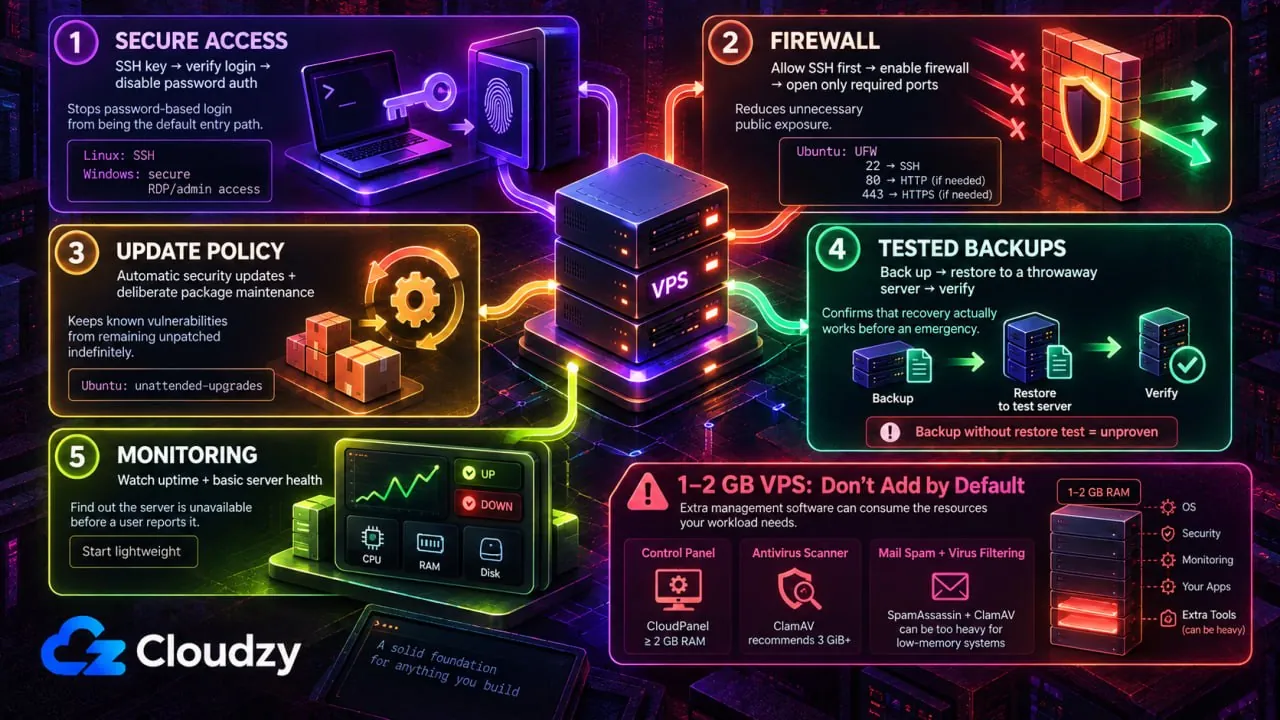
The first thing to install on a new VPS has nothing to do with why it was bought. Five items come first, the same five whether the box ends up running a storefront or a game server.
On Linux, start with key-based SSH. Generate a key pair, put the public key on the server, confirm that key login works in a second session, then disable password authentication, because a password-authenticated port on a public IP is a login-attempt magnet.
Then the firewall, and check that it is running instead of assuming. Ubuntu ships UFW as its default firewall tool, and the community documentation states that by default UFW is disabled. Pre-installed is not the same as on. If you are connected over SSH, allow your actual SSH port first, then enable UFW and open only the additional ports the workload needs. On the default setup, that first rule is sudo ufw allow 22.
If a web application firewall belongs in the picture too, the free firewall options for a Linux VPS split into four easily confused categories.
An update policy comes third, and the default depends on the distribution. Ubuntu Server installs unattended-upgrades by default and applies security updates automatically.
Debian makes no such promise. Its own wiki warns that a system “might not have installed the package at all, or might have installed it but disabled it altogether.” To check whether it is enabled and configure it, run sudo dpkg-reconfigure unattended-upgrades.
Backups are fourth, and the rule is one restore. A backup nobody has ever restored is a hypothesis. Restore one into a throwaway server, watch it come up, and now it is a backup.
Fifth is a monitoring path, something that tells you the server is down before a user does. A lightweight uptime checker does it. No reliable formula converts monitor count into memory, so start at 1 vCPU and 1 GB and watch.
Beyond those five, hardening is a project of its own, not a step. There is a 20-item checklist for a Linux VPS and a Windows equivalent already written for it.
Now the harder half: what not to add by default on a 1 or 2 GB Linux VPS. CloudPanel requires at least 2 GB of RAM before your sites use anything. ClamAV's own documentation recommends 3 GiB or more. And Virtualmin's low-memory guidance recommends disabling SpamAssassin and ClamAV entirely when memory is tight.
Those are vendor requirements and recommendations, not preferences. They make all three poor defaults on a small box unless that software is part of the workload you actually bought the VPS for.
What Each Use Case Runs
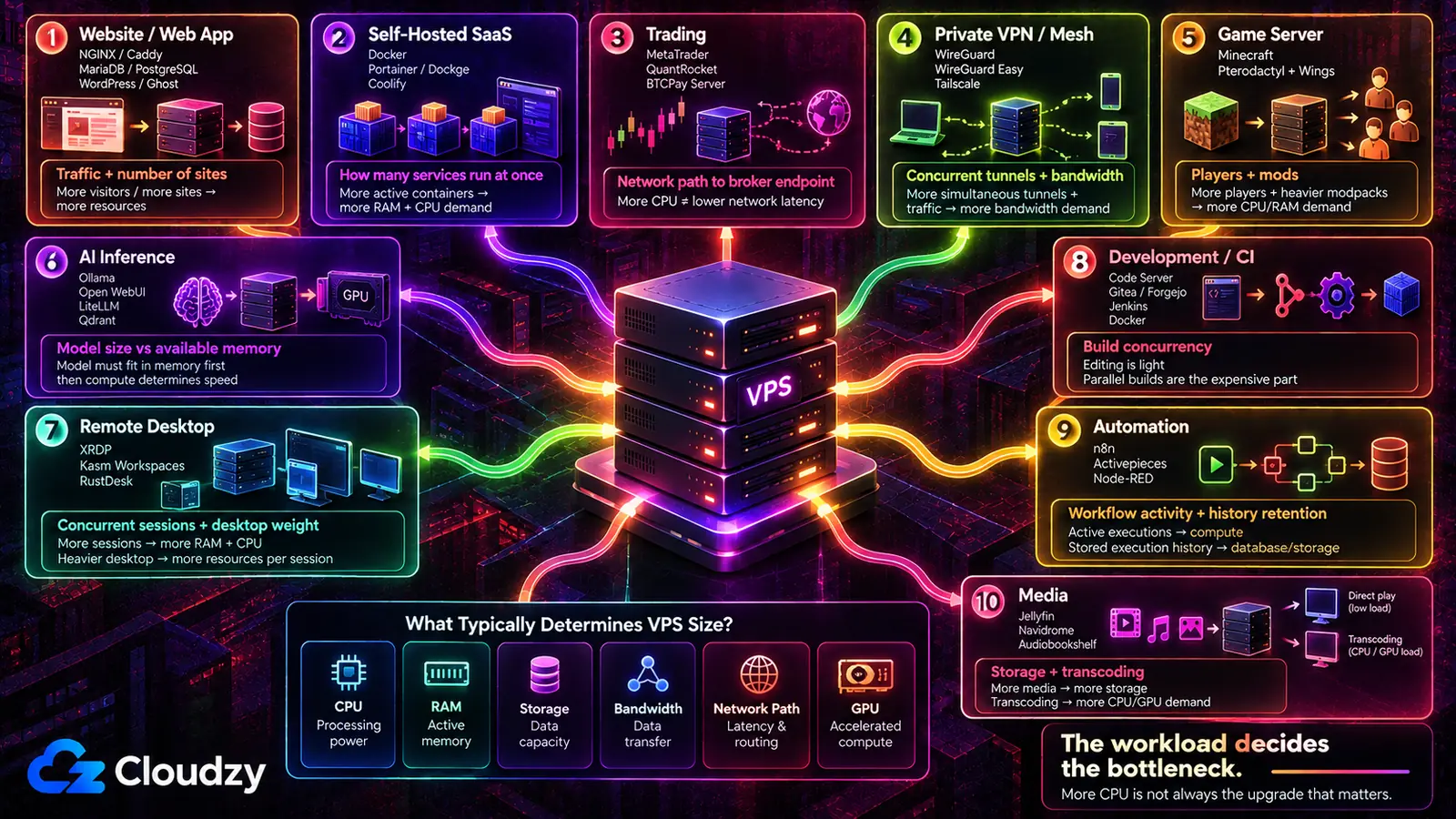
What varies across these ten situations is not the size of the box so much as which two or three programs have to exist before anything else matters, and which constraint usually decides how big that box gets.
| Use case | The programs that do the work | What decides your spec |
|---|---|---|
| Website or web app | NGINX or Caddy, MariaDB or PostgreSQL, WordPress or Ghost | Traffic, and how many sites share the server |
| Self-hosted SaaS replacements | Docker, Portainer or Dockge, Coolify | How many services run at once |
| Trading | MetaTrader 4 or 5, QuantRocket, BTCPay Server | Network path to your broker's endpoint |
| Private VPN or mesh | WireGuard, WireGuard Easy, Tailscale | Concurrent tunnels and bandwidth |
| Game server | Minecraft (Paper, Forge, Quilt), Pterodactyl Panel and Wings | Player count and mod count |
| AI models and inference | Ollama, Open WebUI, LiteLLM, Qdrant | Model size against available memory |
| Remote desktop | IceWM over XRDP, Kasm Workspaces, RustDesk | Concurrent sessions and desktop weight |
| Development and CI | Code Server, Gitea or Forgejo, Jenkins, Docker | Build concurrency, not editing |
| Automation and bots | n8n, Activepieces, Node-RED | Workflow activity and history retention |
| Media | Jellyfin, Navidrome, Audiobookshelf | Storage, and whether anything transcodes |
The third column is the one to read twice. More CPU is the reflexive upgrade, and in several of these rows it is not the constraint that binds.
Hosting a Website or Web App
The choice that shapes this server is not which web server is faster. It is who manages the TLS certificates. Caddy issues and renews them itself with no extra tooling. NGINX expects a separate ACME client such as Certbot and more configuration by hand, and it holds a smaller memory footprint at idle for the trouble. The two config files sit side by side if that trade needs checking before you commit to one.
The rest follows the application rather than the other way around. Many dynamic applications need a database, and whether that is MariaDB or PostgreSQL is usually decided by what the application supports rather than by preference. Redis earns its place when the application actually needs caching, sessions, queues, or another Redis-backed feature. And if more than one site or service will share the server, a reverse proxy, meaning the process that sits in front and routes each request to the right application by hostname, ends the port juggling before it starts. Nginx Proxy Manager puts a GUI on that job and sits comfortably at 2 GB.
One caveat, and it points away from a VPS entirely. If the job is one small site with no custom requirements, managed hosting is a defensible answer and a server you administer yourself is extra work for no return. The VPS earns its keep the moment the site needs something a managed plan will not install for you.
Replacing Paid SaaS Tools With Self-Hosted Ones
Docker is the ordering decision here, and it comes before any of the applications you came for. A container runtime keeps each service and its dependencies sealed in its own box, so Nextcloud's PHP version and Immich's machine-learning libraries never argue with each other. Portainer or Dockge gives that runtime a web UI and a place to see what is running. Coolify goes further and turns the server into something closer to a deployment platform, with git-push builds and automatic TLS. Pick the management layer after the runtime, not instead of it.
Pro Tip
Install Docker from Docker's own repository rather than the distribution's. Docker's install docs call the distro-provided package unofficial and instruct removing it before installing Docker Engine. That package is docker.io.
The applications themselves are the easy part, which turns out to be the problem. In an r/selfhosted thread about which self-hosted services people keep long-term, the original poster lists a run of replacements they set up and then abandoned, and not one of them failed at the deploy step. The reasons given ran to UX polish and the fear of losing access. A VPS answers the second half of that squarely, since it does not depend on home power or a residential connection staying up. It does nothing whatsoever about the first half.
Trading: Forex, Algo, and Crypto
This is the one section where the operating system may change. MetaTrader 4 and MetaTrader 5 are Windows applications, so a trading server is still commonly Windows Server reached over RDP. MetaQuotes also supports running MetaTrader on Linux through Wine, so Windows is the simpler native path rather than a hard requirement. QuantRocket is the algorithmic and quantitative research end of the same list, and BTCPay Server handles crypto payments. Both are Docker workloads on Linux.
The specs matter less than the map. A trader planning an MT5 bot across five brokers asked r/VPSforTradings which VPS gives the lowest latency to each broker's specific data center, which is the question that decides it. Major broker endpoints cluster around a handful of data-center hubs, and the network path between your VPS and the broker endpoint is what you need to measure. Two servers with identical processors on different networks or in different cities can behave very differently for this job.
Which makes the obvious upgrade the wrong one. Buying more cores does not shorten the path, and choosing a location before a plan is where this decision sits.

Keep your trading online 24/7 with a low-latency Forex VPS.
Get Trading VPSRunning a Private VPN or Mesh Network
Two shapes exist here and they are not interchangeable. A WireGuard server on the VPS gives your devices an encrypted path to that server and anything you route through it. WireGuard Easy wraps that setup in a web UI, so adding a peer stops meaning editing a config file by hand. A mesh network like Tailscale is a different animal: devices try to connect directly to each other, but traffic can use a peer relay or a DERP relay when a direct path is not possible. Its coordination layer distributes the information devices need to discover and connect to each other. OpenVPN AS, Pritunl, ZTNET, and WGDashboard fill the range between those two poles.
In an r/selfhosted thread on the choice, one answerer named the thing that worried them about depending on Tailscale: they were “only worried about tailscale becoming enshittified as they try to get profitable.” That is a worry about the vendor, not about the price. Running the tunnel yourself takes that company out of the chain.
It also adds work. A managed coordination server is genuinely less to operate, and for one laptop reaching one server, standing up your own mesh is more machinery than the problem needs. Plain WireGuard is enough for that case.
Hosting a Game Server
The game is the easy install and the panel is the decision. Minecraft alone comes in several server flavours, and which one you run is set by what you want out of it: Paper for performance on a plain survival server, Forge or Quilt when a modpack is the entire point. Running that directly on the server works fine. Running it under Pterodactyl Panel with its Wings daemon, or under PufferPanel, buys per-server resource limits, a web console, and a way to hand a friend restart rights without handing them SSH. Nakama is a different product altogether, for people building a game rather than hosting one.
One r/admincraft guide walks the whole path from a bare VPS to an automated modded server running on Pterodactyl, which is a fair signal of what the panel route buys.
The cost is a second system to keep patched, and it never stops being one. For a single vanilla server serving six friends, the panel is more infrastructure than the game needs. Mod count is the other variable to watch, and modding an ARK server shows what that involves in practice. Anything public also needs securing before someone finds it.
Running AI Models and Local Inference
Ollama runs the model and Open WebUI is the interface bolted onto it. LiteLLM earns a place in front only when calls need routing across providers, and Qdrant only when retrieval is part of the plan.
The ceiling arrives fast without a GPU. Someone attempting Ollama on an 8 GB CPU-only VPS ran into an out-of-memory error: the model wanted 7.2 GiB and 3.8 GiB was free, the operating system and Coolify having already taken the difference. Small quantized models, meaning weights stored at lower precision to fit in less memory, can run on a CPU if the model and runtime fit in system RAM. If they fit, the usual trade-off is slower inference; if they do not, the process can fail with an out-of-memory error.
Quality is the second bound. In an r/selfhosted thread on whether self-hosting Ollama is worth it, one commenter described the open models they had tried as “worse quality” and said “you're not going to beat these billion dollar giants.” That is one user's experience, not a rule for every open model. Self-hosting gives you control over data and infrastructure; whether it beats a hosted API on quality or cost depends on the model, workload, and utilization. The cost math against one shows where the economics change. Larger models, higher concurrency, or tighter latency targets turn it into a hardware question, which is what our GPU plans are for.
A Remote Desktop or Cloud Workstation
Three different mechanisms hide behind the phrase “remote desktop,” and choosing by product name instead of by mechanism is how people end up with the wrong one. An RDP session is a real desktop running on the server that you log into: Cloudzy's IceWM over XRDP one-click image is the lightweight bundle here, shipping IceWM, Terminator, Falkon, and a TLS-enabled xRDP listener together, while Linux Mint gives you a full desktop instead of a minimal one.
Kasm Workspaces can deliver on-demand containerized applications and desktops in a browser, but it can also expose existing RDP, VNC, SSH, and KasmVNC servers through Server workspaces. Neko is different again, streaming one shared virtual browser over WebRTC to several people in a room, which is not a desktop anyone logs into.
If what you want is the server's own desktop, use an RDP- or VNC-backed Kasm Server workspace rather than a container workspace. Kasm's native container sessions are separate environments, not the host desktop.
If the machine you want already exists and just needs reaching, RustDesk reaches it without building a desktop at all, and Sshwifty gives you a shell in a browser when a shell was all you needed. Settle the protocol before the product name: connecting over RDP and streaming a browser session are not the same thing wearing different labels.
A Development, Build, and CI Box
Code Server puts VS Code in a browser tab pointed at the server's filesystem, which is what makes the rest of the box worth keeping together: Gitea or Forgejo holding the repositories the editor opens, Jenkins running the pipelines those commits trigger, and Docker underneath both. The newer piece is the AI coding agents now sitting on that same box: Claude Code, Aider, OpenCode, and Goose CLI.
That obvious setup is not the only one. In an r/selfhosted thread on remote dev environments, one answerer argued the reverse: keep the editor installed locally and point it at the VPS through a remote development extension, so the UI stays local and only the files and the execution are remote. The original poster's complaint was the host catching keyboard shortcuts instead of the browser, which is a real cost of the in-browser version.
Both are legitimate. Running Code Server with an AI agent walks the browser route end to end, and the self-hosted developer stack has everything that sits around the editor.
Automation, Bots, and Scheduled Jobs
n8n is the usual starting point, and it is a fair default: a visual workflow builder where the nodes are services and the edges are data moving between them. Activepieces does similar work under a more permissive license. Node-RED comes at the same problem from the other direction, flow-based and rooted in device and event wiring rather than SaaS glue. Dagu is a scheduler for dependency graphs, which fits when what you have is really a set of cron jobs that need ordering.
These services stay running between jobs. Their resource use grows with workflow activity, while retained execution history mainly grows the database and storage footprint. That makes this the kind of workload that can quietly outgrow the smallest server a few months after it looked fine. The self-hosted Zapier alternatives compared carries the licensing detail and the sizing.
Serving Media
Storage is usually the first constraint here, but transcoding can turn CPU or GPU capacity into the deciding one. Jellyfin for video, Navidrome for music, and Audiobookshelf for audiobooks and podcasts each bundle a library scanner, a metadata fetcher, and a streaming server into a single application that installs like any other web service, and AzuraCast (a web radio station) and Immich (photos) follow the same pattern.
That makes a VPS the wrong shape more often than not. Transcoding on the fly costs processor time a small server does not have spare, and a machine at home with large disks is usually the better host for the library itself, with the VPS earning its place for remote access and for staying up. The Plex alternatives compared goes through which server fits which client.
What You Own Once Everything Is Installed
Every program named above arrives with a job attached to it. Somebody patches it, watches its memory, renews its certificate, and finds out whether the backup restores. On a self-managed VPS that somebody is you, and the load compounds with each of these situations that ends up on one machine.
The install half is the part worth shortening. If the software you choose is available as a one-click app, that shortens the install step instead of leaving you with a blank server and a documentation tab open. Deploy on a Linux VPS and the first hour goes to the thing you bought the server for. The operating half stays yours either way. That part does not outsource.

Build on a Linux VPS with root access, NVMe, and AMD EPYC power.
View Linux PlansFrequently Asked Questions
Do I Need a Control Panel on a VPS?
Only when it is doing more than one job for you. A panel earns its memory when it manages several sites, several non-technical users, and mail or DNS you would otherwise configure by hand. Below that threshold it is a layer between you and a service you could administer directly, and it competes with that service for RAM. The Linux control panel options compared breaks down what each one costs in features and licensing.
Should I Install Software With Docker or Natively on a VPS?
Use containers for multi-service stacks, workloads you expect to move to another host, or dependencies that would otherwise conflict. Install natively when one long-lived service on a small VPS is easier to manage that way. A 1 GB server running one web server and one database may not benefit from Docker; a larger multi-service stack often does, but RAM alone does not decide it.
Can I Run an AI Model on a VPS Without a GPU?
Yes, for small quantized models. RAM decides whether the model can load alongside the operating system and everything else running; CPU performance determines how quickly it runs once loaded. Larger models, higher concurrency, or tighter latency targets usually push you toward a GPU with enough VRAM.
Do I Need Windows for a Trading VPS?
For MetaTrader 4 and MetaTrader 5, Windows is the simplest native option, not a strict requirement. MetaQuotes also supports running MetaTrader on Linux through Wine. Other trading workloads, including Python-based algorithmic tooling and crypto payment software such as BTCPay Server, can run directly on Linux. The platform you trade through is what decides the operating system.
Can One VPS Run More Than One of These Use Cases?
Yes, and memory is usually what limits how many. A few lightweight services can coexist on 4 GB, while a game server and an AI model can compete for RAM quickly. The other consideration is blast radius: putting a public-facing service alongside something you care about means a compromise can put both at risk. Separate the internet-facing thing from the important thing before you separate anything else.
Discussion
Comments
Sign in to join the discussion.