
In March 2025, Krebs on Security reported that US federal investigators had linked a $150 million cryptocurrency theft directly to the 2022 LastPass breach. The mechanism was simple: some customers stored seed phrases in LastPass Secure Notes, attackers obtained encrypted vault backups, and weak or older vault protections let some vault contents be cracked offline.
The lesson is not that LastPass was uniquely careless. The lesson is that every breach you read about is someone else's data being monetized while the apology email sits in your inbox. Self-hosting changes who can do that to your data. It does not change the fact that someone always can.
This post is for readers whose threat model is commercial data exposure, meaning Big Tech monetization and vendor breaches, not state-level surveillance, high-risk journalism, activism, or legal discovery. The architecture below is a five-layer stack for that specific threat model.
The Short Version
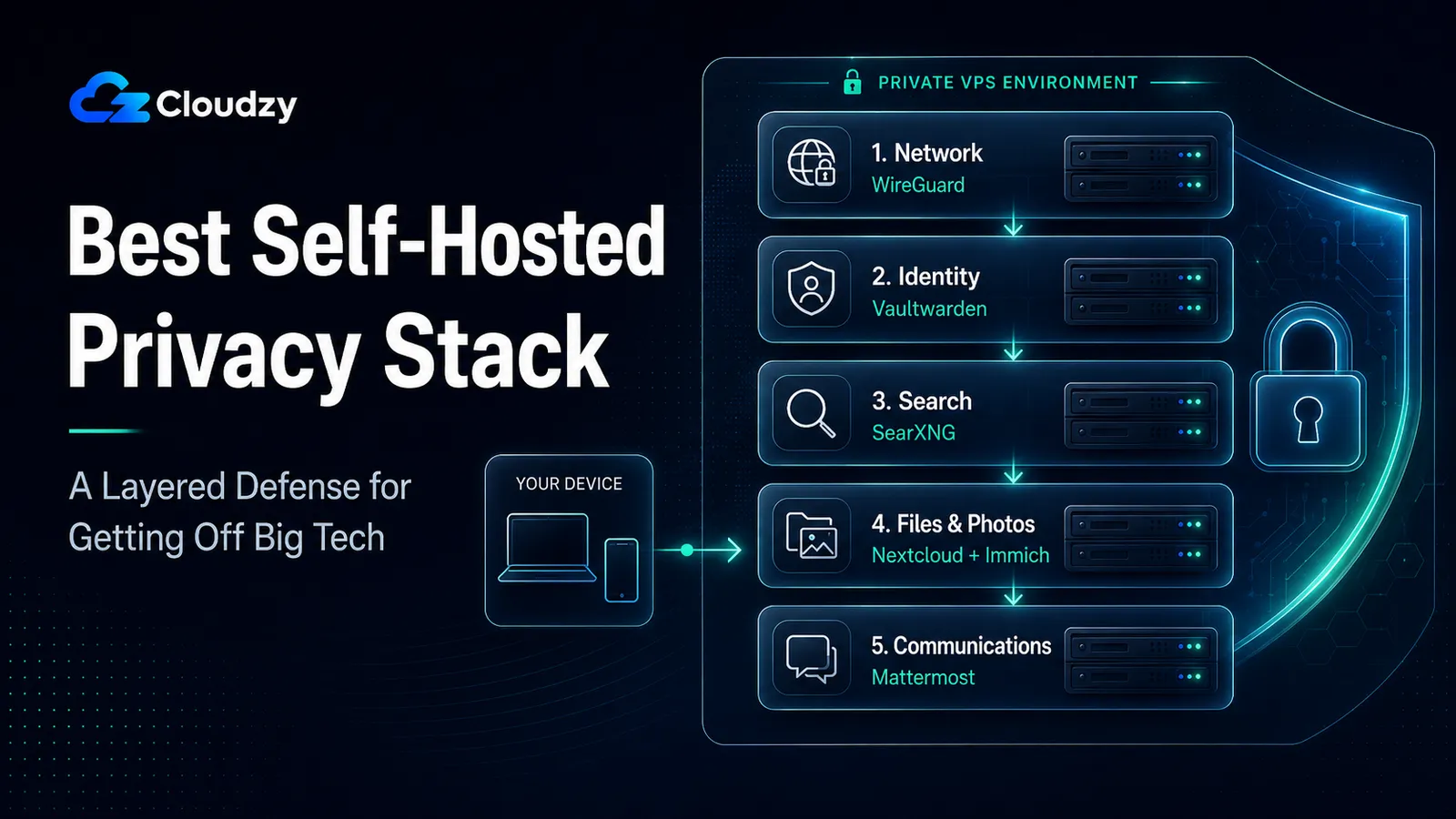
This stack has five layers. Each layer removes one common Big Tech dependency, but none of them make you invisible.
- Network: WireGuard replaces a commercial VPN and limits ISP or local-network visibility.
- Identity: Vaultwarden replaces hosted password managers and reduces vendor-side breach exposure.
- Search: SearXNG reduces search profiling by proxying searches through your VPS and keeping them out of your logged-in search account.
- Files and photos: Nextcloud AIO and Immich replace Google Drive and Google Photos, cutting cloud content scanning and cross-product data joining.
- Team communications: Mattermost or Rocket.Chat move team chat history off Slack, Discord, or Teams.
- Main limits: Your VPS provider can still see infrastructure metadata, your ISP can still see that you connect to your server, and this stack is not built for state-level adversaries.
- Jurisdiction note: EU hosting strengthens the data-sovereignty case, but it is not a magic shield.
Self-Hosting Shifts Trust, It Doesn't Remove It
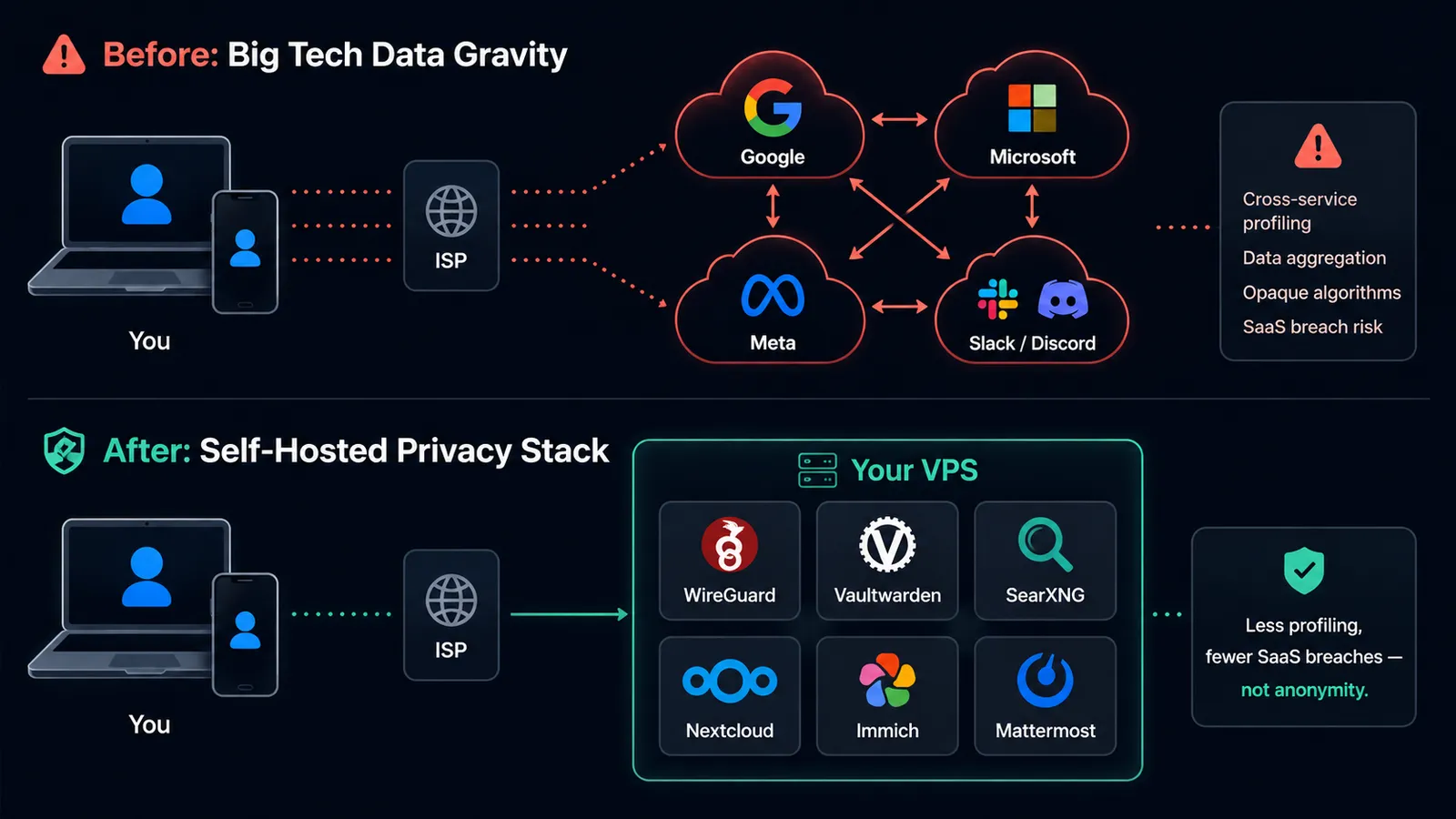
There is a long-running argument on Hacker News, and it is correct on its face: "self-hosting on a VPS does not solve privacy, you just trust a different vendor." Anyone designing a privacy architecture should engage with this directly rather than around it. The honest answer is that the trust shift is asymmetric. It is not equivalent.
Start with what self-hosting reduces. Your SaaS provider's business model is no longer to mine your data, because the provider is gone. Vendor-side breach exposure changes shape: Vaultwarden's vault is encrypted client-side, but server-readable services like Nextcloud, Mattermost, and Rocket.Chat still need proper hardening, backups, and access control.
The LastPass lesson was not that vault encryption never existed. It was that stolen encrypted vault backups, unencrypted metadata, older KDF settings, and weak master passwords created an offline cracking path. Behavioral profiling across services also shrinks, because there is less cross-service data for one company to assemble. Subscription lock-in drops.
Now, what self-hosting does not eliminate. Your VPS provider's hypervisor can, in principle, read your VM's memory. Your VPS provider sees your infrastructure-level metadata: which IPs you connect to, when, and how much data moves.
Your ISP still sees that you are connecting to your server. Jurisdictional legal requests still apply at the VPS provider level, and a court order is still a court order. A compromised VPS, app, database, or admin account can still expose data.
The trust math is what matters. A VPS provider has less commercial incentive to mine your data than Google or Meta, because the monthly fee is the business model, and your data is not. A VPS provider has less aggregated data about you, namely your one server, not your search history, location history, and inbox combined.
In the EU, the provider operates under GDPR and specific contractual terms. None of this makes a VPS more secure than Google in every dimension. It is a different threat model with a different exposure profile, and for the threat model this post addresses, it is a meaningful improvement.
There is one more distinction worth being precise about. Privacy is "they do not know what I am doing." Anonymity is "they do not know it is me doing it." Self-hosting on a commercial VPS improves privacy from SaaS vendors and third-party platforms.
It does not give you anonymity from your VPS provider. If you need anonymity, you are using Tor, not a VPS, and the rest of this post is the wrong tool.
Section key takeaway: A VPS shifts your trust from a SaaS vendor whose business model is monetizing your data to an infrastructure provider whose business model is selling you a server. For most readers' threat model, that is a meaningful improvement, but it is not invisibility.
The Five-Layer Stack at a Glance
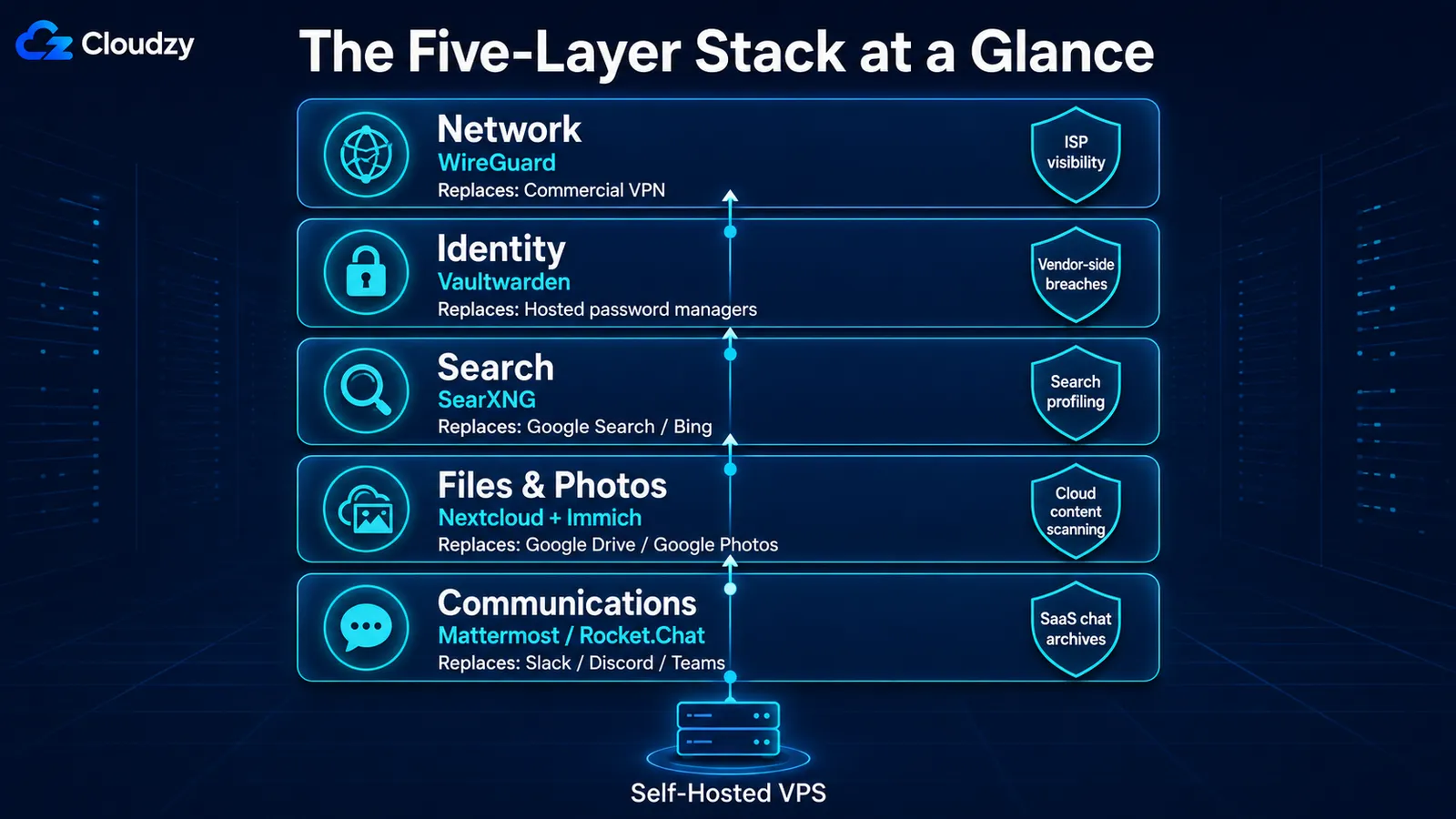
Five layers, deployed in this order: network, identity, search, files, communications. Each addresses a distinct threat. You can deploy them in stages, and you can skip layers that do not apply to you. The model is more useful than an app list because it scales with your concerns rather than the count of services running on your server.
| Layer | Recommended app | Replaces | Protects against | Does NOT protect against | RAM floor |
|---|---|---|---|---|---|
| Network | WireGuard | Commercial VPN | ISP and local-network observers, public Wi-Fi attackers | VPS provider seeing your egress, DNS leaks unless configured | Under 100 MB |
| Identity | Vaultwarden | LastPass, 1Password (hosted) | Vendor-side password breaches, credential reuse | Weak master password, no 2FA, phishing, device compromise | Under 200 MB |
| Search | SearXNG | Google Search, Bing | Search-query profiling, ad targeting based on queries | Tracking on sites you actually visit, browser fingerprinting | ~250 MB |
| Files and photos | Nextcloud AIO + Immich | Google Drive, Google Photos | Cloud-vendor content scanning, cross-product data joining | VPS storage volumes (encryption at rest is on you), device-side compromise | 4 GB floor for Nextcloud AIO alone; 8 GB / 4 vCPU safer once Immich ML is enabled |
| Communications | Mattermost or Rocket.Chat | Slack, Discord (team use) | Vendor-side message archiving and content scanning | End-to-end encryption (these are not E2EE by default) | Mattermost: 2 GB floor; Rocket.Chat: 4 GB+ |
Section key takeaway: Start with WireGuard, Vaultwarden, and SearXNG if you want the lightest privacy stack. Add Nextcloud, Immich, and team chat only after you are ready for higher RAM use, storage planning, backups, and more admin work.
Layer 1: The Network Layer (WireGuard)
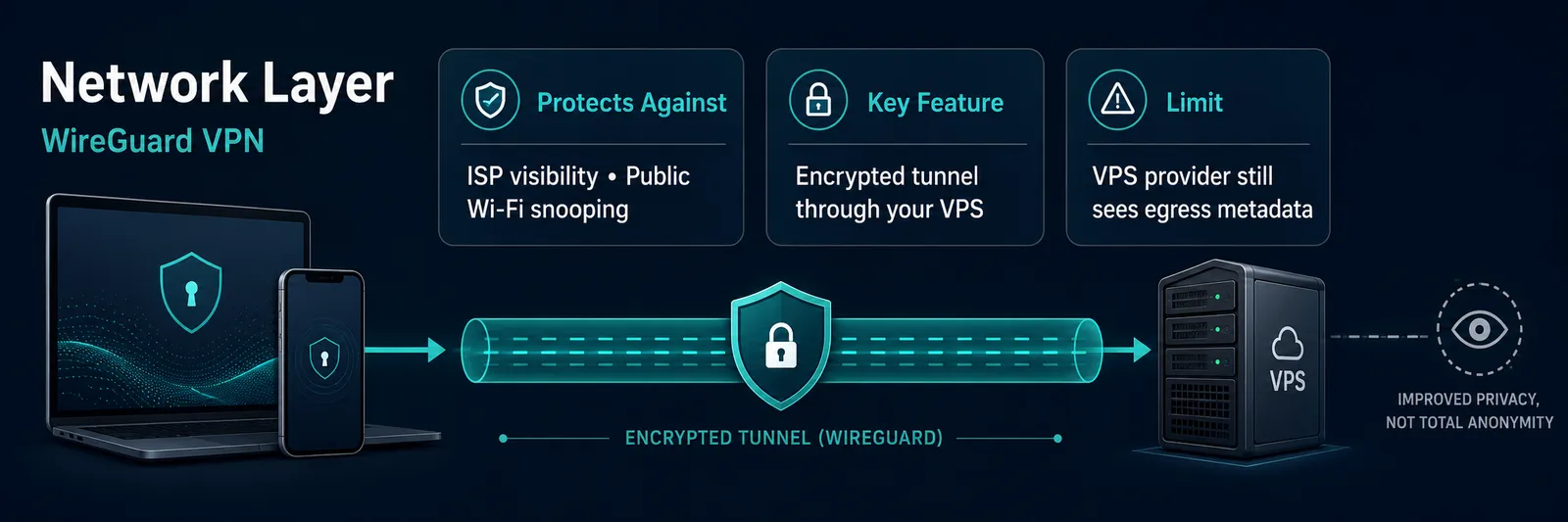
WireGuard's configuration file for a typical single-user setup is twelve lines. Its handshake completes in one round trip and uses the Noise protocol framework. The kernel module has been in mainline Linux since 5.6, which means the protocol you deploy in 2026 is the same one that has been audited and stable for years. This is the right default.
What this layer addresses: ISP and local-network observers who would otherwise see every domain you connect to, public-Wi-Fi attackers, and your home IP being exposed to every service you visit. Your traffic egresses from your VPS instead of from your apartment.
What it does not address: your VPS provider's view of your traffic egress. They see what your VPN endpoint connects to, when, and how much. WireGuard hides traffic from your ISP. It does not hide traffic from the server that operates the egress.
DNS leaks are also a separate problem and are not handled automatically; you have to point your VPN clients at a resolver you trust. Run Unbound on the same VPS, or use a trusted upstream over DoT or DoH. Full DNS-layer ad-blocking with Pi-hole is a separate topic and not the right thing to combine with a VPN egress for most users (more on this below).
WireGuard versus the alternatives, briefly. OpenVPN still works. The handshake is larger, the metadata footprint is bigger, and the throughput is lower. There is no reason to choose it for a new deployment unless you specifically need a feature WireGuard does not offer.
Tailscale is a different tool: it is a zero-config mesh built on WireGuard and is excellent for stitching together your own self-hosted services across machines. It is not what you want as a privacy egress to the internet, because the coordination plane is hosted by Tailscale.
Note: Changing the default 51820/UDP port can reduce low-effort scans, but it does not make WireGuard look like ordinary HTTPS traffic or bypass serious filtering. Treat it as scan reduction, not stealth.
For deployment, we have a step-by-step WireGuard setup guide for Ubuntu that pairs with this architecture.
Section key takeaway: WireGuard on your VPS gives you a private network egress that your ISP cannot inspect, but it does not hide your traffic from the VPS provider that operates the egress.
Layer 2: The Identity Layer (Vaultwarden)
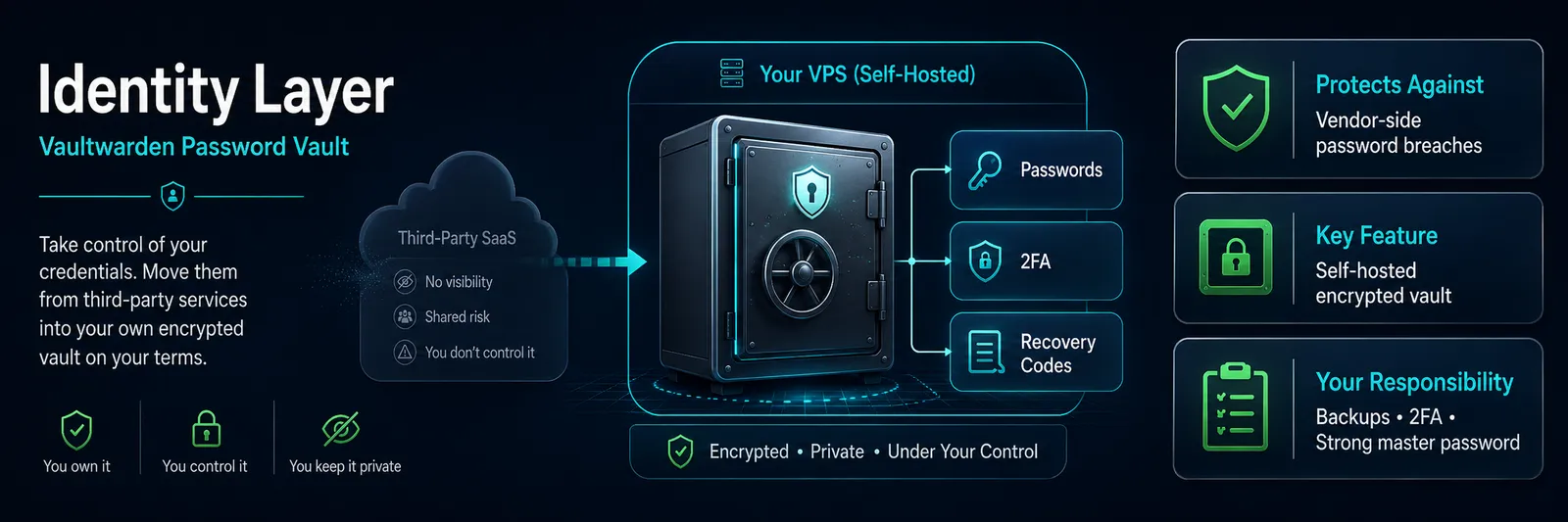
Vaultwarden runs in under 200 MB of RAM. It is a Rust reimplementation of the Bitwarden API, compatible with every official Bitwarden client (browser extensions, desktop apps, mobile apps), and it does not require the heavyweight Bitwarden server reference image. For a single user or a household, this is the right size.
What this layer addresses: vendor-side password breaches, like the LastPass-style failure, where vault contents leaked and were eventually decrypted offline. Credential reuse across services becomes mechanically harder once you have a password manager you actually use. Identity profile aggregation across services drops, because no third party sees the list.
What it does not address: your own OpSec. A weak master password, no 2FA on the vault, or a successful phishing attack on you defeats this layer entirely. A compromised device with a logged-in browser extension defeats it more entirely. Vaultwarden is a vault, not a substitute for the basics.
There is one operational warning that matters more than any other in this stack. Self-hosting your password manager means you are responsible for backups. A VPS that fails at the wrong moment, or a server you accidentally wipe, locks you out of every account this layer protects.
XDA Developers has also covered this risk directly, warning that a self-hosted password manager can lock you out of important accounts if access, backups, or recovery planning fail.
Warning: Run automated encrypted backups of the Vaultwarden data directory. Keep an encrypted offline export, store recovery codes separately, and test restore on a spare device or temporary container. Do not rely on a single VPS backup. This is not optional. This is the price of taking the vault out of vendor infrastructure.
If you are centralizing single sign-on across multiple self-hosted services later, Authentik is the open-source identity provider most people end up at. That is an advanced layer and out of scope for the core stack.
For deployment, our Vaultwarden self-hosting guide is the deployment companion. For a deeper look at the password-manager landscape, see our guide to the best self-hosted password managers.
Section key takeaway: Vaultwarden moves your password vault out of breach-prone vendor infrastructure, but it puts the backup and recovery burden on you, and that burden is real.
Layer 3: The Search and Browsing Layer (SearXNG)
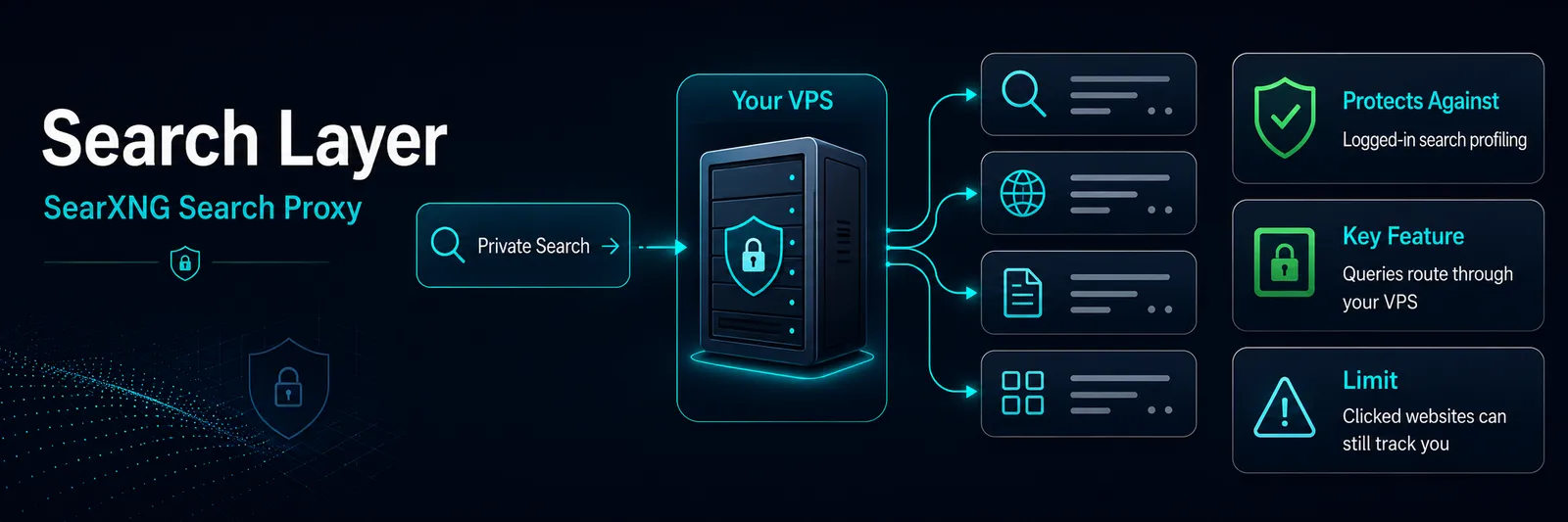
A SearXNG instance receives your query, fans it out to upstream engines (Google, Bing, DuckDuckGo, others you enable), strips some identifying parameters, and returns a unified result page.
Your queries reach Google, but they reach Google as queries from your VPS, not from your logged-in search account. A single-user instance does not create a large anonymity pool, so upstream engines may still associate query patterns with that VPS IP.
What this layer addresses: search-query profiling, behavioral ad targeting keyed to your logged-in search history, and the long memory of a search account. The "why am I seeing ads for the thing I searched yesterday" problem is reduced at the search-account level.
What it does not address: tracking by sites you actually click through to. Cookies, fingerprinting, and trackers on third-party pages are a browser-side problem, not a search-side one. Use a hardened browser configuration to address that.
SearXNG also does not anonymize you from the upstream search engine if your VPS sends only your queries to it; aggregate traffic from a busy instance hides single users in the noise, but a single-user instance can still look like one user's search pattern.
Whoogle Search used to be the lighter alternative here, a simpler Google front-end that did one thing. It was archived in August 2026 and no longer returns results, so SearXNG is the practical choice now: it aggregates multiple engines, which is more useful anyway if your reason for leaving Google was not specifically Google.
One operational note for single-user instances. SearXNG forwards queries to upstream engines, and Google can rate-limit suspicious traffic patterns. A single user rarely hits this. A small public instance might. If queries start failing, reduce the upstream engine count, tune SearXNG's limiter settings, or lean more on less hostile upstream engines.
Section key takeaway: SearXNG proxies your searches through your VPS and keeps them out of your logged-in search account. It reduces direct search profiling, but a private single-user instance does not create a large anonymity pool.
Layer 4: The Files and Photos Layer (Nextcloud AIO + Immich)
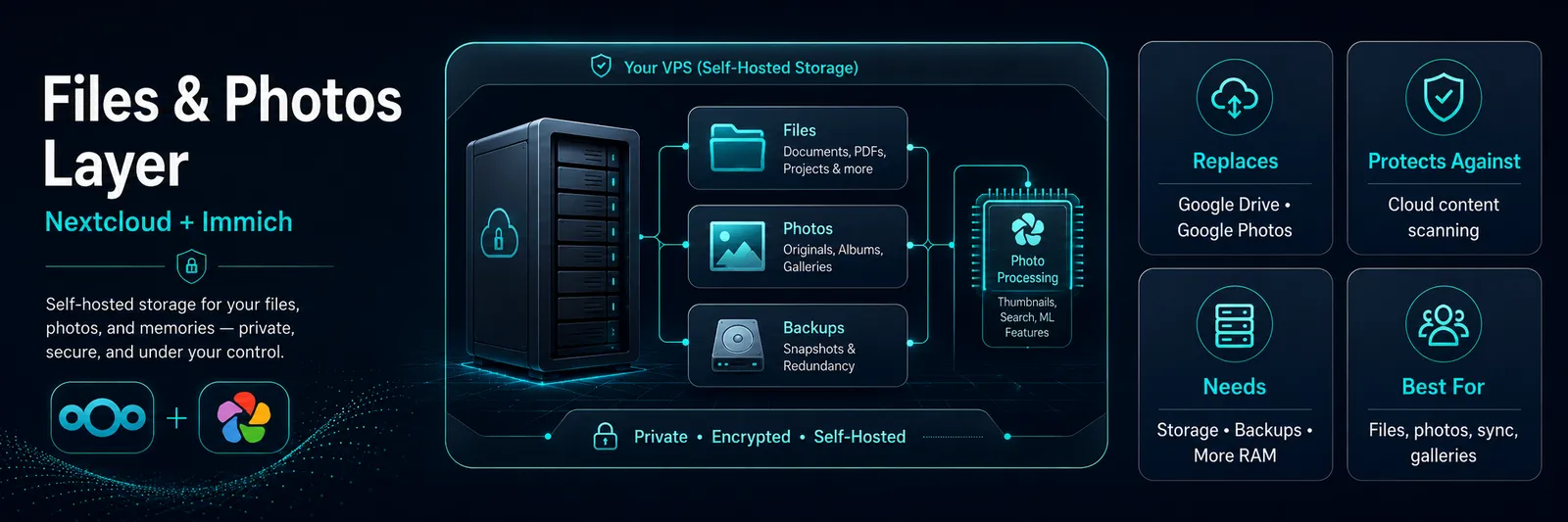
Nextcloud AIO is the all-in-one Docker deployment of Nextcloud and is the path of least resistance to a working file-sync, calendar, contacts, and document collaboration server.
Immich is the photos counterpart: timeline view, mobile auto-upload from iOS and Android, Google Photos-style facial recognition processed on your own server or chosen ML host, and an honest community consensus that it is the most usable Google Photos replacement currently shipping.
These are not lightweight applications. Nextcloud AIO should be treated as a 4 GB / 2 vCPU baseline; Immich's machine-learning, thumbnail generation, and first library scan will use what you give it.
What this layer addresses: cloud-storage vendor scanning, photo content recognition, and cloud-side processing that keep a sensitive personal library inside a vendor account, and account-level data centralization that keeps files, photos, search, location history, and identity signals under one company account.
Replacing this with a server you control breaks that centralization.
What it does not address: the bytes still live on a storage volume your VPS provider operates. Encryption at rest is your responsibility, not theirs by default. Device-side compromise is a separate problem; if your phone is rooted, the Nextcloud client on it is exposed regardless of where the server lives.
If your only need is "keep these folders in sync between my devices," Syncthing is the simpler tool. It is peer-to-peer, has no server in the middle, and does that one job well. It is not a replacement for the calendar, contacts, and collaboration features Nextcloud provides; it is a replacement for the file-sync subset.
For Immich specifically, one practical sizing rule matters. Nextcloud AIO should be treated as a 4 GB / 2 vCPU baseline. Immich is not a light photo sidecar once machine learning, thumbnails, and a first library scan enter the picture. Plan around 6-8 GB RAM for Immich-heavy setups, especially during migration.
For deployment, we have a Nextcloud vs ownCloud comparison for users who are still choosing between the two, and a broader self-hosted cloud platforms with a web UI overview if you are surveying the space.
Section key takeaway: Nextcloud and Immich can move files and photos out of Google-style cloud accounts, but they are the first layer in this stack that needs serious RAM, storage, backup planning, and migration patience.
Layer 5: The Communications Layer (Mattermost or Rocket.Chat)
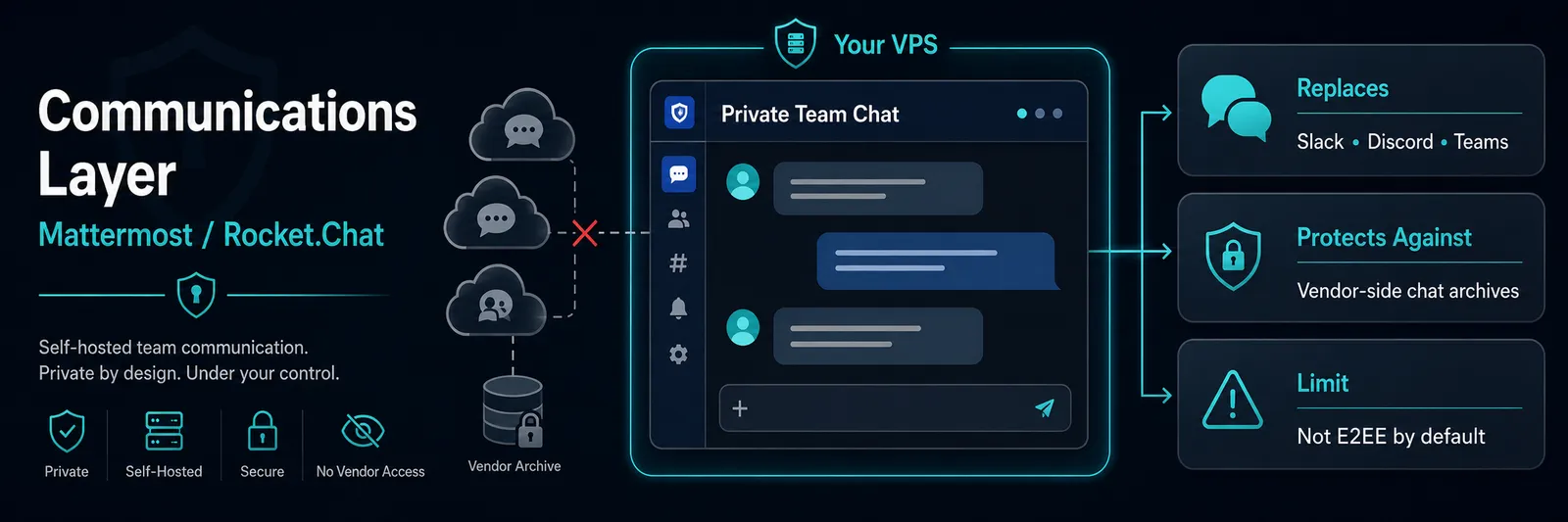
Slack workspaces are searchable by Slack. Discord scans content for ToS violations. Microsoft Teams retains chat records under your tenant's policies, which are policies your IT org can see.
For team or family chat that should not live in any of those places, a self-hosted Mattermost or Rocket.Chat is the standard answer. This layer is about keeping team archives out of SaaS, not about private end-to-end chat.
What this layer addresses: vendor-side message archiving, vendor-side content scanning, and the loss of access that happens when the vendor decides your account is a problem. Your team's message history sits on your server.
What it does not address, and this matters: end-to-end encryption. Mattermost and Rocket.Chat are not E2EE by default. The server admin can read messages. The server admin is now you, which is better than it being a SaaS vendor's employees, but the principle still matters for your team's threat model.
For one-on-one secure messaging, Signal is the right answer, not a self-hosted server. If the communication layer must be E2EE by default, look at Matrix/Element or use Signal for personal chats instead. Self-hosting solves team messaging without a vendor; it does not replace Signal for personal threat models.
Mattermost versus Rocket.Chat. Both are valid. Mattermost is tighter, more enterprise-shaped, and has fewer optional features turned on by default. Rocket.Chat is broader, integrates more channel types, and has a larger plugin ecosystem. Either is fine for the typical privacy-stack use case of a small team or family chat.
2026 caveat: Check the exact free edition before deploying Mattermost. Mattermost Entry has a 10,000-message history cap, while Team Edition avoids that cap but has its own limits. For Rocket.Chat, budget more than a tiny 1 GB VPS because MongoDB, uploads, and integrations add overhead.
Section key takeaway: A self-hosted Mattermost or Rocket.Chat removes your team's chat archive from a SaaS vendor, but if you need true end-to-end encryption between two people, Signal is still the right tool.
What NOT to Self-Host (and Why)
Some things that look like they belong in a privacy stack do not. Listing them is part of building a stack worth trusting.
Email. Do not self-host email if you are not already an experienced Linux operator who specifically wants to. PrivacyGuides has a clear and well-known position on this, and it is the right one: only advanced users should run their own mail server. The reasons are not technical curiosity. SPF, DKIM, and DMARC have to be configured and kept correct.
IP reputation has to be earned and maintained. Spam filtering is a permanent state of affairs. The deliverability fight with Gmail is not a setup step; it is an ongoing condition. For everyone else, a managed privacy-respecting provider is genuinely the right answer for this layer.
Proton Mail, Tuta (formerly Tutanota), and Mailbox.org are all good choices. This is a hard rule of this post: do not self-host email for general-audience privacy.
Pi-hole as your home network's primary DNS resolver, on a VPS. Pi-hole is great. Putting it on a VPS as the recursive resolver for your whole household's internet is a single point of failure that breaks the internet for everyone in the house when the VPS hiccups. Pi-hole belongs on a Raspberry Pi at home. It is not part of this stack.
Federated social media. Mastodon, Pleroma, and the rest are interesting and adjacent. Adoption is the main constraint, not privacy. They are the right answer for some people, but not core to a privacy stack focused on getting your own data off Big Tech's servers.
Anonymity tools. Tor, I2P, mixnets. Different threat model, different post. If you need them, you already know.
The summary: Proton Mail or a peer is a managed alternative for one specific layer, and acknowledging that is part of a stack worth using. Self-hosting helps where those providers do not cover the full workflow: photos, search, custom analytics, and team chat. For general-audience privacy, email is the one layer this stack should outsource.
Section key takeaway: Most users should not self-host email. A privacy-respecting managed provider like Proton Mail is genuinely the better answer for that one layer, and acknowledging it is part of building a trustworthy stack.
Where to Run It: VPS Sizing and Jurisdiction
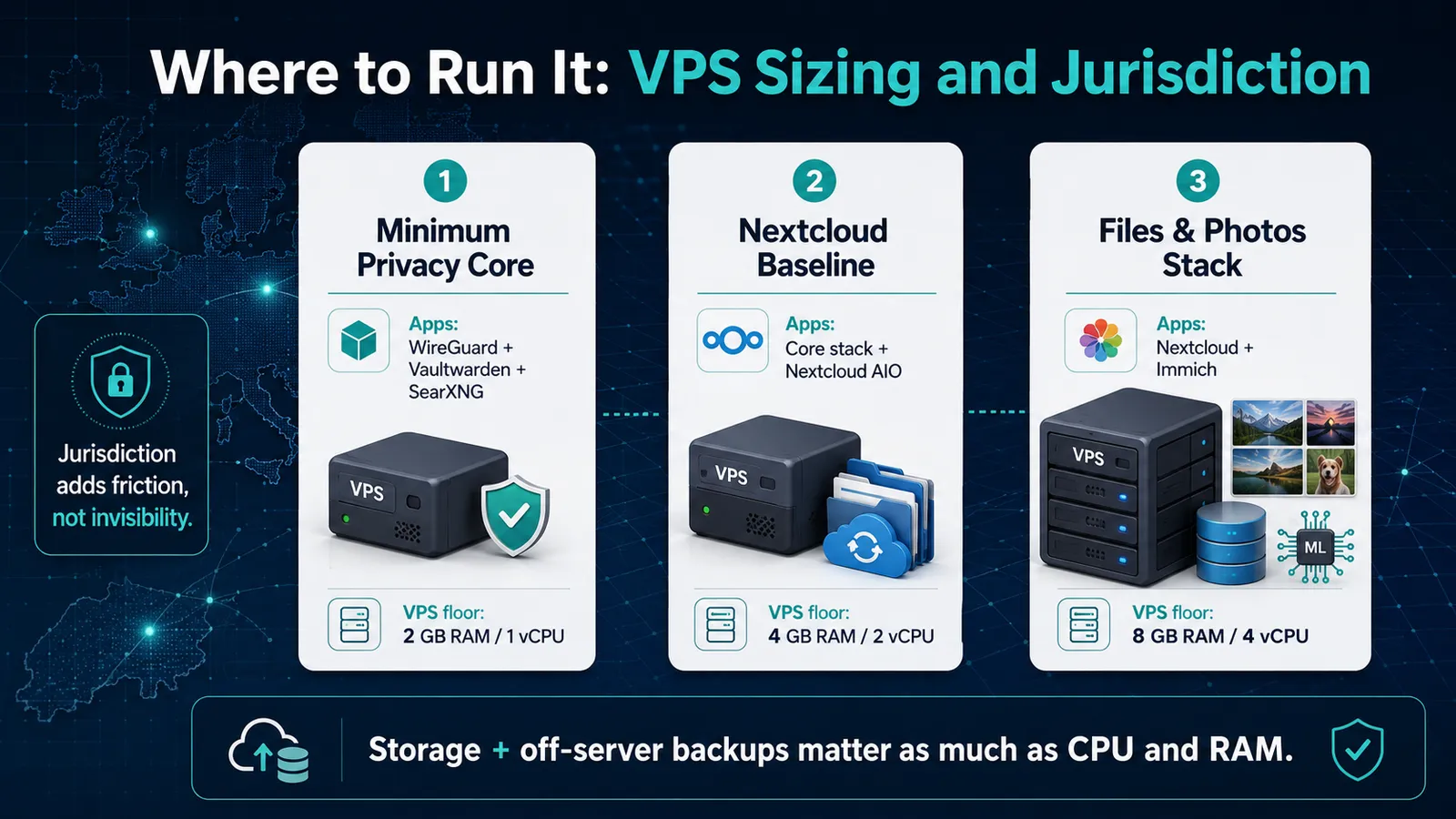
The sizing question is not abstract. This stack has three practical shapes: the light privacy core, the files layer, and the photo-heavy version that brings Immich machine learning into the mix. The jump from one to the next is not cosmetic. Files, thumbnails, face recognition, and first-library migration are what turn a small VPS into a proper server budget.
| Deployment shape | Apps included | Realistic VPS floor |
|---|---|---|
| Minimum viable stack | WireGuard, Vaultwarden, SearXNG | 2 GB RAM / 1 vCPU |
| Nextcloud baseline | WireGuard, Vaultwarden, SearXNG, Nextcloud AIO | 4 GB RAM / 2 vCPU |
| Files and photos stack | WireGuard, Vaultwarden, SearXNG, Nextcloud AIO, Immich | 8 GB RAM / 4 vCPU |
| Storage and backup note | Mostly Nextcloud and Immich | NVMe storage + off-server backups |
Read the table this way:
- Minimum stack covers the three highest-return layers: network, identity, and search.
- Nextcloud baseline needs more headroom because PHP, database work, file indexing, sync jobs, and the web UI all run together.
- Files and photos stack needs a bigger budget because Immich machine learning, thumbnails, face recognition, and the first photo-library scan can hit the server hard during migration.
- Storage matters because compute is only half the plan. Files and photos need room to grow, backups away from the VPS, and a recovery path that still works if the server is gone.
Then there is jurisdiction. In June 2025, Microsoft testified to the French Parliament that it could not guarantee EU-hosted data would be protected from US legal access. That testimony moved the data-sovereignty argument out of theory and into mainstream policy conversation.
For users prioritizing data sovereignty, company jurisdiction, datacenter location, contracts, encryption model, and backup location all matter.
If CLOUD Act exposure is part of the concern, do not treat an EU datacenter alone as the whole answer. A non-US-headquartered provider with a European region is a cleaner fit than a US-headquartered hyperscaler's EU region, but that still does not make the data legally untouchable.
The caveat: Jurisdiction is friction, not invulnerability. A German court order is still a court order. A Dutch one is too. So is a Swiss legal request. European hosting can reduce some direct exposure to US-headquartered cloud providers and add local legal process, but it does not make data legally untouchable.
For most readers' threat model, the added friction is useful. It is not a magic shield.
Section key takeaway: The light stack can run on a small VPS, but files and photos change the budget. Use 4 GB / 2 vCPU as a Nextcloud-only baseline, and plan closer to 8 GB / 4 vCPU for a photo-heavy Immich setup. Cloudzy Marketplace lowers setup effort for the core apps, while jurisdiction adds legal friction, not invisibility.
How to Deploy the Stack Without Turning Setup Into the Project
You can build every layer manually. That is fine if the setup work is part of the appeal. For most readers, it is not. The point of this stack is to get away from Big Tech data gravity, not to spend a week debugging Docker, ports, DNS, and service files before the first app even runs.
The lower-friction path is to start from a working VPS image and harden from there. Cloudzy Marketplace includes one-click VPS images for WireGuard, Vaultwarden, SearXNG, Nextcloud AIO, and other self-hosted tools, so the base deployment is not the part that eats the weekend.
The work that still matters is the work no marketplace can do for you: DNS, firewall rules, backups, access controls, updates, and recovery testing.
The server underneath still matters too. This stack is storage, network, region choice, and headroom, not just app names in a table. Cloudzy gives you NVMe-backed VPS infrastructure, full root access, 13 regions, 40 Gbps networking, 99.95% uptime, and a 14-day money-back period.
Start small for WireGuard, Vaultwarden, and SearXNG. Move up for Nextcloud. Plan more seriously for Immich once machine learning, thumbnails, and photo migration enter the picture.
How to Start
Five layers, each addressing a specific threat. None of them claims to make you invisible. All of them reduce specific commercial data exposure that you currently accept by default.
Pick the one layer that addresses your most concrete current pain. If you have ever opened a breach-notification email, that is the identity layer. If you have noticed ads following you across sites you have never visited, that is the search layer. Deploy that one. The architecture scales. The decision to start does not have to.
The setup of any single layer takes a weekend at most. The configuration files are short. There is no reason for it to be more complicated than this.
Frequently Asked Questions
Does Self-Hosting on a VPS Actually Protect My Privacy, or Am I Just Trusting a Different Vendor?
Yes, for this threat model. It shifts trust from SaaS vendors that monetize user data to a VPS provider selling infrastructure. That reduces commercial exposure and cross-service profiling, but it does not hide VPS metadata, ISP connection records, compromised devices, or state-level surveillance.
What Is the Minimum Self-Hosted Privacy Stack I Should Start With?
Start with WireGuard, Vaultwarden, and SearXNG. Those cover network visibility, password-vendor breach risk, and logged-in search profiling on a 2 GB RAM VPS. Add Nextcloud later; add Immich only after you have more RAM, storage, and backup discipline.
Is Hosting in Frankfurt or Amsterdam Actually Better for Privacy Than the US?
European regions can reduce some direct exposure to US-headquartered providers, but they do not make data legally untouchable. Company jurisdiction, datacenter location, contracts, encryption, and backup location all matter. German, Dutch, or Swiss legal requests can still apply.
Should I Self-Host My Email for Privacy?
For almost everyone, no. Email self-hosting requires SPF, DKIM, DMARC, IP reputation, spam filtering, and constant deliverability work. Use a managed privacy provider such as Proton Mail, Tuta, or Mailbox.org. PrivacyGuides recommends self-hosted email only for advanced users.
What Does WireGuard Actually Protect Me From?
WireGuard routes traffic through your VPS, limiting what your ISP and local network can see. It does not hide egress traffic from the VPS provider. They can still see connection metadata, destination IPs, timing, and volume. It is privacy from your ISP, not invisibility.
Discussion
Comments
Sign in to join the discussion.