
Two assumptions usually travel with self-hosted RMM, and both are wrong in opposite directions. The first is that remote monitoring and management is billed per endpoint, so the invoice grows with the fleet whether or not the work does. The second is that moving the management plane in-house deletes that cost. In reality the category prices on three separate axes, only one of which is per device, and self-hosting does not remove the cost so much as move it onto a line nobody invoices: your own hours. A per-device fee scales on an axis you do not control, since your clients decide how many machines exist rather than how much work those machines create. A self-hosted server scales on an axis you do control, and charges you a maintenance obligation and a support contract you no longer have.
Some contracts make the commercial option correct regardless of the arithmetic: an SLA you cannot personally underwrite at three in the morning is a product you are buying, and self-hosting supplies it only where the project itself sells a support tier. Per-technician pricing already beats both alternatives across a wide band of fleet sizes.
TL;DR
- The category does not price uniformly per device. NinjaOne charges per device; Syncro and Atera charge per technician seat with unlimited devices; ConnectWise, Datto RMM and N-able do not publish a base platform price and route buyers to a quote.
- For a small shop with a high device-per-technician ratio, a per-technician platform can beat per-device pricing and the Tactical RMM self-hosting model used in this article. Check that before provisioning anything.
- On this article's Tactical RMM cost model, self-hosting is usually more expensive than a per-technician platform below roughly 400 endpoints. Around the third technician seat it starts to become competitive, but the exact crossover moves with your hourly rate, sponsor tier, server size and device-per-technician ratio.
- Tactical RMM is not open source. It ships under a custom, non-OSI license with restrictions around SaaS, managed hosting and other commercial service use. MeshCentral is Apache-2.0 and NetLock RMM's core is AGPL-3.0.
- An RMM server is a trusted remote-code-execution path into every machine running its agent. Self-hosting does not create that exposure; it transfers the patching to you.
How Commercial RMM Prices Endpoints
NinjaOne's published per-device rates run from $1.50 per device per month at 10,000 endpoints up to $3.75 at 50 or fewer. Read that curve from the small end and the problem is plain: volume discounting runs toward scale, so the shop with the fewest machines pays the highest rate on each one, on an invoice that grows every time a client buys a laptop.
Syncro prices on a different axis entirely, at $129 per user per month on the Core plan billed annually, $179 on Team, with every plan including unlimited endpoints per technician. Atera uses the same shape and is explicit about why. With its per-technician model, the cost stays the same no matter how many devices you add.
Then there is the third group. What does ConnectWise RMM cost? Its page routes pricing through a request form listing packages and features without a number, and Datto RMM's product page describes the platform at length while carrying no price anywhere on it. N-able markets N-sight the same way, and Kaseya quotes VSA. That is a statement about what those pages contain, not about intent, but it has a cost attached. Extracting a number takes sales calls, and those hours are yours.
| Vendor | Pricing Axis | Publishes a Base Price? | What Makes the Bill Grow |
|---|---|---|---|
| NinjaOne | Per device | Yes: $1.50/device/month at 10,000 devices, up to $3.75 at 50 or fewer | Every agent you install |
| Syncro | Per technician | Yes: $129/user/month (Core, annual), $179 (Team) | Every technician you hire |
| Atera | Per technician | Plan tiers published; unlimited devices per seat | Every technician you hire |
| ConnectWise RMM | Quote only | No | Undisclosed before a sales call |
| Datto RMM | Quote only | No | Undisclosed before a sales call |
| N-able N-sight | Quote-led | No public base platform price | Base subscription disclosed by quote |
| Kaseya VSA | Quote only | No | Undisclosed before a sales call |
The consequence matters more than any individual rate. A per-technician platform stops scaling with the fleet completely. A two-person shop managing 350 machines pays what a two-person shop managing 90 pays, and at a high device-per-technician ratio that model already undercuts both per-device pricing and a server of your own.
The Self-Hosted Platforms and What Their Licenses Permit
Four platforms come up in this conversation under four genuinely different licenses, not four flavours of one. "Open source RMM" is the phrase that collects all four, and it is doing more work than it can carry. They also differ on how much of an RMM they contain and how much server they demand, and the license difference has contractual consequences for anyone selling managed services.
Tactical RMM
Tactical RMM is the most complete of the four: patch management, scripting, alerting and checks, with remote control provided by a bundled MeshCentral instance. The current release is v1.5.2, whose changelog records a memory-leak fix in policy check and task processing, plus a bump of the bundled MeshCentral to 1.2.4. A native remote control layer is in development.
The license needs care. Tactical RMM ships under a custom "Tactical RMM License v1.0," whose text opens by stating that it is not an open-source software license. It grants free use for monitoring and managing your own or your customers' networks, and forbids offering the software's functionality as part of a SaaS product, a managed hosting service or any other for-profit service without the licensor's permission. That is the gap between source-available (you can read and run it, on the author's terms) and open source (an OSI-approved license granting unrestricted commercial redistribution). The license expressly permits hosting and using Tactical RMM to monitor and manage customer networks. It separately places broad restrictions on making the software's functionality available as part of commercial or for-profit services and says prior written approval is required for commercial or for-profit service use. If your MSP model depends on where that boundary sits, get written clarification from AmidaWare rather than relying on an editorial interpretation.
There is also a cash line, published in full. Code-signed Windows agents, Linux and macOS agents outright, single sign-on and the Reporting module all sit behind a sponsor tier. Tier 1 at $55 a month is the minimum for signed agents on any platform; Reporting starts at Tier 2, $80. The tiers above that are suggested by fleet size (Tier 4, at $155, for fewer than 1,000 agents) and from Tier 3 up attach a stated email-response time. Unsigned agents are a support problem on any Windows fleet of consequence, so at scale the sponsor tier is a cost line, not an option.
MeshCentral
MeshCentral is not a full RMM, but the gap is narrower than that. It supports remote control, device inventory, terminal and file access, command and script execution, plus device and session notifications. What it does not provide is the full RMM workflow around those primitives: native patch-management workflows and built-in scheduled policy automation are the main gaps.
That gap is precisely why Tactical RMM was built on top of it. Adopting MeshCentral expecting to replace NinjaOne produces a disappointment that has nothing to do with the software's quality (the patch-management and policy-automation layers are not in the box, even though command and script execution are).
NetLock RMM
NetLock RMM is open-core, not uniformly open, and the project is direct about it: after launching fully under the AGPL, the maintainers moved in 2026 to a model where the core stays open under the AGPL but not every feature's source is published, pausing public commits while they curate what gets released. The published core carries a GNU Affero General Public License v3, which is OSI-approved.
Its commercial shape also differs from everyone else's, and the tier boundary catches fleet-sized readers. The free Community Edition is self-hosted but capped at 25 devices, which puts it out of reach past a homelab or an evaluation. The paid self-hosted tier lifts the cap and includes unlimited devices, users, tenants and locations, alongside professional support. NetLock explicitly separates that model from its cloud-hosted plans, which are device-sized. The self-hosted offer therefore removes the device ceiling, but its current commercial package includes support and other benefits as a bundle rather than pricing exclusively by response time. The trade is maturity and track record.
ITarian On-Premise
ITarian's on-premise build is proprietary software from the Comodo/Xcitium lineage. Self-hosting does not remove its per-device licensing meter: ITarian's current charging documentation gives you up to 50 managed devices free, but once you add the 51st managed device, managed endpoints are billed per device at the applicable rate. It is not open source and does not claim to be. What complicates the operational footprint is that ITarian's current on-premise documentation is internally inconsistent. Its deployment guidance describes a standalone Docker Compose configuration for up to 1,000 endpoints, while its hardware-requirements section lists a two-server baseline: an ITSM node at 8 cores, 8 GB RAM and 100 GB storage alongside an XMPP node at 4 cores, 4 GB and 40 GB, both quoted at 1,000 endpoints. I would treat that as a sizing baseline to confirm with ITarian before budgeting, not as proof that a single-server deployment is unsupported.
| Platform | License | OSI-Approved? | Commercial/Service Constraint | What It Covers |
|---|---|---|---|---|
| Tactical RMM | Tactical RMM License v1.0 (custom) | No | Forbidden without permission | Patching, scripting, alerting, remote control via bundled MeshCentral |
| MeshCentral | Apache-2.0 | Yes | Permitted | Remote control, device inventory and management |
| NetLock RMM | AGPL-3.0 (open core) | Yes, for the published core | Permitted under AGPL obligations | Monitoring, automation, remote support; free edition capped at 25 devices |
| ITarian on-premise | Proprietary | No | Governed by vendor terms | Full endpoint management suite |
Section key takeaway: "open source" describes three different things across these four rows, and only two of them are what the phrase normally promises.
What the Server Has To Be
Tactical RMM's installation documentation states the floor precisely: a fresh Linux VM with 4 GB of RAM on Debian 11, Debian 12 or Ubuntu 22.04 LTS. The same page puts one CPU core as sufficient below 200 agents with limited checks, and 50 GB of storage as adequate for under twelve months of history at that count.
Those figures travel beyond Tactical RMM, because it bundles MeshCentral and the floor already accounts for the remote control layer. The word doing the most work there is "fresh." The installer assumes a server with no other software on it, and warns that running it alongside existing services will break the install. That rules out folding the RMM onto a box already earning its keep (the Nginx and Postgres it installs are its own, and it will not share yours), which makes the server a new line item, not spare capacity. For this cost model, I would size above the published minimum rather than optimise against it: 2 vCPU and 4 GB RAM around the low hundreds, with 4 vCPU and 8 GB as the safer planning target into the high hundreds. Those are planning assumptions for this article, not Tactical RMM's published minimums. ITarian needs separate sizing consideration because its current documentation gives conflicting signals about standalone and two-node deployment.
Endpoint management and infrastructure monitoring get conflated constantly, and they are not the same job. RMM installs an agent on user machines to patch them, script against them and take remote control of them, which is different from asking whether a host is answering. The placement reasoning is the same in both, and it is the same argument for keeping the box separate from what it watches that applies to any availability monitor. A management server living inside the site it manages goes down with it, on precisely the day you need it.
The Break-Even
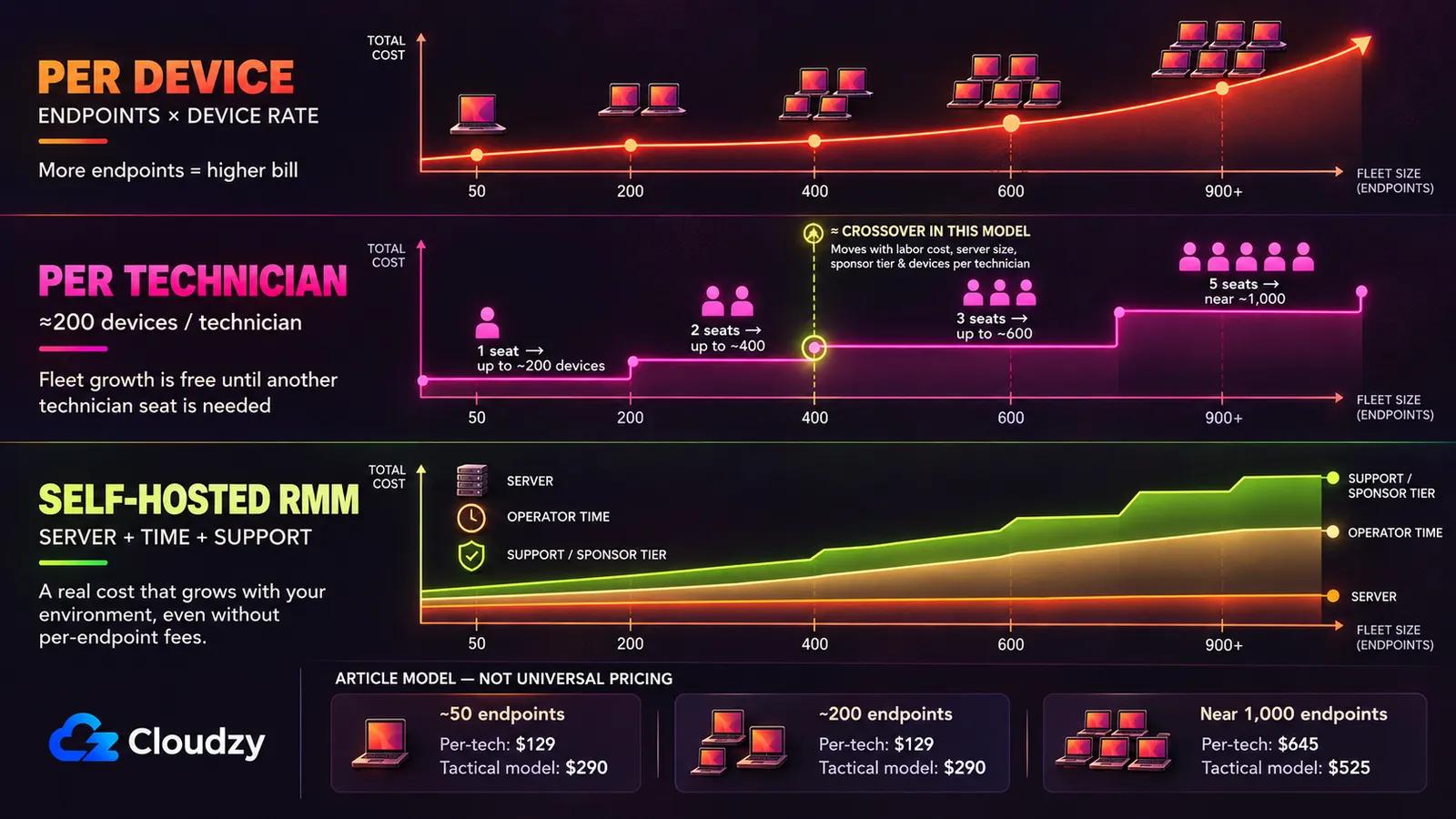
Four numbers decide this, and two belong to you rather than to a vendor: what the commercial fee costs at your fleet size, what a server costs, how many hours a month it takes you, and what an hour of your time is worth. Here is every one, labelled.
Sourced figures. NinjaOne's per-device band and Syncro's seat rates come from the vendor pricing pages linked above, the sponsor-tier rates from Tactical RMM's own published sponsorship table, and the server's spec floor from Tactical RMM's installation documentation.
Stated assumptions, which are this article's and not a vendor's. The server price is a placeholder: $35 a month for the small instance and $70 for the larger one, to be replaced with whatever your own provider charges for those specs. Operator time is four hours a month at 50 and 200 endpoints and six in the near-1,000-endpoint example, covering patching, upgrades, agent troubleshooting and the occasional incident. The hourly rate is $50, standing in for a fully loaded technician hour; the Bureau of Labor Statistics publishes a current median for network and computer systems administrators, but the number that matters is your own billable rate. The technician count assumes roughly 200 devices per technician (if yours runs leaner, move the seat counts and the threshold moves with them). The sponsor-tier line is Tier 1, the published code-signing minimum, at the two smaller fleets, and Tier 4 in the near-1,000-endpoint example; Tactical suggests Tier 4 for fewer than 1,000 agents.
| Monthly Cost | ~50 Endpoints | ~200 Endpoints | ~1,000 Endpoints |
|---|---|---|---|
| Per-device (NinjaOne band) | $188 | $300–$750 | $1,500–$3,750 |
| Per-technician (Syncro Core, annual) | $129 (1 seat) | $129 (1 seat) | $645 (5 seats) |
| Tactical RMM self-host: server | $35 | $35 | $70 |
| Tactical RMM self-host: sponsor tier | $55 (Tier 1) | $55 (Tier 1) | $155 (Tier 4) |
| Tactical RMM self-host: operator time | $200 (4 h) | $200 (4 h) | $300 (6 h) |
| Tactical RMM modeled total | $290 | $290 | $525 |
The per-device row is a range at 200 and 1,000 because NinjaOne publishes the two ends of its curve and not the tiers between. The low end of each range is the 10,000-endpoint floor rate, which a fleet this size will not be offered, so it is deliberately generous to the commercial side. If self-hosting wins against that, it wins against the rate you are quoted.
The two crossovers are not in the same place. Against per-device pricing, the self-hosted line of $290 covers 78 machines at $3.75 each and 194 at the $1.50 floor, so self-hosting overtakes it somewhere between roughly 80 and 190 devices, depending on where your contract sits in that band. Against per-technician pricing the picture changes completely. On a 200-devices-per-technician ratio, one Syncro seat covers you to 200 endpoints ($129), two to 400 ($258) and three to 600 ($387), and the self-hosted line does not undercut that curve until the third seat, just past 400 devices.
Below roughly 400 endpoints, self-hosting a full RMM is usually the more expensive option on these assumptions. The second crossover binds, because a per-technician platform is available this afternoon and requires you to provision, patch and be on the hook for nothing.
Two of your own numbers move that threshold. Halve the assumed rate to $25 an hour and the small-fleet self-hosted line drops from $290 to $190. Double it to $100 and that same line rises to $490 before any higher sponsor tier or larger-server assumption is added. Those changes can move the crossover by hundreds of endpoints, so use the sponsor tier and maintenance hours you would actually choose at your fleet size rather than treating 400 as a universal threshold.
What Self-Hosting Hands Back
In July 2021 a credential disclosure zero-day in on-premise Kaseya VSA servers, CVE-2021-30116, was exploited in the wild. CISA's Known Exploited Vulnerabilities catalog records it as handing an attacker a session ID usable to execute further attacks against the system, and marks it as known to have been used in ransomware campaigns.
Three years later ConnectWise ScreenConnect's CVE-2024-1709, an authentication bypass at a full CVSS 10.0 against versions 23.9.7 and earlier, entered the same catalog and was used in the wild to deploy ransomware, and Huntress's post-exploitation report records adversaries deploying cryptocurrency miners through it. Neither incident argues against commercial RMM, and neither argues for it. Underneath both sits the same fact. An RMM server is a trusted remote-code-execution path into every machine that runs its agent, which is the design working correctly and exactly why it deserves the concern. Compromise the management plane and you have compromised the fleet, whether that plane belongs to a vendor or to you.
What changes when you self-host is who patches it, how quickly, and whose name is on the incident. These platforms carry their own researched vulnerabilities. Tactical RMM has CVE-2025-69516, a server-side template injection in the reporting preview endpoint that let low-privileged report users reach remote command execution, and CVE-2025-69517, an HTML injection in the agent creation endpoint, whose record closes with the supplier's position that it contains incorrect information. Both score 8.8 and both are recorded as affecting v1.3.1 and earlier, against a current v1.5.2. MeshCentral has CVE-2024-26135, cross-site WebSocket hijacking via control.ashx that can compromise an admin session, at CVSS 8.3 and recorded as affecting versions prior to 1.1.21 against a current 1.2.5. Current releases sit outside the affected ranges of the three CVEs cited here. That does not remove the attack surface; it makes staying current part of the operating model. They are an actively researched attack surface, and you are the one who has to stay ahead of it.
The other thing that changes is the counterparty. Two of these four sell a support tier of their own: NetLock RMM's paid plans and Tactical RMM's upper sponsor tiers. The support picture is uneven. MeshCentral is community-driven, while ITarian is a vendor-backed commercial product with its own support channel and licensing terms. For an operator whose RMM outage is a client-facing incident with a contract attached, that counterparty is what a commercial agreement actually sells.
Compliance occasionally runs the other way, narrowly. In an r/msp thread on self-hosted options, one operator describes a contract requiring that "the remote administrative personnel connection shall be via an encrypted (FIPS 140-2 certified) path," and says self-hosting is what lets them satisfy it, since a certified VPN module can carry the connection where most vendors have not filed for certification. One contract in one thread is not a pattern, but it is a case where self-hosting is the compliant answer rather than the cheap one.
The 2021 Tactical RMM Question
Anyone evaluating Tactical RMM will find this within an hour of searching. In a December 2021 r/sysadmin thread, a researcher found cryptocurrency-mining code inside agent binaries hosted on the project's fallback file mirror. The developer replied on the record, and that reply is the source for all of it:
"yes those are 1.98.XXX are my own personal builds that have extra binaries embedded in them (using golangs new embed feature added in go 1.16) and I use them on my own machines to mine [cryptocurrency]."
He stated in the same reply that the production agent does not download those builds, and that the mirror is a fallback for Python dependencies. He also confirmed there that the agent had stopped being open source when code signing began and that development had moved to a private repository, so the public code was out of date and the shipping agent was not publicly auditable at the time.
What the record does not contain is a completed third-party security audit. The assurance that the production agent is clean rests on the developer's own statement plus one commenter's informal sandbox analysis. Both circulating summaries overstate it: "it was nothing" ignores that mining binaries were served from project infrastructure while the agent source was unauditable, and "the tool ships a cryptominer" asserts something no published evidence establishes. My reading is that this is a judgement about operational practices rather than a settled technical finding.
Which One Fits Which Operator
Stay commercial, and skip the self-hosted RMM alternatives entirely, if any of three conditions hold. A client contract requires a named vendor of record. Your device-per-technician ratio already makes per-technician pricing your cheapest line, which covers most fleets under 400 devices. Or nobody will own the server in practice, which makes the operator-hours line fiction.
Pick Tactical RMM if you want the fullest feature set, you are managing in-house or customer networks, you are confident owning a Linux server in production, and you will pay the sponsor tier. If your commercial model could fall within the license's broader restrictions on for-profit services, get written clarification from AmidaWare before deploying it for clients.
Pick NetLock RMM if an OSI-approved core and a paid self-hosted plan with unlimited devices and professional support matter more than track record, and you accept a younger project whose public repository is now a curated subset of the codebase. Be clear which tier you are buying. The free Community Edition stops at 25 devices, so at a few hundred endpoints this is a paid product, and its appeal is a price that does not move when a client buys twelve more laptops.
Pick MeshCentral alone only if your main job is remote access, inventory and ad-hoc command or script execution rather than full RMM patching and policy automation. It is mature, permissively licensed and strong at what it does. If remote control is the whole requirement, compare it against the dedicated remote-desktop options too, since RustDesk covers similar ground with a different feature emphasis. Treating any of them as a full RMM substitute is the mistake.
Pick ITarian on-premise only if keeping the management plane in your own infrastructure matters more than escaping per-device pricing, and you want an established company behind the product despite the proprietary license and heavier footprint. Confirm the supported deployment topology before budgeting.
If the answer is self-hosting, the management plane needs somewhere to live outside the sites it manages, reachable on the day one of those sites is not. Practically: a persistent Linux server on Debian or Ubuntu, root access, nothing else competing for it, and you keeping it patched. Our self-managed Linux VPS is that kind of box, sized from the generic specs above. If the piece you need turns out to be remote control rather than a full management platform, RustDesk deploys in one click.

Build on a Linux VPS with root access, NVMe, and AMD EPYC power.
View Linux PlansFrequently Asked Questions
Is Tactical RMM Open Source?
No. Tactical RMM ships under a custom "Tactical RMM License v1.0," which is not OSI-approved, and the license text itself states that it is not an open-source license. It is free to self-host for monitoring and managing your own or your customers' networks, but it also contains broad restrictions around SaaS, managed hosting and other commercial or for-profit service use. If your MSP model depends on that boundary, get written clarification from AmidaWare. MeshCentral is Apache-2.0 and NetLock RMM's published core is AGPL-3.0, both OSI-approved.
Is There a Free Self-Hosted Alternative to NinjaOne or Atera?
Yes. Tactical RMM, MeshCentral and NetLock RMM's Community Edition are all available without a per-device license fee at their free level. Free to license is not free to run. You pay for a dedicated Linux server, for whatever paid tier unlocks the features you need, and for the hours you spend maintaining it. In the Tactical RMM model used here, those costs exceed Syncro Core at the smaller fleet sizes.
Can MeshCentral Replace a Full RMM?
Not on its own. MeshCentral covers remote control, device inventory and remote management well, under a permissive Apache-2.0 license. It supports command and script execution, but it does not provide the native patch-management and scheduled policy-automation workflow you would expect from a full RMM, which is why Tactical RMM was built as a layer on top of it rather than a replacement for it.
Do All RMM Vendors Charge Per Endpoint?
No. Syncro and Atera price per technician seat with unlimited endpoints, so the bill does not grow when a client adds machines. NinjaOne is the per-device example, tiered by volume. ConnectWise, Datto RMM, N-able and Kaseya do not publish a base platform price and route buyers to a quote.

Discussion
Comments
Sign in to join the discussion.