

Two databases can occupy the same disk space and need different VPS setups. One repeatedly reads a small set of rows; the other sustains writes, builds large indexes, or must recover quickly after failure. Choosing the best VPS for database hosting starts with those differences, before comparing providers.
For an unmanaged VPS, the purchase includes responsibility for the database's operation. PostgreSQL, MySQL, and MariaDB need different memory budgets, and recovery capacity belongs in the design alongside the primary server. A suitable starting configuration must leave room for the work that happens during backups and maintenance, then pass a representative workload test.
Size the Database Workload Before Choosing a Plan
Measure active data and indexes, peak concurrent query work, growth, and recovery requirements before selecting CPU, memory or disk capacity. Match additional resources to the measured constraint. Include maintenance space and the application's peak consumption when it shares the host; the resulting budget must accommodate busy periods as well as ordinary operation.
The working set is the data and indexes touched frequently enough to benefit from staying in memory. Stored size includes colder records too. Likewise, open connections are not the same as active queries: idle clients and simultaneous sorts create different memory and CPU demands. Record both, together with query shape and read/write mix.
Build the purchase requirements from a representative busy period:
- Measure application peak memory if it will share the VPS.
- Record database and index size, working-set estimate, concurrent operations, and growth over the intended capacity horizon.
- Measure log generation and identify the largest expected index build, table rewrite, or other maintenance operation.
- Set the application's p95 latency target, acceptable data-loss window, and restore-time target.
- Decide where the application will run and test the path between it and the database.
PostgreSQL's monitoring documentation recommends combining database statistics with operating-system utilities. Collect CPU, memory pressure and disk activity alongside query and commit timings. A latency increase during backup needs investigation even if an idle-server check looks satisfactory.
Dedicated vCPUs provide sustained access to the allocated CPU resources. They do not give you a whole physical server or establish storage IOPS. Treat CPU allocation, memory capacity, and storage behavior as separate purchase criteria. If measured requirements exceed the available VPS options, investigate dedicated hardware rather than extrapolating from a larger plan's name.
Match SQL Workloads to a Starting Setup
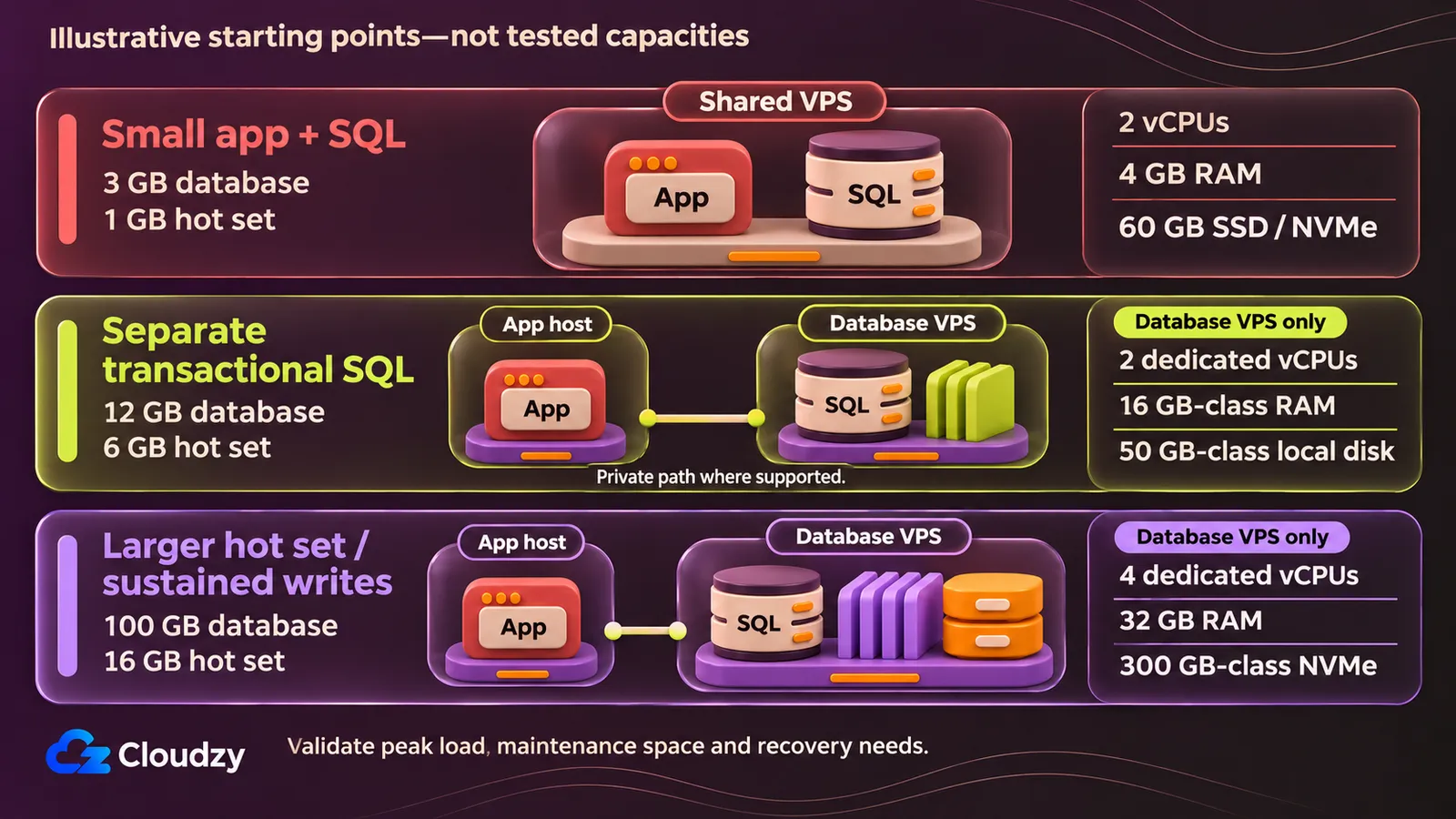
Use PostgreSQL 16, MySQL 8.4 with InnoDB, or MariaDB 11.4 with InnoDB as alternative example environments, according to application compatibility. These are not interchangeable engines or claims about the latest release. Record the installed patch version before testing; the examples do not specify a provider's deployed image version.
Co-Locate a Small App and Its Database
For an assumed 3 GB database with a 1 GB hot set and five active, simple indexed queries, test a 2-vCPU VPS with 4 GB RAM and 60 GB nominal SSD or NVMe storage. Co-location keeps the connection local, but the application and database must fit the same peak-memory budget.
Assume a 90/10 read/write mix, growth of 1 GB each month, and no long reporting queries during backups. Shared CPU can be acceptable for tolerant staging. Choose dedicated allocation when sustained contention makes response times unsuitable; the later production-plan comparison uses dedicated vCPUs throughout.
The following RAM allocation is a proposed envelope, with all figures in GB:
| Consumer | Assumed RAM |
|---|---|
| OS and monitoring agents | 0.75 |
| Application at peak | 1 |
| Database cache | 1 |
| Filesystem cache | 0.75 |
| Query, connection and maintenance reserve | 0.5 |
| Total | 4 |
For MySQL or MariaDB, fit the InnoDB pool inside this envelope. Applying a dedicated-database memory percentage to the entire host would consume memory already assigned to the application. For PostgreSQL, allow for shared buffers and operation memory separately within the database allocation and reserve. Measure the combined peak before accepting either configuration.
An example disk envelope is 5 GB for OS/logs, 3 GB for data/indexes, 4 GB for engine logs, 3 GB for scratch space and 6 GB for growth: 21 GB total. The remaining nominal capacity accommodates filesystem overhead and transient work; it is not a reason to keep the backup retention set on the primary.
Connect through a local socket or localhost. Test durable commits while the app and backup job are active, including storage synchronization (fsync), which asks the OS to flush data to durable storage. If the owner accepts a 24-hour recovery point objective (RPO, the acceptable data-loss window) and four-hour recovery time objective (RTO), propose a nightly native backup stored off-node and prove the restore duration in a drill. A failed memory, latency or restore budget calls for separation, resizing, or a revised recovery design after query/index diagnosis.
Separate a Transactional SQL Database
For an application running elsewhere, an illustrative 12 GB SQL database with a 6 GB hot set can start testing on 2 dedicated vCPUs, 16 GB-class RAM and 50 GB-class local storage. This assumes 20 active indexed queries, short writes and low sustained computation; larger query operations can invalidate the budget.
Assume a 90/10 read/write mix and 1 GB monthly growth over three months. This is the reference workload for the provider table. Capacity units differ across plans, so compare actual available memory and usable filesystem bytes before applying the allocations.
For a VPS for PostgreSQL, the PostgreSQL 16 shared-buffer guidance starts at 25% of system memory on a dedicated database server with at least 1 GB RAM. PostgreSQL also uses the OS cache. A proposed 16 GB budget is 4 GB shared buffers, 2 GB OS/agents, 2 GB query/connection/maintenance reserve, and 8 GB filesystem cache/headroom.
The reserve is not a work_mem setting. PostgreSQL's query-operation memory documentation explains that separate sorts and hashes can each allocate memory while multiple sessions run concurrently. Hash operations also use hash_mem_multiplier. Set operation limits from the allowed concurrent work; a large per-operation setting can exceed the host budget even with adequate shared buffers.
For MySQL VPS hosting, Oracle's MySQL 8.4 buffer-pool guidance typically recommends 50–75% of system memory, accounting for the OS and other allocations. Test an 8 GB InnoDB pool here, leaving the rest for those consumers and peak work.
A MariaDB VPS needs a slightly different calculation. MariaDB's memory-allocation guidance starts mostly-InnoDB systems at 60–70% of available RAM after OS/services. Assuming 13 GB is available gives 7.8–9.1 GB; an 8 GB starting pool fits that example. MyISAM or Aria use requires separate cache consideration. These engine budgets are alternatives, do not add them together.
The disk budget is 12 GB data/indexes + 3 GB growth + 5 GB OS + 4 GB logs + 8 GB temporary/maintenance space = 32 GB. A 50 GB-class disk leaves about 18 GB nominal reserve before filesystem overhead. Require at least 15 GB measured free space in this example; larger retained logs or rewrites invalidate it.
Place app and database nearby, using a tested private path where supported, with authentication, access controls and encryption. Check query and durable-commit latency during checkpoints, flushes and backup. Allocate independent backup storage; the recovery-sensitive case below develops that design. Resize when the relevant resource saturates, free space fails the budget, or recovery targets cannot be met after query/index diagnosis.
Budget for Larger Working Sets or Sustained Writes
For an assumed 100 GB database with a 16 GB hot set, test 4 dedicated vCPUs, 32 GB RAM and 300 GB-class NVMe storage. Keep the application separate. This example allows 30 active mixed queries and a 60/40 read/write mix; measure execution and storage pressure before deciding which resource to increase.
Assume growth of 10 GB per month for three months. A PostgreSQL memory envelope is 8 GB shared buffers, 4 GB OS/query/maintenance reserve, and 20 GB filesystem cache/headroom. For MySQL or MariaDB, an approximately 16 GB InnoDB pool is an alternative starting allocation after reserving other consumers. PostgreSQL settings cannot be transplanted into either engine.
Storage needs include work in progress. Budget 100 GB data/indexes + 30 GB growth + 30 GB retained or queued logs + 60 GB for the largest anticipated maintenance/scratch operation + 10 GB OS = 230 GB. That leaves about 70 GB nominal reserve. A larger table rewrite requires recalculation even when ordinary daily growth remains modest.
PostgreSQL's routine-vacuuming documentation distinguishes ordinary VACUUM, which makes dead-row space reusable, from VACUUM FULL, which writes a new table copy and temporarily needs additional disk space. Buying a disk barely larger than the dataset can prevent the maintenance needed to reclaim space.
Measure CPU execution, cache pressure and physical I/O separately from write latency. Include temporary writes and checkpoint/flush periods in the test. NVMe and dedicated CPU describe the configuration; they do not establish a guaranteed IOPS result. Test sustainable backup and replication transfers too, with nearby private app connectivity and independent recovery storage. Faster log generation changes retention capacity as well as network demand. Increase cores, RAM or disk according to the observed constraint, not because all three happen to rise in the next plan.
Add Recovery Capacity to Production
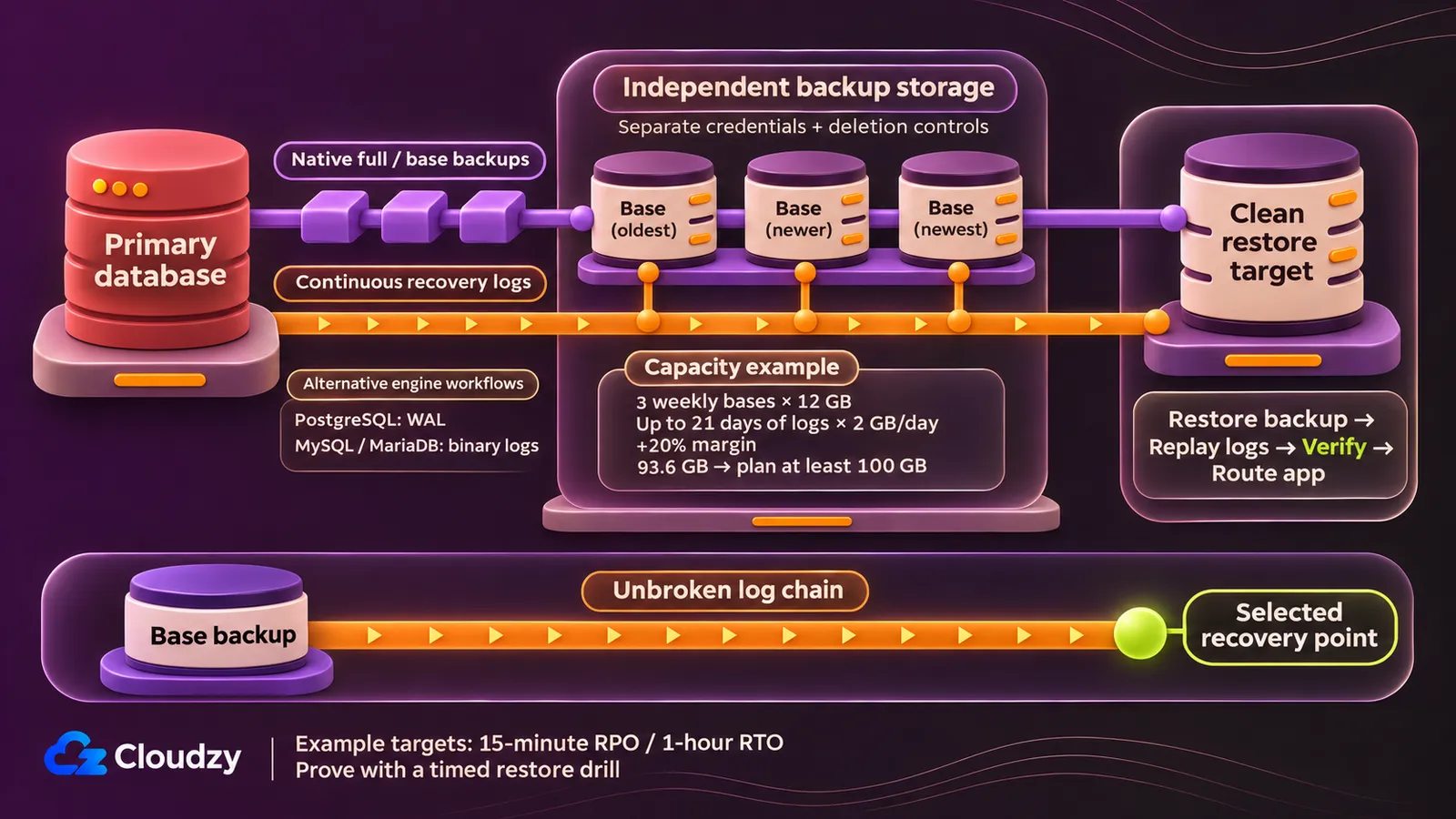
An accepted 15-minute data-loss window and one-hour restore target require a recovery design beyond the primary's resource budget. Keep the separate transactional workload assumptions, then add native backups, retained recovery logs, independent storage and a timed restore exercise. These windows are planning targets; only the exercise establishes whether the proposed setup meets them.
PostgreSQL's continuous-archiving documentation describes a base backup plus an uninterrupted archive of write-ahead log (WAL) records for point-in-time recovery. Oracle's MySQL recovery documentation uses a full backup followed by binary logs. MariaDB's PITR procedure restores full/incremental backup data before binary-log replay. Binary logging must be enabled for those MySQL/MariaDB workflows.
For a capacity example, assume each uncompressed full/base backup is 12 GB. Retain three weekly bases and the continuous recovery logs needed from the start of the oldest retained base. Budget up to 21 days of logs at 2 GB per day, with a 20% storage margin:
(3 × 12 + 21 × 2) × 1.2 = 93.6 GB
Plan at least 100 GB of independent backup storage, without assuming compression. Tie log deletion to backup expiry and successful replacement. Verify that the retained base and logs form a complete chain for every promised recovery point.
Use backups on an independent target, with credentials and deletion controls separated from the primary. A provider snapshot alone does not establish this database-native recovery chain. The proposed restore drill must provision a clean target, transfer and restore the backup, replay logs, verify database/application consistency, and route the application. Time provisioning and transfer as well as database recovery.
A shorter outage target may require an independently placed replica sized to carry the full workload. Budget its CPU, RAM and disk separately, and define promotion, fencing of the former primary, and client routing. Rehearse the sequence. Replication does not replace backups, and one VPS is not high availability. Revise the design if restore exceeds one hour, archive lag exceeds the RPO, a standby cannot carry load, or backup storage approaches its capacity estimate.
When to Choose a Managed VPS Instead of Unmanaged
If nobody can respond to database alerts or perform a restore during an incident, purchase explicitly defined operational coverage. A managed VPS can transfer some maintenance work, but its contract must name the database tasks included. A control panel does not establish that coverage, and managed VPS service is distinct from a managed database.
The difference between managed and unmanaged VPS responsibilities becomes useful at the task level. Treat the following as a procurement checklist, not a promise that every managed service includes the same work. Physical infrastructure remains provider scope across these models; guest software and database operations need explicit ownership.
| Work | Unmanaged VPS | Coverage to Establish Before Buying Management |
|---|---|---|
| Guest OS and database patches/upgrades | You schedule and perform them | Supported OS/engine versions, patch scope, upgrade testing and maintenance windows |
| Query, schema and index tuning | You diagnose and change them | Whether tuning is included, limited to service configuration, or separately charged |
| Monitoring and incidents | You configure alerts and respond | Monitoring hours, response/escalation ownership and who acts after an alert |
| Backups and restores | You own the recovery procedure | Retention, independent storage, restore assistance and evidence of restore testing |
A useful contract question is: "If the database runs out of disk during a backup, who diagnoses it, restores service, and checks that the next backup succeeds?" The answer separates access to support from responsibility for an outcome. Ask the same question for a failed engine upgrade and an accidental deletion.
Managed database services have their own engine-lifecycle, backup and failover agreements. They can be the better purchase when database recovery and upgrades are the work you need to transfer. Do not infer application tuning from that service label; query design and application behavior still need an owner unless the agreement says otherwise.
Keep it simple by assigning each task once, with an escalation path and an acceptance check. Price the covered work against the time and availability you can provide. There is no universal hourly value for self-managing, and an inexpensive compute bill does not answer an unowned incident.
Choose a VPS Setup for Non-SQL Workloads
These examples separate an in-memory workload, document storage and search indexing. Put the application nearby and test its connection path; also test transfers to backup storage and replicas where used.
| Workload and Assumptions | Starting Setup to Test | Storage, Recovery and Change Triggers |
|---|---|---|
| Redis cache/key-value; 2 GB measured dataset | 2 dedicated vCPUs, 8 GB RAM; set maxmemory below host memory with overhead reserved |
A rebuildable cache can accept loss. A persistent primary needs deliberate RDB/AOF settings, rewrite space and independent backups. Measure memory/RSS, fragmentation, evictions, persistence peaks and tail latency. |
| MongoDB; 20 GB documents/indexes and a small measured hot set | 2–4 dedicated vCPUs, 16 GB RAM, 100 GB-class local disk | Budget journal/oplog, growth and scratch. Test restore time; watch cache eviction, disk I/O and replication lag. Budget each replica's CPU, RAM and disk separately according to its role. |
| Elasticsearch; small 30 GB index footprint | 4 dedicated vCPUs, 16 GB RAM, 150 GB-class local disk per relevant data node | Budget replicas, segment merges, retention and independent snapshots. Check heap/GC, search and indexing latency, merge I/O and disk use. Resilience also needs an appropriate voting topology and client routing. |
Redis's administration guidance warns that write-heavy RDB saves or AOF rewrites can use up to twice normal memory, depending on changed pages. The 2 GB dataset therefore cannot consume the whole memory allocation. Redis's persistence documentation distinguishes periodic RDB snapshots from the AOF write log. Select the persistence policy from acceptable loss, then measure peak memory and disk use while it runs.
MongoDB's WiredTiger cache documentation describes internal and filesystem caches. The default internal cache is the larger of 50% × (RAM − 1 GB) or 0.256 GB. Its replica-set guidance recommends three data-bearing members. An arbiter votes but holds no dataset. Allocate independent backup capacity too, and implement MongoDB authentication before connecting the application.
Elastic's JVM settings documentation recommends automatic heap sizing. If you set heap manually, use equal minimum/maximum values and no more than 50% of available memory. Its small-cluster resilience guidance describes two data-capable, master-eligible nodes plus a voting-only tiebreaker. Configure replicas and route clients to the data nodes; the tiebreaker adds a vote, not another data copy. If merging or retention exhausts disk reserve, revise the storage budget before adding more documents.
Compare Unmanaged Plans for the Setup You Need
For the separate transactional SQL example, screen unmanaged plans against a minimum of 2 dedicated vCPUs, 16 GB-class RAM and 50 GB-class local storage. A plan passing that floor is a candidate for testing. Different CPU/disk bundles, capacity units and billing commitments prevent treating these rows as equivalent hardware or a performance ranking.
The reference deployment is self-managed Linux in Germany or nearby Central Europe, with a small stored dataset and a larger memory budget. Nearby locations do not imply identical app latency. The intended app connection is private where supported; the quotes retain standard public IPv4 as provided. Assume transfer stays below every listed allowance.
| Provider and Unmanaged Plan | Dedicated vCPUs / RAM / Local Disk | Location and Transfer Allowance | Charge, Billing and IPv4 |
|---|---|---|---|
| Cloudzy: our Regular Dedicated CPU | 8 / 16 GB / 350 GB NVMe | Global locations across wide regions; 10 TB | $49.98/month; IPv4 and IPv6 included |
| Hetzner CCX23 | 4 / 16 GB / 160 GB NVMe | EU-central NBG1/HEL1; at least 20 TB in EU | €86.49/month cap, including €0.50 primary IPv4, excluding VAT |
| DigitalOcean Memory-Optimized bundled Droplet, Regular CPU, 1× SSD | 2 / 16 GiB / 50 GiB NVMe | FRA1 family available; 4,000 GiB | $84/month cap; $0.125/hour; public IPv4 included |
| Vultr Optimized Cloud Compute, Memory Optimized, 2-core/16 GB/100 GB AMD | 2 / 16,384 MB / 100 GB NVMe | Frankfurt (fra); 6,144 GB |
$80/month; $0.11/hour; default IPv4 assignment; confirm any separate fee or IPv4-free discount before budgeting |
| Akamai/Linode G7 Dedicated 16x8 | 8 / 16,384 MB / 327,680 MB SSD disk (320 GB plan class) | Frankfurt (de-fra-2) listed available; 6,000 GB |
$173/month; $0.2595/hour; standard assigned public IPv4 at no added charge |
DigitalOcean's plan-selection documentation places Memory-Optimized Droplets among its choices for SQL/NoSQL databases and caches. I recommend the bundled Memory-Optimized family above for this small-disk, memory-oriented case. A memory optimized VPS does not imply SQL exclusivity. If measurement instead identifies storage capacity or sustained storage demand as the constraint, evaluate DigitalOcean's Storage-Optimized bundled family separately.
All five meet the reference resource floor, with different amounts of additional CPU and disk. That surplus may accommodate later growth, but it establishes no database-speed advantage without testing. Hetzner's listing does not guarantee ordering stock. Akamai documents SSD storage for G7 Dedicated. Vultr's Optimized Memory is a separate category from shared High Frequency Compute.
Our dedicated allocation fits the self-managed setup at the price shown. Compare each provider’s resources, currency, billing commitment and IPv4 charges before judging overall value.
Budget ownership cost as compute + address + independent backup storage/requests/transfer + restore-test capacity + optional standby. Unknown fees are not zero. Obtain current recovery-service charges before comparing totals, and verify the exact plan, location and upgrade path before committing to a billing term. Do not infer an annual invoice by multiplying a rounded monthly equivalent.
Once the application-compatible SQL engine is selected, our one-click apps shorten the installation path. PostgreSQL, MySQL and MariaDB are separate selections; choosing one does not install all three. The deployment remains self-managed, so patching, tuning and recovery ownership stay with you.
FAQ
Can PostgreSQL's Cache-Hit Ratio Tell Me Whether Storage Is Slow?
No. PostgreSQL's I/O statistics documentation explains that a database read can be satisfied by the OS cache without reaching the disk. Pair cache-hit statistics with OS I/O measurements and query timings. The database ratio alone cannot distinguish physical storage delay from reads served out of kernel memory.
Can a Logical PostgreSQL Dump Be Used for WAL-Based Point-in-Time Recovery?
No. PostgreSQL's continuous-archiving requirements state that logical dumps lack the information needed for WAL replay. A dump restores its captured database state; WAL-based point-in-time recovery requires a suitable base backup and continuous archived WAL. Choose the backup format according to the recovery method you intend to use.
Should MongoDB's Cache Use the Host's RAM When Running in a Container?
Use the memory available to the container. MongoDB's container-memory guidance warns that WiredTiger may not account for a container's lower memory limit in some cases. Configure the cache below that limit, allowing for other processes in the container; the host's total RAM can overstate what the database can use.


Discussion
Comments
Sign in to join the discussion.