
Consider two bots: one runs Python and keeps a local SQLite database; the other runs JavaScript and handles commands. Both work on your laptop. Moving them to a server adds decisions about dependencies, storage and what happens after a process fails. The best Discord bot hosting depends on how those pieces will run together.
Compare the Hosting Plans Before Choosing
Two plans labeled "1 vCPU" can have different allocation rules. Check the compute family, then the billing period and backup scope attached to its price. Shared vCPUs use CPU resources alongside other customers; dedicated allocation reserves CPU resources for your VPS. Quiet bots can run satisfactorily on shared compute.
| Provider | CPU Allocation in Scope | Cost Detail to Check |
|---|---|---|
| Cloudzy | Our Regular CPU and High Frequency CPU both have dedicated vCPUs | Compare plan prices for the resources your bots need and your preferred billing period; easy resizing is available on hourly plans |
| DigitalOcean | Basic uses shared CPU; dedicated families are separate | Bundled Plans include IPv4; backups add cost |
| Hetzner | Cost-optimized CX23 uses shared resources | IPv4 and backups add cost; check stock, location and tax basis |
| Vultr | Cloud Compute, High Frequency and High Performance categories here use shared CPU | Hardware differs by category; automatic backups add cost |
| Akamai/Linode | Shared CPU can experience resource contention | Available in core regions; pricing varies by region |
Compare complete configurations over the same period. An annual commitment and a flexible monthly bill have different consequences if you move or resize the deployment. Include any required address, backup service and separate storage in the amount you expect to pay.
Choose a Provider for the Workload You Run
A bot that waits for events and occasionally handles a command has a different CPU demand from one doing sustained background processing. Choose a compute family around that behavior, then check the memory and disk requirements of the whole deployment. Provider names alone cannot settle those choices.
The managed versus unmanaged VPS distinction also affects the work after purchase: assign responsibility for OS updates, firewall settings and application maintenance. Paying for a server does not transfer every operating task to its host.
Cloudzy for Control Across Several Bots
Choose our Linux VPS when several bots need independent runtimes, process supervision and local storage under your control. We provide root access and a self-managed environment, so you can arrange Python and Node.js processes around your application. Our NVMe storage can hold the bots' local database and files.
The allocation in our CPU families suits a deployment where predictable access to CPU resources is part of the requirement, particularly when bots perform sustained background work.
We have low entry pricing, and our pricing lets you select the capacity and billing period together. Size the plan for the combined workload and maintain its software yourself.
DigitalOcean for a Documented VM Configuration
Choose DigitalOcean when a defined Linux VM bundle and a documented choice of compute families make capacity planning easier. Its Droplet pricing lists a Basic configuration with 1 GiB RAM, 1 vCPU, 25 GiB SSD storage and 1,000 GiB transfer.
Basic is a rational starting point for short bursts of work separated by idle time. If a bot spends much of its time processing jobs, compare the dedicated families before increasing the size within Basic. Buying more memory and changing CPU allocation answer different problems. Identify memory pressure or CPU scheduling delays before choosing the upgrade.
The November 2026 Droplet pricing lists that Basic configuration at a $6 monthly cap. With the percentage-based weekly backup option, the illustrative calculation is $6 × 1.20 = $7.20 per month, before tax and other charges. This covers the selected server and backup option, not every service your application might use; check the current Droplet pricing before purchase.
Hetzner for Several Light Processes in a Suitable Location
Consider Hetzner's European cost-optimized CX23 when several light processes fit its listed 2 Intel/AMD vCPUs, 4 GB RAM and 40 GB NVMe storage. Hetzner’s cost-efficient CX23 is listed as unavailable at the time of checking, so check its cost-optimized product page and confirm availability in your chosen location before planning the move.
This configuration is worth considering when separate runtimes need memory but spend much of their time waiting. Inspect sustained CPU demand before choosing it for continuous processing.
Hetzner's server documentation lists a Primary IPv4 address at €0.50 per month excluding VAT. Its billing FAQ puts backups at 20% of the server price, while its backup documentation excludes attached Volumes. If you move a database onto a Volume, budget for its backup separately. Compare the selected location and configuration with the IP and backup choices you will use, on the same tax basis as other quotes.
Vultr for Choosing the Hardware Family
Choose Vultr when you have a reason to select a particular hardware family for your bots. Its Cloud Compute provisioning documentation distinguishes conventional Cloud Compute with regular SSD storage, High Frequency with higher CPU clocks and NVMe, and High Performance with newer Intel Xeon or AMD EPYC processors and NVMe.
Those distinctions can guide a shortlist when your application measurements point toward CPU work or storage activity. A higher-clock label does not establish a faster Discord response, and it does not change the allocation category shown in the table. Compare the family against the operation taking time in your bot before paying for hardware that may leave the delay unchanged.
Vultr's root or sudo access and OS/ISO choices also fit a deployment with specific runtime requirements. The useful benefit is control over the installed environment. You still need to check that your dependencies and deployment procedure work with the OS you choose; an extra choice in the provisioning menu does not perform that check.
Vultr's Automatic Backups overview states a 20% surcharge and excludes attached Block Storage. If you keep bot data on that storage, arrange its backup separately. Review the complete selected configuration before comparing the bill; neither the hardware category nor a default IPv4 selection tells you the final payable amount.
Akamai/Linode for a Small Existing Linux Deployment
Choose Akamai/Linode when a small Linux deployment fits the Shared CPU resources available in a suitable core region. Its Shared CPU documentation lists an entry configuration with 1 vCPU, 1 GB RAM and 25 GB SSD storage. Root administration lets you retain control over the operating system and application setup.
The documented workload fit includes low to medium CPU requirements and applications that tolerate contention. That makes it a reasonable candidate for bots with occasional bursts. For sustained compute, evaluate another compute family.
Akamai distinguishes core compute regions from distributed compute regions, where Shared CPU instances are unavailable. Match the quote to the location where you intend to deploy and confirm the backup option separately.
Run Multiple Bots Without Sharing Everything
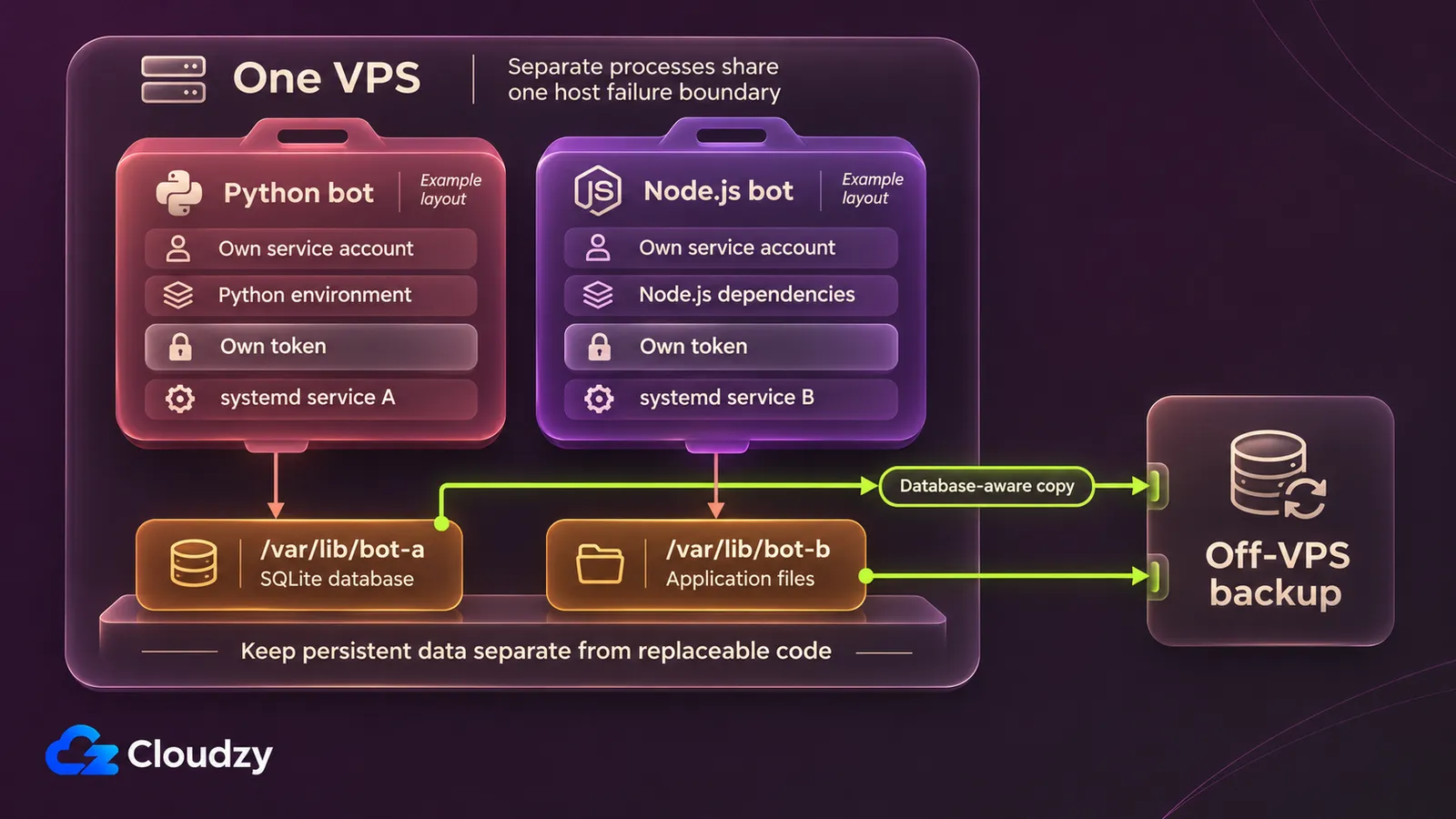
A Python bot and a Node.js bot can occupy one VPS while keeping separate dependencies, tokens and data paths. Give each an independent execution environment and restart target. Root access lets you configure the host; the application processes themselves need not run as root. Separate them deliberately before adding more bots.
For a hypothetical layout, put Python bot A's code under /srv/bot-a with its own Python environment. Put Node.js bot B's code and dependency installation under /srv/bot-b. Give each a separate configuration file or secret reference containing only its own token. Choose distinct application data paths such as /var/lib/bot-a and /var/lib/bot-b, and grant each service account access to the paths it needs. These are proposed names, not an installation procedure.
Containers are another way to separate dependencies. Docker's resource constraints documentation states that containers have no resource limits by default. Set deliberate memory and CPU constraints after observing the workload, so one bot cannot consume an uncontrolled share of the host's budget.
Measure the bots together, including the OS, local database and logging. Include installation, build and restart peaks; an idle reading misses the period when both applications become busy. The baseline tools a VPS needs provide a starting point for maintaining and observing the host. Choose capacity from those measurements, not a bots-per-GB promise or guild count alone. Both processes still share one host failure boundary.
Keep Bot Data Through Redeployment
A SQLite file written inside a container's writable layer disappears when that container is removed. Docker's volume lifecycle documentation explains that a retained volume exists independently of the container using it. Put durable bot data in a deliberately retained volume or host path, with its location recorded before redeployment.
Separate replaceable code from the database, uploaded files and other state the bot must retain. Record which process writes each location and which deployment operations remove it. A retained volume survives replacing a container; explicitly deleting that volume is a different operation. Set a log-retention limit as well, so accumulated output does not consume the disk space reserved for application data.
Persistence keeps the working copy available across a deployment. Backup requires a separate recoverable copy. For a live SQLite database, select a database-aware method such as the documented SQLite Online Backup API. It copies an online database into another database file. A provider disk snapshot alone does not prove that the application state can be recovered correctly.
Keep a backup copy outside the VPS's failure boundary and record how to restore it. Restore into an isolated destination first, then inspect the expected records and files. Check a known piece of saved bot state, such as a configured channel or stored setting. Keep the restored test copy from connecting with production credentials. A completed backup job is useful evidence only alongside a successful restore check.
Check Recovery Before Moving Every Bot
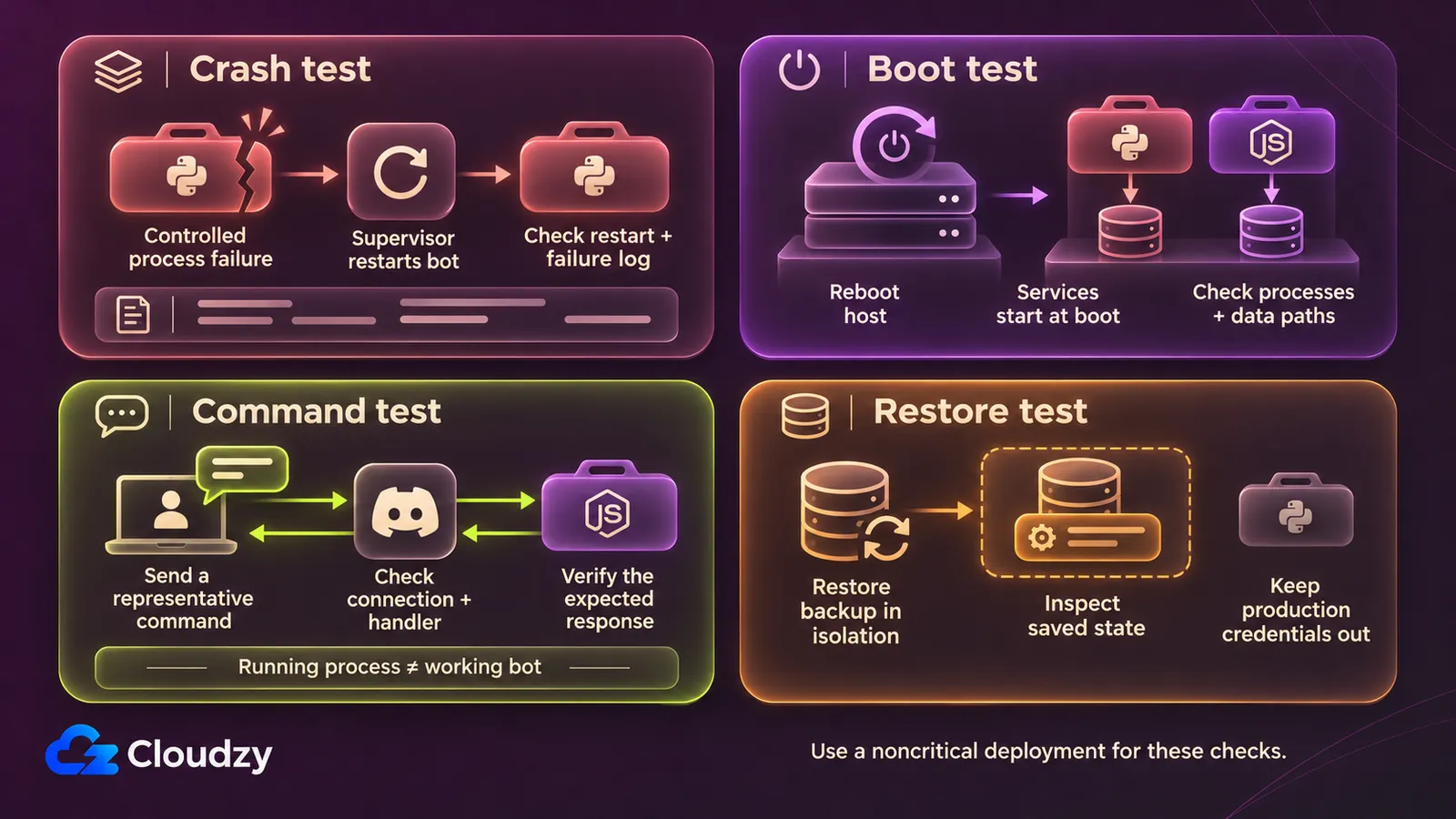
A bot can have a live process and still fail to answer a Discord command. Choose one supervisor for each process, configure its failure and boot behavior, then test the application response separately. Native services, PM2-managed Node.js processes and Docker containers have different recovery settings; a restart policy alone does not establish bot availability.
For native services, the systemd service manual describes Restart=on-failure for qualifying failures, including a nonzero exit. Configure boot startup separately. With Node.js, PM2's startup documentation requires startup integration and a saved application list for reboot recovery. Refresh that integration after changing the Node.js version.
Docker's restart policy documentation distinguishes unless-stopped, which preserves intentional stops across daemon restarts, from on-failure, which does not restart containers when the daemon restarts. Let Docker supervise its containers; avoid having a host process manager compete to restart the same container.
Discord's Gateway connection documentation requires heartbeats and handling disconnections on its persistent WebSocket connection. The application or its library must reconnect appropriately. An infrastructure uptime figure cannot confirm that this connection is healthy, or that a bot's command handler works.
Before moving every bot, run this proposed acceptance check with a noncritical deployment:
- Cause a controlled process failure. Confirm that the chosen supervisor restarts it and that retained logs explain the failure. Investigate repeated crashes before enabling an unattended restart loop.
- Reboot the host. Verify that the intended processes return, with the expected configuration and data paths.
- Check the Discord connection and run a representative command for each bot. Record the observed result, not only the process status.
- Carry out the isolated restore procedure above and confirm the expected application state.
Move the remaining bots after you have recorded those results and resolved any failed check.
FAQ
Discord's interaction method and your database's write pattern can change the deployment requirements.
Does Every Discord Bot Need a Persistent Connection?
No. Discord's interaction delivery documentation allows interactions through the Gateway or an HTTP webhook; the HTTP method needs no connected Gateway client. It still needs a reachable endpoint, and it does not replace every Gateway event. Choose the connection model around the events your application consumes.
Can Several Bots Write to the Same SQLite Database?
Yes, if their writes can take turns. SQLite's concurrency guidance permits multiple readers but only one writer at a time per database file. If simultaneous writers cannot queue, consider a client/server database. Choosing another VPS does not change SQLite's write-concurrency model.
Will a Faster VPS Fix Discord Interaction Timeouts?
Not necessarily. Discord's interaction response requirements require an initial response within three seconds; interaction tokens remain valid for 15 minutes for follow-ups. Check the application's response handling before changing hosts. Extra CPU or memory helps only when resource pressure contributes to the missed deadline.
Discussion
Comments
Sign in to join the discussion.