
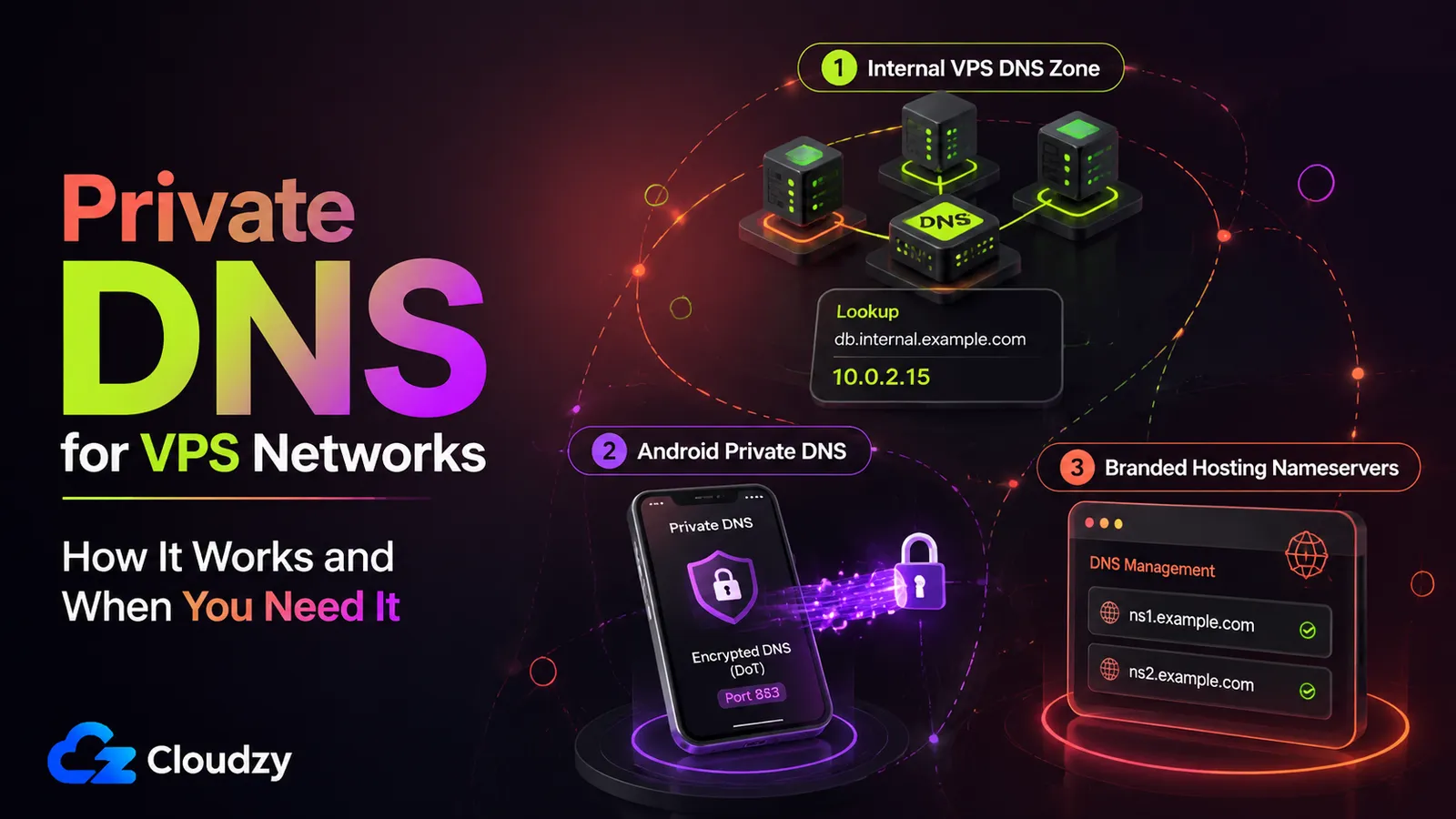
You spin up a third server, need the boxes to reach each other by name instead of by IP, and search "private DNS VPS." Three results come back and they do not agree. One is an Android setting that encrypts your phone's lookups. One is a cPanel guide for branding nameservers on a domain. One is an AWS document about private hosted zones. On July 20, 2026, Cloudflare shipped Internal DNS to general availability and described it as "sometimes also referred to as private DNS," so now the collision comes from infrastructure vendors too.
The term is overloaded. This article separates the different meanings, then focuses on the VPS-networking meaning: an internal DNS zone for server-to-server communication. By the end, you can identify which system you need, decide whether your fleet requires private DNS, and avoid common design mistakes.
TL;DR
- "Private DNS" names at least three unrelated systems: an internal DNS zone for a server network, Android's DNS-over-TLS encryption feature, and cPanel's branded nameservers. This article uses the term in the first sense: an internal DNS zone for a VPS network.
- A VPS private DNS zone is a network-scoped internal namespace that maps hostnames like
db.internal.example.comto private IPs. Its records are not published in public DNS. - For a handful of servers with stable IPs,
/etc/hostsis genuinely enough. An internal DNS server earns its keep once the fleet grows, IPs churn, or services need reliable name resolution. - For most production VPS networks, use a subdomain you own, such as
internal.example.com. Use the .internal namespace only for an isolated setup where cross-network name collisions, private-CA certificate management, and special DNSSEC handling are acceptable. Avoid .local, which mDNS reserves.
What This Article Doesn't Cover
This piece stays scoped to the VPS-networking meaning of private DNS. It does not cover unrelated consumer and hosting-brand uses:
- Configuring Android's Private DNS or DNS-over-TLS setting on a phone.
- Setting up cPanel private nameservers for a hosting brand.
- A full BIND 9, Unbound, dnsmasq, or CoreDNS installation walkthrough. Implementation here stays at reference depth, not step-by-step configuration.
- Encrypted consumer resolvers such as 1.1.1.1 or NextDNS, beyond disambiguating them from the networking meaning.
What Does "Private DNS" Actually Mean?
"Private DNS" is not one system. It names at least three unrelated ones: a network-restricted DNS zone that resolves internal hostnames inside a VPS or VPC network, Android's DNS-over-TLS encryption feature, and cPanel's custom-branded authoritative nameservers. This article covers the first, the internal zone your servers query to find each other. A fourth loose usage exists too: encrypted public resolvers marketed as "private."
The four meanings share a name and nothing else:
| System | What it is | Who uses it | What it does not do |
|---|---|---|---|
| Internal DNS zone (VPS/VPC) | A network-scoped namespace resolving internal hostnames to private IPs | VPS operators, DevOps teams, cloud platforms | Does not inherently encrypt queries or publish its records in public DNS |
| Android Private DNS | A DNS-over-TLS toggle that encrypts a device's lookups on port 853 (since Android 9) | Phone and tablet users | Does not create internal hostnames or a private zone |
| cPanel private nameservers | Custom-branded authoritative nameservers for a domain (ns1.yourbrand.com) | Web hosts and resellers | Does not create a private server-to-server namespace |
| Encrypted consumer resolvers | Public resolvers marketed for query privacy (1.1.1.1, NextDNS) | Individuals wanting lookup privacy | Does not, by itself, create an internal authoritative zone |
Cloudflare's Internal DNS general availability announcement is a current managed example of the first meaning, and one reason the collision is newly visible: an infrastructure vendor now uses "private DNS" as a synonym for internal DNS in its launch copy. The system it describes, a Gateway Resolver plus Internal Authoritative DNS for Enterprise customers, is the same category of system you build yourself on a VPS fleet, just managed.
Section takeaway: the main systems called "private DNS" share a label, not a function. Identify the meaning before following a setup guide.
How Does Private DNS Work on a VPS Network?
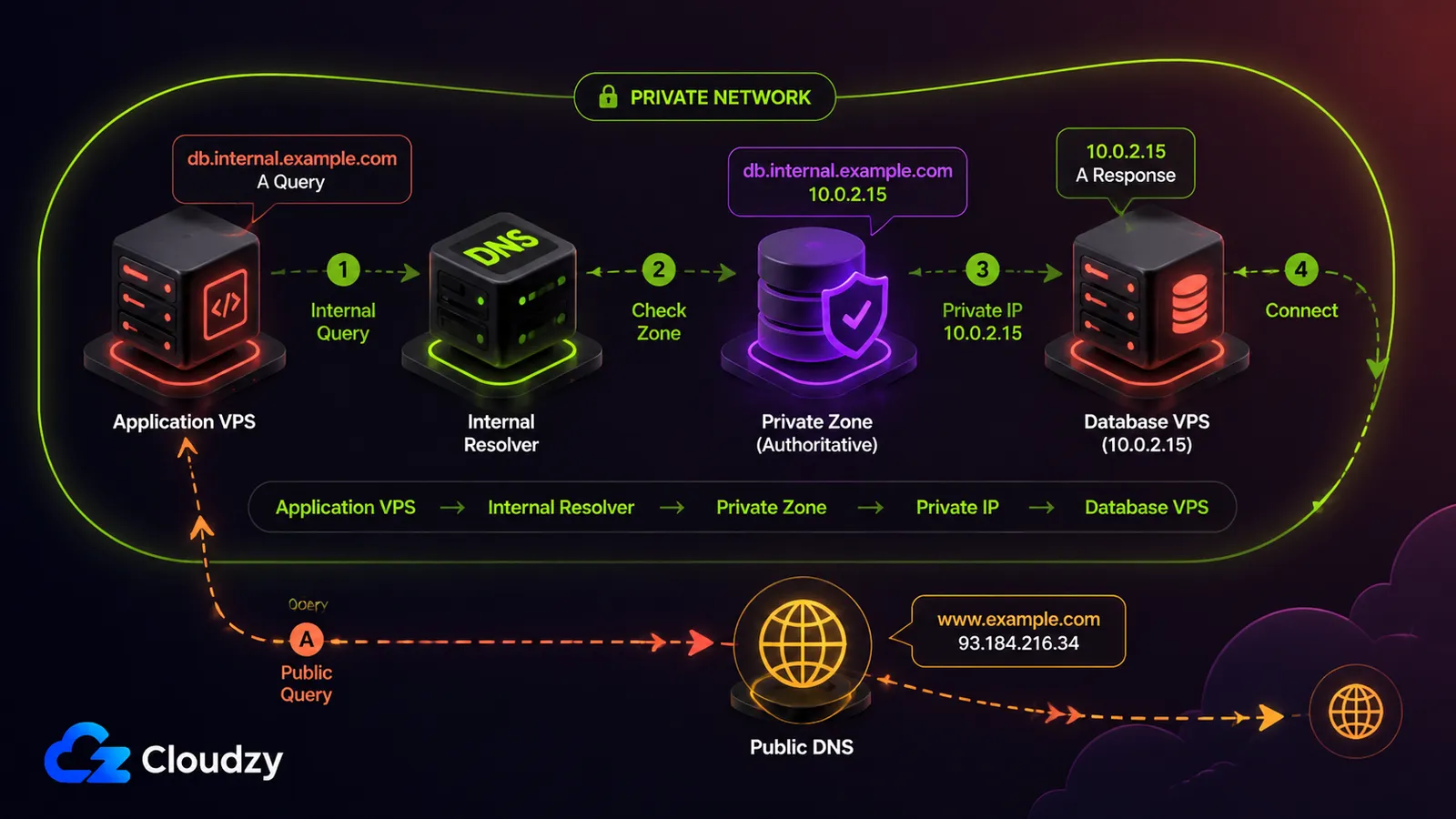
A VPS private DNS zone is a network-scoped namespace served by a resolver your servers are configured to use. It maps internal hostnames such as db.internal.example.com to private IPs in a range you control. The records are not published in public DNS, although the queries may travel through a private tunnel or a managed DNS control plane before reaching the resolver. That separation is the core private-DNS-vs-public-DNS distinction: the protocol is the same, but the zone's visibility and access scope are different.
Three parts do the work. An authoritative server or zone source holds the internal zone and its records. A resolver answers the queries your servers send. And the zone's A and AAAA records map internal hostnames to private addresses, so app.internal.example.com resolves to the app tier and db.internal.example.com resolves to the database. Other record types can provide aliases or service information. When the zone and resolver path are configured correctly, the resolver answers the internal query locally instead of sending it toward the public DNS root.
The cloud platforms scope this to the network rather than the machine, which is a useful reference model. AWS Route 53 private hosted zones only work when the VPC has both enableDnsHostnames and enableDnsSupport set to true, and the resolver answers from the private zone for any VPC you associate with it. Google Cloud private zones are scoped to authorized VPC networks, and in the standard VPC resolution order they are checked before public DNS unless an outbound server policy changes the path. Read those as illustrations of the pattern, not as platform tutorials: a self-managed internal DNS server is the same idea, run on your own VPS.
Keeping the zone out of public DNS is only half the job. Bind the DNS service to a private interface or restrict UDP and TCP port 53 to your private network or VPN. Do not expose recursive service to the public internet; an open resolver can be abused in DNS amplification attacks.
Private and public zones use the same DNS record and caching model. Records carry a TTL, and caching resolvers normally reuse an answer until that TTL expires, although resolver-specific settings can change the effective cache time. That behavior is covered in our guide to pointing a domain to a VPS, including DNS propagation and TTL basics, so it is not re-explained here.
When Does Your VPS Network Actually Need Private DNS?
For two or three static servers, /etc/hosts is genuinely enough. An internal DNS server earns its keep when the fleet grows, IPs change regularly, or applications need reliable service discovery. The exact trigger is operational complexity, not a fixed server count.
/etc/hosts is a static hostname-to-IP map that already exists on every Linux box. It needs no daemon or zone file, but stale or inconsistent copies are real failure modes. Add each server's private IP to the file, keep the copies synchronized, and the boxes can find each other by name. For a small, stable fleet that is the correct answer, and reaching for BIND 9 instead just adds a daemon to maintain for no gain.
It stops scaling in three situations. When you add and remove servers frequently, keeping a static file consistent across every host turns into manual toil. When IPs change, through autoscaling, rebuilds, or provider reassignments, the file goes stale silently. And when containers or isolated runtimes do not inherit the host's entries, the mapping stops being universal. Any one of those is the real trigger. The number of servers alone is a rough proxy, not the actual signal.
Section takeaway: the trigger is operational churn, not server count. A frozen ten-box fleet can live on /etc/hosts; a three-box fleet that rebuilds nightly probably should not.

Build on a Linux VPS with root access, NVMe, and AMD EPYC power.
View Linux PlansWhich DNS Server Should You Run: BIND 9, Unbound, dnsmasq, or CoreDNS?
Pick by the shape of your fleet. dnsmasq suits small networks that want lightweight DNS and, where relevant, DHCP from the same daemon. Unbound is a lean validating recursive resolver that can also answer a modest local zone. BIND 9 provides broad authoritative and recursive capabilities with the widest configuration surface. CoreDNS fits container and Kubernetes fleets where DNS is part of service discovery.
| Tool | Role | Best for | Trade-off |
|---|---|---|---|
| BIND 9 | Full authoritative and recursive | Fleets needing broad DNS functionality and extensive reference material | Broadest configuration surface and the most operational complexity |
| Unbound | Recursive or forwarding resolver with local-zone support and DNSSEC validation | Small fleets needing recursion plus a modest static internal zone | Local-zone data is simple; complex authoritative behavior is better handled through an auth-zone or a dedicated authoritative server |
| dnsmasq | Lightweight DNS and DHCP together | Small static fleets, or LAN-style networks that also need DHCP | Fewer features as the fleet and zone grow |
| CoreDNS | Plugin-based DNS server | Container, Kubernetes, and service-discovery-heavy fleets | Flexible, but behavior depends on the plugin chain you configure |
The selection logic is short. If you need a small resolver backed by a hosts-style file, or you already hand out DHCP leases, dnsmasq removes a moving part. If you mostly need a validating resolver that forwards outward and answers a modest internal zone, Unbound provides that narrower feature set without a full BIND 9 deployment. If you need full authoritative control, delegation, and the largest body of documentation to lean on at 3am, BIND 9 is the conservative pick despite the wider configuration surface. If DNS is already part of a container or Kubernetes service-discovery stack, CoreDNS meets it where it is. The rule of thumb is to run the smallest thing that covers your fleet's shape.
For a production fleet, do not make one DNS instance the only path to every internal name. Run at least two DNS instances that can answer the zone, place them on separate failure domains where practical, and configure clients to reach both. Otherwise, one DNS outage can make healthy services look dead.
How Should You Name Your Internal Domain: .internal, .local, or a Subdomain?
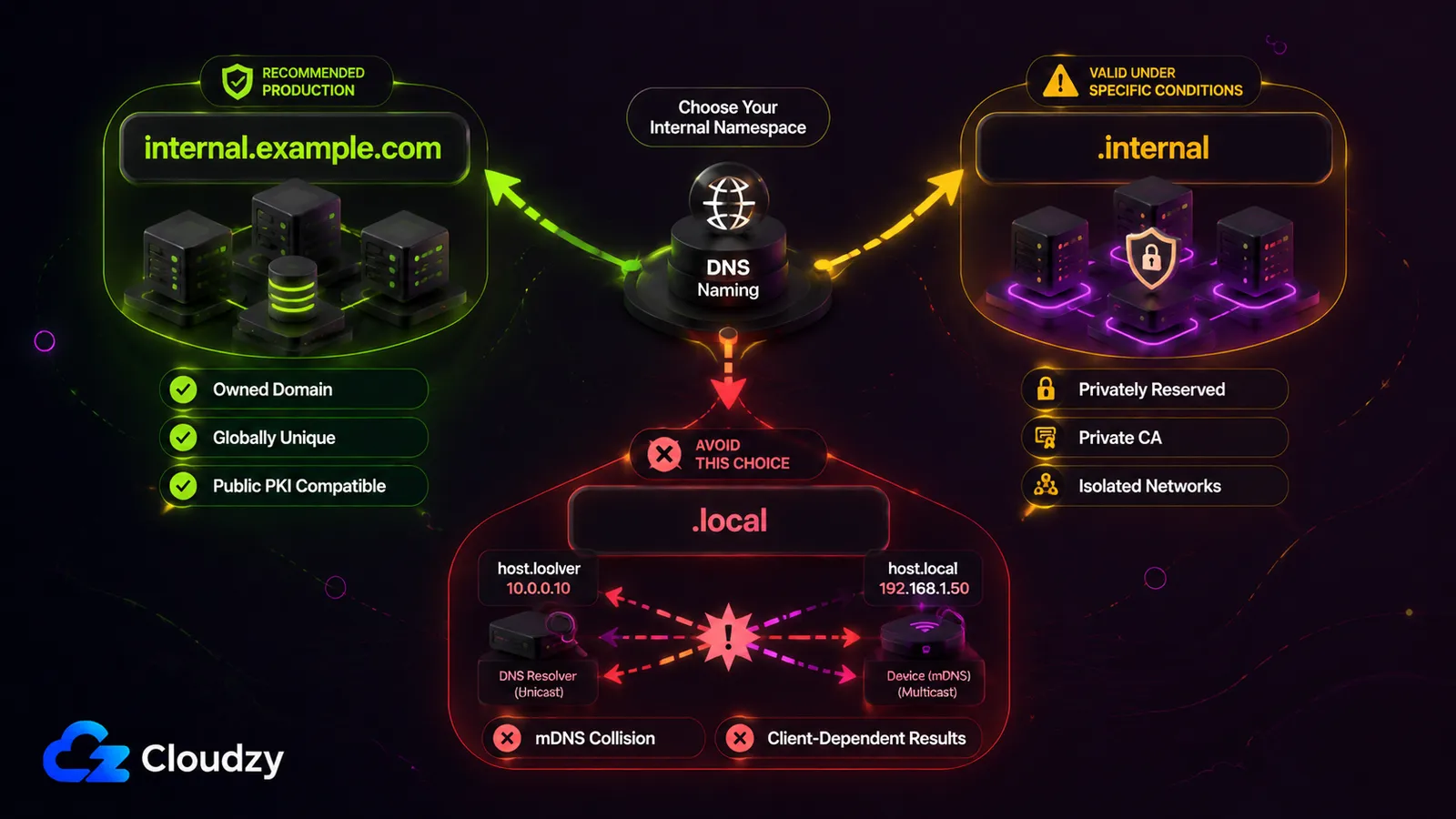
For most production VPS networks, use a subdomain you own, such as internal.example.com. Use the .internal namespace only for an isolated setup where cross-network name collisions, private-CA certificate management, and special DNSSEC handling are acceptable. Avoid .local, which mDNS reserves.
The .local problem is concrete. RFC 6762 gives names ending in .local special handling for Multicast DNS, so a unicast BIND 9 or Unbound zone using the same suffix can conflict with mDNS behavior on Apple devices and other mDNS-enabled systems. Use a different namespace rather than relying on client-specific workarounds.
Pro Tip
If you inherited a .local internal zone, treat it as technical debt. Some clients send .local queries to mDNS rather than your unicast DNS server, which can produce client-dependent or intermittent-looking failures.
ICANN's Board permanently reserved .internal from delegation in the public DNS root in July 2024, following an earlier SSAC recommendation. Names under it will not resolve through the global DNS by design. That comes with trade-offs: .internal names are not globally unique, public certificate authorities are not expected to issue certificates for them, and DNSSEC-validating resolvers that rely on the global trust anchor will fail to resolve them. If you need HTTPS on .internal, plan to operate a private CA.
Keep two things distinct here. ICANN's reservation is final. A separate active Internet-Draft, draft-davies-internal-tld-06, was published on May 6, 2026 to document the namespace and compare it with RFC 1918 private addressing. It remains a work-in-progress Internet-Draft rather than a published RFC, so describe .internal as an ICANN-reserved private-use TLD, not an IETF standard.
For most VPS fleets, a subdomain of a domain you control is the safer default. ISC recommends a subdomain hierarchy, such as an internal subdomain of your own domain, over maintaining separate and incomplete internal and public versions of the same parent zone. That preference is not stylistic; it prevents the failure in the next section.
Section takeaway: the namespace decision is long-lived. A subdomain you control is the default for most production environments because it preserves global uniqueness and works with public PKI. Use .internal when an isolated private namespace is the better fit and you accept its DNSSEC, certificate, and collision trade-offs.
Split-Horizon DNS and the Mistakes That Break It
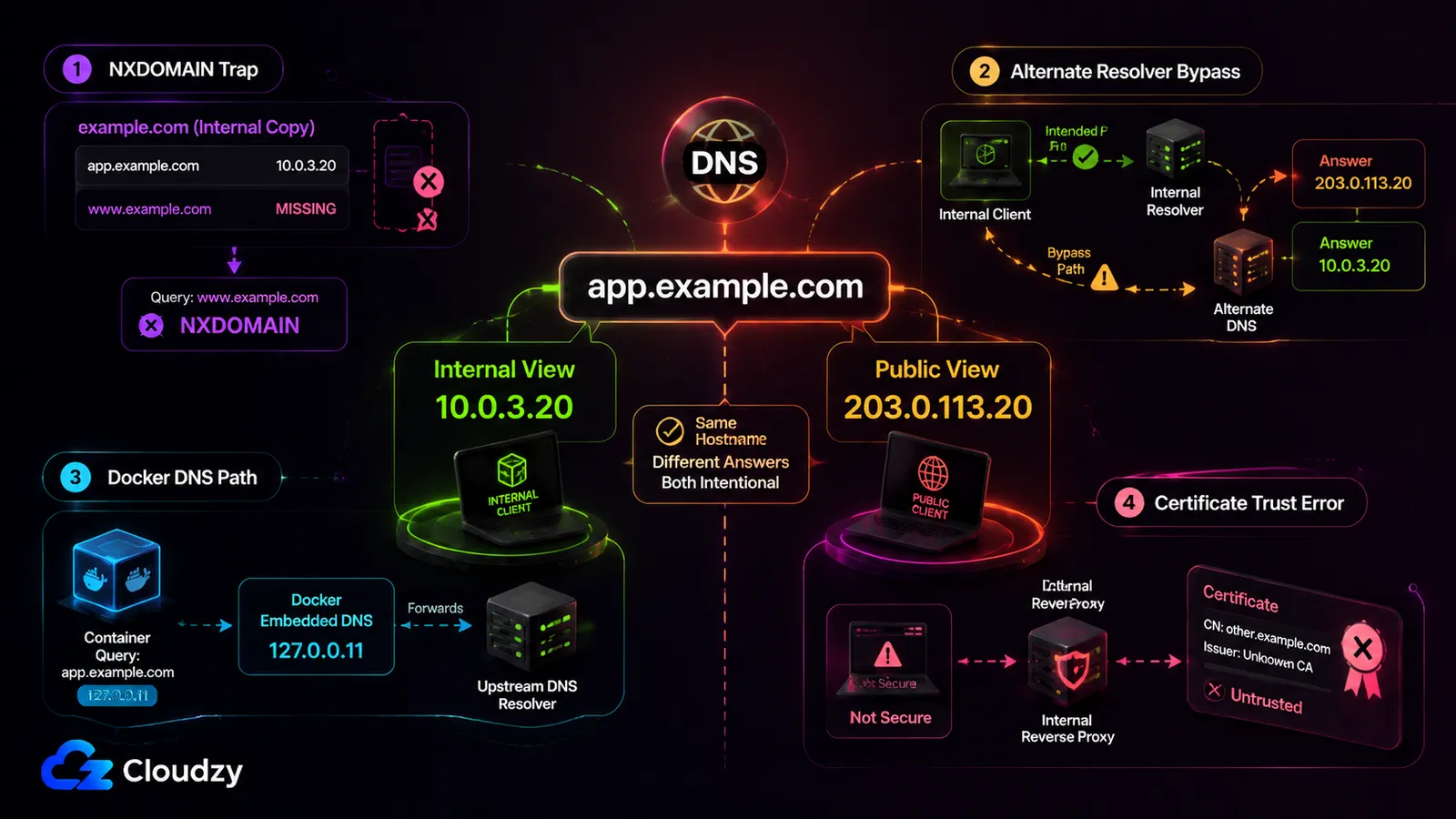
Split-horizon DNS serves the same hostname a different answer depending on who asks: the private IP internally, the public IP externally. It breaks most often through the same-domain NXDOMAIN trap, alternate resolvers that bypass the intended view, and container DNS paths that do not reach the expected upstream. Getting it right depends on three things at once, not one.
The NXDOMAIN trap is the failure ISC warns about directly. If your internal servers are authoritative for the parent domain, but their version of the zone does not contain a public record such as the www host, an internal client querying that name receives NXDOMAIN even though the public zone contains it. The internal zone is authoritative and does not fall back to public DNS for the parent domain. This is exactly why the subdomain-hierarchy approach from the naming section is ISC's preferred design.
Pro Tip
Before pointing your servers at a same-domain split-horizon setup, test a lookup for a known public name in that domain from inside the network. An NXDOMAIN answer for a name that resolves fine externally is the signature of this trap.
Three more pitfalls are easy to miss. An alternate resolver configured on a host or container can bypass the split; depending on the resolver implementation, it might be queried after a timeout or in parallel, so answers can vary. Containers on Docker's default bridge receive a copy of the host's DNS configuration when they start, while containers on custom networks query Docker's embedded resolver at 127.0.0.11. That resolver forwards external lookups to the DNS servers configured for the host or container, so split-DNS behavior depends on the Docker and host configuration rather than on the container's own resolver file alone. If an internal service sits behind a reverse proxy such as Nginx Proxy Manager, certificate validation can fail when the certificate does not cover the requested hostname or its issuing CA is not trusted by the client. Merely using a different certificate internally is not itself an error. These are configuration gaps, not tool bugs.
Remote clients can hit the same failure when a self-hosted VPN does not push or route DNS queries to the intended internal resolver.
There is also a security dimension. If internal hostnames and private IPs leak into public DNS records, you have exposed part of your internal naming and addressing scheme to anyone who queries it. Split-horizon exists partly to keep that map internal, and a misconfigured public zone quietly undoes that.
Section takeaway: split-horizon's failures are configuration traps, not tool defects. Correctness depends on naming discipline, knowing which resolver each client actually queries, and scoping the zone properly, not on any single setting.
Conclusion: Choosing the Right Private DNS Design
You can now identify which "private DNS" system you actually mean. For VPS networking, it is the internal DNS zone rather than Android's DNS-over-TLS setting or branded authoritative nameservers. If your fleet is small and stable, /etc/hosts is a defensible choice. If it is not, use a subdomain you own as the default namespace, choose the smallest DNS server that fits the fleet, and keep access, redundancy, and internal-versus-public zone scope explicit. Use .internal only when an isolated namespace fits better and you accept its certificate, DNSSEC, and collision trade-offs.
Frequently Asked Questions
Is Android's Private DNS the same as a private DNS server on a VPS?
No. Android Private DNS is a DNS-over-TLS feature (query encryption on port 853, added in Android 9) that protects a device's lookups in transit. A VPS private DNS server resolves internal hostnames to private IPs across a network. One encrypts queries; the other creates an internal namespace. They solve unrelated problems.
What is the difference between private DNS and public DNS?
Private DNS makes a zone available only to authorized clients on a particular network, VPN, or cloud environment. Public DNS publishes records that internet resolvers can query. Both use the same DNS record types and caching model; the difference is who can reach the zone and where its records are visible.
What is the difference between private DNS and encrypted DNS?
Encrypted DNS protocols such as DoT and DoH protect DNS queries in transit. Private DNS in the networking sense creates a network-scoped namespace for internal names. Encryption changes how a query travels; a private zone changes which names exist and who can resolve them.
Is .internal safe to use for internal hostnames?
Yes, with caveats. ICANN permanently reserved .internal from public delegation in July 2024, so you can serve it on a private resolver. However, it is not globally unique, public certificate authorities are not expected to issue certificates for it, and DNSSEC validators relying on the global trust anchor will fail to resolve it. For most production VPS networks, an owned subdomain is the safer default.
Do private DNS records use the same TTL and caching as public DNS?
Yes. Private and public zones use the same TTL-based caching model: records carry a TTL, and caching resolvers normally reuse an answer until that value expires. Resolver-specific settings can still change the effective cache time. See DNS propagation and TTL behavior for the underlying mechanics.



Discussion
Comments
Sign in to join the discussion.