

A price-monitoring script that checked a few hundred product pages every night ran cleanly for months. Then the frequency went up, a second retailer was added, and the logs filled with 429 responses and CAPTCHA pages. The usual forum answer is to use a rotating proxy. The belief behind it (more IP addresses, fewer blocks) is half right.
A rotating proxy sends your requests out through a changing set of IP addresses behind one fixed gateway address. That spreads traffic thin enough to stay under a limit counted per IP. But the address can also change in the middle of a login, and a logged-in session often fails to survive that. Rotation fixes one problem and creates another.
The Short Version
- A rotating proxy is one gateway address (a host and port) that forwards each request through an exit IP picked from a pool, and a rotation rule decides when that exit IP changes.
- Rotating on every request suits stateless jobs like fetching public pages; for logins and carts, prefer a sticky session or static proxy, especially when the site checks IP continuity.
- A pool can rotate as configured and still fail, because shared exit IPs carry a reputation that other customers draw down; pool size says little about whether requests get through, while how fresh and lightly shared the addresses are says more.
- Rotation does nothing against a limit keyed on your account, token, or cookie; for a low-volume job, the first fix is slowing down and honoring the
Retry-Afterheader, which says how long to wait.
What Is a Rotating Proxy?
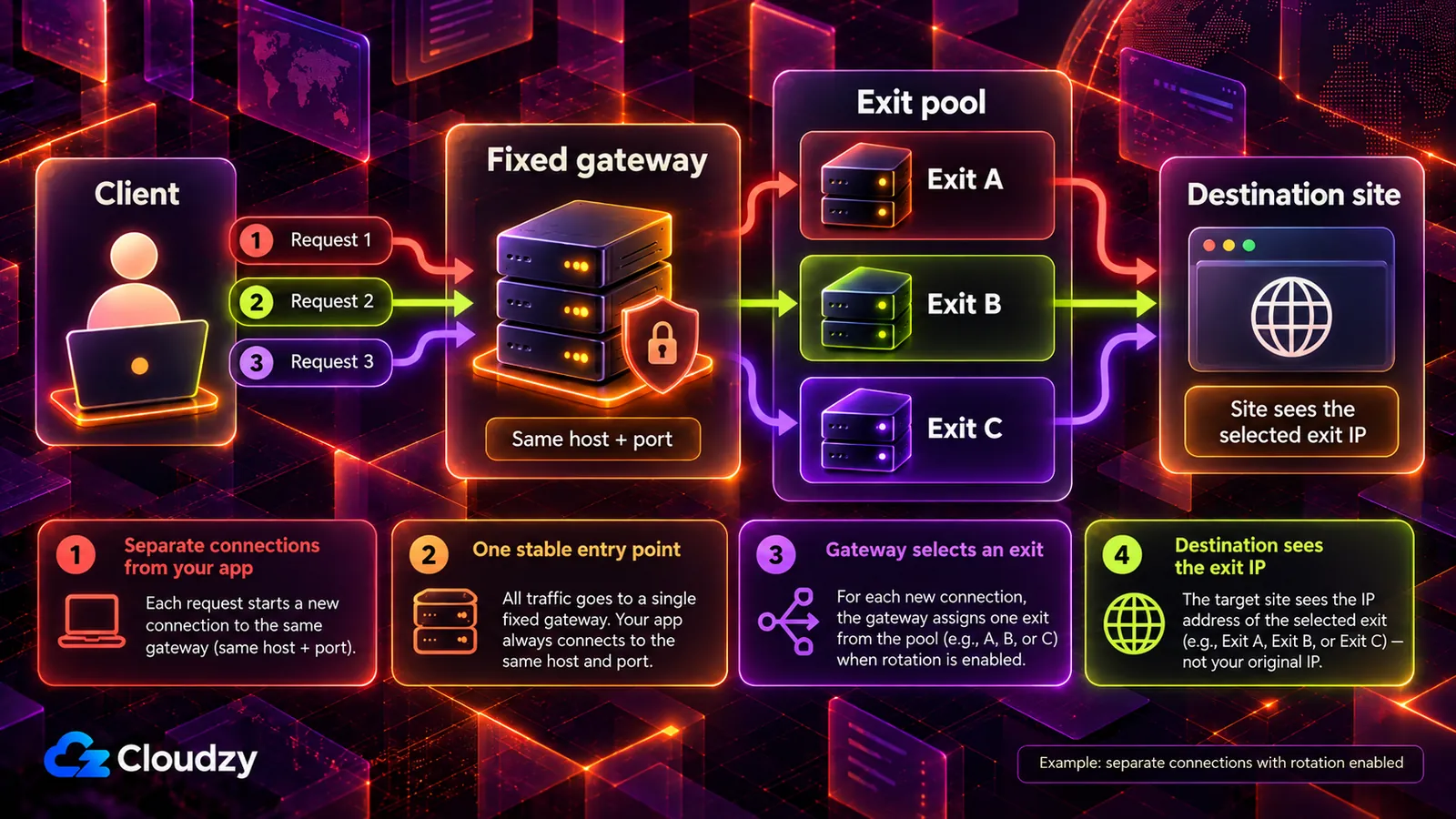
A rotating proxy is one gateway address that forwards each request through an exit IP chosen from a pool, while a rotation rule decides when that exit IP changes: every request, on a timer, or per session. You always connect to the same host and port. The gateway picks which address the destination sees.
Follow one request through the gateway:
- Your client sends the request to the gateway's host and port, the same address every time.
- The gateway applies its rotation rule and picks an exit IP from the pool.
- The request leaves from that exit IP and reaches the destination site.
- The destination sees the exit IP as the address the request came from. Your own address stays out of view unless the gateway passes it along in a forwarding header such as
X-Forwarded-For.
The pool, the health checks on its addresses, and the failover when one of them dies all live on the provider's side, so your script only ever knows one host and port. That convenience is why rotation is sold as a service. But running your own proxy does not get you rotation for free: a single proxy you run yourself normally gives you one stable exit IP, and the pool is the part you would be paying someone else to hold.
Vendors call the gateway-plus-pool arrangement a backconnect proxy. MDN's guide to proxy servers lists "gateway" as another name for a forward proxy, and it is the plainer word. What kind of addresses sit in the pool (residential, datacenter, or mobile) is a separate question from how often they change.
What Decides When a Rotating Proxy Changes Your IP?
A rotating proxy changes your exit IP according to its rotation rule. Rotation options depend on the provider: a new exit IP per request or connection, a fixed time window, or an explicit rotation command. Your client or a proxy manager may also rotate before retrying a failed or blocked request. Check what ‘per request’ means: several HTTPS requests can share one tunnel and therefore one exit IP. A gateway forwarding encrypted HTTPS cannot normally read the destination’s status code to trigger rotation itself.
| Rotation Trigger | What It Costs You |
|---|---|
| Every request | Prioritizes spread over IP continuity. A search and the request for page two of its results can leave from two unrelated IPs. |
| Every N requests | Groups a few requests per address, but the switch is a counter, so it can land between step three and step four of a five-step sequence. |
| On a timer | Holds the exit IP for a fixed window, then switches on the clock, possibly in the middle of a multi-step action. |
| On failure | Retries a blocked or 429'd request from a new IP. Resilient, but a job can quietly burn through addresses on a target that refuses them all. |
Read the table as an allocation decision. Spread keeps each address under a site's per-IP threshold; continuity lets the site recognize a run of requests as one visitor. Per-request rotation allocates everything to spread. The on-failure rule looks like the resilient middle ground, but in reality it hides its costs best, since the logs show a success on retry until nothing succeeds. One more rule reverses the trade by holding a single exit IP for a set window: the sticky session.
How Is a Sticky Session Different From Rotation or a Static Proxy?
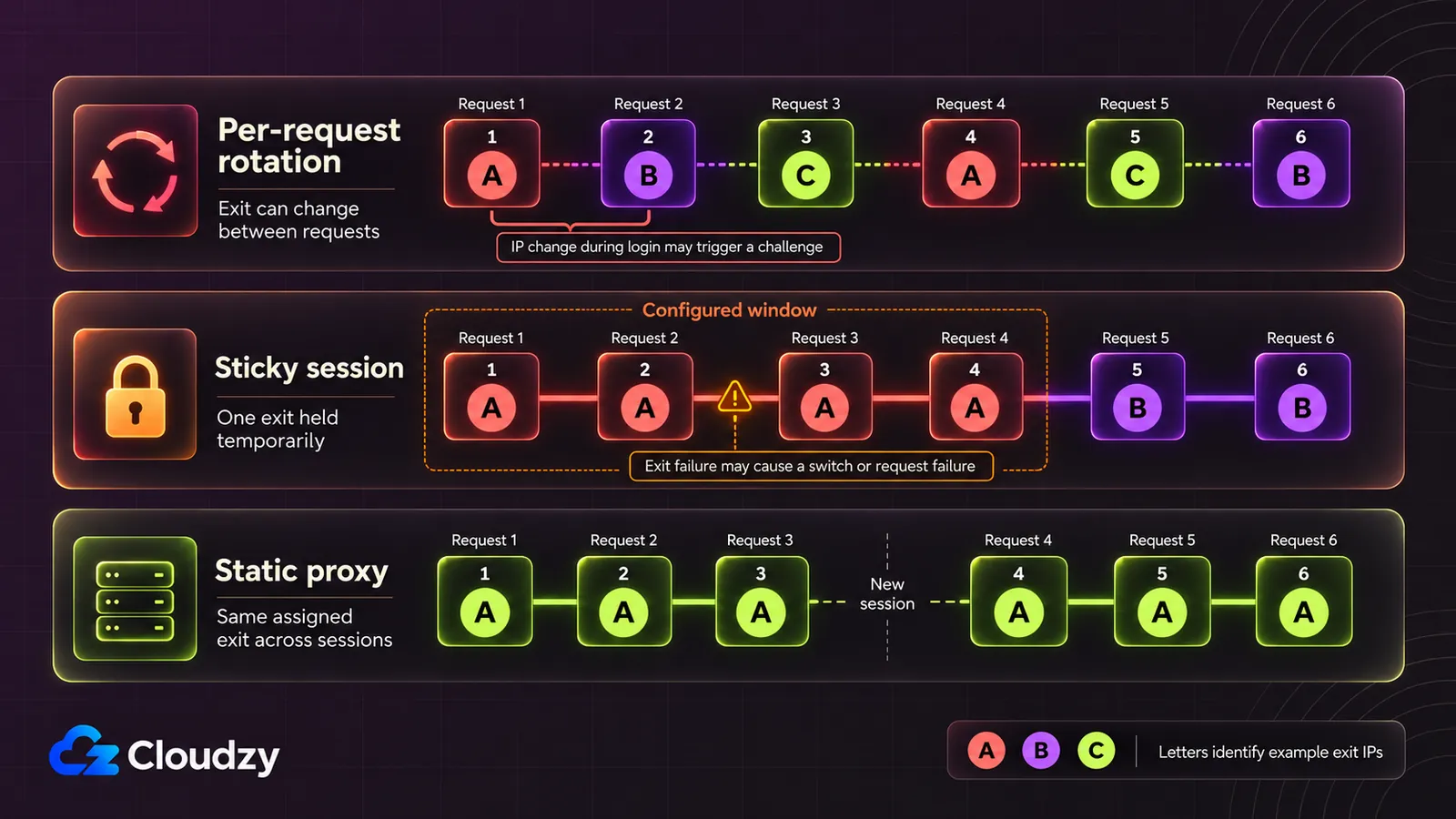
A sticky session holds one exit IP from a rotating pool for a limited window, so a run of requests looks like one visitor, then releases it. A static proxy gives you one fixed IP for as long as you keep it. Per-request rotation holds nothing. The right one depends on whether the site must recognize you across requests.
| Feature | Per-Request Rotation | Sticky Session | Static Proxy |
|---|---|---|---|
| When the Exit IP Changes | Per request or connection, depending on the provider | After a set window, when you end the session, or if the exit fails | Normally stays fixed while assigned |
| Does a Session Survive? | May fail if the site checks IP continuity | Can survive while the IP holds; not guaranteed | Can survive; other session checks still apply |
| How Requests Spread | Across the whole pool | One IP per session, many sessions in parallel | Everything on one IP |
| Fits | Stateless fetches of public pages | Multi-step flows needing minutes of continuity | Account work needing one identity for days |
| Main Risk | Can disrupt stateful flows | The session ends mid-task if the window is too short | One IP absorbs every rate limit and block |
Per-request rotation is the default for stateless fetches; for anything that logs in, the choice narrows to the two holding options, and duration decides between them. A sticky session is borrowed from the shared pool and goes back when the window closes. But a static proxy stays yours, and an account signing in from the same address every day is what a returning user looks like to the site. Sticky windows are a product setting each provider sizes differently, so check the window against the longest sequence your job runs. Also check what happens if the exit goes offline: some providers switch to another IP before the window expires, while strict single-IP modes fail the request instead. A long enough window alone does not guarantee continuity.
When Does IP Rotation Break a Job?
IP rotation can break a job when the exit IP changes inside a flow the site must remember: logins, 2FA prompts, carts and checkouts, multi-step forms. A session cookie does not inherently stop working when the IP changes. But a site that binds sessions to IPs or checks network changes for fraud may respond with a logout, a fresh challenge, or a flag.
None of this is a site singling out proxies; I read it as the site doing its job. A session cookie is a claim that says "this is the same browser that logged in a minute ago," and the connecting IP is one of the pieces of evidence the server can check that claim against. An authenticated session that jumps networks halfway through looks, from the server's side, like a stolen cookie replayed from somewhere else, the scenario anti-fraud systems exist to catch. The logout and the 2FA prompt are proportionate responses to that pattern.
OWASP’s session-management guidance describes checking client properties such as IP address and User-Agent for changes during a session. Depending on the site’s controls, an unexpected change can trigger an alert or session termination.
The test that sorts a job is one question: does the site need to remember you between this request and the next? If it does, hold one IP for that flow. If it does not, rotate. A nightly price check across public product pages answers no. A job that signs in to a dashboard to export reports answers yes, and belongs on one exit IP from start to finish.
Pro Tip
Split mixed workloads into two setups: a rotating pool for stateless data pulls, and a sticky or static IP for the login and anything done while signed in. The two jobs want opposite things from an exit IP, so they should not share one rotation rule.
Why Does a Rotating Proxy Pool Stop Working After a Few Days?
A rotating proxy pool can stop working while rotation runs as configured, because rotation changes which IP you use, not how that IP is regarded. Every address in a shared pool carries a reputation built by everyone who used it before you, and heavy reuse against the same sites gets addresses flagged, so success rates fall.
A shared pool behaves like any common resource with a finite supply. The pool's standing with the sites it visits is that supply, and every customer routing traffic through it draws the standing down. When other customers point the same addresses at the sites you target, the cost shows up as CAPTCHAs and blocks on your requests. In support work, I have seen IP reputation behave like an ecosystem of sites and blocklists, each reacting to what it has seen come from an address.
That is why pool size, the easiest number to print on a pricing page, predicts less than it seems. Whether an exit IP gets through depends on:
- How recently it was used against the same target. An address another customer's job sent to that site an hour ago arrives already counted.
- How many customers share it. The more jobs route through one address, the faster it wears out.
- How varied the pool's networks are. Addresses concentrated in a few network ranges can be blocked together by one range-level rule.
- Whether it is already flagged. A pool that keeps burned addresses (IPs a site has already marked as abusive) in rotation hands them out like any other.
A heavily reused large pool can perform worse than a smaller one whose addresses are fresh against your targets. Compare success rates against your own targets over time; an early successful test does not establish sustained performance.
Do You Need a Rotating Proxy at All?
A rotating proxy may help distribute requests under an IP-based limit, but it does not replace honoring the target’s limits and retry instructions. Per MDN's 429 reference, limits are typically IP-based but can follow a user or application once requests are authenticated or carry a cookie. An account-keyed limit ignores new IPs; a low-volume job should first honor the Retry-After wait.
The standard behind the response is RFC 6585, which defined the 429 status code. It says a 429 may include a Retry-After header indicating how long to wait before making a new request, and it leaves open how the server identifies the user or counts requests. Its own example is that a server "might identify the user by its authentication credentials, or a stateful cookie."
That leaves three cases where a rotating proxy is the wrong purchase. The first is a limit keyed on your account, API token, or cookie: rotation spreads requests across addresses while every one still draws from that account's allowance, so the 429s keep coming. The second is a job small enough to slow down. A nightly check of a few hundred pages can space out requests, wait out the Retry-After interval, and retry with exponential backoff at no cost. The third is the logged-in job that needs a stable identity and wants one fixed exit IP.
Rotation earns its place when the limit is keyed on the IP, the job's value depends on volume, and each request stands alone within the target’s permitted usage. Two caveats apply even there. Rotation changes which address the site sees, and the site's terms of service still apply to whatever arrives from it. And sites also judge signals other than the address, such as how the client identifies itself at the connection level and how its requests are paced, so rotation alone does not guarantee access.
Before paying for any pool, check the target’s rate-limit documentation and response headers. If comparable authenticated requests get 429s while unauthenticated requests from the same address succeed, that suggests an account- or authentication-related limit, but does not prove it. If both get 429s, the limit could be IP-based, per resource, or server-wide. Keep the endpoint and request rate comparable, and honor Retry-After before testing again.
Frequently Asked Questions
Is a Rotating Proxy the Same as a VPN?
No. A VPN usually routes a whole device's traffic through an encrypted tunnel to one server, and the exit address holds for the life of that connection. A rotating proxy is set per application or per request and switches its exit IP by rule, so one script can leave from many addresses.
Does a Rotating Proxy Make You Anonymous?
Not fully. A rotating proxy hides your IP from the destination site, not from the proxy provider, whose gateway relays your requests and sees your address and the sites you connect to. And once you log in or send a stored cookie, the site knows you by that account or cookie, whatever exit IP you arrive from.
Can a Website Block a Rotating Proxy?
Yes. Blocking one address at a time may fail against a rotating pool, as the operator in a Hacker News thread about a proxy-mirrored site found: "That doesn't work as they are rotating the IP from which the request is coming." Replies there moved to blocking entire networks and address ranges, and a site can also run a WAF that judges request patterns on top of per-address rules.
How Often Should You Rotate Proxy IPs?
There is no universal interval, because the right pace depends on each target's per-IP limit. For stateless requests, rotate only as often as that limit requires; inside a session that has to persist, such as a login or a checkout, do not rotate at all.



Discussion
Comments
Sign in to join the discussion.