

In a Hacker News thread on AI crawler traffic, a hosting admin described the load from the operator's side: "about 6 different pretty aggressive AI bots" that periodically get stuck on product-variant or category pages and start hitting them at roughly one request per second, on a site where "each page load can take a full 1s round trip (most of that spent in MySQL)." The cumulative effect, in the same comment: "close to having a site get Slashdotted every single day."
Preparing your website for AI agents is a capacity problem before it is anything else, so most of the work here is server configuration and very little of it is content strategy. The useful property of this traffic is that most of it isn't anonymous: the companies generating it publish their crawler names, document what each one is for, and tell you how to switch them off. What follows is what to configure, what each mechanism enforces in practice, and the two steps I would skip: publishing an llms.txt, and adding schema markup for AI.
TL;DR
- AI traffic commonly falls into training, AI search indexing, and user-triggered fetches. OpenAI and Anthropic expose separate tokens for those purposes, so you can control them independently; some multi-purpose crawlers combine roles under one identity.
- OpenAI, Anthropic, Perplexity, and Common Crawl document robots.txt controls for their automatic crawlers. User-triggered fetchers are the exception: Anthropic applies robots.txt to Claude-User too, OpenAI says the rules may not apply to ChatGPT-User, and Perplexity-User generally ignores them.
- The robots.txt file is a consent mechanism, not access control. RFC 9309 gives it no enforcement of its own; compliant bots can reduce your load by honoring it, but it cannot throttle or stop noncompliant traffic.
- Across 137,210 domains in Ahrefs' analytics customer base, 97% of published llms.txt files received zero requests in May 2026. Publish one if you like; don't build tooling around it.
- Keep structured data where it supports classic Search features, but Google's documentation says no special schema or AI text file is required for its AI features.
- Server-render critical content if you want OpenAI, ClaudeBot, PerplexityBot, or CCBot to read it. Vercel found those crawlers do not render JavaScript; Gemini via Googlebot and AppleBot are exceptions.
- Enforcement beyond cooperative robots.txt rules lives at the reverse proxy, in a WAF you run yourself, or behind a proof-of-work challenge, in that order of cost.
What This Article Doesn't Cover
This is about a site being visited by agents, not a site transacting with them. Four adjacent topics are left alone.
- Agentic commerce and checkout flows, a different problem for a different kind of site.
- The legal and copyright argument over training data, which is a business decision, not a server configuration.
- A WebMCP implementation walkthrough, since the standard is still an origin trial.
- CDN-specific configuration beyond the single Cloudflare section below.
Which AI Crawlers Are Hitting Your Site
GPTBot and ClaudeBot collect content that may be used for model training. OAI-SearchBot and Claude-SearchBot support AI search and retrieval. ChatGPT-User and Claude-User fetch pages in response to user actions. Those jobs are separate for some vendors, but not every crawler on the web maps neatly to one purpose.
The compliance picture is more precise than the shorthand suggests. Anthropic's crawler documentation says ClaudeBot, Claude-User, and Claude-SearchBot honor robots.txt. OpenAI's bot documentation says its automatic crawlers use independent controls, but robots.txt rules may not apply to ChatGPT-User because those requests are initiated by a person. Perplexity's crawler documentation makes a similar distinction: PerplexityBot follows webmaster controls, while Perplexity-User generally ignores robots.txt. So the blanket claim that AI bots ignore robots.txt conflates documented crawlers that honor the file with user-triggered fetchers whose behavior varies by vendor, plus scrapers that never identify themselves at all.
The table below is current as of writing. New tokens appear faster than any article can track them, so treat it as a starting map with a short shelf life.
| Crawler token | Operator | What it does | Respects robots.txt | How to verify identity |
|---|---|---|---|---|
| GPTBot | OpenAI | Collects content that may be used for model training | Yes | openai.com/gptbot.json |
| OAI-SearchBot | OpenAI | Surfaces sites in ChatGPT search results | Yes | openai.com/searchbot.json |
| ChatGPT-User | OpenAI | Fetches a page for a ChatGPT user action | May not apply | openai.com/chatgpt-user.json |
| OAI-AdsBot | OpenAI | Validates submitted ads and landing pages | Yes | openai.com/adsbot.json |
| ClaudeBot | Anthropic | Collects content that may contribute to model training | Yes | Shared list at claude.com/crawling/bots.json |
| Claude-User | Anthropic | Retrieves a page a Claude user asks for | Yes | Shared list at claude.com/crawling/bots.json |
| Claude-SearchBot | Anthropic | Indexes content to improve search quality | Yes | Shared list at claude.com/crawling/bots.json |
| PerplexityBot | Perplexity AI | Indexes and links sites in Perplexity results; not for foundation-model training | Yes | perplexity.com/perplexitybot.json |
| Perplexity-User | Perplexity AI | Fetches a page to answer a user question | Generally ignores it | perplexity.com/perplexity-user.json |
| Google-Extended | Controls Gemini training and grounding outside Search | Yes | Not a crawler; nothing to verify | |
| CCBot | Common Crawl | Builds the public Common Crawl corpus | Yes | Reverse DNS for IPv4; published v4/v6 ranges |
Writing robots.txt Rules for AI Crawlers
RFC 9309 says the rules in robots.txt are not a form of access authorization. The IETF standardized syntax, parsing, and caching in September 2022; it did not turn the file into an enforcement mechanism. The mechanics that bite in practice sit below the syntax: the file must be UTF-8 encoded, parsers must process at least 500 kibibytes, and when directives conflict the most specific path match wins. Where a rule sits in the file has no bearing on it.
A robots.txt for AI bots uses the same file and the same syntax you already have; what changes is the token list. Organize the rules by intent and they will outlast the vendor lineup. If your objection is to training, block the training tokens and leave the indexers alone:
# Block training, keep AI search indexing
User-agent: GPTBot
Disallow: /

User-agent: ClaudeBot
Disallow: /

User-agent: CCBot
Disallow: /

User-agent: Google-Extended
Disallow: /

User-agent: OAI-SearchBot
Allow: /

User-agent: Claude-SearchBot
Allow: /

User-agent: PerplexityBot
Allow: /
If you want to send a site-wide opt-out signal to every named token in the table, group them under one rule. There's no need to repeat the Disallow eleven times:
# Send a site-wide opt-out signal to named AI tokens
User-agent: GPTBot
User-agent: OAI-SearchBot
User-agent: ChatGPT-User
User-agent: OAI-AdsBot
User-agent: ClaudeBot
User-agent: Claude-User
User-agent: Claude-SearchBot
User-agent: PerplexityBot
User-agent: Perplexity-User
User-agent: Google-Extended
User-agent: CCBot
Disallow: /
That still isn't a universal block. Anthropic applies robots.txt to Claude-User, but OpenAI says the rules may not apply to ChatGPT-User, and Perplexity-User generally ignores them. If those user-triggered fetches must be stopped rather than merely discouraged, enforce that decision at the proxy or WAF.
Google-Extended is the token most often misunderstood, and the distinction matters if search traffic pays your bills. Google's crawler documentation describes it as a standalone product token controlling whether crawled content may be used for Gemini training and grounding outside Search, and says it does not affect a site's inclusion or ranking in Google Search. Blocking it doesn't touch Googlebot's Search behavior.
Keeping a token list current by hand isn't a good use of anyone's afternoon. The community-maintained ai.robots.txt repository tracks AI user agents and generates configurations for robots.txt, nginx, Caddy, HAProxy, Lighttpd, and Apache. Apache operators can drop the generated block alongside their other directory-level .htaccess rules.
Pro Tip: don't trust the user-agent string. It's a header, and headers are free to forge. Common Crawl's CCBot documentation warns that crawlers falsely identify themselves as CCBot. For IPv4, verify with forward-confirmed reverse DNS under *.crawl.commoncrawl.org; for IPv6, use Common Crawl's published IP ranges because reverse DNS is not currently supported there. The vendor pages above also publish current IP ranges for the other named crawlers. That is a documented verification path for these vendors, not a property of AI crawlers in general.
Does llms.txt Do Anything?
On the current evidence, close to nothing. llms.txt is a proposed plain-text file at your site's root offering language models a curated summary of your content. Publishing one is cheap, but the current evidence gives you little reason to invest in it, and Google's documentation says you don't need it for its AI Search features.
The format is minimal. The llms.txt proposal dates to September 2024, lives at /llms.txt, and makes an H1 with the site or project name the only required section.
The measurements are where the verdict comes from. Ahrefs' 137,210-domain study found that 28% of the measured domains published an llms.txt file and that 97% of those files received zero requests in May 2026. Of the requests that did arrive, 19.5% came from named AI tools. Ahrefs also cautions that a fetch doesn't prove the file was actually used.
My read of that data is that llms.txt is a bet on a convention the systems it was written for have not broadly adopted. Publish it if you like tidy roots. But don't build a generation pipeline around it, don't let it become a blocking step in your deploy, and treat anyone selling it as a ranking or citation lever as some distance ahead of the evidence.
Key takeaway: in Ahrefs' study, 97% of published llms.txt files received no requests at all in May 2026.
Making Your Pages Machine-Readable
Vercel's crawler measurement found that OpenAI's crawlers, ClaudeBot, PerplexityBot, Meta-ExternalAgent, Bytespider, and CCBot do not render JavaScript. Gemini via Googlebot and AppleBot do. For the non-rendering crawlers, content that only appears after client-side hydration is invisible, so server-render anything critical. Markup is the easier question, and Google's own guidance on it is unusually direct:
"You don't need to create new machine readable files, AI text files, or markup to appear in these features. There's also no special schema.org structured data that you need to add."
The 40% visibility uplift sometimes quoted in support of FAQ schema comes from the GEO paper accepted to KDD 2024. The paper reports gains of up to 40%, but its tested interventions focus on content changes such as citations, quotations, statistics, technical terminology, and fluent wording, not FAQPage or any other Schema.org markup. The number checks out; its attachment to schema markup doesn't.
Keep structured data where it supports a classic Search feature and matches the visible page. Google says eligibility for its AI features runs through ordinary Search indexing, with no separate markup requirement. It just hasn't been shown to move AI citation.
When robots.txt Isn't Enough: Rate Limiting and WAF at the Server
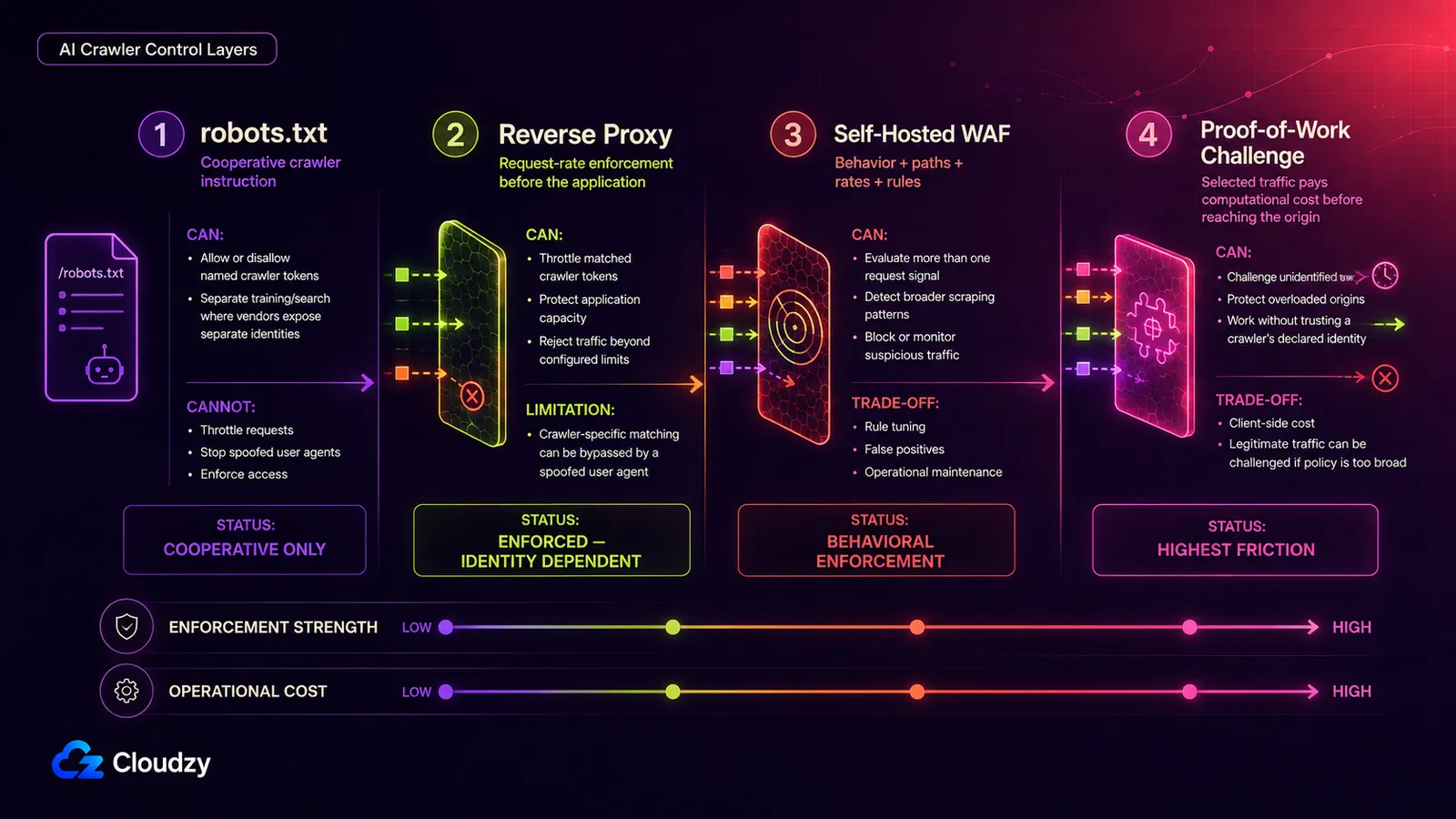
Directives work on the bots that opted in. In the same Hacker News thread, several operators described the traffic that doesn't: crawlers spreading requests across large pools of IP blocks and rotating user agents to look like ordinary visitors, which defeats naive per-IP limits and user-agent matching alike. Treat that as community reporting; nobody in the thread was publishing measurements. But it describes the population robots.txt was never built to reach.
Before you climb that ladder, there's a cheaper move available for traffic that is still cooperating. Slow it down:
User-agent: ClaudeBot
Crawl-delay: 1
Pro Tip: throttle before you block. Anthropic's documentation supports Crawl-delay for ClaudeBot so you can slow a heavy but well-behaved crawler down and keep it. The same page says IP blocking is not a persistent opt-out mechanism. Both points are Anthropic-specific; Crawl-delay isn't a universal directive, so check each vendor's documentation first.
Everything past that is enforcement you run yourself, in three rungs of increasing cost and effectiveness. Each buys something and gives something up.
Rung 1: Reverse-Proxy Directives and Rate Limiting
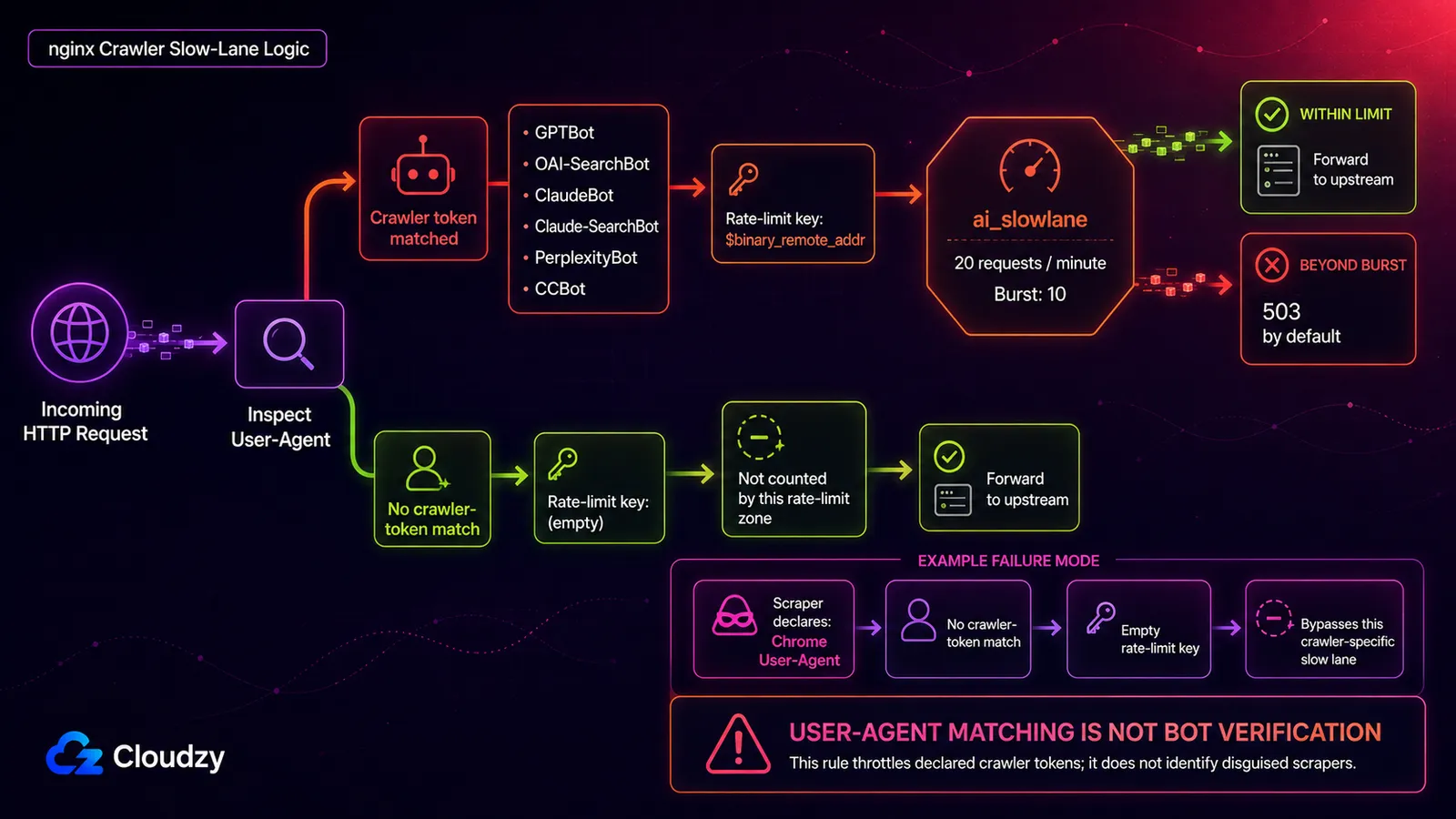
AI crawler rate limiting starts at the reverse proxy, the first thing in your stack that sees a request and can slow it before the application or database does any work. NGINX's rate-limit documentation states that requests with an empty key are not counted, so a map can give only the crawler tokens you want throttled a rate-limit key while leaving unmatched requests outside limit_req_zone.
# /etc/nginx/nginx.conf, inside the http block
map $http_user_agent $ai_rate_key {
    default              "";
    ~*GPTBot             $binary_remote_addr;
    ~*OAI-SearchBot      $binary_remote_addr;
    ~*ClaudeBot          $binary_remote_addr;
    ~*Claude-SearchBot   $binary_remote_addr;
    ~*PerplexityBot      $binary_remote_addr;
    ~*CCBot              $binary_remote_addr;
}

limit_req_zone $ai_rate_key zone=ai_slowlane:10m rate=20r/m;

# /etc/nginx/sites-available/example.conf, inside the server block
location / {
    limit_req zone=ai_slowlane burst=10 nodelay;
    proxy_pass http://127.0.0.1:8080;
}
The pair to tune is burst=10 nodelay: requests above the average rate can consume the burst immediately, and requests beyond it get a 503 by default. Set it too tight and you'll bounce a legitimate crawler mid-crawl, a slower problem to diagnose than an outage. Caddy expresses the same two ideas with a matcher and a handler; if you're choosing between the two, the side-by-side config files are more useful than a synthetic throughput number.
The limitation of this rung is that the slow lane still depends on the declared user agent. A scraper wearing a Chrome user agent bypasses this crawler-specific key entirely; catching that traffic needs a broader rate limit based on IP/path behavior or the WAF rung below.
Rung 2: A Web Application Firewall You Run Yourself
A WAF moves the decision from one header to a rule set that reads request patterns, paths, and rates together, which is what you need once the traffic stops announcing itself. Running one on your own box keeps the rules and the logs on your own disk, where you can grep them at three in the morning. BunkerWeb is one such project, SafeLine is another, and both run on a VPS when the host meets the project's architecture and resource requirements; we ship one-click versions of both to save you the setup, though the packaging isn't the interesting part.
That is also the rung's cost. Rules need maintenance, and a rule tuned tightly enough to catch a determined scraper will eventually catch a person. SafeLine's Monitor, Balanced, and Strict modes make that trade-off explicit: start by observing traffic long enough to find false positives before you let the WAF return 403 responses automatically.
Rung 3: Proof-of-Work Challenges
Anubis skips the identification problem entirely. For traffic you choose to challenge, it makes the request pay a small computational cost before the origin serves it. Its policy system can also allow, deny, or challenge requests according to matching rules. The project README calls it a Web AI Firewall Utility built around challenges for protecting upstream resources from scraper bots. It works without requiring every bot to identify itself correctly.
The project's own framing calls the approach a nuclear response, and the hedge is earned. The tax falls on whatever traffic your policy challenges, which can include humans on slow devices or legitimate crawlers if the rules are too broad. Keep this rung in reserve for genuinely hostile traffic. An enthusiastic crawler is usually a rate-limit problem, and you already have the rate limit.
Sizing for the Burst
Crawler load often arrives in bursts, but whether it is CPU-, database-, or I/O-heavy depends on the application and the URLs being crawled. In the WordPress example above, the operator traced most of the one-second page time to MySQL, so that specific incident was a database bottleneck arriving dressed as a traffic problem.
Which turns sizing into an allocation question, and an uncomfortable one: you pay for headroom continuously, and it only earns its keep during a spike you don't control. Provision for the spike anyway. If BunkerWeb shares a host with the application and database, don't treat 8 GB as a whole-stack recommendation. BunkerWeb's quickstart guide recommends 2 vCPUs and 8 GB RAM for testing or deployments with very few services, and at least 4 vCPUs with 16 GB RAM for production environments protecting many services. Add the application's own peak CPU, database memory, and I/O headroom on top.
Higher-clock cores help when request handling or query execution is CPU-bound; more cores help when you need more concurrent work in flight. Size from peak concurrency, p95 response time, database CPU and I/O wait, and cache-miss rate rather than crawler traffic alone.
Running that layer yourself asks two things of the machine underneath: root access, since every mechanism above is a config file you edit and a service you restart, and enough headroom that a burst doesn't take the site down while the rules do their job. If you're sizing or moving a box for it, our Linux VPS gives you the root access this stack requires and lets you test the proxy-and-WAF setup before committing to a long-term size.

Build on a Linux VPS with root access, NVMe, and AMD EPYC power.
View Linux PlansCloudflare's New AI Traffic Defaults
Cloudflare split AI traffic into Search, Agent, and Training categories in its July 2026 AI-traffic announcement. From September 15, 2026, new domains onboarding to Cloudflare get Training and Agent blocked by default on pages that display ads, while Search stays allowed. Existing customers can change the setting beforehand, and the controls are available across plans.
The part to borrow is the complication Cloudflare names in its own announcement. Googlebot, Applebot, and Bingbot each combine Search with Training work in Cloudflare's classification, so a customer who blocks the Training category blocks those crawlers too, including the search behavior they meant to keep. That is the same trap waiting in any category-level control that treats a multi-purpose crawler as if it had one job.
If your site isn't behind Cloudflare, none of this is a lever you can pull. Know it's coming, because it will move traffic patterns in September; your controls remain the robots.txt tokens and the proxy layer above.
WebMCP: Worth Watching, Not Worth Building For
WebMCP is the browser-side counterpart to the Model Context Protocol, the convention agents use to call structured tools instead of guessing. Chrome's WebMCP origin-trial announcement frames the goal directly: instead of an agent guessing what a button or form field does, a site can expose structured functions and annotated controls that the agent can call directly.
It's the first credible attempt at giving agents something to do on your site beyond reading it, which makes it the most interesting thing in this article. It's also experimental and unfinished: a Chrome 149 origin trial that opened in June 2026. Watch the spec. Don't ship a production dependency around it yet, and keep it out of your capacity plan.
Frequently Asked Questions
Does robots.txt Stop AI Bots?
Partly, and the precision is the answer. Anthropic says ClaudeBot, Claude-User, and Claude-SearchBot honor robots.txt. OpenAI's automatic crawlers use it too, but OpenAI says the rules may not apply to ChatGPT-User; Perplexity says Perplexity-User generally ignores the file. Unnamed or spoofed scrapers are outside robots.txt entirely.
What's the Difference Between llms.txt and robots.txt?
They solve different problems. robots.txt tells cooperative crawlers what they may fetch and is standardized by the IETF. llms.txt is a proposed file offering language models a curated summary of your content, with no requirement that anything fetch or use it. In Ahrefs' May 2026 measurement, 97% of published files received zero requests. If you want crawler directives, robots.txt is the standard mechanism; llms.txt is optional and currently sees little use.
How Do I Block GPTBot From My Website?
Add these two lines to the robots.txt file at your site's root:
User-agent: GPTBot
Disallow: /
That opts your site out of GPTBot's automatic training crawl. OAI-SearchBot, which is used for ChatGPT search, and ChatGPT-User, which fetches pages for user actions, are separate tokens and are unaffected.
Will Blocking AI Training Crawlers Also Block Google Search Indexing?
Not if you use the right control. Blocking Google-Extended does not block Googlebot from Search. The catch appears when you use a category-level control that treats a multi-purpose crawler as Training: Cloudflare, for example, classifies Googlebot, Applebot, and Bingbot as combining Search with Training, so blocking the Training category there also blocks those crawler identities.
How Do I Know If AI Bots Are Crawling My Site?
Grep your access log for the documented tokens, then verify what you find:
grep -ohE 'GPTBot|ClaudeBot|CCBot|PerplexityBot|OAI-SearchBot|ChatGPT-User' \
  /var/log/nginx/access.log | sort | uniq -c | sort -rn
The counts show which declared user agents are visiting and how often. Because the string can be forged, verify heavy hitters against the vendor's published IP ranges or reverse-DNS method before acting on the numbers.


Discussion
Comments
Sign in to join the discussion.