
At 2 a.m., a scheduled job fires on a VPS that never went to sleep. A headless claude -p run works through a queued task in a cloned repo without asking anyone anything, then exits. By the time you check in the morning there's a commit waiting, or a report, or a log showing exactly where it stopped and why. Nobody watched it happen.
That's a different setup from keeping a terminal open overnight and hoping the SSH connection survives. A common failure point in an overnight agent run is the host: a laptop sleeps, the lid closes, the network drops, or an OS update reboots the machine mid-task. Auth failures, API errors, and permission stalls can still kill the job, but an always-on host removes the easiest failure mode.
This guide covers the actual mechanism: the headless flags each major coding-agent CLI ships, the two ways to trigger a run on a schedule and which one to pick, what the host underneath it needs, and the guardrails that keep an unattended run from costing or breaking more than you'd want to explain later.
The Short Version
- Every major coding-agent CLI ships a documented non-interactive mode that runs one prompt to completion and exits. Claude Code has
claude -p, Codex CLI hascodex exec, and Gemini CLI hasgemini -p. This isn't a workaround, it's a first-party feature. - Claude Code also has its own scheduling: Routines, Desktop scheduled tasks, and
/loop. For some readers that's genuinely enough, and less to maintain than a VPS. - Cron works fine for a nightly job. A systemd timer is the better default on a box that might reboot, because
Persistent=truecatches a run that cron would silently skip. - The CLI itself is light because inference happens on the provider's API. Size the VPS for the commands it will run (tests, builds, containers, parallel jobs), not for the model.
- The guardrails (scoped tools, a turn cap, exit-code branching) are what make it safe to leave a schedule alone. The schedule by itself isn't the safety mechanism.
What You'll Need
Get these five things ready before writing a single crontab line or unit file:
- A VPS you can SSH into, running a systemd-based Linux distribution.
- The agent CLI installed on that VPS: Claude Code, Codex CLI, or Gemini CLI.
- A non-interactive credential for the CLI you choose. Bare mode in Claude Code reads no account login, so it needs
ANTHROPIC_API_KEYin the environment or anapiKeyHelperin its settings. A regular print-mode run, Codex, and Gemini can also use their documented account-login credentials. - A repo or task directory the agent will operate against.
- Shell access with permission to edit a crontab or write a systemd unit file.
Running an Agent With No Session Attached
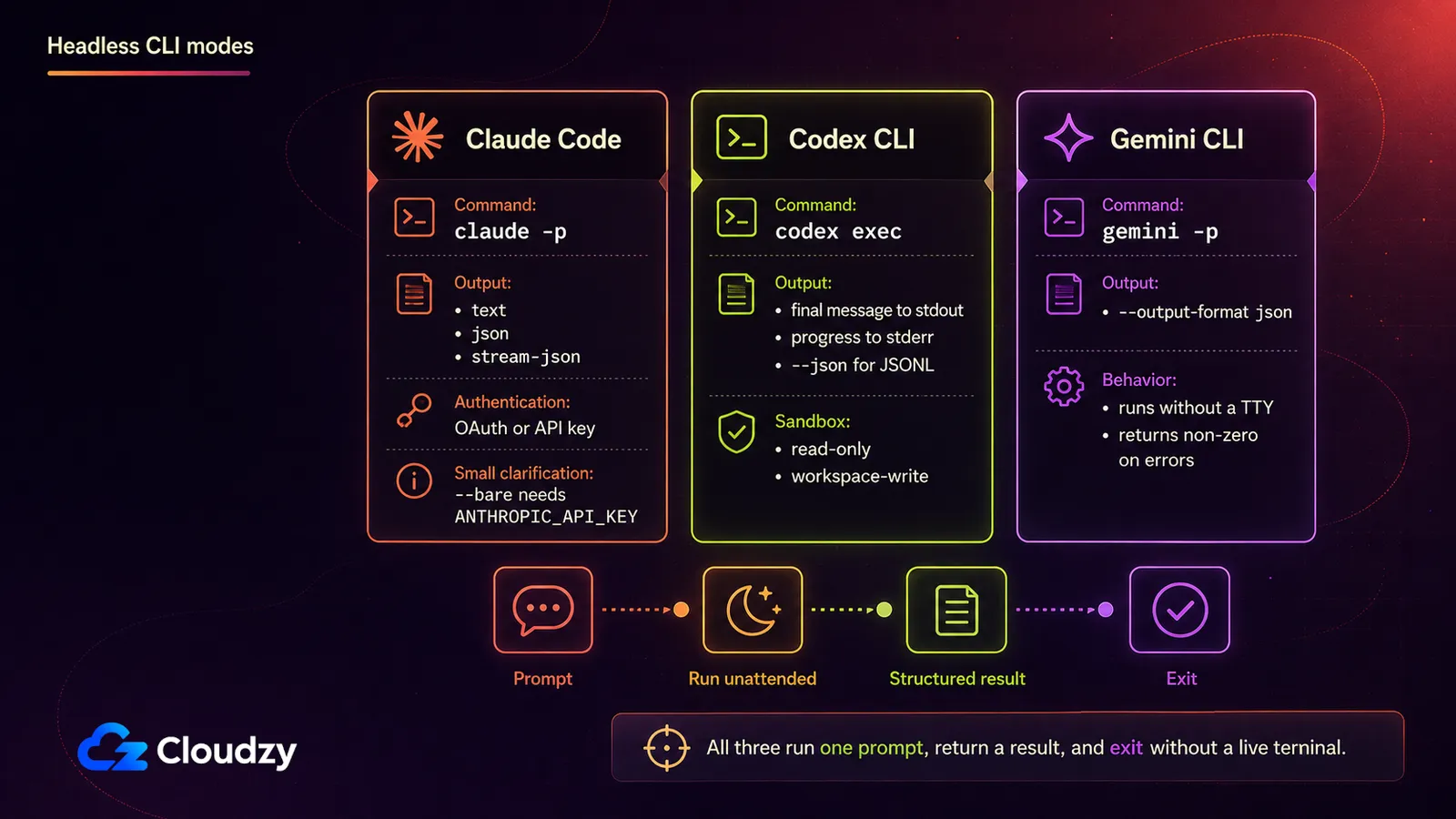
Every major coding-agent CLI ships a non-interactive mode built for exactly this. Claude Code takes -p, also spelled --print. Codex CLI takes codex exec. Gemini CLI takes -p, also spelled --prompt. Each one accepts a prompt, runs it to completion, and exits. No chat loop, no terminal to keep open, nothing to reattach to.
Can Claude Code run without a live session? Yes. Passing -p runs the prompt in non-interactive mode: Claude Code executes it to completion, prints the result, and exits. There's no chat loop and nothing to keep alive, and it runs on the same Agent SDK that powers the interactive CLI, per Anthropic's own headless-mode documentation.
| CLI | Non-interactive flag | Behavior | Structured output |
|---|---|---|---|
| Claude Code | -p / --print | Runs the prompt to completion, prints the result, exits | --output-format set to text, json, or stream-json |
| Codex CLI | codex exec | Streams progress to stderr, writes the final message to stdout, exits | --json for a JSONL event stream |
| Gemini CLI | -p / --prompt | Executes the prompt non-interactively, exits | --output-format json |
Claude Code's own flags matter most here because they're what you'll actually script against. Two of them let a run proceed without stopping to ask for a permission nobody's awake to grant: --allowedTools, which pre-approves specific tools, and --permission-mode, which sets the baseline for the whole run. --max-turns caps how many agentic turns a run can take before it exits with an error.
--bare skips hooks, skills, plugins, MCP servers, and project instructions such as CLAUDE.md, for a faster and more deterministic scripted run. That also means every instruction the job depends on has to be present in the prompt or the command. Bare mode doesn't read your account login either, so Anthropic's docs say to set an API key in the environment before running it. Claude Code rejects --bg outright when combined with -p, and rejects --cloud the same way when you give it a task description. It names the conflict and stops rather than doing something ambiguous.
A worked invocation, adapt the prompt and tool list to your task:
claude --bare -p "Review open PRs in this repo and summarize any blockers in NOTES.md" \
  --allowedTools "Bash(gh pr list *),Bash(gh pr view *),Bash(gh pr diff *),Read,Edit" \
  --permission-mode dontAsk \
  --max-turns 8 \
  --max-budget-usd 5.00 \
  --output-format json
Adjust the budget and command patterns to the task; this example also assumes GitHub CLI authentication is already configured for the account running it.
If you're setting up Claude Code on a fresh VPS and want the walkthrough for authenticating it on a box with no browser, that's covered separately in how to authenticate Claude Code on a headless server; the short version above is enough to get a scheduled run working.
Codex CLI's exec mode, covered in OpenAI's non-interactive-mode documentation, takes --sandbox to choose a policy. read-only is the default, workspace-write lets the agent write inside its workspace, and --json turns stdout into a machine-parseable event stream instead of plain text. Avoid danger-full-access for an unattended job unless the process is isolated and that risk is deliberate.
Gemini CLI's headless mode, documented in the project's own headless docs, activates automatically in a non-TTY environment, or explicitly with -p. It exits with a specific non-zero code for a general error, an input error, or a turn-limit hit, rather than a single generic failure code.
Where the Schedule Should Live
Before any of this setup work: the agent vendor may already schedule this for you. Claude Code offers three built-in options, and one of them might genuinely be a better fit than a self-managed VPS.
| Cloud (Routines) | Desktop scheduled task | /loop | |
|---|---|---|---|
| Runs on | Anthropic's cloud | Your machine | Your machine |
| Machine must be on | Not required | Required | Required |
| Open session required | Not required | Not required | Required |
| Minimum interval | 1 hour | 1 minute | 1 minute |
| Access to local files | None, it runs from a fresh clone | Full access | Full access |
Anthropic's own scheduled-tasks documentation lays this out as a genuine three-way choice, not a hierarchy with the VPS at the top. If your task needs no machine-local state, can tolerate an hourly floor, and you only use Claude Code, Routines is less to maintain than what follows: Anthropic runs it in the cloud from a fresh clone while your machine is off.
/loop is worth knowing about but doesn't fit this use case, because it requires an open, idle session, which is the exact constraint you're trying to remove. The same docs also point to GitHub Actions as a fourth option, for teams whose trigger already lives in CI rather than on a schedule tied to one specific machine.
The self-managed VPS earns its place when the job needs full local filesystem and tool access, when you want the same mechanism working identically across Claude Code, Codex CLI, and Gemini CLI, or when the interval Routines allows is too coarse. A conventional serverless function is usually awkward here because it has to restore credentials, clone the repo, and finish within the platform's runtime limits. An ephemeral CI runner such as GitHub Actions is still a valid third path when a fresh checkout per run is acceptable. If you already have always-on hardware sitting idle, a homelab box works too; the trade is home-network reliability and remote access instead of a provider's.
Cron or a systemd Timer?
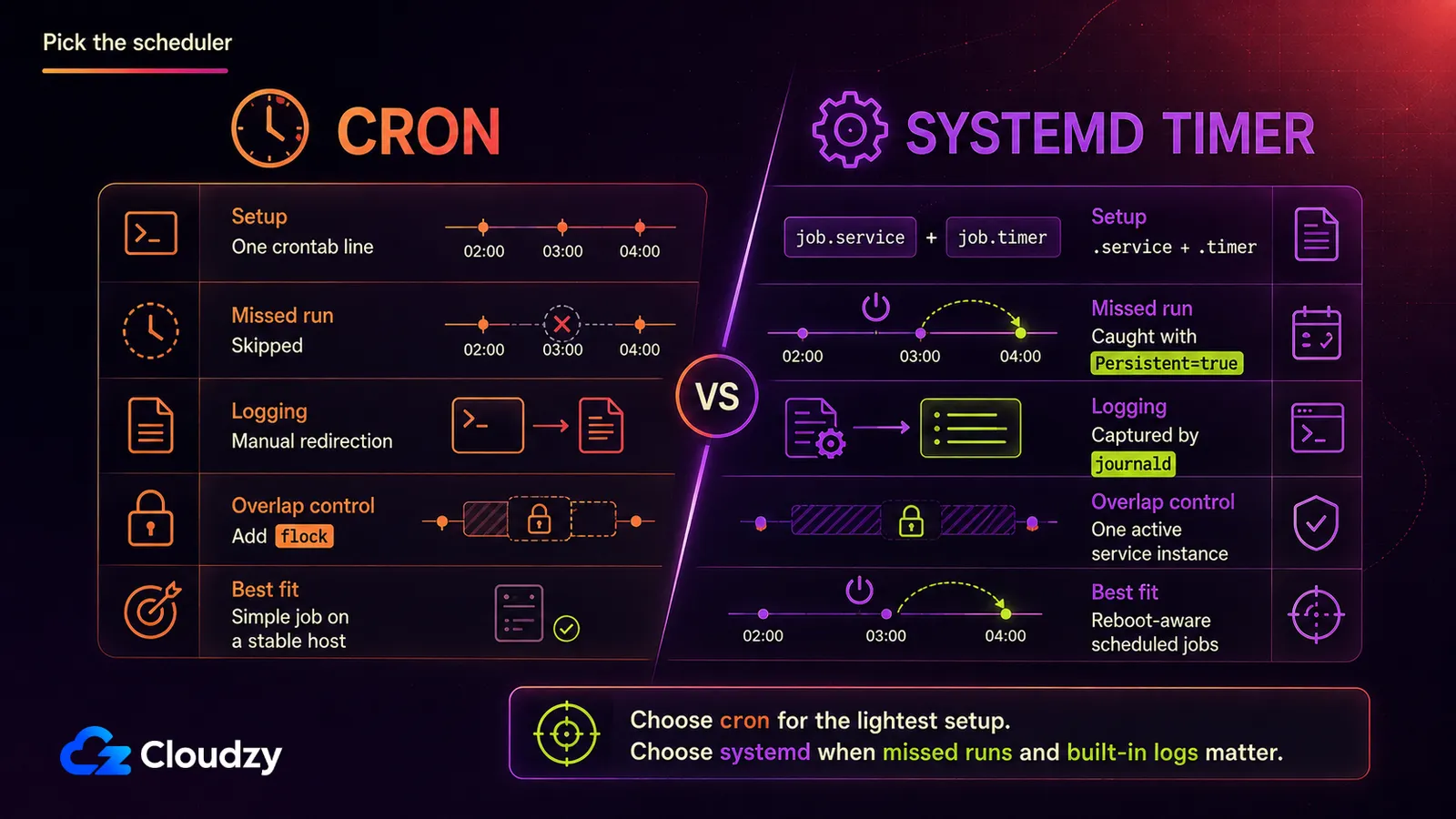
Both tools can fire the same command on the same schedule, but they diverge on what happens when the box reboots and on how much setup each one costs:
| cron | systemd timer | |
|---|---|---|
| Setup weight | One crontab line | A .timer and a .service file |
| Missed-run catch-up | None, a skipped run is just gone | Persistent=true runs it as soon as the system's back up |
| Logging | Manual, you redirect output yourself | Automatic, captured by journald |
| Dependency ordering | None | Full systemd ordering with After= and Requires= |
Plain cron is fine for a nightly job on a box that rarely reboots. The catch is the environment: cron starts with a minimal PATH, does not enter your repo for you, and will happily start a second copy while the first is still running. Put the repo path, the narrow agent command, and the credential loading in a protected wrapper script, then use flock to prevent overlapping runs.
# /usr/local/bin/agent-nightly
#!/usr/bin/env bash
set -euo pipefail
export PATH=/usr/local/bin:/usr/bin:/bin
export ANTHROPIC_API_KEY="$(
  cat "$HOME/.config/agent-nightly/anthropic_api_key"
)"
cd /srv/myrepo
exec /usr/local/bin/claude --bare -p \
  "Run the nightly dependency audit and write the findings to NOTES.md" \
  --allowedTools "Bash(npm audit *),Read,Edit" \
  --permission-mode dontAsk \
  --max-turns 8 \
  --max-budget-usd 5.00 \
  --output-format json
# crontab -e
0 2 * * * /usr/bin/flock -n "$HOME/.local/state/agent-runs/nightly.lock" /usr/local/bin/agent-nightly >> "$HOME/.local/state/agent-runs/nightly.log" 2>&1Create the credential and log directories once, then make the wrapper executable:
install -d -m 700 \
  "$HOME/.config/agent-nightly" \
  "$HOME/.local/state/agent-runs"
touch "$HOME/.config/agent-nightly/anthropic_api_key"
chmod 600 "$HOME/.config/agent-nightly/anthropic_api_key"
"${EDITOR:-nano}" \
  "$HOME/.config/agent-nightly/anthropic_api_key"
sudo chmod 755 /usr/local/bin/agent-nightly
Paste only the API key into the credential file. Do not put it directly in the crontab.
A systemd timer takes more setup and gets you two things cron doesn't: journald logging without hand-rolled redirection, and Persistent=true. The example below assumes a dedicated agent-runner account owns /srv/myrepo. Store the API key in a root-only credential file instead of embedding it in the unit.
Per the systemd.timer manual, setting Persistent=true means "the service unit is triggered immediately if it would have been triggered at least once during the time when the timer was inactive." So a run that would've fired while your VPS was rebooting for a kernel update fires the moment it comes back, instead of silently vanishing until the next scheduled slot.
Create the root-only credential file used by the service:
sudo install -d -m 700 /etc/agent-nightly
sudo touch /etc/agent-nightly/anthropic_api_key
sudo chmod 600 /etc/agent-nightly/anthropic_api_key
sudoedit /etc/agent-nightly/anthropic_api_key
Paste only the API key into the file.
# /etc/systemd/system/agent-nightly.service
[Unit]
Description=Nightly scoped agent run
After=network-online.target
Wants=network-online.target

[Service]
Type=oneshot
User=agent-runner
Group=agent-runner
WorkingDirectory=/srv/myrepo
Environment=HOME=/home/agent-runner
Environment=PATH=/usr/local/bin:/usr/bin:/bin
LoadCredential=anthropic_api_key:/etc/agent-nightly/anthropic_api_key
ExecStart=/bin/sh -c 'export ANTHROPIC_API_KEY="$(cat "$CREDENTIALS_DIRECTORY/anthropic_api_key")"; exec /usr/local/bin/claude --bare -p "Run the nightly dependency audit and write the findings to NOTES.md" --allowedTools "Bash(npm audit *),Read,Edit" --permission-mode dontAsk --max-turns 8 --max-budget-usd 5.00 --output-format json'
StandardOutput=journal
StandardError=journal
UMask=0077
# /etc/systemd/system/agent-nightly.timer
[Unit]
Description=Run agent-nightly.service at 2am daily, catching up missed runs
[Timer]
# Uses the VPS's configured local timezone
OnCalendar=*-*-* 02:00:00
Persistent=true
Unit=agent-nightly.service
[Install]
WantedBy=timers.targetReload systemd, enable the timer, and run the service once immediately so credential, permission, and path problems surface now rather than at 2 a.m.:
sudo systemctl daemon-reload
sudo systemctl enable --now agent-nightly.timer
sudo systemctl start agent-nightly.service
systemctl list-timers agent-nightly.timer
sudo journalctl \
  -u agent-nightly.service \
  -n 100 \
  --no-pager
Persistent=true is the deciding difference: the timer remembers a missed calendar run instead of silently dropping it.
What the VPS Actually Needs
Here's the part that surprises people sizing this for the first time: the CLI itself is light because inference happens on the provider's API. But the agent can still launch builds, tests, package managers, language servers, and containers locally, so the repo's workload sets the real floor.
Treat 1–2 vCPU and 2–4 GB of RAM with NVMe storage as a starting point for one lightweight scheduled job. Large repos, compilers, Docker builds, test suites, or concurrent runs can need much more. What drives sizing up is the heaviest local command the agent will run, not the model behind the API. If you're already running Docker workloads on this VPS and want a fuller picture of what to budget, sizing and securing a build box walks through the same tradeoff for a different unattended workload.
One more thing worth planning for: an unattended run produces logs every night whether or not anything went wrong. Add logrotate if cron writes to a file, and check journald's retention limits instead of assuming its defaults fit the VPS disk.
The whole approach depends on a host that's awake at 2 a.m. and stays that way regardless of what your laptop is doing. That's the specific job a Linux VPS with root access is built for. Nothing sleeps it, and you're not sharing it with anyone else's cron jobs.

Build on a Linux VPS with root access, NVMe, and AMD EPYC power.
View Linux PlansKeeping an Unattended Run From Going Wrong
The single biggest difference between a scheduled run that works and one that doesn't is whether the task is scoped enough to finish without a human answering a question mid-run. Ambitious prompts stall waiting on a decision nobody's there to make; narrow, self-contained tasks finish and exit cleanly.
The two permission flags exist so a run doesn't stall on a prompt at 2 a.m., but bare Bash access is not a narrow guardrail: it can do almost anything the service account can do. Prefer command-specific rules such as Bash(git status *), pair them with --permission-mode dontAsk, and run the service under a dedicated non-root account. Turn count and spend get their own ceilings: --max-turns limits how long the agent can wander, and --max-budget-usd caps what a single run can spend on API calls.
Pro Tip
Run with --output-format json and log the total_cost_usd field from each invocation. It's the cleanest hook for tracking what a scheduled run actually costs per night, and for alerting when one run costs noticeably more than the others. Worth the five minutes it takes to wire up, since that's your bill it's tracking, not an abstraction.
Unattended cost overruns aren't hypothetical. In one Hacker News post, a user reported a $37,901.73 gross AWS Bedrock bill from a daily coding-agent workflow where prompt caching was only partially effective, leaving roughly 6.47 billion input tokens uncached. That happened in a different stack, not in Claude Code headless mode, but it shows why cost logging and a hard per-run budget belong in the schedule.
Pro Tip
Claude Code exits with code 0 on success and a non-zero code on failure. A wrapper script that checks the exit status can send you a notification on failure, so a bad night surfaces the next morning instead of three days later when you happen to look.
At minimum, run each job on a dedicated branch or disposable worktree and require human review before merge. Scoped credentials, filesystem isolation, and server-level blast-radius control are a bigger subject worth their own treatment rather than a paragraph tacked onto a scheduling guide.
The guardrails are what make the schedule safe to leave alone: the schedule itself isn't the safety mechanism.
When Cron Stops Being Enough
One prompt on a timer needs nothing more than what's already covered here. Three chained steps with a conditional, a retry, and a Slack notification need something else.
Three options are worth knowing, each a step up for a different reason:
- Dagu is the lightest step up: self-contained, YAML-defined jobs with DAG dependencies, retries, and a web UI for watching what ran.
- n8n fits best when the agent run is one node among several integrations and notifications, rather than the whole workflow.
- Kestra is the heaviest of the three, built for orchestrating data and infrastructure pipelines, and it's the right answer when scheduling the agent is part of a bigger pipeline rather than the point of it.
For the reader running one nightly prompt, all three are overkill, and that's worth saying plainly rather than talking you into a heavier setup than you need. If a chain of steps does eventually justify one, Dagu, n8n, and Kestra are all one-click deploys, which is a real convenience at exactly the moment you're deciding whether the setup cost is worth it.
Multi-agent orchestration frameworks like LangChain or CrewAI are a different subject entirely: building agent systems rather than scheduling a CLI that already exists.
Frequently Asked Questions
Can Claude Code Run Without a Live Session?
Yes. Passing -p runs the prompt in non-interactive mode: Claude Code executes it to completion, prints the result, and exits, with no chat loop and no session to keep open.
Do I Need a VPS If Claude Code Already Has Routines?
Not always. Routines run in Anthropic's cloud with the machine off and start from a fresh clone, but they cannot access files that exist only on your machine, and they have a one-hour minimum interval. A self-managed VPS earns its place when the task needs local files, arbitrary intervals, or a mechanism that works the same way across more than one vendor's CLI.
Should I Use Cron or a systemd Timer for a Scheduled Agent?
A systemd timer, if the VPS ever reboots for maintenance. Persistent=true runs a job that would've fired during downtime as soon as the system's back, which cron has no equivalent for. Cron is fine for a nightly job on a box that stays up.
How Much RAM Does a Scheduled AI Agent Need on a VPS?
Start around 1–2 vCPU and 2–4 GB of RAM for one lightweight scheduled job, then size for the heaviest local command the agent will run. Builds, tests, Docker, large repositories, and concurrent runs matter far more than the remote model inference.
Does Running an Agent on a Schedule Change How It's Billed?
Scheduling does not create a separate billing mode. Claude Code -p can use subscription credentials or an API key, but --bare ignores the subscription login, so it needs ANTHROPIC_API_KEY in the environment or an apiKeyHelper in its settings. Codex and Gemini follow whichever authentication method you configured for their CLI. Because pricing and usage terms move quickly, check the current provider pricing and your own usage data when you set this up. For Claude Code API runs, you can also log the total_cost_usd field from JSON output.


Discussion
Comments
Sign in to join the discussion.