
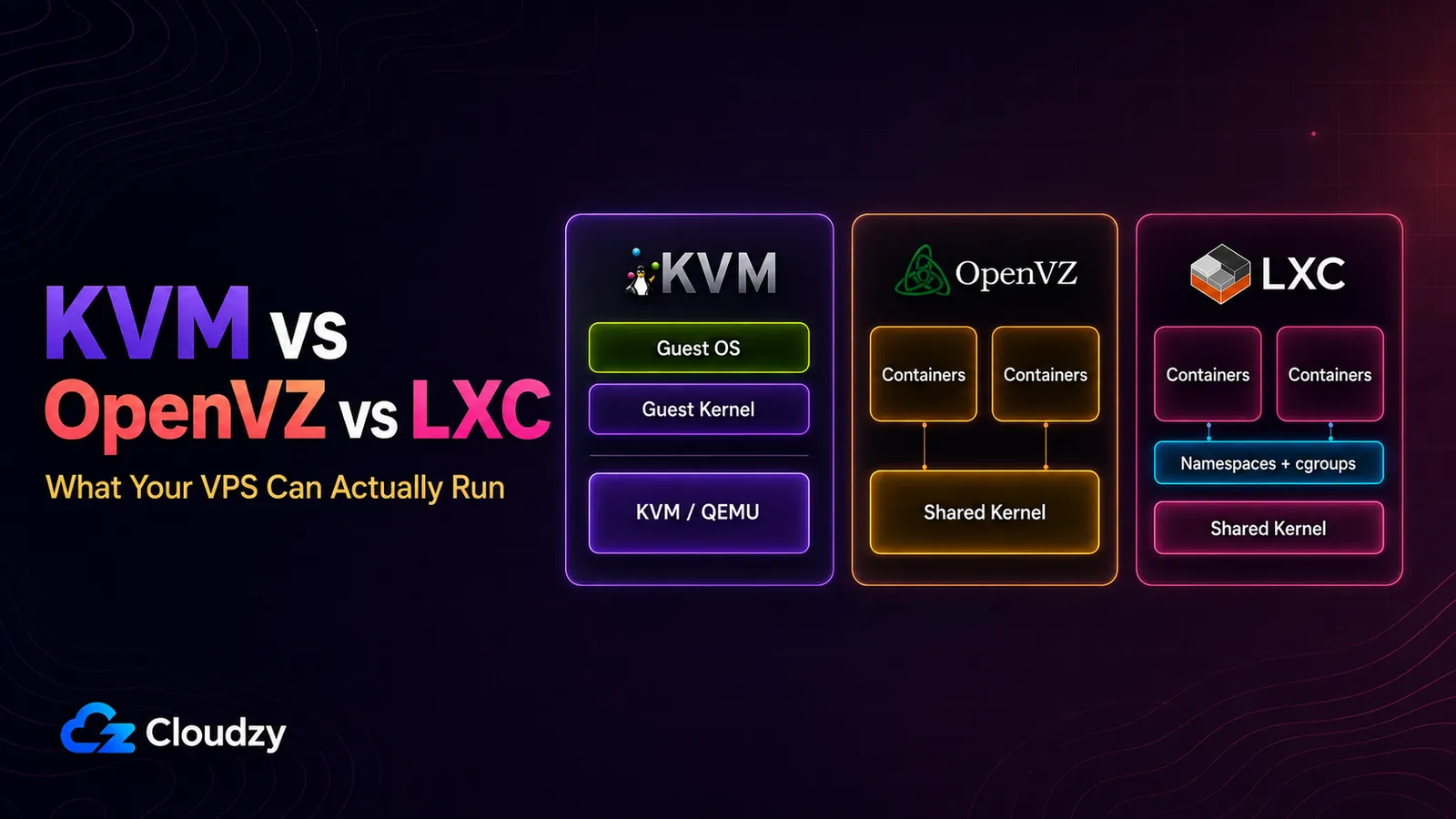
Two VPS plans, same page. Four vCPU, 8 GB RAM, 160 GB of storage, near-identical price. One says KVM. The other says OpenVZ. Nothing on either page explains what that word changes.
It changes what you are allowed to run. VPS virtualization types are not merely a performance footnote. They decide whether you control the kernel, whether Windows is possible, and whether Docker works without help from the provider. KVM vs. OpenVZ vs. LXC is a capability question before it is a speed question.
This guide covers the three labels most relevant to this buying decision. Xen, VMware, Hyper-V, and other virtualization platforms exist, but they are outside this three-way comparison.
TL;DR
- KVM gives each VPS its own guest kernel. Docker runs normally, Windows is technically possible, and you can usually load kernel modules or boot a custom kernel. However, KVM alone does not guarantee dedicated CPU or RAM; resource commitments still depend on the provider and plan.
- OpenVZ VPS plans are normally Linux containers that share the host kernel. Docker can run in OpenVZ 7 only when the provider uses a compatible kernel and template configuration. You cannot replace the host kernel, and memory beyond RAM is handled through provider-controlled VSwap rather than ordinary guest-managed disk swap.
- LXC also shares the host kernel, but it is built around mainline Linux containment features. Docker can run when the host enables the required features, although Proxmox recommends nesting containers inside a QEMU virtual machine for workloads that need maximum isolation and live migration.
- Containers are usually easier to resize while running. KVM can also support CPU and memory hot-plug, so "KVM always requires a reboot" is not a safe buying rule. Ask the provider what its platform actually supports.
- For a static site or a small LAMP stack that never needs Docker, Windows, or kernel-level customization, the practical difference may be small. Isolation, lifecycle, and resource policy can still differ.
The One Difference That Causes All the Others
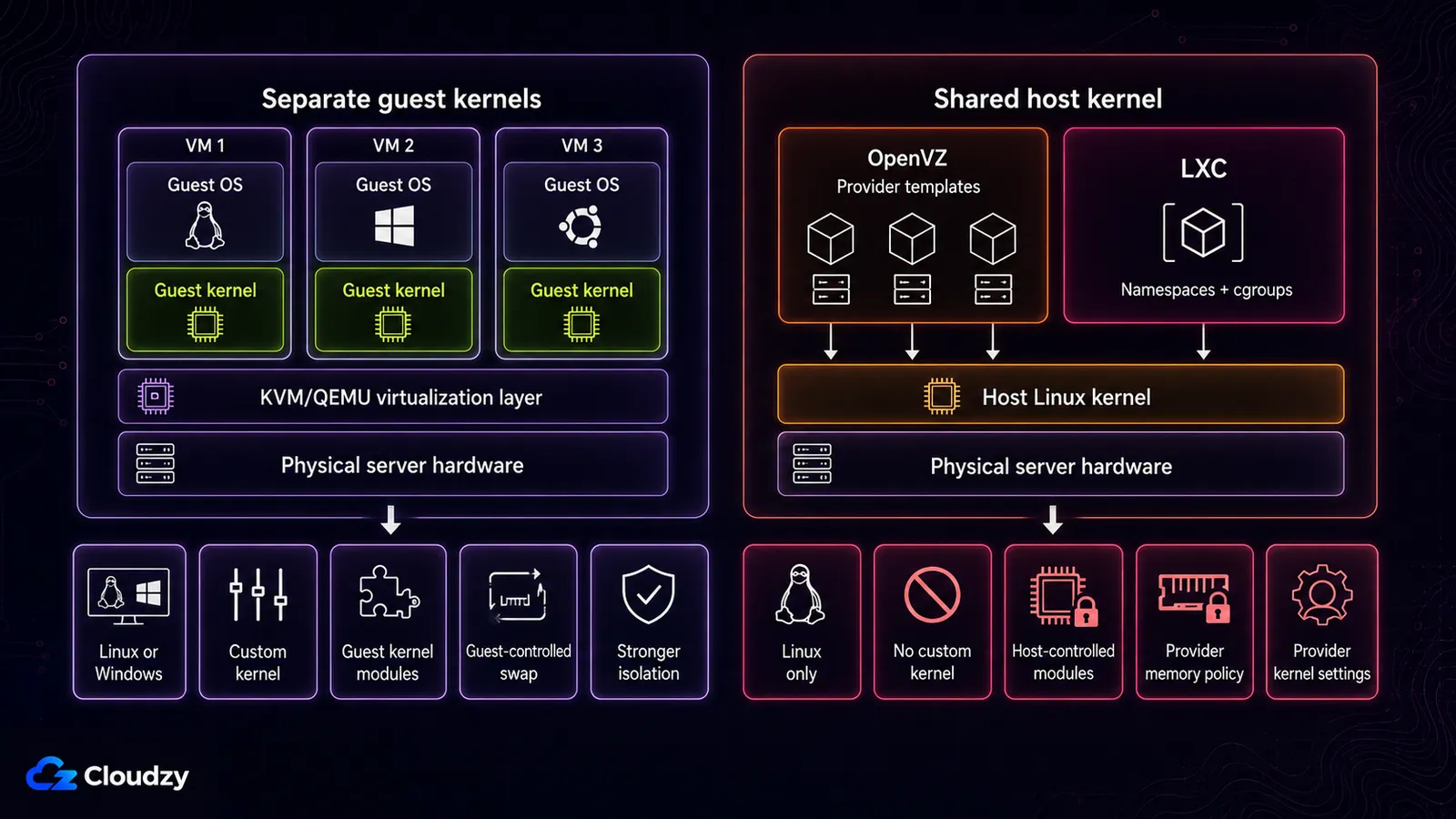
KVM gives every VPS on the host its own guest kernel. OpenVZ containers and LXC containers use the kernel booted by the host.
KVM is a full virtualization solution for x86 hardware with virtualization extensions. It merged into the mainline Linux kernel as of 2.6.20. Each guest sees virtual hardware and boots its own operating system and kernel.
The container types work differently. LXC is a userspace interface for Linux kernel containment features, including namespaces, cgroups, capabilities, seccomp, and security profiles. It aims to provide an environment close to a normal Linux installation without booting a separate kernel.
An OpenVZ container follows the same broad shared-kernel model, although OpenVZ uses its own platform and kernel stack. OpenVZ 7 can manage both containers and KVM virtual machines, but when a retail VPS plan is labeled "OpenVZ," the product normally being sold is the container type.
Every capability difference below follows from that. A kernel module has to be loaded into a kernel you control. A different operating system needs a different kernel. Docker needs kernel-level namespacing that has to be available where the kernel itself lives. On KVM's side of the boundary, the hypervisor layer follows an architecture commonly divided into Type 1 and Type 2 hypervisors.
LXC frequently appears inside Proxmox environments, including self-managed servers and some hosting platforms. Whether you can enable advanced LXC features depends on whoever controls that host.
What Each Type Lets You Run
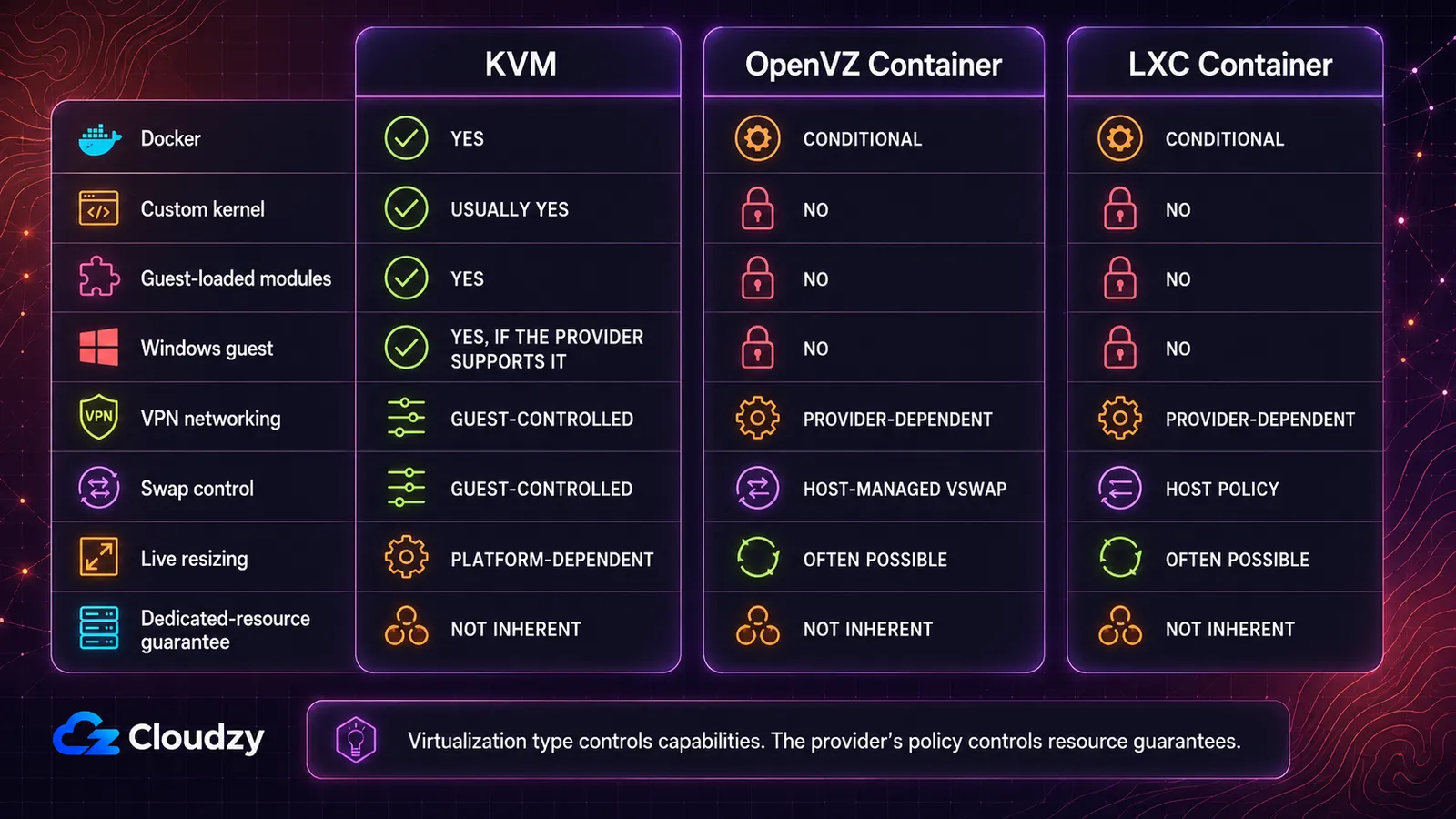
The purchase-defining axes are kernel control, guest operating-system support, Docker compatibility, memory behavior, resizing, and resource policy.
| Capability | KVM | OpenVZ | LXC |
|---|---|---|---|
| Docker | Yes, natively | Conditional: OpenVZ 7 only, and the provider must use an EZ or suitable custom template plus the required host kernel features | Conditional: the host must enable nesting and keyctl |
| Custom kernel or loadable modules | Usually yes | No, locked to the host kernel | No, shares the host kernel |
| Windows as the guest OS | Yes, when the provider supports the image and licensing path | No, Linux only | No, Linux only |
| VPN kernel modules (WireGuard, OpenVPN) | Guest-controlled | Provider-dependent: TUN/TAP must be exposed | Provider-dependent: depends on host-enabled kernel features |
| Swap control | Guest-controlled | Host-managed VSwap rather than ordinary disk swap | Host policy, modern cgroup v2 |
| Live resource resize without reboot | Platform-dependent, CPU and memory hot-plug are possible | Often possible | Often possible |
| Dedicated-resource guarantee | Not inherent, the provider's policy decides | Not inherent, and container density makes overselling easier | Not inherent |
Which should you choose? KVM is the cleanest answer when you need Windows, a custom kernel, guest-loaded modules, or a predictable Docker host. OpenVZ and LXC can be efficient Linux environments, but they leave kernel-level decisions with the provider.
This is a capability map, not a benchmark. It says nothing about storage latency, network quality, CPU generation, host utilization, or the provider's resource-allocation policy. Two providers using the same virtualization type can deliver very different machines.
The conditional cells are where buyers lose time. I once deployed a VPN on a container VPS where the required host-side networking feature was not exposed. The interface would not come up, and the fix required a support ticket rather than a configuration change inside the guest. With a container plan, ask whether the provider exposes the exact device or kernel feature your VPN needs. With KVM, you normally control that inside the guest.
Why Docker Is the Question That Decides Most Purchases
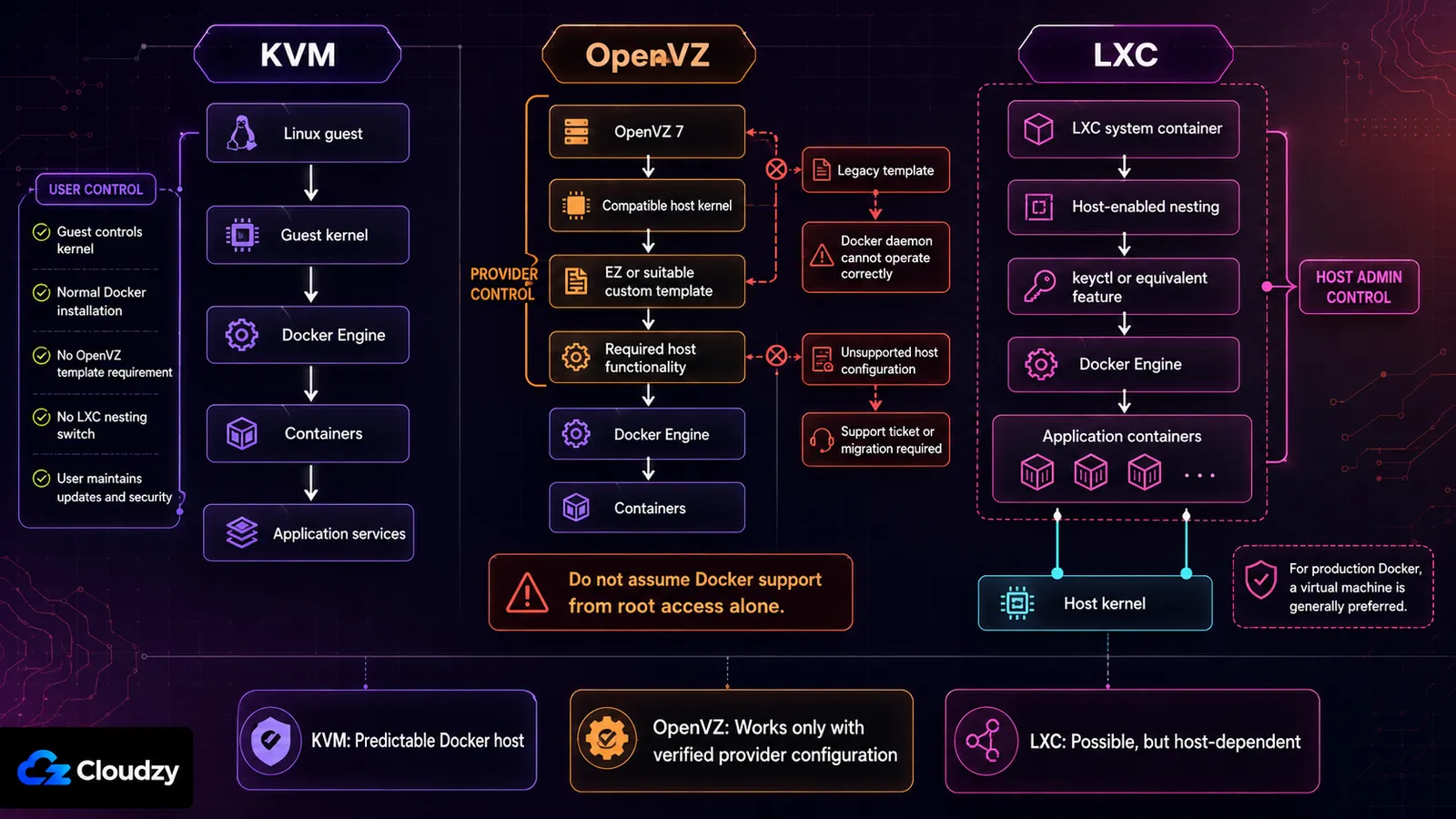
Container VPS vs. KVM VPS stops being an abstract comparison the moment Docker appears in your requirements. Docker itself uses kernel namespaces, cgroups, networking, and storage drivers. Inside KVM, those features belong to the guest kernel you control. Inside OpenVZ or LXC, they ultimately depend on the host.
Docker on OpenVZ
Docker support on OpenVZ is a provisioning decision made above you. A SolusVM support article states that Docker can run inside OpenVZ 7 from a specified 3.10-based kernel release onward, but it also says Docker does not work with the standard legacy precreated templates. The container must use an EZ template or a suitable custom template. That same support article excludes CentOS 8 guests.
So, does Docker work on OpenVZ? Sometimes. The provider must have built the service around a compatible OpenVZ 7 kernel and template path. If the plan page does not state that clearly, ask support before buying and keep the answer in writing.
When the host configuration is incompatible, changing Docker flags inside the VPS will not fix the underlying problem. You need the provider to change the container configuration or move you to a different virtualization type.
Docker on LXC
Docker can run inside LXC when the host exposes the required features. In Proxmox, that commonly includes container nesting and keyctl for unprivileged containers.
The more important buying signal is the platform owner's recommendation. Proxmox recommends running Docker images inside a QEMU virtual machine rather than inside an LXC system container for use cases that demand maximum isolation and the ability to live-migrate.
If you control the LXC host, you can evaluate that trade-off and test upgrades on your own schedule. If you are renting an LXC VPS, the provider controls the kernel, security profile, and advanced feature flags. Confirm the supported configuration instead of assuming that root access inside the container is enough.
Docker on KVM
Docker normally works because the Linux guest controls its own kernel environment. There is no LXC nesting switch or OpenVZ template requirement above the guest. You still need a supported Linux distribution, a compatible kernel, and enough RAM and storage for the workload.
Owning the guest kernel also means maintaining it. On an unmanaged VPS, updates, firewall rules, Docker security, and backups remain your responsibility.
Key takeaway: Docker does not make OpenVZ or LXC impossible, but it makes provider configuration part of the application's reliability. For a rented production Docker host, KVM removes that extra dependency.
Whether "4 vCPU" Means Four Dedicated CPU Cores
A VPS that feels slow while its own monitoring shows idle CPU is the symptom people describe most often. Container virtualization is what makes it possible. The contention is happening a layer below where the guest can see it, so the guest's own metrics show nothing wrong.
The mechanism is the low overhead itself. A container costs the host far less than a full virtual machine, so more containers fit on the same hardware. That density is cheap to create and hard to detect from inside the guest, which makes overselling structurally easier on OpenVZ than on KVM. KVM does not prevent a provider from packing a host. It does commit real memory and real CPU shares per guest, which puts an arithmetic ceiling on how far the packing can go. The diagnostic side has its own walkthrough of how to tell whether your provider is overselling.
Memory behaves differently too. On OpenVZ you cannot use disk swap as additional memory, so the RAM figure on the plan page is a wall rather than a slope. A KVM guest under memory pressure slows down. An OpenVZ container under memory pressure gets processes killed.
There is an isolation consequence as well, and it is the one people underestimate. A container's memory is addressable from the host in a way a KVM guest's is not. In-guest disk encryption still protects you against a stolen disk. It does not protect a running container's keys from the machine that is running it. If your threat model includes the host operator, a shared kernel is the wrong substrate. No configuration inside the guest changes that.
Key takeaway: the same number on a plan page is a different kind of promise depending on the type. On KVM it is an allocation. On OpenVZ it is a ceiling you share.
Where OpenVZ Still Makes Sense, and Where It's Going
Run a static site or a low-traffic LAMP stack and you may never touch the capabilities OpenVZ restricts. No Windows, no custom kernel, no guest-loaded module, and no production Docker requirement. For that narrow workload, a well-operated OpenVZ container can still do the job.
The lifecycle requires more attention than it did a decade ago. According to its official wiki, OpenVZ 7 is based on the RHEL 7 kernel branch, version 3.10. The version number alone does not prove that a maintained enterprise kernel lacks security fixes, because vendors backport patches. It does mean that you should verify compatibility with software that expects newer kernel interfaces.
The open-source OpenVZ project and the commercial Virtuozzo product are on separate tracks, and the commercial one has published dates. Virtuozzo Hybrid Server 7 reached end of maintenance in July 2024 and is listed for end of life in December 2027 in the official lifecycle policy.
That does not break a working OpenVZ site today. It does make the provider's migration plan relevant before you commit a new long-lived workload. Ask which OpenVZ or Virtuozzo version is running, how security fixes are delivered, and what migration path is available.
When a plan page does not name the virtualization type, ask support rather than inferring it from price. The answer is worth having in writing.
Choosing by Workload
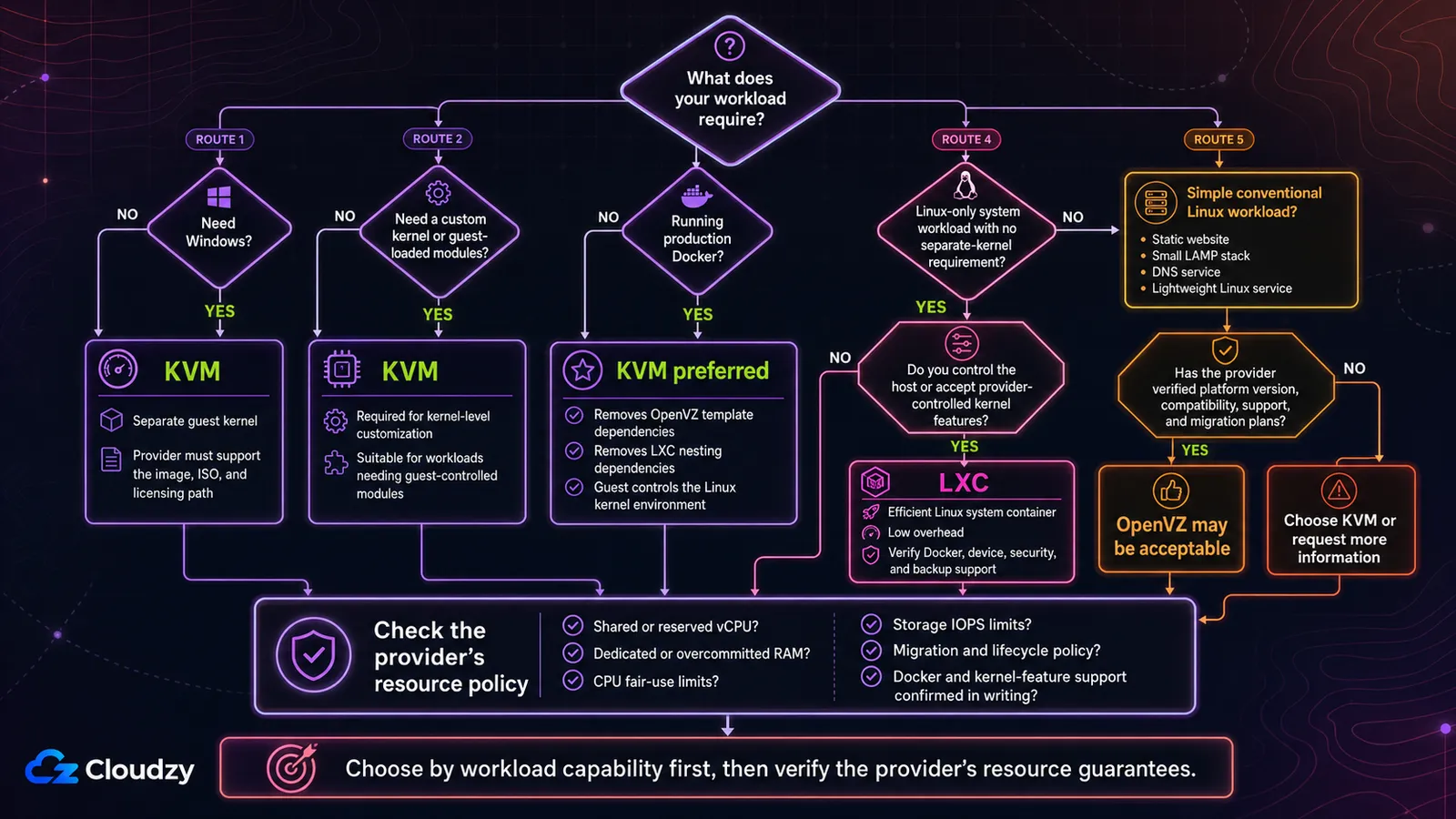
Start from the requirement rather than the technology.
Choose KVM when the workload needs its own kernel
KVM is the direct choice when you need any of the following:
- Windows as the guest operating system
- A custom kernel
- Guest-loaded kernel modules
- Production Docker without container-inside-container dependencies
- Nested virtualization, when the provider exposes it
- Guest-controlled swap and kernel tuning
Windows is decisive because both OpenVZ and LXC containers use a Linux host kernel. Choosing between Linux and Windows for the application itself is a separate question involving software compatibility, administration, and licensing. See the Linux vs. Windows VPS comparison for that decision.
Choose LXC when you want an efficient Linux system container
LXC is rational when the workload is Linux-only, does not need a separate kernel, and benefits from low overhead or fast host-managed changes. It is especially useful when you control the Proxmox or LXC host yourself.
For a rented LXC VPS, verify Docker support, required devices, security mode, backup behavior, and whether advanced features can be enabled.
Consider OpenVZ for a simple, verified Linux workload
OpenVZ can still be acceptable for a basic website, small LAMP stack, DNS service, or similarly conventional Linux workload when:
- The provider documents the platform version.
- Your software supports the available kernel environment.
- You do not need Windows or kernel customization.
- Docker is either unnecessary or explicitly supported.
- The provider has a credible security and migration plan.
- The price or operational model gives you a real reason to choose it.
Do not choose it merely because an old comparison says OpenVZ is always cheaper. Compare the current plan, support, resource policy, and migration options.
If your answer landed on KVM, that is the constraint doing the work rather than a preference. Cloudzy's KVM VPS boots in 60 seconds on AMD EPYC with pure NVMe, and every instance gets its own guest kernel. Kernel modules load, custom kernels boot, and both Linux and Windows guests are supported. Docker is in the marketplace if you would rather not install it yourself.
Frequently Asked Questions
Can I Run Docker on an OpenVZ VPS?
Only when the provider has configured a compatible OpenVZ 7 environment. SolusVM documents support on sufficiently recent OpenVZ 7 kernels with EZ or suitable custom templates, while standard legacy templates do not work. Treat Docker as unsupported unless the provider confirms the exact setup.
Can OpenVZ Run Windows?
No, not as an OpenVZ container. The container shares the host's Linux kernel. KVM can run a Windows guest because the virtual machine boots its own operating-system kernel, although the provider must still support the image, ISO, and licensing path.
Is LXC the Same as Docker?
No. LXC is commonly used for system containers that resemble lightweight Linux machines with an init system and multiple processes. Docker is an application-container platform built around images and individual services. Both use Linux kernel features such as namespaces and cgroups, which is why the terms are sometimes confused.
What Is an LXC VPS?
An LXC VPS is a Linux system container hosted through LXC or an LXC-based platform such as Proxmox. It looks and behaves much like a small Linux server, but it shares the host kernel instead of booting its own. That makes it lightweight while limiting kernel-level control.
How Do I Tell Which Virtualization Type a Provider Uses?
Check the plan page or ask support. Inside a Linux instance, this command often identifies the environment:
systemd-detect-virtIt may report values such as kvm, openvz, or lxc. Detection from inside the guest is useful, but the provider's written specification remains the better source before purchase.
Does KVM Guarantee Dedicated CPU and RAM?
No. KVM supports CPU and memory overcommit. A provider can offer reserved resources, shared resources, or a mixture of both. Look for explicit language such as dedicated RAM, pinned CPU, reserved vCPU, or no overcommit rather than assuming the hypervisor guarantees it.
Is KVM Always the Better Choice?
No. KVM is the only choice for Docker, custom kernels, and Windows, but for a workload that never touches any of those the practical difference is close to invisible.


Discussion
Comments
Sign in to join the discussion.