
The machine looks fine. Load average is reasonable, memory is not exhausted, the disk has room. The application is still slow at 9am every weekday and nobody can say why. Or someone has handed you a sentence instead of a metric: "you need dedicated hardware for this."
The VPS vs dedicated server question is decided by a small number of signals you can measure. In my experience most workloads that arrive here trip none of them. Both purchases are legitimate, and a dedicated server is the correct answer when specific conditions hold.
The Short Version
- The move to dedicated hardware is warranted when a specific signal fires, not when a machine merely feels slow.
- Three operational signals matter: sustained CPU utilization with no headroom left, persistent CPU steal time or IO wait, and a workload that has outgrown the largest instance a provider sells.
- Two of those three are frequently caused by the provider or the plan, not by virtualization. Test that before you spend.
- PCI DSS and the HIPAA Security Rule specify isolation and control outcomes, not a hardware form factor. Neither by itself requires a physical machine.
- Dedicated hardware wins on cost only at high sustained utilization. Below that, you pay for a fixed hardware floor you are not using.
What Differs Between a VPS and a Dedicated Server
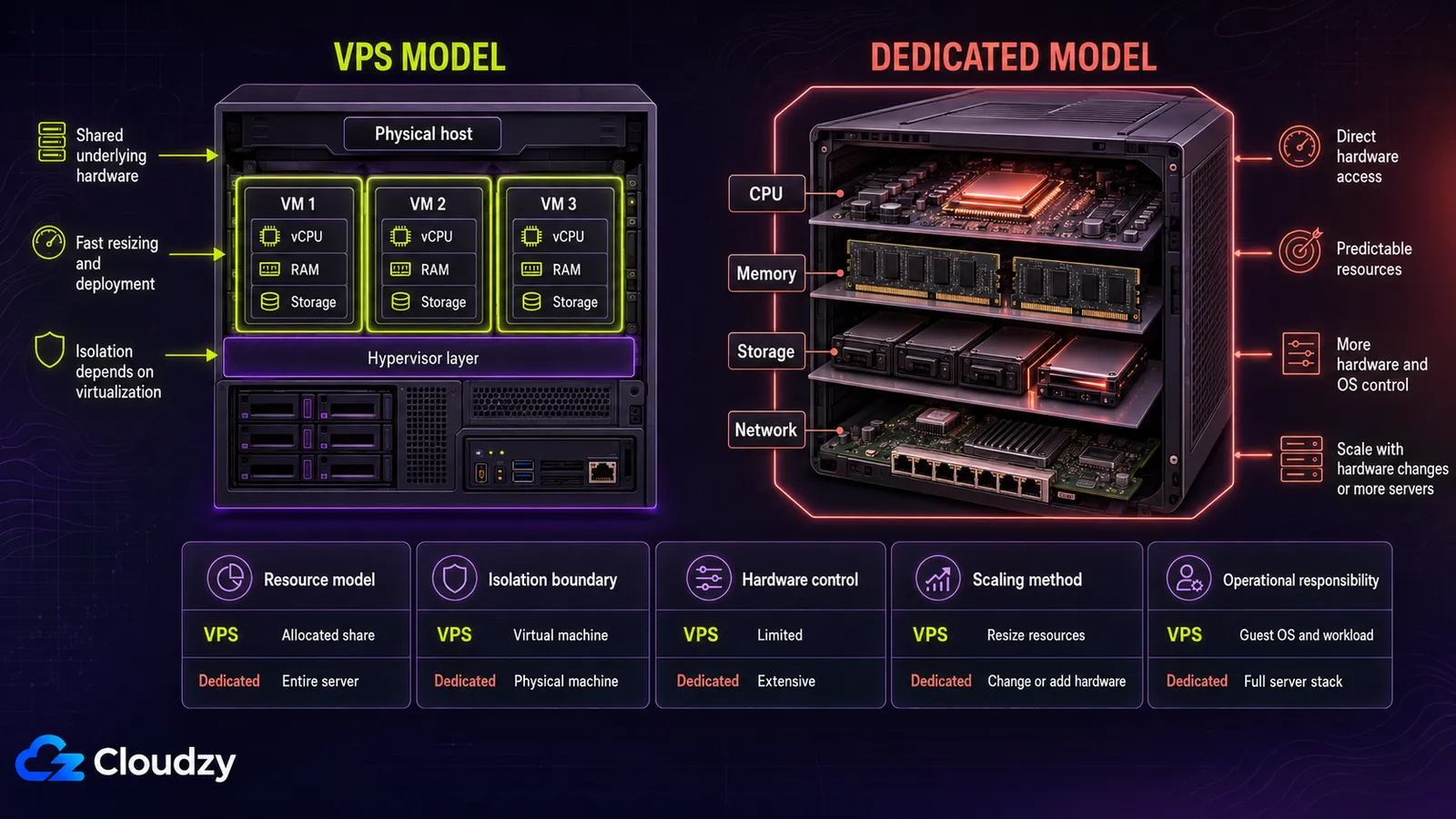
Take a plan that advertises 4 vCPU. On a dedicated server, four cores are yours whether you use them or not. On a VPS, four vCPU is a scheduling claim: the hypervisor presents four virtual processors to your kernel and gives them time on physical cores according to its policy and the host's current load.
Under normal conditions the two behave identically. Under contention they do not.
The difference is not virtual versus physical. It is what is guaranteed to you versus what is allocated to you.
The isolation model follows the same split. A VPS is isolated logically, by the hypervisor: separate kernel, separate memory space, separate virtual disks, enforced in software running on shared silicon. VPS vs bare metal is a difference in where that boundary is drawn, not in whether one exists.
Both are real isolation. They fail differently and they are audited differently, which matters in the compliance section below.
Hypervisor overhead itself is rarely the story anymore. On modern KVM with hardware virtualization extensions and paravirtualized drivers, I have not found the hypervisor to be why an application is slow.
If a VPS is underperforming, the usual cause is contention or sizing.
Contention is where the interesting variable lives, and it is a provider policy, not a property of virtualization. Oversubscription means selling more vCPU, more IOPS, or more memory across guests than the host physically has, on the assumption that not everyone peaks at once. Some providers barely do it. Some do it aggressively.
The consequence is uncomfortable for anyone shopping on category alone. A badly oversubscribed VPS and a well-run VPS are further apart in behavior than a well-run VPS and a dedicated server.
Shared hosting is not in this comparison: no root access and no consistent resource guarantee, and our guide covers when to upgrade from shared to VPS hosting if that step comes first for you. Colocation is out of scope. You buy and own the hardware, which is a different procurement model with different contracts and a different failure story.
| Criterion | VPS | Dedicated server |
|---|---|---|
| Resource isolation | Logical, hypervisor-enforced | Physical, single tenant |
| CPU allocation | vCPU scheduled onto shared physical cores | Physical cores, exclusive |
| IO contention | Shared storage pool; latency varies with host load | Local disks, no external contention |
| Network contention | Shared uplink | Exclusive NIC and port |
| Hardware control | None; provider selects platform | Full; CPU generation, disk layout, RAID |
The Signals That Mean You Have Outgrown a VPS
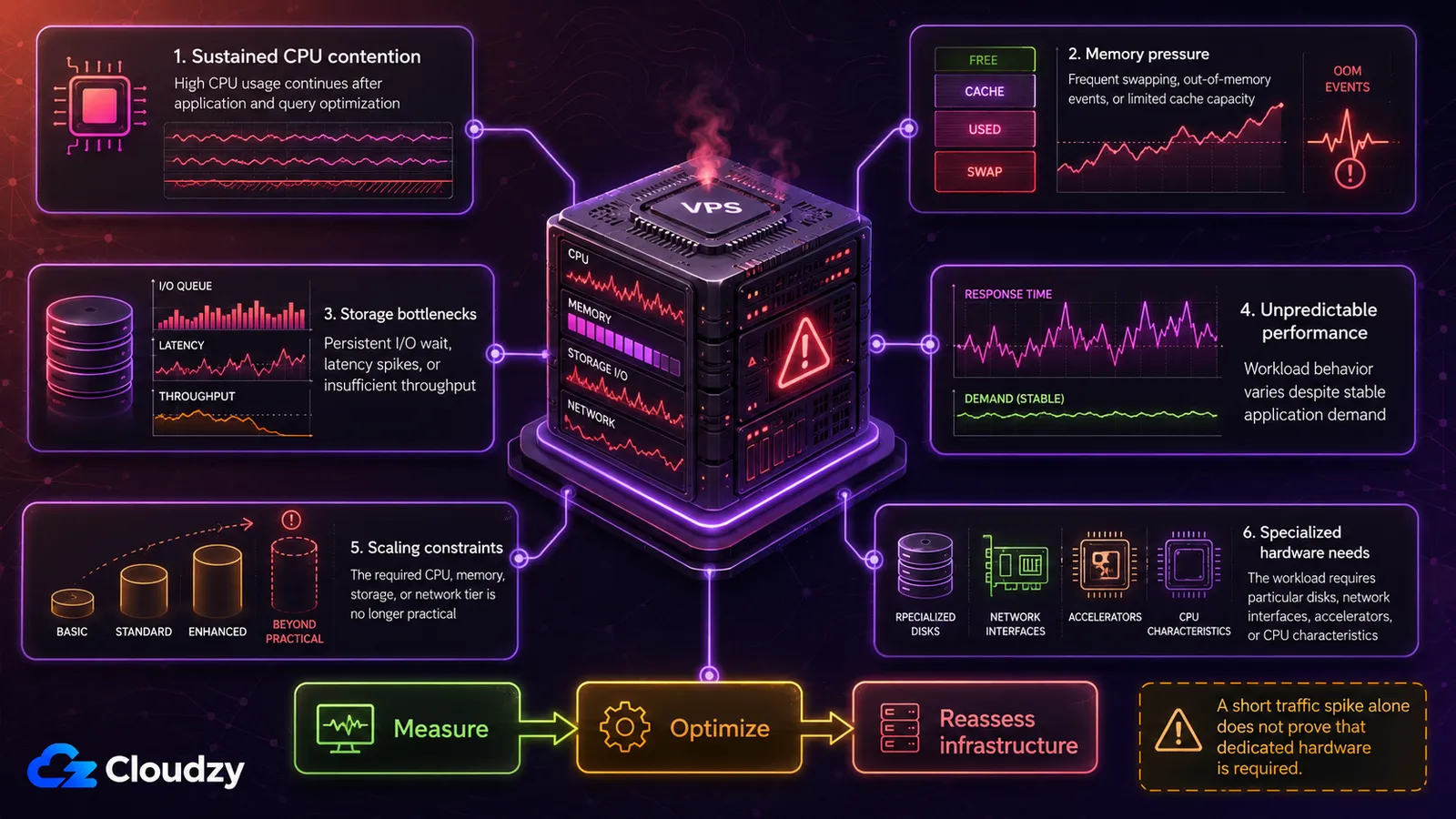
These are checks against your own telemetry, not rules of thumb about your industry. One condition governs all three: a signal counts only when it is sustained.
A machine pinned at 95% CPU during a nightly backup window is behaving correctly. A machine pinned at 95% CPU for a fortnight is telling you something.
Sustained CPU Utilization With No Headroom
The condition to watch is a rolling average over days or weeks that leaves no room to absorb a traffic event, a runaway process, or a slow dependency. Not a peak reading. At that point response times degrade non-linearly instead of gracefully, and the next incident has nowhere to go.
Workload shape moves the line. A steady queue consumer sitting near its ceiling is closer to trouble than a bursty web tier that spikes twice a day and idles otherwise. Read your own curve rather than a number from a vendor page.
Being CPU-bound is not the same as needing dedicated hardware. The first is often solved inside virtualization: a larger instance, or a higher-clock instance when the workload is single-threaded and latency-sensitive.
Confirm which one you have before you price a physical box. A single-threaded application does not get faster on 32 cores.
Steal Time and IO Wait
CPU steal time is the percentage of time your virtual processor was ready to run and the hypervisor gave the physical core to someone else. It is the number that distinguishes a workload that is too big from a host that is too full.
Do not treat a specific steal-time percentage as a gate. Watch the trend on your own machine. Near-zero with occasional blips is normal. Consistently non-zero and climbing means the host is contended.
Sustained and high on a latency-sensitive workload means you are being scheduled around, and the application is paying for it.
Pro Tip
Run vmstat 1 30 and watch the st column in the CPU block; top reports the same figure as %st. Take the reading during your actual peak hours, not once at midnight. A healthy host looks like this:
procs -----------memory---------- ---swap-- -----io---- -system-- ------cpu-----
 r  b   swpd   free   buff  cache   si   so    bi    bo   in   cs us sy id wa st
 1  0      0 412332  84120 1932144    0    0     0    12  842 1503 21  4 75  0  0
 2  0      0 411980  84120 1932148    0    0     0     0  901 1622 24  5 71  0  0
A contended one looks like this, and the missing time is in the last column:
 r  b   swpd   free   buff  cache   si   so    bi    bo   in   cs us sy id wa st
 4  0      0 288104  61228 1104996    0    0     8   140 1502 2210 31  6 45  1 17
 5  0      0 287960  61228 1105004    0    0     0     0 1610 2388 29  7 44  2 18
High steal time means this host is oversubscribed. That is a statement about your provider and your plan, not about virtualization. The correct first response is to move to a better-provisioned host or a plan with dedicated vCPU allocation. Leaving virtualization comes after that, not instead of it.
If steal time is your finding, the overselling diagnosis is the thread to pull first.
I have moved two workloads off a VPS for this reason. Neither was CPU-bound. Both were sitting on hosts that were sold past their capacity, and one of them only needed a different provider.
The Scaling Ceiling
You have hit the ceiling when the largest instance the provider sells no longer fits the workload, or when the last vertical step produced meaningfully less improvement than the step before it. The second one is easy to miss. If doubling the instance bought a 20% improvement, the constraint has moved somewhere more vCPU cannot reach.
Storage triggers are the ones I see survive investigation most often, and they usually arrive wearing a database. The constraint is rarely the engine. It is sustained random IO on a pool you share with strangers.
Any workload that reads and writes small blocks continuously (a busy database, a queue with durable persistence, a log-heavy service) pushes that pool in the pattern it handles worst.
Watch %wa and your own latency percentiles during real peak load. If latency varies in ways your own load does not explain, you are queuing behind other tenants, and disks that belong to you are the reliable fix.
Two of these three signals are usually solvable without leaving virtualization, and testing that is cheaper than buying hardware.
When Compliance Requires Dedicated Hardware
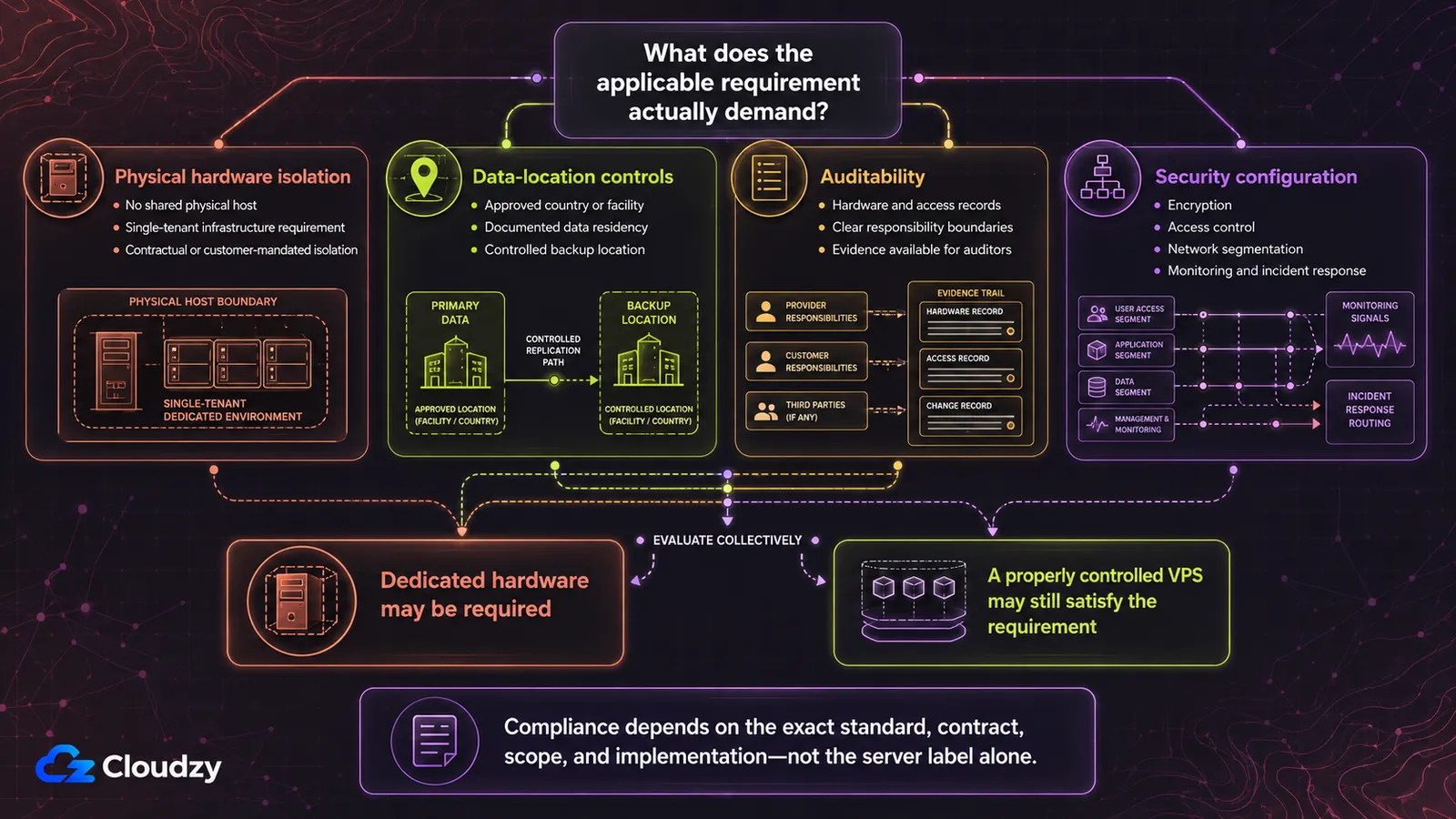
An auditor writes "the cardholder data environment must run on dedicated hardware" and the sentence does two different jobs depending on who reads it. To a compliance professional it usually means an environment isolated from other workloads and scoped tightly. To a hosting shopper it looks like a product category.
The gap between those readings is where budget gets spent for no control benefit.
PCI DSS and the HIPAA Security Rule both specify isolation and control outcomes instead of a form factor. If your requirement is that a defined set of systems is segmented, access-controlled, logged, and independently assessable, a properly segmented virtual environment satisfies it. If your requirement is that no other tenant's code executes on the same silicon, only physical hardware does.
Establish which sentence you were handed before you price anything.
For PCI DSS, the operative concept is scope. The Security Standards Council's own guidance on scoping and network segmentation sets the default position that everything is in scope until verified otherwise. It describes segmentation as one method that can reduce the number of system components in scope. That supplement names no hardware form factor anywhere in its text.
A poorly segmented virtual environment can still drag far more of your stack into scope than you budgeted for. That is the cost of doing it badly, not an argument against doing it.
HIPAA is more explicit about being control-based. Cornell Law School's text of the HIPAA Security Rule's flexibility-of-approach provision states that covered entities and business associates may use any security measures that allow them to reasonably and appropriately implement the standards. The choice is judged against organizational size, technical infrastructure, cost, and risk. That is a test of appropriateness, not a specification of equipment.
The operative requirement for a hosted deployment is usually contractual. Cornell Law School's text of 45 CFR § 164.308(b)(1) states that a covered entity may only let a business associate handle electronic protected health information after obtaining satisfactory assurances that it will be safeguarded appropriately. A provider that will not sign a business associate agreement disqualifies itself regardless of what its hardware looks like.
Some cases are dedicated-only. A customer contract that specifies physical isolation in writing is one.
A control you cannot implement without hardware access is another: full-disk encryption with a key you hold in a TPM you control, verified secure boot, or a firmware baseline you attest yourself. In those cases, buy the hardware and stop evaluating.
Pro Tip
Before accepting "dedicated hardware" as a requirement, ask the person who wrote it which control it implements and which systems it applies to. Frequently the answer is an isolated environment scoped to the cardholder data environment, not a dedicated server product. The two have very different price tags.
Compliance outcomes depend on your assessor and your specific scope. This gives you the right question to ask them, not a ruling you can cite back at them.
Where the Cost Curves Cross
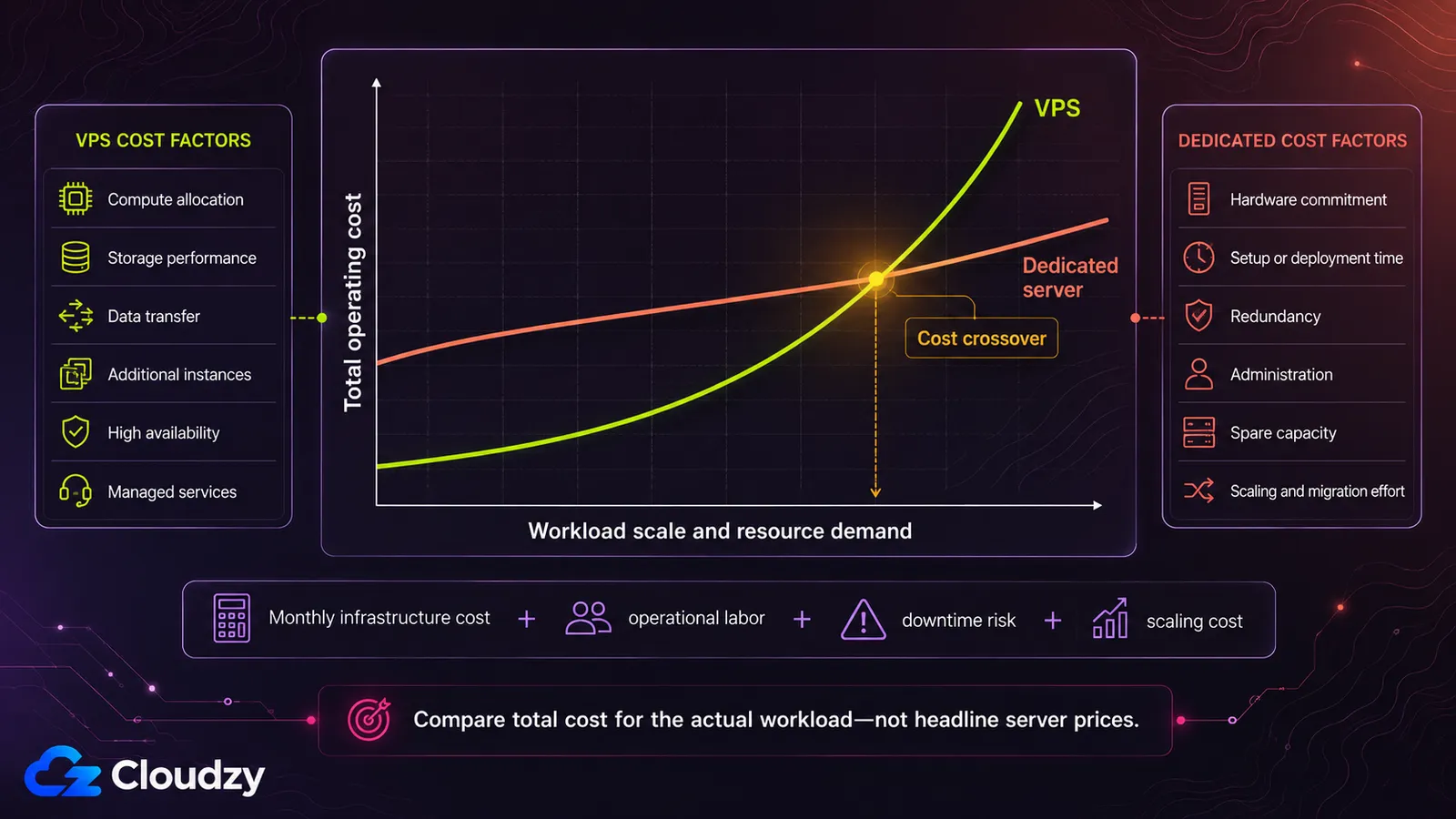
Dedicated hardware looks cheap per core, and at sufficient scale it is. Across providers publishing public bare metal pricing, entry configurations in the 6-core, 32 GB class typically start from around $150 to $200 per month, while 24-core, 256 GB machines with multi-terabyte NVMe commonly start from $450 and up.
Those are typical list-price ranges as of August 2026, not a market average. Price your own shortlist.
Look at the shape instead of the absolute numbers. VPS pricing is close to linear in allocated resources and has effectively no floor, which is why a 1 GB instance costs a few dollars. Dedicated pricing starts at whatever a whole physical machine costs and then rises slowly, because the marginal cost of more cores inside a chassis you already rent is low.
Two lines with different slopes and different intercepts cross at one point.
Utilization decides which side of that crossing you are on. The dedicated line is fixed: you pay for 24 cores whether you use 24 or 4.
A dedicated box at 20% utilization costs more per unit of delivered work than a right-sized VPS, even when the invoice is smaller per core. The denominator is what you consumed, not what you were sold.
The crossover is not "above N cores." It is "above N cores that you keep busy."
Three costs appear on neither invoice and belong in the comparison:
- Provisioning time. A VPS is available in minutes. Physical hardware is ordered, racked, and handed over in hours or days. That latency is a capacity-planning constraint, not a one-time inconvenience.
- No scale-down. After a traffic event you can shrink a VPS back. A dedicated server is a monthly commitment at its full size until the contract term ends.
- Hardware failure. When a host fails under you on a VPS, the provider migrates or restores it. When a disk or PSU fails in your dedicated box, the recovery path is a support ticket and a restore from backup, with the downtime measured in your own SLA.
When a VPS Is Still the Right Answer
No signal fired. Utilization has headroom, steal time is flat, the instance size ceiling is far away, no contract mandates physical isolation, and your usage is nowhere near the cost crossover. Stay virtualized.
That is capability, not consolation. Snapshots make an upgrade reversible and a risky migration testable. Separate small instances give you environment separation at a price that makes staging worth having.
And the 3am hardware failure is somebody else's, which for a small team is worth more than a benchmark delta.
The gap has narrowed, and that is a change in the technology, not a talking point. Dedicated-vCPU plans, NVMe as a default, and mature paravirtualized drivers have removed most of the practical performance distance for typical workloads.
Provider longevity belongs on the shortlist alongside the specs. A VPS plan you can leave in an afternoon carries less vendor risk than a twelve-month hardware contract. That only holds if the provider is still there and still answering tickets in month nine. Check how long they have operated, how they publish incident history, and how support responds before an outage rather than during one.
Managed dedicated hosting also exists and trades hardware control for a lower operational burden, which is the same axis as the managed versus unmanaged decision one tier down.
Staying on a VPS is an active decision with its own escalation path, not the default you land on by not choosing.
If your diagnosis was contention rather than capacity, the purchase you are looking at is a VPS, not a chassis. What you want with it is the freedom to scale back down after the event that pushed you here. That is the case we build for: our Linux VPS runs on NVMe storage with a 99.95% uptime SLA and hourly billing. Testing a larger or higher-clock instance costs you an afternoon instead of a contract. Size it against the thresholds above, run it through your own peak, and check the steal time again.

Build on a Linux VPS with root access, NVMe, and AMD EPYC power.
View Linux PlansFrequently Asked Questions
How Much Faster Is a Dedicated Server Than a VPS?
It depends on which resource you are contending for. On modern virtualization the CPU gap on a well-provisioned host is small, because hypervisor overhead is minimal with hardware virtualization extensions. The reliable differences are the absence of IO contention and network contention, which show up as latency consistency rather than raw speed. If your workload never contends for disk or network at peak, expect the gap to be small enough that it does not decide the purchase.
Is a VPS Good Enough for a Production Database?
For most production databases, yes. The binding constraint is usually sustained random IO on shared storage, not the database engine. A database doing continuous small-block reads and writes will reach the limit of a shared pool long before it reaches the limit of the engine. Dedicated disks remove that limit; a larger instance does not.
Does PCI DSS Require a Dedicated Server?
No, not as a blanket rule. PCI DSS specifies isolation and control requirements scoped to the cardholder data environment rather than a hardware form factor. The Security Standards Council's scoping guidance treats everything as in scope until verified otherwise and describes network segmentation as a method for reducing the systems in scope. A properly segmented virtual environment can satisfy this; a poorly segmented one pulls far more of your stack into scope.
How Do I Know If My VPS Has a Noisy Neighbor Problem?
The symptom is inconsistent performance at peak on a machine that is not otherwise busy: response times that swing while your own load, memory, and disk usage stay flat and unremarkable. Quiet hours look normal, which is why the problem survives so long undiagnosed. The cause sits on the physical host you share, so the fix is a better-provisioned plan or a different provider, not a rewrite of your application.
When Should I Upgrade From a VPS to a Dedicated Server?
Upgrade when at least one of these holds: CPU utilization sits at a rolling-average level that leaves no headroom for a traffic event; steal time or IO wait stays high after you have already tried a better-provisioned plan; the workload has outgrown the largest instance your provider sells; a contract or a control genuinely requires physical isolation; or sustained utilization is high enough that a fixed hardware cost beats per-resource pricing.


Discussion
Comments
Sign in to join the discussion.