

Umami, the open-source web analytics tool, answers three questions on one screen: which pages got visits, where those visitors came from, and whether last week's post landed. Umami says its tracking code sets no cookies. This Umami review ends in a qualified yes for a single small site, with conditions attached to paying and to self-hosting.
Umami comes two ways. Umami Cloud is the hosted service, with a free plan. The same software also runs on a server of your own at no license cost. The current release is v3.4.0, released September 17, 2026.
The Short Version
Umami is worth it for a small site that wants readable traffic numbers from a simpler dashboard than Google Analytics 4. Umami's pricing page lists the free Cloud plan at one website, 100K events a month and six months of history, and the default dashboard answers the everyday questions without opening a report menu. My rating is 4 out of 5. It fits a single blog, portfolio or newsletter site starting on the free plan. Keep Google Analytics 4 if your business runs on Google Ads conversion data, and don't self-host just to avoid the paid plan unless someone will install the updates.
How this review was put together: I haven't installed Umami or run it on a site of my own. The verdict comes from Umami's public live dashboard, its pricing page, its documentation, its GitHub release notes and issue tracker, and the user reports linked below, all checked through October 1, 2026. Umami's developers had no input and provided nothing.
What the Umami Dashboard Shows You
Umami's main dashboard puts five numbers across the top: visitors, visits, views, bounce rate (the share of visits that saw only one page) and visit duration, each with its change from the previous period. Under them sit which pages got traffic, which sites sent it, what browsers and devices visitors used, and which countries they came from.
Umami's public dashboard for its own website runs on Umami Cloud, so you can check all of this yourself. I went through it in September 2026. The pages list switches between path, full URL, entry page and exit page. Sources switch between referrers (the sites that sent visitors) and broader channels, and on that dashboard chatgpt.com shows up as a referrer next to google.com and bing.com. Location goes down to regions and cities. A day-by-hour grid shows when traffic arrives, and a filter and a date-range control sit at the top.
The deeper reports live in a side menu: realtime, events, sessions, compare, breakdown, goals, funnels, journeys, retention, UTM, revenue and attribution. You open them when you have a specific question, not to find out what got visits yesterday.
The clean layout isn't new to version 3. In a 2024 r/webdev thread on GA alternatives, written before the version 3 redesign, one commenter called the dashboard "clear and easy to navigate," with "not a lot of bells and whistles compared to something like GA4." The version 3 dashboard I looked through fits that description. For reading your own traffic, I rate the dashboard 5 out of 5.
Is Umami Free?
Yes, in two ways. As of October 2026, Umami Cloud's free Hobby plan costs $0 for up to 100K events a month on 1 website, with 6 months of data kept. The Umami software itself is open source and free to run on a server of your own.
The limit is counted in events. Umami's pricing page defines them: each pageview is one event, and each custom event you track, such as a click on a sign-up button, is another. If you save extra details with an event, each saved detail counts as one more. A site that tracks nothing beyond pageviews stays inside the free plan while it gets fewer than 100,000 pageviews a month.
"1 website" means exactly that: a second site needs a paid plan or its own install. "6 months of data" means you can look back half a year, not compare this spring with last spring.
The free plan leaves out team members, data import, API access and email reports, which all start at Pro. It keeps data export.
The step up is Pro, from $20 a month: 1 million events included, extra events billed at a per-event rate, up to 20 websites, up to 10 team members and 2 years of data, with a 14-day free trial. Business is from $200 a month and is where session replays and heatmaps start. These are Umami's list prices as of October 2026.
For one site, the free plan is generous. What holds it back is the single-website cap and the six-month history, so I rate plan value 4 out of 5.
Do You Need a Cookie Banner With Umami?
Umami says no. Umami's documentation FAQ states that Umami "does not use any cookies in the tracking code" and collects no personally identifiable information, and on that basis says you can run it without a cookie consent banner. That is the vendor's position, not a regulator's ruling.
The claim rests on what Umami collects. According to the same FAQ, that's page views, referrer URLs, browsers, operating systems, device types and country, with the data anonymized and visitors never tracked across websites. The FAQ also answers "yes" to whether Umami is GDPR compliant.
CNIL, France's data protection authority, frames the question differently. It ties consent to "depositing or reading a cookie or tracer" on a visitor's device. CNIL's guidance on analytics tools also notes that its rules "may be subject to national variation." CNIL doesn't name or assess Umami. Other things on your site can raise their own consent question too: an embedded video player or an advertising pixel can set cookies that have nothing to do with Umami.
For a small site whose only tracker is Umami, I'd start from the FAQ's answer. If the site handles anything sensitive, check with your local data protection authority. This isn't legal advice. On privacy I rate Umami 4 out of 5: the design supports the claim, and the claim is still the vendor's.
Is Umami Stable Since Version 3?
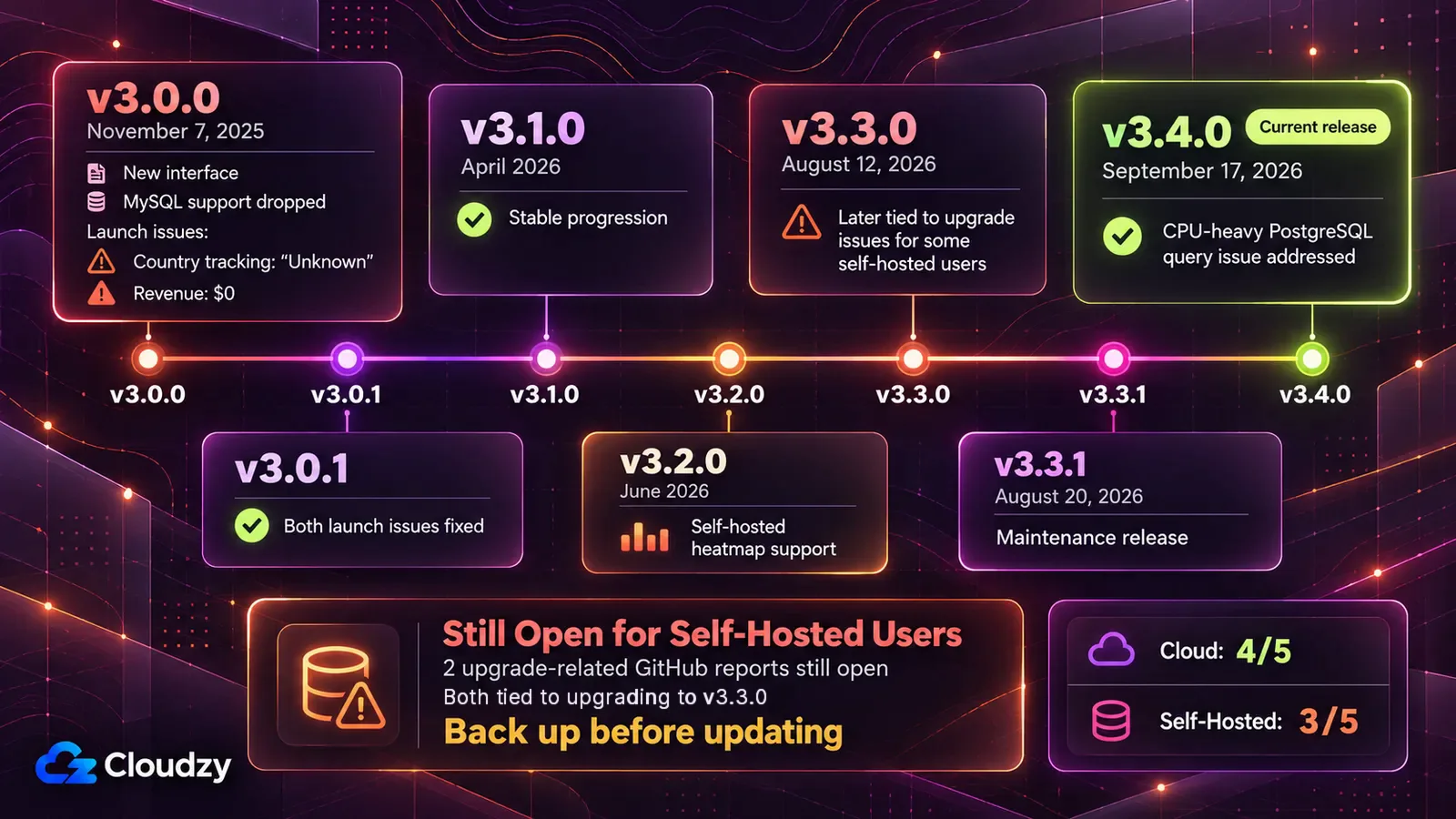
On Umami Cloud, Umami runs the upgrades for you. If you self-host, two GitHub reports I checked again on October 1, 2026 are still open, both describing installs that failed after upgrading to v3.3.0. A separate report about a CPU-heavy PostgreSQL query was addressed in v3.4.0. The open reports are not evidence that a current upgrade will fail, but they're still a reason to back up before you update.
Umami v3.0.0 shipped on November 7, 2025 with a new interface, and the v3.0.0 release notes dropped support for MySQL, one of the databases Umami used to run on. Two features broke at launch: country tracking showed "Unknown" and revenue showed $0. Both were fixed in v3.0.1, about ten days later.
Releases have come steadily since then: v3.1.0 in April 2026, v3.2.0 in June, v3.3.0 on August 12, v3.3.1 on August 20 and v3.4.0 on September 17, 2026. The two upgrade reports describe one install that won't start at all and another that can't log in to its database. A separate CPU-heavy session activity query, reported on September 9, led to a PostgreSQL query fix that shipped in v3.4.0.
All three reports affected self-hosted installs, where users manage their own upgrades and database. I rate stability 4 out of 5 on Cloud and 3 out of 5 if you self-host.
Umami Cloud or Your Own Server: What Self-Hosting Asks of You

On Umami Cloud, Umami runs the software and you paste a snippet into your site. Self-hosting means the same software, released under the MIT license so you can run it at no cost, on a server you rent and look after.
Self-hosting commits you to four things. You need a server that stays on around the clock. It runs Umami plus PostgreSQL, the database where Umami stores your data and the only relational database it supports since version 3. For a source install, follow the requirements for the release you're deploying; PostgreSQL currently needs to be version 12.14 or newer. You install every update yourself, which is why the open upgrade reports above matter. And backups are yours to set up and check.
You do get something back. Self-hosted data is kept indefinitely unless you delete it, per Umami's FAQ, and there's no plan-based event cap. Session replays are the exception: Umami's replay documentation keeps them for 30 days. The self-hosted version also includes session replays and, since v3.2.0's self-hosted heatmap support, heatmaps, which Umami Cloud reserves for Business. What you give up is email reports and the streaming API, which the pricing page lists as Cloud-only.
On Umami's pricing page, self-hosting appears only in the FAQ, and one commenter in a Hacker News thread on leaving Matomo complained in December 2025 that "you can't even find" self-hosting on the front page. Umami's front page now mentions self-hosting in a short section, but the main call to action is still Cloud sign-up, which I read as steering new users toward Cloud.
My recommendation is to start on Cloud. Self-hosting starts to make sense in three cases: you need more than one site and won't pay for Pro, you want more than six months of history without a paid plan, or you already maintain a server. In the first two, it only works if someone will install the updates and check the backups.
If one of those applies and you'd rather not assemble the server yourself, Cloudzy's one-click Umami app sets up Umami with its PostgreSQL database and an Nginx web server in front, on a self-managed VPS with root access. It's still your server: updates and backups stay with you.
For hosting, I rate Umami Cloud 4 out of 5 and self-hosting 2 out of 5 (3 out of 5 if you already run a server).
Where Umami Stops
Umami goes further than a visitor counter. Goals, funnels, user journeys, retention, UTM campaign tracking (the tags added to links so you can tell which newsletter or post a visit came from), revenue and attribution reports are on every Cloud plan, the free one included.
Its limits are the ones covered above: team logins that start at Pro, replays and heatmaps held back for Cloud's Business plan, and no email reports when you self-host.
Advertising is the bigger boundary. If your site's growth runs on Google Ads and you manage campaigns on conversions reported back into Ads, Google Analytics 4 is built for that job. Google's guide to linking Analytics and Ads describes creating consistent Analytics and Ads conversions from your key events and viewing Ads conversion performance. In my view, that's reason enough to keep GA4 for an ad-driven site, with or without Umami next to it.
If you need more depth than Umami offers, a side-by-side of Umami, Matomo, Fathom Lite and Ackee shows where the heavier options go. For marketing measurement, I rate Umami 3 out of 5: enough for content sites, short of what an ad-driven store needs.
Who Should Use Umami, and Who Shouldn't
Umami suits one small site on the free plan, several sites on Pro when a client or colleague needs their own login, and anyone who already maintains a server and wants history kept indefinitely. It doesn't suit a store or lead-generation site that manages Google Ads on conversion data, which should keep GA4.
It also doesn't suit an owner of several sites who won't pay for Pro and has nobody to install updates. Self-hosting to avoid the fee trades a monthly bill for maintenance nobody will do.
If you run a single site, put the free-plan snippet on your main site and read the dashboard for a few weeks before deciding whether to drop GA4.

Build on a Linux VPS with root access, NVMe, and AMD EPYC power.
View Linux PlansFrequently Asked Questions
Can I Take My Data With Me if I Leave Umami Cloud?
Umami's pricing FAQ on data export says yes: all of your data can be exported from Umami Cloud, either through the dashboard or through the API.
Can Umami Track Button Clicks and Sign-Ups?
Yes, through custom events. Umami's guide to tracking events shows two ways to do it: add a data attribute to the button in your site's HTML, or send the event from JavaScript.




Discussion
Comments
Sign in to join the discussion.