
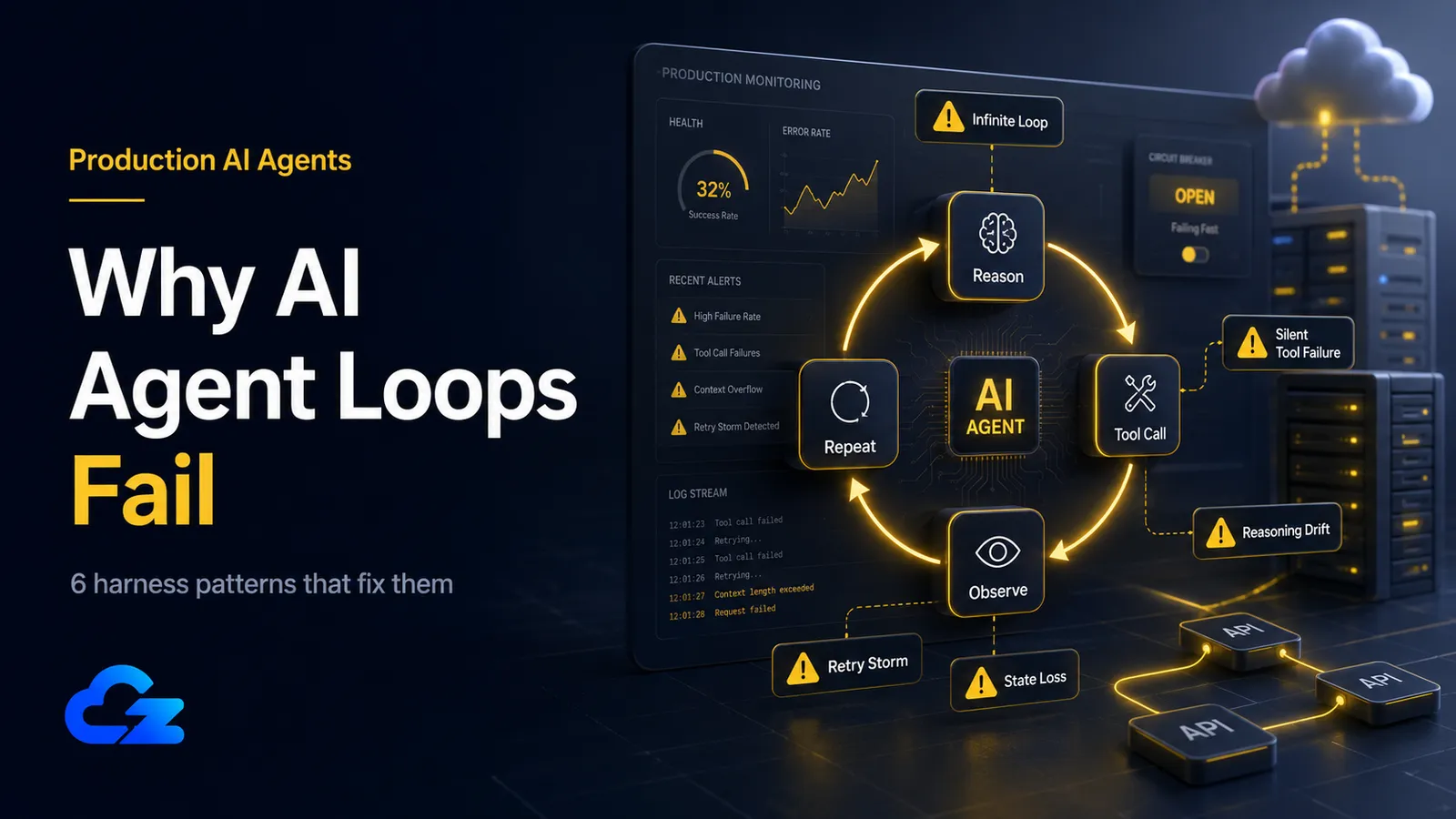
The loop ran clean forty times in testing. On the forty-first run, in production, it called the same SQL tool with the same broken query over and over until it burned through the day's API budget and a billing alert finally woke someone up. Nobody wrote a bad model. Nobody changed the prompt. The agent simply never decided it was done.
This is the pattern I keep seeing with teams who move an agent from a prototype to a 24/7 workload. AI agent loops often fail in production not because the model suddenly got worse, but because the execution layer lacks termination discipline, validated tool contracts, bounded context, and durable state. An agent loop is a stochastic system making one sequential decision after another. Without a few specific guardrails, the rare failure becomes a guaranteed one once you run it long enough. Managed agent platforms (Vertex AI Agent Builder, Bedrock Agents, Azure AI Foundry) bake some of these guardrails in; this guide is for those of us who chose to self-host and own the loop ourselves.
The stakes are real enough that Gartner expects over 40% of agentic AI projects to be canceled by the end of 2027, citing escalating costs and unclear value. What follows is six specific ways loops break in production, the mechanism behind each, and the harness pattern that fixes it, with the LangGraph and n8n details plus what it takes to actually run this 24/7.
The Short Version
- Infinite loops: The agent never decides it is done. Combine a hard step ceiling (LangGraph's
recursion_limit, default 25) with no-progress detection that kills repeated tool+argument calls. - Context overflow: The loop fills its own context window with accumulated history until calls truncate or fail. Summarize history at fixed intervals so the working context stays bounded.
- Silent tool failures: A tool returns an empty string, the model reads it as a valid no-op, and the agent "succeeds" at doing nothing. Validate every tool result before the model sees it.
- Reasoning degradation: Quality decays as context grows, even below the hard limit. Compress mid-loop, but protect pinned safety instructions when you do.
- State loss on restart: A crash means starting from scratch. Checkpoint to Postgres (LangGraph
PostgresSaver), not SQLite, for production. - Retry storms: Ten agents each retrying ten times hit a dead service with a hundred requests. Add exponential backoff with jitter and a global circuit breaker.
What This Guide Doesn't Cover
This is a harness guide, focused on the engineering around the loop, not the model inside it. A few related topics sit deliberately out of scope:
- Multi-agent coordination failures (stale reads, orphaned state between agents): a different problem worth its own write-up.
- Agent security (prompt injection, tool poisoning): a separate failure category with its own threat model.
- Model selection and fine-tuning. This guide assumes you have picked a model and are debugging the system around it.
- Managed agent services, acknowledged above; the patterns here are for the self-hosted path.
Infinite Loops: When the Agent Never Decides It's Done
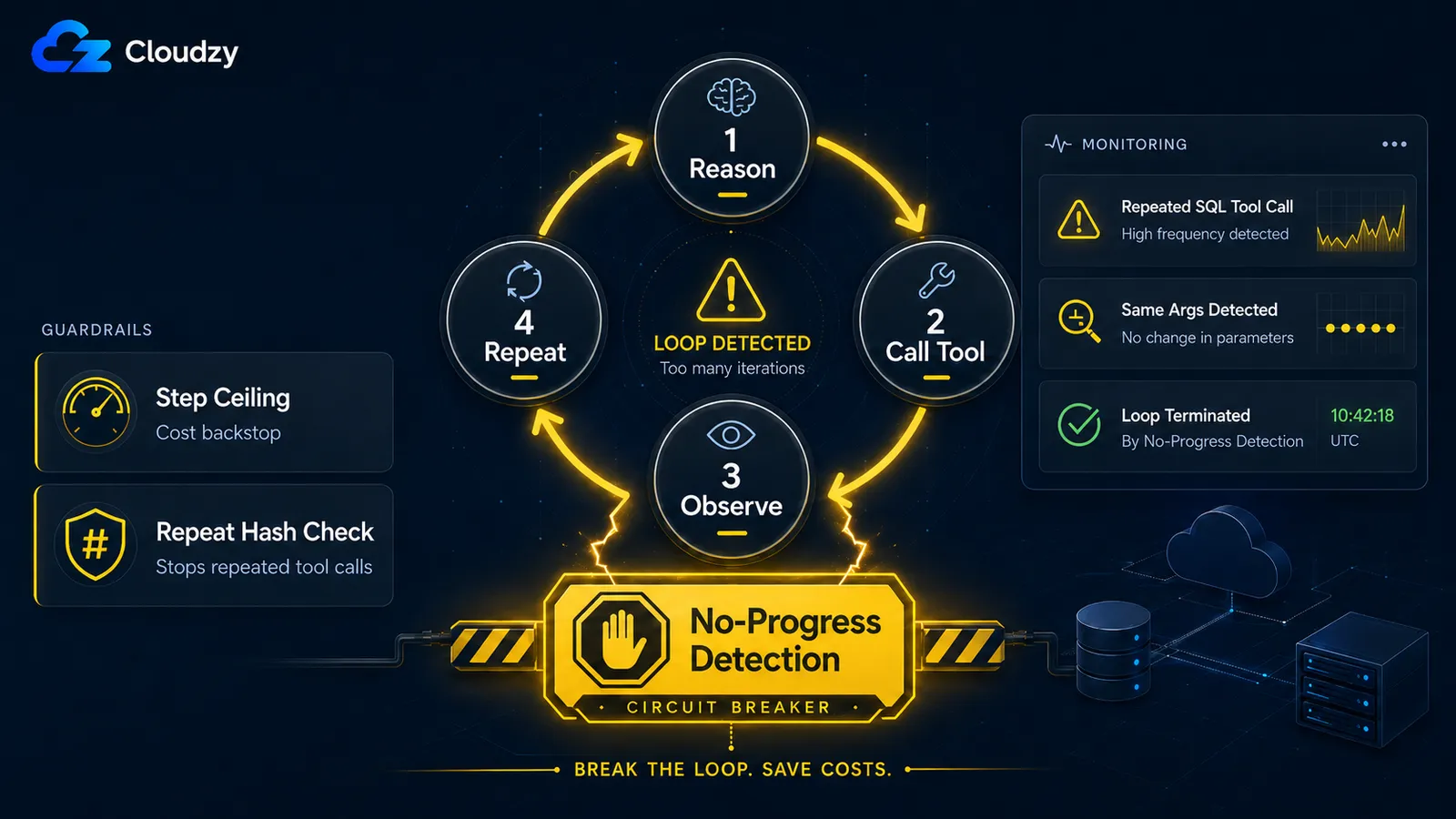
An agent loops forever when it has neither a hard step ceiling nor a way to detect that it has stopped making progress. The fix is two parts: keep a hard ceiling as a cost backstop, and add no-progress detection that hashes each tool-plus-argument call and terminates when it sees the same call repeat. In LangGraph that ceiling is the recursion_limit, default 25 steps; cross it and the graph raises a GraphRecursionError.
LangGraph's docs describe that limit as reaching "the maximum number of steps before hitting a stop condition," and here is the trap worth understanding: the recursion limit is not loop protection. It is a backstop that fires after the loop has already wasted twenty-five steps and the API spend that goes with them. The agent's own learned termination logic is supposed to stop it long before that, and that logic can fail independently. One reported LangGraph case shows a text-to-SQL agent looping until it hit the recursion limit despite clear stop conditions in the prompt. It kept calling the same query tool with the same failing SQL, and the issue was closed as "not planned." I read that as a clear signal: do not treat the ceiling as your stop condition. It is your seatbelt, not your brakes.
Raising the ceiling is straightforward; you pass it through the config when you invoke the graph:
# The hard ceiling -- a backstop, not loop protection
graph.invoke(
    {"messages": [("user", "Generate the quarterly report")]},
    {"recursion_limit": 50},
)
The part that actually stops a stuck loop is progress detection. The mechanism is simple: hash the tool name plus its arguments on each step, keep a short window of recent hashes, and bail when you see a repeat.
import hashlib

def step_signature(tool_name: str, tool_args: dict) -> str:
    payload = f"{tool_name}:{sorted(tool_args.items())}"
    return hashlib.sha256(payload.encode()).hexdigest()

# Inside your loop: terminate if the same tool+args repeats within the window
seen = recent_signatures[-WINDOW:]
sig = step_signature(tool_name, tool_args)
if sig in seen:
    raise StopReason("no_progress: repeated tool call detected")
recent_signatures.append(sig)
This catches the agent that is technically "running" (calling tools, generating tokens) but cycling on the same failed action. The named failure mode here maps to what the MAST taxonomy (IBM Research and UC Berkeley) calls Unaware of Termination Conditions (FM-1.5), one of the failure modes their analysis associates with outright task failure.
A step ceiling stops runaway cost. No-progress detection stops the loop that's technically "progressing" but repeating itself. Production needs both.
Context Window Overflow: When the Loop Fills Its Own Context With Garbage
A long-running loop accumulates every tool output, every intermediate thought, and every message it has produced, then stuffs all of it back into the context window on each turn. Eventually the window fills, and calls either truncate silently or fail outright. The fix is context summarization at fixed intervals: every N steps, compress the accumulated history into a running summary so the working context stays bounded.
Picture a research agent that has been running for an hour. By step 60 it is carrying the full text of every page it has fetched, every search result, every reasoning trace. None of that raw history helps it on step 61, yet all of it counts against the window, and the model is paying attention-budget on tokens it no longer needs. When the window fills, the provider truncates from one end, and the agent quietly loses the instruction it was given at the start.
The trigger is a tuning decision, and there is a useful reference point for it. Mem0's writeup of a real production system notes that the Hermes agent's compressor "fires at 50% of the model's context window by default", with a secondary safety net at 85% for sessions that balloon between turns. Fifty percent is a sensible starting point: compress early enough that a single large tool output cannot blow past the limit before the next scheduled compression.
Note
Overflow and reasoning degradation are different problems, and the next section covers the second one. Overflow is a hard wall, where you run out of tokens. Degradation is soft: the model gets worse before you hit the wall. You need to handle both, and the trigger threshold above protects against the hard wall.
Bounded context is a harness responsibility, not a model feature. Summarize on an interval before the window forces a silent truncation.
Silent Tool Call Failures: When the Agent "Succeeds" at Doing Nothing
A tool call returns an empty string or a soft "no results found" message, the model interprets that as a valid result, and the agent continues as if the step worked, appearing to succeed while doing nothing at all. The fix is a validation gate on every tool return: schema-check or sanity-check the output before the model ever sees it, and surface a real failure the loop has to handle instead of an empty success.
This one is insidious because nothing crashes. A developer writing up silent failure modes in production agents put it directly: models interpret generic empty strings as valid no-ops and continue executing without awareness of the failure. The database query that returned zero rows because the connection dropped looks identical, to the model, to the query that legitimately found nothing. So the agent reports "no matching records" and moves on, and you find out a week later that a third of its runs were quietly broken.
The validation gate sits between the tool and the model:
def gate_tool_result(tool_name: str, result):
    # Reject empties and soft errors before the model can rationalize them
    if result is None or (isinstance(result, str) and not result.strip()):
        raise ToolFailure(f"{tool_name} returned empty -- treat as failure, not no-op")
    if isinstance(result, str) and result.lower().startswith(("error", "exception")):
        raise ToolFailure(f"{tool_name} returned a soft error: {result[:120]}")
    return result  # validated -- safe to hand back to the model
The point is not the exact checks; yours will depend on what each tool legitimately returns. The point is that an unvalidated return value is a decision you have handed to a stochastic model, and the model's default move is to keep going.
An unvalidated tool return is a silent failure waiting to happen. Validate the output, don't trust the call.
Reasoning Degradation Over Long Contexts: When the Agent Gets Worse the Longer It Runs
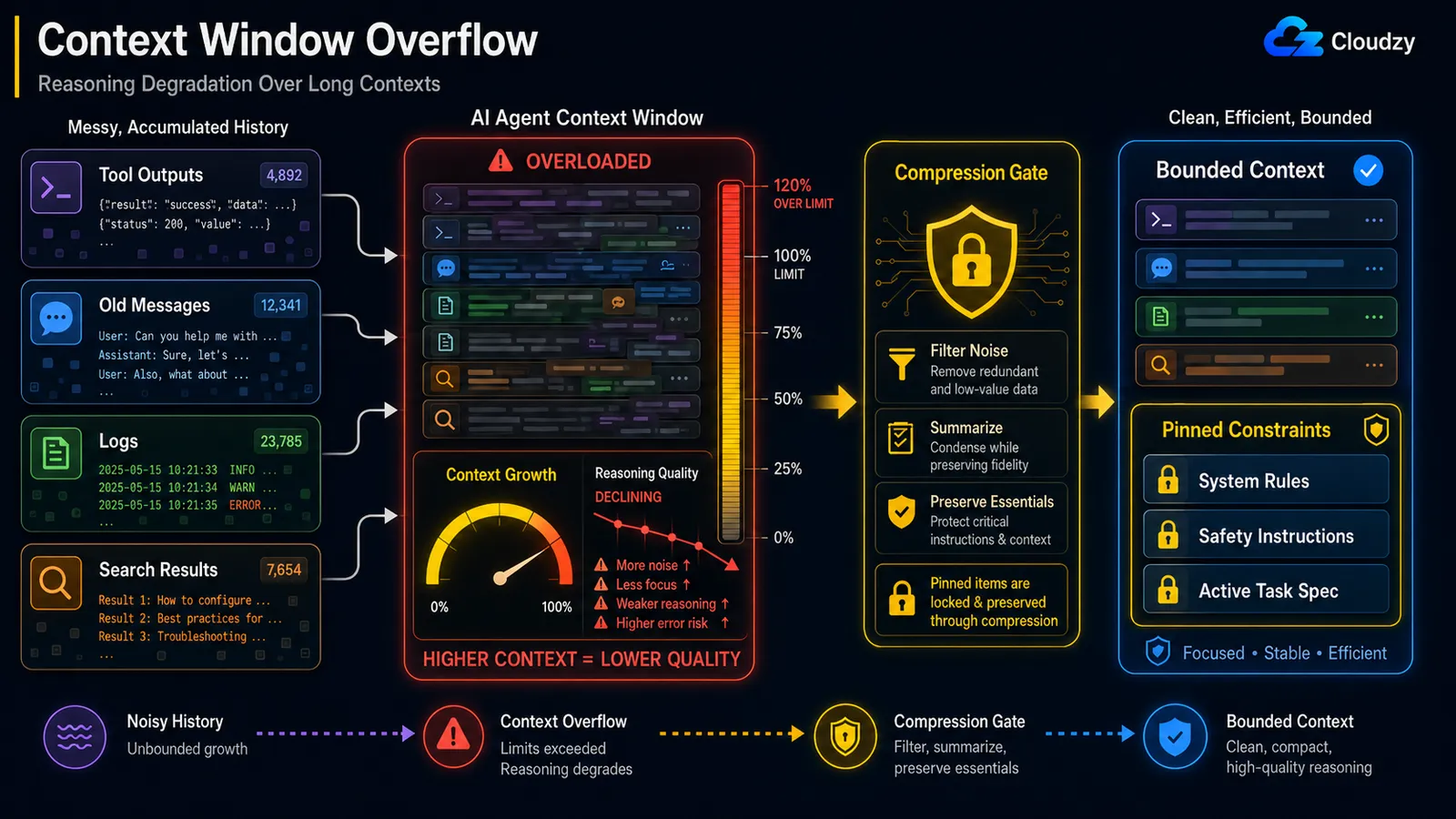
Even when you stay under the hard context limit, reasoning quality decays as the context grows. This is the "lost in the middle" effect, where the model reliably attends to the start and end of a long context but loses the middle. The fix is mid-loop compression that preserves pinned constraints: compress the noise, protect the load-bearing instructions.
The mechanism has a name. Anthropic's engineering blog references it as context rot: "as the number of tokens in the context window increases, the model's ability to accurately recall information from that context decreases." Because "every token attend to every other token," you get n² pairwise relationships for n tokens, and the model's attention stretches thinner the longer the context runs.
That qualifier, protect the load-bearing instructions, is the whole game, and there is a documented incident that shows why. In a reported case, an OpenClaw agent mass-deleted a user's inbox during a context compaction, because the safety instruction it had been given ("don't take action until I tell you to") was dropped from active context when the history got compressed. The constraint that should have been the last thing to go was treated as ordinary history and summarized away.
So a naive "summarize everything older than N turns" is dangerous. Compression has to know what it must never drop:
PINNED = {"system_constraints", "safety_instructions", "active_task_spec"}

def compress_history(messages):
    pinned = [m for m in messages if m.tag in PINNED]      # never summarized
    transient = [m for m in messages if m.tag not in PINNED]
    summary = summarize(transient)                          # lossy is fine here
    return pinned + [summary]                               # constraints survive intact
This is distinct from the overflow problem in the previous section. Overflow is about running out of room; degradation is about the model getting worse while there is still room left. You can be at 60% of your window and already be reasoning badly.
Note
Compression that drops a safety constraint is a different class of bug from compression that loses a stale search result. Tag the constraints, the task spec, and any "do not do X" instruction as pinned, and exclude them from the summarizer entirely.
Compression that drops a safety instruction is worse than no compression. Protect pinned constraints when you compress.
State Loss on Restart: When a Crash Means Starting Over
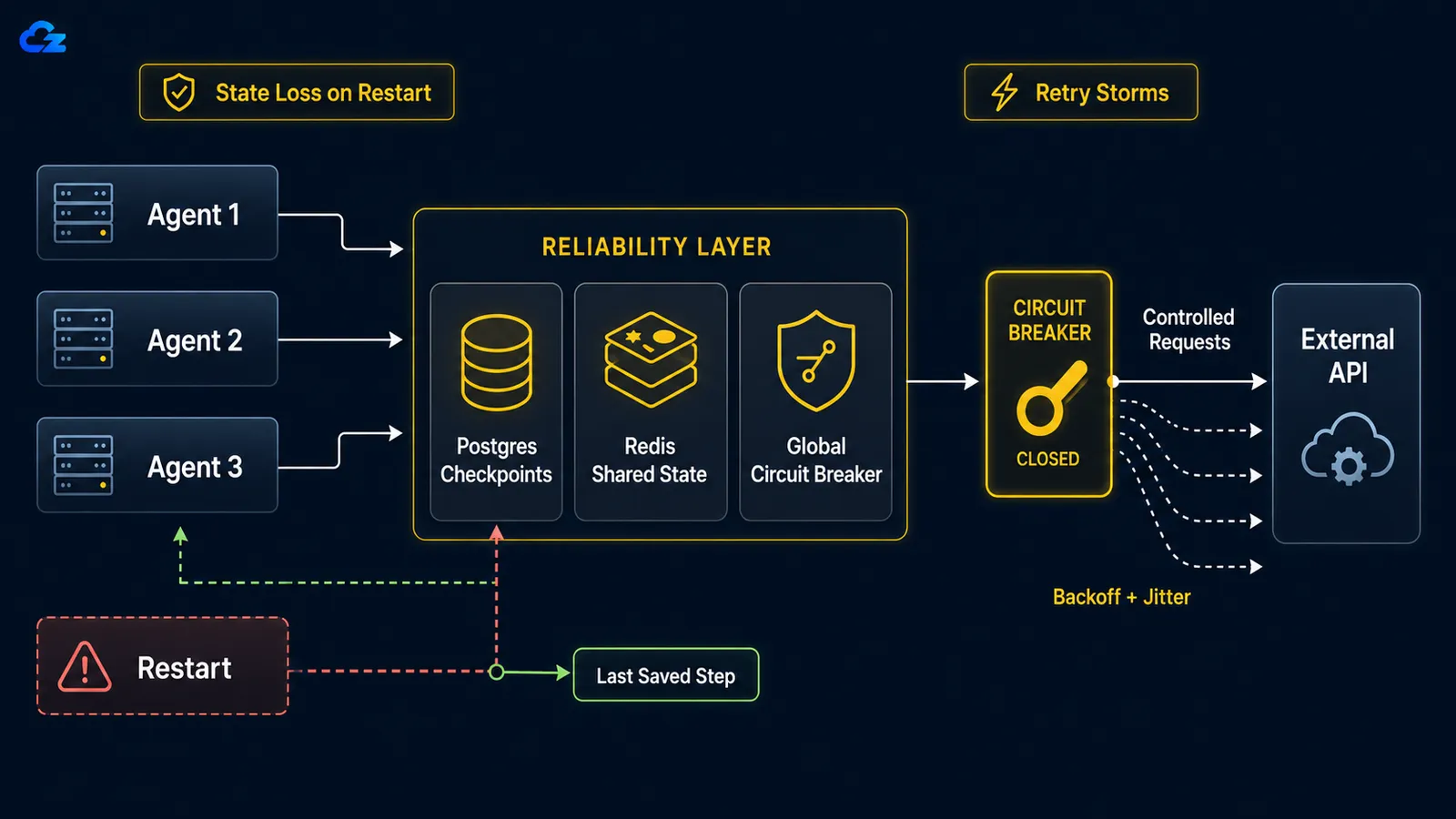
When a long-running agent crashes, whether from a reboot, an OOM kill, or a dropped network connection, there is no resume-from-checkpoint by default. The loop starts over from scratch: it redoes work it already finished and, worse, can re-execute actions it already took, like sending the same email twice or re-running a paid API call. The fix is checkpointing: persist the loop's state after each step so a restart rehydrates from where it stopped instead of from zero.
In LangGraph the choice of checkpoint backend is the choice between dev and production. LangGraph's persistence docs describe SqliteSaver as "ideal for experimentation and local workflows" and PostgresSaver as "ideal for using in production," and the latter is what LangSmith itself runs on. The two are deliberately parallel in code, which makes the contrast easy to see:
# Development -- single file, no server, do not ship this
from langgraph.checkpoint.sqlite import SqliteSaver

# Production -- survives the box it runs on
from langgraph.checkpoint.postgres import PostgresSaver
Two details that bite people. First, the checkpoint packages install separately from core LangGraph (langgraph-checkpoint-sqlite and langgraph-checkpoint-postgres are their own dependencies), so a fresh box will not have the Postgres saver until you add it. Second, every checkpoint operation needs a thread_id in the config. That ID is what ties a given run to its saved state, and a restart without the right thread_id rehydrates nothing.
Pro Tip
The LangGraph checkpoint packages are separate installs. langgraph-checkpoint-postgres is not pulled in by the base langgraph package, so pin it in your production requirements file before you find out the hard way during an incident.
n8n has the same dev-versus-production split, just under different names. Its built-in memory option is also called Simple Memory (or Buffer Window Memory), and the production path is the Postgres Chat Memory node for state that has to survive a restart. The built-in memory holds the conversation in the running process, which is fine for testing and a liability for a 24/7 workload. Practitioners running n8n agents live report having to migrate to a Postgres-backed store after the in-process memory grew until it took the instance down with it. If you are on n8n and your agent needs to remember anything across a restart, wire it to Postgres Chat Memory from the start.
SQLite checkpointing is a development convenience. Surviving a production restart means Postgres (LangGraph) or a Postgres-backed store (n8n).
Retry Storms: When Your Own Agents DDoS a Dead Service
When a downstream service goes down, naive per-execution retries turn your agent fleet into a self-inflicted denial-of-service. The fix has two halves: exponential backoff with jitter on each agent to spread the retries out in time, and a global circuit breaker that trips after a shared failure threshold and stops the whole herd from hammering a service that is clearly down.
The math is unforgiving. As a retry-patterns writeup frames it, with ten parallel agents each retrying ten times, you send a hundred requests to a service that is already on the floor, because each agent's backoff is per-execution, not global. Per-agent backoff alone does not solve this. Ten agents that each back off politely still back off in unison if they all started at the same time, so they retry in synchronized waves. Jitter breaks the synchronization by randomizing each agent's wait; the circuit breaker breaks the herd by sharing one piece of failure state across all of them.
The backoff half is a solved problem in Python; the tenacity library handles exponential-with-jitter cleanly:
from tenacity import retry, stop_after_attempt, wait_random_exponential

@retry(wait=wait_random_exponential(multiplier=1, max=60), stop=stop_after_attempt(5))
def call_flaky_service(payload):
    return downstream.post(payload)
The circuit breaker is the half that has to be global: shared across every agent, not reinstantiated per execution. When failures cross a threshold, it opens, every agent fails fast instead of calling out, and after a cooldown it lets a single probe through to test whether the service is back. A breaker that lives inside each agent's own process protects nothing, because nothing is shared; the dead service still gets the full hundred requests.
Per-execution backoff still lets ten agents hammer a dead service in unison. The circuit breaker has to be global to stop the herd.
The Six Failures at a Glance
Before the infrastructure piece, here is the whole catalog in one place: the failure, the mechanism that causes it, the harness fix, and where the relevant parameter lives in each framework.
| Failure mode | Mechanism | Harness fix | Framework parameter |
|---|---|---|---|
| Infinite loop | No step ceiling or progress check | Hard ceiling + no-progress detection | LangGraph recursion_limit (25) / n8n Max Iterations |
| Context overflow | History grows until the window fills | Interval-based summarization | App-level (compress at ~50% of window) |
| Silent tool failure | Empty/soft returns read as valid no-ops | Validation gate on every tool result | App-level tool wrapper |
| Reasoning degradation | Attention decays as context grows ("context rot") | Mid-loop compression that protects pinned constraints | App-level, constraint-aware |
| State loss on restart | No checkpoint; loop restarts from zero | Persistent checkpointing | LangGraph PostgresSaver / n8n Postgres Chat Memory |
| Retry storm | Per-execution retries cascade on a dead service | Backoff + jitter + global circuit breaker | tenacity + shared breaker state |
A note for readers on CrewAI, AutoGen, Dify, or a hand-rolled Python loop: the framework parameters change, but the six patterns do not. Deduplication, interval summarization, schema validation, constraint-aware compression, checkpointing, and a global circuit breaker are framework-agnostic concepts. The LangGraph and n8n specifics here are concrete handles, not the boundary of where the patterns apply.
Sizing a Production Agent Deployment
Every pattern above assumes you control the process manager, the database, and the restart behavior. Checkpointing buys you nothing if a crashed loop never comes back up, and a global circuit breaker needs a place to keep its shared state. That control is exactly what self-hosting gives you and a managed black box does not, so the last decision is sizing the box that runs it 24/7.
For most single-agent deployments (one agent, LLM calls going out to an external API, basic Postgres checkpointing) a small instance is enough: around 2 GB RAM, 1 vCPU, and 60 GB of NVMe storage. The heavy compute lives on the model provider's side; your box is orchestrating, checkpointing, and holding state, not running inference. Step up to roughly 4 GB RAM, 2 vCPU, and 120 GB NVMe when the agent is stateful and multi-step with Postgres checkpointing plus Redis for session hydration, or when you are running concurrent workflows that share the host.
The reason this wants a self-managed VPS rather than a constrained platform is the same reason the fixes work at all: they need root. Your own Postgres for checkpointing, your own Redis for session state, and a real process manager such as systemd or pm2, so that when a loop dies, the supervisor restarts it and it rehydrates from its last checkpoint instead of starting the job over. That whole recovery story depends on owning the process lifecycle.
Because we run n8n as a one-click app in our own marketplace, that part of the setup is the shortest path on our side: you can deploy n8n on a Cloudzy VPS with the Postgres-backed configuration the production path needs, on an instance where you have the root access to add your own Redis and process supervision. It is the same self-hosted footprint described above, where you own the database and the restart behavior, which is what makes checkpointing and auto-recovery actually work.
The harness patterns are only as reliable as the box they run on. Checkpointing buys you nothing if the process never restarts.
Frequently Asked Questions
How Do I Stop My LangGraph Agent From Looping Forever?
Use two mechanisms together. Set recursion_limit as a hard step ceiling (the default is 25) so a runaway loop cannot burn unlimited budget, and add no-progress detection that hashes each tool-plus-argument call and terminates when the same call repeats within a recent window. The ceiling alone is a backstop that fires after the waste has happened, not real loop protection. Progress detection is what actually stops a stuck loop.
What Is the Right recursion_limit for LangGraph in Production?
There is no universal number. Size it to the maximum number of legitimate steps your agent should ever need, plus a margin, and treat it strictly as a cost backstop. Raising the limit does not make a looping agent converge. If your agent is hitting a high limit, the fix is progress detection, not a higher ceiling.
Why Does My n8n AI Agent Keep Hitting Max Iterations?
Hitting the Max Iterations cap means the agent is not converging: it is taking more steps than the limit allows without reaching a stop. Raise the limit only if the task legitimately needs more steps; otherwise treat it as a signal that the agent is stuck. Watch out for one specific trap: GitHub issue #22771 reports that when the iteration limit is hit with "On Error: Continue" set, execution can route to the Success output instead of the Error output, so a capped, failed run can look like a success in your workflow.
How Do I Persist Agent State Across Restarts?
In LangGraph, use PostgresSaver checkpointing rather than SqliteSaver, which is meant for local development. In n8n, use the Postgres Chat Memory node rather than the in-process built-in memory. Both require a persistent database, and in LangGraph every checkpoint operation needs a thread_id that ties a given run to its saved state.
What Causes Reasoning Degradation in Long Agent Runs?
Reasoning quality drops as context grows, even before you hit the hard token limit. This is the "lost in the middle" effect, where the model attends to the start and end of a long context but loses the middle. Anthropic's engineering blog references the underlying mechanism as "context rot": because every token attends to every other token, you get n² pairwise relationships and the model's attention stretches thinner as the context lengthens. The fix is mid-loop compression that summarizes stale history while keeping pinned constraints and safety instructions intact.


Discussion
Comments
Sign in to join the discussion.