
Ask the CachyOS subreddit whether to install CachyOS or Omarchy and the two highest-scoring replies are not recommendations. One reads "Asking this in related to CachyOS sub…bruh." The other compares it to walking into a Honda forum and asking whether to buy an Accord or a Camry.
Both replies are right, and the reason is mechanical rather than attitudinal. Arch-based distro differences come down to where each project modifies stock Arch. For the distributions compared here, those modifications land mostly in five places: the installer, the kernel and compile targets, the package repositories, the desktop shell and configuration, and the update and rollback policy. CachyOS and Omarchy make their biggest changes in different layers.
The Short Version
- For the distributions compared here, the useful differences fall mostly into five layers: installer, kernel and compile targets, package repositories, desktop shell and configuration, update and rollback policy.
- A project can change one layer and leave the other four alone, which is how two distributions can both be "Arch-based" and share almost nothing.
- CachyOS changes the kernel/compile and repository layers heavily, curates the installer, and imposes no desktop shell: you choose your own at install time.
- Omarchy changes the desktop-shell and update-policy layers heavily, runs its own package channel, and makes no performance-motivated kernel or compile-target changes.
- The layers are separately adoptable: CachyOS documents adding its repositories to an existing Arch install, and people have run that path on Omarchy with mixed results.
What This Article Doesn't Settle
Three questions sit close enough to this one to be mistaken for it, and each needs a different kind of proof than a taxonomy can supply.
- Whether CachyOS is faster in general. That question has its own evidence base and its own article.
- Which of the two you should install.
- Every Arch derivative that exists. Five are named here, and these five layers are a comparison model for this group rather than an exhaustive taxonomy of every Arch derivative.
Five Layers This Comparison Tracks
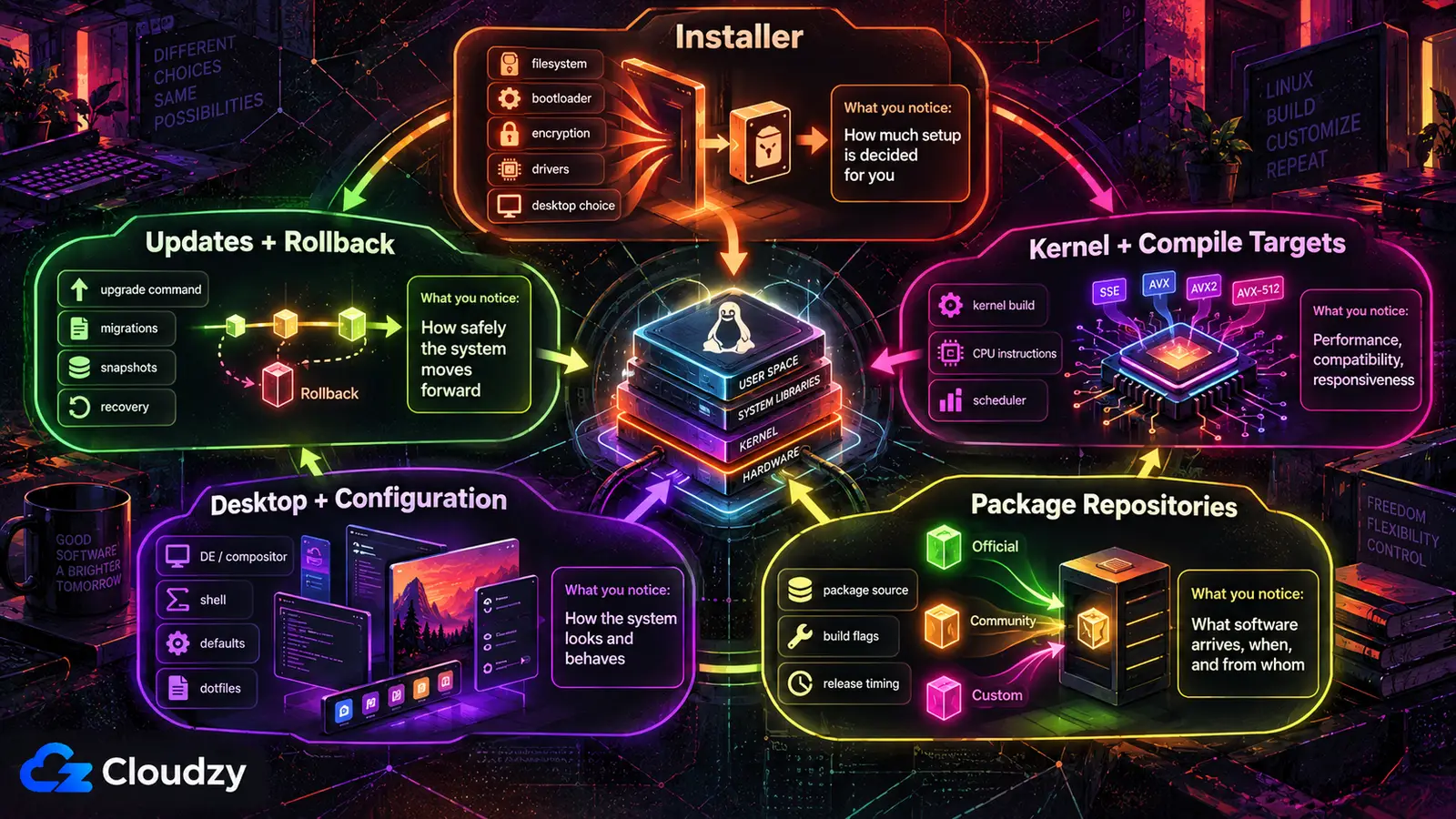
For the derivatives compared here, five layers explain most of the meaningful differences: the installer, the kernel and compile targets, the package repositories, the desktop shell and configuration, and the update and rollback policy. A project can change one of them and leave the other four exactly as Arch delivers them.
The installer is the path from bare metal to a booted system, and the layer where a project decides how many choices to hand you. Stock Arch documents a manual installation path and also includes the guided archinstall installer on its live ISO; a derivative can still replace that experience with its own guided defaults. What matters is what that installer settles on your behalf: filesystem, boot loader, encryption, drivers, desktop. Each default is a position somebody took.
The kernel and compile-target layer covers three things that get conflated. Which kernel build you boot. What CPU instruction set your packages were compiled against. Which scheduler decides what runs when.
A compile target is the microarchitecture level a package was built for. x86-64 is the baseline every x86-64 processor supports. x86-64-v3 adds features including AVX, AVX2, BMI1, BMI2 and FMA, while x86-64-v4 adds AVX-512 requirements on top of v3. A package built for either level will not start on a processor that lacks its required feature set. The scheduler decides which runnable task gets the processor next, and schedulers weigh throughput against interactive responsiveness differently. A derivative can change all three, one, or none.
The package repository layer is a question of provenance: whose build of a package you get, how fresh it is, and who controls the channel it arrives through. Stock Arch pulls binaries from core, extra and multilib, with the AUR beside them as build recipes you compile yourself. A derivative can layer its own repository on top, put a deliberate delay in front of Arch's, or both.
The desktop shell and configuration layer is what appears on screen and how it is arranged, and it is where the vocabulary trips people up. A desktop environment such as KDE Plasma or GNOME is a complete package: window management, panel, file manager, settings, applications. A tiling window manager such as i3, or a tiling Wayland compositor such as Hyprland, handles window placement without supplying a complete desktop suite, leaving the bar, launcher, notifications and lock screen as separate pieces. A derivative can impose a shell, offer a menu, or take no position.
The update and rollback layer covers how the system moves forward and how you get back when it moves somewhere bad. On stock Arch both are yours: pacman -Syu when you decide, recovery through the package cache or a snapshot arrangement you built. A derivative can wrap that command, gate it, or leave it alone, and it can make recovery a default by laying the filesystem out so snapshots are cheap. That is what a Btrfs subvolume arrangement buys: a snapshot is a point-in-time copy of one subvolume, and with bootloader integration a derivative can expose those snapshots as recovery choices.
What CachyOS Changes
CachyOS changes the kernel and compile-target layer and the package repository layer heavily, curates the installer, and imposes no desktop shell. It ships its own kernel builds and recompiles Arch's packages for newer CPU feature levels, then leaves what appears on screen to whoever is installing it.
Its installer lets you choose desktop, filesystem and kernel, along with packages and boot manager, and a hardware-detection tool installs drivers for whatever it finds. The project's opinions live below the installer, not inside it.
The default linux-cachyos kernel is built with Clang ThinLTO and AutoFDO profiling, and the family offers BORE, EEVDF, and BMQ as selectable schedulers. Separately, it supports sched-ext, a framework for loading a BPF scheduler from userspace without building a new kernel. The two are distinct: sched-ext swaps a scheduler at runtime; it is not a fourth entry in that list.
CachyOS also recompiles Arch's packages for x86-64-v3, x86-64-v4 and Zen4+, and its wiki claims a 5% to 20% uplift for x86-64-v3 over baseline. That is CachyOS's own figure for its own work, not an independent measurement. The rebuilt packages sit in a CachyOS repository layered on top of Arch's core, extra and multilib rather than replacing them. Layering rather than replacing keeps provenance legible: for any package you can still say which channel built it.
The desktop shell is the layer CachyOS does not impose. You choose the environment, although several options ship with CachyOS-maintained settings or dotfiles. Its online installer offers seventeen or more environments, including KDE Plasma, GNOME, Hyprland, Niri, Sway and Xfce, and the choice is yours. CachyOS Hello and the Kernel Manager are system-management utilities, not a shell.
CachyOS does not require its own update wrapper: direct pacman -Syu remains a documented path, alongside optional tools such as Shelly, Octopi and offline updates. Installed on Btrfs, CachyOS lays out separate subvolumes and uses Snapper for recovery snapshots; supported bootloader setups can expose those snapshots for recovery.
What Omarchy Changes
Omarchy changes the desktop-shell layer and the update-policy layer heavily, ships its own package channel, and makes no performance-motivated changes to the kernel or compile targets. It installs one fixed desktop and takes ownership of the update command instead of leaving pacman to you.
Omarchy installs from its own ISO, full-disk or into free space beside another operating system, and it encrypts the disk by default. The installer asks no desktop question, because there is only one answer.
The kernel and compile-target layer is largely untouched. Omarchy's own manual describes it as an Arch-based distribution built around Hyprland and Quickshell, and across its installer, update, dotfiles and CLI pages it documents no custom kernel, no compile target and no scheduler selection. On ordinary hardware Omarchy runs the stock Arch kernel packages, which reach it from an Arch mirror like the rest of the system. The one kernel substitution the manual documents is for hardware enablement: on T2-chip Intel Macs, the installer sets up a patched linux-t2 kernel.
The repository layer it does change, along a different axis than CachyOS. Omarchy installs as ordinary pacman packages from its own Package Repository, and its default stable channel tracks an Arch mirror running one month behind the latest, so incompatibilities surface upstream first. Three other channels (RC, edge and dev) trade that buffer for freshness.
Hyprland and Quickshell arrive together, with no opt-out. Hyprland is the tiling Wayland compositor; Quickshell is the construction kit the bar, launcher, menus, notifications and lock screen are built from, which is why Omarchy can replace the whole shell in a release rather than ship a theme. That split gives Omarchy a reproducible project-defined baseline while keeping your own overrides separate. Configuration splits in two: your dotfiles in ~/.config, the project's defaults in /usr/share/omarchy, package-owned and overwritten on update. Anything you want to survive an update belongs on your side of that split.
Update policy is where Omarchy's position is sharpest. The omarchy update command runs pending migrations and package updates in one operation, taking a snapshot first; rolling back means picking that snapshot in the boot loader. Reaching for pacman -Syu instead meets a guard: Omarchy stops a direct system upgrade and points you at its own command, though the manual says the guard will tell you how to bypass it for a single transaction. The point is coupling: the migrations travel with the package updates.

Why the Comparison Threads Never Converge
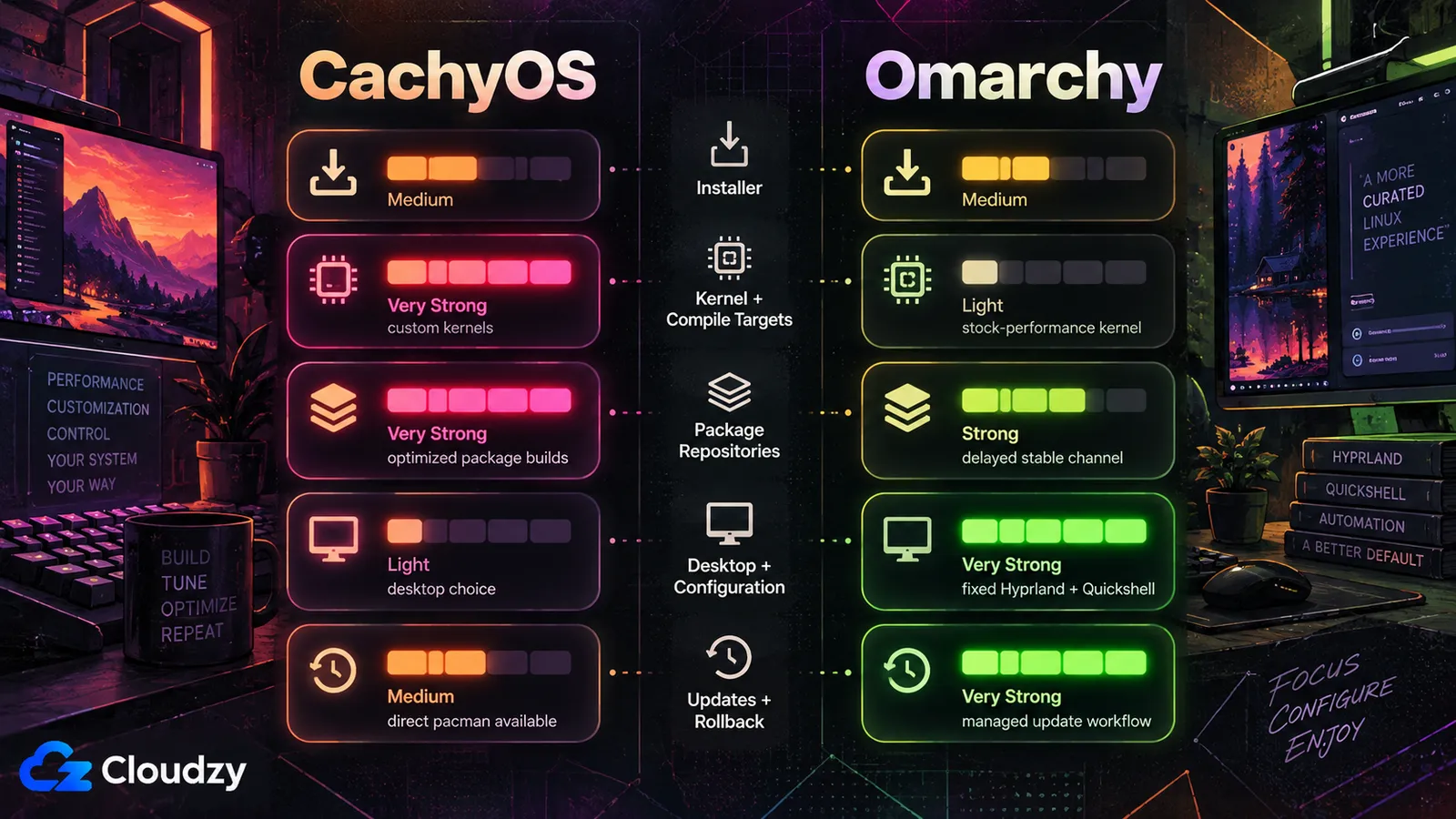
CachyOS and Omarchy touch several of the same layers, but they put their strongest changes in different places. CachyOS concentrates on the kernel, compile targets and package builds; Omarchy concentrates on the desktop shell and update workflow. "Which is better" collapses those separate questions into one.
They overlap in the installer, repository and recovery layers, but not in the same way. CachyOS's repository changes how Arch's packages are built; Omarchy's changes when they arrive. CachyOS leaves direct pacman updates available and adds snapshots around them; Omarchy couples package updates, migrations and snapshots behind its own update command.
| Layer | Stock Arch | CachyOS | Omarchy |
|---|---|---|---|
| Installer | Manual install guide or guided archinstall; choices remain yours | Guided: desktop, filesystem, boot manager, kernel, plus driver auto-detection | ISO-based, full-disk or free-space, encrypted, no desktop choice |
| Kernel and compile targets | Stock kernel; packages built for baseline x86-64 | linux-cachyos builds, selectable schedulers, sched-ext, packages rebuilt for x86-64-v3/v4, Zen4+ | Unchanged for performance: stock kernel (patched linux-t2 on T2 Macs), baseline builds |
| Package repositories | Arch's core, extra, multilib, with the AUR alongside | Own repository layered on top of Arch's | Own repository; stable tracks a mirror one month behind |
| Desktop shell and configuration | None installed; you choose and assemble | None imposed; installer offers 17+ environments | Fixed Hyprland and Quickshell; defaults in /usr/share/omarchy |
| Update and rollback policy | pacman -Syu when you choose; recovery is yours to arrange | Direct pacman -Syu supported; optional update tools; Snapper recovery on Btrfs | omarchy update expected; snapshot each update; direct pacman -Syu guarded, bypass documented |
The two replies at the top of that CachyOS thread were compressing exactly this: a correct diagnosis, delivered without the five layers behind it.
The Layers Can Be Mixed
The five layers are separately adoptable rather than mutually exclusive. CachyOS publishes a documented path for adding its repositories to an Arch install, and for removing them again. Omarchy is an Arch install, so the same path can move CachyOS's optimized repositories onto it.
People do this. A commenter in a thread on r/linux_gaming put it plainly: "There's nothing stopping you from installing the cachyos kernel and repositories on omarchy." Someone has shipped an install script for the combination and posted it to Hacker News.
Independence in principle is not reliability in practice. In an r/omarchy thread about moving between the two, one commenter reported that "All of the install scripts and such to do this are currently not working for many people," and that manual intervention did not get it running either. That is one person in one thread, and the kind of trouble worth planning for.
The second bound is on what the combination is worth. Published performance comparisons show little average-FPS separation in gaming, while broader gains from CachyOS's kernel, schedulers and compile targets remain workload-specific rather than automatic.
Whether CachyOS's kernel work and compile targets produce a meaningful gain more broadly, and for which classes of workload, rests on a different evidence base, not the one this article settles.

Build on a Linux VPS with root access, NVMe, and AMD EPYC power.
View Linux PlansWhere EndeavourOS and Manjaro Sit on the Same Layers
EndeavourOS and Manjaro land on the same five layers in their own combinations, which is what makes the model worth more than a two-project comparison. EndeavourOS changes the installer layer most, but it also uses Dracut for initramfs generation and maintains a small repository for EndeavourOS-specific tools and packages. Manjaro changes the repository layer most, the installer somewhat, and the compile-target layer not at all.
EndeavourOS describes itself as a lightweight, terminal-centric Arch system, and what it adds is a guided installer, a short curated package set (Firefox, Yay, FirewallD, Pipewire) and its own tool for GPU and VM drivers. No custom kernel, no CPU-targeted rebuild of Arch's general repositories, no imposed desktop: it still sits closest to stock Arch of any derivative named here.
Manjaro's framing is an approach of cascading stability: packages move through unstable, testing and stable branches in Manjaro's own repositories rather than tracking Arch's directly, which is why a Manjaro package can be older than the Arch package of the same name. Its installer offers a desktop choice across official Plasma, GNOME and Xfce editions, plus community Cinnamon, i3 and Sway builds.
It also carries a kernel tool, and the distinction matters. Manjaro Settings Manager adds and removes kernels, letting you run a different prebuilt kernel version. Choosing among packaged kernel versions is not the same operation as rebuilding packages for a newer CPU instruction set, though both sit in the kernel and compile-target layer.
That branch model is also what separates Manjaro from the fixed-release world: Manjaro's rolling model against Ubuntu is the same repository-and-update-policy question asked outside the Arch family. The same accounting works past that family too: Ubuntu derives from Debian and differs from it on release cadence, packaging policy and default desktop.
A new derivative's front page usually tells you which of these layers it touches, and whether it changes something outside this five-layer model.
Frequently Asked Questions
Is Omarchy a Real Distro, or Just Dotfiles?
On the five-layer test, Omarchy is more than a dotfiles collection. It ships its own ISO installer, its own package repository with four release channels, and its own update tooling in place of pacman -Syu. It makes no performance-motivated kernel or compile-target changes: the one kernel substitution its manual documents is a hardware-enablement patch for T2-chip Intel Macs. The system underneath is otherwise stock Arch. Whether that adds up to "a distro" is an argument about labels.
Can I Run CachyOS's Kernel and Repositories on Omarchy?
Technically, yes. CachyOS documents adding its repositories to an existing Arch install, and Omarchy uses Arch packages underneath. That does not guarantee compatibility: Omarchy's delayed package channel and update workflow add another moving part, and one r/omarchy commenter reported the convenience scripts failing for many people. Be prepared for manual intervention.
Does CachyOS Force a Desktop Environment on Me?
No. CachyOS leaves the desktop choice to you. Its online installer lists seventeen or more options, from full environments such as KDE Plasma down to tiling Wayland compositors such as Hyprland and Niri, and the choice is made during installation. The tools CachyOS maintains, such as the Kernel Manager, run on whichever desktop you picked.
What Does x86-64-v3 Mean?
x86-64-v3 is a CPU microarchitecture feature level above the x86-64 baseline. It adds requirements including AVX, AVX2, BMI1, BMI2 and FMA, so software built specifically for v3 needs a CPU that supports that feature set. A package compiled for it can use them, and will not start on a processor that lacks them. CachyOS rebuilds Arch's packages for x86-64-v3 and x86-64-v4 and claims a 5% to 20% uplift for v3, which is the project's own figure.

Discussion
Comments
Sign in to join the discussion.