
HP stopped selling new HP Anyware licenses on May 7, 2026. What your team is replacing is not really a protocol. It is an architecture where nothing had to be installed on a single user endpoint.
Kasm Workspaces restores that specific property. It delivers containerized Linux desktops and applications, and it can broker existing Windows desktops, to a modern browser with no client software on the endpoint. It can also pass an NVIDIA GPU into Linux container sessions, and I had it installed on a GPU VPS in an afternoon.
It is not an automatic fit for color-critical grading or CAD verification, because Kasm does not document a selectable 4:4:4 mode comparable to HP Anyware. The relevant limits, decision boundary, and GPU setup are below.
The Short Version
Kasm Workspaces is a genuine HP Anyware replacement for teams whose hard requirement is zero client software: it delivers containerized Linux environments and can broker Windows desktops to a browser, while its Linux container sessions support NVIDIA GPU acceleration. Kasm does not document a selectable 4:4:4 mode comparable to HP Anyware, so color-critical teams should validate the actual workload and compare Amazon DCV's lossless-quality path before migrating.
- The dates you plan against: new HP Anyware sales ended May 7, 2026. One-year renewals remain available through October 31, 2027, while maintenance and support for existing multi-year terms can continue through October 31, 2029.
- What Kasm restores is browser-native access with nothing installed on the endpoint, which is the specific property HP Anyware's zero clients provided.
- GPU acceleration works, with conditions: NVIDIA CUDA-capable hardware, the NVIDIA Container Toolkit, and one GPU per container for graphics workloads.
- The streaming tradeoff: Kasm's standard path uses browser-native JPEG/WebP, while its optional true-lossless mode is designed for high-bandwidth local networks.
- The licensing boundary: Community Edition is limited to five concurrent sessions and excludes commercial use, so business teams should budget for Starter or Enterprise from day one.
- The split: browser-first Linux and container workflows fit Kasm, color-critical teams should compare Amazon DCV, and Windows-heavy teams should test Kasm's server-workspace path before committing.
What This Guide Doesn't Cover
A few adjacent topics are deliberately out of scope so this stays a setup and evaluation guide:
- PCoIP protocol internals, covered in Cloudzy's PCoIP vs. RDP protocol comparison.
- NICE DCV enterprise licensing detail beyond the AWS versus off-AWS split.
- VMware Horizon and Citrix VDI, which serve a different deployment scale and buyer.
- Building Windows container workspaces, which deserves its own guide.
What Ended with HP Anyware, and What It Leaves Behind
May 7, 2026 was the last day HP sold a new Anyware license. HP's Anyware end-of-life notice says one-year renewals remain available through October 31, 2027, support for those renewals ends October 31, 2028, and maintenance and support for existing multi-year terms can continue through October 31, 2029. Separate dates apply to Trusted Zero Clients and Desktop Access, so check your contract and product line instead of treating 2029 as a universal support date.
HP frames the decision directly:
"After careful consideration around our portfolio investment priorities, we have made the difficult decision to wind down certain areas of our remote desktop solutions." - HP Anyware end-of-life announcement
HP also says HP Z Remote Graphics Software (RGS) will remain available for certain workstation use cases.
The zero-client architecture remains the useful benchmark: users reach a remote workstation without maintaining a full software client on every endpoint. For a closer look at the transport layer, Cloudzy's guide to how PCoIP streams a remote desktop explains the pixel-based model.
How Kasm Delivers a Desktop Through a Browser
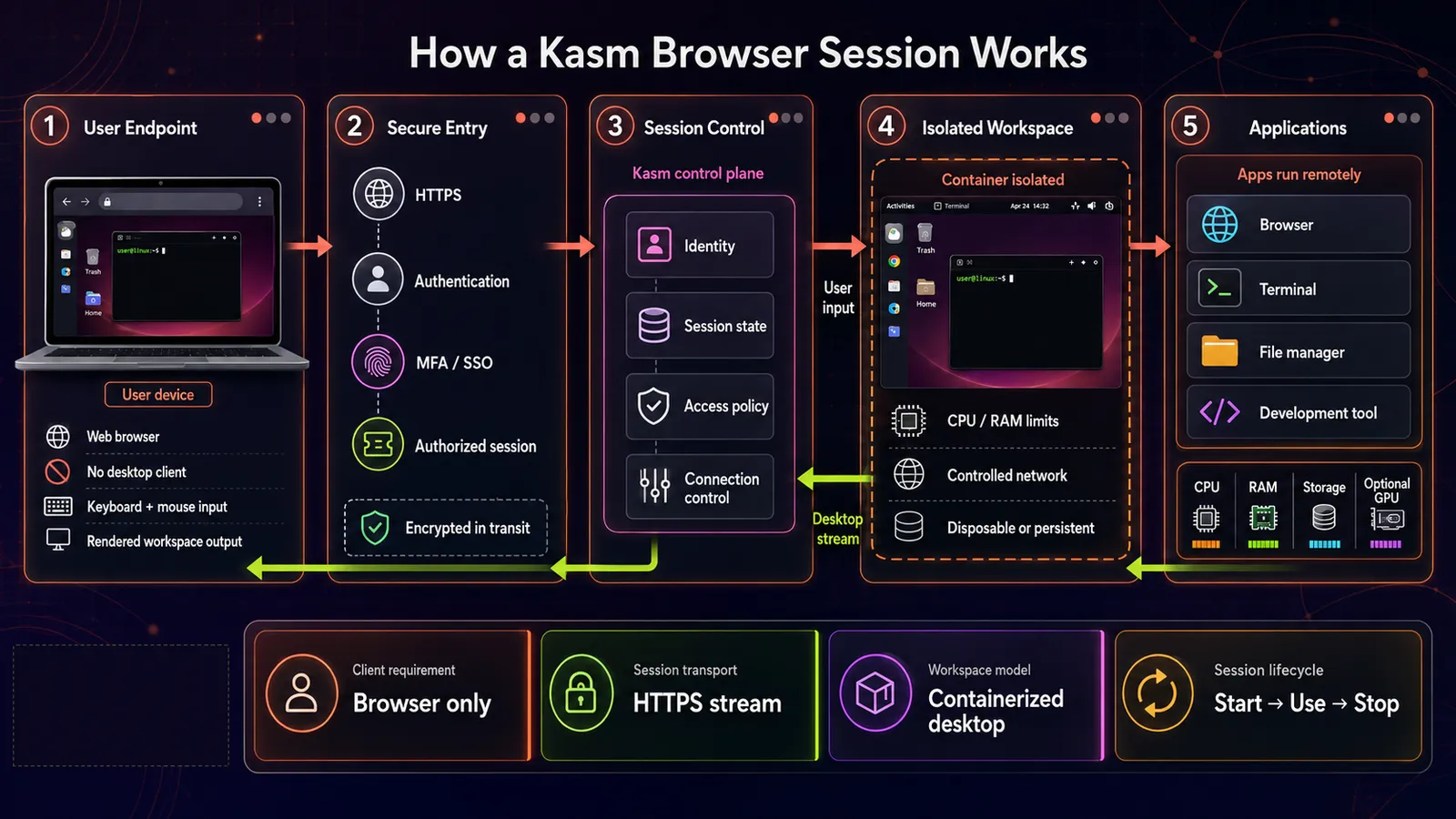
For a container workspace, Kasm starts an isolated Linux container from a registered image and streams its desktop or application to the browser.
That container model is what makes the browser-based remote desktop GPU VPS pattern work cleanly, and it is the part I care about most as the person who has to keep it running. For container workspaces, each session is disposable, reproducible, and image-defined. You patch the image and every container desktop your team opens tomorrow uses the updated image. That is the maintenance story, and on a fifty-seat deployment it is the whole reason to pick this architecture. Kasm's remote-desktop overview describes browser access with no endpoint agent, plugin, or software and explains that traditional Windows desktops can be streamed alongside Linux environments.
GPU acceleration is added at the container runtime, not in the display protocol. Kasm's current GPU-acceleration guide requires a CUDA-capable NVIDIA card, current NVIDIA drivers, and the NVIDIA Container Toolkit on each agent host. For graphics acceleration, Kasm assigns one GPU to a container; multiple GPUs per container are reserved for non-graphics workloads.
On the wire, Kasm's standard path uses browser-native JPEG/WebP, while its optional true-lossless mode uses QOI. Both matter because the encoder is where Kasm and HP Anyware part company.
The platform can be self-hosted or purchased as a hosted service. Everything below assumes you are running it yourself.
Where Kasm Falls Short of HP Anyware
Four limits are worth knowing before you provision anything. None of them are secret, all of them are on record, and one of them will end the evaluation for certain teams while the others move a line into a budget, a schedule, or a hardware requirement.
Kasm Does Not Document a 4:4:4 Mode
PCoIP Ultra can use YUV 4:4:4 for full chroma detail, but availability depends on the host, client, GPU, and selected optimization mode. HP's PCoIP Ultra session-planning guide notes that PCoIP policies can configure NVENC for either YUV 4:4:4 or YUV 4:2:0 depending on the configuration. Kasm's standard browser-native path uses JPEG/WebP, while its optional true-lossless QOI mode is positioned for high-bandwidth local networks. Kasm does not document a selectable 4:4:4 mode directly comparable to HP Anyware.
Kasm's current lossless-encoding guide says that 1920x1080 at 60 fps with moderate motion will likely consume an entire gigabit connection and that many post-2014 quad-core x86_64 CPUs can sustain roughly 1000 Mbps of decoding. That makes the mode practical mainly on a LAN; it is not a general substitute for testing chroma fidelity over home broadband.
Requires workload testing: color-critical grading, print proofing, and CAD verification where the pixel is the deliverable. If verifiable chroma fidelity is contractual, treat the lack of a documented 4:4:4 mode as a blocker until testing proves otherwise.
Multi-Tenant GPU Sharing Needs MIG
Kasm's current GPU guidance makes the security caution explicit:
"The security of multi-tenant container GPU acceleration is not well established." - Kasm Workspaces GPU documentation
The same page tells you to use the feature with caution and full understanding of the security implications, and it names NVIDIA MIG, supported from Kasm Workspaces 1.19.0, as the only secure way to share one GPU between multiple users. Kasm can also over-subscribe a card by overriding the GPU count an agent reports, which lets several containers share it, but that is a scheduling change and not an isolation boundary.
Disqualifies: shared-GPU deployments where tenants do not trust each other and MIG-capable hardware is not on the table, or where a regulator will ask you to justify the isolation boundary.
Community Edition Stops at Five Concurrent Sessions
Kasm's current edition matrix lists Community Edition as free, limited to five concurrent sessions, and without commercial-use rights. Starter is listed at $10 per named user or $20 per concurrent session, while Enterprise pricing is quote-based. Check the matrix for current figures before you build a budget on them.
The session cap is not the only boundary. A five-person business team still needs a commercial tier even if it never exceeds five concurrent sessions. Kasm positions Starter for self-hosted deployments under 25 users or sessions and Enterprise above that threshold.
For businesses, this moves a paid license into the budget from day one.
Windows Uses a Server Workspace, Not a Container
Kasm can deliver Windows desktops and applications through static servers, auto-scaled servers, RDS, or Azure Virtual Desktop. Kasm's Windows support overview treats those as server workspaces, not disposable Windows containers. If your remote workstation exists because three people need a Windows-only engineering application, prototype that exact path before touching the Linux GPU-container work below. It is the branch most likely to change the architecture, so test it while it is still cheap to walk away.
Implication: Windows-heavy teams should prototype the server-workspace path first.
My read on these four: the concurrency ceiling and the Windows path are licensing and schedule items you can plan around. Multi-tenant GPU sharing now has a documented answer in MIG, so it becomes a hardware and version question. Color fidelity is the limit that is genuinely architectural and will not move without a different delivery model or evidence from your own tests.
Kasm vs. NICE DCV vs. HP Anyware, Side by Side
AWS renamed NICE DCV to Amazon DCV. Amazon DCV's feature and pricing overview documents its HTML5 client, lossless-quality compression, GPU sharing on Linux, and the rule that EC2 use has no additional DCV server charge while other deployments require a license. Here is how the three line up on the axes that decide a migration.
| Axis | Kasm Workspaces | NICE DCV | HP Anyware |
|---|---|---|---|
| Client install required | None on the endpoint | Native client or HTML5 browser client | Zero client / thin client |
| Browser-native access | Yes, any modern browser | Yes, HTML5 client | Via zero client hardware |
| GPU acceleration | NVIDIA via container runtime, one GPU per graphics container, MIG to share a card | Yes, including GPU sharing on Linux servers | Yes |
| Color fidelity | Standard JPEG/WebP, optional true lossless, no documented 4:4:4 mode | Lossless-quality compression when network and CPU allow | PCoIP Ultra supports YUV 4:4:4 on compatible configurations |
| Licensing model | Community: 5 concurrent sessions, noncommercial, paid business tiers | No charge on AWS EC2, license required elsewhere | New sales ended, limited renewals |
| Self-hosted off-cloud | Yes, fully | Yes, with a purchased license | Yes |
| Current availability | Available | Available | No new sales, support dates vary by contract through 2029 |
| Windows delivery | Static or auto-scaled server workspace, RDS, or AVD | Native server install | Native PCoIP agent |
The table does not cover operational weight, and that difference decides many migrations. Kasm asks you to think in container images and a workspace registry. That is comfortable if you already run Docker and alien if you do not. Amazon DCV asks you to think in server installs and, outside EC2, a license server. If your decision also depends on whether to pool desktops or preserve one machine per user, the distinction between pooled VDI and standalone VMs is the next architecture question.
Which One Fits Your Team
Run the decision in this order, because the first branch eliminates the most people.
Color-critical 3D, CAD verification, or VFX grading. Compare Amazon DCV first and budget the off-EC2 floating license. AWS states that there is no additional DCV server charge on EC2 and that other deployments require a license. It is still the correct spend when tested chroma accuracy is the product.
Zero client install as a hard requirement, with workloads that are developer environments, office and productivity applications, or browser-delivered creative tools. Go to Kasm. This is the case where you get back the endpoint simplicity HP Anyware gave you, with GPU acceleration attached. Validate text clarity, motion, and input latency with real users before expanding the pilot.
An existing HP Anyware Pro license and an appetite for HP's own path. Look at HP RGS, which HP says it will offer as an alternative for certain HP Anyware customers. Verify current client platform support against HP RGS documentation for your actual device pool before committing, particularly if your fleet is mixed.
Staying put through the renewal window. This is a legitimate choice, not a delay tactic. The renewal and support dates above give you a bounded buying window and a longer support tail. If your team is mid-project, buying stability while you prototype properly is defensible. Plan the prototype around your contract's actual support date, not the broadest date in HP's notice.
Managed services like Splashtop and Parsec are the fifth option and are excluded here on purpose: each requires client software or a cloud broker, which is the property this migration is trying to escape.
Setting Up Kasm with GPU Acceleration on a VPS
Use one of two paths. Cloudzy's one-click Kasm Workspaces image currently lists Kasm 1.17 on Ubuntu Server 24.04 LTS; if you select it, skip the "Install Kasm Workspaces" section below. On a fresh Cloudzy GPU VPS, use its Ubuntu/CUDA image and follow the manual Kasm 1.19 installation path below. In either case, verify the installed Kasm version and NVIDIA stack before enabling GPU sessions.
Prerequisites
The GPU, host software versions, and available storage are the main constraints. The rest is a standard supported Linux host with room for the Kasm services and each session.
- A CUDA-capable NVIDIA GPU on the host that will run Kasm's agent role.
- Ubuntu 24.04 LTS, which is Kasm's primary documented target for the GPU path.
- Root or sudo access.
- Kasm's 1.19 system-requirements page specifies 2 CPU cores, 4 GB RAM, and 75 GB of SSD storage for the platform, plus the resources assigned to each session; the default workspace allocation is 2,768 MB and 2 cores.
- A modern browser. That is the entire client-side requirement.
Install Kasm Workspaces
Kasm publishes a versioned installer bundle and checksum. Kasm's 1.19 single-server installation guide uses this standard online-install sequence:
cd /tmp

curl --fail-early -fO https://kasm-static-content.s3.amazonaws.com/kasm_release_1.19.0-latest.tar.gz -fO https://kasm-static-content.s3.amazonaws.com/kasm_release_1.19.0-latest.tar.gz.sha256sum

sha256sum --check kasm_release_1.19.0-latest.tar.gz.sha256sum

tar -xf kasm_release_1.19.0-latest.tar.gz

sudo bash kasm_release/install.sh
The installer prints the admin and user credentials at the end. Save them, then open the web application on port 443.
Install the NVIDIA Driver and Confirm the Card
Run nvidia-smi before installing anything. Cloudzy GPU VPS images already include NVIDIA drivers and CUDA. If the command reports the card, keep the existing driver and skip the installation block below. Kasm warns that mixing driver-install methods can prevent the host from booting, so use this block only on a clean Ubuntu 24.04 host with no working NVIDIA driver.
nvidia-smi

sudo apt update

sudo apt install -y software-properties-common ubuntu-drivers-common

sudo add-apt-repository ppa:graphics-drivers/ppa -y

sudo apt update

sudo ubuntu-drivers install

sudo reboot

nvidia-smi
For Kasm's AI workspace images, its GPU guide lists 560.28.03 as the minimum. That number follows NVIDIA's driver-version format, so compare it with the Driver Version field in nvidia-smi, not the separate CUDA Version field.
Pro Tip
Confirm nvidia-smi on the host before changing any Kasm GPU setting. Driver and container-toolkit alignment is the prerequisite for GPU workspaces, and confirming the card at the host level first removes an entire class of ambiguity later.
Install the NVIDIA Container Toolkit
The NVIDIA Container Toolkit is separate from CUDA. The conditional block below installs it only when nvidia-ctk is absent, then configures and restarts Docker:
if ! command -v nvidia-ctk >/dev/null 2>&1; then

curl -fsSL https://nvidia.github.io/libnvidia-container/gpgkey | sudo gpg --dearmor -o /usr/share/keyrings/nvidia-container-toolkit-keyring.gpg

curl -s -L https://nvidia.github.io/libnvidia-container/stable/deb/nvidia-container-toolkit.list | sed 's#deb https://#deb [signed-by=/usr/share/keyrings/nvidia-container-toolkit-keyring.gpg] https://#g' | sudo tee /etc/apt/sources.list.d/nvidia-container-toolkit.list

sudo apt update && sudo apt install -y nvidia-container-toolkit

fi

sudo nvidia-ctk runtime configure --runtime=docker && sudo systemctl restart docker
Confirm the runtime actually reaches the GPU from inside a container:
sudo docker run --rm --gpus all ubuntu:24.04 nvidia-smiYou should see the same GPU and driver information from inside the container. If this command fails, stop: no Kasm workspace setting will fix a container runtime that cannot see the card.
Enable the GPU on a Workspace and Verify It
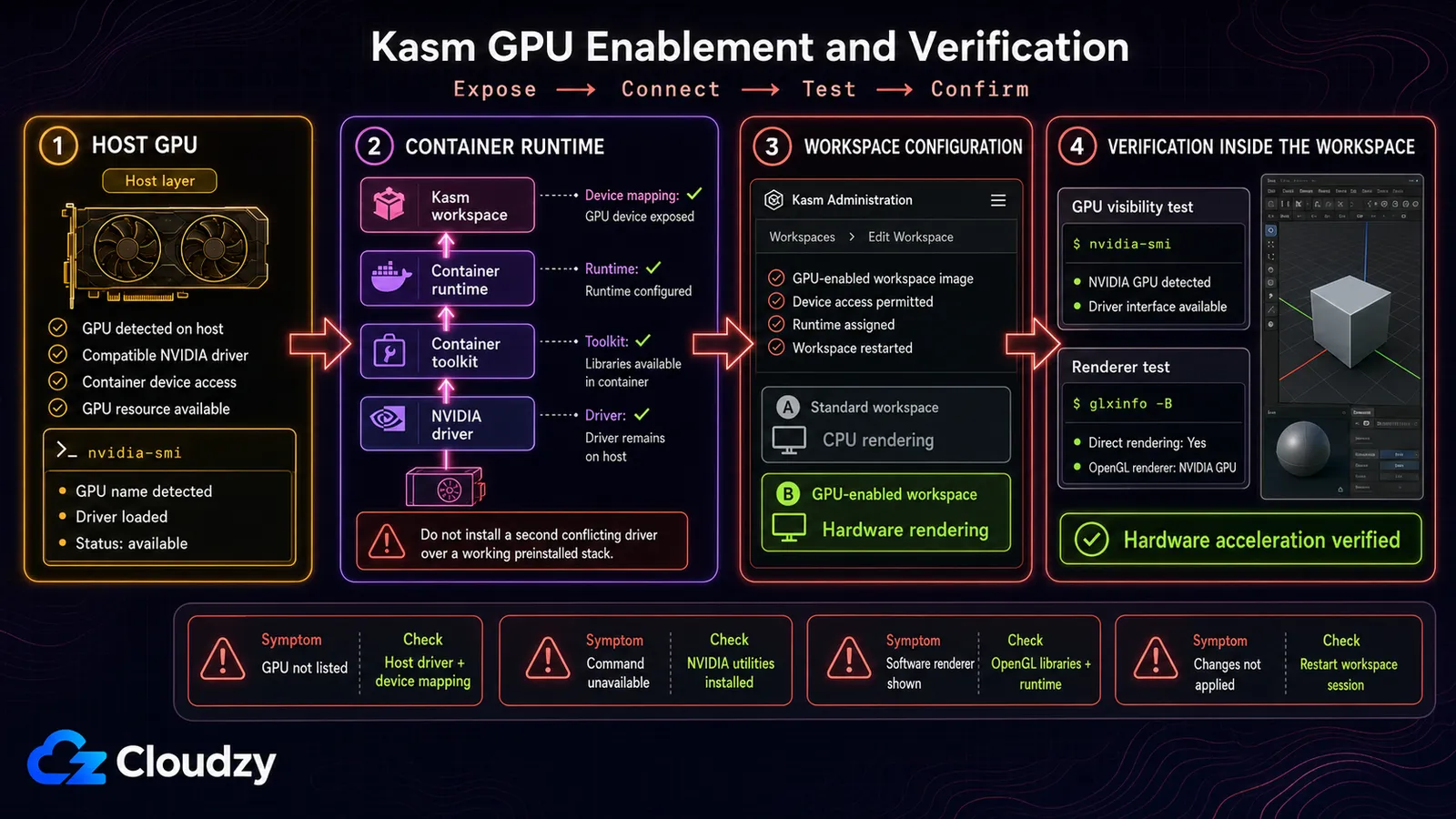
In the admin console, choose a desktop image that supports the required graphics stack, set GPU Count to 1, and confirm that the agent reports the GPU. For graphics acceleration, Kasm assigns one GPU to the container; multiple GPUs per container are for non-graphics workloads.
A GPU count only proves device assignment. In a compatible desktop image that includes VirtualGL and glxinfo, verify both container access and the OpenGL renderer:
nvidia-smi

vglrun -d "${KASM_EGL_CARD}" glxinfo -B | grep -i "OpenGL renderer"
The first command confirms that the container can see the card. The second should name the NVIDIA GPU as the OpenGL renderer.
If the renderer reports a software rasterizer such as llvmpipe, KASM_EGL_CARD is unset, or the session opens to a black screen, re-check image compatibility, the host driver, container runtime, agent GPU detection, and workspace GPU count. A successful nvidia-smi result does not by itself prove that VirtualGL is rendering on the GPU.
Pro Tip
Work through the checks in layers: nvidia-smi on the host, nvidia-smi inside a plain Docker container with --gpus all, agent GPU detection in Kasm, then vglrun glxinfo inside the workspace. The first layer that fails is the one to fix.
GPU passthrough decides where this runs. A standard CPU-only VPS does not expose a physical CUDA card, so start with a GPU instance. Cloudzy GPU VPS plans use dedicated passthrough and CUDA-ready Ubuntu images; inventory and VRAM tiers can change, so size from the live plan page instead of hard-coding 24 GB or 48 GB assumptions. The one-click Kasm image and the GPU plan are separate deployment paths, so confirm the selected image, Kasm version, driver, and toolkit before launching sessions.
Once the layered GPU checks pass, the hard part is behind you. From there, the work is workspace-image and registry maintenance rather than patching a fleet of individual desktops. That is a trade I would take on any team I have run.
Conclusion: Kasm Replaces the Browser-First Workflow
Kasm is the strongest fit when the requirement is browser-only access to disposable Linux desktops or applications, with optional GPU acceleration. It is not a drop-in replacement for every HP Anyware deployment: Windows uses a server-workspace path, commercial use needs a paid tier, multi-tenant GPU sharing needs MIG-capable hardware, and color-critical teams should validate fidelity or compare Amazon DCV.
Build the pilot around the hardest workload first. Test the Windows-only application, color-sensitive viewport, or shared-GPU security boundary before migrating easier users. If that passes, Kasm's browser delivery and image-based maintenance can remove much of the endpoint overhead that made zero clients attractive.
Frequently Asked Questions
What Is Kasm Workspaces Used For?
Kasm Workspaces is a browser-delivered workspace platform. It runs containerized Linux desktops and applications and can broker existing Windows, Linux, and macOS servers through server workspaces. Container sessions can be discarded and recreated from an image, while server workspaces retain the lifecycle of the underlying host.
Does Kasm Workspaces Support GPU Acceleration?
Yes. Kasm supports NVIDIA GPU acceleration through the NVIDIA Container Toolkit. For graphics acceleration, a container is assigned one GPU; non-graphics compute workloads can use multiple GPUs. The host needs a compatible NVIDIA driver, the container runtime, agent GPU detection, and a workspace configured with a GPU count.
Is Kasm Workspaces Free?
Community Edition is free for individual, nonprofit, and noncommercial use and is limited to five concurrent sessions. Commercial teams should use Starter or Enterprise; Kasm currently lists Starter at $10 per named user or $20 per concurrent session for self-hosted deployments under 25 users or sessions.
Can Kasm Workspaces Run Windows?
Yes. Kasm can stream Windows desktops and applications through static or auto-scaled server workspaces, RDS, and Azure Virtual Desktop. That is a different architecture from Kasm's disposable Linux containers, so teams whose core requirement is Windows-only software should prototype the exact server-workspace path before committing.
Is Kasm or NICE DCV Better for a Remote Workstation?
It depends on whether browser-only access or validated display fidelity is the hard requirement. Amazon DCV is the stronger first comparison for color-critical work because it documents lossless-quality compression when network and processor conditions allow. Kasm is the stronger fit when browser access with no endpoint software and image-defined Linux workspaces are the priority.

Discussion
Comments
Sign in to join the discussion.