
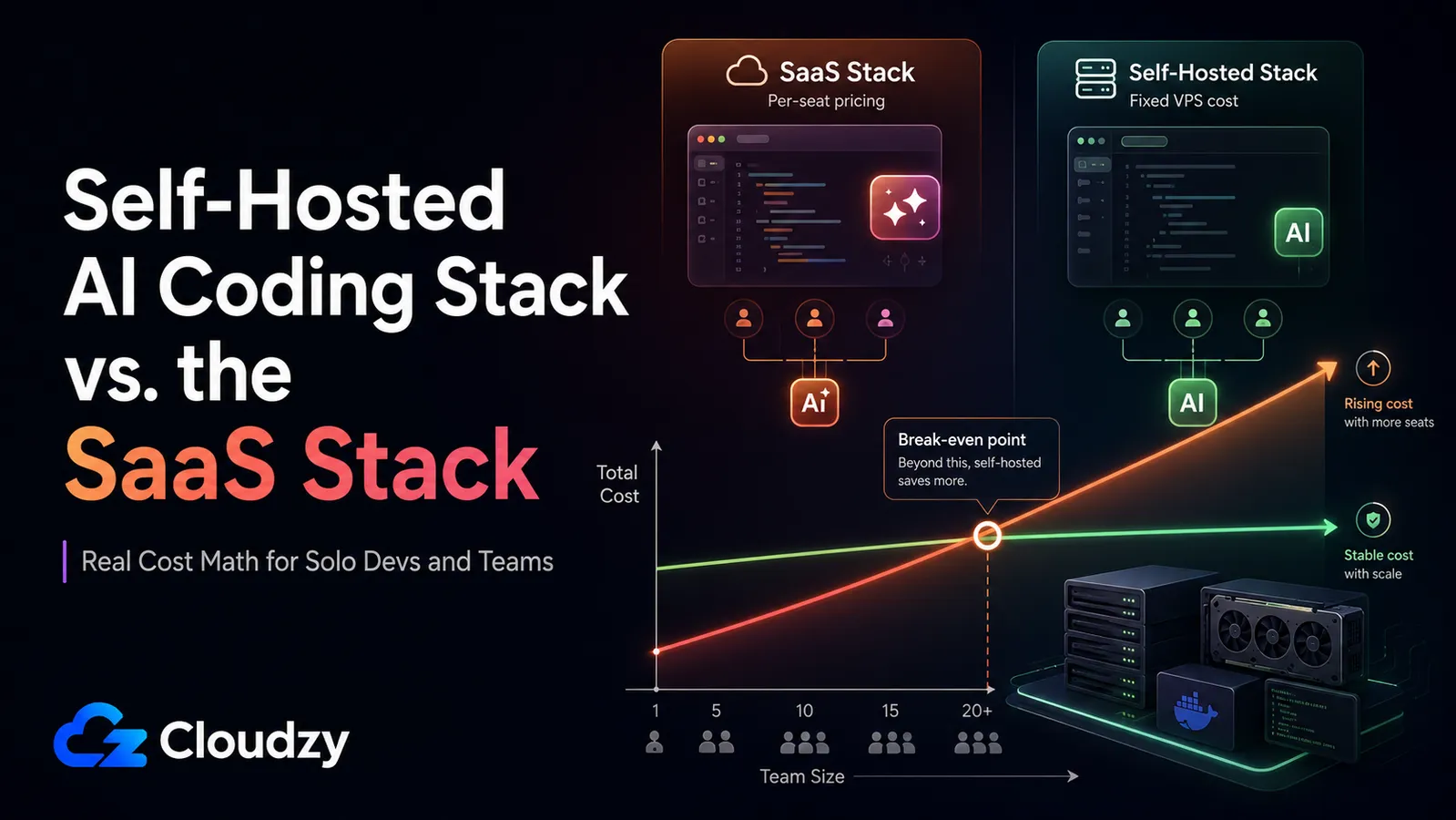
Last month a developer I talked to opened their Cursor invoice and found $80 on it. The month before that, it had been the same flat $20 it had always been. Nothing about how they worked had changed; the billing had. That's the moment a lot of people are having right now, and it's why "should I just self-host this?" stopped being a hobbyist question and became a budget question.
Here's what actually happened. All three of the big SaaS AI coding tools (GitHub Copilot, Cursor, and Windsurf) moved to usage or credit-based billing between mid-2025 and mid-2026. At the same time, open-weight coding models like Qwen2.5-Coder-32B got good enough that self-hosting your own coding assistant is now a real option, not a science project. So the comparison is finally worth running with actual numbers.
This is that comparison. I'll give you the real cost math for both a solo dev and a growing team, an honest read on where the self-hosted models hold up and where they don't, and a recommendation matched to your seat count and your quality bar. Fair warning up front: for a solo developer, the popular "self-host it on a GPU" advice is usually wrong on the money, and I'll show you why.
TL;DR
- If you're solo, the GPU path doesn't pay off. A monthly-billed, list-price GPU VPS at about $779/month never beats a $10/month Copilot Pro seat for one person.
- The self-hosted GPU stack is a team play. A single GPU VPS breaks even against Copilot Business (about $19/seat) at roughly 27 seats, and against Cursor Teams (about $40/seat) at roughly 13 seats, at the current $506.35/month GPU price (roughly 41 and 20 seats at the undiscounted $779 list price). Below that, per-seat SaaS is usually cheaper.
- Capability splits by task. Qwen2.5-Coder-32B is strong on autocomplete and everyday edits; frontier hosted models still win clearly on complex, multi-file, agentic work.
- Self-hosting has a maintenance tax. Model updates, GPU driver quirks, context sizing, uptime: a few hours a month, not a second job. Price that in before you switch.
What This Article Covers (and Doesn't)
This is a cost-and-capability comparison of one specific, buildable stack against the SaaS tools most developers already pay for. To keep it useful and honest:
- Covers: monthly cost math (solo and team), everyday-coding capability, and a matched recommendation.
- Covers: a concrete self-hosted stack (Ollama, Continue.dev, Code Server, and n8n) on a VPS.
- Doesn't cover: exhaustive model benchmarking or leaderboard chasing.
- Doesn't cover: fine-tuning, or using these models for non-coding LLM work.
- Doesn't cover: step-by-step install. This is the "should I" article, not the "how to build it" article.
What Changed in AI Coding Tool Pricing
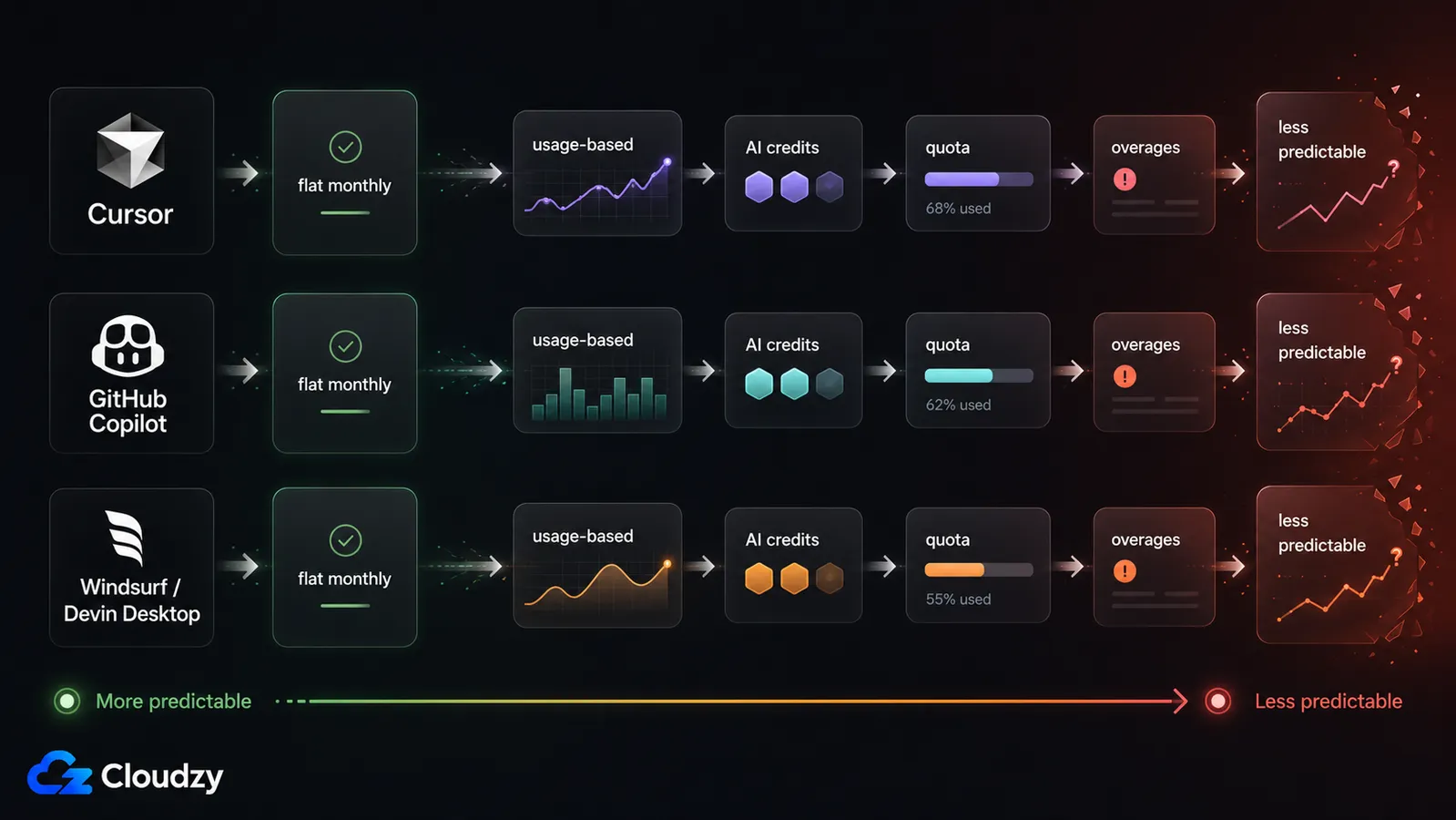
Cursor went first. On June 16, 2025, it replaced its per-request limits with API-usage-based pricing: you get a pool of frontier-model usage priced at API rates, and heavy months cost more than light ones. The change came as a surprise to many, and Cursor offered refunds for a window after the announcement. A June 2026 update reworked the usage pools further but kept the usage-based model.
GitHub Copilot followed in 2026. Per GitHub's announcement, on June 1, 2026 the old premium request units were replaced with token-based "GitHub AI Credits." Subscription prices stayed the same (Pro at $10/month, Business at $19/user/month), but what you can do inside that price is now metered by token consumption, with code completions still included at no credit cost.
Windsurf did the biggest reshuffle. In March 2026, it replaced the old credit-style self-serve plans with quota-based plans, added a $200/month Max tier, and moved new Pro pricing to $20/month while grandfathering existing Pro and Teams subscribers at their current plan price. The editor has since become Devin Desktop; windsurf.com now routes to devin.ai/desktop. Devin's current self-serve billing docs describe Teams as $40 per full dev seat with an $80/month minimum, not a simple "$80 base plus $40 per seat" add-on model.
The through-line: the flat monthly bill you could forecast is mostly gone. That predictability is exactly what self-hosting buys back, and exactly what makes this comparison live right now.
The SaaS Stack: What You Get and What It Costs Per Seat
Start with what the money buys, because it buys a lot. The SaaS side is three editors (GitHub Copilot, Cursor, and Devin Desktop, formerly Windsurf) that give you zero setup, tight IDE integration, and the best agentic, multi-file reasoning available today. You install an extension or download an editor and you're working in minutes. For most people that convenience is the whole point.
Here's the current per-seat pricing, pulled from each tool's own pricing page:
| Tool | Individual | Team / Business |
|---|---|---|
| GitHub Copilot | Pro $10/mo | Business $19/user/mo |
| Cursor | $20/mo | Teams $40/user/mo |
| Devin Desktop (Windsurf) | Pro $20/mo; Max $200/mo | Teams $40/full dev seat, with an $80/mo minimum |
The failure mode is the meter. On the usage-and-credit plans, a heavy month is a heavy bill, and you often don't see it coming until it arrives. Worse, when your credits run out, several of these tools cut you off or push you to overages; there's no degraded-but-free local fallback to limp along on until the next cycle. If your income is lumpy or your usage spikes on crunch weeks, that variability is a real operational headache, not a rounding error.
If you're weighing specific tools against each other rather than the self-host question, I went deeper on the individual editors in a separate comparison of Claude Code alternatives.
The Self-Hosted Stack: Ollama, Continue.dev, Code Server, n8n
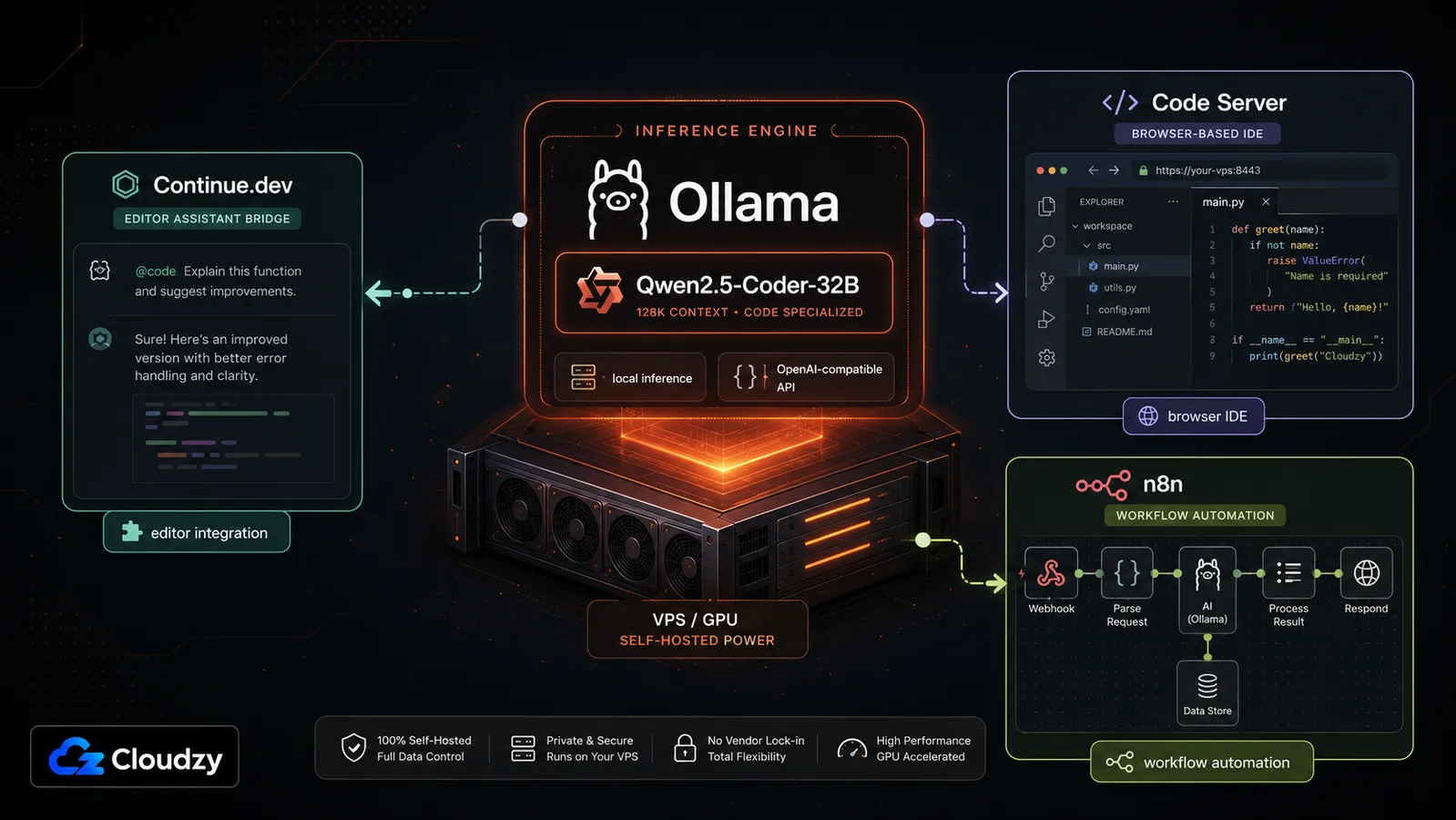
The self-hosted side is four pieces, and each one does a specific job. Ollama (currently v0.31.1) is the local inference engine: it runs the open-weight model on your server and exposes an OpenAI-compatible API. Continue.dev is the bridge, a VS Code and JetBrains extension that points your editor's autocomplete and chat at your Ollama endpoint instead of a cloud provider. Code Server (currently v4.127.0) is VS Code running in the browser, hosted on the VPS itself, handy when you want the whole environment to live next to the model rather than on your laptop. And n8n is the workflow layer: it's how you wire up agentic or multi-step automations (run tests, open a PR, ping a webhook) around the model.
The model choice that makes this credible is Qwen2.5-Coder-32B, which Ollama positions as one of the strongest open-weight code models on standard benchmarks. That's the piece that changed the math. A couple of years ago the open models weren't close enough to bother; now, for everyday work, they are.
One caveat worth knowing before you commit to Continue: it is now part of the Cursor ecosystem. Continue's own site confirms the acquisition, and its docs still show Ollama and local-model configuration, but the long-term product direction is less certain than it was before the acquisition. Treat it as a practical bridge for now, not the safest long-term dependency.
Here's the convenient part for the setup-averse: Ollama, Code Server, and n8n are all available as one-click deployments in the Cloudzy marketplace, which takes the "spend a weekend on install" objection off the table. You point-and-deploy the whole stack instead of assembling it by hand. If you want the tool-selection reasoning behind Ollama specifically, I compared it against the main alternative, LM Studio.
Pro Tip: Qwen2.5-Coder-32B is about 20 GB on disk, and at Q4_K_M quantization it needs roughly 20-25 GB of VRAM to run. That fits on a 24 GB-VRAM GPU like the RTX 4090, but it's a tight fit. It runs fine at default settings and short-to-medium context windows; push the context very long and you can start to swap. Plan for "fits with careful context management," not "tons of headroom."
The Cost Table: Solo Developer vs. Team
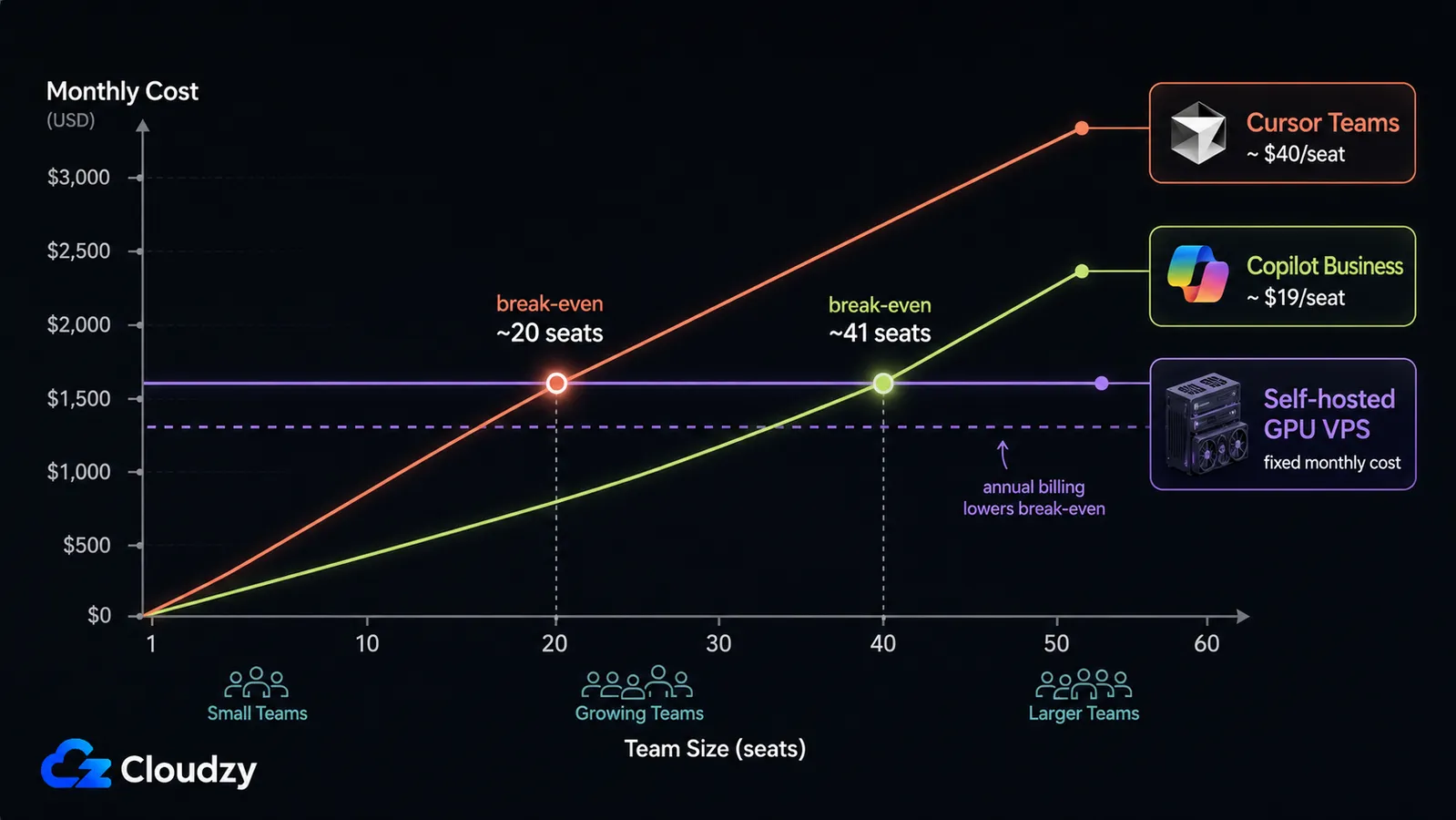
For one developer, self-hosting on a GPU is the wrong call on cost. Using Cloudzy's month-to-month list price for a 1x RTX 4090 GPU VPS, the stack runs about $779/month against $10/month for Copilot Pro. The GPU stack only pays off when that fixed cost is shared across a team: at the current price ($506.35/month at the time of writing, billed month-to-month with no annual commitment), it breaks even at roughly 27 Copilot Business seats or 13 Cursor Teams seats. At the undiscounted $779/month list price, the break-even moves out to roughly 41 Copilot Business seats or 20 Cursor Teams seats.
Now the numbers. The SaaS columns are per-seat totals; the self-hosted stack is a fixed monthly cost no matter how many people share it.
| Scenario | Copilot Business ($19/seat) | Cursor Teams ($40/seat) | Self-hosted GPU stack (fixed) |
|---|---|---|---|
| Solo (1) | $19 (or $10 on Pro) | $40 (or $20 individual) | about $779 |
| 5 people | $95 | $200 | about $779 |
| 10 people | $190 | $400 | about $779 |
| Break-even seat count | about 41 seats | about 20 seats | N/A |
Read the table by where the fixed line crosses the rising one. Against Cursor Teams at $40/seat, the GPU VPS becomes the cheaper option somewhere around 13 developers at the current price (about 20 at list). Against Copilot Business at $19/seat, you need roughly 27 developers at the current price (about 41 at list) before the fixed cost wins. Below those thresholds, per-seat SaaS is simply cheaper, and no amount of "but it's unlimited" changes that.
The solo story is different and worth stating plainly. You don't put one person on a $779 GPU. If you want to self-host as an individual, the honest comparison is a small model (7B) on a roughly $29/month CPU VPS against a $10/month Copilot Pro seat. That's about $19/month more, and what you buy for it is no usage caps, no metered surprises, and your code never leaving your server. Whether that's worth $19 depends entirely on how much the billing unpredictability is costing you in stress and forecasting, not on raw dollars.
Quick Verdict: The self-hosted GPU stack is a team-scale or multi-workload decision, not a solo one. For one person it's stay-on-SaaS or run-a-small-model-on-a-cheap-CPU-box. For a team, run the seat count against $19 and $40 before you touch a GPU.
Section key takeaway: the GPU stack's whole economic case is sharing one fixed cost across many seats. It's a team or multi-workload play, never a solo purchase.
Capability Comparison: Where Self-Hosted Holds Up and Where It Doesn't
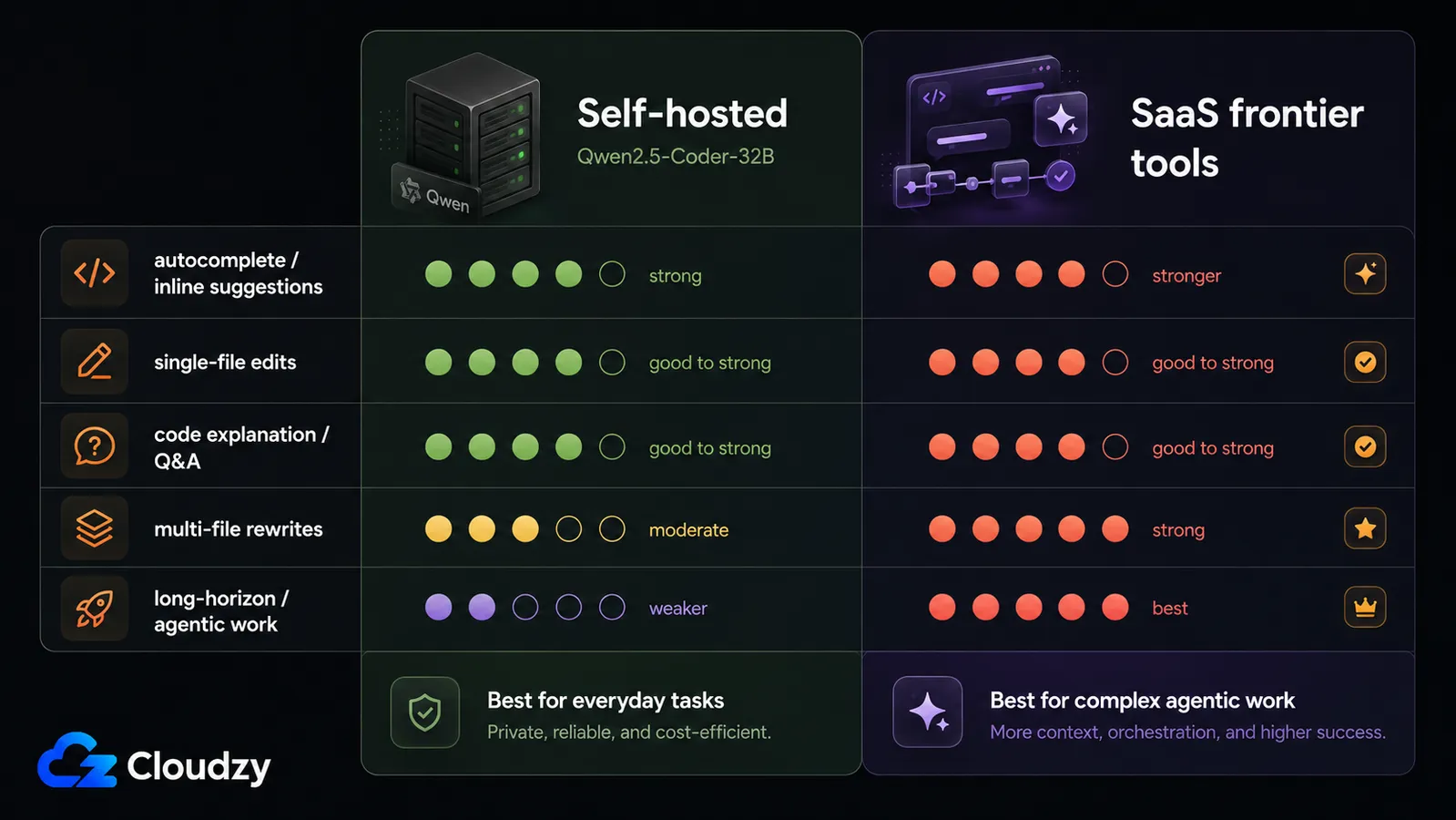
Give a self-hosted Qwen2.5-Coder-32B setup a day of ordinary work (autocomplete, single-file edits, "write me this function," explain-this-code) and you'll have a hard time telling it apart from a paid assistant. On the everyday stuff, the gap is small. Where it breaks down is the hard 20%: multi-file rewrites, long-horizon agentic tasks, and complex reasoning across a big codebase. There, the frontier hosted models still win clearly, and it's not close.
| Task type | Self-hosted (Qwen2.5-Coder-32B) | SaaS frontier models |
|---|---|---|
| Autocomplete / inline suggestions | Strong | Strong |
| Single-file edits, small functions | Strong | Strong |
| Code explanation, Q&A | Good | Strong |
| Multi-file rewrites | Weaker | Strong |
| Complex agentic / long-horizon tasks | Notably weaker | Strong |
There's also a speed dimension people underrate. A hosted frontier model answers fast because it's running on someone else's enormous inference fleet. Your $779 GPU VPS, especially under concurrent load from a few teammates at once, can feel slower for interactive work than the sub-second responses you're used to. It's usable, but "self-hosted" and "instant" aren't the same thing once several people share one card.
So the accurate framing isn't "Ollama replaces Copilot." It's "Ollama matches Copilot for everyday tasks and trails it on the complex ones." If your day is mostly the everyday tasks, that's a great trade. If your day is mostly the hard 20%, it isn't.
When SaaS Still Wins
Picture a solo dev whose work is genuinely quality-critical (the AI is doing multi-file architectural changes, not autocomplete) and who has zero interest in running a server. For that person, $20/month for a frontier tool is one of the best deals in software, and self-hosting would be a downgrade dressed up as a savings. SaaS wins outright there, and it's not the only case.
SaaS is the right call when:
- You're solo and your quality bar is the hard 20%, not everyday edits.
- Your team is under the crossover seat count: below about 13 (vs Cursor Teams) or about 27 (vs Copilot Business) at current pricing, per-seat is cheaper.
- Your workflows lean on top-tier agentic reasoning that the open models don't match yet.
- Nobody on the team wants to, or has time to, own the ops.
That last point is the one people wave away, so let me be specific about the maintenance tax. Self-hosting a coding stack isn't a second job, but it isn't free either. Real recurring work includes: pulling and testing new model versions, sorting out GPU driver quirks after updates, tuning context-window sizes so you don't swap VRAM, and keeping the box up so your team isn't blocked when the model's down. Call it a few hours a month once it's stable, which is fine if someone owns it, and a slow-motion disaster if nobody does.
Section key takeaway: self-hosting is a cost-and-control decision that only pays off past a specific team scale, or when privacy and compliance requirements make "our code never leaves our server" non-negotiable regardless of the math.
How to Choose: A Decision Framework
Match yourself to a row and you're basically done. The cost table and the capability split above give you everything you need to place yourself; this is just the mapping.
- Solo, cost-sensitive, everyday tasks: stay on Copilot Pro, or run a 7B model on a cheap CPU VPS if you want uncapped, private, predictable cost. Skip the GPU.
- Solo, quality-critical work: stay on SaaS. The frontier tools are worth it and self-hosting is a downgrade for you.
- Team under about 13 seats: per-seat SaaS is usually cheaper at current GPU pricing. Don't self-host to save money at this size.
- Team about 13 to 27+ seats, or with other GPU workloads, or with privacy and compliance requirements: the self-hosted GPU stack starts to make real sense. Run the seat math and factor in who owns the ops.
If you land in that last row, the practical question becomes where the GPU box lives. Running Qwen2.5-Coder-32B means you need a card with 24 GB of VRAM, and the setup burden (the exact objection that keeps people on SaaS) is the thing worth engineering away. A GPU VPS with a one-click Ollama, Code Server, and n8n deployment gets your whole stack running without the weekend of assembly, so the ops you're signing up for is ongoing maintenance, not a from-scratch build. If that's the path you're on, Cloudzy's Ollama VPS gives you the 24 GB-VRAM GPU and the one-click stack in one place; pricing and current GPU locations are on the page.
Frequently Asked Questions
Is self-hosting AI coding tools actually worth it for a solo developer?
Can Ollama with Qwen2.5-Coder-32B replace GitHub Copilot for everyday coding?
How much VRAM do I need to run Qwen2.5-Coder-32B?
What changed in Cursor, Copilot, and Windsurf pricing in 2025 to 2026?
Does self-hosting AI coding tools scale to a team?
The Bottom Line
Pick the row that matches your seat count and your quality bar, and the decision makes itself. Solo and cost-sensitive: stay on Copilot Pro or run a small model on a cheap CPU box. Solo and quality-critical: stay on SaaS. A team past the crossover size, or one with other GPU workloads or privacy requirements, is where the self-hosted GPU stack finally earns its keep. The billing changes made this worth calculating; the calculation, for most individuals, still points back at SaaS, and that's fine. Run your own numbers against $19 and $40 a seat before you buy a GPU.




Discussion
Comments
Sign in to join the discussion.